Thursday, April 12, 2012

Relational Algebra - Select and Project Operators


  • Relational Algebra - Select and Project Operators

http://www.youtube.com/watch?v=yVh_LcOcQdg


  • Relational Algebra


Relational SELECT

SELECT is used to obtain a subset of the tuples of a relation that satisfy a select condition.

For example, find all employees born after 1st Jan 1950:

SELECTdob '01/JAN/1950'(employee)


Relational PROJECT

The PROJECT operation is used to select a subset of the attributes of a relation by specifying the names of the required attributes.

For example, to get a list of all employees surnames and employee numbers:

PROJECTsurname,empno(employee)

http://db.grussell.org/section010.html#_Toc67114472


  • Relational Algebra: 5 Basic Operations


• Selection () Selects a subset of rows from
relation (horizontal).
• Projection () Retains only wanted columns
from relation (vertical).

• Cross-product (x) Allows us to combine two
relations.
• Set-difference (–) Tuples in r1, but not in r2.

• Union ( ) Tuples in r1 and/or in r2.

https://docs.google.com/viewer?a=v&q=cache:VDokuEkCX5wJ:inst.eecs.berkeley.edu/~cs186/sp06/lecs/lecture8Alg.ppt+&hl=en&pid=bl&srcid=ADGEESgiCeJZcOiv5iPRotaxu6pomoztERrMYuEVScwpi1kqlrF3ep4OJFlHIAWi4oJY0lFzFdq_eN73o0g7LQQo0Hvq34G_A9_pPIHPycr-NpyCL8B4brQhGmZwtReFMTuvHpynj-w5&sig=AHIEtbS3ZRzsDc-Udg4I5DzR4P1muwA-VA


  • Relational Algebra


An algebra is a formal structure consisting of sets and operations on those sets.
Relational algebra is a formal system for manipulating relations.

Operands of this algebra are relations.
Operations of this algebra include the usual set operations (since relations are sets of tuples), and special operations defined for relations
selection
projection
join
http://www.cs.rochester.edu/~nelson/courses/csc_173/relations/algebra.html


  • relational schema for a music albums database.
Keys are (mostly) underlined.
The attributes should be self-evident.
For a given music track, we code the title, its play length in time (minutes:seconds), its genre (pop, metal, jazz, etc.) and a 5 star maximum rating.
The musicians, singers and instrumentalists are all listed in on their contribution to the track.
A person may have 1 or more listing for a track. For example someone may both sing and play the piano.
The album is a collection of tracks.  An album is distributed and owned by a company called the label and has a producer and an engineer.
For a given music track, we code the title, its play length in time (minutes:seconds), its genre (pop, metal, jazz, etc.) and a 5 star maximum rating.
The musicians, singers and instrumentalists are all listed in on their contribution to the track.
A person may have 1 or more listing for a track. For example someone may both sing and play the piano.
The album is a collection of tracks.
An album is distributed and owned by a company called the label and has a producer and an engineer.


PEOPLE (PID, name, address, zip, phone)
CSZ (zip, city, state)
TRACKS (trID, title, length, genre, rating, albID) //trID is unique across all albums
ALBUMS (albID, albumTitle, year, label, prodPID, engPID, length, price)
CONTRIBS (trID, PID, role)


Use the R.A. notation below.
BE EXPLICIT in the join condition which attributes make the join where necessary.

Syntax reminder for Relational Algebra expressions:
SELECT :  condition(relation)
PROJECT : attribute-list(relation)
SET Operations and JOIN:  relation1 OP relation2, where OP is  , , - , , , and  ||condition
RENAME:  relation[new attribute names]
ASSIGN:    new-relation(attrs)  R.A. expression


a) List all names and phone numbers of people from zip 90210.
name, phone(zip=90210(PEOPLE))

b) List album titles and labels with a list price of more than $18.
albumTitle, label(price>18(ALBUMS))


c) List all the musicians and what they played or contributed to on all jazz type tracks.
name, role(genre= ‘jazz’(TRACKS |X| trID=trID CONTRIBS |X| PID= PID PEOPLE))


d) Get a list of names of people who produced OR engineered an album, but did not perform on any track.  (Hint: set operations are very helpful)
d) name(((prodPID ALBUMS)[PID]  (engrPID ALBUMS)[PID]) - PID CONTRIB)

          |X| PID= PID PEOPLE)


e) List names of musicians who have contributed in at least two different roles on the same tracks with ratings 4 or higher. (Hint: self-join)
name, role(rating>= 4 and role <>role2
(CONTRIBS |X| trID=trID and PID=PID CONTRIBS[trID, PID, role2] )
|X| PID= PID PEOPLE))


http://jcsites.juniata.edu/faculty/rhodes/dbms/funcdep.html


  • relational algebra

Consider the following relation database
schema of people who places book orders.
Book(BookID,title,price)
Person(PersonID,Name,Zip)
Orders(PersonID,BookID,quantity,BillingID)
Billing(BillingID,PersonID,CreditCardNum)
Answer the following questions based on this schema. Pay particular attention to the language we
ask for the query in.
(a) Write a query in Relational Algebra to find the title of the book(s) with the lowest price. (3
points)
(b) Write a query in Relational Algebra to find Zip of every person who ordered the book with
the title ’Database Systems’. (4 points)
(c) Write a query in SQL to create the table Billing. Remember to specify the Primary Key and
the foriegn key constraints. All columns are of type Varchar(255). No column is allowed to
be NULL. (4 points)
(d) Write a query in SQL to find how much money has been spent on the books. (4 points)

Solution:
(a) πtitle(Book) − πB1.title(ρB1(Book) c ρB2(Book))
Where c = B1.price > B2.price
(b) πZip(σtitle= DatabaseSystems ((Book c1 Orders) c2 P erson))
Where c1 = Book.BookID = Orders.BookID
Where c2 = Orders.PersonID = Person.PersonID
(c) CREATE TABLE Billing (
BillingID Varchar(255) PRIMARY KEY,
PersonID Varchar(255) NOT NULL,
CreditCardNum Varchar(255) NOT NULL,
FOREIGN KEY (PersonID) REFERENCES Person(PersonID)
)
(d) SELECT SUM(booksales) FROM (SELECT (price*quantity) AS booksales FROM Orders o
LEFT JOIN Book b ON o.BookID = b.BookID)

webcache.googleusercontent.com/search?q=cache:8vRupC7L9OYJ:https://wiki.engr.illinois.edu/download/attachments/227743489/CS411-F2011-Final-Sol.pdf%3Fversion%3D1%26modificationDate%3D1380470739000+&cd=3&hl=tr&ct=clnk&gl=tr&client=firefox-a

Why paging is used?


Paging is solution to external fragmentation problem which is to permit the logical address space of a process to be noncontiguous, thus allowing a process to be allocating physical memory wherever the latter is available.

http://www.techinterviews.com/operating-system-questions

Disk-scheduling algorithms


  • Disk Scheduling

The seek time is the time for the disk arm to move the heads to the cylinder containing the desired sector.
The rotational latency is the additional time for the disk to rotate the desired sector to the disk head.


Disk-scheduling algorithms.


  • FCFS Scheduling

The simplest form of disk scheduling is the first-come, first-served (FCFS) algorithm. This algorithm is intrinsically fair, but it generally does not provide the fastest service.


  • SSTF Scheduling

It seems reasonable to service all the requests close to the current head position before moving the head far away to service other requests. This assumption is the basis for the shortest-seek-time-first (SSTF) algorithm.


  • SCAN Scheduling

The SCAN algorithm is sometimes called the elevator algorithm, since the disk arms behaves just like an elevator in a building, first servicing all the requests going up and then reversing to service requests the other way.


  • C-SCAN Scheduling

Circular SCAN (C-SCAN) scheduling is a variant of SCAN designed to provide a more uniform wait time
When the head reaches the other end, however, it immediately returns to the beginning of the disk, without servicing any requests on the return trip


  • LOOK Scheduling

LOOK scheduling improves upon SCAN by looking ahead at the queue of pending requests, and not moving the heads any farther towards the end of the disk than is necessary.


http://siber.cankaya.edu.tr/ozdogan/OperatingSystems/ceng328/node263.html


  • TYPES OF DISK SCHEDULING ALGORITHMS 


Given the following queue -- 95, 180, 34, 119, 11, 123, 62, 64 with the Read-write head initially at the track 50 and the tail track being at 199 let us now discuss the different algorithms.

1. First Come -First Serve (FCFS)
All incoming requests are placed at the end of the queue. Whatever number that is next in the queue will be the next number served.
To determine the number of head movements you would simply find the number of tracks it took to move from one request to the next. For this case it went from 50 to 95 to 180 and so on. From 50 to 95 it moved 45 tracks. If you tally up the total number of tracks you will find how many tracks it had to go through before finishing the entire request. In this example, it had a total head movement of 640 tracks. The disadvantage of this algorithm is noted by the oscillation from track 50 to track 180 and then back to track 11 to 123 then to 64. As you will soon see, this is the worse algorithm that one can use.


2. Shortest Seek Time First (SSTF)
In this case request is serviced according to next shortest distance
Starting at 50, the next shortest distance would be 62 instead of 34 since it is only 12 tracks away from 62 and 16 tracks away from 34
For example the next case would be to move from 62 to 64 instead of 34 since there are only 2 tracks between them and not 18 if it were to go the other way.
Although this seems to be a better service being that it moved a total of 236 tracks
The reason for this is if there were a lot of requests close to eachother the other requests will never be handled since the distance will always be greater.

3. Elevator (SCAN)
This approach works like an elevator does. It scans down towards the nearest end and then when it hits the bottom it scans up servicing the requests that it didn't get going down. If a request comes in after it has been scanned it will not be serviced until the process comes back down or moves back up. This process moved a total of 230 tracks

4. Circular Scan (C-SCAN)
Circular scanning works just like the elevator to some extent. It begins its scan toward the nearest end and works it way all the way to the end of the system. Once it hits the bottom or top it jumps to the other end and moves in the same direction. Keep in mind that the huge jump doesn't count as a head movement. The total head movement for this algorithm is only 187 track, but still this isn't the mose sufficient.


5. C-LOOK
This is just an enhanced version of C-SCAN. In this the scanning doesn't go past the last request in the direction that it is moving. It too jumps to the other end but not all the way to the end. Just to the furthest request. C-SCAN had a total movement of 187 but this scan (C-LOOK) reduced it down to 157 tracks.

http://www.cs.iit.edu/~cs561/cs450/disksched/disksched.html


  • https://www.cs.washington.edu/education/courses/451/04au/section/section7.pdf


  • The set of requests is 98 183 37 122 14 124 65 67

and the disk head starts at cylinder 53. 

Where direction is important (LOOK and SCAN), the disk head is moving outward.

Order of Service
algorithm request order
fcfs 98 183 37 122 14 124 65 67
pickup 65 67 98 122 124 183 37 14
sstf 65 67 37 14 98 122 124 183
scan 37 14 65 67 98 122 124 183
look 37 14 65 67 98 122 124 183
c-scan 65 67 98 122 124 183 14 37
c-look 65 67 98 122 124 183 14 37
Head Motion

This chart shows how far the disk heads move to service each request, and the mean and standard deviation of the head motion.
algorithm total number of cylinders moved total avg stdev
fcfs 45 85 146 85 108 110 59 2 640 80.00 44.47
pickup 12 2 31 24 2 59 146 23 299 37.38 47.57
sstf 12 2 30 23 84 24 2 59 236 29.50 28.62
scan 16 23 79 2 31 24 2 59 236 29.50 26.97
look 16 23 51 2 31 24 2 59 208 26.00 20.72
c-scan 12 2 31 24 2 59 231 23 384 48.00 76.18
c-look 12 2 31 24 2 59 169 23 322 40.25 55.16


http://nob.cs.ucdavis.edu/classes/ecs150-2008-02/handouts/io/io-example.html

Swapping

Swapping
A process must be in memory to be executed. A process, however, can be swapped temporarily out of memory to a backing store (disk) and then brought back into memory for continued execution.

http://siber.cankaya.edu.tr/ozdogan/OperatingSystems/ceng328/node179.html

memory-mapping

Rather than accessing data files directly via the file system with every file access, data files can be paged into memory the same as process files, resulting in much

faster accesses ( except of course when page-faults occur. ) This is known as memory-mapping a file.

9.7.2 Shared Memory in the Win32 API
Windows implements shared memory using shared memory-mapped files


http://www.cs.uic.edu/~jbell/CourseNotes/OperatingSystems/9_VirtualMemory.html

Page Replacement Algoritms

Page Replacement Algoritms


9.4.2 FIFO Page Replacement
A simple and obvious page replacement strategy is FIFO, i.e. first-in-first-out.

An interesting effect that can occur with FIFO is Belady's anomaly, in which increasing the number of frames available can actually increase the number of page faults

that occur!


9.4.3 Optimal Page Replacement
The discovery of Belady's anomaly lead to the search for an optimal page-replacement algorithm, which is simply that which yields the lowest of all possible page-

faults, and which does not suffer from Belady's anomaly.

This algorithm is simply "Replace the page that will not be used for the longest time in the future."


9.4.4 LRU Page Replacement

The prediction behind LRU, the Least Recently Used, algorithm is that the page that has not been used in the longest time is the one that will not be used again in the

near future. ( Note the distinction between FIFO and LRU: The former looks at the oldest load time, and the latter looks at the oldest use time. )


9.4.5 LRU-Approximation Page Replacement

http://www.youtube.com/watch?v=pGWbb7QIapQ
http://www.youtube.com/watch?v=GUL2txPndHs
http://www.cs.uic.edu/~jbell/CourseNotes/OperatingSystems/9_VirtualMemory.html


  • Page Replacement Algorithms


Fixed Number of Frames
First In/First Out (FIFO)
Optimal (OPT, MIN)
Least Recently Used (LRU)
Not-Recently-Used or Not Used Recently (NRU, NUR)
Clock
Second-chance Cyclic

Variable Number of Frames
Working Set (WS)
Page Fault Frequency (PFF)
http://nob.cs.ucdavis.edu/classes/ecs150-2008-02/handouts/memory/mm-pagexample.html


  • Paging


• If a page is not in physical memory

– find the page on disk
– find a free frame
– bring the page into memory


• What if there is no free frame in memory?
Page Replacement

Basic idea
if there is a free page in memory, use it
if not, select a victim frame
write the victim out to disk
read the desired page into the now free frame
update page tables
restart the process

Page Replacement

• Main objective of a good replacement algorithm is to achieve a low page fault rate
– insure that heavily used pages stay in memory
– the replaced page should not be needed for
some time

• Secondary objective is to reduce latency of a page fault
– efficient code
– replace pages that do not need to be written out


https://docs.google.com/viewer?a=v&q=cache:Z21kbpmJIh4J:pages.cs.wisc.edu/~mattmcc/cs537/notes/Replacement.ppt+&hl=en&pid=bl&srcid=ADGEESj7uIgxkdOGy1nM__CGFctASur2ho79p326r_SPmkGuw_5G0sBrMh9curCHZ-yMfReLi5KTfYDWT-26pMp-ua-0JlYqejMr0MuE5K_g7otBipb33lvXDxWBWmql18tZhNjMFp1J&sig=AHIEtbRh8mSv8F9CqmQBImgSfm0uSEen-g


  • Page Replacement Algorithms


Want lowest page-fault rate
Evaluate algorithm by running it on a particular string of memory references (reference string)
and computing the number of page faults on that string

https://docs.google.com/viewer?a=v&q=cache:1EsrAb83UboJ:www.cs.gsu.edu/~sguo/slides/4320/ch9.ppt+&hl=en&pid=bl&srcid=ADGEESg9YCt0XM4M5Kbx0qMipuZRja3jt3YNkX9El58HVxjyc5YUBhRQnDNWjEb-g82gxVAZSnZku0E0YPDcStMOlsGvxNfpe_D9KVxt-Hj-sl2E2H8al0Cf5ovtlio0vk7empKIc3eg&sig=AHIEtbRmJmBULv6rfF0J5nUwxXhs6qZKKA


  • Page Replacement Algoritms

http://www.sal.ksu.edu/faculty/tim/ossg/Memory/virt_mem/page_replace.html


  • Simulation

http://www.cs.uiuc.edu/class/sp06/cs241/Animations/PageReplace/replacement.html


  • Page replacement algorithms


CPU cache
Web server cache of web pages
Buffered I/O (file) caches

https://docs.google.com/viewer?a=v&q=cache:87q4IkXXN4wJ:www.sju.edu/~ggrevera/csc4035/csc4035-4-4.ppt+&hl=en&pid=bl&srcid=ADGEESiss2DUzrHjwkVrMB7ryPxqMJcbpPULKDK2dgWPwLRBZeaGOjjtIwvnJ4Gub_0Niz5e9C5QF7pA1plk2Wi_6AWcZuAmGgZ5RL0JyYLSc6CjWrBGH0u3qvVgPk1vkbOvesVwLywL&sig=AHIEtbSiMSED0PP13zzQIvs5KiXkHgbjCg


  • Page-Replacement Algorithms

A page replacement algorithm picks a page to  paged out and free up a frame

https://docs.google.com/viewer?a=v&q=cache:s6l_kPSedtYJ:www.cs.utah.edu/~mflatt/past-courses/cs5460/lecture10.pdf+&hl=en&pid=bl&srcid=ADGEEShMd71xSLfqZl12xDeMg6Ttawvbf94YiUSaGHHDw4vYKerSTntGWld6kN2iJEt2fdIzlJTrJw1Pp7M1rJaTXQaYSKUpIKMOtSttnmXTdjqgoFks2wwE_1n1SEKXZsDzwPRBN2d8&sig=AHIEtbQa2NhT70uDN_TLxB2fuPQ5dUnOwQ

Page Replacement

Page Replacement

In order to make the most use of virtual memory, we load several processes into memory at the same time. Since we only load the pages that are actually needed by each

process at any given time, there is room to load many more processes than if we had to load in the entire process

what happens if some process suddenly decides it needs more pages and there aren't any free frames available?


This is known as page replacement, and is the most common solution. There are many different algorithms for page replacement


9.4.1 Basic Page Replacement

page-fault processing assumed that there would be free frames available on the free-frame list
Now the page-fault handling must be modified to free up a frame if necessary

Find a free frame:

If there is a free frame, use it.
If there is no free frame, use a page-replacement algorithm to select an existing frame to be replaced, known as the victim frame.

http://www.cs.uic.edu/~jbell/CourseNotes/OperatingSystems/9_VirtualMemory.html

Virtual Memory

Virtual Memory

Virtual memory is a technique that allows the execution of processes that are not completely in memory.
One major advantage of this scheme is that programs can be larger than physical memory.
Further, virtual memory abstracts main memory into an extremely large, uniform array of storage, separating logical memory as viewed by the user from physical

memory.

http://siber.cankaya.edu.tr/ozdogan/OperatingSystems/ceng328/node191.html

Segmentation

Segmentation

An important aspect of memory management that became unavoidable with paging is the separation of the user's view of memory and the actual physical memory.
The user's view of memory is not the same as the actual physical memory. The user's view is mapped onto physical memory.
This mapping allows differentiation between logical memory and physical memory.

http://siber.cankaya.edu.tr/ozdogan/OperatingSystems/ceng328/node188.html

Paging


  • Paging


Paging is a memory-management scheme that permits the physical address space of a process to be non-contiguous.
Eliminates problems with fragmentation by allocating memory in equal sized blocks known as pages.

The basic idea behind paging is to divide physical memory into a number of equal sized blocks called frames,
and to divide a programs logical memory space into blocks of the same size called pages
Any page ( from any process ) can be placed into any available frame.
The page table is used to look up what frame a particular page is stored in at the moment

http://www.cs.uic.edu/~jbell/CourseNotes/OperatingSystems/8_MainMemory.html


  • Paging

http://www.youtube.com/watch?v=-Ypa8Uwf5YA&feature=related

paging provides shared memory among multiple  userspace processes

Wednesday, April 11, 2012

Deadlocks


  • Deadlocks


A deadlock situation can arise if the following four conditions hold simultaneously in a system:

*Mutual exclusion. At least one resource must be held in a nonsharable mode;
That is, only one process at a time can use the resource.
If another process requests that resource, the requesting process must be delayed until the resource has been released.

*Hold and wait. A process must be holding at least one resource and waiting to acquire additional resources that are currently being held by other processes.


*No preemption. Resources cannot be preempted; that is, a resource can be released only voluntarily by the process holding it, after that process has completed its task.


*Circular wait. A set $ \{P_0,P_1,\ldots,P_n\}$ of waiting processes must exist such that

http://siber.cankaya.edu.tr/ozdogan/OperatingSystems/ceng328/node155.html


  • Deadlock

A deadlock is a situation in which two or more competing actions are each waiting for the other to finish, and thus neither ever does
http://en.wikipedia.org/wiki/Deadlock

Process Synchronization

Process Synchronization

Cooperating processes can

either directly share a logical address space (that is, both code and data)

or be allowed to share data only through files or messages.

Concurrent access to shared data may result in data inconsistency.


Race Condition
A potential problem; the order of instructions of cooperating processes


The Critical-Section Problem
How do we avoid race conditions? What we need is mutual exclusion

Various proposals for achieving mutual exclusion, so that while one process is busy updating shared memory in its CS, no other process will enter its CS and cause trouble.

Disabling Interrupts
Lock Variables
Strict Alternation
Peterson's Solution
The TSL instructions (Hardware approach)

Semaphores
A synchronization tool called semaphore.
Semaphores are variables that are used to signal the status of shared resources to processes.


Classic Problems of Synchronization
a number of synchronization problems as examples of a large class of concurrency-control problems.
The Bounded-Buffer Problem
The Readers-Writers Problem
The Dining-Philosophers Problem


6.7 Monitors
Semaphores can be very useful for solving concurrency problems, but only if programmers use them properly. If even one process fails to abide by the proper use of semaphores, either accidentally or deliberately, then the whole system breaks down. ( And since concurrency problems are by definition rare events, the problem code may easily go unnoticed and/or be heinous to debug. )


A monitor is essentially a class, in which all data is private, and with the special restriction that only one method within any given monitor object may be active at the same time. An additional restriction is that monitor methods may only access the shared data within the monitor and any data passed to them as parameters. I.e. they cannot access any data external to the monitor.


http://siber.cankaya.edu.tr/ozdogan/OperatingSystems/ceng328/node150.html

Algorithm Evaluation

Algorithm Evaluation

The first step in determining which algorithm ( and what parameter settings within that algorithm ) is optimal for a particular operating environment is to determine what criteria are to be used, what goals are to be targeted, and what constraints if any must be applied. For example, one might want to "maximize CPU utilization, subject to a maximum response time of 1 second".


5.7.1 Deterministic Modeling
If a specific workload is known, then the exact values for major criteria can be fairly easily calculated, and the "best" determined.


5.7.2 Queuing Models
Specific process data is often not available, particularly for future times

5.7.3 Simulations
Another approach is to run computer simulations of the different proposed algorithms ( and adjustment parameters ) under different load conditions, and to analyze the results to determine the "best" choice of operation for a particular load pattern.


5.7.4 Implementation
The only real way to determine how a proposed scheduling algorithm is going to operate is to implement it on a real system.


www2.cs.uic.edu/~jbell/CourseNotes/OperatingSystems/5_CPU_Scheduling.html

Multiple-Processor Scheduling

5.5 Multiple-Processor Scheduling

When multiple processors are available, then the scheduling gets more complicated, because now there is more than one CPU which must be kept busy and in effective use at all times

Multi-processor systems may be heterogeneous, ( different kinds of CPUs ), or homogenous, ( all the same kind of CPU )


One approach to multi-processor scheduling is asymmetric multiprocessing, in which one processor is the master, controlling all activities and running all kernel code, while the other runs only user code. This approach is relatively simple, as there is no need to share critical system data.

Another approach is symmetric multiprocessing, SMP, where each processor schedules its own jobs, either from a common ready queue or from separate ready queues for each processor.
Virtually all modern OSes support SMP, including XP, Win 2000, Solaris, Linux, and Mac OSX.

www2.cs.uic.edu/~jbell/CourseNotes/OperatingSystems/5_CPU_Scheduling.html

Scheduling Algorithms

5.3 Scheduling Algorithms

5.3.1 First-Come First-Serve Scheduling, FCFS
FCFS is very simple - Just a FIFO queue, like customers waiting in line at the bank or the post office or at a copying machine.
Unfortunately, however, FCFS can yield some very long average wait times, particularly if the first process to get there takes a long time

5.3.2 Shortest-Job-First Scheduling, SJF
The idea behind the SJF algorithm is to pick the quickest fastest little job that needs to be done, get it out of the way first, and then pick the next smallest fastest job to do next


5.3.3 Priority Scheduling
Priority scheduling is a more general case of SJF, in which each job is assigned a priority and the job with the highest priority gets scheduled first.
Priority scheduling can suffer from a major problem known as indefinite blocking, or starvation, in which a low-priority task can wait forever because there are always some other jobs around that have higher priority.


5.3.4 Round Robin Scheduling
Round robin scheduling is similar to FCFS scheduling, except that CPU bursts are assigned with limits called time quantum.
When a process is given the CPU, a timer is set for whatever value has been set for a time quantum.


5.3.5 Multilevel Queue Scheduling
When processes can be readily categorized, then multiple separate queues can be established, each implementing whatever scheduling algorithm is most appropriate for that type of job, and/or with different parametric adjustments.


5.3.6 Multilevel Feedback-Queue Scheduling
Multilevel feedback queue scheduling is similar to the ordinary multilevel queue scheduling described above, except jobs may be moved from one queue to another for a variety of reasons:

If the characteristics of a job change between CPU-intensive and I/O intensive, then it may be appropriate to switch a job from one queue to another.
Aging can also be incorporated, so that a job that has waited for a long time can get bumped up into a higher priority queue for a while.

http://www2.cs.uic.edu/~jbell/CourseNotes/OperatingSystems/5_CPU_Scheduling.html


  • Operating Systems Lecture Notes 
Lecture 6
CPU Scheduling

When do scheduling decisions take place? When does CPU choose which process to run? Are a variety of possibilities:
When process switches from running to ready - on completion of interrupt handler, for example.
Common example of interrupt handler - timer interrupt in interactive systems. If scheduler switches processes in this case, it has preempted the running process. Another common case interrupt handler is the IO completion handler

Big difference: Batch and Interactive systems.
In batch systems, typically want good throughput or turnaround time.
In interactive systems, both of these are still usually important (after all, want some computation to happen), but response time is usually a primary consideration.

What about interactive systems?
Cannot just let any process run on the CPU until it gives it up - must give response to users in a reasonable time.
So, use an algorithm called round-robin scheduling. Similar to FCFS but with preemption.
Have a time quantum or time slice.
Let the first process in the queue run until it expires its quantum (i.e. runs for as long as the time quantum), then run the next process in the queue

http://people.csail.mit.edu/rinard/osnotes/h6.html


  • The CPU scheduler algorithm may have tremendous effects on the system performance

Interactive systems
Real-time systems

https://docs.google.com/viewer?a=v&q=cache:RZfa-x-ejVYJ:cs.gmu.edu/~astavrou/courses/CS_571_F09/CS571_Lecture4_Scheduling.pdf+&hl=en&pid=bl&srcid=ADGEESiX_7iA0OeeayJ8iJ6e57m5E05DmQhvTaFI_RQ7UAx8jX-FFVZXjz4qgIza_AZ4BZB-nOmN-CwLwF-Dk1aAiFiG9AV5GsYf4u_-hVjYuYSWmpZ0sBVk9XJRRVL1IHmNoLvPP2xJ&sig=AHIEtbQuS4_Mr9TKwjZpNXLwy72aXWQMYw


  • Presented Scheduling Algorithms


For interactive systems
Round-Robin scheduling
Priority scheduling
Multiple queues
Guaranteed scheduling
Lottery scheduling
Fair-share scheduling

https://docs.google.com/viewer?a=v&q=cache:SJZ1uCD84pUJ:soc.eurecom.fr/OS/docs/CourseOS_III_Scheduling.pdf+&hl=en&pid=bl&srcid=ADGEESiVcJ_QcPa7_VZ7caCkPycPSiwDwfgc6ohu4vzp6xGrxcQMsmZhbC1AwB-FFH-MRKRnpnY-d8icc_HMXFPezCDDj7hemAhRdXSXrBqZ2aRsHa6lS3eVo4aEBgYVAsxLSKLuUJp8&sig=AHIEtbRVjdr3i0JZeu70Y0t3N-Fdf2WZLQ

Scheduling Criteria

5.2 Scheduling Criteria

There are several different criteria to consider when trying to select the "best" scheduling algorithm
CPU utilization - Ideally the CPU would be busy 100% of the time, so as to waste 0 CPU cycles
Throughput - Number of processes completed per unit time.
Turnaround time - Time required for a particular process to complete,
Waiting time - How much time processes spend in the ready queue waiting their turn to get on the CPU
Response time - The time taken in an interactive program from the issuance of a command to the commence of a response to that command.


A nonpreemptive scheduling algorithm picks a process to run and then just lets it run until it blocks (either on I/O or waiting for another process) or until it voluntarily releases the CPU.
First-Come-First-Served (FCFS),
Shortest Job first (SJF).

a pre-emptive scheduling algorithm picks a process and lets it run for a maximum of some fixed time. If it is still running at the end of the time interval, it is suspended and the scheduler picks another process to run.
Round-Robin (RR),
Priority Scheduling.


http://www2.cs.uic.edu/~jbell/CourseNotes/OperatingSystems/5_CPU_Scheduling.html

Tuesday, April 10, 2012

Threads


  • A thread is a basic unit of CPU utilization, consisting of a program counter, a stack, and a set of registers, ( and a thread ID. )


the difference between a Thread and a Process?

A process is an executing instance of an application.
For example, when you double-click the Microsoft Word icon, you start a process that runs Word.
A process is a collection of virtual memory space, code, data, and system resources.
A processor executes threads, not processes, so each application has at least one process, and a process always has at least one thread of execution, known as the

primary thread.
A process can have multiple threads in addition to the primary thread
a process is an instance of a computer program that is being sequentially executed


A thread is a path of execution within a process.
a process can contain multiple threads. When you start Word, the operating system creates a process and begins executing the primary thread of that process.
A thread is code that is to be serially executed within a process
Thread – is stream of executable code within process. They are light weight process.
A single process may contain several executable programs (threads) that work together as a coherent whole


http://www.cs.jhu.edu/~yairamir/cs418/os2/index.htm
http://siber.cankaya.edu.tr/ozdogan/OperatingSystems/ceng328/node99.html
http://www.cs.uic.edu/~jbell/CourseNotes/OperatingSystems/4_Threads.html


  • For example in a word processor, a background thread may check spelling and grammar while a foreground thread processes user input ( keystrokes ), while yet a third


thread loads images from the hard drive, and a fourth does periodic automatic backups of the file being edited.

Another example is a web server - Multiple threads allow for multiple requests to be satisfied simultaneously, without having to service requests sequentially or to

fork off separate processes for every incoming request.
( The latter is how this sort of thing was done before the concept of threads was developed. A daemon would listen at a port, fork off a child for every incoming

request to be processed, and then go back to listening to the port. )

A single threaded process can only run on one CPU, no matter how many may be available, whereas the execution of a multi-threaded application may be split amongst

available processors.


There are two types of threads to be managed in a modern system: User threads and kernel threads.

User threads are supported above the kernel, without kernel support. These are the threads that application programmers would put into their programs.

Kernel threads are supported within the kernel of the OS itself. All modern OSes support kernel level threads, allowing the kernel to perform multiple simultaneous

tasks and/or to service multiple kernel system calls simultaneously.


Thread libraries provide programmers with an API for creating and managing threads.

There are three main thread libraries in use today:

POSIX Pthreads - may be provided as either a user or kernel library, as an extension to the POSIX standard.

Win32 threads - provided as a kernel-level library on Windows systems.

Java threads - Since Java generally runs on a Java Virtual Machine, the implementation of threads is based upon whatever OS and hardware the JVM is running on, i.e. either Pthreads or Win32 threads depending on the system.


http://www2.cs.uic.edu/~jbell/CourseNotes/OperatingSystems/4_Threads.html


  • An application typically is implemented as a separate process with several threads of control.

A web browser might have one thread display images or text while another thread retrieves data from the network.

A word processor may have a thread for displaying graphics, another thread for responding to keystrokes from the user, and a third thread for performing spelling

and grammar checking in the background.

Consider the Web server could be written in the absence of threads. The net result is that many fewer requests/sec can be processed.

The better approach would multithread the web-server process. Thus threads gain considerable performance.
The server would create a separate thread that would listen for client requests;
when a request was made, rather than creating another process, the server would create another thread to service the request.

Many OS kernels are now multithreaded; several threads operate in the kernel, and each thread performs a specific task, such as managing devices or interrupt handling.

http://siber.cankaya.edu.tr/ozdogan/OperatingSystems/ceng328/node100.html


  • Three main thread libraries are in use today:


POSIX Pthreads. Pthreads, the threads extension of the POSIX standard, may be provided as either a user- or kernel-level library.

Win32. The Win32 thread library is a kernel-level library available on Windows systems.

Java. The Java thread API allows thread creation and management directly in Java programs. However, because in most instances the JVM is running on top of a host OS, the Java thread API is typically implemented using a thread library available on the host system.
http://siber.cankaya.edu.tr/OperatingSystems/ceng328/node106.html

  • concurrency is related to how an application handles multiple tasks it works on. An application may process one task at at time (sequentially) or work on multiple tasks at the same time (concurrently).

Parallelism on the other hand, is related to how an application handles each individual task. An application may process the task serially from start to end, or split the task up into subtasks which can be completed in parallel.
 As you can see, an application can be concurrent, but not parallel. This means that it processes more than one task at the same time, but the tasks are not broken down into subtasks.

An application can also be parallel but not concurrent. This means that the application only works on one task at a time, and this task is broken down into subtasks which can be processed in parallel.

Additionally, an application can be neither concurrent nor parallel. This means that it works on only one task at a time, and the task is never broken down into subtasks for parallel execution.
http://tutorials.jenkov.com/java-concurrency/concurrency-vs-parallelism.html

  • The Java Concurrency Utilities framework is a library of types that are designed to be used as building blocks for creating concurrent classes or applications. These types are thread-safe, have been thoroughly tested, and offer high performance.

Examples include semaphores, barriers, thread pools, and concurrent hashmaps.


https://www.javaworld.com/article/2078809/java-concurrency/java-concurrency-java-101-the-next-generation-java-concurrency-without-the-pain-part-1.html

  • Lesson: Concurrency

Computer users take it for granted that their systems can do more than one thing at a time. They assume that they can continue to work in a word processor, while other applications download files, manage the print queue, and stream audio. Even a single application is often expected to do more than one thing at a time. For example, that streaming audio application must simultaneously read the digital audio off the network, decompress it, manage playback, and update its display. Even the word processor should always be ready to respond to keyboard and mouse events, no matter how busy it is reformatting text or updating the display. Software that can do such things is known as concurrent software.
https://docs.oracle.com/javase/tutorial/essential/concurrency/

  • A computer system normally has many active processes and threads. This is true even in systems that only have a single execution core, and thus only have one thread actually executing at any given moment. Processing time for a single core is shared among processes and threads through an OS feature called time slicing.

Processes
A process has a self-contained execution environment. A process generally has a complete, private set of basic run-time resources; in particular, each process has its own memory space.
Processes are often seen as synonymous with programs or applications. However, what the user sees as a single application may in fact be a set of cooperating processes. To facilitate communication between processes, most operating systems support Inter Process Communication (IPC) resources, such as pipes and sockets. IPC is used not just for communication between processes on the same system, but processes on different systems.


Threads
Threads are sometimes called lightweight processes. Both processes and threads provide an execution environment, but creating a new thread requires fewer resources than creating a new process.
Threads exist within a process — every process has at least one. Threads share the process's resources, including memory and open files

https://docs.oracle.com/javase/tutorial/essential/concurrency/procthread.html

What difference is between prefix and postfix operator in java? ++a , a++

1) The prefix ++ operator first increments the value by one and then returns the new value.
while The postfix ++ operator first returns the value and then increments it.

2) prefix will increment first and assigns to the variable postfix will assing the value to the variable and then increments

Communication in Client-Server Systems

3.6 Communication in Client-Server Systems


  • 3.6.1 Sockets

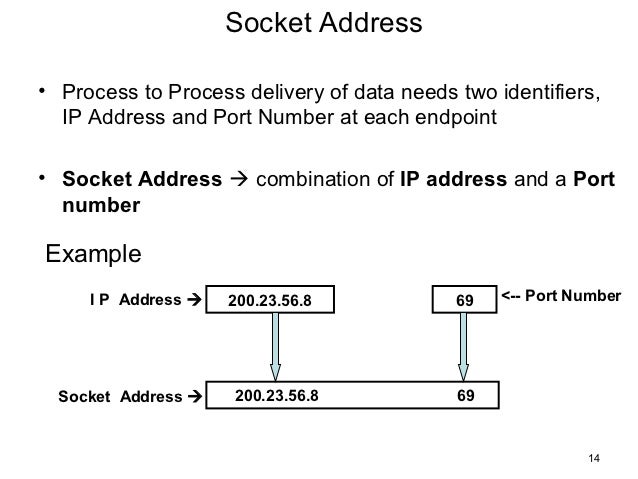
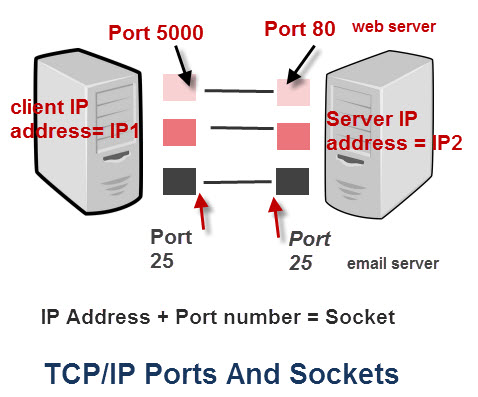
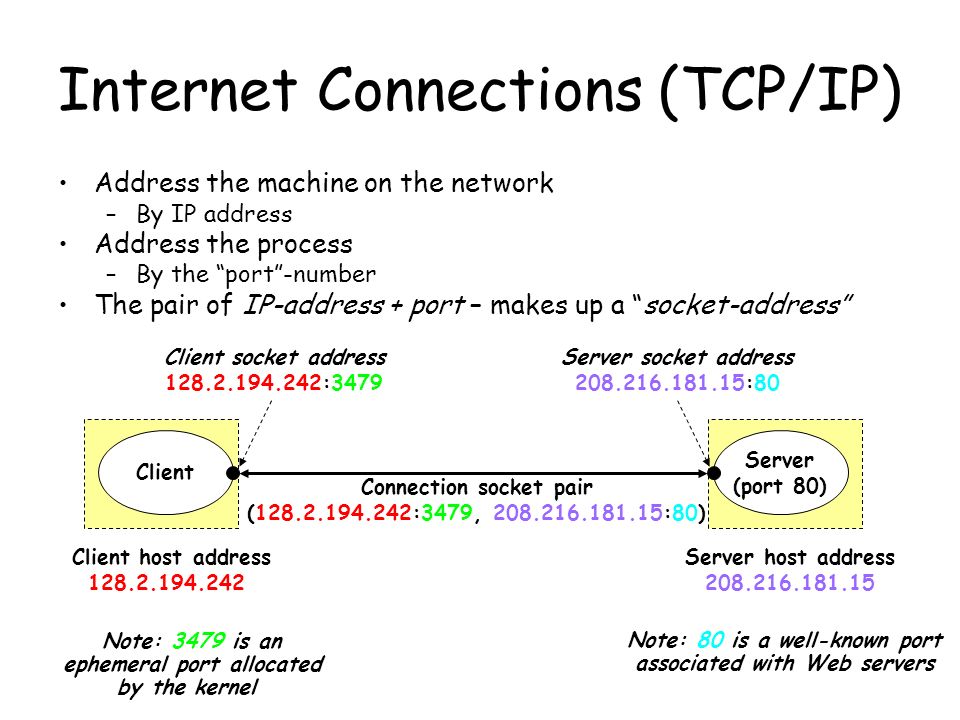
A socket is an endpoint for communication.
Two processes communicating over a network often use a pair of connected sockets as a communication channel

Software that is designed for client-server operation may also use sockets for communication between two processes running on the same computer - For example, the UI for a database program may communicate with the back-end database manager using sockets.

A socket is identified by an IP address concatenated with a port number, e.g. 200.100.50.5:80.
Sockets are considered a low-level communications channel

Communication channels via sockets may be of one of two major forms,
1-Connection-oriented ( TCP, Transmission Control Protocol )
2-Connectionless ( UDP, User Datagram Protocol )


  • 3.6.2 Remote Procedure Calls, RPC

The general concept of RPC is to make procedure calls similarly to calling on ordinary local procedures, except the procedure being called lies on a remote machine.
Implementation involves stubs on either end of the connection.

The local process calls on the stub, much as it would call upon a local procedure.
The RPC system packages up ( marshals ) the parameters to the procedure call, and transmits them to the remote system.
On the remote side, the RPC daemon accepts the parameters and calls upon the appropriate remote procedure to perform the requested work.
Any results to be returned are then packaged up and sent back by the RPC system to the local system, which then unpackages them and returns the results to the local calling procedure.


  • 3.6.3 Pipes

Pipes are one of the earliest and simplest channels of communications between ( UNIX ) processes.
There are four key considerations in implementing pipes:

Unidirectional or Bidirectional communication?
Is bidirectional communication half-duplex or full-duplex?
Must a relationship such as parent-child exist between the processes?
Can pipes communicate over a network, or only on the same machine?


Unidirectional=operating or moving in one direction only; not changing direction
Bidirectional=capable of reacting or functioning in two, usually opposite, directions.
half-duplex=of or pertaining to the transmission of information in opposite directions but not simultaneously.
full-duplex=of or pertaining to the simultaneous, independent transmission of information in both directions over a two-way channel.


  • 3.6.3.1 Ordinary Pipes

Ordinary pipes are uni-directional, with a reading end and a writing end
Ordinary pipes in Windows are very similar. Windows terms them anonymous pipes


  • 3.6.3.2 Named Pipes

Named pipes support bidirectional communication, communication between non-parent-child related processes, and persistence after the process which created them exits.
Multiple processes can also share a named pipe, typically one reader and multiple writers


  • OLD 3.6.3 Remote Method Invocation, RMI ( Removed from 8th edition )


RMI is the Java implementation of RPC for contacting processes operating on a different Java Virtual Machine, JVM, which may or may not be running on a different physical machine.

There are two key differences between RPC and RMI, both based on the object-oriented nature of Java:
RPC accesses remote procedures or functions, in a procedural-programming paradigm. RMI accesses methods within remote Objects.
The data passed by RPC as function parameters are ordinary data only, i.e. ints, floats, doubles, etc. RMI also supports the passing of Objects.


RMI is implemented using stubs ( on the client side ) and skeletons ( on the server's side), whose responsibility is to package ( marshall ) and unpack the parameters and return values being passed back and forth


http://www.cs.uic.edu/~jbell/CourseNotes/OperatingSystems/3_Processes.html


  • Socket


A socket is a transport mechanism. Sockets are like applying procedural networking to object-oriented environment.
Sockets-based network programming can be laborious.

RMI

RMI uses sockets. RMI is object-oriented. Methods can be invoked on the remote objects running on a separate JVM.
RMI provides a convenient abstraction over raw sockets. Can send and receive any valid Java object utilizing underlying object serialization without having to worry about using data streams.

http://www.cloudsopedia.com/interviewquestions/j2ee/j2ee-rmi.php


context switch

context switch

Switching the CPU to another process requires performing a state save of the current process and a state restore of a different process.
This task is known as a context switch.
When a context switch occurs, the kernel saves the context of the old process in its PCB and loads the saved context of the new process scheduled to run.

http://siber.cankaya.edu.tr/ozdogan/OperatingSystems/ceng328/node91.html

Process Scheduling

3.2 Process Scheduling

The two main objectives of the process scheduling system are to keep the CPU busy at all times and to deliver "acceptable" response times for all programs, particularly for interactive ones


http://www.cs.uic.edu/~jbell/CourseNotes/OperatingSystems/3_Processes.html

Processes


  • Processes

A process is an instance of a program in execution.

Process in the memory is divided into four sections

The text section comprises the compiled program code, read in from non-volatile storage when the program is launched.
The data section stores global and static variables, allocated and initialized prior to executing main.
The heap is used for dynamic memory allocation, and is managed via calls to new, delete, malloc, free, etc.
The stack is used for local variables

http://www.cs.uic.edu/~jbell/CourseNotes/OperatingSystems/3_Processes.html


  • Processes - Part I

http://www.youtube.com/watch?v=TIa2mhKCeYo&feature=related

what is a process?
an instance of a computer program in execution
can have several threads
each process has its own state,address and space

process in memory
-stack(local function variables)
-heap(memory allocated directly by a program)
-shared variables
-global variables
-text(program code converted to machine instructions)

process states
-new
-ready
-running
-waiting
-terminated


  • Processes - Part II

http://www.youtube.com/watch?v=_5EV7isUJ6k&feature=relmfu

  • process are created by system call fork() on unix-like systems

exec system call
fork system call

child process that run in the background after parent process terminates are

In Linux we can set guidelines for the CPU to follow when it is looking at all the tasks it has to do. These guidelines are called niceness or nice value. The Linux niceness scale goes from -20 to 19. The lower the number the more priority that task gets. If the niceness value is high number like 19 the task will be set to the lowest priority and the CPU will process it whenever it gets a chance. The default nice value is zero.

By using this scale we can allocate our CPU resources more appropriately. Lower priority programs that are not important can be set to a higher nice value, while high priority programs like daemons and services can be set to receive more of the CPU’s focus. You can even give a specific user a lower nice value for all of his/her processes so you can limit their ability to slow down the computer’s core services.

https://www.nixtutor.com/linux/changing-priority-on-linux-processes/called demon processes

  • Linux Kernel schedules the process and allocates CPU time accordingly for each of them. But, when one of your process requires higher priority to get more CPU time, you can use nice and renice command
A nice value of -20 represents highest priority, and a nice value of 19 represent least priority for a process.
By default when a process starts, it gets the default priority of 0.
https://www.thegeekstuff.com/2013/08/nice-renice-command-examples/?utm_source=tuicool
  • A Vanilla Kernel is the official Kernel released on http://www.kernel.org/. It is a standard release, ?gzipped tar kernel file, from kernel.org.
https://wiki.debian.org/vanilla

  • The kernels at www.kernel.ORG are vanilla kernels.
Each different distribution takes these vanilla kernels and adds their own type of flavoring. They may fix particular bugs in the code (Debian is very good at doing this), and they may add their own patches to do fancy things (SuSE adds a patch to do a boot screen animation), and they may add patches to enhance the facilities of the kernel (often using the source from the developmental branch of the kernel eg for very new USB devices).Thus, although all kernels are derived from the same kernel source, not all kernels are equal.
https://www.linuxquestions.org/questions/linux-general-1/what-is-vanilla-kernel-79388/


Virtual Machines

2.8 Virtual Machines
The concept of a virtual machine is to provide an interface that looks like independent hardware, to multiple different OSes running simultaneously on the same physical hardware. Each OS believes that it has access to and control over its own CPU, RAM, I/O devices, hard drives, et

2.8.3 Simulation
An alternative to creating an entire virtual machine is to simply run an emulator, which allows a program written for one OS to run on a different OS.
For example, a UNIX machine may run a DOS emulator in order to run DOS programs, or vice-versa.

2.8.4 Para-virtualization
Para-virtualization is another variation on the theme, in which an environment is provided for the guest program that is similar to its native OS, without trying to completely mimic it
Solaris 10 uses a zone system, in which the low-level hardware is not virtualized, but the OS and its devices ( device drivers ) are.

2.8.6 Examples
2.8.6.1 VMware
2.8.6.2 The Java Virtual Machine


http://www.cs.uic.edu/~jbell/CourseNotes/OperatingSystems/2_Structures.html

Modules

2.7.4 Modules
Modern OS development is object-oriented, with a relatively small core kernel and a set of modules which can be linked in dynamically.

http://www.cs.uic.edu/~jbell/CourseNotes/OperatingSystems/2_Structures.html

Microkernels

2.7.3 Microkernels
The basic idea behind micro kernels is to remove all non-essential services from the kernel, and implement them as system applications instead, thereby making the kernel as small and efficient as possible.
Security and protection can be enhanced, as most services are performed in user mode, not kernel mode


http://www.cs.uic.edu/~jbell/CourseNotes/OperatingSystems/2_Structures.html

System Calls

2.3 System Calls
System calls provide a means for user or application programs to call upon the services of the operating system.
Generally written in C or C++, although some are written in assembly for optimal performance.


2.4 Types of System Calls

2.4.1 Process Control
2.4.2 File Management
2.4.3 Device Management
2.4.4 Information Maintenance
2.4.5 Communication
2.4.6 Protection

http://www.cs.uic.edu/~jbell/CourseNotes/OperatingSystems/2_Structures.html

Monday, April 9, 2012

Deadlock Avoidance


  • Deadlock Avoidance


This approach to the deadlock problem anticipates deadlock before it actually occurs. This approach employs an algorithm to access the possibility that deadlock could

occur and acting accordingly. This method differs from deadlock prevention, which guarantees that deadlock cannot occur by denying one of the necessary conditions of  deadlock.


http://www.personal.kent.edu/~rmuhamma/OpSystems/Myos/deadlockAvoidance.htm


  • Deadlock Avoidance


Deadlock can be avoided if certain information about processes are available to the operating system before allocation of resources, such as which resources a process will consume in its lifetime

One known algorithm that is used for deadlock avoidance is the Banker's algorithm, which requires resource usage limit to be known in advance. However, for many systems it is impossible to know in advance what every process will request. This means that deadlock avoidance is often impossible.

Two other algorithms are Wait/Die and Wound/Wait, each of which uses a symmetry-breaking technique. In both these algorithms there exists an older process (O) and a younger process (Y). Process age can be determined by a timestamp at process creation time. Smaller timestamps are older processes, while larger timestamps represent younger processes.


en.wikipedia.org/wiki/Deadlock#Distributed_deadlock_prevention


  • Deadlock Avoidance


Tries to anticipate deadlock

Will deny resource requests if algorithm decides that granting the request could lead to deadlock.

Because of nondeterminacy of OS, algorithm is not always correct, and denies requests that would not have led to deadlock.

Deadlock does not occur immediately after allocating a resource, so cannot simply make projection on state graph and then run deadlock detection algorithm


http://staff.um.edu.mt/csta1/courses/lectures/csm202/os7.html#2

Saturday, April 7, 2012

Deadlock prevention


Deadlock prevention

Removing the mutual exclusion condition means that no process will have exclusive(not shared) access to a resource
Algorithms that avoid mutual exclusion are called non-blocking synchronization algorithms.


The hold and wait or resource holding conditions may be removed by requiring processes to request all the resources they will need before starting up
Another way is to require processes to request resources only when it has none.
(These algorithms, such as serializing tokens, are known as the all-or-none algorithms.


The no preemption condition may also be difficult or impossible to avoid as a process has to be able to have a resource for a certain amount of time,
Algorithms that allow preemption include lock-free and wait-free algorithms and optimistic concurrency control.


Approaches that avoid circular waits include disabling interrupts during critical sections and using a hierarchy to determine a partial ordering of resources.
The Dijkstra's solution can also be used.


http://en.wikipedia.org/wiki/Deadlock#Distributed_deadlock_prevention


all four of the conditions are necessary for deadlock to occur, it follows that deadlock might be prevented by denying any one of the conditions.

Elimination of “Mutual Exclusion” Condition
several processes cannot simultaneously share a single resource
This condition is difficult to eliminate because some resources, such as the tap drive and printer, are inherently non-shareable

Elimination of “Hold and Wait” Condition
The first alternative is that a process request be granted all of the resources it needs at once, prior to execution.
The second alternative is to disallow a process from requesting resources whenever it has previously allocated resources.

Elimination of “No-preemption” Condition
When a process release resources the process may lose all its work to that point. One serious consequence of this strategy is the possibility of indefinite postponement (starvation). A process might be held off indefinitely as it repeatedly requests and releases the same resources.

Elimination of “Circular Wait” Condition
The last condition, the circular wait, can be denied by imposing a total ordering on all of the resource types and than forcing, all processes to request the resources in order (increasing or decreasing)


http://www.personal.kent.edu/~rmuhamma/OpSystems/Myos/deadlockPrevent.htm


Preventing Deadlock (by denying one of the conditions)

Denying Mutual Exclusion

Not desirable to deny - we want dedicated resources

Denying Hold-And-Wait

Force processes to request and gain all their resources in one go.

Disadvantages are other processes are made to wait.

A resource which will not be used until the end of a process still has to be requested at the beginning - poor resource utilisation

Denying No Pre-emption

Some non-shareable resources can be pre-empted if the hardware/software saves the context of the interrupted process - but what about printers?

Only partial denial of no pre-emption is possible.

Denying Circular Waiting

Resources are grouped into `Frequency of Use' classes, C1, C2, C3, etc.

All required resources belonging to the same class are requested at the same time in class order

No circular wait because either all required resources one class are held, or process waits until all required resources within a class are available.

Disadvantages are that resources must be requested in an artifical order - not necessarily the order in which they will be used.

http://staff.um.edu.mt/csta1/courses/lectures/csm202/os7.html#2

Ostrich algorithm

Solutions to deadlock

There are several ways to address the problem of deadlock in an operating system.

Just ignore it and hope it doesn't happen
Detection and recovery - if it happens, take action
Dynamic avoidance by careful resource allocation. Check to see if a resource can be granted, and if granting it will cause deadlock, don't grant it.
Prevention - change the rules


Ignore deadlock

The text refers to this as the Ostrich Algorithm. Just hope that deadlock doesn't happen. In general, this is a reasonable strategy. Deadlock is unlikely to occur very often; a system can run for years without deadlock occurring. If the operating system has a deadlock prevention or detection system in place, this will have a negative impact on performance (slow the system down) because whenever a process or thread requests a resource, the system will have to check whether granting this request could cause a potential deadlock situation.


http://www.cs.rpi.edu/academics/courses/fall04/os/c10/


Ostrich algorithm


n computer science, the ostrich algorithm is a strategy of ignoring potential problems on the basis that they may be exceedingly rare - "to stick your head in the sand and pretend that there is no problem". This assumes that it is more cost-effective to allow the problem to occur than to attempt its prevention.

This approach may be used in dealing with deadlocks in concurrent programming if deadlocks are believed to be very rare, and if the cost of detection or prevention is high


http://en.wikipedia.org/wiki/Ostrich_algorithm

Necessary conditions for deadlock

Conditions for Deadlock

Mutual exclusion: resources cannot be shared.
Hold and wait: processes request resources incrementally, and hold on to what they've got.
No preemption: resources cannot be forcibly taken from processes.
Circular wait: circular chain of waiting, in which each process is waiting for a resource held by the next process in the chain.

http://www1bpt.bridgeport.edu/sed/projects/cs503/Spring_2001/kode/os/deadlock.htm#conditions


four (4) conditions that must hold simultaneously for there to be a deadlock.

1. Mutual Exclusion Condition
The resources involved are non-shareable.
Explanation: At least one resource (thread) must be held in a non-shareable mode, that is, only one process at a time claims exclusive control of the resource. If another process requests that resource, the requesting process must be delayed until the resource has been released.

2. Hold and Wait Condition
Requesting process hold already, resources while waiting for requested resources.
Explanation: There must exist a process that is holding a resource already allocated to it while waiting for additional resource that are currently being held by other processes.

3. No-Preemptive Condition
Resources already allocated to a process cannot be preempted.
Explanation: Resources cannot be removed from the processes are used to completion or released voluntarily by the process holding it.

4. Circular Wait Condition
The processes in the system form a circular list or chain where each process in the list is waiting for a resource held by the next process in the list.

http://www.personal.kent.edu/~rmuhamma/OpSystems/Myos/deadlockCondition.htm


Necessary conditions for deadlock

A deadlock situation can arise if and only if the following four conditions hold simultaneously in a system-

Mutual Exclusion: At least one resource is held in a non-sharable mode that is only one process at a time can use the resource. If another process requests that resource, the requesting process must be delayed until the resource has been released.

Hold and Wait:There must exist a process that is holding at least one resource and is waiting to acquire additional resources that are currently being held by other processes.

No Preemption: Resouces cannot be preempted; that is, a resource can only be released voluntarily by the process holding it, after the process has completed its task.

Circular Wait: There must exist a set {p0, p1,.....pn} of waiting processes such that p0 is waiting for a resource which is held by p1, p1 is waiting for a resource which is held by p2,..., pn-1 is waiting for a resource which is held by pn and pn is waiting for a resource which is held by p0.


http://wikieducator.org/Necessary_conditions_for_deadlock

The Bounded-Buffer semaphores

The Bounded-Buffer semaphores

We assume that the pool consists of $ n$ buffers, each capable of holding one item. The mutex semaphore provides mutual exclusion for accesses to the buffer pool and is initialized to the value 1.

The empty and full semaphores count the number of empty and full buffers.

The semaphore empty is initialized to the value n.
The semaphore full is initialized to the value 0.


http://siber.cankaya.edu.tr/ozdogan/OperatingSystems/ceng328/node147.html#6.8

Friday, April 6, 2012

The consumer producer problem (also known as the bounded-buffer problem)

The consumer producer problem (also known as the bounded-buffer problem)


The consumer producer problem (also known as the bounded-buffer problem) is a classical example of a multi-process synchronization problem.

The problem describes two processes, the producer and the consumer, who share a common, fixed-size buffer used as a queue. The producer's job is to generate a piece of data, put it into the buffer and start again. At the same time, the consumer is consuming the data (i.e., removing it from the buffer) one piece at a time. The problem is to make sure that the producer won't try to add data into the buffer if it's full and that the consumer won't try to remove data from an empty buffer.

The solution for the producer is to either go to sleep or discard data if the buffer is full. The next time the consumer removes an item from the buffer, it notifies the producer, who starts to fill the buffer again. In the same way, the consumer can go to sleep if it finds the buffer to be empty. The next time the producer puts data into the buffer, it wakes up the sleeping consumer.

The solution can be reached by means of inter-process communication, typically using semaphores.

An inadequate solution could result in a deadlock where both processes are waiting to be awakened. The problem can also be generalized to have multiple producers and consumers.


http://en.wikipedia.org/wiki/Producer-consumer_problem

Semaphore (programming)

In computer science, a semaphore is a variable or abstract data type that provides a simple but useful abstraction for controlling access by multiple processes to a common resource in a parallel programming environment.

Semaphores are a useful tool in the prevention of race conditions and deadlocks;


http://en.wikipedia.org/wiki/Semaphore_%28programming%29

Inter-process communication(IPC)

Inter-process communication

In computing, Inter-process communication (IPC) is a set of methods for the exchange of data among multiple threads in one or more processes.
Processes may be running on one or more computers connected by a network
IPC methods are divided into methods for message passing, synchronization, shared memory, and remote procedure calls (RPC).

http://en.wikipedia.org/wiki/Inter-process_communication


Processes executing concurrently in the OS may be either independent processes or cooperating processes.

Cooperating processes require an interprocess communication (IPC) mechanism that will allow them to exchange data and information.

inter-process communication, which is most commonly one of two types: Shared Memory systems or Message Passing systems

There are two fundamental models of interprocess communication:

Shared Memory. A region of memory that is shared by cooperating processes is established. Processes can then exchange information by reading and writing data to the shared region.

Message Passing. Communication takes place by means of messages exchanged between the cooperating processes


Shared Memory is faster once it is set up, because no system calls are required and access occurs at normal memory speeds.
However it is more complicated to set up, and doesn't work as well across multiple computers.
Shared memory is generally preferable when large amounts of information must be shared quickly on the same computer.
Shared memory allows maximum speed and convenience of communication, as it can be done at memory speeds when within a computer.
Shared memory is faster than message passing, as message-passing systems are typically implemented using system calls and thus require the more time-consuming task of kernel intervention

Message Passing requires system calls for every message transfer, and is therefore slower, but it is simpler to set up and works well across multiple computers. Message passing is generally preferable when the amount and/or frequency of data transfers is small, or when multiple computers are involved.
Message passing is useful for exchanging smaller amounts of data, because no conflicts need be avoided


3.5 Examples of IPC Systems

3.5.1 An Example: POSIX Shared Memory
3.5.2 An Example: Mach
3.5.3 An Example: Windows XP


http://siber.cankaya.edu.tr/ozdogan/OperatingSystems/ceng328/node96.html
http://www.cs.uic.edu/~jbell/CourseNotes/OperatingSystems/3_Processes.html

Semaphore vs. mutex

Semaphore vs. mutex

A mutex is essentially the same thing as a binary semaphore
the term "mutex" is used to describe a construct which prevents two processes from executing the same piece of code or accessing the same data, at the same time
The term "binary semaphore" is used to describe a construct which limits access to a single resource.

http://en.wikipedia.org/wiki/Semaphore_%28programming%29


Mutex Is a key to a toilet. One person can have the key - occupy the toilet - at the time. When finished, the person gives (frees) the key to the next person in the queue.

A mutex object only allows one thread into a controlled section, forcing other threads which attempt to gain access to that section to wait until the first thread has exited from that section

A mutex is really a semaphore with value 1.


Semaphore Is the number of free identical toilet keys.Example, say we have four toilets with identical locks and keys. The semaphore count - the count of keys - is set to 4 at beginning (all four toilets are free), then the count value is decremented as people are coming in. If all toilets are full, ie. there are no free keys left, the semaphore count is 0. Now, when eq. one person leaves the toilet, semaphore is increased to 1 (one free key), and given to the next person in the queue.


"A semaphore restricts the number of simultaneous users of a shared resource up to a maximum number. Threads can request access to the resource (decrementing the semaphore), and can signal that they have finished using the resource (incrementing the semaphore)."


http://koti.mbnet.fi/niclasw/MutexSemaphore.html


a mutex is locking mechanism used to synchronize access to a resource. Only one task (can be a thread or process based on OS abstraction) can acquire the mutex. It means there will be ownership associated with mutex, and only the owner can release the lock (mutex).

Semaphore is signaling mechanism (“I am done, you can carry on” kind of signal). For example, if you are listening songs (assume it as one task) on your mobile and at the same time your friend called you, an interrupt will be triggered upon which an interrupt service routine (ISR) will signal the call processing task to wakeup.


http://www.geeksforgeeks.org/archives/9102

Principles of Operating System - Lecture 6

producer-consumer problem
producer process
consumer process
buffer(shared)

synchronization between producer and consumer processes


race condition
there is a race condition because of the timing of which process starts first
when two or more processes race for a shared resource and it's unpredictable which one is gonna get first

critical section
race condition might create a situation where the consumer is trying to consume something that has not been produced yet
or
producer is producing so much in the buffer that consumer does not get a chance to consume
or
regional code where we have shared variables

mutual exclusion
only one process at a time can access to critical section

why processes need to communicate?


rules to form critical sections

mutual exclusion problem-starvation

deadlocks

how to implement mutual exclusion

application mutual exclusion

busy wait


mutual exclusion through OS

semaphores operations

producer-consumer problem:solution by semaphores


bounded-buffer problem

what is deadlock

process deadlock
system deadlock


necessary conditions for a deadlock

mutual exclusion
hold&wait
no preemption
circular wait


no deadlock situation?

ostrich algorithm

ways of handling deadlock


deadlock prevention


denying the "hold&wait"

denying "no preemption"

denying "circular wait"


deadlock avoidance


banker's algorithm


classical IPC problems

readers and writers problem

dining philosophers problem

sleeping barber problem


http://www.youtube.com/watch?v=ZMD9vybAjo4&feature=related

Producer Consumer Problem code examples


  • Producer consumer in Java 2

http://www.java2s.com/Code/Java/Threads/ProducerconsumerinJava2.htm


  • Implementation of the Producer/Consumer problem in Java

http://www.java-forums.org/java-lang/7353-implementation-producer-consumer-problem-java.html


  • Producer-consumer problem

The producer-consumer problem (also known as the bounded-buffer problem) is a classic example of a multi-process synchronization problem
The problem describes two processes, the producer and the consumer, who share a common, fixed-size buffer used as a queue.
The producer's job is to generate a piece of data, put it into the buffer and start again. At the same time, the consumer is consuming the data (i.e., removing it from the buffer) one piece at a time

The problem is to make sure that the producer won't try to add data into the buffer if it's full and that the consumer won't try to remove data from an empty buffer.
https://en.wikipedia.org/wiki/Producer-consumer_problem

Banker’s Algorithm code examples

Program for Banker’s Algorithm

http://labprograms.wordpress.com/2009/07/31/program-for-bankers-algorithm/

course pages

Operating Systems
Course Notes Main Page

http://www.cs.uic.edu/~jbell/CourseNotes/OperatingSystems/index.html


CS 140: Operating Systems (Winter 2012)
http://www.stanford.edu/~ouster/cgi-bin/cs140-winter12/lectures.php


CENG 328 Operating Systems
Spring 2011

http://siber.cankaya.edu.tr/ozdogan/OperatingSystems/spring2011/index.html#Text%20Book|outline


Lectures of the Operating Systems course (Fall 2000):

http://www.cs.jhu.edu/~yairamir/cs418/600-418.html


CMP 426 (section ZF81) CMP 697 (section ZF81): Operating Systems

Practices:Questions and Answers

http://comet.lehman.cuny.edu/jung/cmp426697/cmp426697.html


CS241 Lectures

http://www.cs.illinois.edu/class/fa11/cs241/schedule.html


Operating Systems: Schedule
http://lass.cs.umass.edu/~shenoy/courses/fall08/schedule.html


İşletim Sistemleri (BTP,2005)
http://web.itu.edu.tr/~bkurt/Courses/os/index2k5.html

İşletim Sistemleri (BTP,2006)
http://web.itu.edu.tr/~bkurt/Courses/os/


İşletim Sistemleri
http://udes.iku.edu.tr/index.php?option=com_content&view=article&id=49&Itemid=49

Lab (301)
http://yunus.hacettepe.edu.tr/~yurdugul/3/OS/index.html

İŞLETİM SİSTEMLERİ DÖNEMİÇİ SINAVI
http://bmb.cu.edu.tr/mavci/soru/os-vize.pdf

Operating Systems and System Programming
http://www.youtube.com/watch?v=XgQo4JkN4Bw

CS3753 (Operating Systems) University of Colorado, Boulder
http://www.youtube.com/watch?v=UlZZQ9GtVQc&feature=relmfu


Principles of Operating System
http://www.youtube.com/watch?v=CkqFxzuN9g0&feature=relmfu


CS 4375: Theory of Operating Systems,Fall 2009 ,Homework Assignments
http://www.cs.utep.edu/tmagoc/course/cs4375_F09/homework.html