Friday, December 8, 2017

Block Storage, Object Storage, and File Systems

  • Gemini
Understanding the Basics

Before diving into the differences and use cases, let's establish a foundation.

Block Storage: Data is stored in blocks, the smallest unit of data storage.   

Object Storage: Data is stored as objects, with metadata attached to each object.  

File Storage: Data is stored in files, organized in a hierarchical structure.  

SAN (Storage Area Network): A network-attached storage system providing block-level access to data.  

NAS (Network Attached Storage): A network-attached storage system providing file-level access to dat

Detailed Comparison and Use Cases

Block Storage

    How it works: Data is stored in fixed-size blocks, accessed directly by the operating system.
    Best for: High-performance applications like databases, virtual machines, and online transaction processing.   


    Example: SAN

Object Storage

    How it works: Data is stored as objects with metadata, accessed via APIs.   


Best for: Storing large amounts of unstructured data, backups, archives, and big data analytics.  


    Example: Amazon S3, Google Cloud Storage

File Storage

    How it works: Data is stored in files and organized in a hierarchical structure.   


    Best for: File sharing, collaboration, and general data storage.
    Example: NAS

SAN (Storage Area Network)

    How it works: A dedicated network for storage devices, providing block-level access to data.   


Best for: High-performance computing, databases, virtualized environments.  


    Example: Enterprise data centers

NAS (Network Attached Storage)

    How it works: A file-level network storage device accessible via standard network protocols.
    Best for: File sharing, home/small office storage, backup and recovery.
    Example: Network-attached storage device in a home or small office
  • Object Storage
Object storage works differently from file system storage or block storage. Rather than referencing data by a block address or a file name, data is stored as an object and is referenced by an object ID.  The advantages of object storage are that it is massively scalable, and allows for a high degree of flexibility with regard to associating attributes with objects. The disadvantage to using object storage is that it does not perform as well as block storage.

Block storage is another storage option for containers. As previously mentioned, file system storage organizes data into a hierarchy of files and folders. In contrast, block storage stores chunks of data in blocks. A block is identified only by its address. A block has no filename, nor does it have any metadata of its own. Blocks only become meaningful when they are combined with other blocks to form a complete piece of data.

File System Storage
File system storage has been around for decades, and stores data as files. Each file is referenced by a filename, and typically has attributes associated with it. Some of the more commonly used file systems include NFS and NTFS.
http://rancher.com/block-object-file-storage-containers/


  • Storage Wars: File vs Block vs Object Storage

The standard naming convention makes them easy enough to organize while storage technologies such as NAS allow for convenient sharing at the local level
File Storage Use Cases
File sharing: If you just need a place to store and share files in the office, the simplicity of file-level storage is where it’s at.
Local archiving: The ability to seamlessly accommodate scalability with a scale-out NAS solution makes file-level storage a cost effective option for archiving files in a small data center environment.
Data protection: Combined with easy deployment, support for standard protocols, native replication, and various drive technologies makes file-level storage a viable data protection solution

IT pros will deploy block storage most commonly in  SAN architectures. It is the natural alternative to file-based storage. A block is a raw storage volume filled with files that have been split into chunks of data of equal size. A server-based operating system manages these volumes and can use them as individual hard drives. That means they perform a number of functions native to individual OS platforms.One of the most interesting things about block storage is how it handles metadata. Unlike in file-based architectures, there are no additional details associated with a block outside of its address. Instead, the controlling operating system determines how storage management.
Block Storage Use Cases
Databases: Block storage is common in databases and other mission-critical applications that demand consistently high performance.
Email servers: Block storage is the defacto standard for Microsoft’s popular email server Exchange, which doesn’t support file or network-based storage systems.
RAID: Block storage can create an ideal foundation for RAID arrays designed to bolster data protection and performance by combining multiple disks as independent volumes.
Virtual machines: Virtualization software vendors such as VMware use block storage as file systems for the guest operating systems packaged inside virtual machine disk images.

object-based storage stores data in isolated containers known as objects
You can give a single object a unique identifier and store it in a flat memory model. This is important for two reasons. You can retrieve an object from storage by simply presenting its unique ID, thus making information much easier to find in a large pool of data
you can customize metadata so it pairs objects with specific applications. You can also determine that application’s level of importance, move objects to different areas of storage, and even delete objects when you no longer need them
Scalability is where object-based storage does its most impressive work.
Scaling out an object architecture is as simple as adding additional nodes to the storage cluster.
Every server has its physical limitations. But thanks to location transparency and remarkable metadata flexibility

While files and blocks are generally available to an operating system, object-level platforms typically rely on REST APIs for access.
API applications such as Amazon Simple Storage Services and OpenStack Swift round out flexibility.


Object Storage Use Cases
Big data: Object storage has the ability to accommodate unstructured data with relative ease. This makes it a perfect fit for the big data needs of organizations in finance, healthcare, and beyond.
Web apps: You can normally access object storage through an API. This is why it’s naturally suited for API-driven web applications with high-volume storage needs.
Backup archives: Object storage has native support for large data sets and near infinite scaling capabilities. This is why it is primed for the massive amounts of data that typically accompany archived backups

https://blog.storagecraft.com/storage-wars-file-block-object-storage/


  •  In the Cloud: Block Storage vs. Object Storage
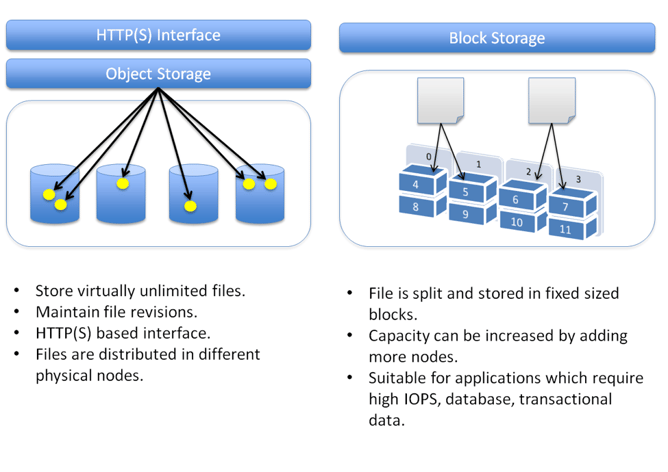
 Object Storage Systems
        Enterprises use object storage for different use cases, such as static content storage and distribution, backup and archiving, and disaster recovery. Object storage works very well for unstructured data sets where data is mostly read (rather than written to). It’s more of a write once, read many times use case.


    The data or content of the object
    A unique identifier associated with the object, which allows developers to easily track and maintain the object details
    Metadata - each object has metadata, containing contextual information about data such as its name, size, content-type, security attributes, and URL. This metadata is generally stored as a key-value pair.

    For object-based storage systems, there is no hierarchy of relations between files.

        The Block Storage System
        We use block storage systems to host our databases, support random read/write operations, and keep system files of the running virtual machines.
        Data is stored in volumes and blocks, where files are split into evenly sized blocks. Each block has its own address, but unlike objects they do not have metadata.
   
        Why Object-based Storage and Not Block?

The primary advantage of the object-based storage is that you can easily distribute objects across various nodes on the storage backend. As each object is referred to and accessed by its unique ID, an object can be located on any machine in the data center.


Why Block-based Storage and Not Object?
With block-based storage, it is easier to modify files because you have access to the specific required blocks in the volumes.
In object-based storage, modifying a file means that you have to upload a new revision of the entire file. This can significantly impact performance if modifications are frequent.
area where the Block Storage wins—the IO speed. While access to an object generally relies on HTTP protocol, block storage systems are mounted as a storage device on the server with underlying file system protocol (such as NFS, CIFS, ext3/ext4 and others).Object-based mechanisms should not be used for high-activity IO operations like caching, database operations, log files, etc. Block storage mechanisms are better suited for these activities

    https://cloud.netapp.com/blog/block-storage-vs-object-storage-cloud


  • Object Storage versus Block Storage: Understanding the Technology Differences

Every object contains three things:

    The data itself. The data can be anything you want to store, from a family photo to a 400,000-page manual for assembling an aircraft.
    An expandable amount of metadata. The metadata is defined by whoever creates the object storage; it contains contextual information about what the data is, what it should be used for, its confidentiality, or anything else that is relevant to the way in which the data is used.
    A globally unique identifier. The identifier is an address given to the object in order for the object to be found over a distributed system. This way, it’s possible to find the data without having to know the physical location of the data (which could exist within different parts of a data center or different parts of the world)https://www.druva.com/blog/object-


    With block storage, files are split into evenly sized blocks of data, each with its own address but with no additional information (metadata) to provide more context for what that block of data is. You’re likely to encounter block storage in the majority of enterprise workloads; it has a wide variety of uses (as seen by the rise in popularity of SAN arrays)

    Object storage, by contrast, doesn’t split files up into raw blocks of data. Instead, entire clumps of data are stored in, yes, an object that contains the data, metadata, and the unique identifier. There is no limit on the type or amount of metadata, which makes object storage powerful and customizable

    However, object storage generally doesn’t provide you with the ability to incrementally edit one part of a file (as block storage does). Objects have to be manipulated as a whole unit, requiring the entire object to be accessed, updated, then re-written in their entirety. That can have performance implications.

    Another key difference is that block storage can be directly accessed by the operating system as a mounted drive volume, while object storage cannot do so without significant degradation to performance. The tradeoff here is that, unlike object storage, the storage management overhead of block storage (such as remapping volumes) is relatively nonexistent

    Items such as static Web content, data backup, and archives are fantastic use cases. Object-based storage architectures can be scaled out and managed simply by adding additional nodes. The flat name space organization of the data, in combination with its expandable metadata functionality, facilitate this ease of use.

    Objects remain protected by storing multiple copies of data over a distributed system;(Downtime? What downtime?) In most cases, at least three copies of every file are stored. This addresses common issues including drive failures, bit-rot, server and failures, and power outages. This distributed storage design for high availability allows less-expensive commodity hardware to be used because the data protection is built into the object architecture.

    Object storage systems are eventually consistent while block storage systems are strongly consistent.

    Eventual consistency can provide virtually unlimited scalability. It ensures high availability for data that needs to be durably stored but is relatively static and will not change much, if at all. This is why storing photos, video, and other unstructured data is an ideal use case for object storage systems; it does not need to be constantly altered. The downside to eventual consistency is that there is no guarantee that a read request returns the most recent version of the data.

    Strong consistency is needed for real-time systems such as transactional databases that are constantly being written to, but provide limited scalability and reduced availability as a result of hardware failures. Scalability becomes even more difficult within a geographically distributed system.

    Geographically distributed back-end storage is another great use case for object storage. The object storages applications present as network storage and support extendable metadata for efficient distribution and parallel access to objects. That makes it ideal for moving your back-end storage clusters across multiple data centers.

    We don’t recommend you use object storage for transactional data, especially because of the eventual consistency model outlined previously. In addition, it’s very important to recognize that object storage was not created as a replacement for NAS file access and sharing; it does not support the locking and sharing mechanisms needed to maintain a single accurately updated version of a file.

    block level storage devices are accessible as volumes and accessed directly by the operating system, they can perform well for a variety of use cases. Good examples for block storage use cases are structured database storage, random read/write loads, and virtual machine file system (VMFS) volumes.


    storage-versus-block-storage-understanding-technology-differences/

  • FILE STORAGE

File storage exists in two forms: File Servers and Networked Attached Storage (NAS).
NAS is a file server appliance.
File storage provides standard network file sharing protocols to exchange file content between systems.
Standard file sharing protocols include NFS and SMB (fka CIFS)
Index tables include: inode tables, records of where the data resides on the physical storage devices or appliances, and file paths, which provide the addresses of those files.
Standard file system metadata, stored separately from the file itself, record basic file attributes such as the file name, the length of the contents of a file, and the file creation date.


BLOCK STORAGE
Which manages data as blocks within sectors and tracks, and file storage, which manages files organized into hierarchical file systems.
In computing, a block, sometimes called a physical record, is a sequence of bytes or bits, usually containing some whole number of records, having a maximum length, a block size
Block storage is used by Storage Area Networks (SANs), where a SAN disk array is connected via a SCSI, iSCSI (SCSI over Ethernet) or Fibre Channel network to servers.

OBJECT STORAGE
Object storage organizes information into containers of flexible sizes, referred to as objects.
Each object includes the data itself as well as its associated metadata and has a globally unique identifier, instead of a file name and a file path.
These unique identifiers are arranged in a flat address space, which removes the complexity and scalability challenges of a hierarchical file system based on complex file paths
https://www.scality.com/topics/what-is-object-storage/

  • DISTRIBUTED FILE SYSTEM

A distributed file system resides on different machines and/or sites, and offers a unified, logical view of data scattered across machines/sites, whether local or remote.

METADATA
Metadata in object storage systems can be augmented with custom attributes to handle additional file-related information. Doing so with a traditional storage system would require a custom application and database to manage the metadata (these are known as “extended attributes”).

EXAMPLES OF DFS
NFS
CIFS/SMB
Hadoop
NetWare

https://www.scality.com/topics/what-is-a-distributed-file-system/

  • OBJECT STORAGE VS. NAS


WHAT IS NAS?
NAS, or Network Attached Storage, is the main and primary shared storage architecture for file storage, which has been the ubiquitous and familiar way to store data for a long time, based on a traditional file system comprising files organized in hierarchical directories.

WHAT IS OBJECT STORAGE?
By design, it overcomes the limitations of NAS and other traditional storage architectures that would not fit the bill for such cloud-scale environments.
In an Object Storage solution, data is stored in objects that carry a unique ID and embed an extensible set of metadata.
These objects can be grouped in buckets, but are otherwise stored in a flat address space, or pool.
Objects may be local or geographically separated, but they are accessed the same way, through HTTP-based REST application programming interface.
Most object storage solutions are based on clusters of commodity server nodes, each presenting their internal direct-attached storage to create an aggregate capacity, distributed across the whole cluster. Data protection is accomplished through replication (typically for smaller files) and/or advanced Erasure Coding algorithms.

https://www.scality.com/topics/object-storage-vs-nas/
  • Deduplication
Data deduplication is a process that optimizes space utilization by eliminating duplicate copies of data. Files are scanned and analyzed for duplicates before being written to disk. This process is resource-intensive and can impact performance greatly if the system lacks caching devices or sufficient RAM.

Snapshots and clones
Make and save snapshots of the entire file system on demand or schedule the process to save effort. In case of malware attack or user error, administrators can roll the system back to an uninfected state. Recovery takes seconds, not days. Snapshots can be replicated to another FreeNAS system to create a remote backup in case of fire or catastrophic hardware failure. Users can easily manage, delete, copy, and monitor saved snapshots through the web UI.


https://www.ixsystems.com/freenas-mini/

  • Compression Vs. Deduplication


 Thin Provisioning
 just makes sure that the overall storage capacity is not held captive by a LUN or volume. It does this by only allocating space to a volume as that space is consumed. Some advanced thin provisioning technologies can do free space reclamation which essentially means zeroing out deleted space and returning that capacity to a global pool of storage.

 Compression
 Compression works by identifying redundancy “within a file” and then removing those redundancies.

 Deduplication
 While deduplication takes potentially the same amount of processing power, it by comparison can be more memory intensive than compression because the comparable range is now “across all the files” (in fact segments of those files) in the environment.
 http://www.storage-switzerland.com/Articles/Entries/2012/9/26_Compression_Vs._Deduplication.html

  • ChatGPT
Compression, deduplication, and encryption are distinct data management techniques used to optimize storage, enhance security, and manage data more efficiently. Here’s a detailed explanation of each, including their differences and best use cases:
1. Compression

Definition: Compression reduces the size of data by encoding it more efficiently, which can save storage space and improve data transfer speeds.

Characteristics:

    Reduces Data Size: Compresses data to occupy less space, either by removing redundancy (lossless) or discarding some data (lossy).
    Improves Efficiency: Helps in reducing storage costs and speeding up data transmission.
    Decompression Required: Data needs to be decompressed before use, which requires additional processing.

Types:

    Lossless Compression: No data is lost during compression. Examples include ZIP files and PNG images.
    Lossy Compression: Some data is discarded to achieve higher compression rates. Examples include JPEG images and MP3 audio.

Best Use Cases:

    File Storage: Reducing the size of files to save disk space.
    Data Transfer: Compressing data for faster transmission over networks.
    Backup: Compressing backup files to save storage space and improve backup speed.

Example: Gzip - A popular tool for compressing files in UNIX-based systems.
2. Deduplication

Definition: Deduplication eliminates duplicate copies of data to reduce storage usage and increase efficiency.

Characteristics:

    Eliminates Redundancy: Identifies and removes duplicate data blocks, keeping only one copy.
    Efficiency: Reduces storage requirements and can improve backup performance by minimizing the amount of data written.
    Single Instance Storage: Stores only a single instance of identical data.

Types:

    File-Level Deduplication: Removes duplicate files across the storage system.
    Block-Level Deduplication: Identifies and removes duplicate blocks of data within files.

Best Use Cases:

    Backup and Archiving: Reducing storage requirements for backups and archives by eliminating duplicate data.
    Virtualization: Optimizing storage for virtual machines by eliminating redundant virtual disk data.
    Data Storage: Reducing the size of data stored on disk by eliminating redundant blocks.

Example: Dell EMC Data Domain - A deduplication appliance that optimizes backup storage.
3. Encryption

Definition: Encryption transforms data into a secure format that can only be read or decrypted by authorized users with the correct decryption key.

Characteristics:

    Data Security: Protects data from unauthorized access and ensures confidentiality.
    Two Types:
        Symmetric Encryption: Uses the same key for encryption and decryption (e.g., AES).
        Asymmetric Encryption: Uses a pair of keys (public and private) for encryption and decryption (e.g., RSA).
    Performance Impact: Can affect system performance due to the computational overhead of encryption and decryption.

Best Use Cases:

    Data at Rest: Encrypting stored data to protect it from unauthorized access if storage devices are compromised.
    Data in Transit: Encrypting data transmitted over networks to prevent eavesdropping or tampering.
    Compliance: Meeting regulatory requirements for data protection and privacy.

Example: BitLocker - A disk encryption feature in Windows that encrypts entire drives to protect data.
Summary of Differences:

    Compression:
        Purpose: Reduces the size of data to save space and improve transfer speeds.
        Impact: Saves storage space and speeds up data transfer.
        Use Cases: File storage, data transfer, backup.

    Deduplication:
        Purpose: Eliminates duplicate data to reduce storage usage.
        Impact: Reduces storage requirements by keeping only one copy of duplicated data.
        Use Cases: Backup and archiving, virtualization, data storage.

    Encryption:
        Purpose: Secures data by converting it into a format only accessible by authorized users.
        Impact: Protects data from unauthorized access, ensuring confidentiality.
        Use Cases: Data at rest, data in transit, compliance.

Each technique addresses different aspects of data management and security. Compression and deduplication focus on optimizing storage efficiency, while encryption is concerned with protecting data confidentiality and security. Depending on your needs, you might use one or a combination of these techniques to manage your data effectively.
  • Compression, deduplication and encryption: What's the difference?


Data compression
Compression is actually a decades-old idea, but it's making a renewed appearance in storage systems like virtual tape libraries (VTL). Compression basically attempts to reduce the size of a file by removing redundant data within the file.By making files smaller, less disk space is consumed, and more files can be stored on disk. For example, a 100 KB text file might be compressed to 52 KB by removing extra spaces or replacing long character strings with short representations.

Data deduplication
File deduplication (sometimes called data reduction or commonality factoring) is another space-saving technology intended to eliminate redundant (duplicate) files on a storage system.A typical data center may be storing many copies of the same file.By saving only one instance of a file, disk space can be significantly reduced.For example, suppose the same 10 MB PowerPoint presentation is stored in 10 folders for each sales associate or department. That's 100 MB of disk space consumed to maintain the same 10 MB file. File deduplication ensures that only one complete copy is saved to disk. Subsequent iterations of the file are only saved as references that point to the saved copy, so end-users still see their own files in place
http://searchdatabackup.techtarget.com/tip/Compression-deduplication-and-encryption-Whats-the-difference


  • Understanding data deduplication ratios in backup systems


The effectiveness of data deduplication is often expressed as a deduplication or reduction ratio, denoting the ratio of protected capacity to the actual physical capacity stored. A 10:1 ratio means that 10 times more data is protected than the physical space required to store it.

Data backup policies: the greater the frequency of "full" backups (versus "incremental" or "differential" backups), the higher the deduplication potential since data will be redundant from day to day.
Data retention settings: the longer data is retained on disk, the greater the opportunity for the deduplication engine to find redundancy.
Data type: some data is inherently more prone to duplicates than others. It's more reasonable to expect higher deduplication ratios if the environment contains primarily Windows servers with similar files, or VMware virtual machines.
http://searchdatabackup.techtarget.com/tip/Understanding-data-deduplication-ratios-in-backup-systems


  • In computing, data deduplication is a specialized data compression technique for eliminating duplicate copies of repeating data. Related and somewhat synonymous terms are intelligent (data) compression and single-instance (data) storage. This technique is used to improve storage utilization and can also be applied to network data transfers to reduce the number of bytes that must be sent

https://en.wikipedia.org/wiki/Data_deduplication


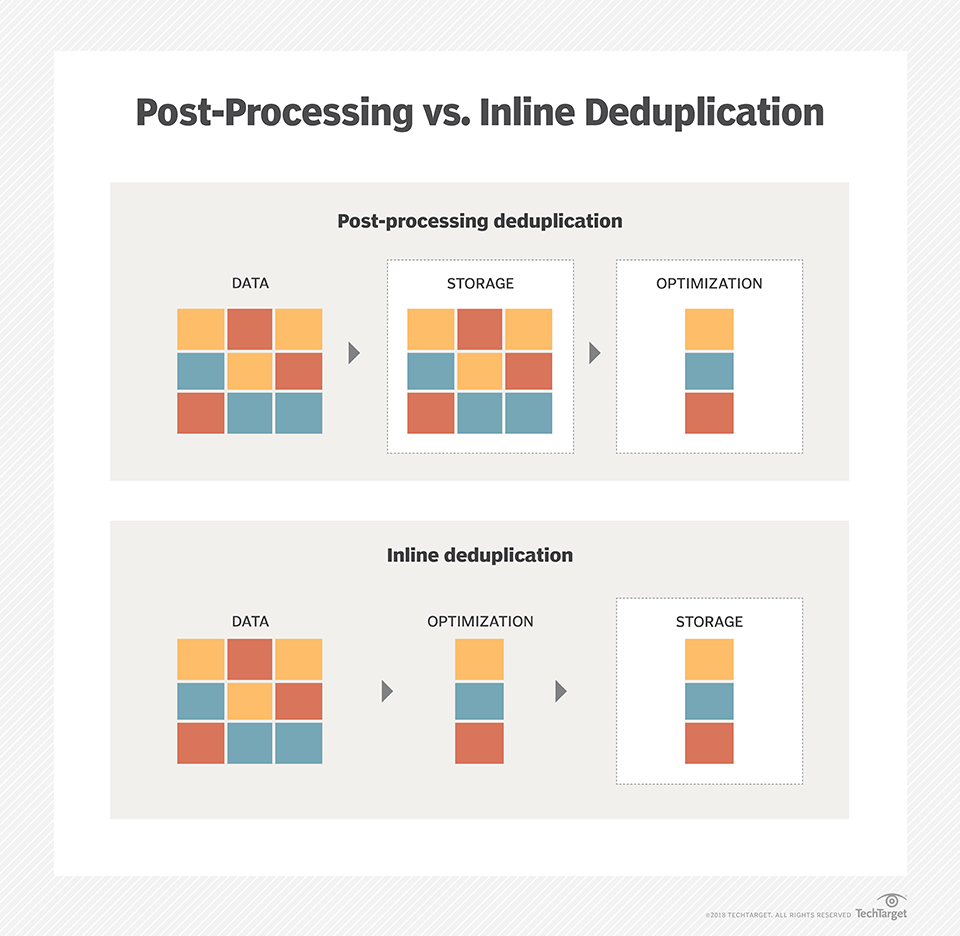
  • Inline deduplication is the removal of redundancies from data before or as it is being written to a backup device. Inline deduplication reduces the amount of redundant data in an application and the capacity needed for the backup disk targets, in comparison to post-process deduplication.

https://searchdatabackup.techtarget.com/definition/inline-deduplication
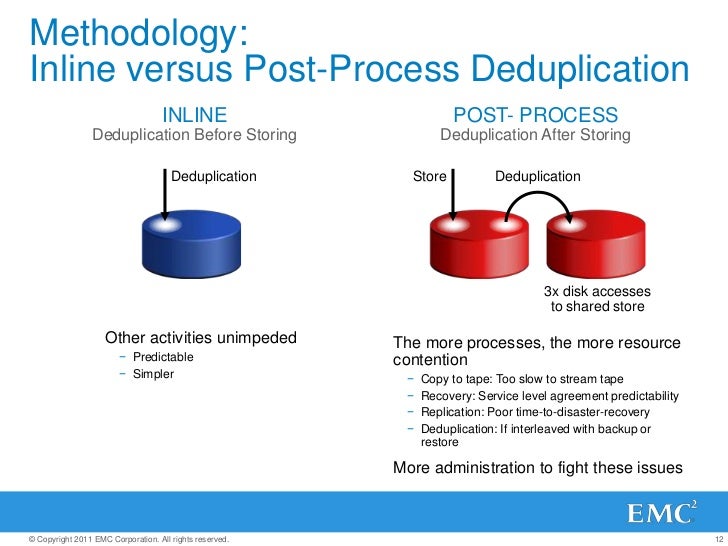


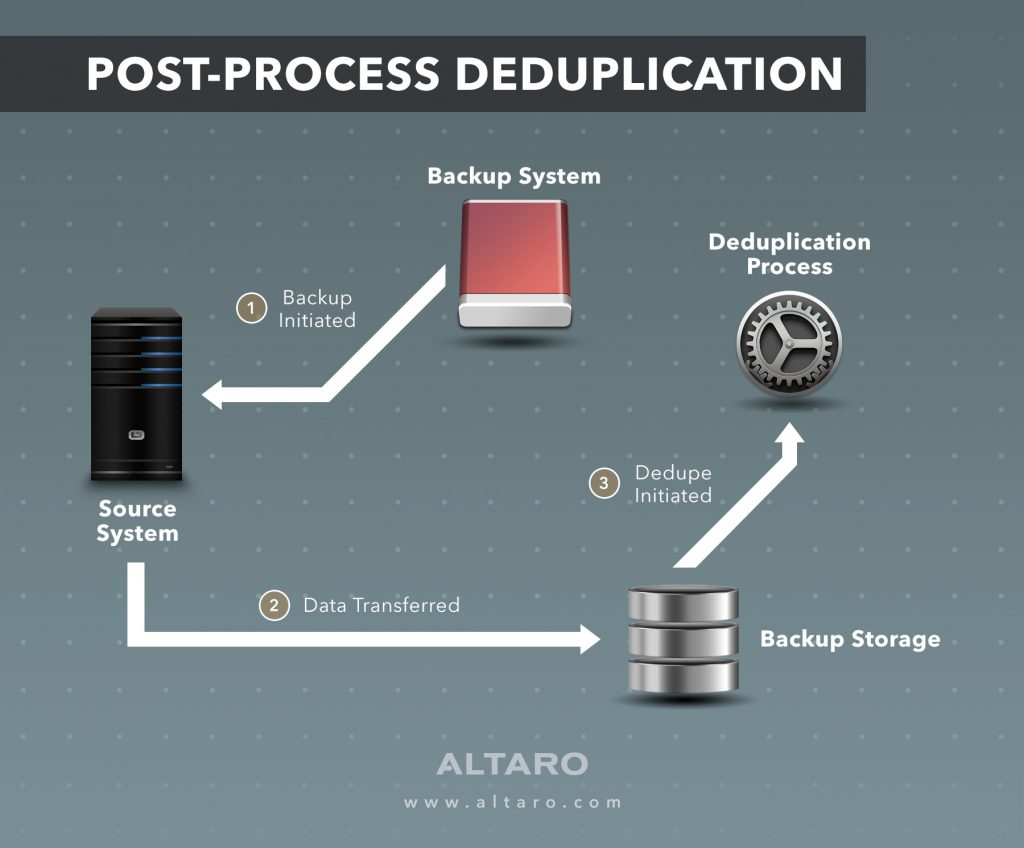
  • Post-Processing Deduplication (PPD)

Post-process deduplication (PPD) refers to a system where software processes filter redundant data from a data set after it has been transferred to a data storage location. This can also be called asynchronous deduplication, and is often used where managers consider it inefficient or unfeasible to remove redundant data before or during transfer.
https://www.techopedia.com/definition/14776/post-processing-deduplication-ppd


  • Post-processing backs up data faster and reduces the backup window, but requires more disk because backup data is temporarily stored to speed the process.

Temporary storage space is not needed for inline deduplication. Inline deduplication is a popular option for primary storage on flash arrays, as it reduces the amount of data written to drives, reducing wear on the drives.
However, inline deduplication can cause a performance issue during the data backup process because the dedupe takes place between servers and backup systems.
Deduplication is often combined with replication for disaster recovery. While deduplication reduces the amount of duplicate data and lowers the bandwidth requirement to copy data off-site, replication copies data from one location to another, providing up-to-date information in the event of a disaster
In addition, erasure coding, compression and deduplication can work together in data protection and conserving storage capacity, but they have stark differences. Erasure coding enables data that becomes corrupted to be reconstructed through information about that data that's stored elsewhere. Compression reduces the number of bits needed to represent data.
https://searchdatabackup.techtarget.com/tutorial/Inline-deduplication-vs-post-processing-Data-dedupe-best-practices
  • The term raw disk refers to the accessing of the data on a hard disk drive (HDD) or other disk storage device or media directly at the individual byte level instead of through its filesystem as is usually done.

http://www.linfo.org/raw_disk.html


  • Block And File—The Long-Time Storage Champions


The most common enterprise data storage models are ‘block storage’ and ‘file storage’. Block storage became increasingly popular in the mid-1990s, as computers in the data center moved from each using its own directly-attached storage device, to sharing a single large storage device or ‘array’. This more flexible and efficient approach creates a ‘storage area network’ or SAN.

While both block and file storage have many advantages, they both face challenges with the changing nature and explosive growth of data. More and more data created today is ‘unstructured’—individual items of information. This kind of data is not organized in a ‘structured’ database, so block storage is not suited for it.

Some of the unstructured data growth is in terms of files and documents—so file storage can be used. However, the sheer volume of data is beyond what most file systems were designed to handle. The hierarchical nature of file storage becomes ever more complex to sustain and manage as the amount of data grows.

Object Storage—Valet Parking For Your Data
To illustrate how object storage works, computer experts often use a car parking analogy. Imagine your car is an item of unstructured data. You want to 'store' or park it in a parking lot. You have three options.

Object Metadata Powers Big Data, Analytics and Data Science
Another powerful feature of object storage is its use of ‘metadata’—or ‘data about data’. Each object when stored is labeled not only with its unique ID, but also with information about the data within the object. For example, a digitized song placed in object storage might be stored with additional metadata about the song title, artist, album, duration, year, and so on. It’s important to note that this metadata about each object is fixed to and stored with that object. It does not need to be held in a separate centralized database, which might quickly become unmanageably large.

This attached metadata enables much more sophisticated searching of data in object storage than in file storage—where the filename is often the only clue to a file’s contents. In a supermarket analogy, file storage is like the ‘value’ or ‘white label’ shelf, where items are identified only by a short (and often misleading) name on otherwise blank packaging. Object storage is more like a supermarket shelf where every item is clearly and comprehensively labeled with name, manufacturer, images, ingredients, serving instructions, nutritional information, and so on—enabling you to easily find exactly what you want, without having to open the packaging.
Another powerful aspect of object storage is that the nature of this metadata can be customized to suit the needs of the storage users and applications. The metadata can also be analyzed to gain new insights into the preferences of users and customers.

Organizations can use the latest on-premise systems like EMC Elastic Cloud Storage (ECS) to implement a ‘private cloud’ of object storage—securely within their own enterprise data centers. EMC ECS also works perfectly as a complementary option to public cloud storage, creating a smart 'hybrid cloud' approach.
https://turkey.emc.com/storage/elastic-cloud-storage/articles/what-is-object-storage-cloud-ecs.htm

  • Object storage offers substantially better scalability, resilience, and durability than today’s parallel file systems, and for certain workloads, it can deliver staggering amounts of bandwidth to and from compute nodes as well. It achieves these new heights of overall performance by abandoning the notion of files and directories. Object stores do not support the POSIX IO calls (open, close, read, write, seek) that file systems support. Instead, object stores support only two fundamental operations: PUT and GET


Key Features of Object Storage
    PUT creates a new object and fills it with data.
        There is no way to modify data within an existing object (or “modify in place”) as a result, so all objects within an object store are said to be immutable.
        When a new object is created, the object store returns its unique object id. This is usually a UUID that has no intrinsic meaning like a filename would.
    GET retrieves the contents of an object based on its object ID

Editing an object means creating a completely new copy of it with the necessary changes, and it is up to the user of the object store to keep track of which object IDs correspond to more meaningful information like a file name.
This gross simplicity has a number of extremely valuable implications in the context of high-performance computing:

    Because data is write-once, there is no need for a node to obtain a lock an object before reading its contents. There is no risk of another node writing to that object while its is being read.
    Because the only reference to an object is its unique object ID, a simple hash of the object ID can be used to determine where an object will physically reside (which disk of which storage node). There is no need for a compute node to contact a metadata server to determine which storage server actually holds an object’s contents.


The Limitations of Object Storage
Objects’ immutability restricts them to write-once, read-many workloads. This means object stores cannot be used for scratch space or hot storage, and their applications are limited to data archival.
Objects are comprised of data and an object ID and nothing else. Any metadata for an object (such as a logical file name, creation time, owner, access permissions) must be managed outside of the object store.

Both of these drawbacks are sufficiently prohibitive that virtually all object stores come with an additional database layer that lives directly on top of the database layer. This database layer (called “gateway” or “proxy” services by different vendors) provides a much nicer front-end interface to users and typically maintains the map of an object ID to user-friendly metadata like an object name, access permissions, and so on

This separation of the object store from the user-facing access interface brings some powerful features with it. For example, an object store may have a gateway that provides an S3-compatible interface with user accounting, fine-grained access controls, and user-defined object tags for applications that natively speak the S3 REST API. At the same time, a different NFS gateway can provide an easy way for users to archive their data to the same underlying object store with a simple cp command.

Because object storage does not attempt to preserve POSIX compatibility, the gateway implementations have become convenient places to store extremely rich object metadata that surpasses what has been traditionally provided by POSIX and NFSv4 ACLs

Much more sophisticated interfaces can be build upon object stores as well; in fact, most parallel file systems (including Lustre, Panasas, and BeeGFS) are built on concepts arising from object stores. They make various compromises in the front- and back-end to balance scalability with performance and usability, but this flexibility is afforded by building atop object-based (rather than block-based) data representations.

Object Storage Implementations

DDN WOS
how object stores in general work
-separates back-end object storage servers and front-end gateways, and the API providing access to the back-end is dead simple and accessible via C++, Python, Java, and raw REST
-objects are stored directly on block devices without a file-based layer like ext3 interposed
-erasure coding is supported as a first-class feature, although the code rate is fixed. Tuning durability with erasure coding has to be done with multi-site erasure coding.
-searchable object metadata is built into the backend, so not only can you tag objects, you can retrieve objects based on queries
-active data scrubbing occurs on the backend; most other object stores assume that data integrity is verified by something underneath the object storage system
-S3 gateway service is built on top of Apache HBase
-NFS gateways scale out to eight servers, each with local disk-based write cache and global coherency via save-on-close

OpenStack Swift
-stores objects in block file systems like ext3, and it relies heavily on file system features (specifically, xattrs) to store metadata
-its backend database of object mappings and locations are stored in .gz files which are replicated to all storage and proxy nodes
-container and account servers store a subset of object metadata (their container and account attributes) in replicated sqlite databases

Ceph
Ceph uses a deterministic hash (called CRUSH) that allows clients to communicate directly with object storage servers without having to look up the location of an object for each read or write.
Ceph implements its durability policies on the server side, so that a client that PUTs or GETs an object only talks to a single OSD. Once an object is PUT on an OSD, that OSD is in charge of replicating it to other OSDs, or performing the sharding, erasure coding, and distribution of coded shards.

https://www.glennklockwood.com/data-intensive/storage/object-storage.html

  • What is iRODS?

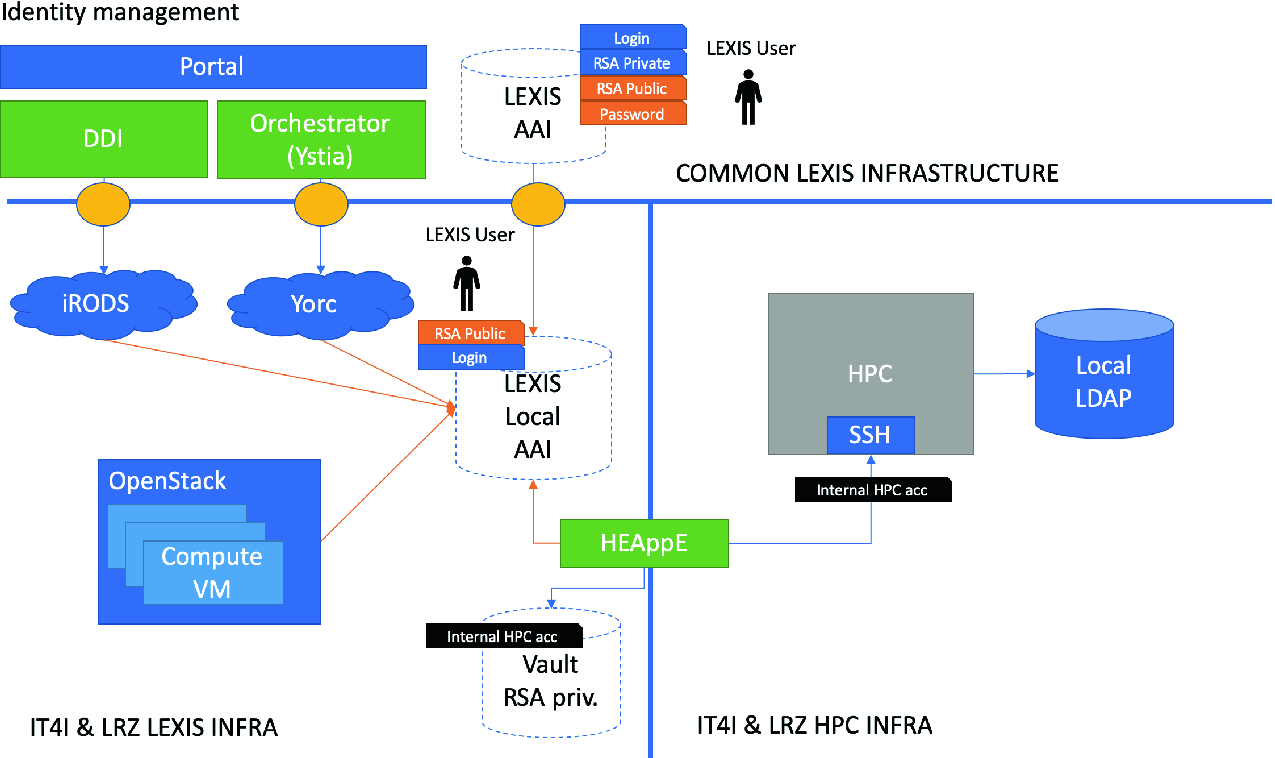
The Integrated Rule-Oriented Data System (iRODS) is open source data management software used by research organizations and government agencies worldwide
iRODS which provides the gateway layer of an object store without the object store underneath.
Open Source Data Management Software
The plugin architecture supports microservices, storage systems, authentication, networking, databases, rule engines, and an extensible API.
https://irods.org
HPC, Cloud and Big-Data Convergent Architectures: The LEXIS Approach
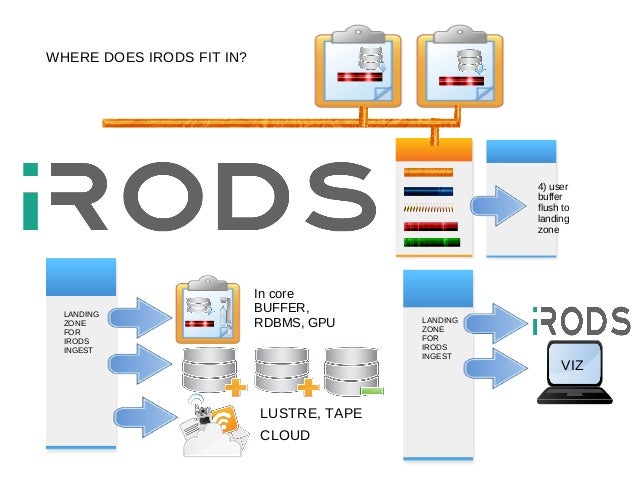
A Fast, Scale-able HPC Engine for Data Ingest 
Managing Next Generation Sequencing Data with iRODS 

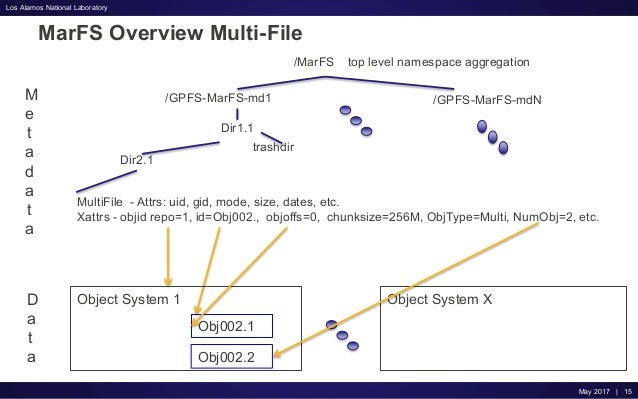
  • MarFS provides a scalable near-POSIX file system by using one or more POSIX file systems as a scalable metadata component and one or more data stores (object, file, etc) as a scalable data component.

Our default implementation uses GPFS file systems as the metadata component and Scality object stores as the data component.
https://github.com/mar-file-system/marfs
An Update on MarFS in Production

Tuesday, November 28, 2017

Error splicing file

Error splicing file: File too large
when you copy a file greater than 4 GB on fat32 disks, which has a limit of 4 gigs for the maximum file size
formatted with FAT32 (which has a file size limit of about 4GB. The solution is to format your destination disk to EXT3, EXT4, or NTFS

Network Address Translation (NAT) and Port Address Translation (PAT)


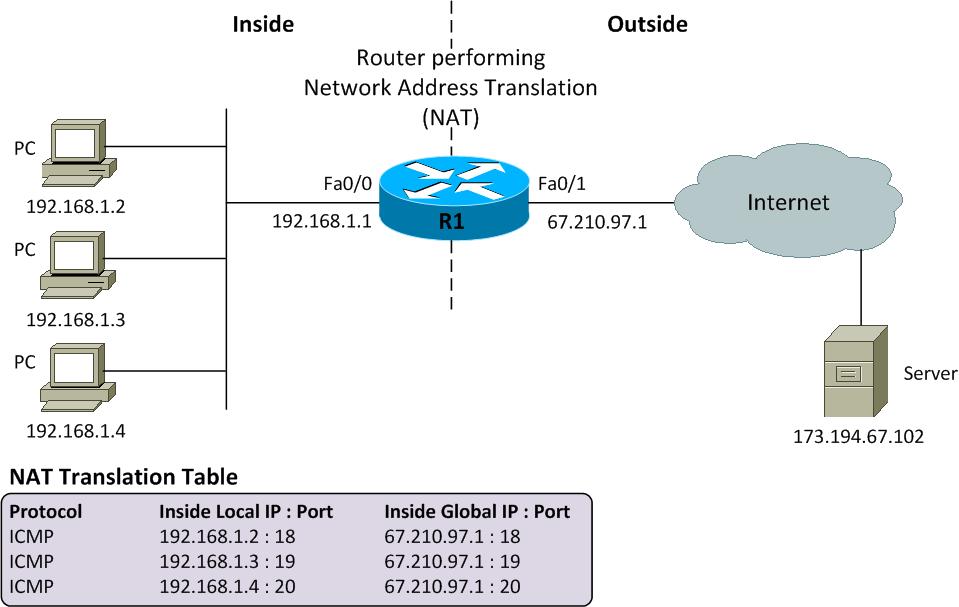
  • Network Address Translation (NAT) and Port Address Translation (PAT) both map IP addresses on an internal network to IP addresses on an external network.


If you are connecting a site in the 10.10.10.0 network to a site in the 10.10.20.0 network, you could use NAT to translate 10.10.10.0 IP addresses to available 10.10.20.0 IP addresses so that hosts on the 10.10.10.0 network can access data and use network resources on the 10.10.20.0 network.
NAT requires a one-to-one relationship when translating IP addresses.

For example, two hosts that have been assigned the IP addresses 10.10.10.100 and 10.10.10.101, respectively, could send traffic to and receive traffic from the Internet by using the single public IP address 123.45.67.89.

PAT is also referred to as NAT overloading because it uses one IP address for all clients to multiple ports, whereas standard NAT uses a one-to-one IP address relationship per client
http://blog.boson.com/bid/53313/NAT-and-PAT-What-s-the-Difference


  • Port Address Translation (PAT) is a feature of a network device
that translates communications made between hosts on a
private network and hosts on a public network.
• PAT allows a single public IP address to be used by many hosts
on the private network, which is usually a LAN.
• Cisco uses term PAT, while other vendors use different names:
— Microsoft: Internet Connection Sharing,
— Check Point: Hide-Mode NAT
• PAT is informally called router; gateway is more appropriate.
• PAT device sits at the network perimeter where one side connects the external network, usually the public Internet, and on
the other side an internal network using private IP addressing.
• PAT operation is typically transparent to both the internal and
external hosts.

When a host in the private network sends its first packet to
some host in the outside network (as either TCP SYN or UDP
segment), the PAT device replaces the inside source IP address
in the IP header with a single public IP.
• Also, it assigns to this connection a port number from the pool
of available ports, inserts this number in the TCP/UDP header
source port, and places the IP packet on the outside network.
• The PAT device then makes an entry in its translation table
containing the inside IP address, TCP or UDP, inside source
port, and assigned outside port.
• Subsequent packets from the same TCP connection on the
inside IP address are always translated to the same outside
port number (and outside IP address).

• The host in the external network receiving a data packet will
move the source IP address and source port as the
corresponding destination fields in any response it sends back.
• For packets arriving from outside, the PAT device operates on
IP destination address and TCP/UDP destination port:
— If the destination port number of the incoming TCP/UDP
segment is not found as an outside port in the translation
table, the IP packet is simple dropped.
— Otherwise, the corresponding inside IP address and inside
port number from the translation table replace, in the
incoming packet, the destination address in IP header and
the destination port in TCP/UDP header.
— And, the modified IP packet is placed on the inside network

A host at IP address 192.168.0.2 on a private network may ask
for TCP connection to a remote host on the public network
giving source address & source port 192.1680.2&15245.
• PAT device, with its public IP address 214.35.3.4, translates
this source address & source port pair to 214.35.3.4 & 16529
(16529 was available in the pool) and make an entry in its
internal table that port 16529 is in use by 192.168.0.2 on the
private network with TCP connection on port number 15245.
• When a packet is received from the public network by the PAT
device with 214.35.3.4&16529, the packet is forwarded to the
internal network with destination IP address changed to
192.168.0.2 and with the port destination changed to 15345.

 Advantages:
— multiple internal hosts can share a single IP address for
communication, thus conserving precious IP addresses,
— hosts on the private network don’t have to exposed their
private IP addresses to the public network, making attacks
from the public network less likely.

Disadvantages:
— an organization using PAT and a single IP address cannot
easily run more than one of the same type of public service
behind a PAT, e.g. two Web public servers using the default
port 80; Also, a remote login is possible on


http://web.cse.ohio-state.edu/~athreya.14/cse3461-5461/Cse3461.NAT-PAT.pdf


  • Port Address Translation
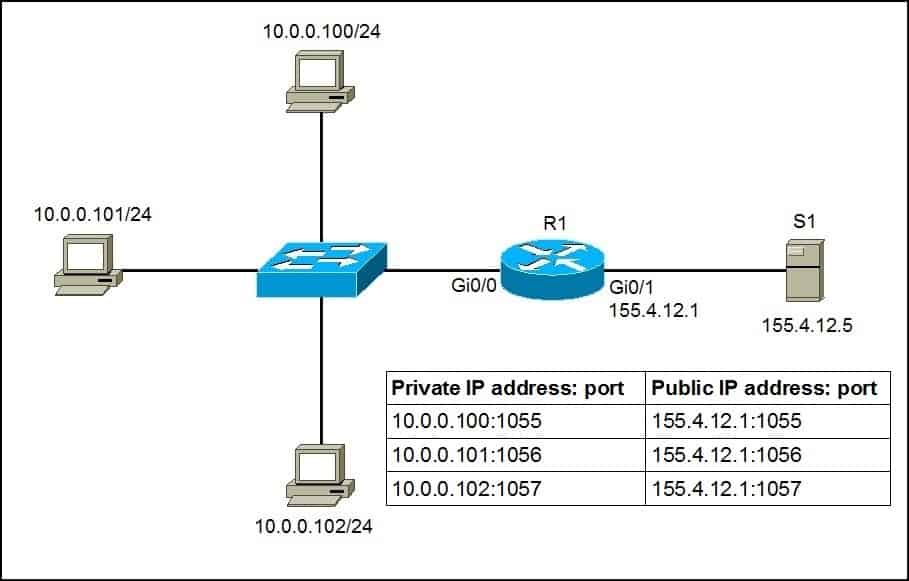
Port Address Translation (PAT) is an extension of Network Address Translation (NAT) that permits multiple devices on a LAN to be mapped to a single public IP address to conserve IP addresses.

PAT is similar to port forwarding except that an incoming packet with destination port (external port) is translated to a packet different destination port (an internal port). The Internet Service Provider (ISP) assigns a single IP address to the edge device. When a computer logs on to the Internet, this device assigns the client a port number that is appended to the internal IP address, giving the computer a unique IP address.

If another computer logs on the Internet, this device assigns it the same public IP address, but a different port number. Although both computers are sharing the same public IP address, this device knows which computer to send its packets, because the device uses the port numbers to assign the packets the unique internal IP address of the computers.
https://www.cisco.com/assets/sol/sb/RV320_Emulators/RV320_Emulator_v1-1-0-09/help/Setup13.html


LTE Vs. Wi-Fi


  • LTE Vs. Wi-Fi

The 3rd Generation Partnership Project Long-Term Evolution technology, or LTE, is a 4G wireless network technology. LTE is built on the High-Speed Downlink Packet Access 3G network protocol, and offers high-speed wireless cellular network connectivity through mobile computing devices. Wi-Fi is a wireless technology that enables several types of computing devices, including personal computers and mobile phones, to connect to a wireless network through a router.
http://smallbusiness.chron.com/lte-vs-wifi-37986.html


  • We presented a measurement study of single-path TCP and MPTCPover LTE and WiFi networks. For single-path TCP, we found that LTE outperforms WiFi 40% of the time – a higher fraction than one might expect at first sight. We also find that MPTCP offers no appreciable benefit over TCP for shorter flows, but it does improve performance for longer flows. For MPTCP, we found that, especially for short flows, it is crucial to select the correct network for the primary subflow. 
http://people.csail.mit.edu/shuodeng/papers/deng-imc2014.pdf

benchmarking

  • Fio resides in a git repo, the canonical place is:
git://git.kernel.dk/fio.git

download
http://brick.kernel.dk/snaps/

# wget http://brick.kernel.dk/snaps/fio-2.1.10.tar.gz
# gunzip fio-3.2.tar.gz
# tar -xf fio-3.2.tar
   
# cd fio-3.2/
# ./configure
# make
# sudo make install

# fio -h

  • fio is an I/O tool that will spawn a number of threads or processes doing a particular type of io action as specified by the user.
The typical use of fio is to write a job file matching the io load one wants to simulate.
https://apps.fedoraproject.org/packages/fio

  • GitHub - axboe/fio: Flexible I/O Tester
https://github.com/axboe/fio

  • sysbench is a scriptable multi-threaded benchmark tool based on LuaJIT.
https://github.com/akopytov/sysbench


  • The dd utility is really not useful as a benchmarking tool, but it is an excellent tool to use to break in SSDs before you run a real benchmark like FIO or Sysbench 

Fio is one of my favorite tools to benchmark SSD or HDD I/O because it's so flexible. You can run sequential read and write tests, as well as random read and write tests using various block sizes like 4KB, 128KB, 512KB, or 1MB+.

On CentOS 7 / Fedora you need to add an additional repo since the stock repos don't usually include benchmarking utilities.

I strongly suggest using both FIO and Sysbench to measure I/O performance because every utility will provide a slightly different view of performance, and the results may not be the same between a FIO random write test and a Sysbench random write test, if you run both tests and the results are similar then you can consider the results to be accurate, however if the results are totally different then you might want to find out why this is the case before you can consider the test results to be accurate.


https://wiki.mikejung.biz/Benchmarking#Install_Fio_on_CentOS_7

Monday, October 30, 2017

VirtualBox/SharedFolders

  • Select Devices -> Shared Folders
Choose the 'Add' button.

On the Windows Guest, run
net use x: \\vboxsvr\share

On the Linux Guest, run
sudo mount -t vboxsf -o uid=$UID,gid=$(id -g) share ~/host

https://help.ubuntu.com/community/VirtualBox/SharedFolders

virtualization configuration

  • VT-x is disabled in the BIOS for all CPU modes
hp elitebook 8470p
https://www.youtube.com/watch?v=HrQdi8FxaG8

Tuesday, October 24, 2017

DevOps

  • DevOps is a set of practices that automates the processes between software development and IT teams, in order that they can build, test, and release software faster and more reliably.
https://www.atlassian.com/devops

  • DevOps (a clipped compound of "development" and "operations") is a software engineering practice that aims at unifying software development (Dev) and software operation (Ops). The main characteristic of the DevOps movement is to strongly advocate automation and monitoring at all steps of software construction, from integration, testing, releasing to deployment and infrastructure management.
https://en.wikipedia.org/wiki/DevOps


  • DevOps

The modern trend as espoused by the DevOps movement is that the team that builds the software also runs the software. In the past we normally developed a software project using a project management methodology and then an operations team took over the maintenance and operation of it. Traditional IT models divide implementation and support into separate teams, sometimes referred to as “build” and “run” or “development” and “support”

  • Comparison of open-source configuration management software
This is a comparison of notable free and open source configuration management software, suitable for tasks like server configuration, orchestration and infrastructure as code typically performed by a system administrator.
https://en.wikipedia.org/wiki/Comparison_of_open-source_configuration_management_software.

  • Configuration management and data center automation are mechanisms to manage the technical description of a system, its components and all of the changes on the configuration during the life
cycle of a system or during its different processes.
Source code deployments on multiple environments requires a configuration management and provisioning tool
From the development, integration, test, deployment, to the production environment, configuration management becomes a process of normalization of the configuration of the application according
to the state of the infrastructure and other requirements. The same process of normalization should be ensured when changing the environment, the infrastructure or when the configuration itself
changes
DevOps as the intersection of development (software engineering), technology operations and quality assurance(QA)

out of band management - OOBM

  • The simplest definition is that OOBM provides access and control of IT assets outside of the production network
As the name would imply, the primary use of OOBM is access and control of IT infrastructure when the production network is unavailable, such as cases involving unplanned downtime. OOBM networks can be 100% dedicated or leveraged hybrid models. The type of assets that require OOBM can include the mission critical routers, switches, KVMs, servers, storage, and appliances that serve as the backbone of the IT infrastructure.
https://www.lantronix.com/blog/out-of-band-management-what-why-where-and-when/

Network Tapping System

  • The Network Tapping System is one of the most important network systems. It takes a copy of all the networking events and sends it to the served system to be monitored and analyzed
It is a hardware device which provides a way to access the data flowing across a computer network.
In many cases, it is desirable for a third party to monitor the traffic between two points in the network.
If the network between points A and B consists of a physical cable, a "network tap" may be the best way to accomplish this monitoring.
The network tap has (at least) three ports: an A port, a B port, and a monitor port.
A tap inserted between A and B passes all traffic (send and receive data streams) through unimpeded in real time, but also copies that same data to its monitor port, enabling a third party to listen.
Network taps are commonly used for network intrusion detection systems, VoIP recording, network probes, RMON probes, packet sniffers, and other monitoring and collection devices and software that require access to a network segment.
Taps are used in security applications because they are non-obtrusive, are not detectable on the network (having no physical or logical address), can deal with full-duplex and non-shared networks, and will usually pass through or bypass traffic even if the tap stops working or loses power.
https://en.wikipedia.org/wiki/Network_tap

  • Port Mirroring, also known as SPAN (Switched Port Analyzer), is a method of monitoring network traffic. With port mirroring enabled, the switch sends a copy of all network packets seen on one port (or an entire VLAN) to another port, where the packet can be analyzed.

Conclusion: With a regular switch the network traffic is visible only to computers, which directly participare in a communication. Other computers do not see the traffic, that is not destined for them.

this switch supports port mirroring function. And administrator has configured the switch to mirror to computer D all network packets, which are transmitted between computers A and B.
Computer D is a listener to the traffic. Computer D can be used for network logging or call recording if we have IP phones instead of computers A and B .
Conclusion: Port mirroing allows a particular computer to see the network traffic, which is normally hidden from it.

In this example, one of IP Phones makes a call to a remote phone outside of the local network (whether it is analog phone, cellular or another IP Phone).
Network traffic from IP Phone goes through network switch with port mirroring. The switch sends to MiaRec a copy of every network packet, sent or received by IP Phone.
By using intelligent packet capturing technology, MiaRec detects Voip-related packets inside the network traffic, decodes them and saves audio on a disk.

https://www.miarec.com/faq/what-is-port-mirroring

  • A network tap is an external monitoring device that mirrors the traffic that is passing between network nodes. A tap (test access point) is a hardware device inserted at a specific point in the network to monitor specific data. As part of the Gigamon Visibility Platform, network TAPs provide the visibility required to secure, monitor and manage your enterprise network infrastructure continuously and efficiently.

Passive optical TAPs are the ultimate source of truth for data in motion on the network because they create perfect copies of all traffic at full bandwidth. They require no power or management and do not actively interact with other components of the network. Gigamon offers several passive optical TAP solutions:

Active TAPs are used in networks where copper cabling or optical budgets do not allow for passive TAPs. In the event of a power failure, active TAPs have battery backup to keep them running and will send an alert to indicate the failure. A bypass TAP is a type of active TAP that also has a relay that closes when it loses power, maintaining the network connection and minimizing disruption to traffic.

https://www.gigamon.com/products/visibility-nodes/network-taps.html


  • Moloch augments your current security infrastructure by storing and indexing network traffic in standard PCAP format, while also providing fast indexed access. Moloch is not meant to replace Intrusion Detection Systems (IDS), instead it provides more visibility. Moloch is built with an intuitive UI/UX which reduces the analysis time of suspected incidents.
https://molo.ch/

Common Vulnerabilities and Exposures

  • Finally, it will allow us to search by CVE, which is the Common Vulnerability and Exploit number. These numbers are assigned by Mitre Corporation, who is funded by the National Cyber Security Division of the U.S. Homeland Security.The CVE database includes nearly every vulnerability that has been found in the wild or discovered by security researchers, even if the software publisher doesn't want it known or hasn't patched it yet.A vulnerability is simply a weakness or hole in the system that can be exploited.it does not necessarily mean it has been exploited.if we click on the Exploit tab, we can see that an exploit is available and we can get it through clicking on the link.
https://null-byte.wonderhowto.com/how-to/hack-like-pro-find-almost-every-known-vulnerability-exploit-out-there-0147820

  • Microsoft offers us database of all the vulnerabilities they want to acknowledge, and this can be found at their Microsoft Security Bulletins webpage.
Microsoft lays out all the details of the vulnerabilities that they are aware of in their operating system and application software.
These vulnerabilities are only those that Microsoft is aware of and has a patch developed for.
It goes without saying—I think—that zero day vulnerabilities and vulnerabilities that Microsoft doesn't want to acknowledge yet, won't be found here.
Generally, a re-boot is necessary to patch a system. If the system has not been re-booted for, say 2 years, we know that all the vulnerabilities listed in Microsoft's security bulletin are available on that system.
When that's the case, you can simply find a vulnerability that has been found within that last two years and then exploit it on that system.
It is estimated that a majority of the software in China and other developing nations is pirated. This means that these systems will NOT get the latest patches and are vulnerable to the listed vulnerabilities in Microsoft's security bulletins.
https://null-byte.wonderhowto.com/how-to/hack-like-pro-find-latest-exploits-and-vulnerabilities-directly-from-microsoft-0147354/


  • The Common Vulnerability Scoring System (CVSS) provides an open framework for communicating the characteristics and impacts of IT vulnerabilities.
https://nvd.nist.gov/vuln-metrics/cvss


  • BID, Bugtraq ID
http://bugtraq-team.com/downloads.html

  • Microsoft Security Bulletin MS13-018 - Important
https://technet.microsoft.com/en-us/library/security/MS13-018


  • The Common Vulnerability Scoring System (CVSS) provides a way to capture the principal characteristics of a vulnerability and produce a numerical score reflecting its severity. The numerical score can then be translated into a qualitative representation (such as low, medium, high, and critical) to help organizations properly assess and prioritize their vulnerability management processes.

https://www.first.org/cvss/

  • The Exploit Database is maintained by Offensive Security, an information security training company that provides various Information Security Certifications as well as high end penetration testing services.
The Exploit Database is a CVE compliant archive of public exploits and corresponding vulnerable software, developed for use by penetration testers and vulnerability researchers.
https://www.exploit-db.com/about-exploit-db/

  • The name of this utility is SearchSploit and as its name indicates, it will search for all exploits and shellcode.
Included in our Exploit Database repository on GitHub is “searchsploit”, a command line search tool for Exploit-DB that also allows you to take a copy of Exploit Database with you, everywhere you go.
SearchSploit gives you the power to perform detailed off-line searches through your locally checked-out copy of the repository. This capability is particularly useful for security assessments on segregated or air-gapped networks without Internet access.
https://www.exploit-db.com/searchsploit/#what

  • CVSS Version 2
Common Vulnerability Scoring System Calculator 
https://nvd.nist.gov/vuln-metrics/cvss/v2-calculator

  • Common Vulnerability Scoring System Version 3.0 Calculator
https://www.first.org/cvss/calculator/3.1