how to design automation processes
declarative (also often known as the model)
imperative (also often known as the workflow or procedural)
how they can
be used together.
Declarative/Model-Based Automation
The fundamental of the declarative model is that of the desired state
The principle is that we declare, using a model, what a system should look like.
The model is “data driven,” which allows data, in the form of attributes or variables, to
be injected into the model at run-time to bring it to a desired state.
A declarative process should not require the user to
be aware of the current state
usually bring it to a required state using a concept known as idempotent
Idempotent
if you deploy version 10 of a component to a development environment and it is
currently at version 8, changes 9 and 10 will
be applied
If you deploy the same release to a test environment where version 5
is installed,
changes 6 through 10 will be applied
if you deploy it to a production system where it has never
been deployed, it will apply changes 1 through 10
Each of the deployment processes brings it to the same state regardless of where they were initially
The user, therefore,
does not need to be aware of the current state
Maintaining State
as a model changes over time—and may have a current, past or future state.
how can a model
be applied to a target system, how can it know what changes to make
State Management
three methods used to keep an environment or system and its desired state models in line:
Maintain an inventory of
what has been deployed.
This where we maintain the state of
what has been deployed, and what is in the desired state of a release, and only apply the difference
Validate/compare the desired state with
what has been been deployed.
Just make it so. The most obvious example here is anything that is stateless, such as a container
.you would just want to instantiate a new one that has the new configuration you require.
Imperative/Procedural/Workflow-Based Automation
a series of actions are executed in a specific order to achieve an outcome.
For an application deployment, this is where the process of “how the application needs to
be deployed”
is defined,
and a series of steps in the workflow are executed to deploy the entire application
A standard example might include
Some pre-install/validation steps
Some install/update steps
Finally, some validation to verify what we have automated has worked as expected
The often-cited criticism of this approach is that we end up with lots of separate workflows that layer changes onto our infrastructure and applications—and the relationship between these procedures
are not maintained. The user, therefore, needs to
be aware of the current state of a target before they know which workflow to execute. That means the principle of the desired state/idempotent is hard to maintain—and
each of the workflows are tightly coupled to the applications
Puppet is an example of
what is seen as a Declarative automation tool while
Chef is said to be Imperative.
Do they both support concepts of the desired state and are idempotent? The answer is
, of course, Yes
Is it possible to use a workflow tool to design a tightly coupled release that is not idempotent? The answer is, again, yes
What are the Benefits of Workflows?
The benefit of using a workflow is that we
are able to define relationship and dependencies for our units of automation—and orchestrate them together.
Procedural workflows also allow us to, for example, deploy component A & B on Server1, then deploy component C or Server2 and then continue to deploy D on Server1. This give us much greater control in orchestrating multi-component releases.
Workflow for Applications
a stateless loosely coupled micro service on a cloud native platform
Model for Components
The concept of something being Idempotent—I can deploy any version to any target system if it has never
been deployed to before
if we want to introduce a new change to an
already existing environment or even if we want to roll a unit of automation back
Imperative Orchestration & Declarative Automation
a combination of Declarative (or model-driven) units of automation, coordinated by Imperative (or workflow-based) Orchestration can be used to achieve this
An imperative/workflow-based orchestrator also will allow you to executive not only declarative automation but also autonomous imperative units of automation should you need to.
My recommendation is that an application workflow defines the order and dependencies of components being deployed.
The Declarative Model for a component determines
what action needs to be taken to bring a target system into compliance with the model
https://devops.com/perfect-combination-imperative-orchestration-declarative-automation/#disqus_thread
The debate hearkens back to concepts of declarative, model-based programming (the most like Puppet's approach)
The declarative approach requires that users specify the end state of the infrastructure they want, and then Puppet's software makes it happen.
some proponents of the imperative/procedural approach to automation say the declarative model can break down when there are subtle variations in the environment, since
declarative configuration files must be made for every edge case in the environment.
Puppet Labs gets into the software-defined infrastructure game with new modules that allow it to orchestrate infrastructure resources such as network and storage devices.
an imperative, or procedural, approach (the one
generally taken by Puppet rival Chef).
The imperative/procedural approach takes action to configure systems in a series of actions.
https://searchitoperations.techtarget.com/news/2240187079/Declarative-vs-imperative-The-DevOps-automation-debate
- There're many ways to do this, from provisioning shell scripts to use boxes with Chef already installed. A clean, reliable,
and repeatable way is to use a Vagrant plugin to do just that—vagrant-omnibus. Omnibus is a packaged Chef
Terraform can also
be used to manipulate Docker. The classical usage is against an already
running Docker server on the network, but it will work exactly the same locally with your own
Docker installation. Using Terraform for controlling Docker, we'll be able to trigger
Docker image updates dynamically, execute containers with every imaginable option, manipulate Docker
networks, and use Docker volumes.
Vagrant is a tool focused for managing development environments and Terraform is a tool for building infrastructure.
Terraform can describe complex sets of infrastructure that exists locally or remotely.
Vagrant provides
a number of higher level features that Terraform doesn't. Synced folders, automatic networking, HTTP tunneling, and more are features provided by Vagrant to ease development environment usage.
Because Terraform is focused on infrastructure management and not development environments, these features are out of scope for that project.
https://www.vagrantup.com/intro/vs/terraform.html
- we explained why we picked Terraform as our IAC tool of choice and not Chef, Puppet, Ansible, SaltStack, or CloudFormation.
https://blog.gruntwork.io/an-introduction-to-terraform-f17df9c6d180
Terraform has a number of modules that will allow you manage your OpenStack infrastructure. It does support some (but not all) of the components of OpenStack, namely:
Block Storage
Compute
Networking
Load Balancer
Firewall
Object Storage
https://www.stratoscale.com/blog/openstack/tutorial-how-to-use-terraform-to-deploy-openstack-workloads/
- Terraform is a tool from HashiCorp that can be used to deploy and manage the cloud infrastructure easily by defining configuration files. It is similar to OpenStack Heat. However, unlike Heat which is specific to OpenStack, Terraform is provider-agnostic and can work with multiple cloud platforms such as OpenStack, AWS and VMware.
Terraform supports OpenStack Compute resources such as Instance, Floating i/p, Key Pair, Security Group and Server Group. It supports OpenStack Network resources such as Network, Subnet, Router and Router interface, Floating i/p. For Block Storage it supports Volume and for Object Storage it supports Containers.
https://platform9.com/blog/how-to-use-terraform-with-openstack/
- Terraform vs. CloudFormation, Heat, etc.
Tools like
CloudFormation, Heat, etc. allow the details of an infrastructure to
be codified into a configuration file.
Terraform similarly uses configuration files to detail the infrastructure setup, but it goes further by being both cloud-agnostic and enabling multiple providers and services to
be combined and composed.
The configuration files allow the infrastructure to
be elastically created,
modified and destroyed. Terraform
is inspired by the problems they solve.
For example,
Terraform can be used to orchestrate an AWS and OpenStack cluster simultaneously, while enabling 3rd-party providers like
Cloudflare and DNSimple to
be integrated to provide CDN and DNS services.
https://www.terraform.io/intro/vs/cloudformation.html
- Terraform vs. Boto, Fog, etc.
Libraries like Boto, Fog, etc.
are used to provide native access to cloud providers and services by using their APIs.
https://www.terraform.io/intro/vs/boto.html
- Terraform vs. Chef, Puppet, etc.
Configuration management tools install and manage software on a machine that already exists. Terraform is not a configuration management tool, and it allows existing tooling to focus on their strengths: bootstrapping and initializing resources
https://www.terraform.io/intro/vs/chef-puppet.html
- Terraform is a tool for building, changing, and versioning infrastructure safely and efficiently. Terraform can manage existing and popular service providers as well as custom in-house solutions.
Configuration files describe to Terraform the components needed to run a single application or your entire
datacenter. Terraform generates an execution plan describing what it will do to reach the desired state and then executes it to build the described infrastructure
The infrastructure Terraform can manage includes low-level components such as
compute instances, storage, and networking,
as well as high-level components such as DNS entries, SaaS features,
etc.
Terraform is used to create, manage, and update infrastructure resources such as physical machines, VMs, network switches, containers, and more. Almost any infrastructure type can
be represented as a resource in Terraform.
A provider
is responsible for understanding API interactions and exposing resources. Providers
generally are an
IaaS (e.g. AWS, GCP, Microsoft Azure, OpenStack),
PaaS (e.g. Heroku), or SaaS services (e.g. Terraform Enterprise, DNSimple, CloudFlare).
https://www.terraform.io/docs/providers/index.html
- Provisioners are used to execute scripts on a local or remote machine as part of resource creation or destruction. Provisioners can be used to bootstrap a resource, cleanup before destroy, run configuration management, etc.
https://www.terraform.io/docs/provisioners/index.html
- Step 2 — Setting Up a Virtual Environment
Virtual environments enable you to have an isolated space on your computer for Python projects, ensuring that each of your projects can have its own set of dependencies that won’t disrupt any of your other projects.
https://www.digitalocean.com/community/tutorials/how-to-install-python-3-and-set-up-a-local-programming-environment-on-ubuntu-16-04
- Terraform is to easily deploy our infrastucture and orchestrate our Docker environment.
The base idea is to manage and provision your infrastructure by code (configuration files, scripts, etc).
Terraform is an example of
IaC that converts your infrastructure to human friendly config files that are JSON compatible.
http://t0t0.github.io/internship%20week%209/2016/05/02/terraform-docker.html
- Top 3 Terraform Testing Strategies for Ultra-Reliable Infrastructure-as-Code
Aside from
CloudFormation for AWS or OpenStack Heat, it's the single most useful open-source tool out there for deploying and provisioning infrastructure on any platform.
This post will also briefly cover deployment strategies for your infrastructure as they relate to testing.
Software developers use unit testing to check that individual functions work as they should.
They then use integration testing to test that their feature works well with the application
as a whole.
Being able to use terraform plan to see what Terraform will do before it does it is one of Terraform's most
stand-out features.
it was designed for practitioners to see what would happen before a run occurred, check that everything looks good before applying it and then running terraform apply to add the finishing touches.
Disadvantages
It's hard to spot mistakes this way
wanted to deploy five replicas of your
Kubernetes master instead of three.
You check the plan really quickly and apply it, thinking
that all is
good.
deployed three masters instead of five
The remediation is harmless in this case: change your variables
.tf to deploy five
Kubernetes masters and redeploy.
However, the remediation would be much more painful if this
were done in production and your feature teams had already deployed services onto it.
trudging through chains of repositories or directories to find out what a Terraform configuration is doing is annoying
at best and damaging at worst
To avoid the consequences from the approach above, your team might
decide to use something like
serverspec, Goss and/or
InSpec to execute your plans first into a sandbox, automatically confirm that everything looks good then tear down your sandbox and collect results.
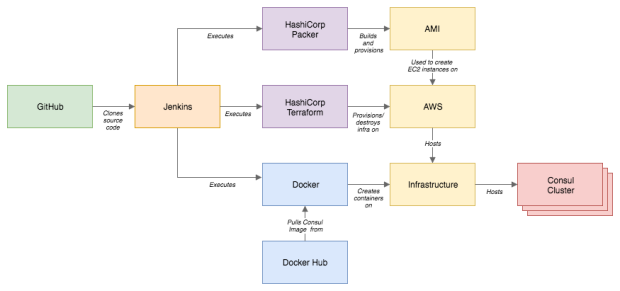
If this were a pipeline in Jenkins or Bamboo CI
Orange border
indicates steps executed within sandbox.
Advantages
Removes the need for long-lived development environments and encourages immutable infrastructure
Well-written integration tests provide enough confidence to do away with this practice completely.
Every sandbox environment created by an integration test will be an
exact replica of production because every sandbox environment will ultimately become production.
This provides a key building block towards infrastructure immutability whereby any changes to production become part of a
hotfix or future feature release, and no changes to production
are allowed or even needed.
Documents your infrastructure
You no longer have to wade through chains of modules to make sense of what your infrastructure is doing. If you have 100% test coverage of your Terraform code (a caveat that
is explained in the following section), your tests tell the entire story and serve as a contract to which your infrastructure must adhere
Allows for version tagging and "releases" of your infrastructure
Because
integration tests are meant to test your entire system cohesively, you can use them to tag your Terraform code with
git tag or similar. This can be useful for rolling back to previous states (especially when combined with a blue/green deployment strategy) or enabling developers within your organization to test differences in their features between iterations of your infrastructure.
They can serve as a first-line-of-defense
let's say that you created a pipeline in Jenkins or Bamboo that runs integration tests against your Terraform infrastructure twice daily and pages you if an integration test fails.
you receive an alert saying that an integration test failed. Upon checking the build log, you see an error from Chef saying that it
failed to install IIS because
the installer could not be found. After digging
some more, you discover that the URL that
was provided to the IIS installation cookbook has expired and needs an update
After cloning the repository within which this cookbook
resides, updating the URL, re-running your integration tests locally and waiting for them to pass, you submit a pull request to the team that owns this repository asking them to integrate
You just saved yourself a work weekend by fixing your code proactively instead of waiting for it to surface come release time.
Disadvantages
Depending on the number of resources your Terraform configuration creates and the number of modules they reference, doing a Terraform run might be costly
It can also get
quite costly
Performing a full integration test within a sandbox implies that you mirror your entire infrastructure (albeit at a smaller scale with smaller
compute sizes and dependencies) for a short time
Obtaining code coverage is hard
Terraform doesn't yet have a framework for
obtaining a percentage of configurations that have a matching integration test.
This means that teams that
choose to embark on this journey need to be fastidious about maintaining a high bar for code coverage and will
likely write tools themselves that can do this (such as scanning all module references and looking for a matching spec definition).
kitchen-terraform is the most popular integration testing framework for Terraform at the moment.
Goss is a simple validation/health-check framework that lets you define what a system should look like and either validates against that definition or provides an endpoint
integration testing enables you to test interactions between components in an entire system.
Unit testing
, on the other hand, enables you to test those individual components in isolation.
Advantages
It enables test-driven development
Test-driven development is a software development pattern whereby every method in a feature
is written after writing a test describing what that feature
is expected to do.
Faster than integration tests
Disadvantages
unit tests complement integration tests. They do not replace them.
https://www.contino.io/insights/top-3-terraform-testing-strategies-for-ultra-reliable-infrastructure-as-code
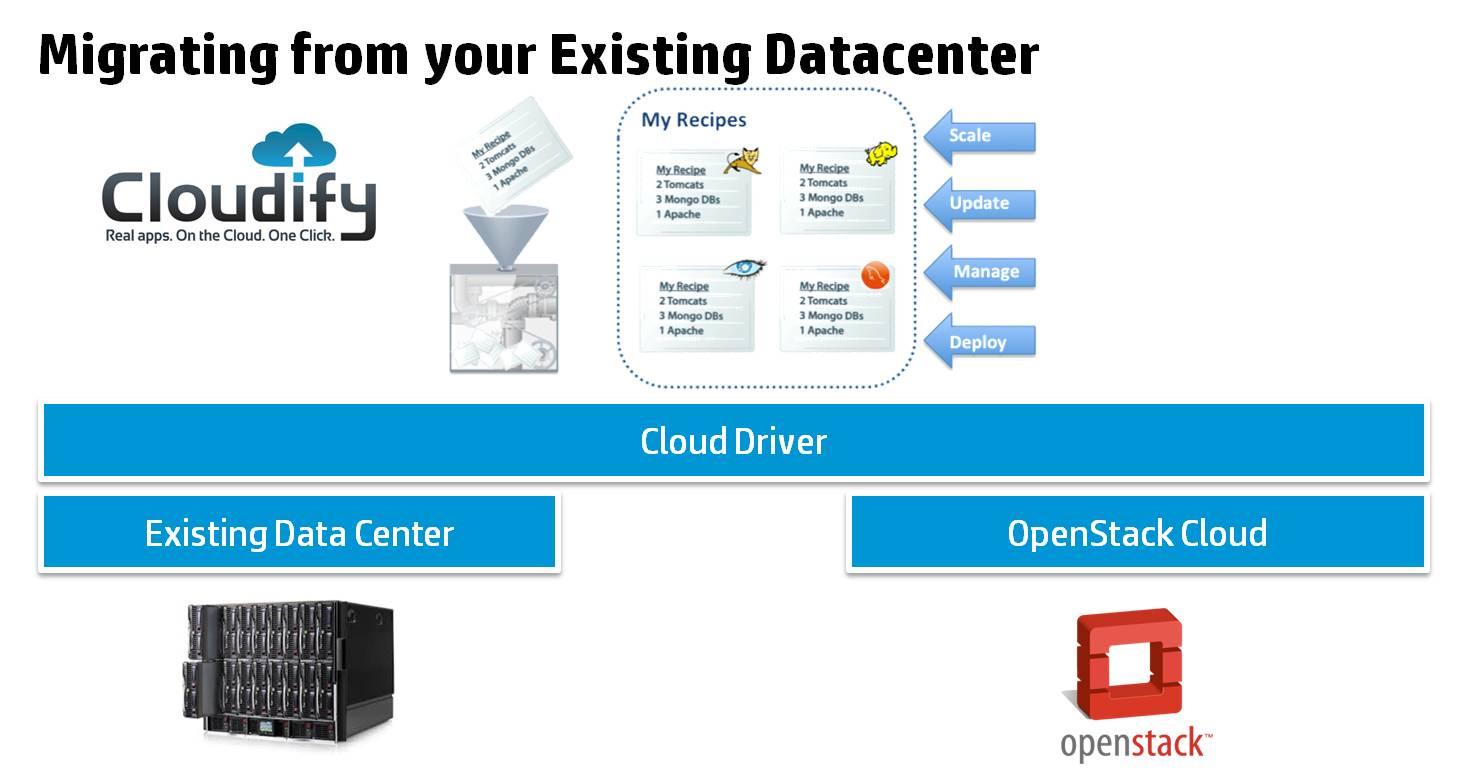
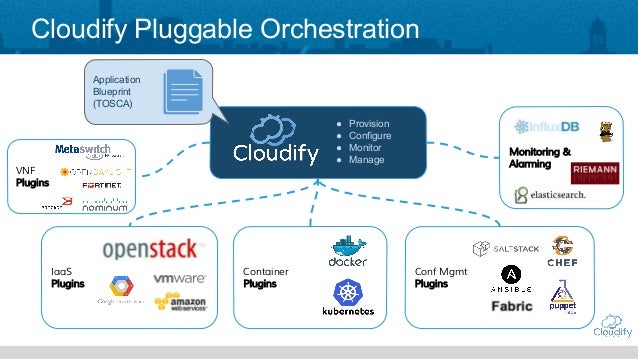
- Cloudify is an open source cloud orchestration platform, designed to automate the deployment, configuration and remediation of application and network services across hybrid cloud and stack environments.
Cloudify uses a declarative approach based on TOSCA, in which users focus on defining the desired state of the application through a simple DSL, and Cloudify takes care of reaching this state, all while continuously monitoring the application to ensure that it maintains the desired SLAs
in the case of failure or capacity shortage.
https://cloudify.co/product/
The new Cloudify release now provides coverage for 90% of the workloads being used in large enterprises today - from hybrid cloud models through our plugin support of the top 5 clouds, alongside containerized and non-containerized workloads
http://getcloudify.org/
- Cloudify vs. Terraform; How they compare
There are many ways to break down the
types of automation, whether it’s imperative versus declarative, or orchestration versus desired configuration state.
Terraform Strengths
Diversity
Easy to Get Started
Fast Standup
Wide Adoption (and Open Source)
Cloudify Strengths
Full-Scale Service Orchestration
Controlled Operations as Code or GUI
Terraform Use Cases
Terraform has become even easier to
use to create entire environments that can
be managed from a single state file.
Creating Terraform stacks for lab, POC, and testing environments is fantastic considering the ease and speed of deployment
Terraform really shines when it is managing stacks
utilizing statelessness, such as auto-scaling groups, lambda functions, and network resources.
It’s better to avoid having Terraform manage individual stateful instances or volumes because it can easily destroy resources.
Cloudify Use Cases
Instead of having deployments such as “Web
frontend” or “Mongo Cluster,” blueprints can better resemble “ERP system,” or “BI Solution.”
Cloudify is TOSCA compliant and
is designed to provide end-to-end orchestration.
This cradle-to-grave construct means that users can deploy an environment and manage that environment through Cloudify until decommission. This provides enterprise customers change management, auditing, and provisioning capabilities to control deployments of interdependent resources through their entire
lifecycle
Blueprints can be a single component or mixed ecosystems containing thousands of servers.
https://cloudify.co/2018/10/22/terraform-vs-cloudify/
- InfraKit is a toolkit for infrastructure orchestration. With an emphasis on immutable infrastructure, it breaks down infrastructure automation and management processes into small, pluggable components. These components work together to actively ensure the infrastructure state matches the user's specifications.
https://github.com/docker/infrakit
- Juju deploys everywhere: to public or private clouds.
https://jujucharms.com/
Getting started with Foreman
Today, there is a great number of
available tools allowing quick OS deployment and configuration, status monitoring and maintenance of the desired configuration. Here, the absolute leader for Win is SCCM.
While full-featured analogues for *nix have just started to take on momentum. Nowadays, an administrator has to cope with a variety of tools and each of them performs its own role. This is convenient for development, but
greatly complicates the support, while the results are not
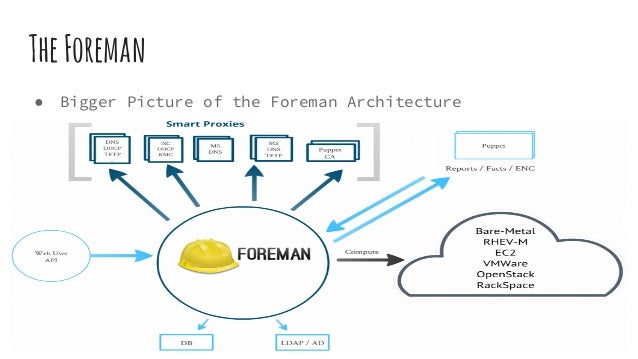
quite obvious. Foreman project, to be more precise, The Foreman is, in fact, an add-on for some open source solutions, which provides system management throughout system
lifecycles from deployment and configuration to monitoring (Provisioning, Configuration, Monitoring). With it you can easily automate any repetitive tasks, manage changes on thousands of servers
located on bare hardware or in the cloud, monitoring their status. The concept of server groups “config group” allows giving commands to multiple systems regardless of their location.
For example,
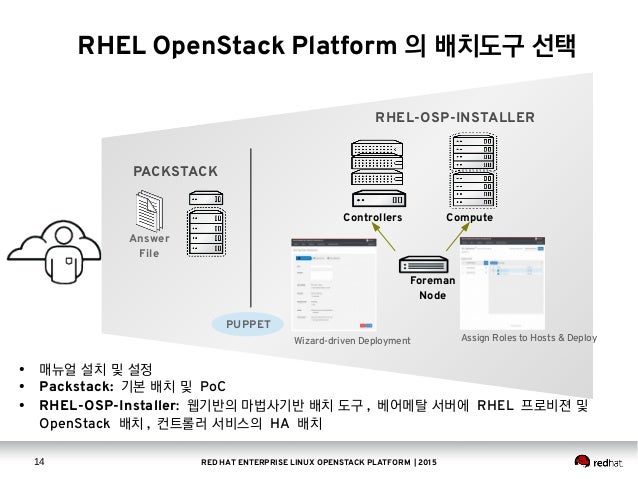
Foreman is used in RHOS to configure the nodes.
It is written using Ruby and JavaScript. Foreman operates in two modes:
Foreman
consists of several components that can
be deployed either on a single server, or on multiple servers:
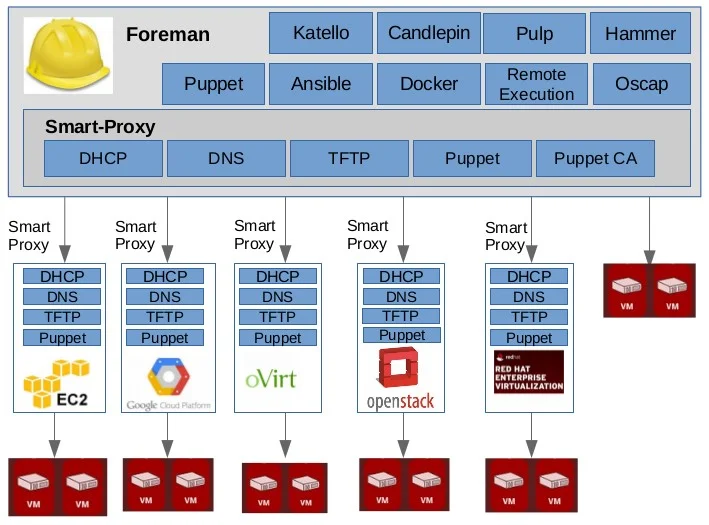
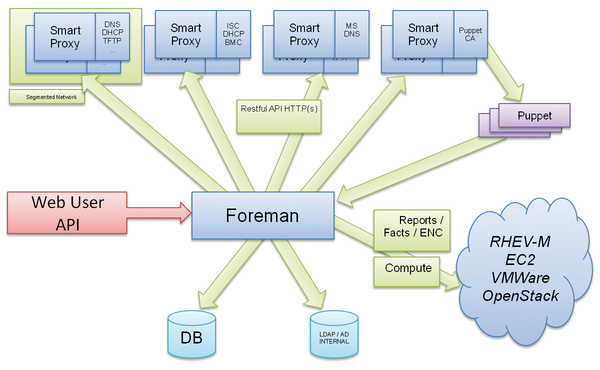
Smart Proxy — is an autonomous web component which
is placed on the host and allows Foreman connection to TFTP, DHCP (ISC DHCP, MS DHCP), DNS (Bind, MS DNS), Chef Proxy, Realm (
FreeIPA), Puppet and Puppet CA. One Smart Proxy can manage multiple services, but the autonomous installation is also possible;
WebGUI, CLI and API management interfaces;
Configuration Management — the complete solution for configuration management based on Puppet and Chef, including Puppet ENC (external node classifier) with integrated support for
parameterized classes and parameter hierarchy;
DBMS (MySQL,
PostgreSQL or
SQLite)— storage of settings and metadata managed computers.
https://hackmag.com/devops/getting-started-with-foreman/
- Foreman is a complete lifecycle management tool for physical and virtual servers. We give system administrators the power to easily automate repetitive tasks, quickly deploy applications, and proactively manage servers, on-premise or in the cloud.
https://www.theforeman.org/
How to get started with the Foreman
sysadmin tool
Full Stack Automation with
Katello & The Foreman
Life cycle management with Foreman and Puppet
Red Hat Satellite 6 comes with improved server and cloud management
- Cobbler is an install server; batteries are included
Cobbler is a Linux installation server that allows for rapid setup of network installation environments. It glues together and automates many associated Linux tasks so you do not have to hop between lots of various commands and applications when rolling out new systems, and,
in some cases, changing existing ones.
https://fedorahosted.org/cobbler/
- CF BOSH is a cloud-agnostic open source tool for release engineering, deployment, and lifecycle management of complex distributed systems.
https://www.cloudfoundry.org/bosh/
- BOSH is a project that unifies release engineering, deployment, and lifecycle management of small and large-scale cloud software. BOSH can provision and deploy software over hundreds of VMs. It also performs monitoring, failure recovery, and software updates with zero-to-minimal downtime.
In addition, BOSH supports multiple Infrastructure as a Service (IaaS) providers like
VMware vSphere, Google Cloud Platform, Amazon Web Services EC2, Microsoft Azure, and OpenStack. There is a Cloud Provider Interface (CPI) that enables users to extend BOSH to support additional IaaS
providers such as Apache
CloudStack and
VirtualBox.
https://bosh.io/docs/
- Python library for interacting with many of the popular cloud service providers using a unified API.
Resource you can manage with
Libcloud are divided in the following categories:
Cloud Servers and Block Storage - services such as Amazon EC2 and Rackspace
CloudServers
Cloud Object Storage and CDN - services such as Amazon S3 and Rackspace
CloudFiles
Load Balancers as a Service - services such as Amazon Elastic Load Balancer and
GoGrid LoadBalancers
DNS as a Service - services such as Amazon Route 53 and
Zerigo
https://libcloud.apache.org/




.png?version=1&modificationDate=1505026671000&api=v2)