Tuesday, September 25, 2018

Kubernetes Tools

  • Use the Kubernetes command-line tool, kubectl, to deploy and manage applications on Kubernetes. Using kubectl, you can inspect cluster resources; create, delete, and update components; and look at your new cluster and bring up example app
 https://kubernetes.io/docs/tasks/tools/install-kubectl/helm
  • Disable the swap file
    This is now a mandatory step for Kubernetes. The easiest way to do this is to edit /etc/fstab and to comment out the line referring to swap.
    To save a reboot then type in sudo swapoff -a.
    https://blog.alexellis.io/your-instant-kubernetes-cluster
  • Swap disabled. You MUST disable swap in order for the kubelet to work properly.
    https://kubernetes.io/docs/setup/independent/install-kubeadm/
  • This document shows you how to perform setup tasks that kubeadm doesn’t perform: provision hardware; configure multiple systems; and load balancing.
https://kubernetes.io/docs/setup/independent/high-availability/

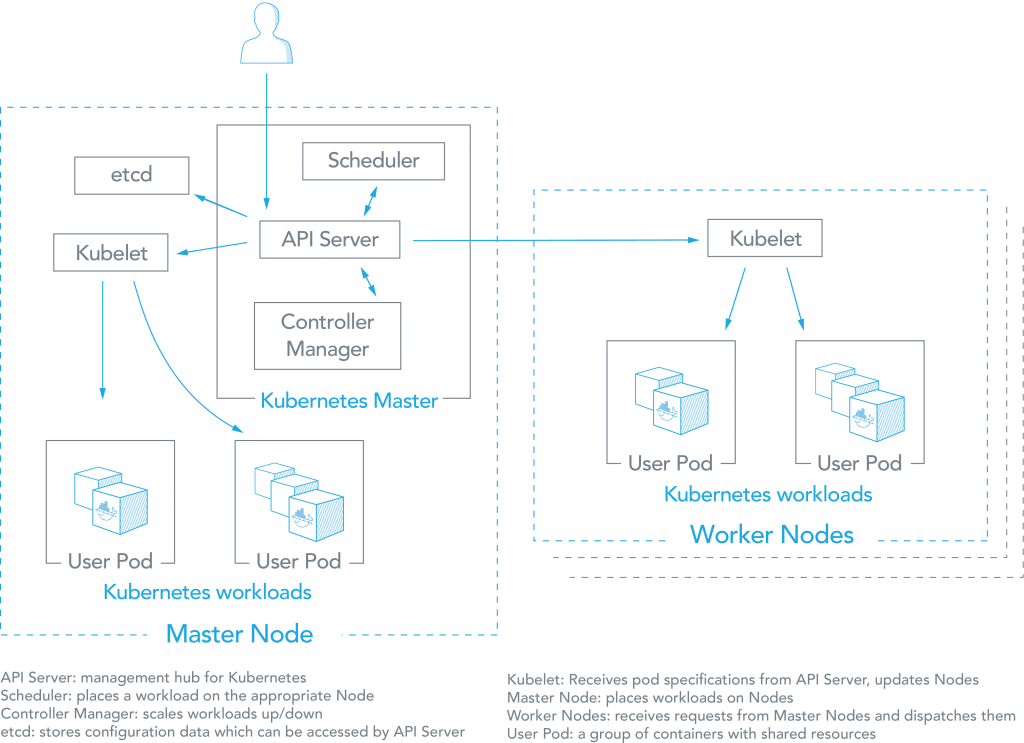
  •  kubeadm: the command to bootstrap the cluster. 
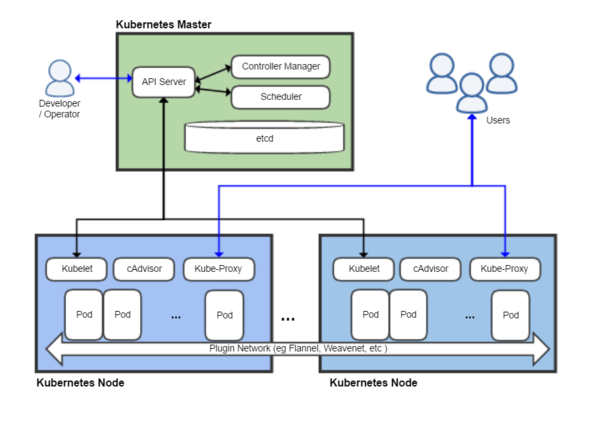
    • kubelet: the component that runs on all of the machines in your cluster and does things like starting pods and containers.
    •  kubectl: the command line util to talk to your cluster.
https://kubernetes.io/docs/setup/independent/install-kubeadm/
  • The network must be deployed before any applications. Also, kube-dns, an internal helper service, will not start up before a network is installedkubeadm only supports Container Network Interface (CNI) based networks (and does not support kubenet).
https://kubernetes.io/docs/setup/independent/create-cluster-kubeadm/#pod-network
  • Kubernetes DNS schedules a DNS Pod and Service on the cluster, and configures the kubelets to tell individual containers to use the DNS Service’s IP to resolve DNS names

    • https://kubernetes.io/docs/concepts/services-networking/dns-pod-service/
    • Container visibility requires context.

    • Helm is a Kubernetes-based package installer. It manages Kubernetes “charts”, which are “preconfigured packages of Kubernetes resources.” Helm enables you to easily install packages, make revisions, and even roll back complex changes
    https://www.mirantis.com/blog/install-kubernetes-apps-helm/
    • Deploying an application using containers can be much easier than trying to manage deployments of a traditional application over different environments, but trying to manage and scale multiple containers manually is much more difficult than orchestrating them using Kubernetes. But even managing Kubernetes applications looks difficult compared to, say, “apt-get install mysql”.
    Helm is a Kubernetes-based package installer. It manages Kubernetes “charts”, which are “preconfigured packages of Kubernetes resources.” Helm enables you to easily install packages, make revisions, and even roll back complex changes.
    https://www.mirantis.com/blog/install-kubernetes-apps-helm/


    • Three Big Concepts

    A Chart is a Helm package. It contains all of the resource definitions necessary to run an application, tool, or service inside of a Kubernetes cluster. Think of it like the Kubernetes equivalent of a Homebrew formula, an Apt dpkg, or a Yum RPM file.
    A Repository is the place where charts can be collected and shared. It's like Perl's CPAN archive or the Fedora Package Database, but for Kubernetes packages.
    A Release is an instance of a chart running in a Kubernetes cluster. One chart can often be installed many times into the same cluster. And each time it is installed, a new release is created. Consider a MySQL chart. If you want two databases running in your cluster, you can install that chart twice. Each one will have its own release, which will in turn have its own release name.

    https://helm.sh/docs/intro/using_helm/

    • You could avoid this by writing an automation script, but if you change the filenames or paths of your Kubernetes resources, then you need to update the script too.
    The real problem is that we have to remember exactly how to deploy the application step by step. Our “application” (i.e, all of our Kubernetes resources packaged together) is something kubectl has no idea about.

    Helm is a tool for managing Kubernetes charts. Charts are packages of pre-configured Kubernetes resources.
    A chart is organized as a collection of files inside of a directory.

    Helm allows us to work from the mental model of managing our “application” on our cluster, instead of individual Kubernetes resources via kubectl
    https://medium.com/ingeniouslysimple/deploying-kubernetes-applications-with-helm-81c9c931f9d3

    • A Chart is a Helm package. It contains all of the resource definitions necessary to run an application, tool, or service inside of a Kubernetes cluster. Think of it like the Kubernetes equivalent of a Homebrew formula, an Apt dpkg, or a Yum RPM file.
    A Repository is the place where charts can be collected and shared. It’s like Perl’s CPAN archive or the Fedora Package Database, but for Kubernetes packages.
    A Release is an instance of a chart running in a Kubernetes cluster. One chart can often be installed many times into the same cluster. And each time it is installed, a new release is created. Consider a MySQL chart. If you want two databases running in your cluster, you can install that chart twice. Each one will have its own release, which will in turn have its own release name.
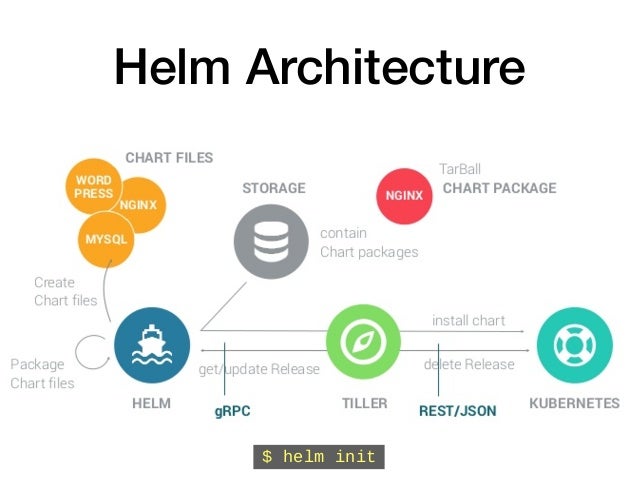
    Helm installs charts into Kubernetes, creating a new release for each installation. And to find new charts, you can search Helm chart repositories.
    https://docs.helm.sh/using_helm/#quickstart


    • Helm is made of two components:
    helm client. Used to create, fetch, search and validate charts and to instruct tiller.
    tiller server. Runs inside the Kubernetes cluster and manages the releases.
    https://docs.helm.sh/using_helm/#installation-frequently-asked-questions


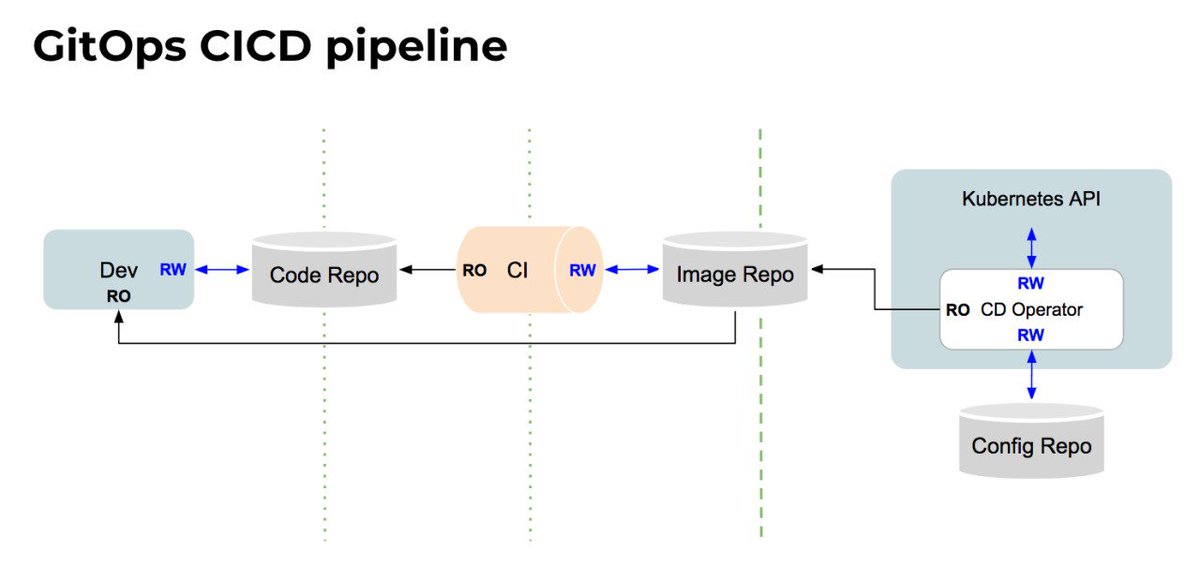
    • our developers operate Kubernetes via Git
    In fact, we manage and monitor all of our applications and the whole ‘cloud native stack’ using GitOps
    By using Git as our source of truth, we can operate almost everything
    For example, version control, history, peer review, and rollback happen through Git without needing to poke around with tools like kubectl.
    Our provisioning of AWS resources and deployment of k8s is declarative
    Our entire system state is under version control and described in a single Git repository
    Operational changes are made by pull request (plus build & release pipelines)
    Diff tools detect any divergence and notify us via Slack alerts; and sync tools enable convergence
    Rollback and audit logs are also provided via Git

    Let’s say a new team member deploys a new version of a service to prod without telling the on-call team.  Our diff tools detect that what is running does not match what is configured to run  (ie. the image specified in the Git repo is different from the one deployed in production).  The diff tools fires an alert.
    By using declarative tools, the entire set of configuration files can be version controlled in Git
    In the case of Kubernetes, we use version control not only for code but also for the YAML files that define the Kubernetes Deployments, Services, DaemonSets, etc.
    We also use Terraform and Ansible to provision Kubernetes on Amazon, and these are also version controlled in Git.
    Tools like Chef, Puppet and Ansible support features like “diff alerts”
    These help operators to understand when action may need to be taken to “converge” the live system to the intended state (as defined by the configuration scripts).
    best practice is to deploy immutable images (eg. containers) so that divergence is less likely.
    we have 3 main 'diff' tools: kubediffansiblediff, and terradiff.  Each one compares the latest Git to what's running in a deployed environment.
    https://www.weave.works/blog/gitops-operations-by-pull-request


    • Spinnaker is an open source, multi-cloud continuous delivery platform for releasing software changes with high velocity and confidence

    https://www.spinnaker.io/

    • By running an active-active architecture across Google Cloud Platform (GCP) and AWS, we’re in a better position to survive a DNS DDOS attack, a regional failure —  even a global failure of an entire cloud provider.

    This is where continuous delivery helps out. Specifically, we use Spinnaker, an open source, continuous delivery platform for releasing software changes with high velocity and confidence. Spinnaker has handled 100% of our production deployments for the past year, regardless of target platform.

    Spinnaker abstracts many of the particulars of each cloud provider.
    we’re able to maintain important continuous delivery concepts like canaries, immutable infrastructure and fast rollbacks.
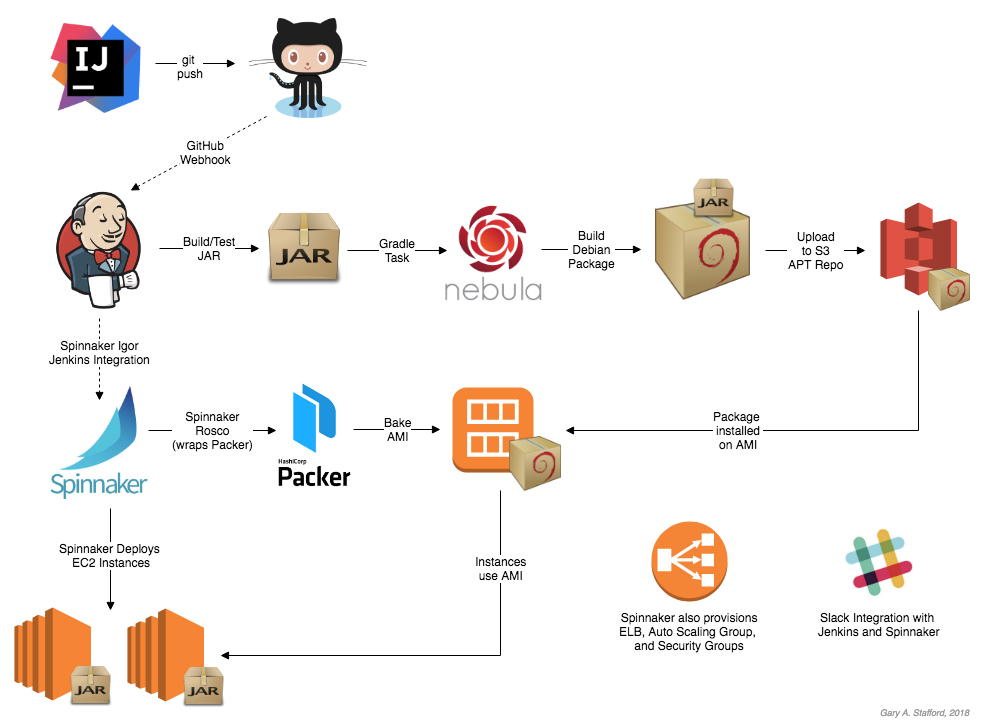
    once code is committed to git and Jenkins builds a package, that same package triggers the main deployment pipeline for that particular microservice
    That pipeline bakes the package into an immutable machine image on multiple cloud providers in parallel and continues to run any automated testing stages.
    The deployment proceeds to staging using blue/green deployment strategy, and finally to production without having to get deep into the details of each platform
    Support for tools like canary analysis and fast rollbacks allows developers to make informed decisions about the state of their deployment.

    http://www.googblogs.com/guest-post-multi-cloud-continuous-delivery-using-spinnaker-at-waze/

    • Automatic pipelines: Upgrade the binary and config in both AWS and GCP with one click

    Cross-Cloud Canary & Rollback: Each pipeline has canary testing and fast rollback if there's a problem with the canary.
    Multi-Cloud Redundancy: "If one goes down [Spinnaker] just launches instances in the next one."
    https://blog.armory.io/spinnaker-enables-multi-cloud-deployments-for-waze-and-saved-1-000-people/
    Multi-Cloud Deployments with Spinnaker

    Discussing Terraform and Spinnaker

    • The Benefits of Immutable Infrastructure

    Immutable Infrastructure: The practice of replacing your infrastructure with new instances each time you deploy new code to ensure mutated code does not carry forward.
    a short list of benefits immutable infrastructure may provide you:
    Your company is preparing to run cloud-native applications
    You are trying to automate the scaling of your infrastructure in the cloud
    You want simple and infinitely repeatable deployments
    Continuous deployments safely and quickly
    The operations become more automated and responsibility falls on the developers
    Server and node failures do not result in your service going down for long if at all
    https://blog.armory.io/spinnaker-feature-immutable-infrastructure/


    • The Benefits of Multi-Cloud Deployments

    The main purpose of multi-cloud deployments is to mitigate against disasters that were not in your control: if a service such as AWS or GCP becomes unresponsive or critically fails, your infrastructure and applications can redirect traffic and user access to other cloud services that are still up and running
    Spinnaker allows for easy configurations of a pipeline to execute a multi-cloud deployment as well as keep track of the execution’s progress.
    https://blog.armory.io/the-benefits-of-multi-cloud-deployments/


    • Spinnaker Feature - Blue/Green (AKA Red/Black) Deployments

    Blue/Green Deployments: A deployment methodology that runs two production environments while keeping your live and testing environments separate.
    Internally, you can treat one production environment as a testing environment while the other is live and being used. When satisfied with the test environment’s viability, the team can simply re-route all workload from the live server group to the test server group, swapping their roles. If any critical issues arise, the team can rollback to the previous live server that they knew was working and minimizing any downtime for users.
    Blue/Green deployment is intended to allow an immediate rollback to a previously working version as soon as any problems arise.
    https://blog.armory.io/spinnaker-feature-blue-green-aka-red-black-deployments-2/


    • Spinnaker Feature - Canary Deployments

    Canary Deployments: For monitoring test deployments on a small percentage of servers before scaling the changes to the rest.
    When testing a new batch of code or deployments that may or may not break your servers, it should be good practice for developers to push the code to a small subset of canary servers for monitoring. When satisfied with the code’s viability, developers can then deploy the code to the rest of the servers. In contrast, if the deployments break the canary servers only those servers are affected and we limit any downtime your users may experience.

    After you successfully deploy to canary servers, you can then run automated or manual tests as well as allow the server to be deployed live for users to interact with. We recommend multiple scaling tests: 1% to 10%, then to 25%, then to 50% and so on because minor issues may balloon out of control when scaled.

    https://blog.armory.io/spinnaker-feature-canary-deployments/


    • Chaos Monkey is a resiliency tool that helps applications tolerate random instance failures.

    This version of Chaos Monkey is fully integrated with Spinnaker, the continuous delivery platform that we use at Netflix. You must be managing your apps with Spinnaker to use Chaos Monkey to terminate instances.
    Chaos Monkey should work with any back-end that Spinnaker supports (AWS, Google Compute Engine, Azure, Kubernetes, Cloud Foundry). It has been tested with AWS, GCE, and Kubernetes.
    https://github.com/Netflix/chaosmonkey

    • Deploying the Netflix API

    Development & Deployment Flow
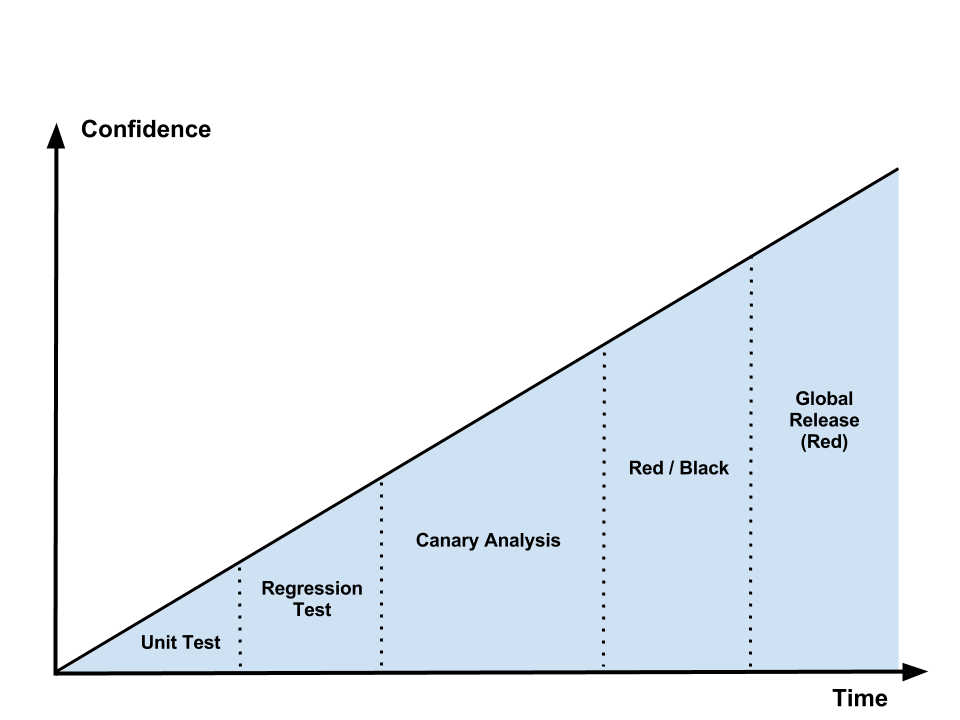
    The following diagram illustrates the logical flow of code from feature inception to global deployment to production clusters across all of our AWS regions. Each phase in the flow provides feedback about the “goodness” of the code, with each successive step providing more insight into and confidence about feature correctness and system stability.
    https://medium.com/netflix-techblog/deploying-the-netflix-api-79b6176cc3f0
    • Blue Green Deployments


    Simply, you have two identical environments (infrastructure) with the “green” environment hosting the current production apps (app1 version1, app2 version1, app3 version1 for example):
    Now, when you’re ready to make a change to app2 for example and upgrade it to v2, you’d do so in the “blue environment”. In that environment you deploy the new version of the app, run smoke tests, and any other tests (including those to exercise/prime the OS, cache, CPU, etc). When things look good, you change the load-balancer/reverse proxy/router to point to the blue environment:
    You monitor for any failures or exceptions because of the release. If everything looks good, you can eventually shut down the green environment and use it to stage any new releases. If not, you can quickly rollback to the green environment by pointing the load balancer back.

    A/B Testing
    A/B testing is a way of testing features in your application for various reasons like usability, popularity, noticeability, etc
    The difference between blue-green deployments and A/B testing is A/B testing is for measuring functionality in the app.
    Blue-green deployments are about releasing new software safely and rolling back predictably
    You can obviously combine them: use blue-green deployments to deploy new features in an app that can be used for A/B testing.

    Canary releases
    Canary releases are a way of sending out a new version of your app into production that plays the role of a “canary” to get an idea of how it will perform (integrate with other apps, CPU, memory, disk usage, etc).
    Canary releases let you test the waters before pulling the trigger on a full release.
    https://www.testingexcellence.com/difference-between-greenblue-deployments-ab-testing-and-canary-releases/
    • How to configure AB Deployments on Openshift

    AB deployments are a simple and effective strategy to split traffic between different applications
    One common use case is to split the load between the same application using a different template or database and measure the impact with different% of each application
    You can also use it to switch off completely one version of one application by setting its load to 0%.
    http://www.mastertheboss.com/soa-cloud/openshift/how-to-configure-ab-deployments-on-openshift

    • What is A/B testing?

    In short, A/B testing is about testing a hypothesis (= any enhancement that a user can view or interact with like text, components, colors, etc) compared to the current view. The current view is usually referred to as ‘the control’ and the test itself ‘the variant’.

    A/B testing deployment
    All methods are based on canary deployments. Canary deployment means that a release is only deployed to a subset of users first before rolling out to all users (once it meets expectations).

    Canary deployment on (full stack) application via load-balancing
    This means there is a layer in between called a load balancer that directs traffic to manage the load over several identical web servers and fail-over when needed.
    In this case a portion of the back-end servers is deployed with the test variant and the load balancer redirects 25% of the traffic to the test variant servers.
    The configuration is compatible with HaProxy, the most used load balancer software on the planet

    Canary deployment on micro-services via URL routing

    https://melv1n.com/ab-testing-guide-product-managers/


    • Stop Gambling with Upgrades, Murphy’s Law Always Wins

    Take your running cluster and upgrade each component one by one.  In this case the load balancer is pointing to every version.  Select one of them and stop sending production traffic to it.
    Once traffic stops, upgrade the unused cluster member then run whatever tests need to be run.
    Once all tests pass, add the new member back to the load balancer and start sending production traffic to it.
    Repeat until the entire cluster is upgraded and getting production traffic.

    What do you do if configuration management hangs or if the tests don’t succeed

    Red Black Deployments
    The approach is fairly straight forward, create a new system and leave the old system alone.
    Send production traffic to the new system only after it’s up and in a known, confirmed state.
    The big benefit here is no changes to the ‘production’ environment happen until the new environment is confirmed good.
    The drawback is the need for extra capacity to create this new environment. Using a public or private cloud provider is one way to make sure the extra capacity is there when it’s needed.

    https://rhelblog.redhat.com/2015/05/07/stop-gambling-with-upgrades-murphys-law-always-wins/#more-908

    • Red-Black Deployment

    Red-Black deployment is a release technique that reduces downtime and risk by running two identical production environments called Red and Black.
    At any time, only one of the environments is live, with the live environment serving all production traffic. For this example, Red is currently live and Black is idle(in this case we have kept the Black down-scaled to zero servers).
    As we prepare a new release of our application, deployment and the final stage of testing takes place in the environment that is not live: in this example, Black. Once we have deployed and fully tested the software in Black, we switch the ASG attached behind ELB all incoming requests now go to Black instead of Red. Black is now live, and Red is idle(down-scaled to zero servers).

    This technique can eliminate downtime due to application deployment. In addition, Red-Black deployment reduces risk: if something unexpected happens with our new release on Black, we can immediately roll back to the last version by switching back to Red.

    https://sweetibharti.wordpress.com/2016/11/11/red-black-deployment-on-aws/


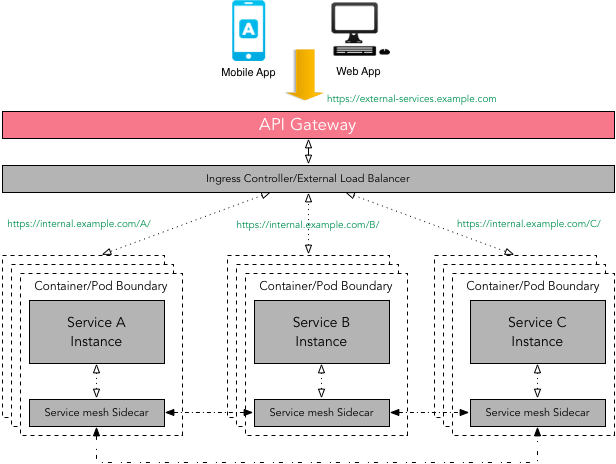
    • Ultralight service mesh for Kubernetes and beyond 

    Linkerd gives you observability, reliability, and security for your microservices — with no code change required
    https://linkerd.io/


    • In this article, we’ll show you how to use linkerd as a service mesh to add TLS to all service-to-service HTTP calls, without modifying any application code.

    https://blog.linkerd.io/2016/10/24/a-service-mesh-for-kubernetes-part-iii-encrypting-all-the-things/


    Computer Networking Tutorial - 15 - Mesh Topology
    advantages
    provides alternative routes if one node fails
    the more nodes you add the more communication routes you have 
    suitable for MAN,WAN not LAN

    disadvantages
    expensive to set up
    • A high-performance, open-source universal RPC framework

    Define your service using Protocol Buffers, a powerful binary serialization toolset and language
    Works across languages and platforms
    Automatically generate idiomatic client and server stubs for your service in a variety of languages and platforms
    Start quickly and scale
    Install runtime and dev environments with a single line and also scale to millions of RPCs per second with the framework
    Bi-directional streaming and integrated auth
    Bi-directional streaming and fully integrated pluggable authentication with http/2 based transport

    gRPC is a modern open source high performance RPC framework that can run in any environment. It can efficiently connect services in and across data centers with pluggable support for load balancing, tracing, health checking and authentication. It is also applicable in last mile of distributed computing to connect devices, mobile applications and browsers to backend services.
    https://grpc.io/
    Istio + envoy + grpc + metrics winning with service mesh in practice
    How to Deploy a gRPC Mode Istio Mixer Adapter into Kubernetes
    • Zipkin is a distributed tracing system. It helps gather timing data needed to troubleshoot latency problems in microservice architectures.

    https://zipkin.io/

    Apache DC/OS


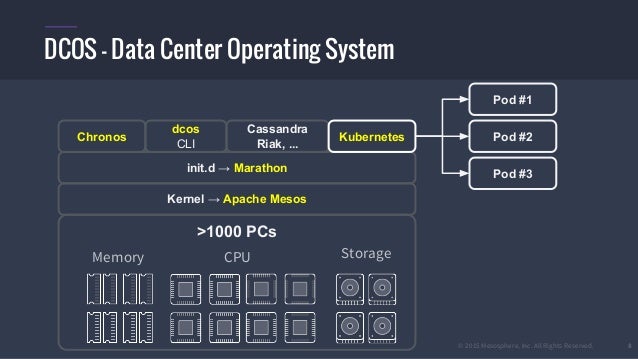
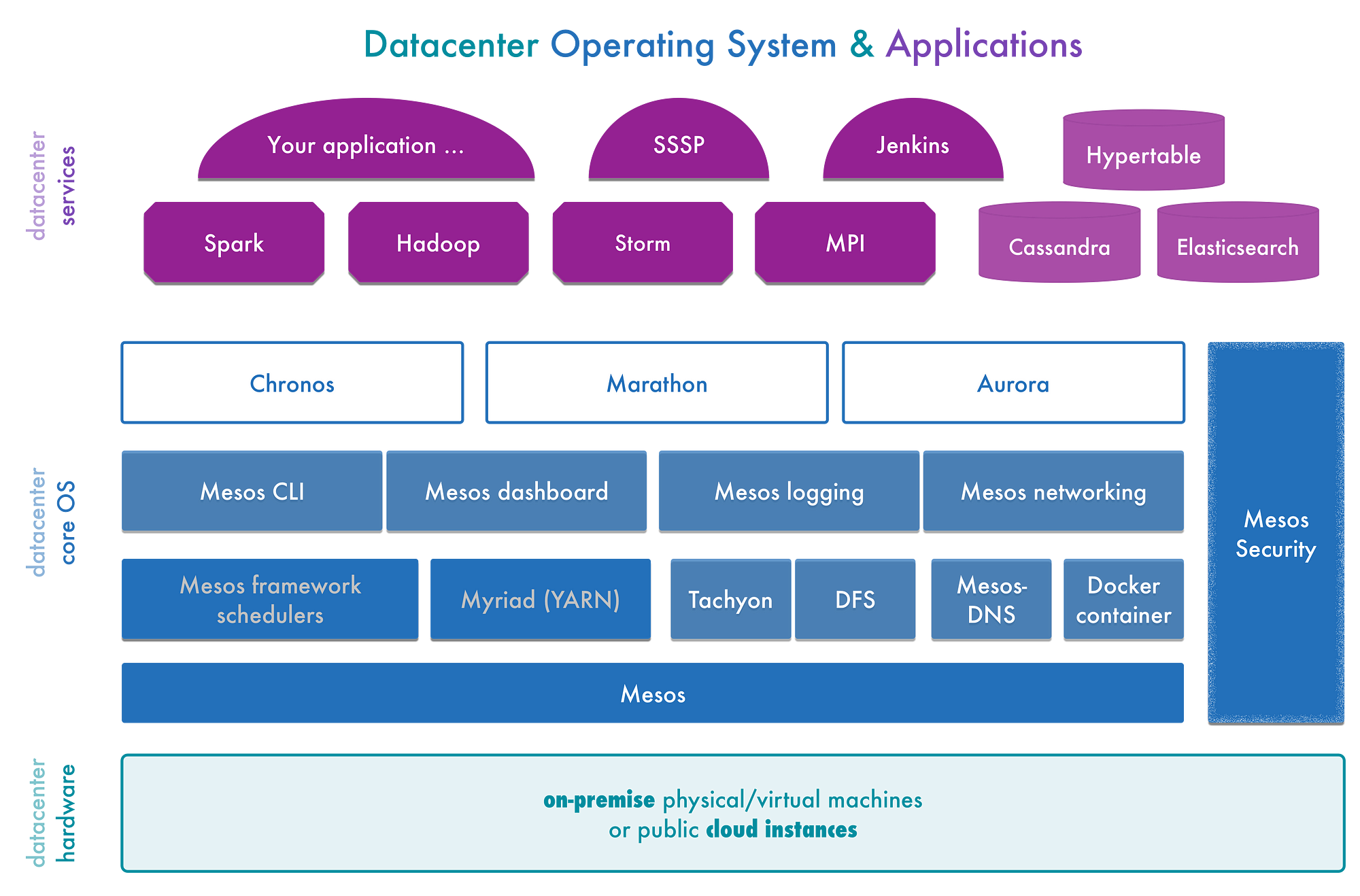
    • What is DC/OS?

      DC/OS (the datacenter operating system) is an open-source, distributed operating system based on the Apache Mesos distributed systems kernel. DC/OS manages multiple machines in the cloud or on-premises from a single interface; deploys containers, distributed services, and legacy applications into those machines; and provides networking, service discovery and resource management to keep the services running and communicating with each other. https://dcos.io/

      Try DC/OS by installing a dcos-vagrant cluster on your local machine. Room for workloads is limited by CPU and memory. (limited functionality)

      https://dcos.io/install/

      • Aurora runs applications and services across a shared pool of machines, and is responsible for keeping them running, forever. When machines experience failure, Aurora intelligently reschedules those jobs onto healthy machines.

      http://aurora.apache.org/
      • This is openDCIM, a free, web based Data Center Infrastructure Management application
          Provide complete physical inventory (asset tracking) of the data center
          Support for Multiple Rooms (Data Centers)
          Management of the three key elements of capacity management - space, power, and cooling
          Basic contact management and integration into existing business directory via UserID
          Fault Tolerance Tracking - run a power outage simulation to see what would be affected as each source goes down
          Computation of Center of Gravity for each cabinet
          Template management for devices, with ability to override per device
          Optional tracking of cable connections within each cabinet, and for each switch device
          Archival functions for equipment sent to salvage/disposal
          Integration with intelligent power strips and UPS devices - APC, Geist Manufacturing, Liebert, and Server Technologies. Easy to update with OIDs for other manufacturers.
          Open Architecture - All built on a MySQL database for easy report building, or export to other applications
      http://www.opendcim.org/
      • CA Data Center Infrastructure Management (CA DCIM) provides real-time monitoring of power distribution and use across your data centers, enabling you to measure, trend, alert and take action. It can also help you visualize and manage space and capacity, so that you can better plan and optimize your data center operations.
      http://www.ca.com/us/opscenter/ca-dcim.aspx
      • Collins exists to drive infrastructure automation.
      Collins started as a system to manage all of the physical servers, switches, racks, etc in Tumblr production environments. As we started to inventory hardware, IP addresses, software, and so on, we found the API and data gave us an excellent way to drive automation processes
      https://tumblr.github.io/collins/

      • Bower
      Bower works by fetching and installing packages from all over, taking care of hunting, finding, downloading, and saving the stuff you’re looking for. Bower keeps track of these packages in a manifest file, bower.json.
      http://bower.io/


      • MAAS

      Get the flexibility of the cloud and the efficiency of physical servers. MAAS is designed for devops at scale, in places where bare metal is the best way to run your app. Big data, private cloud, PAAS and HPC all thrive on MAAS.
      https://maas.io/


      Distributed Computing Systems

      • Apache Flink is a framework and distributed processing engine for stateful computations over unbounded and bounded data streams. Flink has been designed to run in all common cluster environments, perform computations at in-memory speed and at any scale


      Apache Flink is a distributed system and requires compute resources in order to execute applications. Flink integrates with all common cluster resource managers such as Hadoop YARN, Apache Mesos, and Kubernetes but can also be setup to run as a stand-alone cluster.

      Bounded streams have a defined start and end. Bounded streams can be processed by ingesting all data before performing any computations. Ordered ingestion is not required to process bounded streams because a bounded data set can always be sorted. Processing of bounded streams is also known as batch processing.

      Run Applications at any Scale
      Flink is designed to run stateful streaming applications at any scale. Applications are parallelized into possibly thousands of tasks that are distributed and concurrently executed in a cluster.
      Therefore, an application can leverage virtually unlimited amounts of CPUs, main memory, disk and network IO.
      Moreover, Flink easily maintains very large application state. Its asynchronous and incremental checkpointing algorithm ensures minimal impact on processing latencies while guaranteeing exactly-once state consistency.
      A modern container is more than just an isolation mechanism: it also includes an
      image—the files that make up the application that runs inside the container.
      Within Google, MPM (Midas Package Manager) is used to build and deploy container images.
      Containerization transforms the data center from being machine-oriented to being application-oriented.

      Containers encapsulate the application environment, abstracting away many details of machines and operating
      systems from the application developer and the deployment infrastructure.

      Because well-designed containers and container images  are scoped to a single application, managing containers
      means managing applications rather than machines. This shift of management APIs from machine-oriented to
      application oriented dramatically improves application deployment and introspection.

      The original purpose of the cgroup, chroot , and namespace facilities in the kernel was to protect applications from
      noisy, nosey, and messy neighbors. Combining these with container images created an abstraction that also isolates
      applications from the (heterogeneous) operating systems on which they run.

      This decoupling of image and OS makes it possible to provide the same deployment environment in
      both development and production, which, in turn, improves deployment reliability and speeds up development by
      reducing inconsistencies and friction.

      https://flink.apache.org/flink-architecture.html


      Hadoop vs Spark vs Flink – Big Data Frameworks Comparison
      • Apache Flink on DC/OS (and Apache Mesos

      For the uninitiated: Flink is a stateful stream processing framework that supports high-throughput, low-latency applications. Flink is a lightweight and fault tolerant, providing strict accuracy guarantees in case of failures, with minimal impact on performance. Flink deployments cover a range of use cases; Alibaba, for example, uses Flink to optimize search results in real-time.

      Flink on DC/OS
      In its Mesos user survey, Mesosphere found that 87% of new Mesos users are running DC/OS, and so Flink’s Mesos support wouldn’t be complete without DC/OS support, too. To run Flink on DC/OS, first install DC/OS from the official site.
      Note that DC/OS includes Mesos, Marathon (a service that will supervise your applications and maintain their state in case of failures), and ZooKeeper, all pre-configured out of the box.

      Flink on Mesos
      First things first: the Mesos documentation will walk you through initial Mesos setup. Next you should also install Marathon, since you usually want your cluster to be highly available (HA). In order to run Marathon, you also need a ZooKeeper quorum running. We assume for the following that ZooKeeper is reachable under node:2181. Lastly, we recommend installing a distributed file system where Flink can store its checkpoints. We assume for the following that HDFS is installed and can be reached via hdfs://node/.


      https://mesosphere.com/blog/apache-flink-on-dcos-and-apache-mesos/


      This repository is a sample setup to run an Apache Flink job in Kubernetes.

      https://github.com/sanderploegsma/flink-k8s


      Flink session cluster on Kubernetes

      A Flink session cluster is executed as a long-running Kubernetes Deployment. Note that you can run multiple Flink jobs on a session cluster. Each job needs to be submitted to the cluster after the cluster has been deployed.
      https://ci.apache.org/projects/flink/flink-docs-stable/ops/deployment/kubernetes.html


      Flink Helm Chart

      https://github.com/docker-flink/examples

      • Apache Samza is a distributed stream processing framework. It uses Apache Kafka for messaging, and Apache Hadoop YARN to provide fault tolerance, processor isolation, security, and resource management.

      http://samza.apache.org/


      • Choose between Confluent Open Source or Confluent Enterprise edition. Both are built on the world’s most popular streaming platform, Apache Kafka

      Know and respond to every single event in your organization in real time.
      Like a central nervous system, Confluent creates an Apache Kafka-based streaming platform to unite your organization around a single source of truth.
      Confluent Platform adds administration, data management, operations tools and robust testing to your Kafka environment.
      an architecture based on a highly scalable, distributed streaming platform like Confluent will grow quickly with your business and the expanding data pipelines that come with it, accelerating both performance and cost savings.
      https://www.confluent.io/

      • Apache Spark
      Apache Spark is a fast and general engine for large-scale data processing.
      Run programs up to 100x faster than Hadoop MapReduce in memory, or 10x faster on disk
      https://spark.apache.org

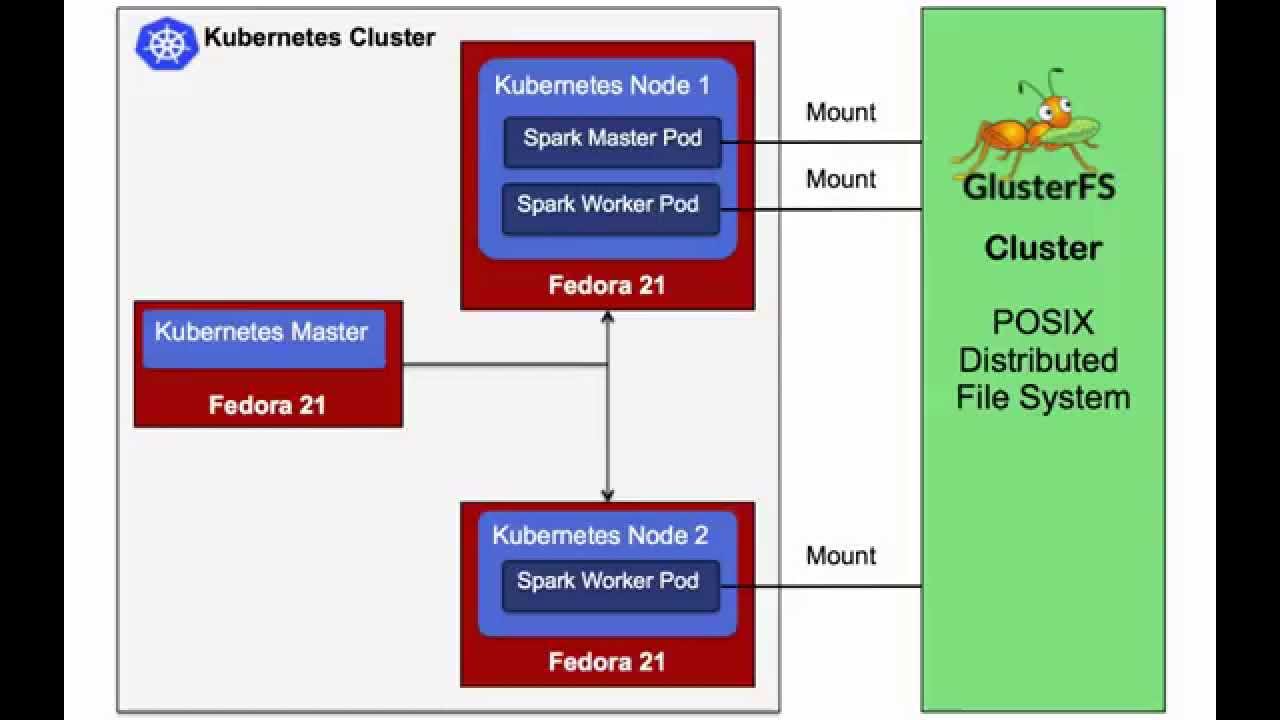
      • Spark runs on Hadoop, Apache Mesos, Kubernetes, standalone, or in the cloud. It can access diverse data sources
      ou can run Spark using its standalone cluster mode, on EC2, on Hadoop YARN, on Mesos, or on Kubernetes. Access data in HDFS, Apache Cassandra, Apache HBase, Apache Hive, and hundreds of other data sources.
      https://spark.apache.org/

      Apache Spark is an open-source cluster-computing framework.
      Spark provides an interface for programming entire clusters with implicit data parallelism and fault tolerance.
      https://en.wikipedia.org/wiki/Apache_Spark


      Building Clustered Applications with Kubernetes and Docker

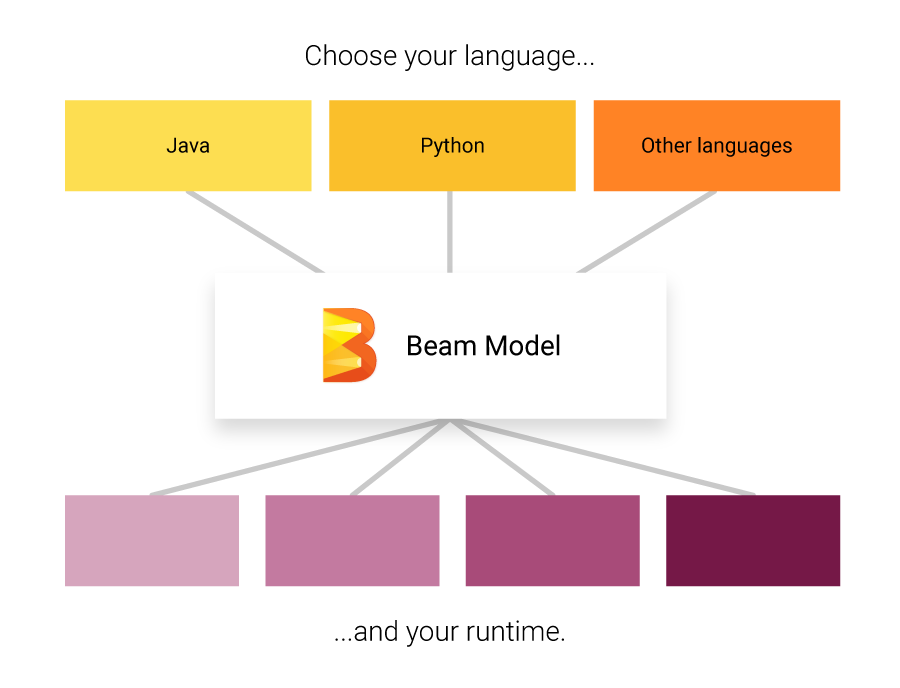
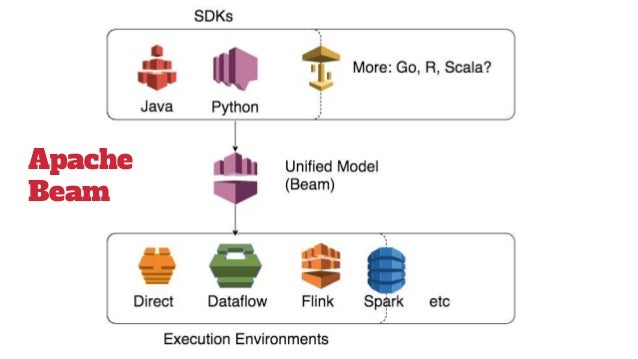
      • Implement batch and streaming data processing jobs that run on any execution engine.

      https://beam.apache.org/

      • The Grizzly NIO framework

      Writing scalable server applications in the Java™ programming language has always been difficult. Before the advent of the Java New I/O API (NIO), thread management issues made it impossible for a server to scale to thousands of users. The Grizzly NIO framework has been designed to help developers to take advantage of the Java™ NIO API. Grizzly’s goal is to help developers to build scalable and robust servers using NIO as well as offering extended framework components: Web Framework (HTTP/S), WebSocket, Comet
      https://javaee.github.io/grizzly/


      • Netty is an asynchronous event-driven network application framework for rapid development of maintainable high performance protocol servers & clients.Netty is a NIO client server framework which enables quick and easy development of network applications such as protocol servers and clients. It greatly simplifies and streamlines network programming such as TCP and UDP socket server. 

      https://netty.io/

      • How WebSockets Work

      WebSockets provide a persistent connection between a client and server that both parties can use to start sending data at any time.
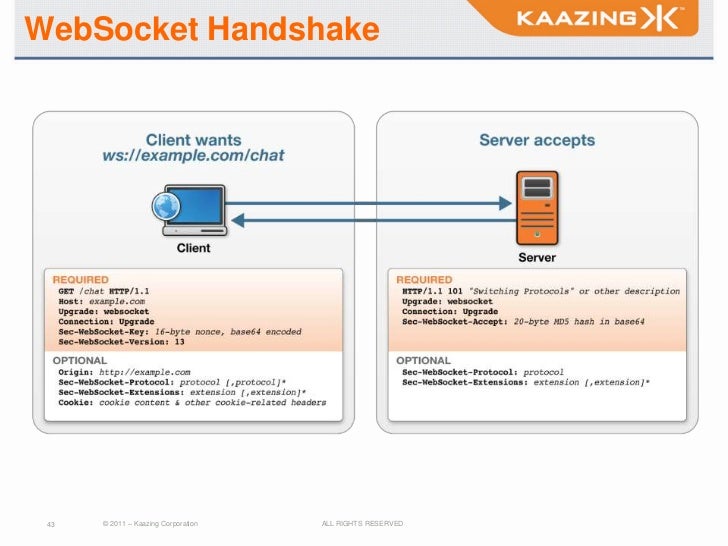
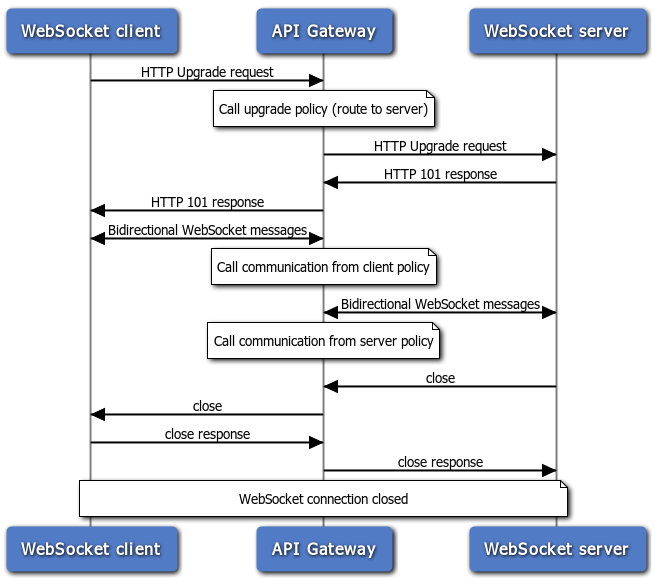
      The client establishes a WebSocket connection through a process known as the WebSocket handshake. This process starts with the client sending a regular HTTP request to the server.
      WebSocket URLs use the ws scheme. There is also wss for secure WebSocket connections which is the equivalent of HTTPS.
      Now that the handshake is complete the initial HTTP connection is replaced by a WebSocket connection that uses the same underlying TCP/IP connection.
      At this point either party can starting sending data.

      With WebSockets you can transfer as much data as you like without incurring the overhead associated with traditional HTTP requests. Data is transferred through a WebSocket as messages, each of which consists of one or more frames containing the data you are sending (the payload). In order to ensure the message can be properly reconstructed when it reaches the client each frame is prefixed with 4-12 bytes of data about the payload. Using this frame-based messaging system helps to reduce the amount of non-payload data that is transferred, leading to significant reductions in latency.
      having the ability to open bidirectional, low latency connections enables a whole new generation of real-time web applications.

      https://blog.teamtreehouse.com/an-introduction-to-websockets

      • HTTP protocol is connection-less

      only the client can request information from a server
      HTTP is purely half-duplex
      a server can answer only one time to a client request
      Some websites or web applications require the server to update client from time to time

      There were a few ways to do so
      the client request the server at a regular interval to check if there is a new information available
      the client send a request to the server and the server answers as soon as he has an information to provide to the client (also known as long time polling)
      those methods have many drawbacks due to HTTP limitation

      So a new protocol has been designed: websockets
      allows a 2 ways communication (full duplex) between a client and a server, over a single TCP connection
      websockets re-use the HTTP connection it was initialized on
      uses the standard TCP port

      How does websocket work ???
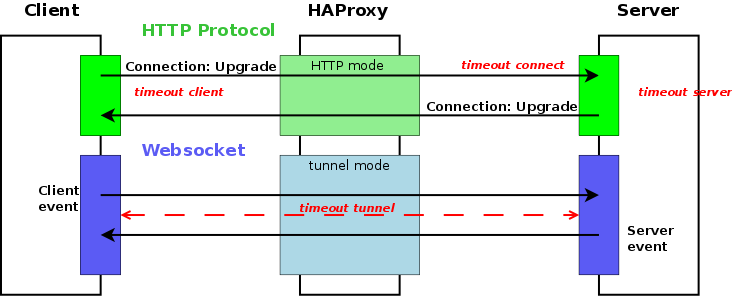
      The most important part is the “Connection: Upgrade” header which let the client know to the server it wants to change to an other protocol, whose name is provided by “Upgrade: websocket” header
      the TCP connection used for the HTTP request/response challenge is used for the websocket: whenever a peer wants to interact with the other peer, it can use the it
      The socket finishes as soon as one peer decides it or the TCP connection is closed
      https://www.haproxy.com/blog/websockets-load-balancing-with-haproxy/

      • HTML5 WebSocket: A Quantum Leap in Scalability for the Web

      defines a full-duplex communication channel that operates through a single socket over the Web
      especially for real-time, event-driven web applications
      how HTML5 Web Sockets can offer such an incredibly dramatic reduction of unnecessary network traffic and latency

      Normally when a browser visits a web page, an HTTP request is sent to the web server that hosts that page. The web server acknowledges this request and sends back the response
      If you want to get the most up-to-date "real-time" information, you can constantly refresh that page manually
      Current attempts to provide real-time web applications largely revolve around polling and other server-side push technologies

      HTML5 Web Sockets represents the next evolution of web communications—a full-duplex, bidirectional communications channel that operates through a single socket over the Web
      HTML5 Web Sockets provides a true standard that you can use to build scalable, real-time web applications

      To establish a WebSocket connection, the client and server upgrade from the HTTP protocol to the WebSocket protocol during their initial handshake
      Once established, WebSocket data frames can be sent back and forth between the client and the server in full-duplex mode
      Both text and binary frames can be sent full-duplex, in either direction at the same time.
      The data is minimally framed with just two bytes.
      In the case of text frames, each frame starts with a 0x00 byte, ends with a 0xFF byte, and contains UTF-8 data in between. WebSocket text frames use a terminator while binary frames use a length prefix.
      it cannot deliver raw binary data to JavaScript because JavaScript does not support a byte type. Therefore, binary data is ignored if the client is JavaScript—but it can be delivered to other clients that support it.

      Today, only Google's Chrome browser supports HTML5 Web Sockets natively
      To leverage the full power of HTML5 Web Sockets, Kaazing provides a ByteSocket library for binary communication and higher-level libraries for protocols like Stomp, AMQP, XMPP, IRC and more, built on top of WebSocket.

      http://www.websocket.org/quantum.html
      SIMPLEX, HALF-DUPLEX, FULL-DUPLEX

      • Who said REST can’t be realtime? Stop polling your REST APIs and have Kaazing dynamically deliver updates from them the moment they are available to any client, anywhere

      A distributed cloud-based service ensures the highest reliability and performance.

      kaazing.io seamlessly connects to a Kafka instance and subscribes to messages that need to be delivered over the web.
      using Server Sent Events (SSE) it streams these messages to either browsers or mobile apps
      SSE is a HTML5 standard
      Advanced security capabilities include end-to-end encryption and access control (a set which app users receive which data) while performance innovations ensure that no matter what, users will receive, the right data, at the right time in the right form
      https://kaazing.com/

      • Once established, a websocket connection does not have to send headers with its messages so we can expect the total data transfer per message to be less than an equivalent HTTP request

      Although most often used in the context of HTTP, Representational State Transfer (REST) is an architectural design pattern and not a transport protocol. The HTTP protocol is just one implementation of the REST architecture.
      When it comes to scalability, one advantage of a REST architecture is the statelessness which means that any server can handle any request and there is no need to synchronize any shared state other than the database
      https://blog.feathersjs.com/http-vs-websockets-a-performance-comparison-da2533f13a77
      • CLOUD SCALABILITY: SCALE UP VS SCALE OUT

      IT Managers run into scalability challenges on a regular basis. It is difficult to predict growth rates of applications, storage capacity usage, and bandwidth.
      When a workload reaches capacity limits the question is how is performance maintained while preserving efficiency to scale?

      Scale-up vs Scale-out
      Infrastructure scalability handles the changing needs of an application by statically adding or removing resources to meet changing application demands as needed.In most cases, this is handled by scaling up (vertical scaling) and/or scaling out (horizontal scaling).

      Scale-up or Vertical Scaling
      Scale-up is done by adding more resources to an existing system to reach a desired state of performance. For example, a database or web server needs additional resources to continue performance at a certain level to meet SLAs. More compute, memory, storage, or network can be added to that system to keep the performance at desired levels.When this is done in the cloud, applications often get moved onto more powerful instances and may even migrate to a different host and retire the server it was on.These types of scale-up operations have been happening on-premises in datacenters for decades.However, the time it takes to procure additional recourses to scale-up a given system could take weeks or months in a traditional on-premises environment while scaling-up in the cloud can take only minutes

      Scale-out or Horizontal Scaling
      Scale-out is usually associated with distributed architectures.There are two basic forms of scaling out:
      Adding additional infrastructure capacity in pre-packaged blocks of infrastructure or nodes (i.e. hyper-converged) 
      use a distributed service that can retrieve customer information but be independent of applications or services.Horizontal scaling makes it easy for service providers to offer “pay-as-you-grow” infrastructure and services.Hyper-converged infrastructure has become increasingly popular for use in private cloud and even tier 2 service providers.This approach is not quite as loosely coupled as other forms of distributed architectures but, it does help IT managers that are used to traditional architectures make the transition to horizontal scaling and realize the associated cost benefits.
      Loosely coupled distributed architecture allows for scaling of each part of the architecture independently. This means a group of software products can be created and deployed as independent pieces, even though they work together to manage a complete workflow. Each application is made up of a collection of abstracted services that can function and operate independently. This allows for horizontal scaling at the product level as well as the service level. Even more granular scaling capabilities can be delineated by SLA or customer type (e.g. bronze, silver, or gold) or even by API type if there are different levels of demand for certain APIs. This can promote an efficient use of scaling within a given infrastructure.

      https://blog.turbonomic.com/blog/on-technology/cloud-scalability-scale-vs-scale

      Sunday, September 23, 2018

      Time division Multiplexing(TDM)

      • Time-division multiplexing (TDM) is a method of transmitting and receiving independent signals over a common signal path by means of synchronized switches at each end of the transmission line so that each signal appears on the line only a fraction of time in an alternating pattern.
      https://en.wikipedia.org/wiki/Time-division_multiplexing
       
      Time division Multiplexing TDM

      • Multiplexing: a system resource is shared among multiple
      users
      – Analogy: CPU sharing

      Mechanisms to multiplexing
      – Time-division multiplexing (TDM)
      – Frequency-division multiplexing (FDM)
      – Statistical multiplexing

      Statistical Multiplexing
      The physical link is shared over time (like TDM)
      • But does not have fixed pattern. This is called
      statistical multiplexing
      – Sequence of A & B packets are sent on demand, not
      predetermined slots

      https://www2.cs.duke.edu/courses/spring19/compsci356/slides/02NetArch.pdf

      • Data Communications and Computer Networks

      Under the simplest conditions, a medium can carry only one signal at any moment in time.
      For multiple signals to share one medium, the medium must somehow be divided, giving each signal a portion of the total bandwidth.
      The current techniques that can accomplish this include frequency division multiplexing, time division multiplexing, and code division multiplexing.

      Frequency Division Multiplexing
      Assignment of non-overlapping frequency ranges to each “user” or signal on a medium.  Thus, all signals are transmitted at the same time, each using different frequencies.

      Time Division Multiplexing
      Sharing of the signal is accomplished by dividing available transmission time on a medium among users.

      Synchronous Time Division Multiplexing
      The original time division multiplexing.

      Statistical Time Division Multiplexing
      A statistical multiplexor transmits only the data from active workstations

      Wavelength Division Multiplexing
      Wavelength division multiplexing multiplexes multiple data streams onto a single fiber optic line.

      Discrete Multitone (DMT)
      A multiplexing technique commonly found in digital subscriber line (DSL) systems

      Code Division Multiplexing
      Also known as code division multiple access
      An advanced technique that allows multiple devices to transmit on the same frequencies at the same time.
      http://facweb.cs.depaul.edu/cwhite/Book/Slides%20Third%20Ed/Old%20TE%20Chapter%205.ppt

      Thursday, September 20, 2018

      augmented reality(AR)


      • Virtual Fixtures – first A.R. system, 1992, U.S. Air Force, WPAFB

      Augmented Reality (AR) is an interactive experience of a real-world environment whereby the objects that reside in the real-world are "augmented" by computer-generated perceptual information, sometimes across multiple sensory modalities, including visual, auditory, haptic, somatosensory, and olfactory
      https://en.wikipedia.org/wiki/Augmented_reality


      • A Simple Explanation of Augmented Reality (AR)

      The origin of the word augmented is augment, which means to add or enhance something. In the case of Augmented Reality (also called AR), graphics, sounds, and touch feedback are added into our natural world to create an enhanced user experience.

      Augmented Reality vs Virtual Reality
      Unlike virtual reality, which requires you to inhabit an entirely virtual environment, augmented reality uses your existing natural environment and simply overlays virtual information on top of it. As both virtual and real worlds harmoniously coexist, users of augmented reality experience a new and improved natural world where virtual information is used as a tool to provide assistance in everyday activities.

      https://www.realitytechnologies.com/augmented-reality/