Showing posts with label HPC. Show all posts

Tuesday, October 13, 2020

HPC fabric topology

  •  ExascaleHPC Fabric Topology


Topologies –Fat Tree Example


Torus Topology

Mesh or 3DTorus

▪Mesh –each node is connected to 4 other nodes: positive and negative X and Y axis

▪3Dmesh –Each node is connected to 6 other nodes: positive and negative X, Y and Z axis

▪2D/3Dtorus –The ends of the 2D/3Dmeshes are connected


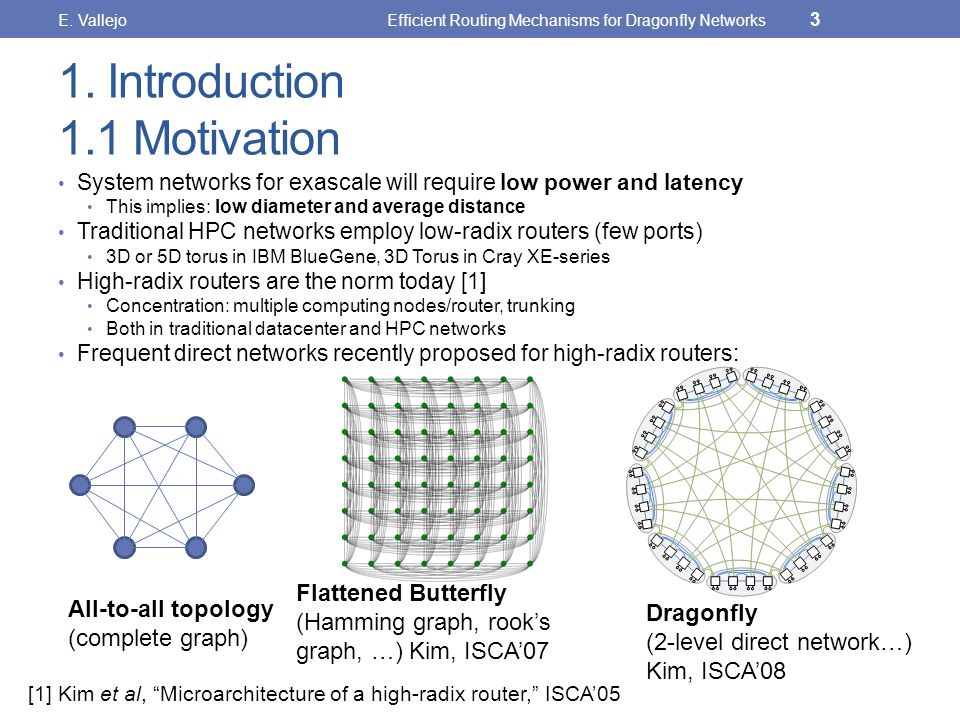
Dragonfly+ Topology

What is Dragonfly Topology?

Dragonfly is a hierarchical topology with the following properties:

Several “groups”, connected together using all to all links▪The topology inside each group can be any topology

▪Focus on reducing the number of long links and network diameter to reduce total cost of network

▪Requires Adaptive Routing to enable efficient operation


There are Different Dragonfly Topologies Options


Dragonfly+ Topology

▪Several “groups”, connected using all to all links

▪The topology inside each group can be any topology

▪Reduce total cost of network (fewer long cables)

▪Utilizes Adaptive Routing to for efficient operations ▪Simplifies future system expansion 


Future Expansion of Dragonfly+ Based System

▪Dragonfly+ is the only topology that allows system expansion at zero cost

▪While maintaining bisection bandwidth

▪No port reservation

▪No re-cabling


Dragonfly+ Simplifies Scale Deployment and Cost


http://www.hpcadvisorycouncil.com/events/2019/APAC-AI-HPC/uploads/2018/07/Exascale-HPC-Fabric-Topology.pdf


Wednesday, May 27, 2020

Multi-Processing


  • OpenACC is a directive-based programming model designed to provide a simple yet powerful approach to accelerators without significant programming effort. With OpenACC, a single version of the source code will deliver performance portability across the platforms.


The NVIDIA HPC SDK™ with OpenACC offers scientists and researchers a quick path to accelerated computing with less programming effort. By inserting compiler “hints” or directives into your C11, C++17 or Fortran 2003 code, with the NVIDIA OpenACC compiler you can offload and run your code on the GPU and CPU.

https://developer.nvidia.com/openacc


  • OpenACC is a user-driven directive-based performance-portable parallel programming model. It is designed for scientists and engineers interested in porting their codes to a wide-variety of heterogeneous HPC hardware platforms and architectures with significantly less programming effort than required with a low-level model. The OpenACC specification supports C, C++, Fortran programming languages and multiple hardware architectures including X86 & POWER CPUs, and NVIDIA GPUs.

https://www.openacc.org/


  • OpenMP (Open Multi-Processing) is an application programming interface (API) that supports multi-platform shared memory multiprocessing programming in C, C++, and Fortran .OpenMP is designed for multi-processor/core, shared memory machines. The underlying architecture can be shared memory UMA or NUMA. 

http://hpc.mediawiki.hull.ac.uk/Programming/OpenMP


  • Sequential Program

When you run sequential program
Instructions executed on 1 core
Other cores are idle
Waste of available resources. We want all cores to be used to execute program.
What is OpenMP?
Defacto standard API for writing shared memory parallel applications in C, C++, and Fortran
OpenMP API consists of:
Compiler Directives
Runtime subroutines/functions
Environment variables
https://people.math.umass.edu/~johnston/PHI_WG_2014/OpenMPSlides_tamu_sc.pdf


  • Memory modelsParallel computing is about data processing.In practice, memory models determine how we write parallel programs

Two types:Shared memory modelDistributed memory mode
Shared MemoryAll CPUs have access to the (shared) memory
Distributed MemoryEach CPU has its own (local) memory, invisible to other CPUs


  • Hybrid Model

Shared-memory style within a node
Distributed-memory style across nodes
https://idre.ucla.edu/sites/default/files/intro-openmp-2013-02-11.pdf


  • Advantages of OpenMP

Simple programming model –Data decomposition and communication handled by compiler directives •Single source code for serial and parallel codes •No major overwrite of the serial code  •Portable implementation •Progressiveparallelization –Start from most critical or time consuming part of the code
OpenMP vs. MPI
OpenMP Basic Syntax
Loop Parallelism
Threads share the work in loop parallelism. •For example, using 4 threads under the default “static” scheduling, in Fortran: –thread 1 has i=1-250 –thread 2 has i=251-500, etc.
Loop Parallelism:  ordered and collapse
https://www.nersc.gov/assets/Uploads/XE62011OpenMP.pdf
  • HPCaaS

Designed for speed and simplicity, HPCaaS from Rescale on IBM Cloud™ enables you to execute your HPC jobs along with the associated data in a few easy clicks. You configure the workflow and job execution environment (for example, compute cores, memory and GPU options) and execute and monitor the work directly from the easy-to-use portal.
https://www.ibm.com/cloud/hpcaas-from-rescale

Saturday, May 2, 2020

lustre


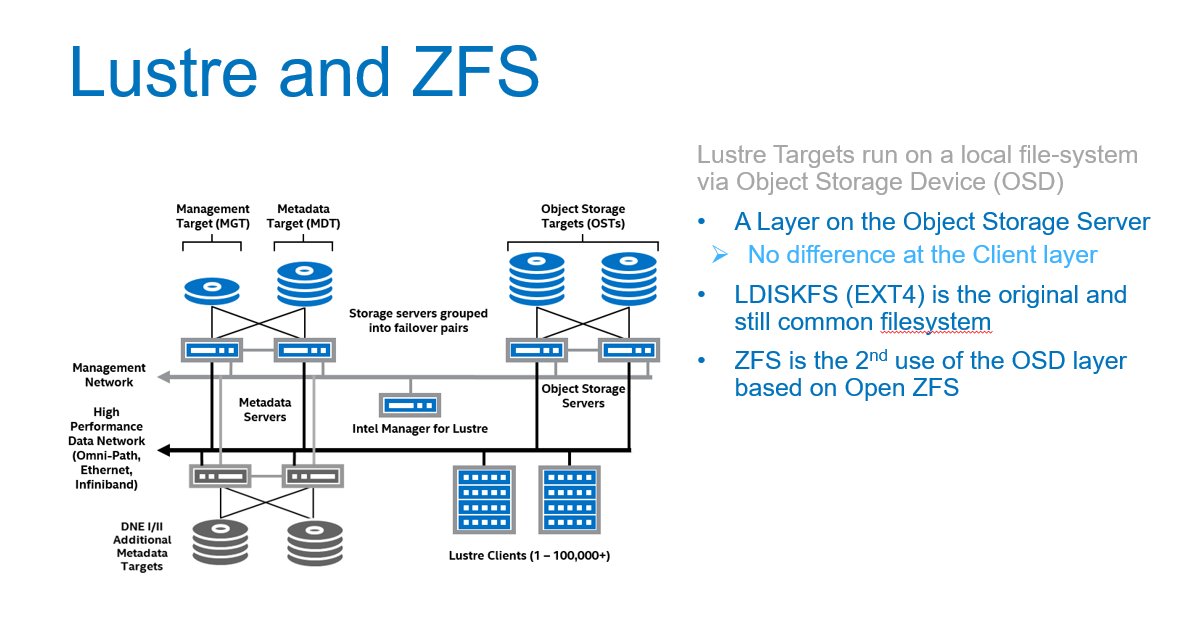
  • The Lustre file system is a parallel file system used in a wide range of HPC environments

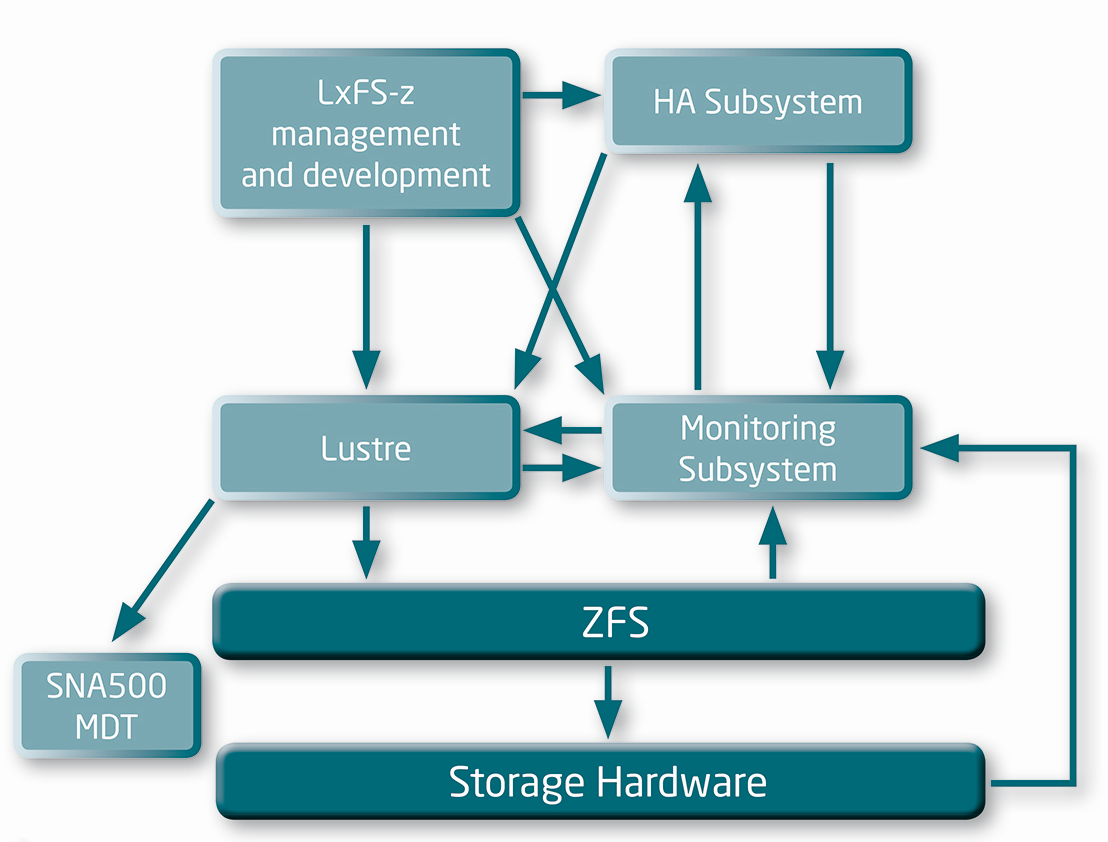
https://it.nec.com/it_IT/global/solutions/hpc/storage/lxfs.html?


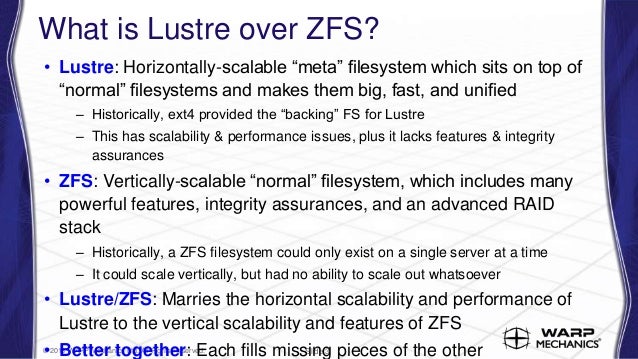
  • How the Lustre Developer Community is Advancing ZFS as a Lustre Back-end File System

    Increasing support on Lustre for a 16 MB block size—already supported by ZFS—which will increase the size of data blocks written to each disk. A larger block size will reduce disk seeks and boost read performance. This, in turn, will require supporting a dynamic OSD-ZFS block size to prevent an increase in read/modify/write operations.
    Implementing a dRAID mechanism instead of RAIDZ to boost performance when a drive fails. With RAIDZ, throughput of a disk group is limited by the spare disk’s bandwidth. dRAID will use a mechanism that distributes data to spare blocks among the remaining disks. Throughput is expected to improve even when the group is degraded because of a failed drive.
    Creating a separate Metadata allocation class to allow a dedicated high throughput VDEV for storing Metadata. Since ZFS Metadata is smaller, but fundamental, reading it faster will result in enhanced IO performance. The VDEV should be an SSD or NVRAM, and it can be mirrored for redundancy.
    https://www.codeproject.com/Articles/1191923/How-the-Lustre-Developer-Community-is-Advancing-ZF


  • ZFS OSD Hardware Considerations

The double parity implementation in OpenZFS (RAID-Z2) recommended for object storage targets (OST) uses an algorithm similar to RAID-6, but is implemented in software and not in a RAID card or a separate storage controller.
OpenZFS uses a copy-on-write transactional object model that makes extensive use of 256-bit checksums for all data blocks, using hash algorithms like Fletcher-4 and SHA-256. This makes the choice of CPU an important consideration when designing servers that use ZFS storage.
Metadata server workloads are IOps-centric, characterized by small transactions that run at very high rates and benefit from frequency-optimized CPUs.
Object storage server workloads are throughput-centric, often with long-running, streaming transactions. Because the workloads are oriented more toward streaming IO, object storage servers are less sensitive to CPU frequency than metadata servers,
http://wiki.lustre.org/ZFS_OSD_Hardware_Considerations

Friday, May 1, 2020

iRODS


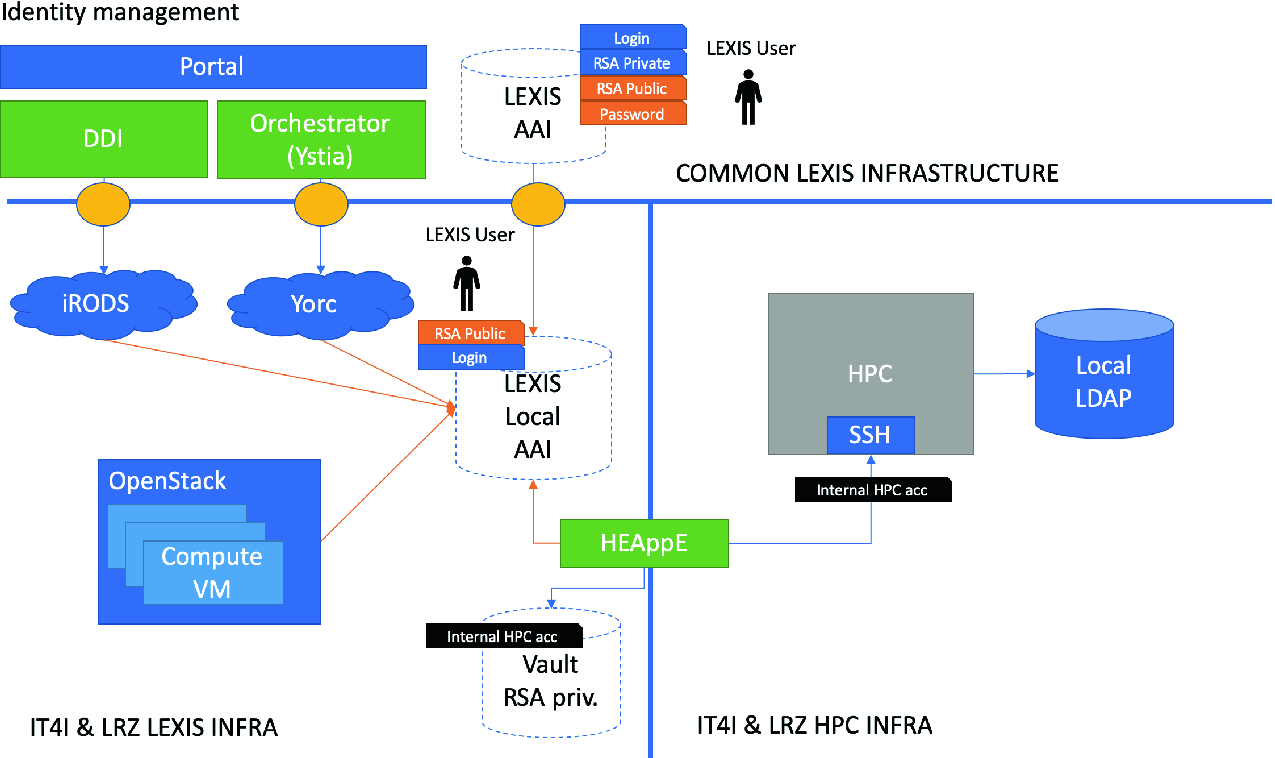
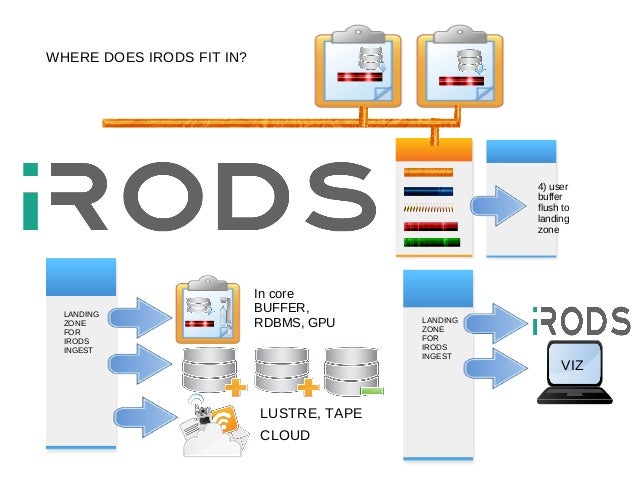
  • The integrated Rule-Oriented Data System (iRODS) is open source data management software.It virtualizes data storage resources, so users can take control of their data, regardless of where and on what device the data is stored.

Core Competencies

    iRODS implements data virtualization, allowing access to distributed storage assets under a unified namespace, and freeing organizations from getting locked in to single-vendor storage solutions.
    iRODS enables data discovery using a metadata catalog that describes every file, every directory, and every storage resource in the iRODS Zone.
    iRODS automates data workflows, with a rule engine that permits any action to be initiated by any trigger on any server or client in the Zone.
    iRODS enables secure collaboration, so users only need to log in to their home Zone to access data hosted on a remote Zone.

https://github.com/irods/irods


  • Installation


iRODS is provided in binary form in a collection of interdependent packages. There are two types of iRODS server, iCAT and Resource:

    An iCAT server manages a Zone, handles the database connection to the iCAT metadata catalog (which could be either local or remote), and can provide Storage Resources. An iRODS Zone will have exactly one iCAT server.
    A Resource server connects to an existing Zone and can provide additional storage resource(s). An iRODS Zone can have zero or more Resource servers.

An iCAT server is just a Resource server that also provides the central point of coordination for the Zone and manages the metadata.
A single computer cannot have both an iCAT server and a Resource server installed.
The simplest iRODS installation consists of one iCAT server and zero Resource servers.
https://docs.irods.org/4.1.9/manual/installation/


  • iRODS is open source data grid middleware for... 

•Data Discovery :metadata
•Workflow Automation :policies : any condition; any action
•Secure Collaboration :sharing without losing control
•Data Virtualization :file system flexibility

Using iRODS   for...
  Data Virtualiza1on with Workflow Automation
  Seamless data replication,
  automatic checksumming,
  policy-based data resource selection

Using iRODS for...
  Secure Collabora1on
  Selectively sharing data between workgroups;
  isolation for maintenance operations;
  options for defining policy on a per-group basis
  
Using iRODS for...   
Data Discovery and Workflow Automa1on
  Metadata automatically generated from original file system,
  used to enforce policy and verify integrity
Policy 1 – Validate,checksum,replicate, compress
Policy 2 – Users cannot delete files
Policy 3 – Purge files by expiration  

Using iRODS for...
Data Virtualization with Workflow Automation
  Automatically staging data for HPC and interpretation;
  using hardware from multiple vendors;

iRODS
•Metadata! 
•Vendor neutrality
–Not subject to storage vendor lock-in 
–Mitigates risk of vendor termination
•Open source 
–Mitigate risk of developer termination 
•Flexibility 
–Policy enforcement: any trigger, any action 
–Storage virtualization: layers-deep replication; local <> cloud
–User permissions 
•Sharing between workgroups

http://docplayer.net/7491516-Managing-next-generation-sequencing-data-with-irods.html


Thursday, April 30, 2020

NVMe over Fabrics

  • NAND flash memory

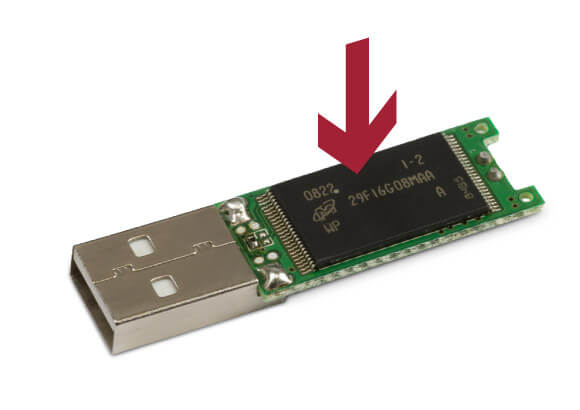
Flash memory is an electronic (solid-state) non-volatile computer memory storage medium that can be electrically erased and reprogrammed. The two main types of flash memory are named after the NAND and NOR logic gates.
The NAND type is found primarily in memory cards, USB flash drives, solid-state drives (those produced in 2009 or later), and similar products, for general storage and transfer of data. NAND or NOR flash memory is also often used to store configuration data in numerous digital products, a task previously made possible by EEPROM or battery-powered static RAM. One key disadvantage of flash memory is that it can only endure a relatively small number of write cycles in a specific block
https://en.wikipedia.org/wiki/Flash_memory


  • NVMe vs SSD: Speed, Storage & Mistakes to Avoid

SSD (solid-state drive) is a type of nonvolatile storage media that stores persistent data on flash memory. It has two essential parts - a NAND flash memory and a flash controller optimized to deliver high read-write performance in sequential as well as random data fetching.
SSDs offer high transfer speeds, low latency even with random data access, more durability but not for hierarchical storage use, and expectedly no sound of moving parts
For perceived and real performance gains, storage was the last bottleneck, which was eliminated with the advent of SSD and then the high-performance NVMe SSD storage solutions. The NAND flash SSDs radically improved input-output performance, access times dropped from 6-12 milliseconds to less than 1ms.

What is SATA SSD?
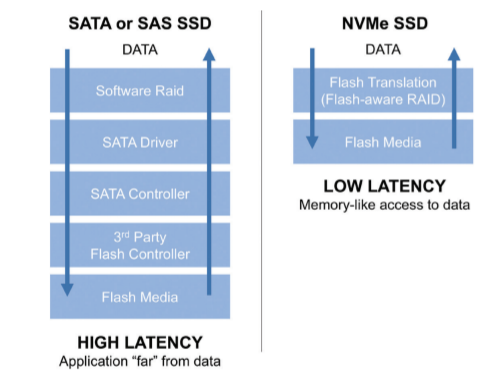
SATA uses the AHCI command protocol and supports the IDE, which primarily was built for the older and sluggish spinning disk drives and not for the sturdy flash-based storage.

Mistakes to avoid
Defragmentation is not for SSDs and can negatively affect its lifespan. SSDs save data in blocks and can randomly read from any location, whether contiguous or random. You will be overkilling the flash drive when you defrag.
Don’t use the SSD to its full capacity or you risk choking it. Because its performance gets affected, mainly write speeds, it is suggested to have minimal 25 percent of your storage space free for improved performance.
Modern SSDs come with an in-built Garbage Collection Mechanism. Whether the TRIM command should be enabled or not is a question based on the specific OS you are using and needs to be looked into as it can clutter unwanted data in your drive and needs to be handled properly

What is NVMe SSD?
Non-Volatile Memory Express (NVMe) is the latest industry-standard software interface for PCIe SSDs.
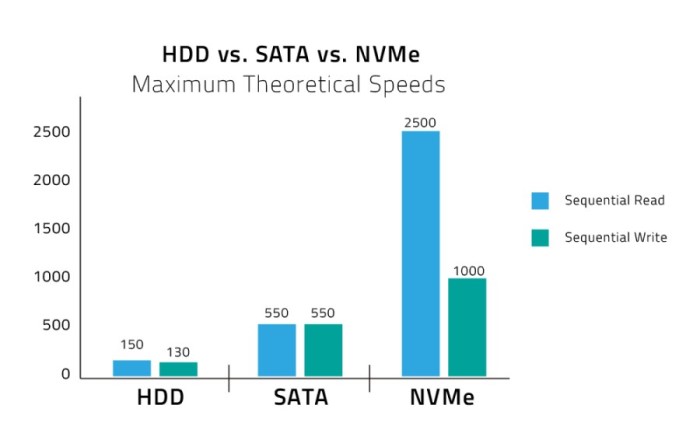
The NVMe SSD enables the flash memory to run directly through the PCI Express (PCIe) serial bus interface as it offers high bandwidth due to being directly attached to the CPU rather than function through the limiting SATA speeds.
It comes in two form factor, M.2 or PCIe expansion card, a 2.5-inch U.2 connector, but with both form factors, it directly connects electrically to the motherboard via the PCIe rather than SATA connection.

Mistakes to avoid
Remember, NVMe is a communication interface and storage protocol, not a storage media device.
Deploy pooled SSD storage across the data center, which places a cache of SSD storage before higher capacity drives to provide cost-efficient and enhanced performance.
Don’t judge an NVMe SSD on the base of price; it can cost you in endurance, quality of service, and most I/O consistency.
A cost-benefit analysis is recommended and the analysis of the performance requirements of application workloads to determine if you do need the transitioning.
Don’t deploy NVMe on top of the same architecture used for conventional flash, as the traditional controller can only handle low levels of I/O processing and create latency and cap performance.

https://www.promax.com/blog/nvme-vs-ssd-speed-storage-mistakes-to-avoid


  • NVMe, AHCI and IDE are transfer protocols (languages). They run on top of transfer interfaces such as PCIe or SATA (spoken, written).

NVMe is the latest high performance and optimized protocol which supersedes AHCI and compliments PCIe technology. It offers an optimised command and completion path for use with NVMe based storage. It was developed by a consortium of manufacturers specifically for SSDs to overcome the speed bottleneck imposed by the older SATA connection. It is akin to a more efficient language between storage device and PC: one message needs to be sent for a 4GB transfer instead of two, NVMe can handle 65,000 queues of data each with 65,000 commands, instead of one queue that with the capacity for 32 commands, and it only has seven major commands (read, write, flush etc). As well as delivering better throughput NVMe offers reduced latency
https://www.userbenchmark.com/Faq/What-s-the-difference-between-SATA-PCIe-and-NVMe/105


  • NVMe (Non-Volatile Memory Express) is an interface protocol built especially for Solid State Drives (SSDs). NVMe works with PCI Express (PCIe) to transfer data to and from SSDs. NVMe enables rapid storage in computer SSDs and is an improvement over older Hard Disk Drive (HDD) related interfaces such as SATA and SAS. The only reason SATA and SAS are used with SSDs in computers is that until recently, only slower HDDs have been used as the large-capacity storage in computers. Flash memory has been used in mobile devices such as smartphones, tablets, USB drives and SD cards. (SSDs are flash memory.)

https://www.microcontrollertips.com/why-nvme-ssds-are-faster-than-sata-ssds/
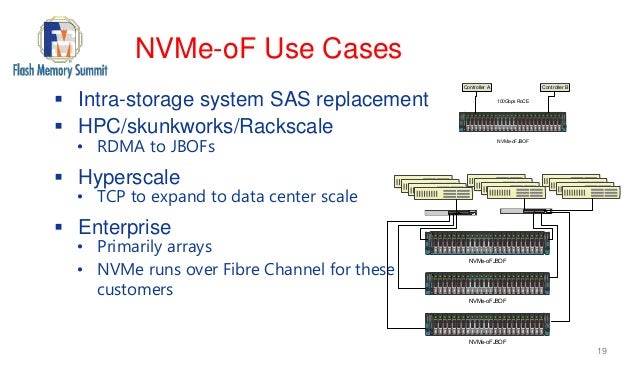

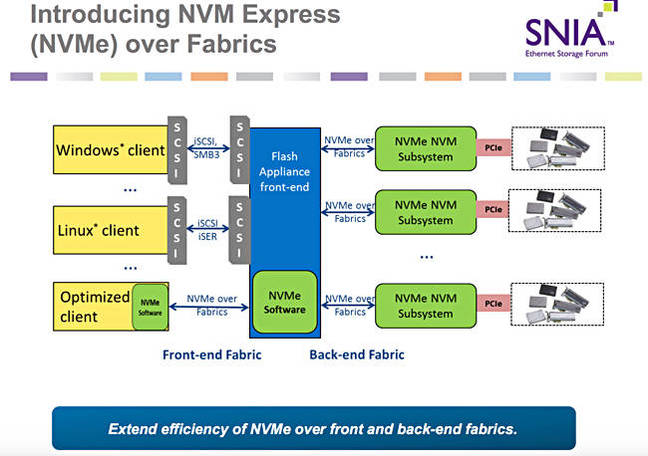
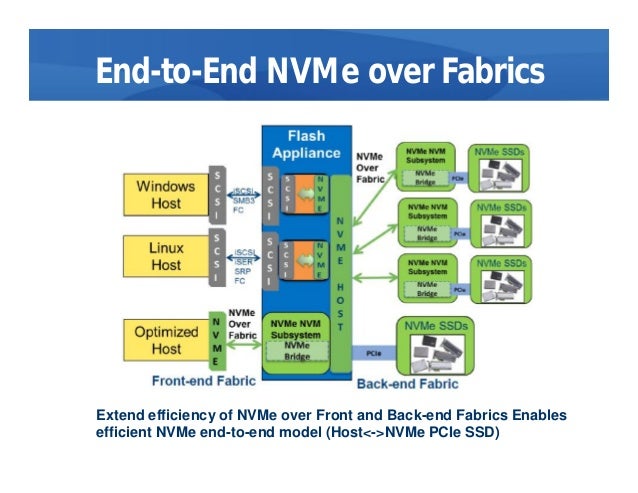
  • NVMe over Fabrics, also known as NVMe-oF and non-volatile memory express over fabrics, is a protocol specification designed to connect hosts to storage across a network fabric using the NVMe protocol.
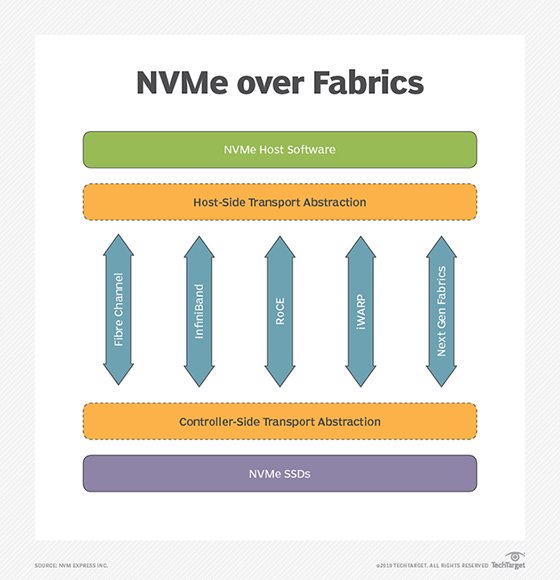
The protocol is designed to enable data transfers between a host computer and a target solid-state storage device or system over a network -- accomplished through a NVMe message-based command. Data transfers can be transferred through methods such as Ethernet, Fibre Channel (FC) or InfiniBand.

there have been multiple implementations of the protocol, such as NVMe-oF using remote direct memory access (RDMA), FC or Transmission Control Protocol/Internet Protocol (TCP/IP).

Uses of NVMe over Fabrics
Using NVMe-oF can help provide a state-of-the-art storage protocol that can take full advantage of today's SSDs. The protocol can also help in bridging the gaps between direct-attached storage (DAS) and SANs, enabling organizations to support workloads that require high throughputs and low latencies.
NVMe over Fabrics vs. NVMe: Key differences
One of the main distinctions between NVMe and NVMe over Fabrics is the transport-mapping mechanism for sending and receiving commands or responses. NVMe-oF uses a message-based model for communication between a host and a target storage device. Local NVMe will map commands and responses to shared memory in the host over the PCIe interface protocol.

While it mirrors the performance characteristics of PCIe Gen 3, NVMe lacks a native messaging layer to direct traffic between remote hosts and NVMe SSDs in an array. NVMe-oF is the industry's response to developing a messaging layer.

NVME over Fabrics using RDMA
NVMe-oF use of RDMA is defined by a technical subgroup of the NVM Express organization. Mappings available include RDMA over Converged Ethernet (RoCE) and Internet Wide Area RDMA Protocol (iWARP) for Ethernet and InfiniBand.

RDMA is a memory-to-memory transport mechanism between two computers. Data is sent from one memory address space to another, without invoking the OS or the processor. Lower overhead and faster access and response time to queries are the result, with latency usually in microseconds (μs).

NVMe over Fabrics using Fibre Channel
The FC protocol supports access to shared NVMe flash, but there is a performance hit imposed to interpret and translate encapsulated SCSI commands to NVMe commands.

NVMe over Fabrics using TCP/IP
One of the newer developments regarding NVMe-oF includes the development of NVMe-oF using TCP/IP. NVMe-oF can now support TCP transport binding. NVMe over TCP makes it possible to use NVMe-oF across a standard Ethernet network.

https://searchstorage.techtarget.com/definition/NVMe-over-Fabrics-Nonvolatile-Memory-Express-over-Fabrics


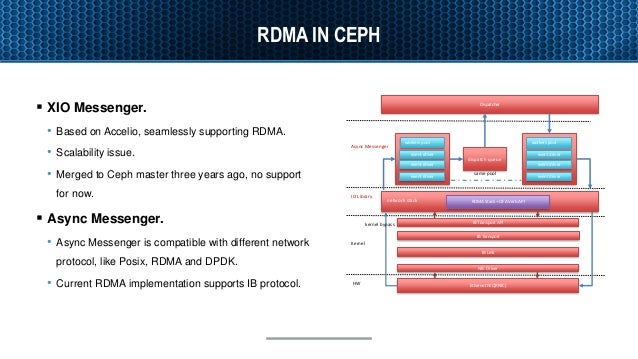
  • Accelerating Ceph with RDMA and NVMe-oF


RDMA as Ceph NVMe fabrics
RDMA is a direct access from the memory of one computer into that of another without involving either one’s operating system.
RDMA supports zero-copy networking(kernel bypass)
Eliminate CPUs, memory or context switches
Reduce latency and enable fast messenger transfer.
Potential benefit for ceph
Better Resource Allocation – Bring additional disk to servers with spare CPU. 
Lower latency - generated by ceph network stack.
https://www.slideshare.net/insideHPC/accelerating-ceph-with-rdma-and-nvmeof

  • DRBD Fundamentals


The Distributed Replicated Block Device (DRBD) is a software-based, shared-nothing, replicated storage solution mirroring the content of block devices (hard disks, partitions, logical volumes etc.) between hosts.

DRBD mirrors data

    in real time. Replication occurs continuously while applications modify the data on the device.

    transparently. Applications need not be aware that the data is stored on multiple hosts.

    synchronously or asynchronously. With synchronous mirroring, applications are notified of write completions after the writes have been carried out on all hosts. With asynchronous mirroring, applications are notified of write completions when the writes have completed locally, which usually is before they have propagated to the other hosts.
https://www.linbit.com/drbd-user-guide/users-guide-drbd-8-4/


Monday, July 29, 2019

workload managers

Slurm and Moab
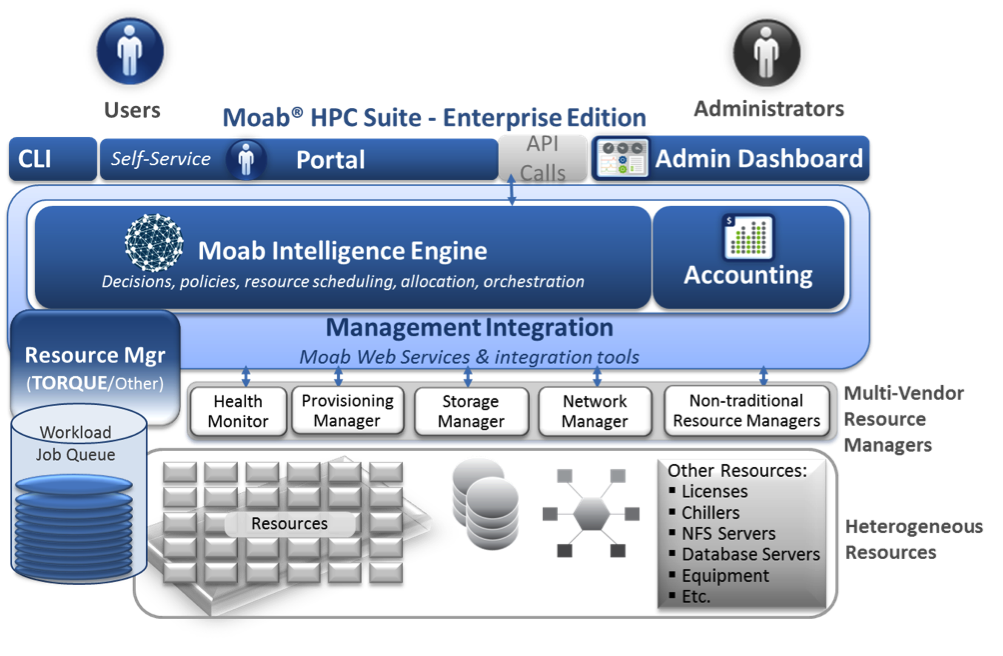
Slurm and Moab are two workload manager systems that have been used to schedule and manage user jobs run on Livermore Computing (LC) clusters. Currently, LC runs Slurm natively on most clusters, and provides Moab "wrappers" now that Moab has been decommissioned. This tutorial presents the essentials for using Slurm and Moab wrappers on LC platforms

What is a Workload Manager?
The typical LC cluster is a finite resource that is shared by many users.
In the process of getting work done, users compete for a cluster's nodes, cores, memory, network, etc.
In order to fairly and efficiently utilize a cluster, a special software system is employed to manage how work is accomplished.
Commonly called a Workload Manager. May also be referred to (sometimes loosely) as:
Batch system
Batch scheduler
Workload scheduler
Job scheduler
Resource manager (usually considered a component of a Workload Manager)
Tasks commonly performed by a Workload Manager:
Provide a means for users to specify and submit work as "jobs"
Evaluate, prioritize, schedule and run jobs
Provide a means for users to monitor, modify and interact with jobs
Manage, allocate and provide access to available machine resources
Manage pending work in job queues
Monitor and troubleshoot jobs and machine resources
Provide accounting and reporting facilities for jobs and machine resources
Efficiently balance work over machine resources; minimize wasted resources
https://computing.llnl.gov/tutorials/moab/
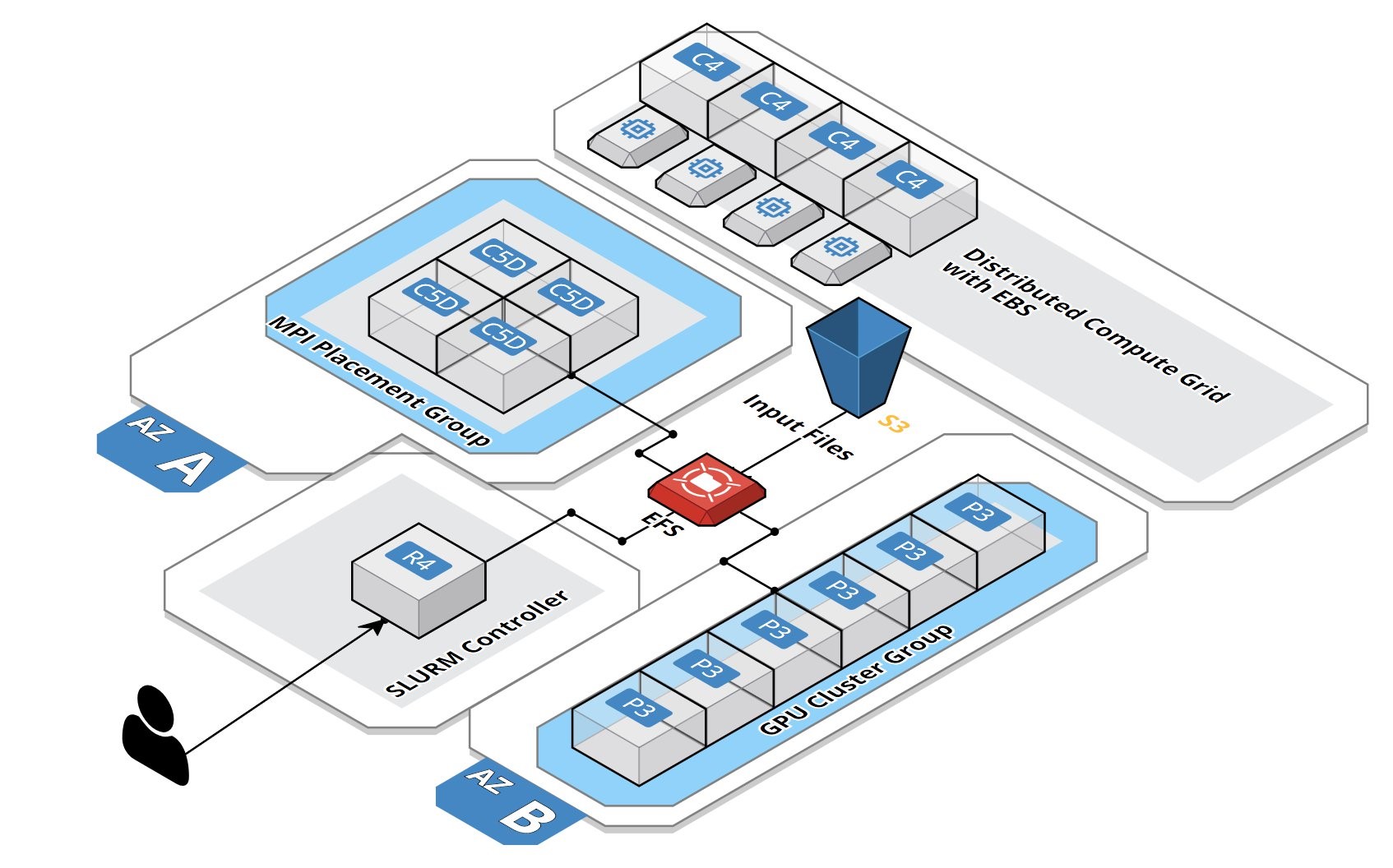
Deploying a Burstable and Event-driven HPC Cluster on AWS Using SLURM, Part 1
Google Codelab for creating two federated Slurm clusters on Google Cloud Platform
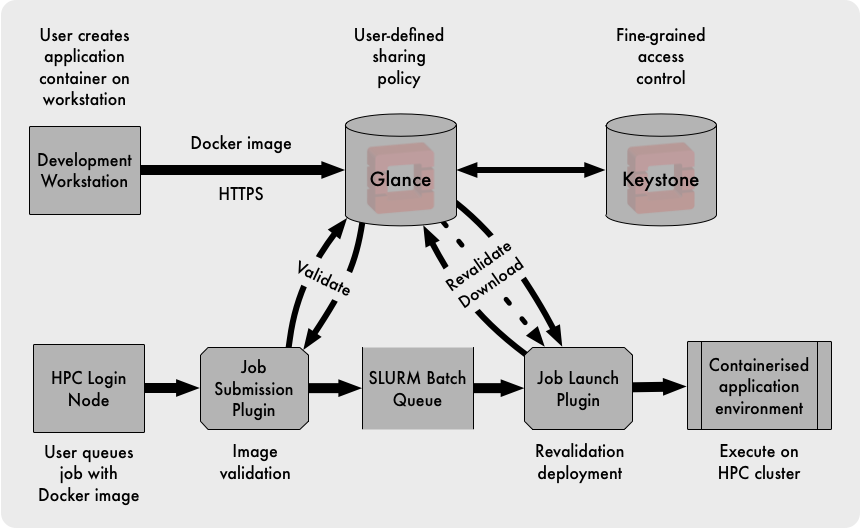
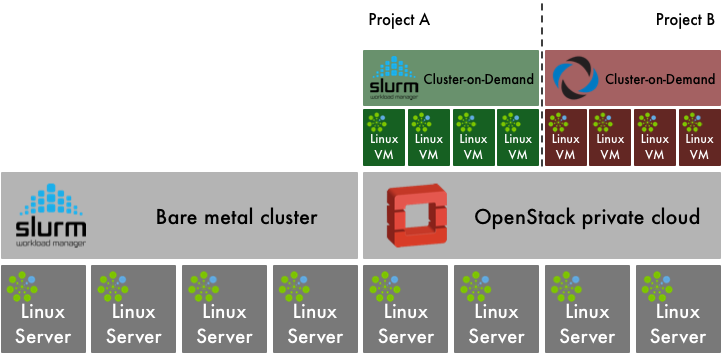
OpenStack and HPC Workload Management
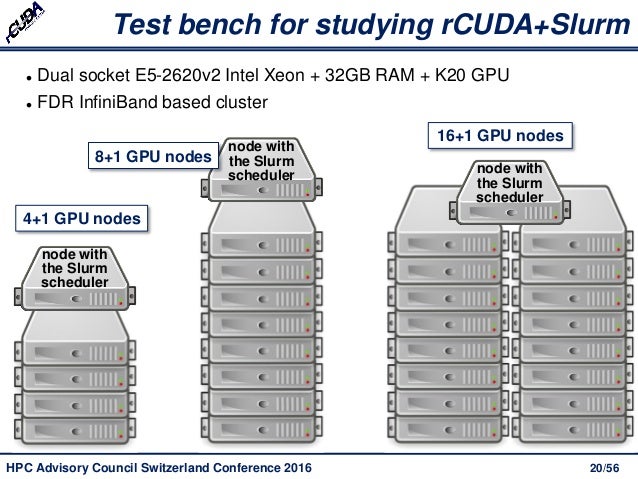
Increasing Cluster Performance by Combining rCUDA with Slurm
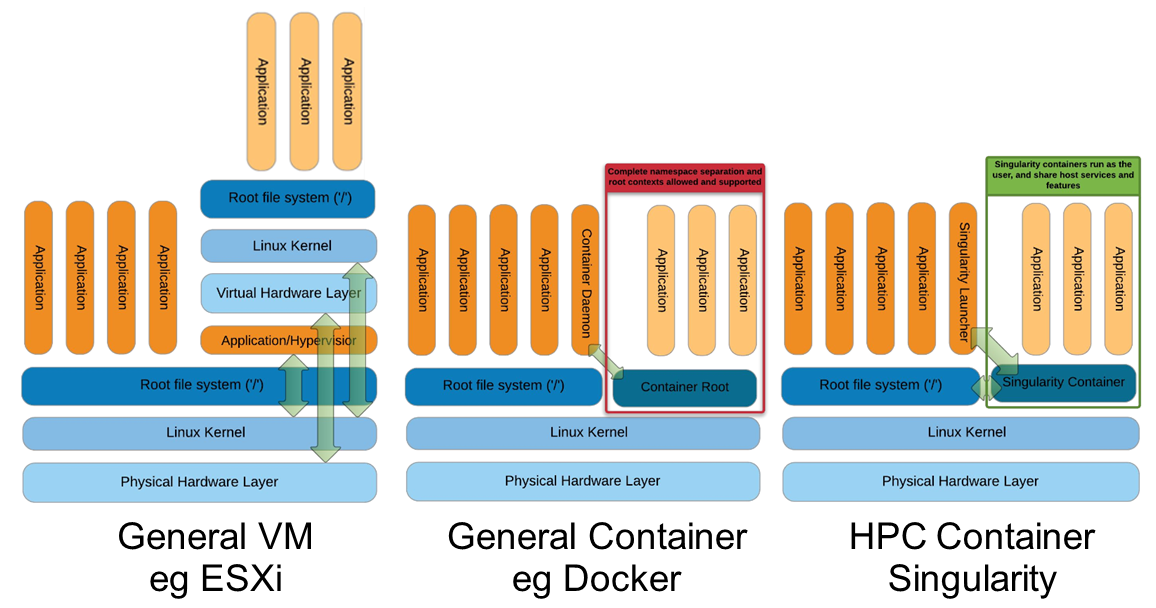
Docker vs Singularity vs Shifter in an HPC environment
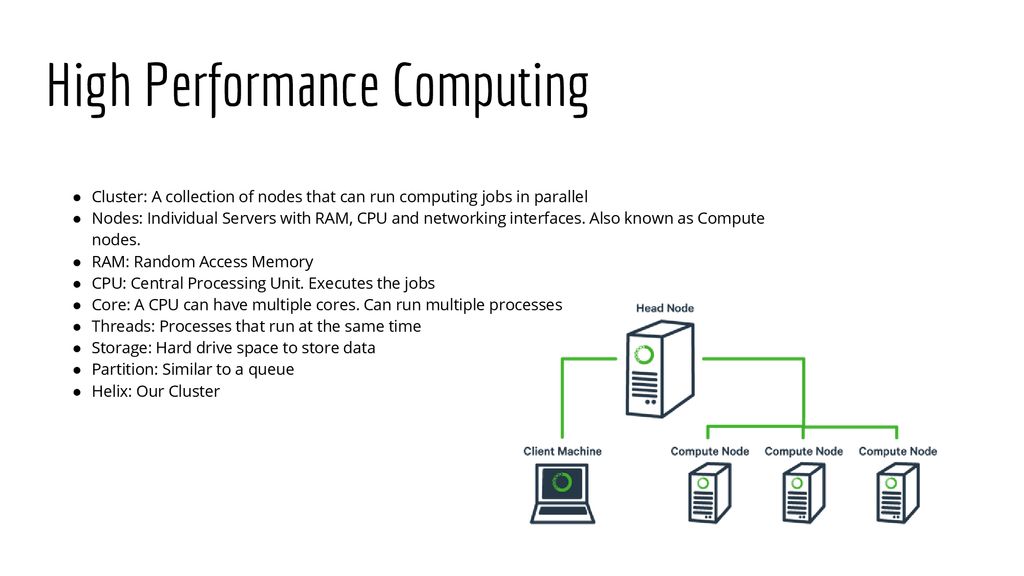
Helix - HPC/SLURM Tutorial


  • SchedMD® is the core company behind the Slurm workload manager software, a free open-source workload manager designed specifically to satisfy the demanding needs of high performance computing. 

https://www.schedmd.com/

  • Slurm vs Moab/Torque on Deepthought HPC clusters

Intro and Overview: What is a scheduler?
A high performance computing (HPC) cluster (hereafter abbreviated HPCC) like the Deepthought clusters consists of many compute nodes, but at the same time have many users submitting many jobs, often very large jobs. The HPCC needs a mechanism to distribute jobs across the nodes in a reasonable fashion; this is the task of a program called a scheduler.
This is a complicated tasks: the various jobs can have various requirements ( e.g. CPU, memory, diskspace, network transportation, etc. ) as well as differing priorities. And because we want to enable large parallel jobs to run, the scheduler needs to be able to reserve nodes for larger jobs (i.e. if an user submits a job requiring 100 nodes, and only 90 nodes are currently free, the scheduler might need to keep other jobs off the 90 free nodes in order that the 100 node job might eventually run). The scheduler must also account for nodes which are down, or have insufficient resources for a particular job, etc. As such, a resource manager is also needed (which can either be integrated with the scheduler or run as a separate program). The scheduler will also need to interface with an accounting system (which also can be integrated into the scheduler) to handle the charging of allocations for time used on the cluster.

The original Deepthought HPC cluster at the University of Maryland originally used the Maui scheduler for scheduling jobs, along with the Torque Resource Manager and the Gold Allocation Manager.
In 2009, we migrated to the Moab scheduler, still keeping Torque as our resource manager and Gold for allocation management.Moab derived from Maui, and so the user interface was mostly unchanged during this migration.
Slurm includes its own resource management and accounting system, so Torque and Gold are no longer used.

http://hpcc.umd.edu/hpcc/help/slurm-vs-moab.html
Intelligent HPC Workload Management Across Infrastructure and Organizational Complexity
Running computations on the Torque cluster
Workload Management in HPC and Cloud
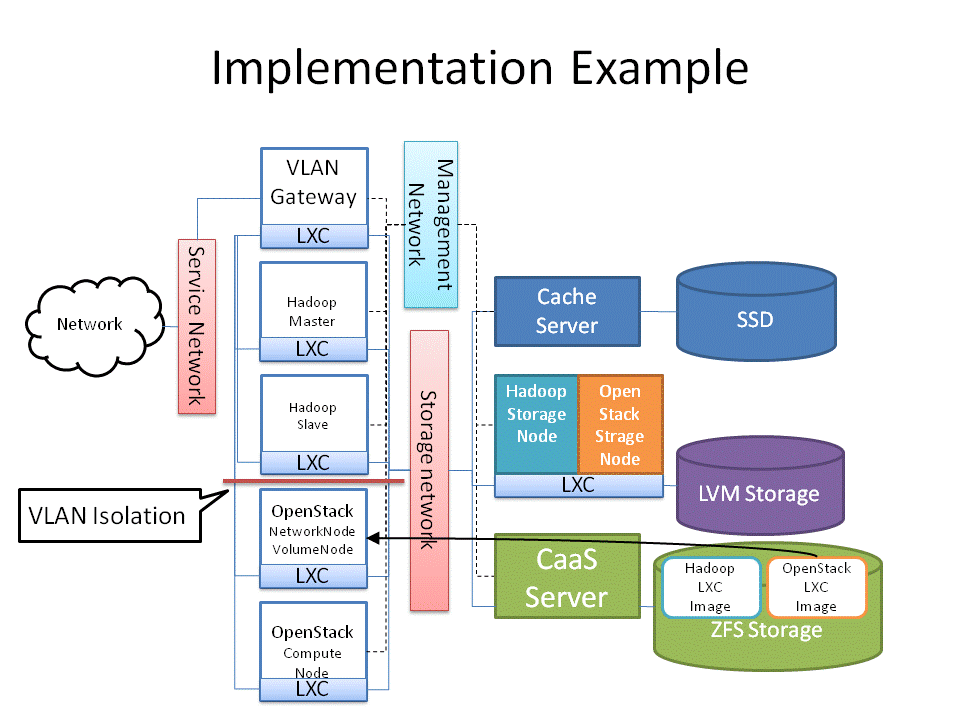
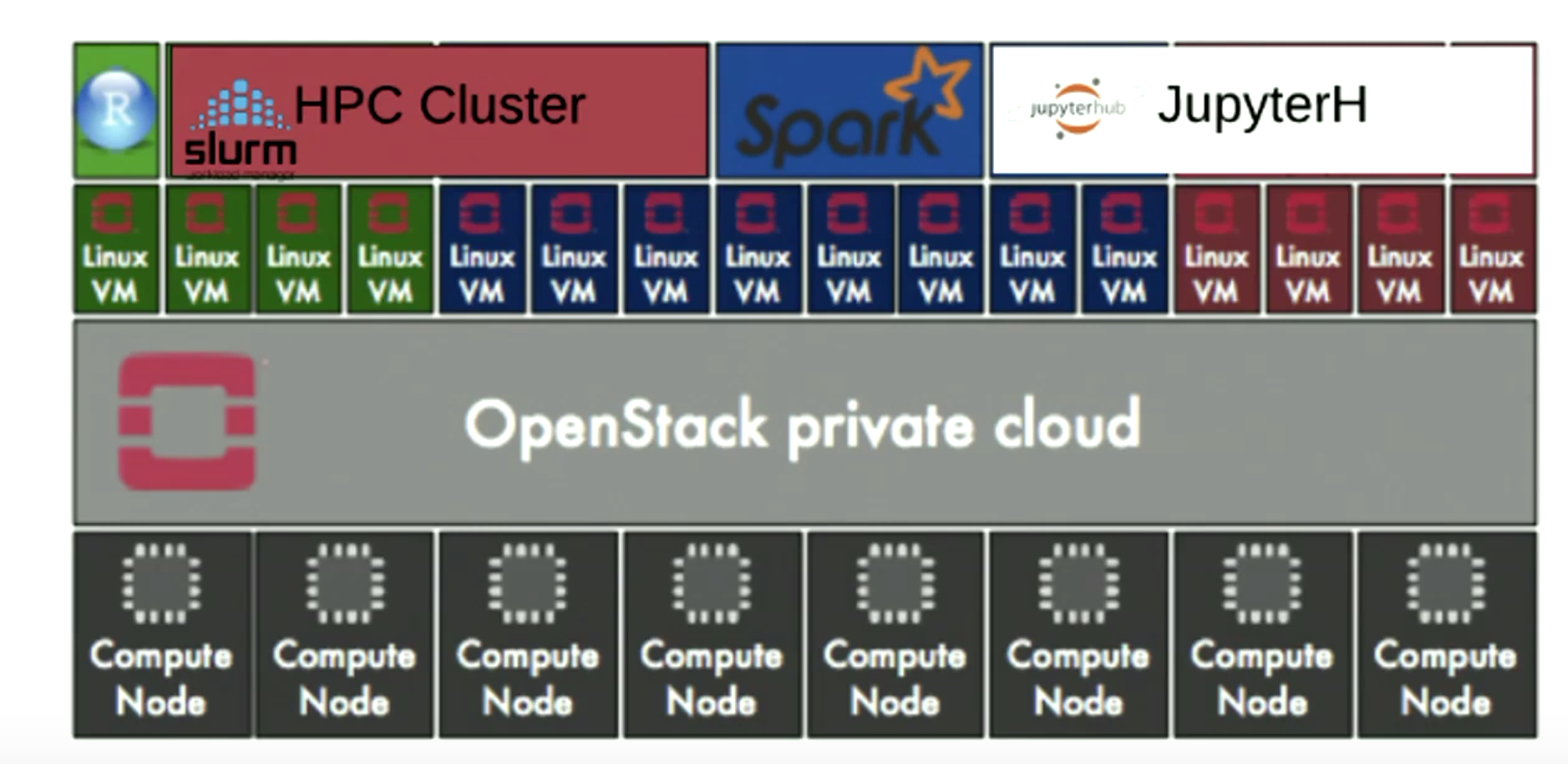
Cluster as a Service: Managing multiple clusters for openstack clouds and other diverse frameworks

Overview of the UL HPC Viridis cluster, with its OpenStack-based private Cloud setup.

OpenStack and Virtualised HPC
How the Vienna Biocenter powers HPC with OpenStack

Monday, June 24, 2019

High Throughput Computing (HTC)

  • What is HTCondor?
HTCondor is a specialized workload management system for compute-intensive jobs. Like other full-featured batch systems, HTCondor provides a job queueing mechanism, scheduling policy, priority scheme, resource monitoring, and resource management. Users submit their serial or parallel jobs to HTCondor, HTCondor places them into a queue, chooses when and where to run the jobs based upon a policy, carefully monitors their progress, and ultimately informs the user upon completion.
https://research.cs.wisc.edu/htcondor/description.html

  • High Throughput Computing (HTC) 
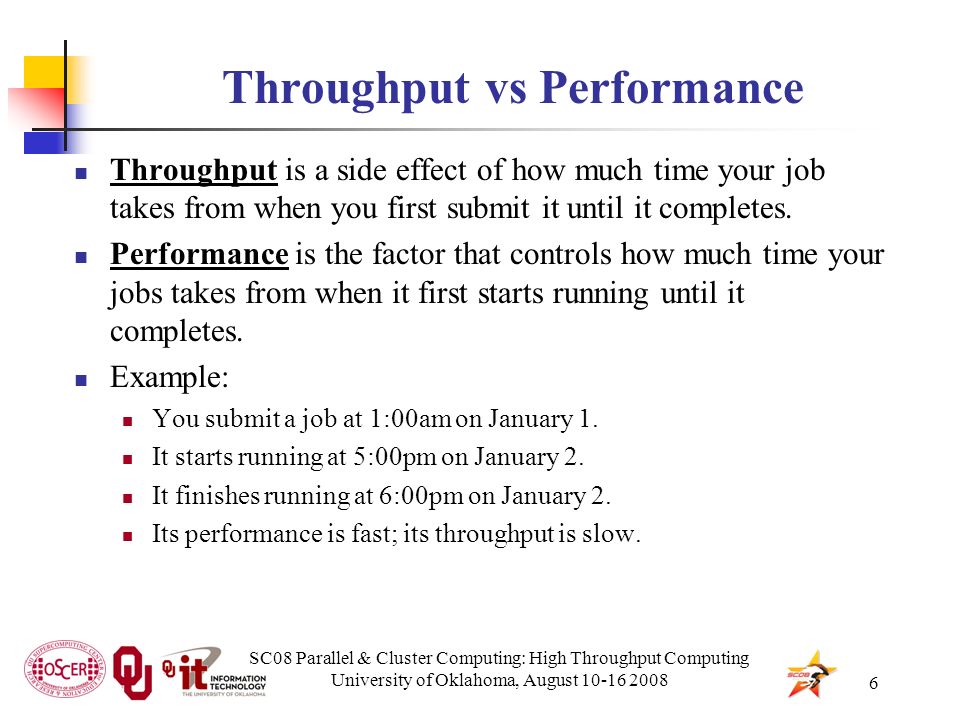
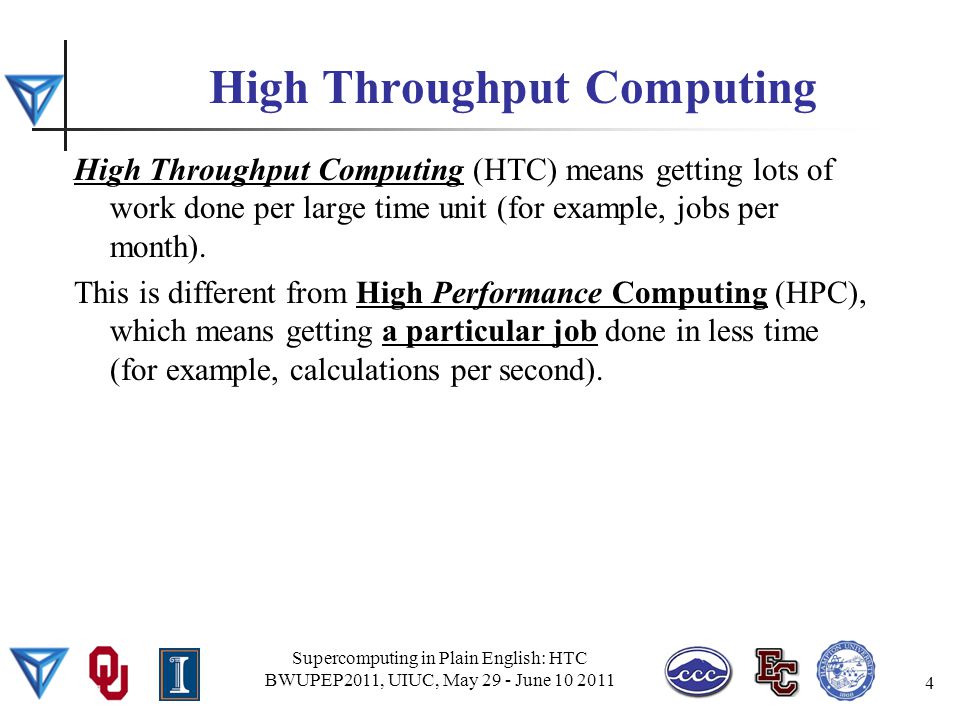
For many scientists, the quality of their research is heavily dependent on computing throughput. It is not uncommon to find problems that require weeks or months of computation to solve. Scientists involved in this type of research need a computing environment that delivers large amounts of computational power over a long period of time. Such an environment is called a High-Throughput Computing (HTC) environment. In contrast, High-Performance Computing (HPC) environments deliver a tremendous amount of power over a short period of time. HPC environments are often measured in terms of FLoating point OPerations per Second (FLOPS). Many scientists today do not care about FLOPS; their problems are on a much larger scale. These people are concerned with floating point operations per month or per year. They are interested in how many jobs they can complete over a long period of time.

As computers became smaller, faster and less expensive, scientists moved away from mainframes and purchased personal computers or workstations. An individual or a small group could afford a computing resource that was available whenever they wanted it. The resource might be slower than the mainframe, but it provided exclusive access. Recently, instead of one large computer for an institution, there are many workstations. Each workstation is owned by its user. This is distributed ownership. While distributed ownership is more convenient for the users, it is also less efficient. Machines sit idle for long periods of time, often while their users are busy doing other things. HTCondor takes this wasted computation time and puts it to good use. The situation today matches that of yesterday, with the addition of clusters in the list of resources. These machines are often dedicated to tasks. HTCondor manages a cluster's effort efficiently, as well as handling other resources.

To achieve the highest throughput, HTCondor provides two important functions. First, it makes available resources more efficient by putting idle machines to work. Second, it expands the resources available to users, by functioning well in an environment of distributed ownership.

http://research.cs.wisc.edu/htcondor/overview/
High Throughput Computing Facilities

High throughput computing(HTC) is an efficient and effective way to solve many research problems – by breaking the problems up into numerous small, independent sub-tasks and distributing work across a grid of many different computers. HTC is a complement to supercomputing and is particularly well suited to applications in which there is much data to be analyzed but little need for communication - such as data mining, molecular docking, etc.
https://www.its.hku.hk/services/research/htc/system
What Is High Throughput Distributed Computing
Parallel & Cluster Computing High Throughput Computing

  • In this tutorial, we will learn how to apply DAGMan to help us manage jobs and job interdependencies. First, we will revisit the optimization example from in the previous section. Second, we will manage a set of molecular dynamics (MD) simulations using the NAMD program. NAMD is conventionally used in highly parallel HPC settings, scaling to thousands of cores managed by a single job. One can achieve the same scaling and ease of management in HTC systems using thousands of individual jobs using workflow tools such as DAGMan. 

https://swc-osg-workshop.github.io/OSG-UserTraining-Internet2-2018/novice/DHTC/04-dagman.html

  • DAGMan (Directed Acyclic Graph Manager) is a meta-scheduler for HTCondor. It manages dependencies between jobs at a higher level than the HTCondor Scheduler.

https://research.cs.wisc.edu/htcondor/dagman/dagman.html