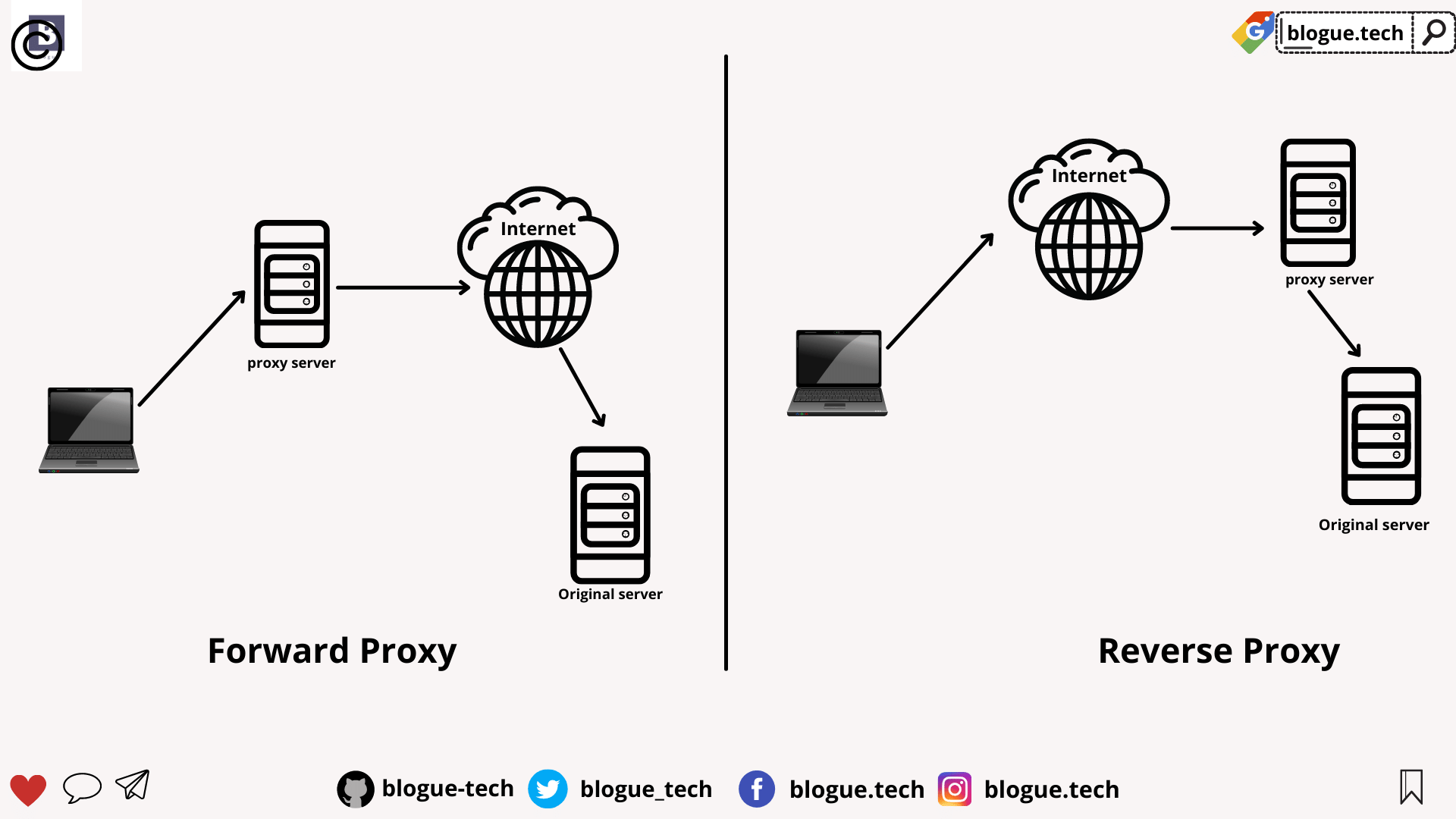
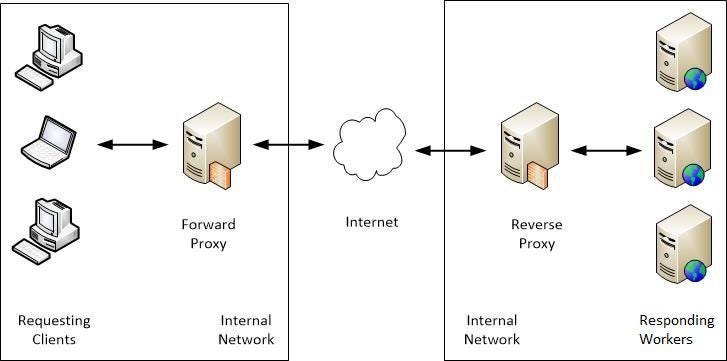
A forward proxy is the most common form of a proxy server and is generally used to pass requests from an isolated, private network to the Internet through a firewall. Using a forward proxy, requests from an isolated network, or intranet, can be rejected or allowed to pass through a firewall.
A forward proxy server will first check to make sure a request is valid. If a request is not valid, or not allowed (blocked by the proxy), it will reject the request resulting in the client receiving an error or a redirect. If a request is valid, a forward proxy may check if the requested information is cached. If it is, the forward proxy serves the cached information. If it is not, the request is sent through a firewall to an actual content server which serves the information to the forward proxy. The proxy, in turn, relays this information to the client and may also cache it, for future requests.
Reverse proxy
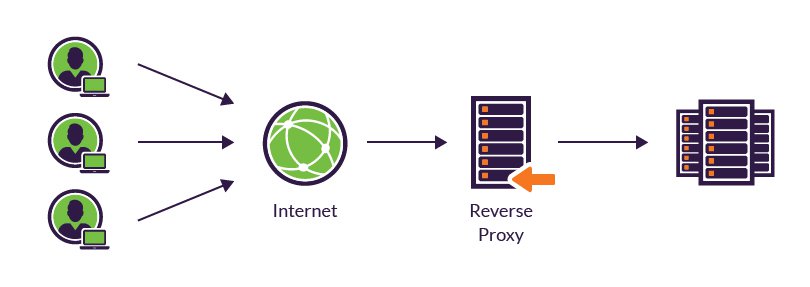
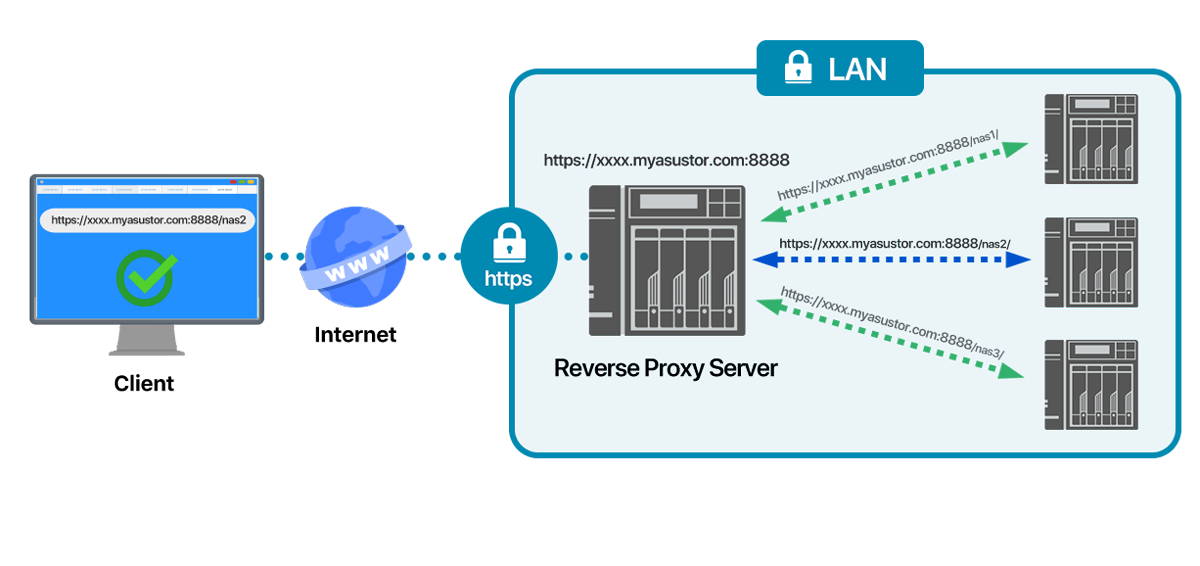
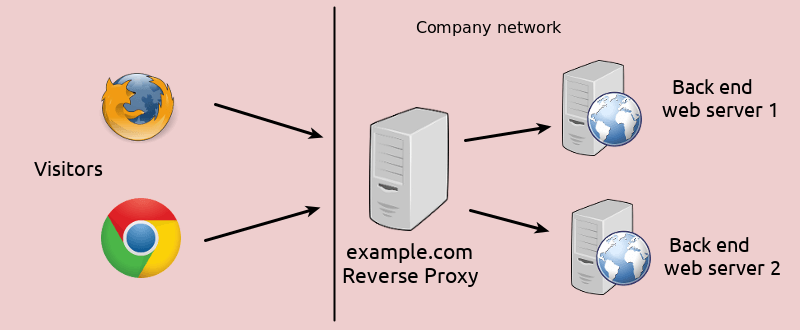
A reverse proxy is another common form of a proxy server and is generally used to pass requests from the Internet, through a firewall to isolated, private networks. It is used to prevent Internet clients from having direct, unmonitored access to sensitive data residing on content servers on an isolated network, or intranet
If caching is enabled, a reverse proxy can also lessen network traffic by serving cached information rather than passing all requests to actual content servers.
Reverse proxy servers may also balance workload by spreading requests across a number of content servers.
One advantage of using a reverse proxy is that Internet clients do not know their requests are being sent to and handled by a reverse proxy server.
The above image shows a reverse proxy configuration. An Internet client initiates a request to Server A (Proxy Server) which, unknown to the client, is actually a reverse proxy server. The request is allowed to pass through the firewall and is valid but is not cached on Server A. The reverse proxy (Server A) requests the information from Server B (Content Server), which has the information the Internet client is requesting. The information is served to the reverse proxy, where it is cached, and relayed through the firewall to the client. Future requests for the same information will be fulfilled by the cache, lessening network traffic and load on the content server (proxy caching is optional and not necessary for proxy to function on your HTTP Server). In this example, all information originates from one content server (Server B).
Proxy chaining
A proxy chain uses two or more proxy servers to assist in server and protocol performance and network security. Proxy chaining is not a type of proxy, but a use of reverse and forward proxy servers across multiple networks. In addition to the benefits to security and performance, proxy chaining allows requests from different protocols to be fulfilled in cases where, without chaining, such requests would not be possible or permitted.
For example, a request using HTTP is sent to a server that can only handle FTP requests. In order for the request to be processed, it must pass through a server that can handle both protocols. This can be accomplished by making use of proxy chaining which allows the request to be passed from a server that is not able to fulfill such a request (perhaps due to security or networking issues, or its own limited capabilities) to a server that can fulfill such a request.
First the sender needs to enter the email address of the recipient along with the message using an email application. This should be done at the local computers. Once it is finished and the “Send” button is clicked, the email will be going to the MTA (The Mail Transfer Agent). This communication is done via the SMTP protocol.
The next step is DNS lookup. The system sends a request to find out the corresponding MTA of the recipient. This will be done with the help of the MX record. In the DNS zone, for the receiver address’ domain, there will be an MX record (stands for Mail Exchanger record). This is a DNS resource record which specifies the mail server of a domain. So, after the DNS lookup, a response is given to the requested mail server with the IP address of the recipient’s mail server. This way the ‘to’ mail server is identified.
The next step is transferring the message between the mail servers. The SMTP protocol is used for this communication. Now our message is with the recipient mail server (MTA).
Now, this message is transferred to the Mail Delivery Agent and then it is transferred to the recipient’s local computer. As we have seen earlier, two protocols can be used here. If we use POP3, then the whole email will be downloaded to the local computer and the copy at the server gets deleted. If the protocol used is IMAP, then the email message is stored in the mail server itself, but the user can easily manipulate the emails on the mail server as in the local computer. This is the difference when using both the protocols and this is how your email gets delivered. If some error occurred to send the email, the emails will be delayed. There is a mail queue in every mail server. These mails will be pending in the mail queue. The mail server will keep trying to resend the email. Once the email sending fails permanently, the mail server may send a bounce back email message to the sender’s email address.
This explains why you maybe getting bounce back emails sometimes. The reason for bouncing back will be explained in the message. There are many reasons for getting an email to bounce back such as as incorrect email address in the ‘to’ field.
https://www.interserver.net/tips/kb/exactly-emails-works-steps-explanation/
What is SMTP?
SMTP is part of the application layer of the TCP/IP protocol. Using a process called "store and forward," SMTP moves your email on and across networks. It works closely with something called the Mail Transfer Agent (MTA) to send your communication to the right computer and email inbox.
SMTP spells out and directs how your email moves from your computer's MTA to an MTA on another computer, and even several computers. Using that "store and forward" feature mentioned before, the message can move in steps from your computer to its destination.
https://whatismyipaddress.com/smtp
250 – This SMTP server response simply means everything went well and your message was delivered to the recipient server.
450 – Your message was not delivered because the other user mailbox was not available. This can happen if the mailbox is locked or is not routable
https://sendgrid.com/blog/smtp-server-response-codes-explained/
Mail servers can be expressed in DNS servers with the MX records. MX stands for Mail Exchanger. MX records specified the Domain name related mail server IP address. This mail server accepts mail with smtp protocol from senders.
To retrieve domain MX recordssimply use MX option in combination to domain name you wish to query.
Use the +short option to retrieve only mail exchange (MX) records:
If you need to troubleshoot your own DNS server locally while the domain's name server is not yet set, you can point dig to any local or remote DNS server you wish to query by using @HOST/IP syntax.
https://linuxconfig.org/how-to-check-domain-s-mx-mail-exchange-records-using-dig-command-on-linux
Email Client
SMTP Server - mail carrier
Hello Command
MTA - local post office
DNS - to map out path
SMTP Server
Email Client
user agent(UA) - email application such as outlook, thunderbird
web-based email - gmail etc
private email system - thunderbird outlook etc
UA - MTA1 - MTA2 - UA
MTA uses SMTP to communicate each other
MIME Header - what the email contains, txt image etc
A broadcast domain is a logical division of a computer network, in which all nodes can reach each other by broadcast at the data link layer. A broadcast domain can be within the same LAN segment or it can be bridged to other LAN segments. Any computer connected to the same Ethernet repeater or switch is a member of the same broadcast domain. Further, any computer connected to the same set of inter-connected switches/repeaters is a member of the same broadcast domain Routers and other higher-layer devices form boundaries between broadcast domains. broadcast domains are only divided by layer 3 network devices such as routers or layer 3 switches https://en.wikipedia.org/wiki/Broadcast_domain
Internet Protocol Security (IPsec) is a protocol suite for securing Internet Protocol (IP) communications by authenticating and encrypting each IP packet of a communication session
Some other Internet security systems in widespread use, such as Secure Sockets Layer (SSL), Transport Layer Security (TLS) and Secure Shell (SSH), operate in the upper layers of the TCP/IP model. In the past, the use of TLS/SSL had to be designed into an application to protect the application protocols. In contrast, since day one, applications did not need to be specifically designed to use IPsec. Hence, IPsec protects any application traffic across an IP network.
http://en.wikipedia.org/wiki/IPsec
85) What do mean by tunnel mode?
This is a mode of data exchange wherein two communicating computers do not use IPSec themselves. Instead, the gateway that is connecting their LANs to the transit network creates a virtual tunnel that uses the IPSec protocol to secure all communication that passes through it.
IPsec consist of several protocols
ISAKMP
IKE
ESP - protocol 50
AH - protocol 51
IPsec Modes
Transport Mode
Tunnel Mode
Encryption Algols
DES
3DES
AES
RSA
Hashing Algols
MD5
SHA-1
IKE Phases
Data integrity-HMAC
Data Confidentiality-Encryption
Data Origin Authentication-SA peer
anti-replay- sequence numbers
HMAC
Diffie-Hellman
http://networkqna.com/ipsec/
Q1 – In which IPSEC Phase is the keys used for data encryption derived.
Q2 – In IPSEC, If ESP provides both encryption and authentication, why is AH required.
Q3 – Explain two methods by which two IPSEC routers can authenticate with each other.
Q4 – Which UDP ports should be open on a firewall to allow traffic from a L2TP/IPSEC based VPN clients to a PPTP VPN server on the inside
Q5 -Which IP protocol does AH and ESP headers use in IPSEC
Q6 – Which type of VPN would you use if data has to be encrypted at the network layer
Q7 – What is the use of configuring ACL in IPSEC configuration on a Cisco router
Q8 – If a packet sniffer is used on the VPN tunnel can the inner IP header be viewed
Q9 – Are the pre-shared keys used between the routers used for data encryption between systems at the different sites.
Q10 – How does the IPSEC protocols, ESP and AH provide replay protection
http://tcpipguru.com/ipsec-interview-questions/
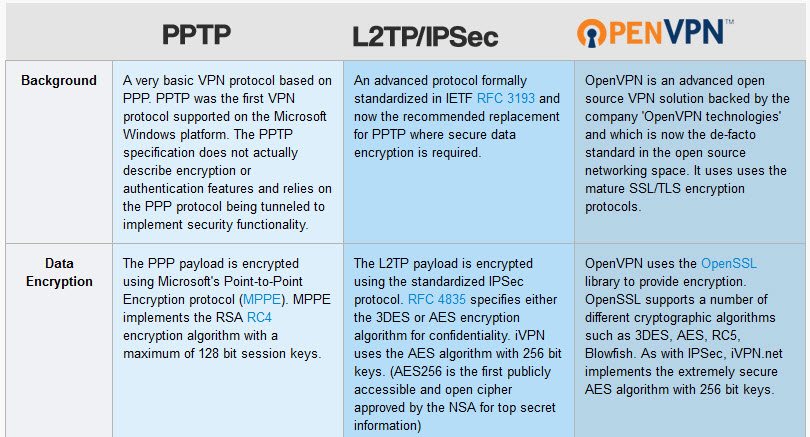
IPSEC - The Internet Protocol Security is a set of protocols that provides security features to IP; like authentication, encryption and confidentiality.
L2TP -Layer Two Tunneling Protocol is a tunneling protocol (VPN) used to transport in L2 traffic over an IP Network ( Internet)
L2TP as follows from the name, is a layer 2 tunneling protocol. So, it can tunnel Layer 2 frames over IPSEC.
PPTP or Point-to-Point Tunneling Protocol is an outdated method for implementing VPNs. It is developed by Microsoft and the easiest protocol to configure. PPTP VPN has low overhead and that makes it faster than other VPN protocols.
L2TP or Layer 2 Tunneling Protocol (L2TP) is the result of a partnership between Cisco and Microsoft.
It was created to provide a more secure VPN protocol than PPTP. L2TP is a tunneling protocol like PPTP that allows users to access the common network remotely.
IEEE 802.1X is an IEEE Standard for port-based Network Access Control (PNAC). It is part of the IEEE 802.1 group of networking protocols. It provides an authentication mechanism to devices wishing to attach to a LAN or WLAN.
IP (short for Internet Protocol) specifies the technical format of packets and the addressing scheme for computers to communicate over a network.
What is TCP?
Transmission Control Protocol (TCP), which establishes a virtual connection between a destination and a source.
IP by itself can be compared to something like the postal system. It allows you to address a package and drop it in the system, but there's no direct link between you and the recipient. TCP/IP, on the other hand, establishes a connection between two hosts so that they can send messages back and forth for a period of time.
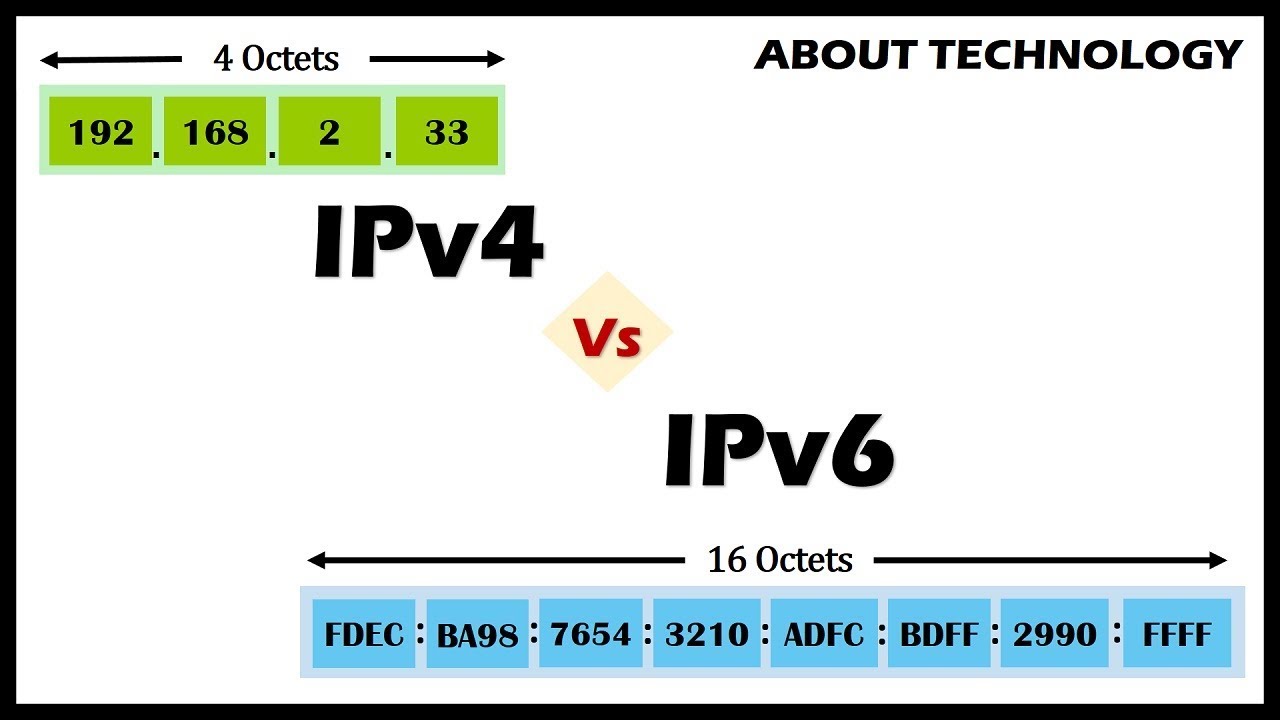
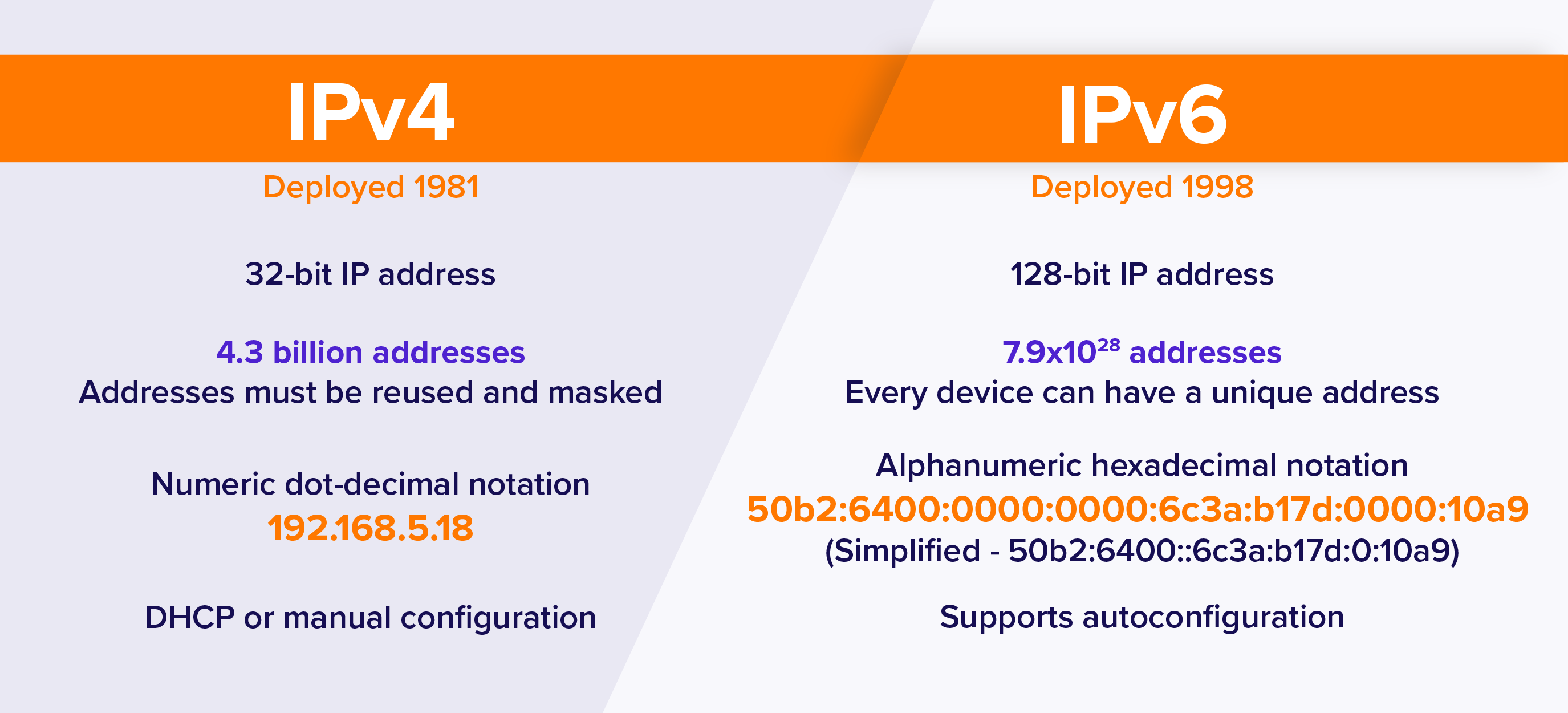
IPv4 and a new version called IPv6. IPv6 is an evolutionary upgrade to the Internet Protocol. IPv6 will coexist with the older IPv4 for some time.
The Difference Between IPv6 and IPv4 IP Addresses
An IP address is binary numbers but can be stored as text for human readers. For example, a 32-bit numeric address (IPv4) is written in decimal as four numbers separated by periods. Each number can be zero to 255. For example, 1.160.10.240 could be an IP address.
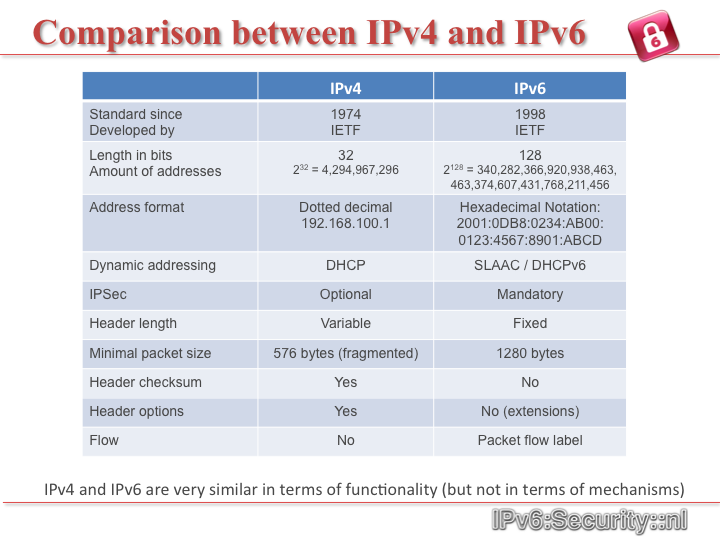
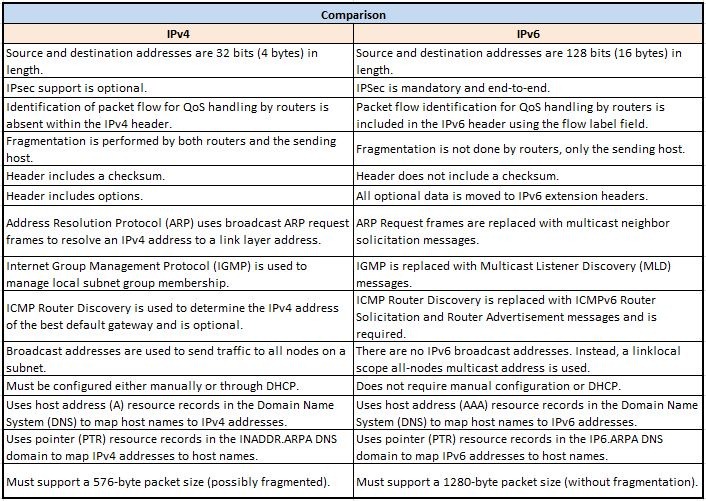
Addresses are 32 bits (4 bytes) in length.
IPv6 addresses are 128-bit IP address written in hexadecimal and separated by colons. An example IPv6 address could be written like this: 3ffe:1900:4545:3:200:f8ff:fe21:67cf
Addresses are 128 bits (16 bytes) in length
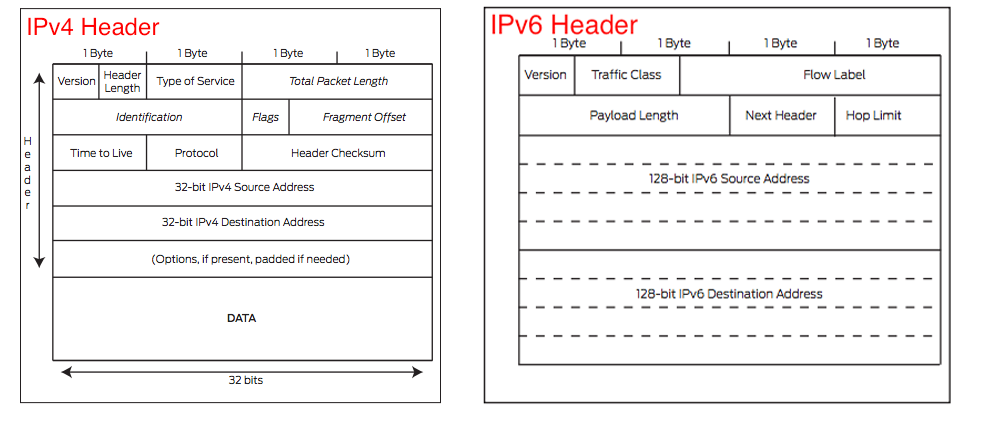
1.Simplified header format.Even though the IPv6 header contains two 128 bit addresses (source and destination IP address) the whole header has a fixed length of 40 bytes only. This allows for faster processing.
2.Address extended to 128 bits.
3.A lot of the new IPv6 functionality is built into ICMPv6 such as Neighbor Discovery, Autoconfiguration, Multicast Listener Discovery, Path MTU Discovery.
4.Enhanced Security and QoS Features.
Why are we running out of IPv4 addresses?
IPv4 uses 32 bits for its Internet addresses. That means it can support 2^32 IP addresses in total — around 4.29 billion. That may seem like a lot, but all 4.29 billion IP addresses have now been assigned to various institutions, leading to the crisis we face today.
How does IPv6 solve this problem?
As previously stated, IPv6 utilizes 128-bit Internet addresses. Therefore, it can support 2^128 Internet addresses — 340,282,366,920,938,000,000,000,000,000,000,000,000 of them to be exact. That's a lot of addresses, so many that it requires a hexadecimal system to display the addresses. In other words, there are more than enough IPv6 addresses to keep the Internet operational for a very, very long time.
http://mashable.com/2011/02/03/ipv4-ipv6-guide/
The Need for IPv6
IPv4 vs IPv6
Address space
End-to-End Connectivity
Ease of configuration
Security concerns
QoS
6in4 is an Internet transition mechanism for migrating from Internet Protocol version 4 (IPv4) to IPv6.
6in4 uses tunneling to encapsulate IPv6 traffic over explicitly-configured IPv4 links as defined in RFC 4213
6in4 traffic is sent over the IPv4 Internet inside IPv4 packets whose IP headers have the IP protocol number set to 41.
This protocol number is specifically designated for IPv6 encapsulation.
The 6in4 protocol has no security features, thus one can easily inject IPv6 packets by spoofing the source IPv4 address of a tunnel endpoint and sending it to the other endpoint. This problem can partially be solved by implementing network ingress filtering or with IPsec. Another solution is to use a secure protocol such as AYIYA or other tunneling methods that compute digital signatures for each packet thus facilitating verification of packet authenticity.
The mentioned packet injection loophole of 6in4 was exploited for a research benefit in a method called IPv6 Tunnel Discovery which allowed the researchers to discover operating IPv6 tunnels around the world.
http://en.wikipedia.org/wiki/6in4
IPv6 transition mechanisms
IPv6 transition mechanisms are technologies that facilitate the transitioning of the Internet from its initial (and current) IPv4 infrastructure to the successor addressing and routing system of Internet Protocol Version 6 (IPv6). As IPv4 and IPv6 networks are not directly interoperable, these technologies are designed to permit hosts on either network to participate in networking with the other network.
Dual IP stack implementation
Dual-stack (or native dual-stack) refers to side-by-side implementation of IPv4 and IPv6. That is, both protocols run on the same network infrastructure, and there's no need to encapsulate IPv6 inside IPv4 (using tunneling) or vice-versa. Dual-stack is defined in RFC 4213
Tunneling
Many current internet users do not have IPv6 dual-stack support, and thus cannot reach IPv6 sites directly. Instead, they must use IPv4 infrastructure to carry IPv6 packets. This is done using a technique known as tunneling, which encapsulates IPv6 packets within IPv4, in effect using IPv4 as a link layer for IPv6
Automatic tunneling
Automatic tunneling refers to a technique by which the routing infrastructure automatically determines the tunnel endpoints
Configured and automated tunneling (6in4)
6in4 tunneling requires the tunnel endpoints to be explicitly configured, either by an administrator manually or the operating system's configuration mechanisms, or by an automatic service known as a tunnel broker
Proxying and translation for IPv6-only hosts
It is likely that hosts newly added to the Internet might only have IPv6 connectivity. For these clients to have backward-compatible connectivity to existing IPv4-only resources, suitable IPv6 transition mechanisms must be deployed.
One form of address translation is the use of a dual-stack application-layer proxy server, for example a web proxy.
Our work aims to develop non-invasive methods for discovering, and collecting information about, IPv6-in-IPv4 tunnels in the Internet at large. This can be useful for diagnostic and troubleshooting purposes, and also provides insight on the evolution and the present structure of the IPv6 Internet.
http://www.dia.uniroma3.it/~compunet/tunneldiscovery/
IPv6 probable side-effects
4G implements over VoIP which requires IPv6
hard-coded IP addresses in software
here are now two kinds
of companies: those that have been hacked and those that don’t know they’ve been hacked
Cyber Attack Deterrence by Punishment
a legal foundation for the cyber attack, defense, and deterrence strategies is needed as soon as possible.
Improved Security?
a better network protocol is needed, both for size and for security.
IPv6 offers clear security upgrades over IPv4.
First, IPv6 is much more cryptography-friendly. A mechanism called IP Security (IPSec) is built directly into the protocol’s “code
stack.” IPSec should reduce Internet users’ vulnerability to spoofing, illicit traffic sniffing and Man-in-the-Middle (MITM) attacks.
IPv6 also offers end-to-end connectivity, which is afforded by the incredibly high number of IP addresses available. Since it is possible, in theory, to give anything anIP address, any two points on the Internet may communicate directly with each other.
For example, the astronomical number of IP addresses may mean that attackers will no longer be able to randomly “scan” the Internet to find their victims.
IPv6 Answers Some Questions, Creates Others
Hackers have already demonstrated that IPv6 is not invulnerable to many traditional, IPv4 attack methods, including DoS packetcrafting, and MITM attacks. Vulnerabilities in software (operating systems, network services, web applications) will continue to exist, no matter which protocol they use
And perhaps most crucially, although IPSec is available, it is not required
The need for cyber defense exercises (CDX) is clear.
virtual battlefield
A robust CDX requires a team-oriented approach.
There are friendly forces (Blue), hostile forces (Red), technical infrastructure (Green), and game management (White).
Host address, e.g., 192.168.1.1
Network address, e.g., 192.168.1.0/24 or 192.168.1.0 255.255.255.0
Host address is the first address in subnetwork, e.g. 192.168.1.0
Broadcast address is the last address in the subnetwork, e.g.,
192.168.1.255
IP-Lookup
Every machine that is on a TCP/IP network ( a local network, or the Internet ) has a unique Internet Protocol ( IP ) address.
IP-Lookup helps you to find information about your current IP address or any other IP address. It supports both IPv4 and IPv6 addresses.
IEEE 802.11 is a set of standards for implementing wireless local area network (WLAN) computer communication in the 2.4, 3.6 and 5 GHz frequency bands.
http://en.wikipedia.org/wiki/IEEE_802.11
the most prevalent is 802.11b. Equipment using 802.11b is comparitively
inexpensive. The 802.11b wireless communication standard operates in the
unregulated 2.4 Ghz frequency range. Unfortunately, so do many other
devices such as cordless phones and baby monitors which can interfere
with your wireless network traffic. The maximum speed for 802.11b
communications is 11 mbps.
The newer 802.11g standard improves on 802.11b. It still uses the same
crowded 2.4 Ghz shared by other common household wireless devices, but
802.11g is capable of transmission speeds up to 54 mbps
The 802.11a standard is in a whole different frequency range. By
broadcasting in the 5 Ghz range 802.11a devices run into a lot less
competition and interference from household devices. 802.11a is also
capable of transmission speeds up to 54 mbps like the 802.11g standard,
however 802.11 hardware is significantly more expensive.
Bluetooth devices trasnmit at relatively low power and have a range of
only 30 feet or so. Bluetooth networks also use the unregulated 2.4 Ghz
frequency range and are limited to a maximum of eight connected devices.
The maximum transmission speed only goes to 1 mbps.
a wireless personal area network technology designed and marketed by the Bluetooth Special Interest Group aimed at novel applications in the healthcare, fitness, beacons,security, and home entertainment industries
Compared to Classic Bluetooth, Bluetooth Smart is intended to provide considerably reduced power consumption and cost while maintaining a similar communication range.
CSR Mesh protocol uses Bluetooth Smart to communicate with other Bluetooth Smart devices in the network. Each device can pass the information forward to other Bluetooth Smart devices creating a “mesh” effect. For example, switching off an entire building of lights from a single smartphone.
https://en.wikipedia.org/wiki/Bluetooth_low_energy
Wi-Fi calling is nothing new; apps like Skype, Google Hangouts, Facebook Messenger and WhatsApp make it easier to use a phone to place calls and send texts over the internet and forgo mobile networks altogether.
Carriers are also adopting Wi-Fi calling themselves. Whether it's because they want to bolster their network coverage or improve user experience, several networks have phones that have this service baked in.
Instead of using your carrier's network connection, you can make voice calls via a Wi-Fi network. That could mean using a Wi-Fi connection you have set up at home, or whatever Wi-Fi hotspot you happen to be on when you're out and about, such as at a cafe or library. In most ways, it's like any other phone call, and you still use regular phone numbers.
Wi-Fi calling is especially useful when you're in an area with weak carrier coverage. For example, when you're traveling to the residential countryside, or you're in a building with spotty reception. You may already be familiar with using Wi-Fi to send messages when SMS texting is unavailable (apps like Kik and Facebook Messenger provide these services) -- and the same applies when you're trying to place a call. With Wi-Fi, you can call a friend up even if you're in a dingy, underground bar (assuming you can connect to the bar's Wi-Fi, that is.)
Carrier-branded Wi-Fi calling is a bit different, however. It's baked directly into the phone's dialer, so you don't need to fire up an app or connect to a service to use it.
https://www.cnet.com/news/what-you-need-to-know-about-wifi-calling/
A duplex communication system requires a pair of channels/frequencies hence the term duplex meaning two parts. The two channels are defined as uplink/downlink or reverse/forward.
In a full-duplex system simultaneous transmission/reception is available,i.e., one can transmit and receive simultaneously.
In a half-duplex system, each party can communicate with the other but not simultaneously; the communication is one direction at a time. Half duplex systems utilize separate channels for uplink and downlink, i.e., a transmit and receive frequency. In a half duplex communications system one user is allowed to transmit on the uplink channel at a time.
https://en.wikipedia.org/wiki/Duplex_(telecommunications)
Windows Internet Name Service (WINS) is Microsoft's implementation of NetBIOS Name Service (NBNS), a name server and service for NetBIOS computer names.
Effectively WINS is to NetBIOS names what DNS is to domain names — a central mapping of host names to network addresses.
Like DNS it is broken into two parts, a Server Service (that manages the encoded Jet Database, server to server replication, service requests, and conflicts) and a TCP/IP Client component which manages the client's registration and renewal of names, and takes care of queries.
http://en.wikipedia.org/wiki/Windows_Internet_Name_Service
WINS was designed specifically to support NetBIOS over TCP/IP (NetBT).
WINS is required for any environment in which users access resources that have NetBIOS names.
If you do not use WINS in such a network, you cannot connect to a remote network resource by using its NetBIOS name unless you use Lmhosts files, and you might be unable to establish file and print sharing connections.
WINS and DNS are both name resolution services for TCP/IP networks.
While WINS resolves names in the NetBIOS namespace, DNS resolves names in the DNS domain namespace.
WINS primarily supports clients that run older versions of Windows and applications that use NetBIOS
Environments that include some computers that use NetBIOS names and other computers that use domain names must include both WINS servers and DNS servers
explain how DNS works briefly when user types www.google.com on the browser. the user's computer is connected to local network. there is a local dns server in the local network.
When a user on a local network types "www.google.com" in a web browser, and there is a local DNS server in the network, here's how DNS resolution works:
User's Request:
The user's computer sends a DNS query to the local DNS server, requesting the IP address for "www.google.com."
Local DNS Server Check:
The local DNS server checks its cache to see if it already knows the IP address for "www.google.com." If the information is cached and valid, it responds to the request immediately. If not, it proceeds with the resolution.
Local DNS Server Query:
The local DNS server becomes a DNS client and queries a series of DNS servers in a recursive process. Here's a simplified version of the steps it follows:
a. Root DNS Server: The local DNS server starts by querying a root DNS server, asking for information about the root domain (".").
b. Top-Level Domain (TLD) DNS Server: The root DNS server responds with a referral to the TLD DNS server responsible for the "com" domain.
c. Authoritative DNS Server for "google.com": The TLD DNS server provides a referral to the authoritative DNS server for "google.com."
d. Authoritative DNS Server for "www.google.com": The authoritative DNS server for "google.com" finally provides the IP address for "www.google.com."
Response to the Local DNS Server:
The local DNS server receives the IP address for "www.google.com" from the authoritative DNS server.
Response to User's Computer:
The local DNS server now has the IP address and responds to the user's computer with the IP address.
Browser Connects to the Website:
With the IP address, the user's web browser establishes a connection to the web server associated with "www.google.com." This allows the user to access the Google website.
The local DNS server plays a crucial role in the network by efficiently managing DNS queries and caching resolved domain information. It helps reduce the load on external DNS servers and speeds up DNS resolution for devices on the local network
How the DNS works
How Does DNS Works : Resolving DNS
Components of DNS
-domain name space
-zones
-name servers(zone databases)
FQDN(fully qualified domain name)
DNS use FQDN to map a hostname to an ip address
name resolution process
to locate the ip address of requested domain name
forward lookup query
to map a name to an ip address
DNS is a distributed database with a hierarchical structure
that can serve as the foundation
for name resolution in a TCP/IP network
Understanding How DNS Works in Depth
windows client first looks into dns resolver cache
ipconfig /flushdns #clears dns resolver cache
troubleshooting, could have old IP address in its cache, dns name is resolving old IP address
ipconfig /displaydns # shows dns resolver cache
if windows client needs to resolve a dns it does not go out to a dns server,because it has it in its local cache
time to live #how long it can keep this record in its cache before it has to query a dns server again
to make sure IP address does not change
hosts file # records are loaded into local dns resolver cache
any change causes to unload local dns resolver cache and load records in the hosts file
if it can not find dns record in local dns resolver cache
it goes to query dns servers defined TCP/IPv properties, local dns server in the local network
it first look into forward look zones to see if it is authoritative for this domain
if it is authoritative for this domain it has zone files then.
it sends back the response to the client with IP address
How the DNS works
Domain Name System
The Domain Name System (DNS) is a hierarchical distributed naming system for computers, services, or any resource connected to the Internet or a private network. It associates various information with domain names assigned to each of the participating entities. A Domain Name Service resolves queries for these names into IP addresses for the purpose of locating computer services and devices worldwide.
http://en.wikipedia.org/wiki/Domain_Name_System
A Record : A record stands for Address record. The ‘A’ record specifies the IP address (IPv4) of a host. Whenever DNS server get a query to resolve domain-name, it will refer the A record to answer the IP address.
AAA Record : The ‘AAA’ record specifies the IP address (IPv6) of a host.
NS Record : NS Record stands for Name Server record. NS Records maps a domain name to a list of authoritative DNS servers.
MX Record : MX Record stands for mail exchange record. MX Records maps a domain name to a list of mail exchange servers.
PTR Record : PTR record stands for Reverse lookup record or Pointer record. A PTR record maps the IP address to a specific host.
CNAME Record : CNAME Record stands for Canonical Name. CNAME record is used to create aliases that point to other names such as WWW, FTP, MAIL & subdomains to a domain name. Example : a CNAME record can associate the subdomain www.2daygeek.com with 2daygeek.com
SOA Record : SOA record stands for Start of Authority records. SOA records contain information about a DNS zone such as Primary nameserver, Hostmaster E-mail address, zone file seriel number, zone transfer interval and zone expiry details.
TXT Record : TXT Record stands for text record. A TXT record is a type of DNS record that provides text information to sources outside your domain. The text can be either human-or machine-readable and can be used for a variety of purposes.
SPF Record : SPF Record stands for Sender Policy Framework. SPF is an extension to the SMTP mail protocol which is used for e-mail authentication. SPF record used to verifies that the message came from an authorized mail server or not. SPF is designed to detect SPAM & PHISHING mail sender’s, IP address which was included in e-mail header
DKIM Record : DKIM record stands for Domain Keys Identified Mail. DKIM is an email validation system designed to detect email spoofing by providing encryption authentication to receiving mail exchangers. It will check whether the incoming mail domain is authorized by the domain’s administrators and that the email (including attachments) has not been modified during transport. A digital signature included with the message can be validated by the recipient using the signer’s public key published in the DNS.
https://www.2daygeek.com/check-find-dns-records-of-domain-in-linux-terminal/#
resolver server
root server
TLD - Top Level Domain Server
Authoritative Server
Checks Browser and Operating System cache
DNS Resolver - ISP
Check DNS Resolver cache
Root Nameservers -13 different servers
TDL Namservers
Authoritative Nameserver - zone files
DNS Recursive Resolver - ISP
3rd party DNS Resolver- Google DNS / Internal resolver
Root Name Server
Top Level Domaın Nameserver - TLD
Authoritative Nameserver
It is also used to troubleshoot DNS related problems
network administration tool for querying the Domain Name System (DNS) to obtaindomain name or IP address mapping or any other specific DNS record. nslookup can operate on both “Interactive mode” and “Non-Interactive mode”. Interactive mode allows the user to query the DNS-Server about various host, and domains. Non-Interactive mode allows the user to query the information for a host or domain.
MX ( Mail Exchange ) record maps a domain name to a list of mail exchange servers for that domain.
The MX record tells that all the mails sent to “@redhat.com” should be routed to the Mail server in that domain.
nslookup -query=mxredhat.com
we have 2 MX records for the domain “redhat.com”. The number ( 5, 10 ), associated with the MX records tells the preference of mail server. Lower the number, higher the preference. So when a mail is sent to “@redhat.com”, first preference will be “mx1.redhat.com”, then “mx2.redhat.com
Any answer that originates from the DNS Server which has the complete zone file information available for the domain is said to be authoritative answer.
NS ( Name Server ) record maps a domain name to a list of DNS servers authoritative for that domain. It will output the name serveswhich are associated with the given domain.
SOA record ( start of authority ), provides the authoritative information about the domain, the e-mail address of the domain admin, the domain serial number, nslookup -type=soaredhat.com
DIG: look up DNS domain IP address information
http://www.kloth.net/services/dig.php
DNS Checker
https://tools.keycdn.com/dig
Common DNS Records
A: Indicates the IP address of the domain.
AAAA: IPV6 address record.
CNAME: Canonical name, used for making a domain alias.
NS: Name server, indicates which name server is authoritative for the domain.
MX: Mail exchange, a list of mail exchange servers used for the domain.
TXT: Administrator record use for domain facts and verifications.
SRV: Service, defines the TCP service the domain operates on.
PTR: Pointer record, maps an IPv4 address to CNAME.
SOA: State of authority, stores information about when domain was updated.
https://tools.keycdn.com/dig
If you're a small business owner or WordPress blogger, you've probably been told to configure your A and CNAME records.
Or, that time you tried to move your email, you were told to change your MX record.
Or, a cool web service asked you to set up a TXT record before it would work with you
A Records
If a web user types in jeffreifman.com, the request will be passed off to a directory which will look for a DNS record that corresponds to my root domain. By root, I mean no prefix, no www, i.e. no sub-domain, just http://jeffreifman.com. For example, the root-level A record of your domain might point to 107.164.32.96. That will tell the Internet to which IP address to send your browsing request.
Subdomain Records
You can also configure A records for a variety of sub-domains. For example, if you want www.yourwebsite.com to go to the same address, you can set up an identical A record for the sub-domain www, i.e. the root domain, and the www domain would have identical IP addresses.
Wildcard Entries
DNS records also allow wildcard entries (using an asterisk *) that make it easy to route all sub-domain traffic to one IP address. For example, if I want any city request for Flee the Jungle to be hosted by one server,
CNAME records. These are helpful in a number of ways and can be especially helpful in simplifying the management of your IP addresses and future migrations from one server to another.
CNAME Records
CNAMEs are essentially domain and sub-domain text aliases to map traffic to. For example, if you've ever set up a blog through a service such as WordPress or Tumblr, they may ask you to map your domain name to a CNAME rather than with an A record to an IP address.
When a user requests misc.jeffreifman.com in their browser, the DNS points them to domains.tumblr.com which it will then recursively look up the IP address for, which will be 66.6.44.4.
One advantage of CNAMEs is that if Tumblr ever changes the IP address of their inbound server, I might not need to ever change my CNAME record. It could stay the same and Tumblr can manage the IP change by changing the A record for domains.tumblr.com.
If I need to change hosts and change the IP address of my web server, I can change one sub-domain A record for the CNAME I used, rather than changing one hundred A records for each domain name.
Another scenario you'll use CNAMEs with is CDN services
I set up four cloudsubdomains named c1, c2, c3, c4, all pointing to KeyCDN's content mirror at jr-faf.kxcdn.com.
rDNS (Reverse DNS) is a type of DNS (Domain Name System) record that
maps an IP address to a domain name. While regular DNS maps domain names
to IP addresses, rDNS maps IP addresses to domain names.
rDNS is often used to check the legitimacy of an incoming email message.
This is because spammers and scammers often use fake email addresses
that claim to be from legitimate domains. By checking the rDNS record,
the email server can verify if the IP address is associated with the
claimed domain.
rDNS can also be used for network troubleshooting and debugging. By
checking the rDNS record, you can verify if the IP address is associated
with the correct domain and identify any DNS misconfiguration
To set up an rDNS record, the owner of the IP address must contact the
ISP (Internet Service Provider) or hosting provider that owns the IP
address block. The ISP or hosting provider will then create a PTR
(Pointer) record in their DNS server that maps the IP address to a
domain name. The PTR record is the rDNS record
For example, if the IP address is 192.0.2.1 and the domain name is example.com, the rDNS record would be:
1.2.0.192.in-addr.arpa. IN PTR example.com.
The in-addr.arpa domain is a special domain used for rDNS. The IP address is reversed and appended to the in-addr.arpa domain to create the domain name for the PTR record.