Showing posts with label testing. Show all posts

Thursday, March 31, 2022

MVP vs POC vs prototype

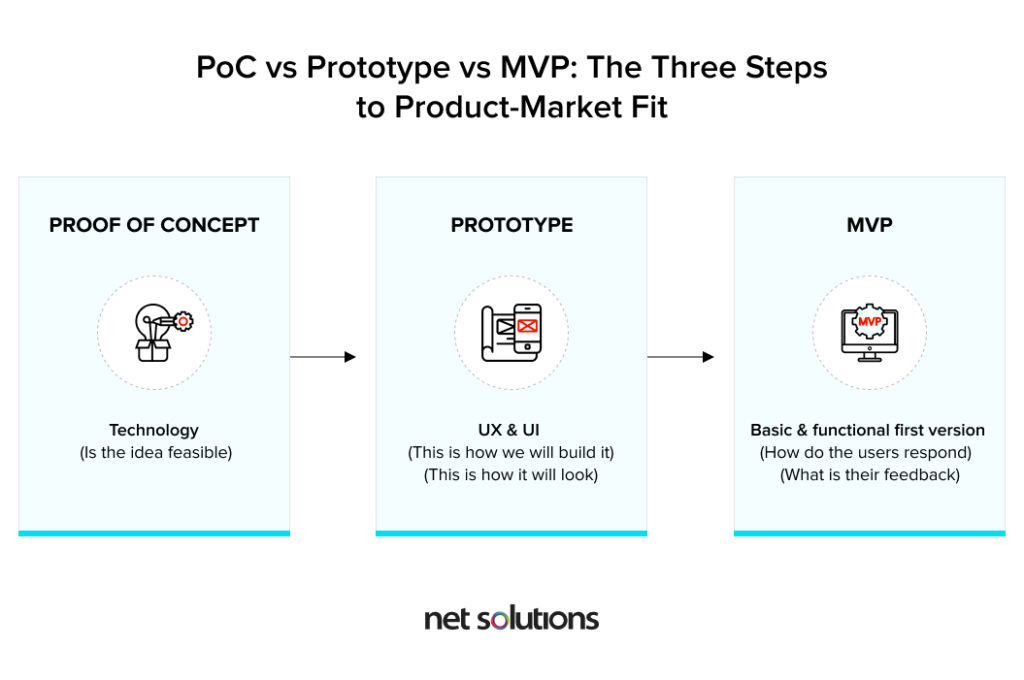
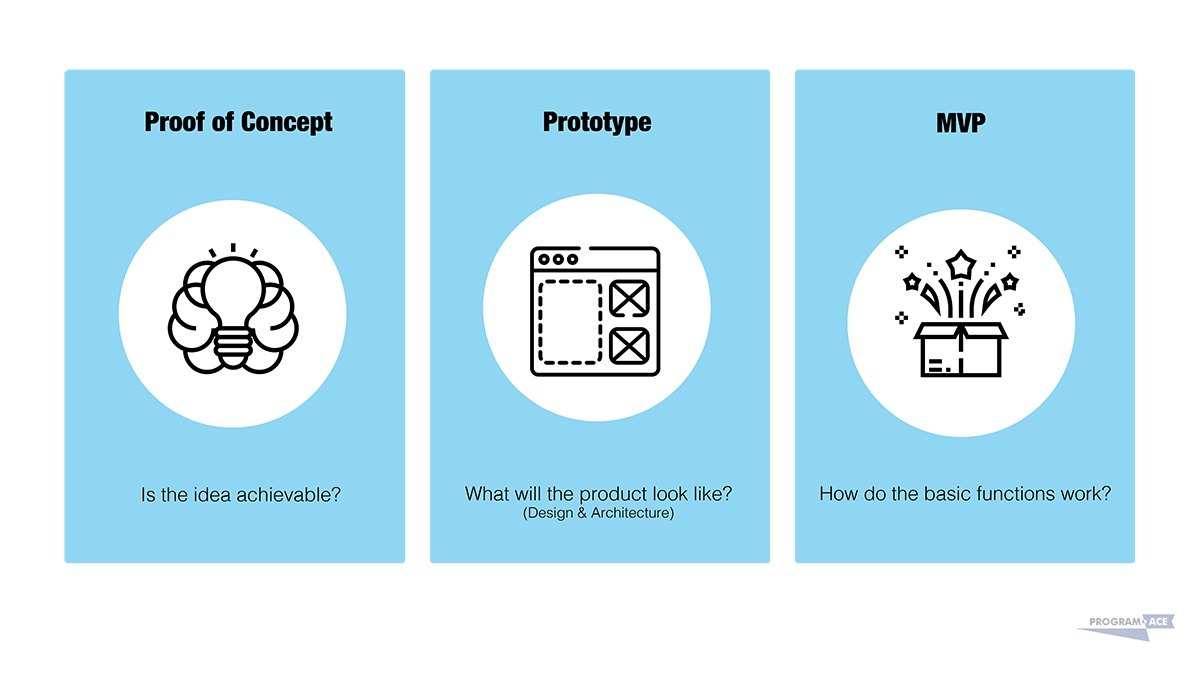
  •  Proof of Concept (POC)


Approach: Is the idea feasible? 


Implementation: Developing a POC is the quickest and most accurate way to validate or invalidate assumptions about your target users and app concept. 


Mobile App Prototype


Approach: How will this product function? 


Implementation: Mobile app prototyping is a form of user research to validate the strategic design direction of a product. A prototype is a preliminary visualization of a working product. Prototypes build an understanding of the mobile app’s look and feel, which helps test how customers use and react to the overall user experience (UX) design. Using a prototype for usability testing gives you enough time to make changes to critical design issues before the product reaches development and it’s too late (and too expensive) to make major changes to the UX. 


Minimum Viable Product (MVP)


Approach: What are the product’s core functionalities and value proposition? 


Implementation: A mobile app MVP is a minimal and usable form of your complete product to release and test in the app market. The MVP development method allows your team to learn how the product’s target users experience and respond to the app’s core business purpose. Using the insight and learnings from real users, you can allocate your time, effort and budget to areas that best satisfy your overall business objectives. Building an MVP is an iterative process designed to identify user pain points and determine the proper functionality to address those needs over time.


What is a POC? 

A POC will provide a definitive “yes” or “no” answer; either the concept is viable or it’s not.

The POC approach to product validation is about demonstrating functionality and verifying whether a particular idea is feasible for development.

Even if a POC proves that the concept won’t work, it’s possible to find other solutions from the same starting point. 


What is a Mobile App Prototype? 

While a POC shows a product concept can be done, a mobile app prototype shows how it will be done.

The purpose of a prototype is to communicate a product’s design and navigation flow to maximize the efficiency of development. Prototyping is a valuable exercise which results in visualization of how the app will function by demonstrating user flows and depicting a working design and layout. Naturally, there will be errors in a prototype, but discovering these errors during the early stages of a project is one of the purposes of a prototype. 


What is a Minimum Viable Product?

Prototypes often influence an MVP and the two work together to create a successful end product.

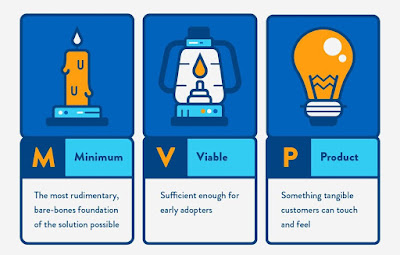
An MVP is a minimal form of your complete product that is tested in the market.

This approach to development allows you to learn how your users will react to your product before you waste a lot of money and resources building something no one wants or needs.

While prototypes solve problems during the early stages of development, an MVP’s iterative process is designed to identify users’ pain points when the product is actually tested in the market. 

The risk of developing more (or less) than you need is why validating your product assumptions with an MVP is so important. 

Starting with a core feature, learning how users react to that feature and building in accordance with user feedback is essential for determining the appropriate amount of functionality your product needs to acquire and retain users. Over time, the learnings that come from an MVP define your product roadmap and guide the evolution of your app. 


An MVP is a version of a product that includes only the features it needs to be marketable. With the MVP process, you can verify the following: 


    Product viability 

    Product assumptions 

    Usability 

    Market demand 


MVPs provide immediate value while minimizing development costs.

Ultimately, an MVP allows you to build a product with minimal features and iteratively build it out to create a better, more polished product while leveraging user intelligence to make the best decisions possible. With every release version, the product evolves to maximize ROI and move towards a fully mature application. 


https://clearbridgemobile.com/beginners-guide-poc-vs-mvp-vs-prototype/
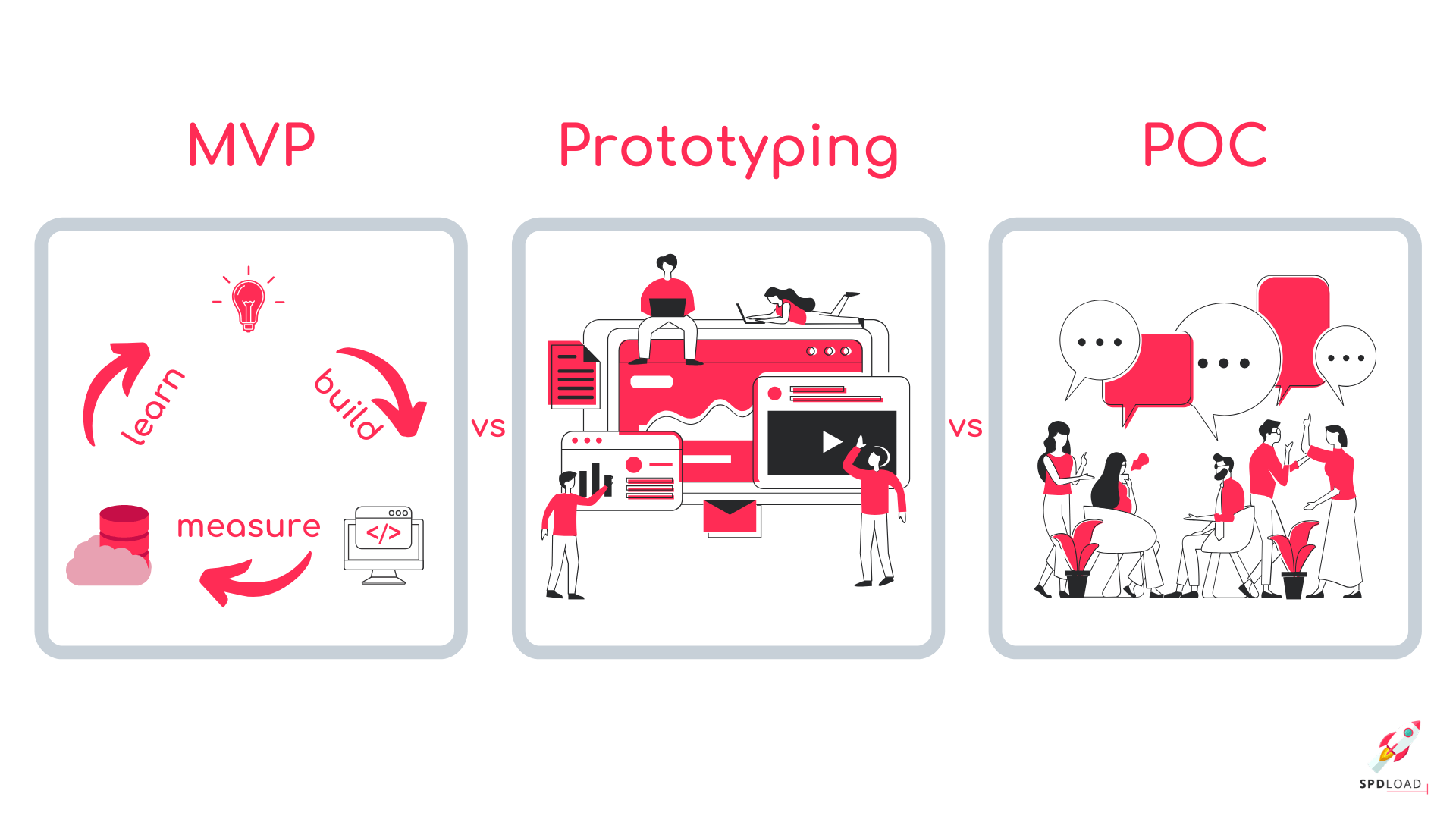


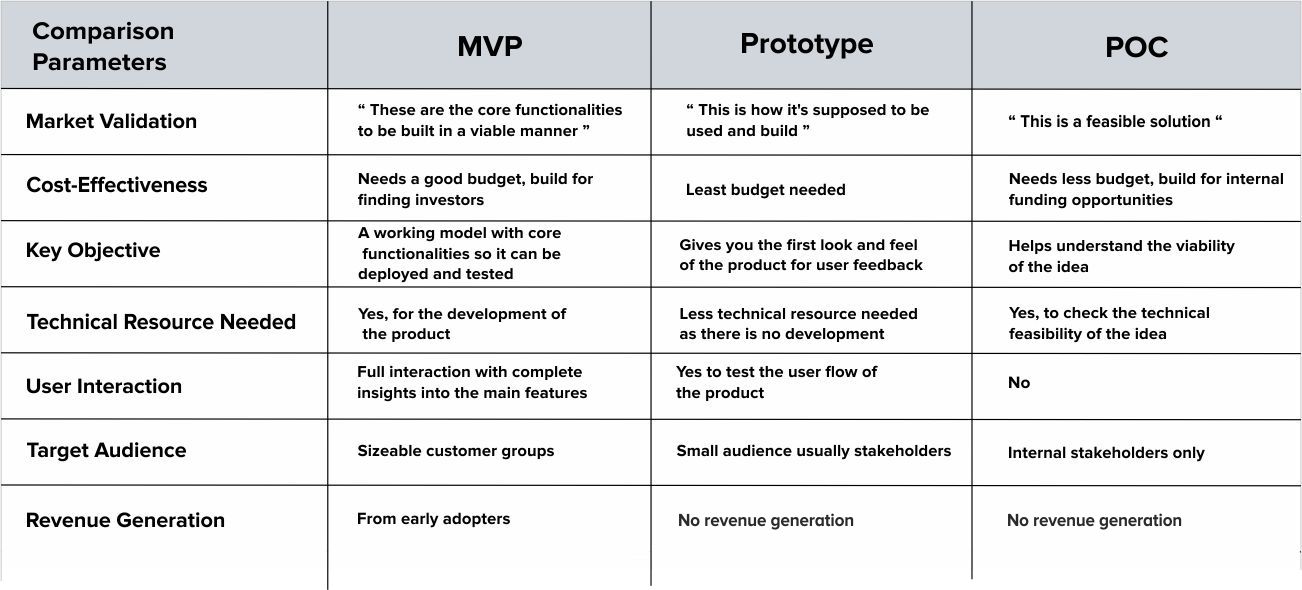
  • What is the Difference Between MVP vs POC vs Prototype and why does it matter?


Factor:Role 


POC

Is this concept even feasible? The POC can be used to validate assumptions about the idea.

Prototype:

How will the product or solution actually function?

MVP:

What is the value proposition of the product and how will it function?


Factor:Development


POC

Demonstrates that a solution could be built

Prototype:

Shows how the solution will be built and how it will work.

MVP:

Is a built version of the product that tests the market for it.


Factor:Audiences


POC

Tends to be rather small and used internally to showcase an idea.

Prototype:

Usually used internally to see how the development work will be carried out.

MVP:

Is used externally to gauge market interest and see how it could be improved.


Factor:Issues


Prototype:

Deals with issues at the early stage of development.

MVP:

Takes an iterative approach to development looking at issues the client has with the product when it is in the market.


Factor: Function


POC

Does not function as a fully working product.

Helps to understand whether it is feasible to go ahead with the product.

Prototype:

Does not function as a fully working product.

Helps to see how the product will look and how it will feel for the user.

MVP:

Functions fully as a working product using the basic but most essential functionality.

Helps to see how the product will be used.


Factor: Feedback


POC

Does not provide an opportunity for feedback from actual or possible customers. Might sometimes be used with investors to attract funding.

Prototype:

Can allow the firm to get feedback from a few possible customers.

MVP:

Allows the firm to gather feedback from a lot of customers, potentially.


Factor: Customer growth


POC

Does not grow the customer base.

Prototype:

Does not grow the customer base.

MVP:

Grows the customer base at the same time as iterative development is taking place.


Factor: Revenues


POC

Will not bring in revenues from customers.

Prototype:

Will not bring in revenues from customers.

MVP:

Can bring in revenues from customers.


https://enkonix.com/blog/mvp-vs-poc-vs-prototype/

Monday, November 1, 2021

open source security

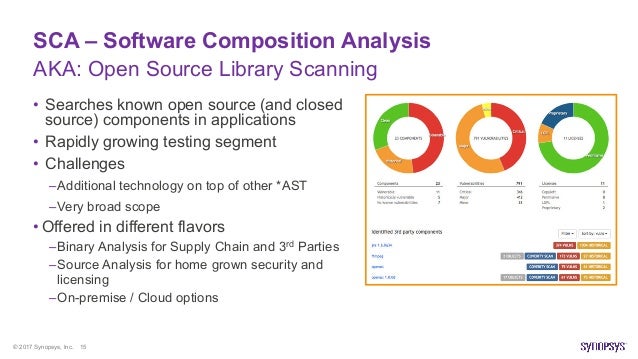
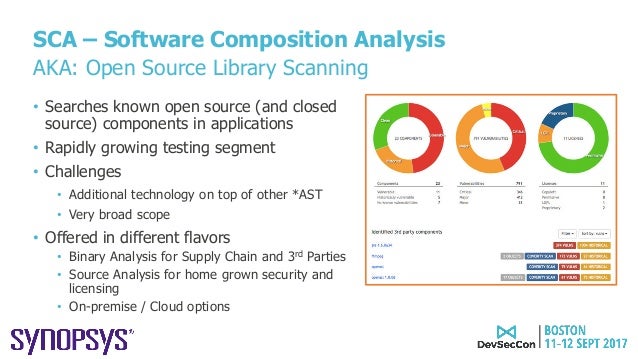
  • software composition analysis (SCA) SCA, a term coined by market analysts, describes an automated process to identify open source components in a codebase. Once a component is identified, it becomes possible to map that component to known security disclosures and determine whether multiple versions are present within an application. SCA also helps identify whether the age of the component might present maintenance issues. While not strictly a security consideration, SCA also facilitates legal compliance related to those open source components. While development and security teams often use SAST (static application security testing) and SCA solutions to identify security weaknesses and vulnerabilities in their web applications, detection of many vulnerabilities is only possible by dynamically testing the running application, which led to the development of dynamic application security testing (DAST) tools. Despite similarities to traditional DAST and penetration testing tools, IAST is superior to both in finding vulnerabilities earlier in the software development life cycle (SDLC)—when it is easier, faster, and cheaper to fix them. Over time, IAST is likely to displace DAST usage for two reasons: IAST provides significant advantages by returning vulnerability information and remediation guidance rapidly and early in the SDLC, and it can be integrated more easily into CI/CD and DevOps workflows. https://www.synopsys.com/blogs/software-security/iast-sca-security-toolkit/ 

  • Component Analysis is the process of identifying potential areas of risk from the use of third-party and open-source software and hardware components. Component Analysis is a function within an overall Cyber Supply Chain Risk Management (C-SCRM) framework. A software-only subset of Component Analysis with limited scope is commonly referred to as Software Composition Analysis (SCA). https://www.owasp.org/index.php/Component_Analysis
  • Software Composition Analysis (SCA) platform that keeps track of all third-party components used in all the applications an organization creates or consumes. It integrates with multiple vulnerability databases including the National Vulnerability Database (NVD), Node Security Platform (NSP), and VulnDB from Risk Based Security.


  • Dependency-Check is a Software Composition Analysis (SCA) tool that attempts to detect publicly disclosed vulnerabilities contained within a project’s dependencies.

https://owasp.org/www-project-dependency-check/
  • What is Open Source Security?
Open Source Security, commonly referred to as Software Composition Analysis (SCA), is a methodology to provide users better visibility into the open source inventory of their applications.

What is Open Source?
Open source refers to any software with accessible source code that anyone can modify and share freely.

Why Use Open Source Software?
Open Source Software (OSS) is distributed freely, making it very cost-effective. Many developers benefit by starting with OSS and then tweaking it to suit their needs. Since the code is open, it's simply a matter of modifying it to add the functionality they want.

Is Open Source a Security Risk?
Open source components are not created equal. Some are vulnerable from the start, while others go bad over time
Usage has become more complex. With tens of billions of downloads, it’s increasingly difficult to manage libraries and direct dependencies
Transitive dependencies: if you are using dependency management tools like Maven (Java), Bower (JavaScript), Bundler (Ruby), etc., then you are automatically pulling in third party dependencies – a liability that you can’t afford.

https://www.microfocus.com/en-us/what-is/open-source-security


  • Open Source Security Foundation (OpenSSF) 
Concise Guide for Developing More Secure Software

Ensure all privileged developers use multi-factor authentication (MFA) tokens. This includes those with commit or accept privileges. MFA hinders attackers from “taking over” these accounts.

Use a combination of tools in your CI pipeline to detect vulnerabilities.

Evaluate software before selecting it as a direct dependency. Only add it if needed, evaluate it (see Concise Guide for Evaluating Open Source Software, double-check its name (to counter typosquatting), and ensure it’s retrieved from the correct repository.

Use package managers. Use package managers (system, language-level, and/or container-level) to automatically manage dependencies and enable rapid updates.

Implement automated tests. Include negative tests (tests that what shouldn’t happen doesn’t happen) and ensure the test suite is thorough enough to “ship if it passes the tests”

Monitor known vulnerabilities in your software’s direct & indirect dependencies. E.g., enable basic scanning via GitHub’s dependabot or GitLab dependency scanning. Many other third party Software Composition Analysis (SCA) tools are also available. Quickly update vulnerable dependencies.

Keep dependencies reasonably up-to-date

Do not push secrets to a repository. Use tools to detect pushing secrets to a repository.

Review before accepting changes. Enforce it, e.g., GitHub or GitLab protected branches.

Improve your OpenSSF Scorecards score (if OSS and on GitHub). You can read the Scorecards checks. Use the Allstar monitor.

Improve your Supply chain Levels for Software Artifacts (SLSA) level. This hardens the integrity of your build and distribution process against attacks.


Publish and consume a software bill of materials (SBOM). This lets users verify inventory, id known vulnerabilities, & id potential legal issues. Consider SPDX or CycloneDX.

Onboard your project into LFX Security if you manage a Linux Foundation project.
Apply the CNCF Security TAG Software Supply Chain Best Practices guide.
Implement ASVS and follow relevant cheatsheets.
Apply SAFECode’s Fundamental Practices for Secure Software Development.

https://best.openssf.org/Concise-Guide-for-Developing-More-Secure-Software

  • Guide to Security Tools

Two main tool categories

There are two main technical categories of verification tools:

    Static analysis is any approach for verifying software (including finding defects) without executing software. This includes tools that examine source code looking for vulnerabilities (e.g., source code vulnerability scanning tools). It also includes humans reading code, looking for problems.
    Dynamic analysis is any approach for verifying software (including finding defects) by executing software on specific inputs and checking the results. Traditional testing is a kind of dynamic analysis. Fuzz testing, where you send many random inputs to a program to see if it does something it should not, is also an example of dynamic analysis.


Types of Tools

This section will cover some of the most common application security tools including linters, SAST, SCA, DAST, Fuzzers, Hard Coded Secrets Detectors, and SBOM generators.

Quality scanners (linters)

Quality scanners, also called "linters", examine source code, byte code, or machine code to look for generic “quality” problems. For example, they may look for misleading indentation, combinations of constructs that usually indicate a defect, or overly-long methods that may be hard to understand later. There are a large variety of these, including style checkers and external type checkers.

For our purposes we will include compiler warning flags in this category.

These tools often don’t focus on security, but using them can still help improve security:

Security Code Scanners (Static Application Security Testing (SAST) Tools)

Some tools analyze code specifically looking for vulnerabilities. They go by a variety of names, such as security code scanners, Static Application Security Testing (SAST) tools, security source code scanners (if they examine source code), binary code scanners (if they only examine executables), or sometimes just static code analyzers. Some people use the term SAST only when the tool analyzes source code.

Secret scanning tools

Secret scanning tools look for secrets (passwords, stored keys, etc.), typically in a repository's code and/or configuration. These are typically static analysis tools. These tools typlically detect the secrets in code by grepping (simple text based searching) or regex searches.

Software Bill Of Materials (SBOM) tools

A Software Bill Of Materials (SBOM) is an artifact that may accompany the release of a software package. The SBOM includes an inventory of the software components and dependencies that are included in a parent software. This may include both open source and proprietary components and dependencies. It may also include additional information such as more in-depth package information, file information, licensing, authors, contributors, security checksums or references, copyright information, as well as their hierarchical relationships.

Machine-readable formats for SBOMs grant the opportunity for this information to be shared throughout the software supply chain; thus increasing transparency of and confidence in the final delivered software artifact. The machine readable formats for SBOMs currently include SPDX, CycloneDX, and SWID.

SBOMs are quickly becoming a necessity for software products and services to include in their software delivery practices. SBOMs are being recommended by several security frameworks, organizations, and security requirements such as the White House Executive Order 14028, NIST, NTIA,the OpenSSF Mobilization Plan, and SLSA.

Software Component Analysis (SCA)/Dependency Analysis tools

Software component analysis (SCA) tools, also called dependency analysis or origin analysis tools, determine the reused components used by code (source code or executable). To be security-relevant, these tools also determine which of those reused components have publicly-known vulnerabilities (CVEs).

Dependency Updating & Hygiene Tools

SCA tools help identify the known vulnerable OSS components used in your project, but other tools exist to help ensure that OSS hygiene becomes an automated process. As required in the OpenSSF Secure Supply Chain Consumption Framework (S2C2F) maturity level 2, tools such as Dependabot or Renovate bot will auto-submit Pull Requests (PRs) to update your known-vulnerable dependencies. All a developer has to do is choose to accept the PR to keep their dependencies up-to-date.

Fuzzers

A fuzzer is a tool that implements a dynamic analysis approach called fuzz testing or fuzzing. In fuzz testing, you generate a large number of inputs, run the program, and see if the program behaves badly (e.g., crashes or hangs). A key aspect of fuzzing is that it does not generally check if the program produces the correct answer; it just checks that certain reasonable behavior (like “does not crash”) occurs

Web Application Scanner

A web application scanner (WAS), also called a web application vulnerability scanner, essentially pretends it is a simulated user or web browser and tries to do many things to detect problems. Think of a WAS as a frenetic and malicious web browser user; the WAS will try to click on every button it finds, enter bizarre text into every text field it finds, and so on. In short, it attempts simulated attacks and odd behavior to try to detect problems. This means that WASs often build on fuzzers internally, but they are specifically designed to analyze web applications.

There are many of these tools. OSS tools include OWASP ZAP, W3AF, IronWASP, Skipfish, and Wapiti. Proprietary tools include IBM AppScan, HP WebInspect, and Burp Suite Pro. If you have no idea, you might check out OWASP ZAP at least; it is easy to use, and it can find many things. But tools change over time, and it is best to look at your options before picking one (or several).

The term Dynamic Application Security Testing, or DAST, is often seen in literature. However, the meaning of DAST has a lot of variation:

    For some, DAST is dynamic analysis for finding vulnerabilities in just web applications, making DAST the same as a web application scanner.
    For others, DAST includes web application scanners and fuzzers for programs other than web applications.


https://github.com/ossf/wg-security-tooling/blob/main/guide.md#readme

  • About secret scanning
 your project communicates with an external service, you might use a token or private key for authentication. Tokens and private keys are examples of secrets that a service provider can issue. If you check a secret into a repository, anyone who has read access to the repository can use the secret to access the external service with your privileges. We recommend that you store secrets in a dedicated, secure location outside of the repository for your project.

Secret scanning will scan your entire Git history on all branches present in your GitHub repository for secrets. 
https://docs.github.com/en/code-security/secret-scanning/about-secret-scanning


Thursday, June 25, 2020

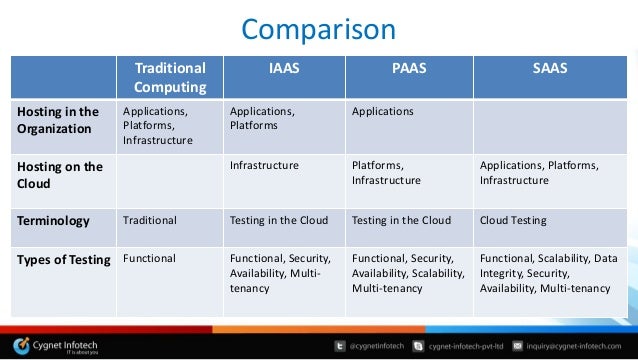
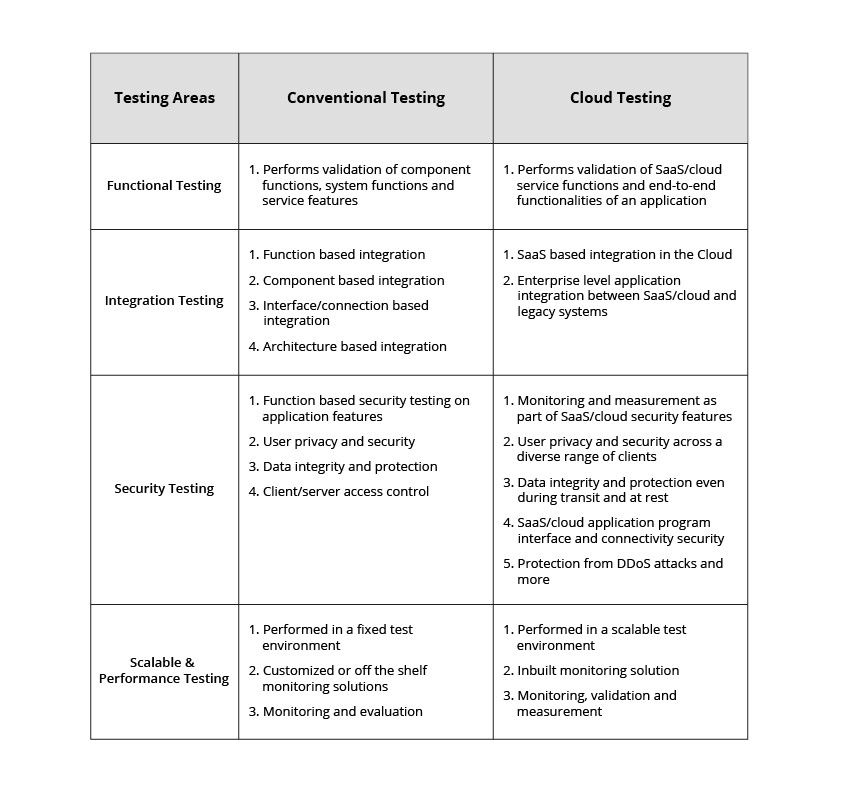
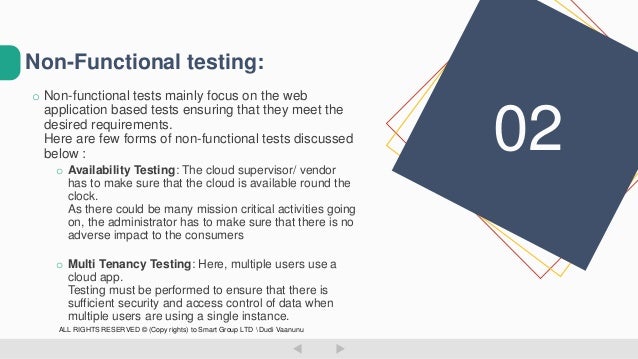
Functional Non-functional testing (cloud)


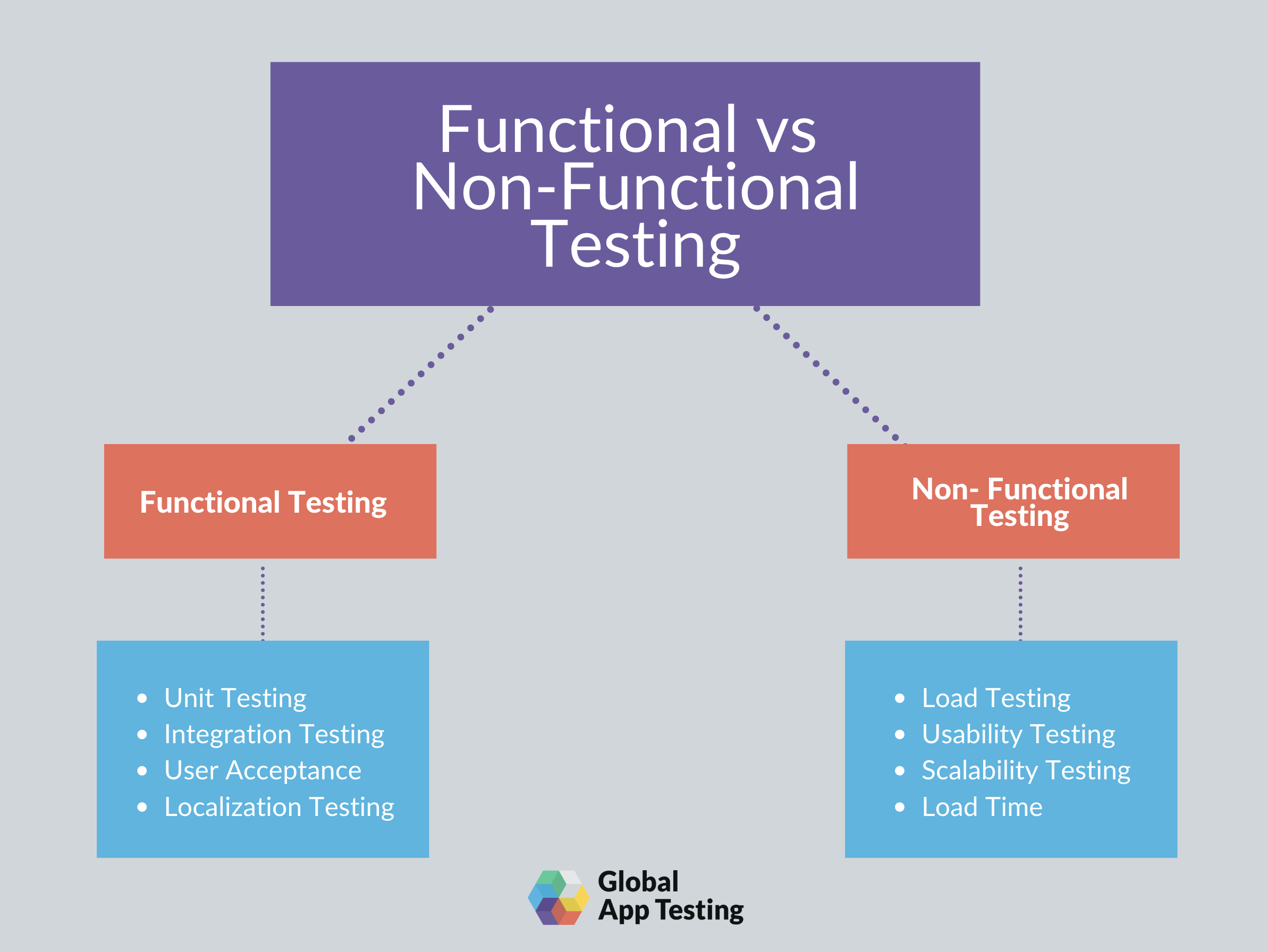
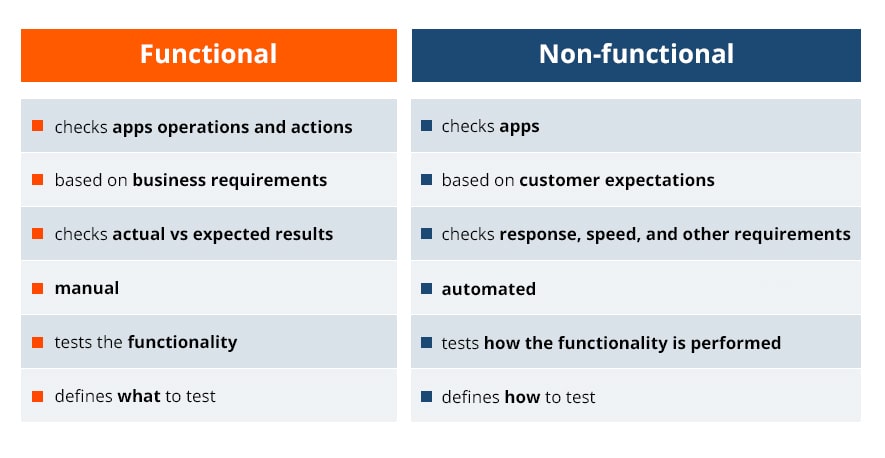
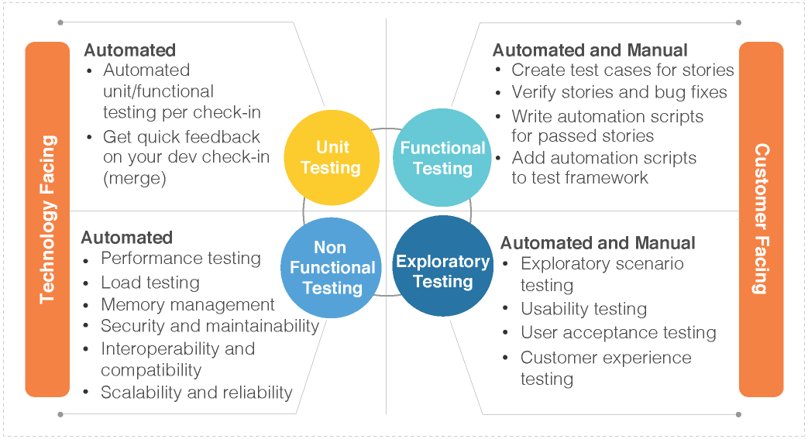
  • The main difference between functional and nonfunctional testing

Functional requirements: describe the behavior/execution of the software system
Non-functional requirements: describe the performance or usability of the software system

Here are some of the common functional testing techniques:

Installation testing – for desktop or mobile application, testing proper installation
Boundary value analysis – testing of the boundaries of numerical inputs
Equivalence partitioning – grouping tests together to reduce overlap of similar functional tests
Error guessing – assessing where functional issues are most likely to be found and testing these more extensively than other areas
Unit testing – testing performed at the smallest level of the software—not how the system is functioning as a whole, but whether each unit is executing properly
API testing – checks that internal and external APIs are functioning properly, including data transfer and authorization
Regression testing – tests that are performed to verify that new software changes did not have adverse effects on existing functionality (most common automation technique)


These are the chief nonfunctional testing techniques:

Load testing – tests performed on simulated environment to test the behavior of the system during expected conditions (various number of users)
Stress testing – testing performance when low on resources, such as server issues or lack of hard drive space on a device
Scalability testing – checking a system’s ability to scale with increased usage and to what extent performance is affected
Volume testing – testing performance with a high volume of data, not necessarily high number of users, but could be one user performing a high-volume task, such as a multiple-file upload
Security testing – tests performed to uncover how vulnerable the system is to attacks, and how well data is protected
Disaster recovery testing – checks on how quickly a system can recover following a crash or major issue
Compliance testing – tests of the software system against any set of standards (whether due to industry regulations or a company’s set of standards)
Usability testing – testing whether the GUI is consistent and if the application as a whole is intuitive and easy to use

https://testlio.com/blog/whats-difference-functional-nonfunctional-testing/#:~:text=Functional%20requirements%20are%20the%20WHAT,customer%20expectations%20are%20being%20met.

  • Differences between Functional and Non-functional Testing


Functional Testing:
Functional testing is a type of software testing in which the system is tested against the functional requirements and specifications. Functional testing ensures that the requirements or specifications are properly satisfied by the application. This type of testing is particularly concerned with the result of processing. It focuses on simulation of actual system usage but does not develop any system structure assumptions.
Non-functional Testing:
Non-functional testing is a type of software testing that is performed to verify the non-functional requirements of the application. It verifies whether the behavior of the system is as per the requirement or not. It tests all the aspects which are not tested in functional testing.
https://www.geeksforgeeks.org/differences-between-functional-and-non-functional-testing/
  • The implementation under test is that which implements the base standard(s) being tested.
https://link.springer.com/referenceworkentry/10.1007%2F978-0-387-73003-5_700

Implementation under test, a term used in technological vulnerability analysis, particularly protocol evaluation
https://en.wikipedia.org/wiki/IUT

Implementation Under Test (IUT) That part of a real system which is to be tested, which should be an implementation of applications, services or protocols.
https://portal.etsi.org/CTI/CTISupport/Glossary.htm

  • The main difference is that regression testing is designed to test for bugs you don't expect to be there, whereas retesting is designed to test for bugs you do expect to be there.
The point of regression testing is to ensure that new updates or features added to software don’t break any previously released updates or features.
To perform regression testing you typically have a regression suite – a series of test cases set up to test these older features.
Regression test cases are often automated because these tests build up as the software changes or grows

retesting is designed to test specific defects that you’ve already detected (typically during your regression testing).
In other words, regression testing is about searching for defects, whereas retesting is about fixing specific defects that you’ve already found.
https://www.leapwork.com/blog/difference-between-retesting-and-regression-testing

Regression testing is performed for passed test cases while Retesting is done only for failed test cases
Regression testing checks for unexpected side-effects while Re-testing makes sure that the original fault has been corrected.
Regression Testing doesn’t include defect verification whereas Re-testing includes defect verification.
Regression testing is known as generic testing whereas Re-testing is planned testing.
Regression Testing is possible with the use of automation whereas Re-testing is not possible with automation.
https://www.guru99.com/re-testing-vs-regression-testing.html

  • Examples of Functional testing are
Black Box testing
https://www.guru99.com/functional-testing.html

Black-box testing. Contrary to white-box testing, black-box testing involves testing against a system where the internal code, paths and infrastructure are not visible. Thus, testers use this method to validate expected outputs against specific inputs. 
https://www.applause.com/blog/functional-testing-types-examples

  • It helps detect defects in the software.
Testing is done by executing the program. 
Dynamic testing involves both functional and non-functional testing.
https://www.professionalqa.com/dynamic-testing
  •  Ensures the functionality, reliability, and performance between the integrated module.
 To be precise the success of Integration Testing lies in the perfection of the test plan.
 https://www.professionalqa.com/integration-testing

Monday, April 20, 2020

Data Driven Testing


  • What is Data Driven Testing?

Data Driven Testing is an Automation framework where we can alliteratively run multiple data set from an external source like a table for the same test script-instead of hard coding.
Multiple data sets and test environment can be controlled and run without hard coding and results obtained can be compared.

Types of Data Driven Testing
Data-driven testing can be broadly classified into three parts:
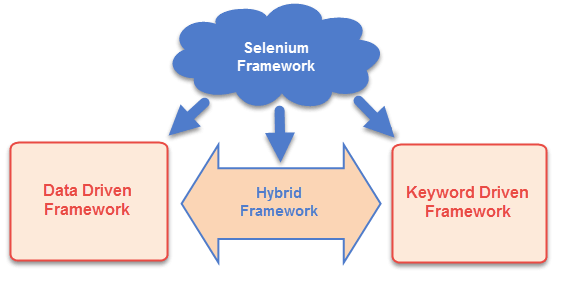
Data-driven scripts: Data-Driven Scripts are application-specific scripts (like JavaScript) that are coded to include variable data sets.
Keyword-driven test automation: Keyword Driven Test Automation is also known as Table Driven Test Automation. In keyword Driven test automation a data table using keyword id deployed for testing
Hybrid Test automation: It is a blend of Data-Driven and Keyword Driven Automation Frameworks.
Why Data Driven Testing?
Data-Driven testing tests application with multiple data sets ensuring extensive testing.
It also allows in organizing Test data and validation data in a single file.

Example:
For example, we have a login system that has to be tested for multiple input fields with different data sets.
Approach 1) For every data set creates separate scripts and execute each of it one by one.
Approach 2) Every time you have to run the test case for different data set, annually change it in the test script and execute it for all required number of data sets.
Approach 3) Import the data in an excel sheet and fetch this data one by one from the excel and run the script.
Executing the test scripts using approach 1 and 2 are very time consuming and lengthy process, the third method or what we call data-driven framework is ideal for such scenarios.

Data Provider
Data can be fed in different forms. Few popular ones are
    Internal table
    Spreadsheet
    CSV file
    XML file

What is the Difference between Keyword Driven Testing and Data Driven Testing?
In Data driven testing test scripts are executed for a different set of data to validate proper working of application with different variable values.
On the other hand, in Keyword-driven testing, a keyword represents action. A set of keywords drives a script. These keywords build test scripts.

Automation Framework For Data Driven Testing
This method can be used integrating with various Test Automation Tools like Selenium, QTP, TestComplete, TestNG etc 

https://www.testbytes.net/blog/data-driven-testing/


  • What is Data Driven Testing?

Data-driven is a test automation framework which stores test data in a table or spread spreadsheet format.
In Data-driven test automation framework, input data can be stored in single or multiple data sources like xls, XML, csv, and databases.
To create an individual test for each data set is a lengthy and time-consuming process. Data Driven Testing framework resolves this issue by keeping the data separate from Functional tests.
In Data Driven Testing, it is an ideal option to use realistic information
It allows testing application with multiple sets of data values during Regression testing
Drawback of this method is that it is depended on the automation skills of the Implementing team
https://www.guru99.com/data-driven-testing.html


  • Open Data Kit

Our community produces two suites of software: ODK and ODK-X (formerly ODK 2).
ODK: Tools for the common case
ODK-X: Tools for complex workflows
https://opendatakit.org/software/


  • ODK: Tools for the common case

https://opendatakit.org/software/odk/


  • Open Source Data Management Software

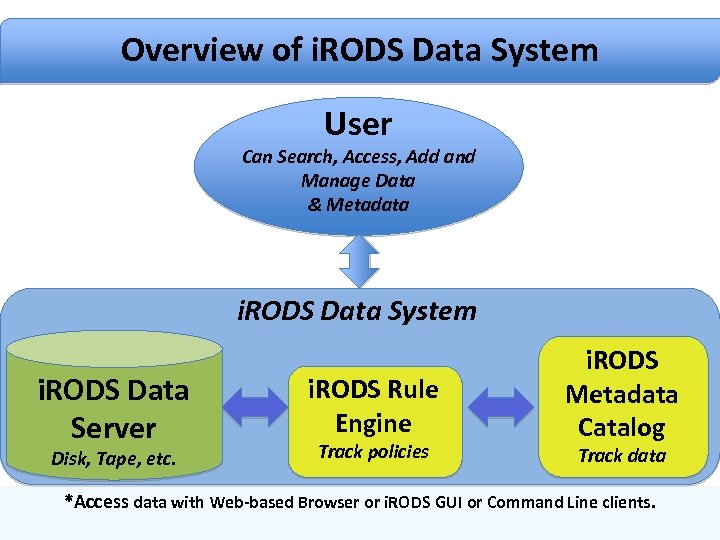
The Integrated Rule-Oriented Data System (iRODS) is open source data management software used by research, commercial, and governmental organizations worldwide.

The Four Core Competencies of iRODS
Data Virtualization
Data Discovery
Workflow Automation
Secure Collaboration
https://irods.org/

Tuesday, May 28, 2019

Nonfunctional Requirements


  • Nonfunctional Requirements  NFR roadmap

Nonfunctional Requirements (NFRs) define system attributes such as security, reliability, performance, maintainability, scalability, and usability. They serve as constraints or restrictions on the design of the system across the different backlogs.
Also known as system qualities, nonfunctional requirements are just as critical as functional Epics, Capabilities, Features, and Stories.
https://www.scaledagileframework.com/nonfunctional-requirements/

Thursday, May 23, 2019

Code Coverage


  • In computer science, test coverage is a measure used to describe the degree to which the source code of a program is executed when a particular test suite runs

A program with high test coverage, measured as a percentage, has had more of its source code executed during testing, which suggests it has a lower chance of containing undetected software bugs compared to a program with low test coverage
Basic coverage criteria
There are a number of coverage criteria, the main ones being:
    Function coverage – Has each function (or subroutine) in the program been called?
    Statement coverage – Has each statement in the program been executed?
    Edge coverage – has every edge in the Control flow graph been executed?
    Branch coverage – Has each branch (also called DD-path) of each control structure (such as in if and case statements) been executed? For example, given an if statement, have both the true and false branches been executed? Notice that this one is a subset of Edge coverage.
    Condition coverage (or predicate coverage) – Has each Boolean sub-expression evaluated both to true and false?
https://en.wikipedia.org/wiki/Code_coverage
  • What is Code Coverage?

Code coverage is the percentage of code which is covered by automated tests. Code coverage measurement simply determines which statements in a body of code have been executed through a test run, and which statements have not. In general, a code coverage system collects information about the running program and then combines that with source information to generate a report on the test suite's code coverage.
Code coverage is part of a feedback loop in the development process. As tests are developed, code coverage highlights aspects of the code which may not be adequately tested and which require additional testing. This loop will continue until coverage meets some specified target.

Why Measure Code Coverage?
It is well understood that unit testing improves the quality and predictability of your software releases
Measuring code coverage can keep your testing up to the standards you require.

Do you know, however, how well your unit tests actually test your code?
How many tests are enough?
Do you need more tests?

In summary, we measure code coverage for the following reasons:
    To know how well our tests actually test our code
    To know whether we have enough testing in place
    To maintain the test quality over the lifecycle of a project


https://confluence.atlassian.com/clover/about-code-coverage-71599496.html

  • Use code coverage to determine how much code is being tested

To determine what proportion of your project's code is actually being tested by coded tests such as unit tests, you can use the code coverage feature of Visual Studio. To guard effectively against bugs, your tests should exercise or 'cover' a large proportion of your code
https://docs.microsoft.com/en-us/visualstudio/test/using-code-coverage-to-determine-how-much-code-is-being-tested?view=vs-2017

  • Code Coverage vs. Test Coverage: Pros and Cons


Code Coverage
This metric aims to measure number of lines covered by the test cases. It reports total number of lines in the code and number of lines executed by tests. Think of it as the degree to which the source code of a program is executed when a test suite runs. The intent is, the higher the code coverage, the lower the chance of having undetected software bugs.
Subtypes

Coverage is further split into many subtypes – function coverage, branch coverage, condition coverage, loop coverage, statement coverage and parameter value coverage.

Let me define the subtypes for the sake of clarity.

    If tests cover all the function calls in code, function coverage is said to be 100%.
    Similarly, if all branches in the code, i.e. all the if – else conditions have been tested with every possible input, then branch coverage is said to be 100%.
    If all loop statements in the code are executed then loop coverage and statement coverage would be 100% respectively

For Python, a popular tool for code coverage measurement is Coverage.py
A measurement tool widely used for Go is gocov.


Test Coverage

Test Coverage aims to measure of the effectiveness of testing in a qualitative manner. It determines whether the test cases are covering entire functional requirements. You can think of it as a kind of black box testing, where test cases are not written based on code but based on user requirements or expected functionality.
Subtypes
The common mechanisms used for test coverage measurement are unit testing, functional testing, performance testing, integration or system testing and acceptance testing.

Unit tests are written at a granular level to check if a function/method performs as expected.
In functional testing, each functionality mentioned in the requirement document is tested.
Performance testing is generally a way to stress test the code for its responsiveness and stability at different workloads.
Integration testing or system testing is done to test if completely integrated product works in expected manner.
Acceptance testing is generally done at the end of the development cycle. For acceptance testing, the product is handed over to the stakeholders and tested by them to determine whether the product is in acceptable state.

For Python, framework called PyUnit is available.
JUnit, the well known Java testing framework serves as a foundation to launch tests on the Java Virtual Machine.
Go also offers a built in testing package for programs letting you easily write, organize and run tests


Code Coverage vs Test Coverage
So, now we know that code coverage is a measure of how much code is executed during testing, while test coverage is a measure of how much of the feature set is covered with tests.

Code Coverage Pros and Cons
Pros:
Helps capture bugs in program flow.
Cons:
Most Code coverage tools are relevant for Unit test only. It is essential to track all test types coverage (unit, API, System and even manual).

Test Coverage Pros and Cons
As a black-box testing methodology this approach is aligned to the requirement specifications and has minimal interaction with code itself.
Cons:
Most of the tasks in such testing methodology are manual.

Function and feature are different. Covering a single feature will cover several functions, while the required effort may be similar.

https://www.sealights.io/test-metrics/code-coverage-vs-test-coverage-pros-and-cons
  • Code coverage is a metric that can help you understand how much of your source is tested

Code coverage tools will use one or more criteria to determine how your code was exercised or not during the execution of your test suite.

Function coverage: how many of the functions defined have been called.
Statement coverage: how many of the statements in the program have been executed.
Branches coverage: how many of the branches of the control structures (if statements for instance) have been executed.
Condition coverage: how many of the boolean sub-expressions have been tested for a true and a false value.
Line coverage: how many of lines of source code have been tested

Code coverage tools can help you understand where you should focus your attention next, but they won't tell you if your existing tests are robust enough for unexpected behaviors.
Achieving great coverage is an excellent goal, but it should be paired with having a robust test suite that can ensure that individual classes are not broken as well as verify the integrity of the system
When you've established your continuous integration (CI) workflow you can start failing the tests if you don't reach a high enough percentage of coverage. Of course, as we said it earlier, it would be unreasonable to set the failure threshold too high, and 90% coverage is likely to cause your build to fail a lot. If your goal is 80% coverage, you might consider setting a failure threshold at 70% as a safety net for your CI culture.
Once again, be careful to avoid sending the wrong message as pressuring your team to reach good coverage might lead to bad testing practices
https://www.atlassian.com/continuous-delivery/software-testing/code-coverage
  • Linting is the process of checking the source code for Programmatic as well as Stylistic errors. This is most helpful in identifying some common and uncommon mistakes that are made during coding
  • A Lint or a Linter is a program that supports linting (verifying code quality). They are available for most languages like JavaScript, CSS, HTML, Python, etc..
    https://stackoverflow.com/questions/8503559/what-is-linting/8503586

  • A linter or lint refers to tools that analyze source code to flag programming errors, bugs, stylistic errors, and suspicious constructs.The term is originated from a Unix utility that examined C language source code.

  • https://en.wikipedia.org/wiki/Lint_(software)

  • EclEmma
EclEmma is an Eclipse plug-in that generates code coverage reports and provide simple trace information about test cases
Coverage is defined as a measure of the completeness of the set of test cases.
This definition means that the more source code that is executed by your test cases the better.
There are four types of coverage:
    Method coverage: how many of your methods have been called by your test cases?
    Statement coverage: how many of your statements have been run by your test cases?
    Decision/Branch coverage: how many decision points (if statements) have evaluated both true and false?
    Condition coverage: how many Boolean sub-expressions have been evaluated both true and false at a decision point?
EclEmma may be used on top of JUnit.
EclEmma runs the JUnit test cases and generates the coverage report from the execution.
EclEmma provides overall, package, and file level information on the statement.
http://agile.csc.ncsu.edu/SEMaterials/tutorials/eclemma/


  • Coverage.py

Coverage measurement is typically used to gauge the effectiveness of tests. It can show which parts of your code are being exercised by tests, and which are not.
https://coverage.readthedocs.io/en/v4.5.x/
  • gocov

Coverage reporting tool for The Go Programming Language
https://github.com/axw/gocov
  • EMMA

EMMA is a fast Java code coverage tool based on bytecode instrumentation. It differs from the existing tools by enabling coverage profiling on large scale enterprise software projects with simultaneous emphasis on fast individual development.
http://sourceforge.net/projects/emma/


  • Crap4j 

Crap4j report screenshot. Crap4j is a Java implementation of the CRAP (Change Risk Analysis and Predictions) software metric. The CRAP metric combines cyclomatic complexity and code coverage from automated tests (e.g. JUnit tests) to help you identify code that might be particularly difficult to understand, test, or maintain
www.crap4j.org
  • Cobertura
Cobertura is a Java code coverage reporting tool. It is based on jcoverage and works on any platform with Java 5 or higher. You can use Cobertura with ant, maven or command line access.
Cobertura is a free Java tool that calculates the percentage of code accessed by tests. It can be used to identify which parts of your Java program are lacking test coverage. It is based on jcoverage.
http://cobertura.github.io/cobertura/


  • djUnit

djUnit uses jcoverage to generate a coverage report of the performed tests, and it can be checked on Eclipse.
The results are shown on djUnit coverage view , task list and java source editor.

http://works.dgic.co.jp/djunit/
  • Lint4j
Lint4j ("Lint for Java") is a static Java source and byte code analyzer that detects locking and threading issues, performance and scalability problems, and checks complex contracts such as Java serialization by performing type, data flow, and lock graph analysis.

http://www.jutils.com/

  • JaCoCo - Java Code Coverage Library

https://www.jacoco.org/jacoco/trunk/index.html