Showing posts with label containerization. Show all posts

Wednesday, February 26, 2020

docker interview questions

What are the main drawbacks of Docker?
Some notable drawbacks of Docker are:
    Doesn't provide a storage option
    Offer a poor monitoring option.
    No automatic rescheduling of inactive Nodes
    Complicated automatic horizontal scaling set up

What is Docker Engine?
Docker daemon or Docker engine represents the server. The docker daemon and the clients should be run on the same or remote host, which can communicate through command-line client binary and full RESTful API

Docker Engine is supported by the following components:

  • Docker Engine REST API
  • Docker Command-Line Interface (CLI)
  • Docker Daemon
Explain the Docker components
Docker Client: This component executes build and run operations to communicate with the Docker Host.
Docker Host: This component holds the Docker Daemon, Docker images, and Docker containers. The daemon sets up a connection to the Docker Registry.
Docker Registry: This component stores Docker images. It can be a public registry, such as Docker Hub or Docker Cloud, or a private registry.

What is memory-swap flag?
Memory-swap is a modified flag that only has meaning if- memory is also set. Swap allows the container to write express memory requirements to disk when the container has exhausted all the RAM which is available to it.

Explain Docker Swarm?
Docker Swarm is native gathering for docker which helps you to a group of Docker hosts into a single and virtual docker host. It offers the standard docker application program interface.
Docker Swarm is native clustering for Docker.It turns a pool of Docker hosts into a single, virtual Docker host.
Docker Swarm is an open-source container orchestration tool that is integrated with the Docker engine and CLI. If you want to use Docker Swarm, you should use the overlay network driver. Using an overlay network enables the Swarm service by connecting multiple docker host daemons together.

What is Docker hub?
Docker hub is a cloud-based registry that which helps you to link to code repositories. It allows you to build, test, store your image in Docker cloud.

Explain Docker object labels
Docker object labels is a method for applying metadata to docker objects including, images, containers, volumes, network, swam nodes, and services.

You can use labels to organize your images, record licensing information, annotate relationships between containers, volumes, and networks, or in any way that makes sense for your business or application.

How can you run multiple containers using a single service?
By using docker-compose, you can run multiple containers using a single service. All docker-compose files uses yaml language.

Does Docker offer support for IPV6?
Yes, Docker provides support IPv6. IPv6 networking is supported only on Docker daemons runs on Linux hosts.

Can you lose data when the container exits?
No, any data that your application writes to disk get stored in container. The file system for the contain persists even after the container halts.


  • What is the use of the docker save and docker load commands?

A Docker image can be exported as an archive via the docker save command.
The exported Docker image can then be imported to another Docker host via the docker load command:

What is the default Docker network driver, and how can you change it when running a Docker image?
Docker provides different network drivers like bridge, host, overlay, and macvlan. bridge is the default.


What is a Docker image? What is a Docker image registry?
A Docker image consists of many layers. Each layer corresponds to a command in an image’s Dockerfile. This image provides isolation for an application when you run a Docker image as a container.
A Docker image registry is a storage area for Docker images. You can get images from them instead of building them.

What is a DockerFile?
Docker uses the instructions in the Dockerfile to automatically build images.

Is there any problem with just using the latest tag in a container orchestration environment? What is considered best practice for image tagging?
The problem is if you push a new image with just the latest tag, you lose your old image and your deployments will use the new image.

What is Docker Compose?
Docker Compose is a tool that lets you define multiple containers and their configurations via a YAML or JSON file.
Docker Compose is a YAML file which contains details about the services, networks, and volumes for setting up the Docker application. So, you can use Docker Compose to create separate containers, host them and get them to communicate with each other.
use a JSON file instead of a YAML file for the Docker Compose file. 

  • What is a Docker Container?

Docker containers include the application and all of its dependencies. It shares the kernel with other containers, running as isolated processes in user space on the host operating system.Docker containers are basically runtime instances of Docker images.
  • think of containers as runtime instances of Docker images.
  • use the underlying system’s CPU and memory to perform tasks.
  • any containerized application can run on any platform regardless of the underlying operating system
Docker containers wrap a piece of software in a complete filesystem that contains everything needed to run: code, runtime, system tools, system libraries – anything that can be installed on a server.

Docker containers include the application and all of its dependencies. It shares the kernel with other containers, running as isolated processes in user space on the host operating system

  • What are Docker Images?
Docker images are used to create containers. When a user runs a Docker image, an instance of a container is created. These docker images can be deployed to any Docker environment.


  • Will you lose your data, when a docker container exists?
Any data that your application writes to the container gets preserved on the disk until you explicitly delete the container.
The file system for the container persists even after the container halts.

What is Docker Machine?
Docker machine is a tool that lets you install Docker Engine on virtual hosts.Docker machine also lets you provision Docker Swarm Clusters.

What’s the difference between virtualization and containerization?
Virtualization helps us run and host multiple operating systems on a single physical server. In virtualization, hypervisors give a virtual machine to the guest operating system. The VMs form an abstraction of the hardware layer so each VM on the host can act as a physical machine.
Containers form an abstraction of the application layer, so each container represents a different application.
Containerization provides us with an isolated environment for running our applications.

  • What is the functionality of a hypervisor?
A hypervisor, or virtual machine monitor, is software that helps us create and run virtual machines
Native: Native hypervisors, or bare-metal hypervisors, run directly on the underlying host system. It gives us direct access to the hardware of the host system and doesn’t require a base server operating system.
Hosted: Hosted hypervisors use the underlying host operating system.

A vCPU is a VM thread (see cpu in the “VM Configuration Reference” chapter). These vCPUs appear to a guest just like physical CPUs. A guest's scheduling algorithm can't know that when it is migrating execution between vCPUs it is switching threads, not physical CPUs
This switching between threads can degrade performance of all the guests and the overall system. This is especially common when VMs are configured with more vCPUs than there are physical CPUs on the hardware.
Specifically, if in the hypervisor host there are more threads (including vCPU threads) ready to run than there are physical CPUs available to run them, the hypervisor host scheduler must apply its priority and scheduling policies (round-robin, FIFO, etc.) to decide which threads to run. These scheduling policies may employ preemption and time slicing to manage threads competing for physical CPUs.
Every preemption requires a guest exit, context switch and restore, and a guest entrance (see “Guest exits”). Thus, inversely to what usually occurs with physical CPUs, reducing the number of vCPUs in a VM can improve overall performance: less threads will compete for time on the physical CPUs, so the hypervisor will not be obliged to preempt threads (with the attendant guest exits) as often. In brief, fewer vCPUs in a VM may sometimes yield the best performance.

Virtual CPU’s can be allocated to a virtual machine.  The amount of virtual processors available are determined by the number of cores available on the hardware. 

It is important not to allow a running container to consume too much of the host machine’s memory. On Linux hosts, if the kernel detects that there is not enough memory to perform important system functions, it throws an OOME, or Out Of Memory Exception, and starts killing processes to free up memory. Any process is subject to killing, including Docker and other important applications. This can effectively bring the entire system down if the wrong process is killed.

By default, Docker does not apply any CPU limitations. Containers can all of the hosts given CPU power.


Virtual machines are considered a suitable choice in a production environment, rather than Docker containers since they run on their own OS without being a threat to the host computer. But if the applications are to be tested then Docker is the choice to go for, as Docker provides different OS platforms for the thorough testing of the software or an application.

  • Sharing sockets with docker-compose
    Create common volume
    Connect the socket position of the container with the socket you want to refer to the common volume
    Mount the common volume on the referencing container
The following is an example of connecting a certain API server to MySQL.

a want to run a bunch of applications that inside containers (for security and management reasons), and these applications need to speak to a mysql server (via a unix domain socket – which just appears to be a file on the filesystem.
I also want to run the mysql server inside a container – so the mechanics of getting a socket shared between them are a little non-trivial.

A Unix domain socket or IPC socket (inter-process communication socket) is a data communications endpoint for exchanging data between processes executing on the same host operating system

/var/run/docker.sock is the Unix domain socket . Sockets are used in your favorite Linux distribution, allowing different processes to communicate with each other. Like everything in Unix, sockets are files. In Docker,/var/run/docker.sock is the way to communicate with the main Docker process. Because it is a file, we can share it with other containers.

When you start Docker and share the socket, you give the container permission to manipulate the Docker host. Your container can now start or stop other containers, drag in or create images on the Docker host, and even write to the host file system


X11 applications may fail due to failures in sharing sockets with containers created by the master container.  There seems to be no problem sharing sockets between the vnc container and the master, but when the master creates a container and names its volume, the socket is not functional.

Didn’t know that sockets could be mounted.
I’m starting the Jenkins container with the following command
Jenkins is running and “sees” a change in the repository
It thens tries to build and run a docker container by using the binded Docker socket.


 /var/run/docker.sock is a Unix domain socket. Sockets are used in your favorite Linux distro to allow different processes to communicate with one another. Like everything in Unix, sockets are files, too. In the case of Docker, /var/run/docker.sock is a way to communicate with the main Docker process and, because it's a file, we can share it with containers.

  • Differentiate between COPY and ADD commands that are used in a Dockerfile?
COPY provides just the basic support of copying local files into the container whereas ADD provides additional features like remote URL and tar extraction support

Can a container restart by itself?
it is possible only while using certain docker-defined policies while using the docker run command. 

Can you tell the differences between a docker Image and Layer?
Image: This is built up from a series of read-only layers of instructions. An image corresponds to the docker container and is used for speedy operation due to the caching mechanism of each step.
Layer: Each layer corresponds to an instruction of the image’s Dockerfile. In simple words, the layer is also an image but it is the image of the instructions run.

What is the purpose of the volume parameter in a docker run command?
docker run -v /data/app:usr/src/app myapp
mounts the directory  /data/app in the host to the usr/src/app directory.
The volume parameter is used for syncing a directory of a container with any of the host directories
sync the container with the data files from the host without having the need to restart it
ensures data security in cases of container deletion
even if the container is deleted, the data of the container exists in the volume mapped host location making it the easiest way to store the container data.

Where are docker volumes stored in docker?
Volumes are created and managed by Docker and cannot be accessed by non-docker entities. 
 
Can you differentiate between Daemon Logging and Container Logging?
Daemon Level: This kind of logging has four levels- Debug, Info, Error, and Fatal.
Container Level:
docker logs <container_id>

What is the best way of deleting a container?
- docker stop <container_id>
- docker rm <container_id>

  • Can you tell the difference between CMD and ENTRYPOINT?

CMD command provides executable defaults for an executing container.

ENTRYPOINT specifies that the instruction within it will always be run when the container starts.
This command provides an option to configure the parameters and the executables
If the DockerFile does not have this command, then it would still get inherited from the base image mentioned in the FROM instruction

  • Docker Layer Caching (DLC) can reduce Docker image build times on CircleCI.
Docker Layer Caching (DLC) is a great feature to use if building Docker images is a regular part of your CI/CD process. DLC will save image layers created within your jobs, rather than impact the actual container used to run your job.

DLC caches the individual layers of any Docker images built during your CircleCI jobs, and then reuses unchanged image layers on subsequent CircleCI runs, rather than rebuilding the entire image every time. In short, the less your Dockerfiles change from commit to commit, the faster your image-building steps will run.


As Docker is processing your Dockerfile to determine whether a particular image layer is already cached it looks at two things: the instruction being executed and the parent image.
Docker will scan all of the children of the parent image and looks for one whose command matches the current instruction. If a match is found, docker skips to the next instruction and repeats the process.
If a matching image is not found in the cache, a new image is created
Since the cache relies on both the instruction being executed and the image generated from the previous instruction it should come as no surprise that changing any instruction in the Dockerfile will invalidate the cache for all of the instructions that follow it. Invalidating an image also invalidates all the children of that image.


How to reduce the size of Docker Images
    Use a .dockerignore file to remove unnecessary content from the build context
    Try to avoid installing unnecessary packages and dependencies
    Keep the layers in the image to a minimum
    Use alpine images wherever possible
    Use Multi-Stage Builds, which I am going to talk about in this article.


The multi-stage build is the dividing of Dockerfile into multiple stages to pass the required artifact from one stage to another and eventually deliver the final artifact in the last stage.

Previously, when we didn’t have the multi-stage builds feature, it was very difficult to minimize the image size. We used to clean up every artifact (which isn’t required) before moving to the next instruction as every instruction in Dockerfile adds the layer to the image. We also used to write bash/shell scripts and apply hacks to remove the unnecessary artifacts.

https://blog.logrocket.com/reduce-docker-image-sizes-using-multi-stage-builds/
https://circleci.com/docs/2.0/docker-layer-caching/
https://www.ctl.io/developers/blog/post/caching-docker-images
https://www.edureka.co/blog/interview-questions/docker-interview-questions/#DockerAdvancedQuestions
https://www.toptal.com/docker/interview-questions
https://www.guru99.com/docker-interview-questions.html
https://www.educative.io/blog/top-40-docker-interview-questions
https://www.interviewbit.com/docker-interview-questions/
https://raw.githubusercontent.com/kubernetes/website/master/content/en/examples/application/nginx-app.yaml
https://www.ctl.io/developers/blog/post/tutorial-understanding-the-security-risks-of-running-docker-containers
https://forums.docker.com/t/using-docker-in-a-dockerized-jenkins-container/322/9
https://nps.edu/web/c3o/support1
https://blog.fearcat.in/a?ID=01000-18e50b57-7ac9-4466-83ce-e3904cca07bc
https://en.wikipedia.org/wiki/Unix_domain_socket
http://bobtfish.github.io/blog/2013/10/06/read-only-bind-mounts-and-docker/
https://titanwolf.org/Network/Articles/Article?AID=33d13422-4d43-4955-9610-c0461ea53678
https://cloudacademy.com/blog/docker-vs-virtual-machines-differences-you-should-know/
https://docs.docker.com/config/containers/resource_constraints/
https://www.fastvue.co/tmgreporter/blog/understanding-hyper-v-cpu-usage-physical-and-virtual/
https://www.qnx.com/developers/docs/7.0.0/#com.qnx.doc.hypervisor.user/topic/perform/vcpu.html
https://stackoverflow.com/questions/41582969/how-does-docker-images-and-layers-work
https://www.edureka.co/blog/interview-questions/docker-interview-questions/


Tuesday, November 27, 2018

Blue-green deployments

  • Blue-green deployments
Blue-green deployments use two identical environments. While clients are using one active environment, you can update the other environment without interrupting the active environment. Then, when the other environment is ready, you set a load balancer to send client traffic to the updated environment. Updating environments in this way allows for zero-downtime deployments and keeps a second working environment ready at all times in case anything goes wrong with the active environment.

Rolling deployments
Rolling deployments update large environments a few nodes at a time. The setup for rolling deployments can be similar to blue-green deployments, but this time with a single logical environment.

Canary deployments
Canary deployments are deployments that start by updating a single node or a subset of nodes.
That way, you can test the update on a small subset of your system before you update every node.

https://www.ibm.com/support/knowledgecenter/en/SS4GSP_6.2.7/com.ibm.udeploy.doc/topics/app_process_advanced_ov.html

  • Blue/Green (aka Red/Black) Deployment
In this approach we always manage 2 versions of our production environment. One of them is considered ‘blue’ – i.e this is the version that is now live. The new versions are always deployed to the ‘green’ replica of the environment. After we run the necessary tests and verifications to make sure the ‘blue’ environment is ready we just flip over the traffic, so ‘green’ becomes ‘blue’ and ‘blue’ becomes ‘green’.
https://codefresh.io/kubernetes-tutorial/continuous-deployment-strategies-kubernetes-2/

Tuesday, September 25, 2018

service discovery / clusterization

  • Decommissioning Otto
Otto was created to provide a high-level abstraction to both develop and deploy applications. Its goal was to unify HashiCorp tools across the application delivery spectrum, including Vagrant to manage development environments, Packer to build images, Terraform to provision images, Consul to connect and monitor applications, Nomad to deploy applications, and Vault to secure applications and infrastructure
https://www.ottoproject.io/

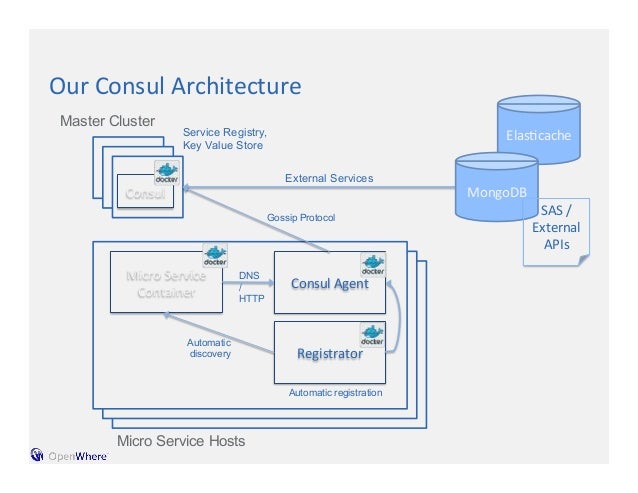
  •  how Microservices work with Consul

 how the following components affect Consul.
    Using docker
    Building Registrator for Service Discovery
    Using rkt and Nomad

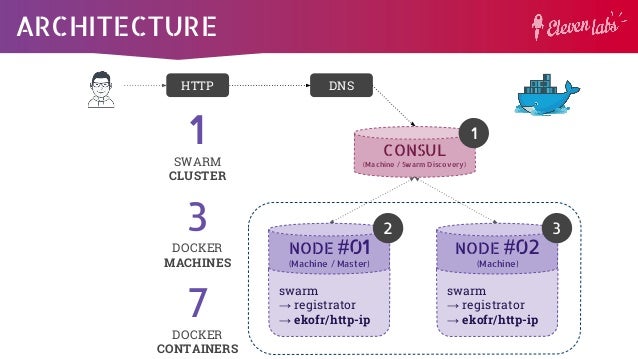
the consul server will wait until there are 3 peers connected before self-bootstrapping and becoming a working cluster

Building Registrator for Service Discovery
Registrator automatically registers and deregisters services for any Docker container by inspecting containers as they come online.
The Registrator we are about to use currently supports pluggable service registries, which currently includes Consul, Etcd and SkyDNS2

Using rkt and Nomad
The rkt is another container-based service
The main reason for building rkt was to improve the security that was one of the crisis issues for Docker back when it was still in development in 2013-14.
As for Consul, we can use the Rkt Registrator for working on service discovery with Consul.

Nomad is a tool for managing a cluster of machines and running applications on them.
It is similar to Mesos or Kubernetes.
By default, Nomad covers the Docker and rkt driver within itself.
https://www.tutorialspoint.com/consul/consul_working_with_microservices.htm


  • Within each datacenter, we have a mixture of clients and servers. It is expected that there be between three to five servers. This strikes a balance between availability in the case of failure and performance, as consensus gets progressively slower as more machines are added. However, there is no limit to the number of clients, and they can easily scale into the thousands or tens of thousands.

    All the nodes that are in a datacenter participate in a gossip protocol.
    This means there is a gossip pool that contains all the nodes for a given datacenter.
    first, there is no need to configure clients with the addresses of servers; discovery is done automatically
    Second, the work of detecting node failures is not placed on the servers but is distributed. This makes failure detection much more scalable than naive heartbeating schemes.
    Thirdly, it is used as a messaging layer to notify when important events such as leader election take place.

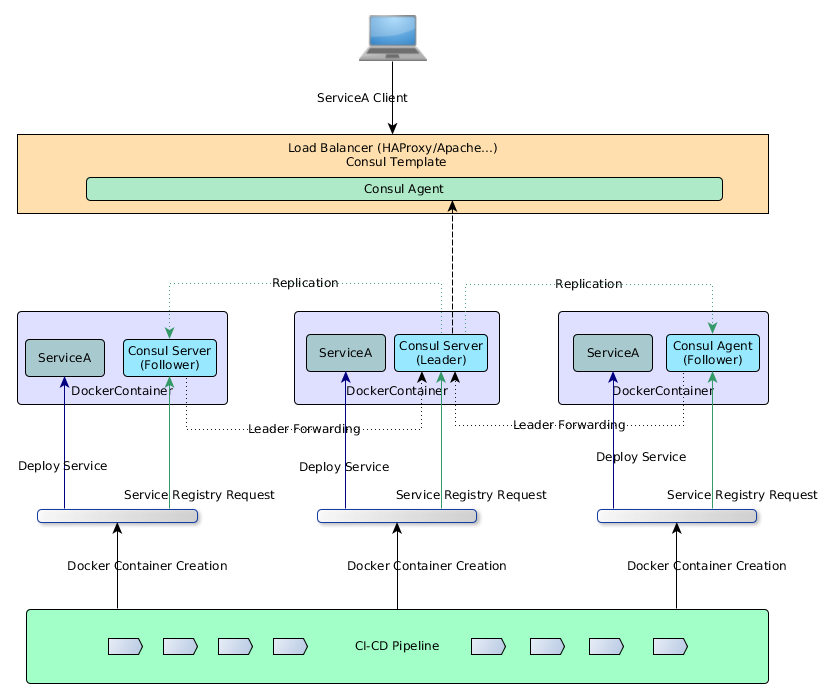
    The servers in each datacenter are all part of a single Raft peer set. This means that they work together to elect a single leader, a selected server which has extra duties. The leader is responsible for processing all queries and transactions. Transactions must also be replicated to all peers as part of the consensus protocol. Because of this requirement, when a non-leader server receives an RPC request, it forwards it to the cluster leader.

    The server nodes also operate as part of a WAN gossip pool. This pool is different from the LAN pool as it is optimized for the higher latency of the internet and is expected to contain only other Consul server nodes.
    The purpose of this pool is to allow datacenters to discover each other in a low-touch manner.
    Bringing a new datacenter online is as easy as joining the existing WAN gossip pool.
    Because the servers are all operating in this pool, it also enables cross-datacenter requests.

    In general, data is not replicated between different Consul datacenters.
    When a request is made for a resource in another datacenter, the local Consul servers forward an RPC request to the remote Consul servers for that resource and return the results
    There are some special situations where a limited subset of data can be replicated, such as with Consul's built-in ACL replication capability, or external tools like consul-replicate.

    https://www.consul.io/docs/internals/architecture.html


    • Basic Federation with the WAN Gossip Pool 

    One of the key features of Consul is its support for multiple datacenters.
    The architecture of Consul is designed to promote a low coupling of datacenters so that connectivity issues or failure of any datacenter does not impact the availability of Consul in other datacenters.
    This means each datacenter runs independently, each having a dedicated group of servers and a private LAN gossip pool.
    https://www.consul.io/docs/guides/datacenters.html


    • Quorum - A quorum is a majority of members from a peer set: for a set of size n, quorum requires at least (n/2)+1 members. For example, if there are 5 members in the peer set, we would need 3 nodes to form a quorum. If a quorum of nodes is unavailable for any reason, the cluster becomes unavailable and no new logs can be committed.

    https://www.consul.io/docs/internals/consensus.html


    • Consul uses a consensus protocol to provide Consistency (as defined by CAP). The consensus protocol is based on "Raft: 

    https://www.consul.io/docs/internals/consensus.html


    • Raft is a consensus algorithm that is based on Paxos. Compared to Paxos, Raft is designed to have fewer states and a simpler, more understandable algorithm.

    https://www.consul.io/docs/internals/consensus.html


  • Gossip Protocol

Serf uses a gossip protocol to broadcast messages to the cluster.
https://www.serf.io/docs/internals/gossip.html


  • Serf is a decentralized solution for cluster membership, failure detection, and orchestration. Serf is in use in some huge deployments (more than 10,000 machines in a single cluster), and powers Consul and Nomad.

This release brings improvements in Serf's gossip protocol which provide better robustness for applications that rely on Serf to detect the health of nodes in a cluster
https://www.hashicorp.com/blog/serf-0-8


  • Thanos - a Scalable Prometheus with Unlimited Storage

Thanos' architecture introduces a central query layer across all the servers via a sidecar component which sits alongside each Prometheus server, and a central Querier component that responds to PromQL queries. This makes up a Thanos deployment. Inter-component communication is via the memberlist gossip protocol.
https://www.infoq.com/news/2018/06/thanos-scalable-prometheus

  • Highly available Prometheus setup with long term storage capabilities. 

Thanos is a set of components that can be composed into a highly available metric system with unlimited storage capacity. It can be added seamlessly on top of existing Prometheus deployments and leverages the Prometheus 2.0 storage format to cost-efficiently store historical metric data in any object storage while retaining fast query latencies. Additionally, it provides a global query view across all Prometheus installations and can merge data from Prometheus HA pairs on the fly.
https://github.com/improbable-eng/thanos


  • Consul is an important service discovery tool in the world of Devops. 

https://www.tutorialspoint.com/consul/index.htm

Consul is a Hashicorp based tool for discovering and configuring a variety of different services in your infrastructure
It is based and built on Golang.
One of the core reasons to build Consul was to maintain the services present in the distributed systems
https://www.tutorialspoint.com/consul/index.htm


Service Discovery − Using either DNS or HTTP, applications can easily find the services they depend upon.
Health Check Status It is used by the service discovery components to route traffic away from unhealthy hosts.
Key/Value Store −dynamic configuration, feature flagging, coordination, leader election, etc
Multi Datacenter Deployment − Consul supports multiple datacenters. It is used for building additional layers of abstraction to grow to multiple regions.


Service Discovery
It is defined as the detection of different services and network protocols using which a service is found.
The usage of service discovery comes in as a boon for distributed systems.
This is one of the main problems, which are faced by today's large-scale industries with the advancement of distributed systems in their environment.

Comparison with Etcd and Zookeeper


https://www.tutorialspoint.com/consul/consul_introduction.htm

 there are three different servers, which are managed by Consul. The working architecture works by the using raft algorithm, which helps us in electing a leader out of the three different servers.
 Each server interacts with its own client using the concept of RPC. The Communication between the Clients is possible due to Gossip Protocol as mentioned below
 The Communication with the internet facility can be made available using TCP or gossip method of communication

 Raft Algorithm
Raft is a consensus algorithm for managing a replicated log. It relies on the principle of CAP Theorem, which states that in the presence of a network partition, one has to choose between consistency and availability.

A Raft Cluster contains several servers, usually in the odd number count.
For example, if we have five servers, it will allow the system to tolerate two failures.
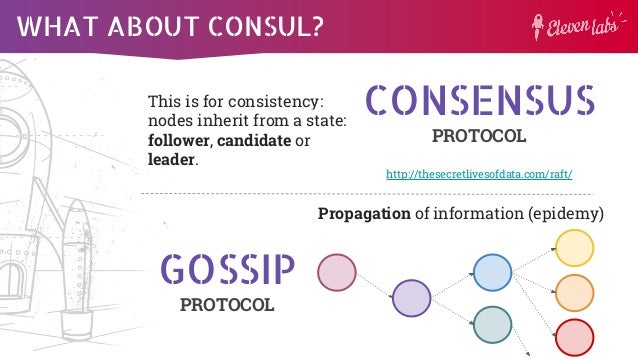
At any given time, each server is in one of the three states: Leader, Follower, or Candidate.
In a normal operation, there is exactly one leader and all of the other servers are followers. These followers are in a passive state, i.e. they issue no requests on their own, but simply respond to requests from leaders and the candidate.

There are two types of protocol in Consul, which are called as −
    Consensus Protocol and
    Gossip Protocol

Consensus Protocol
Consensus protocol is used by Consul to provide Consistency as described by the CAP Theorem.

Gossip Protocol
The gossip protocol can be used to manage membership, send and receive messages across the cluster.
In consul, the usage of gossip protocol occurs in two ways, WAN (Wireless Area Network) and LAN (Local Area Network).

There are three known libraries, which can implement a Gossip Algorithm to discover nodes in a peer-to-peer network −
    teknek-gossip − It works with UDP and is written in Java.
    gossip-python − It utilizes the TCP stack and it is possible to share data via the constructed network as well.
    Smudge − It is written in Go and uses UDP to exchange status information.

Gossip protocols have also been used for achieving and maintaining a distributed database consistency or with other types of data in consistent states, counting the number of nodes in a network of unknown size, spreading news robustly, organizing nodes, etc

Remote Procedure Calls
a protocol that one program uses to request a service from another program
Before RPC, Consul used to have only TCP and UDP based connections, which were good with most systems, but not in the case of distributed systems. RPC solves such problems by reducing the time-period of transfer of packet information from one place to another.
In this area, GRPC by Google is a great tool to look forward in case one wishes to observe benchmarks and compare performance.
 https://www.tutorialspoint.com/consul/consul_architecture.htm


  •  A high performance, open-source universal RPC framework

 Install runtime and dev environments with a single line and also scale to millions of RPCs per second with the framework
 https://grpc.io/


  • ZooKeeper
A high-performance coordination service for distributed applications.ZooKeeper is a centralized service for maintaining configuration information, naming, providing distributed synchronization, and providing group services. All of these kinds of services are used in some form or another by distributed applications. Each time they are implemented there is a lot of work that goes into fixing the bugs and race conditions that are inevitable. Because of the difficulty of implementing these kinds of services, applications initially usually skimp on them , which make them brittle in the presence of change and difficult to manage. Even when done correctly, different implementations of these services lead to management complexity when the applications are deployed
http://zookeeper.apache.org/


  • etcd is a distributed key-value store that provides a reliable way to store data across a cluster of machines. It’s open-source and available on GitHub. etcd gracefully handles leader elections during network partitions and will tolerate machine failure, including the leader.

https://coreos.com/etcd/

  • Setup Etcd Cluster on CentOS 7/8 / Ubuntu 18.04/16.04 / Debian 10/9

etcd is a distributed and reliable key-value store for the most critical data of a distributed system. It is written in Go and uses the Raft consensus algorithm to manage a highly-available replicated log.

Etcd is designed to be:
Simple: well-defined, user-facing API (gRPC)
Secure: automatic TLS with optional client cert authentication
Fast: benchmarked 10,000 writes/sec
Reliable: properly distributed using Raft
https://computingforgeeks.com/setup-etcd-cluster-on-centos-debian-ubuntu/

  • Gossip protocol

a procedure or process of computer–computer communication that is based on the way social networks disseminate information or how epidemics spread.
It is a communication protocol.
Modern distributed systems often use gossip protocols to solve problems that might be difficult to solve in other ways, either because the underlying network has an inconvenient structure, is extremely large, or because gossip solutions are the most efficient ones available.
https://en.wikipedia.org/wiki/Gossip_protocol

  • Gossip Protocols are executed periodically, that is, in cycles. That's what the word cycle in the simulator means. It will rotate in every cycle.
https://flopezluis.github.io/gossip-simulator/
  • In large distributed systems, knowing the state of the whole system is a difficult task that becomes harder as you increment the number of nodes.

Since the underlying network is a problem, you can’t rely on hardware solutions, such as multicast, as they wouldn’t be available in the cloud.
https://conferences.oreilly.com/velocity/vl-eu/public/schedule/detail/71020


  • The Gossip Protocol is a method to resolve this communication chaos. In Cassandra, when one node talks to another, the node which is expected to respond, not only provides information about its status,but also provides information about the nodes that it had communicated with before. Through this process, there is a reduction in network log, more information is kept and efficiency of information gathering increases. The main feature of the protocol is to provide the latest information of any node respectively.

An important feature of Gossip Protocol is Failure Detection. Basically, when two nodes communicate with one another; for instance, Node A to Node B, then Node A sends a message ‘gossipdigestsynmessage’, which is very similar to TCP protocol to Node B. Here, Node B, once receives the message, sends an acknowledgement message ‘ack’, and then Node A responds with an acknowledgement message to Node B’s ‘ack’ message. This is known as the 3 way handshake.
https://www.edureka.co/blog/gossip-protocol-in-cassandra/


Kubernetes Tools

  • Use the Kubernetes command-line tool, kubectl, to deploy and manage applications on Kubernetes. Using kubectl, you can inspect cluster resources; create, delete, and update components; and look at your new cluster and bring up example app
 https://kubernetes.io/docs/tasks/tools/install-kubectl/helm
  • Disable the swap file
    This is now a mandatory step for Kubernetes. The easiest way to do this is to edit /etc/fstab and to comment out the line referring to swap.
    To save a reboot then type in sudo swapoff -a.
    https://blog.alexellis.io/your-instant-kubernetes-cluster
  • Swap disabled. You MUST disable swap in order for the kubelet to work properly.
    https://kubernetes.io/docs/setup/independent/install-kubeadm/
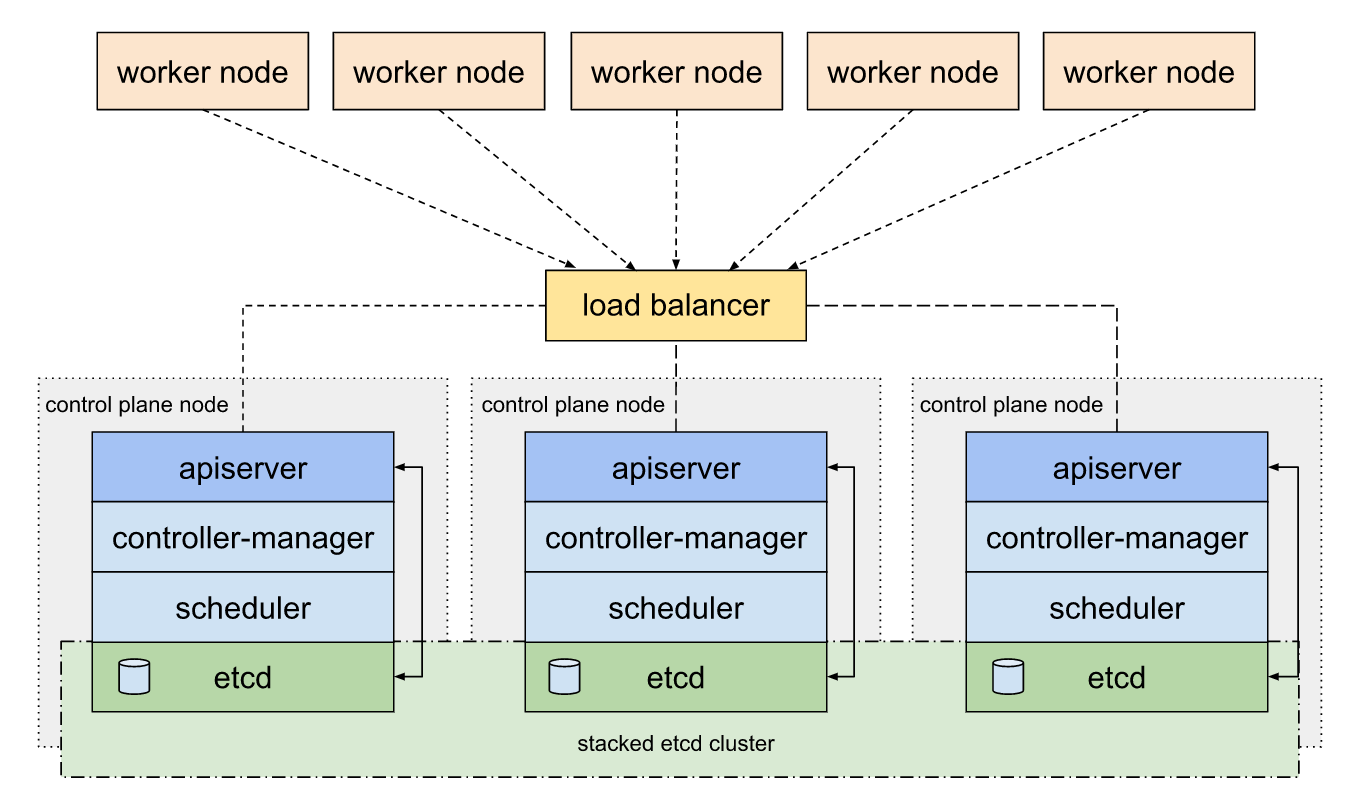
  • This document shows you how to perform setup tasks that kubeadm doesn’t perform: provision hardware; configure multiple systems; and load balancing.
https://kubernetes.io/docs/setup/independent/high-availability/

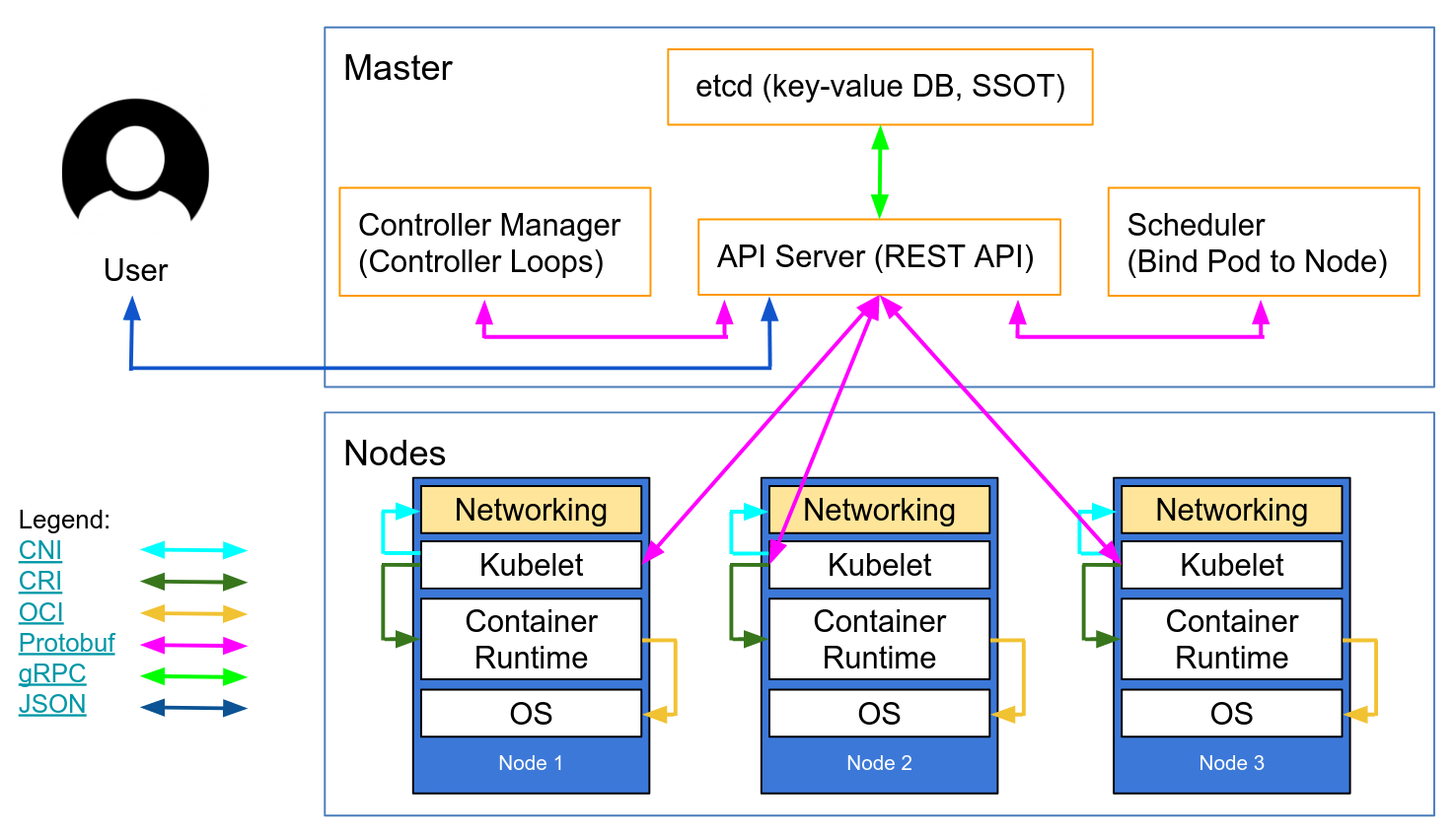
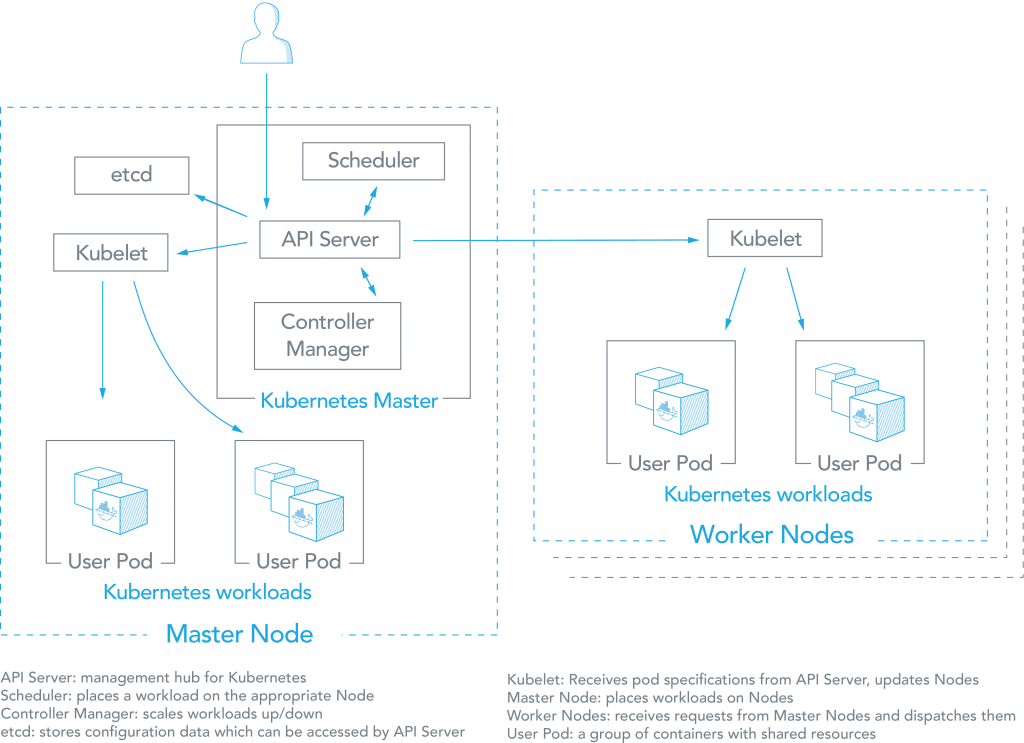
  •  kubeadm: the command to bootstrap the cluster. 
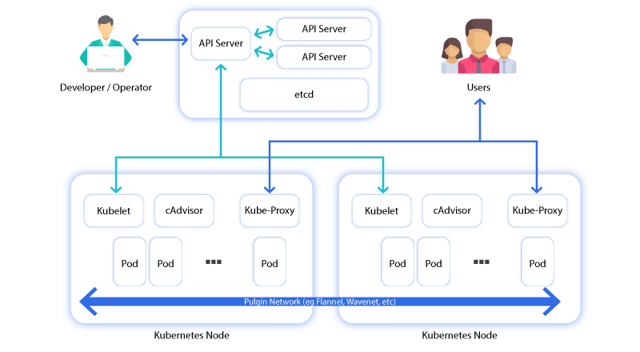
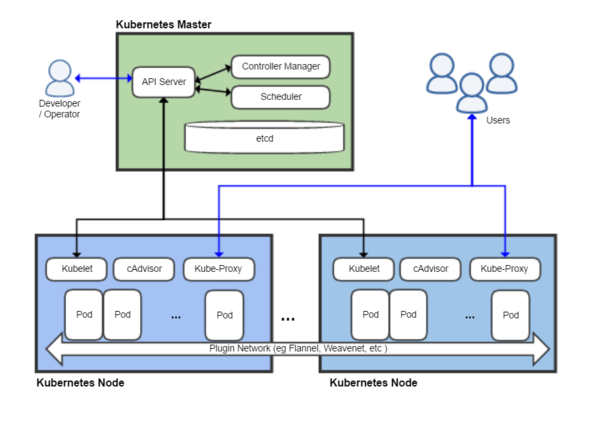
    • kubelet: the component that runs on all of the machines in your cluster and does things like starting pods and containers.
    •  kubectl: the command line util to talk to your cluster.
https://kubernetes.io/docs/setup/independent/install-kubeadm/
  • The network must be deployed before any applications. Also, kube-dns, an internal helper service, will not start up before a network is installed. kubeadm only supports Container Network Interface (CNI) based networks (and does not support kubenet).
https://kubernetes.io/docs/setup/independent/create-cluster-kubeadm/#pod-network
  • Kubernetes DNS schedules a DNS Pod and Service on the cluster, and configures the kubelets to tell individual containers to use the DNS Service’s IP to resolve DNS names

    • https://kubernetes.io/docs/concepts/services-networking/dns-pod-service/
    • Container visibility requires context.


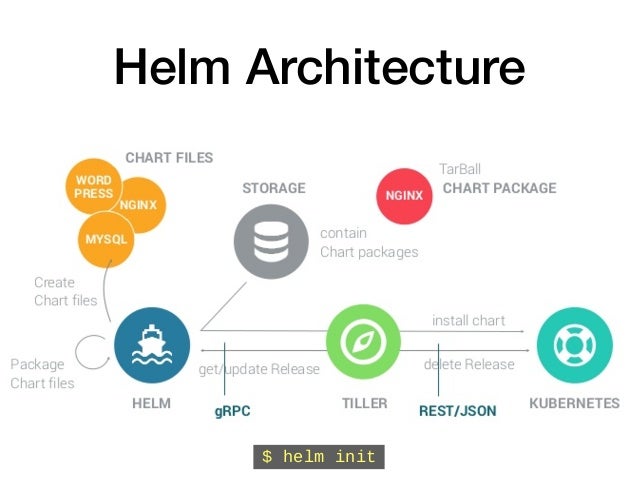
    • Helm is a Kubernetes-based package installer. It manages Kubernetes “charts”, which are “preconfigured packages of Kubernetes resources.” Helm enables you to easily install packages, make revisions, and even roll back complex changes
    https://www.mirantis.com/blog/install-kubernetes-apps-helm/
    • Deploying an application using containers can be much easier than trying to manage deployments of a traditional application over different environments, but trying to manage and scale multiple containers manually is much more difficult than orchestrating them using Kubernetes. But even managing Kubernetes applications looks difficult compared to, say, “apt-get install mysql”.
    Helm is a Kubernetes-based package installer. It manages Kubernetes “charts”, which are “preconfigured packages of Kubernetes resources.” Helm enables you to easily install packages, make revisions, and even roll back complex changes.
    https://www.mirantis.com/blog/install-kubernetes-apps-helm/


    • Three Big Concepts

    A Chart is a Helm package. It contains all of the resource definitions necessary to run an application, tool, or service inside of a Kubernetes cluster. Think of it like the Kubernetes equivalent of a Homebrew formula, an Apt dpkg, or a Yum RPM file.
    A Repository is the place where charts can be collected and shared. It's like Perl's CPAN archive or the Fedora Package Database, but for Kubernetes packages.
    A Release is an instance of a chart running in a Kubernetes cluster. One chart can often be installed many times into the same cluster. And each time it is installed, a new release is created. Consider a MySQL chart. If you want two databases running in your cluster, you can install that chart twice. Each one will have its own release, which will in turn have its own release name.

    https://helm.sh/docs/intro/using_helm/

    • You could avoid this by writing an automation script, but if you change the filenames or paths of your Kubernetes resources, then you need to update the script too.
    The real problem is that we have to remember exactly how to deploy the application step by step. Our “application” (i.e, all of our Kubernetes resources packaged together) is something kubectl has no idea about.

    Helm is a tool for managing Kubernetes charts. Charts are packages of pre-configured Kubernetes resources.
    A chart is organized as a collection of files inside of a directory.

    Helm allows us to work from the mental model of managing our “application” on our cluster, instead of individual Kubernetes resources via kubectl
    https://medium.com/ingeniouslysimple/deploying-kubernetes-applications-with-helm-81c9c931f9d3

    • A Chart is a Helm package. It contains all of the resource definitions necessary to run an application, tool, or service inside of a Kubernetes cluster. Think of it like the Kubernetes equivalent of a Homebrew formula, an Apt dpkg, or a Yum RPM file.
    A Repository is the place where charts can be collected and shared. It’s like Perl’s CPAN archive or the Fedora Package Database, but for Kubernetes packages.
    A Release is an instance of a chart running in a Kubernetes cluster. One chart can often be installed many times into the same cluster. And each time it is installed, a new release is created. Consider a MySQL chart. If you want two databases running in your cluster, you can install that chart twice. Each one will have its own release, which will in turn have its own release name.
    Helm installs charts into Kubernetes, creating a new release for each installation. And to find new charts, you can search Helm chart repositories.
    https://docs.helm.sh/using_helm/#quickstart


    • Helm is made of two components:
    helm client. Used to create, fetch, search and validate charts and to instruct tiller.
    tiller server. Runs inside the Kubernetes cluster and manages the releases.
    https://docs.helm.sh/using_helm/#installation-frequently-asked-questions


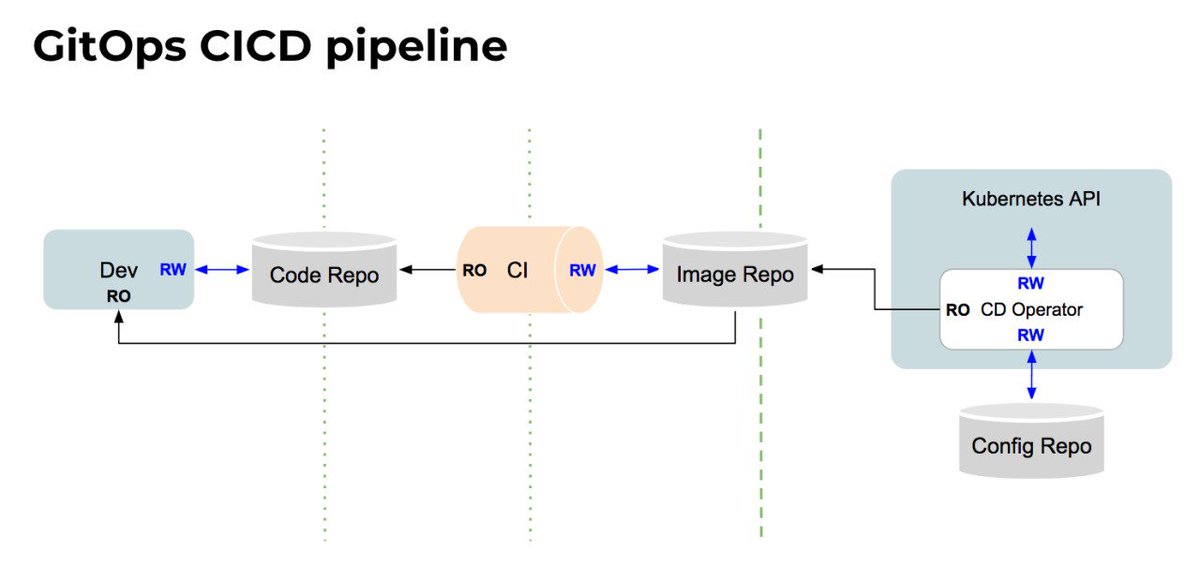
    • our developers operate Kubernetes via Git
    In fact, we manage and monitor all of our applications and the whole ‘cloud native stack’ using GitOps
    By using Git as our source of truth, we can operate almost everything
    For example, version control, history, peer review, and rollback happen through Git without needing to poke around with tools like kubectl.
    Our provisioning of AWS resources and deployment of k8s is declarative
    Our entire system state is under version control and described in a single Git repository
    Operational changes are made by pull request (plus build & release pipelines)
    Diff tools detect any divergence and notify us via Slack alerts; and sync tools enable convergence
    Rollback and audit logs are also provided via Git

    Let’s say a new team member deploys a new version of a service to prod without telling the on-call team.  Our diff tools detect that what is running does not match what is configured to run  (ie. the image specified in the Git repo is different from the one deployed in production).  The diff tools fires an alert.
    By using declarative tools, the entire set of configuration files can be version controlled in Git
    In the case of Kubernetes, we use version control not only for code but also for the YAML files that define the Kubernetes Deployments, Services, DaemonSets, etc.
    We also use Terraform and Ansible to provision Kubernetes on Amazon, and these are also version controlled in Git.
    Tools like Chef, Puppet and Ansible support features like “diff alerts”
    These help operators to understand when action may need to be taken to “converge” the live system to the intended state (as defined by the configuration scripts).
    best practice is to deploy immutable images (eg. containers) so that divergence is less likely.
    we have 3 main 'diff' tools: kubediff, ansiblediff, and terradiff.  Each one compares the latest Git to what's running in a deployed environment.
    https://www.weave.works/blog/gitops-operations-by-pull-request


    • Spinnaker is an open source, multi-cloud continuous delivery platform for releasing software changes with high velocity and confidence

    https://www.spinnaker.io/

    • By running an active-active architecture across Google Cloud Platform (GCP) and AWS, we’re in a better position to survive a DNS DDOS attack, a regional failure —  even a global failure of an entire cloud provider.

    This is where continuous delivery helps out. Specifically, we use Spinnaker, an open source, continuous delivery platform for releasing software changes with high velocity and confidence. Spinnaker has handled 100% of our production deployments for the past year, regardless of target platform.

    Spinnaker abstracts many of the particulars of each cloud provider.
    we’re able to maintain important continuous delivery concepts like canaries, immutable infrastructure and fast rollbacks.
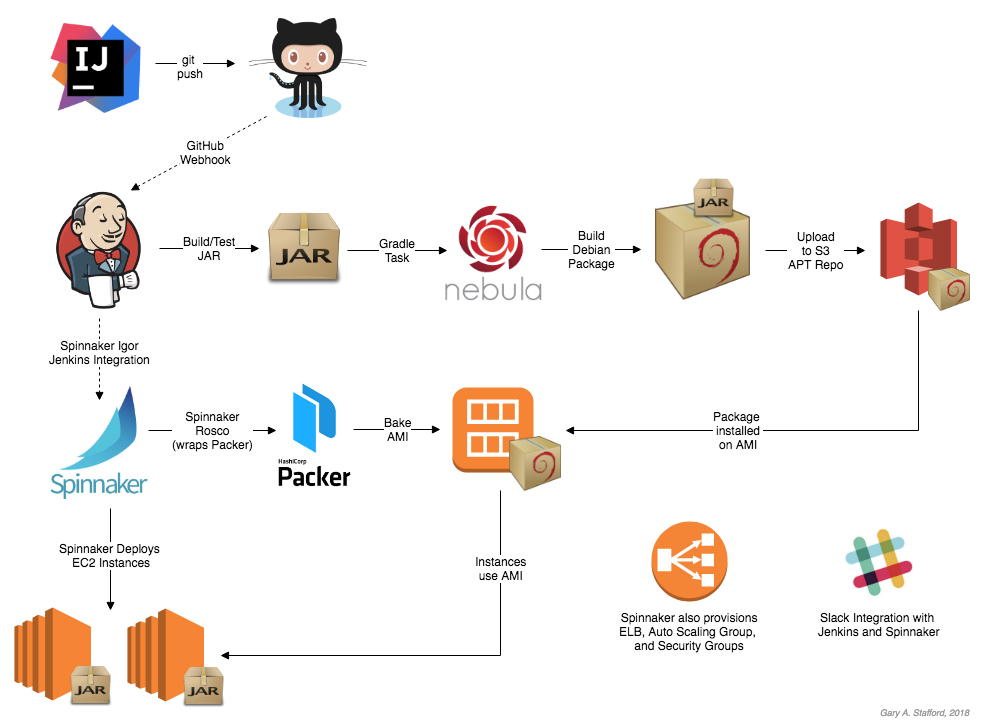
    once code is committed to git and Jenkins builds a package, that same package triggers the main deployment pipeline for that particular microservice. 
    That pipeline bakes the package into an immutable machine image on multiple cloud providers in parallel and continues to run any automated testing stages.
    The deployment proceeds to staging using blue/green deployment strategy, and finally to production without having to get deep into the details of each platform
    Support for tools like canary analysis and fast rollbacks allows developers to make informed decisions about the state of their deployment.

    http://www.googblogs.com/guest-post-multi-cloud-continuous-delivery-using-spinnaker-at-waze/

    • Automatic pipelines: Upgrade the binary and config in both AWS and GCP with one click

    Cross-Cloud Canary & Rollback: Each pipeline has canary testing and fast rollback if there's a problem with the canary.
    Multi-Cloud Redundancy: "If one goes down [Spinnaker] just launches instances in the next one."
    https://blog.armory.io/spinnaker-enables-multi-cloud-deployments-for-waze-and-saved-1-000-people/
    Multi-Cloud Deployments with Spinnaker

    Discussing Terraform and Spinnaker

    • The Benefits of Immutable Infrastructure

    Immutable Infrastructure: The practice of replacing your infrastructure with new instances each time you deploy new code to ensure mutated code does not carry forward.
    a short list of benefits immutable infrastructure may provide you:
    Your company is preparing to run cloud-native applications
    You are trying to automate the scaling of your infrastructure in the cloud
    You want simple and infinitely repeatable deployments
    Continuous deployments safely and quickly
    The operations become more automated and responsibility falls on the developers
    Server and node failures do not result in your service going down for long if at all
    https://blog.armory.io/spinnaker-feature-immutable-infrastructure/


    • The Benefits of Multi-Cloud Deployments

    The main purpose of multi-cloud deployments is to mitigate against disasters that were not in your control: if a service such as AWS or GCP becomes unresponsive or critically fails, your infrastructure and applications can redirect traffic and user access to other cloud services that are still up and running
    Spinnaker allows for easy configurations of a pipeline to execute a multi-cloud deployment as well as keep track of the execution’s progress.
    https://blog.armory.io/the-benefits-of-multi-cloud-deployments/


    • Spinnaker Feature - Blue/Green (AKA Red/Black) Deployments

    Blue/Green Deployments: A deployment methodology that runs two production environments while keeping your live and testing environments separate.
    Internally, you can treat one production environment as a testing environment while the other is live and being used. When satisfied with the test environment’s viability, the team can simply re-route all workload from the live server group to the test server group, swapping their roles. If any critical issues arise, the team can rollback to the previous live server that they knew was working and minimizing any downtime for users.
    Blue/Green deployment is intended to allow an immediate rollback to a previously working version as soon as any problems arise.
    https://blog.armory.io/spinnaker-feature-blue-green-aka-red-black-deployments-2/


    • Spinnaker Feature - Canary Deployments

    Canary Deployments: For monitoring test deployments on a small percentage of servers before scaling the changes to the rest.
    When testing a new batch of code or deployments that may or may not break your servers, it should be good practice for developers to push the code to a small subset of canary servers for monitoring. When satisfied with the code’s viability, developers can then deploy the code to the rest of the servers. In contrast, if the deployments break the canary servers only those servers are affected and we limit any downtime your users may experience.

    After you successfully deploy to canary servers, you can then run automated or manual tests as well as allow the server to be deployed live for users to interact with. We recommend multiple scaling tests: 1% to 10%, then to 25%, then to 50% and so on because minor issues may balloon out of control when scaled.

    https://blog.armory.io/spinnaker-feature-canary-deployments/


    • Chaos Monkey is a resiliency tool that helps applications tolerate random instance failures.

    This version of Chaos Monkey is fully integrated with Spinnaker, the continuous delivery platform that we use at Netflix. You must be managing your apps with Spinnaker to use Chaos Monkey to terminate instances.
    Chaos Monkey should work with any back-end that Spinnaker supports (AWS, Google Compute Engine, Azure, Kubernetes, Cloud Foundry). It has been tested with AWS, GCE, and Kubernetes.
    https://github.com/Netflix/chaosmonkey


    • Deploying the Netflix API

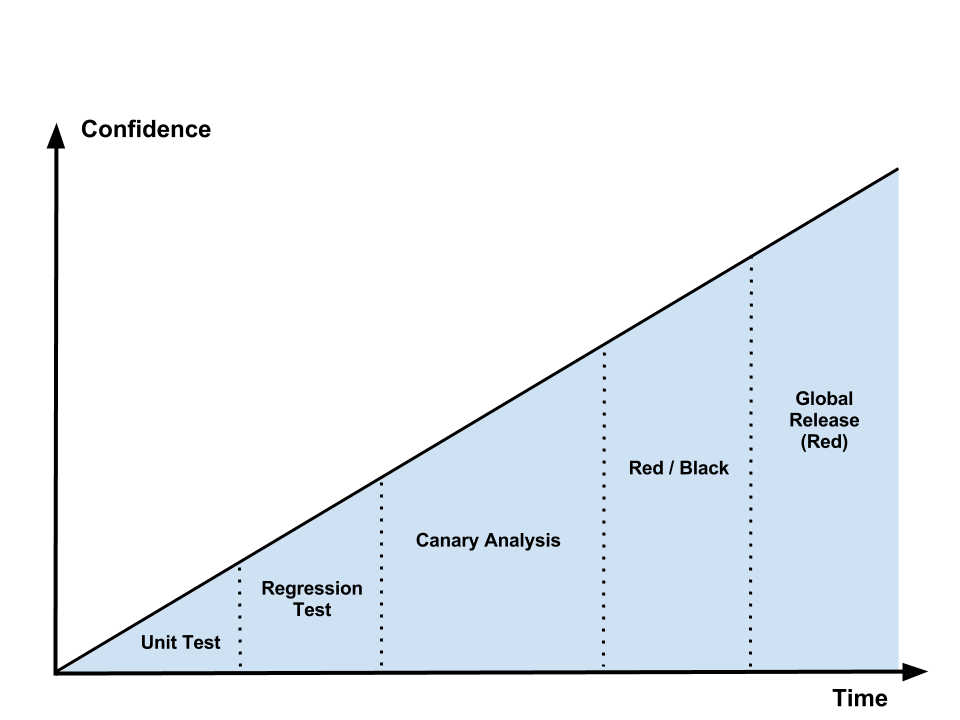
    Development & Deployment Flow
    The following diagram illustrates the logical flow of code from feature inception to global deployment to production clusters across all of our AWS regions. Each phase in the flow provides feedback about the “goodness” of the code, with each successive step providing more insight into and confidence about feature correctness and system stability.
    https://medium.com/netflix-techblog/deploying-the-netflix-api-79b6176cc3f0
    • Blue Green Deployments


    Simply, you have two identical environments (infrastructure) with the “green” environment hosting the current production apps (app1 version1, app2 version1, app3 version1 for example):
    Now, when you’re ready to make a change to app2 for example and upgrade it to v2, you’d do so in the “blue environment”. In that environment you deploy the new version of the app, run smoke tests, and any other tests (including those to exercise/prime the OS, cache, CPU, etc). When things look good, you change the load-balancer/reverse proxy/router to point to the blue environment:
    You monitor for any failures or exceptions because of the release. If everything looks good, you can eventually shut down the green environment and use it to stage any new releases. If not, you can quickly rollback to the green environment by pointing the load balancer back.

    A/B Testing
    A/B testing is a way of testing features in your application for various reasons like usability, popularity, noticeability, etc
    The difference between blue-green deployments and A/B testing is A/B testing is for measuring functionality in the app.
    Blue-green deployments are about releasing new software safely and rolling back predictably
    You can obviously combine them: use blue-green deployments to deploy new features in an app that can be used for A/B testing.

    Canary releases
    Canary releases are a way of sending out a new version of your app into production that plays the role of a “canary” to get an idea of how it will perform (integrate with other apps, CPU, memory, disk usage, etc).
    Canary releases let you test the waters before pulling the trigger on a full release.
    https://www.testingexcellence.com/difference-between-greenblue-deployments-ab-testing-and-canary-releases/
    • How to configure AB Deployments on Openshift

    AB deployments are a simple and effective strategy to split traffic between different applications
    One common use case is to split the load between the same application using a different template or database and measure the impact with different% of each application
    You can also use it to switch off completely one version of one application by setting its load to 0%.
    http://www.mastertheboss.com/soa-cloud/openshift/how-to-configure-ab-deployments-on-openshift

    • What is A/B testing?

    In short, A/B testing is about testing a hypothesis (= any enhancement that a user can view or interact with like text, components, colors, etc) compared to the current view. The current view is usually referred to as ‘the control’ and the test itself ‘the variant’.

    A/B testing deployment
    All methods are based on canary deployments. Canary deployment means that a release is only deployed to a subset of users first before rolling out to all users (once it meets expectations).

    Canary deployment on (full stack) application via load-balancing
    This means there is a layer in between called a load balancer that directs traffic to manage the load over several identical web servers and fail-over when needed.
    In this case a portion of the back-end servers is deployed with the test variant and the load balancer redirects 25% of the traffic to the test variant servers.
    The configuration is compatible with HaProxy, the most used load balancer software on the planet

    Canary deployment on micro-services via URL routing

    https://melv1n.com/ab-testing-guide-product-managers/


    • Stop Gambling with Upgrades, Murphy’s Law Always Wins

    Take your running cluster and upgrade each component one by one.  In this case the load balancer is pointing to every version.  Select one of them and stop sending production traffic to it.
    Once traffic stops, upgrade the unused cluster member then run whatever tests need to be run.
    Once all tests pass, add the new member back to the load balancer and start sending production traffic to it.
    Repeat until the entire cluster is upgraded and getting production traffic.

    What do you do if configuration management hangs or if the tests don’t succeed

    Red Black Deployments
    The approach is fairly straight forward, create a new system and leave the old system alone.
    Send production traffic to the new system only after it’s up and in a known, confirmed state.
    The big benefit here is no changes to the ‘production’ environment happen until the new environment is confirmed good.
    The drawback is the need for extra capacity to create this new environment. Using a public or private cloud provider is one way to make sure the extra capacity is there when it’s needed.

    https://rhelblog.redhat.com/2015/05/07/stop-gambling-with-upgrades-murphys-law-always-wins/#more-908

    • Red-Black Deployment

    Red-Black deployment is a release technique that reduces downtime and risk by running two identical production environments called Red and Black.
    At any time, only one of the environments is live, with the live environment serving all production traffic. For this example, Red is currently live and Black is idle(in this case we have kept the Black down-scaled to zero servers).
    As we prepare a new release of our application, deployment and the final stage of testing takes place in the environment that is not live: in this example, Black. Once we have deployed and fully tested the software in Black, we switch the ASG attached behind ELB all incoming requests now go to Black instead of Red. Black is now live, and Red is idle(down-scaled to zero servers).

    This technique can eliminate downtime due to application deployment. In addition, Red-Black deployment reduces risk: if something unexpected happens with our new release on Black, we can immediately roll back to the last version by switching back to Red.

    https://sweetibharti.wordpress.com/2016/11/11/red-black-deployment-on-aws/


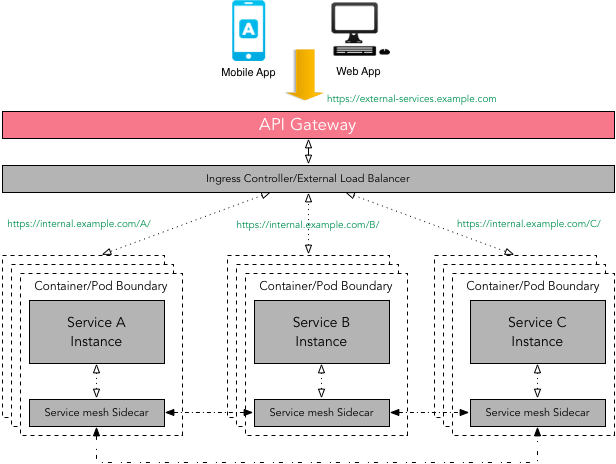
    • Ultralight service mesh for Kubernetes and beyond 

    Linkerd gives you observability, reliability, and security for your microservices — with no code change required
    https://linkerd.io/


    • In this article, we’ll show you how to use linkerd as a service mesh to add TLS to all service-to-service HTTP calls, without modifying any application code.

    https://blog.linkerd.io/2016/10/24/a-service-mesh-for-kubernetes-part-iii-encrypting-all-the-things/


    Computer Networking Tutorial - 15 - Mesh Topology
    advantages
    provides alternative routes if one node fails
    the more nodes you add the more communication routes you have 
    suitable for MAN,WAN not LAN

    disadvantages
    expensive to set up
    • A high-performance, open-source universal RPC framework

    Define your service using Protocol Buffers, a powerful binary serialization toolset and language
    Works across languages and platforms
    Automatically generate idiomatic client and server stubs for your service in a variety of languages and platforms
    Start quickly and scale
    Install runtime and dev environments with a single line and also scale to millions of RPCs per second with the framework
    Bi-directional streaming and integrated auth
    Bi-directional streaming and fully integrated pluggable authentication with http/2 based transport

    gRPC is a modern open source high performance RPC framework that can run in any environment. It can efficiently connect services in and across data centers with pluggable support for load balancing, tracing, health checking and authentication. It is also applicable in last mile of distributed computing to connect devices, mobile applications and browsers to backend services.
    https://grpc.io/
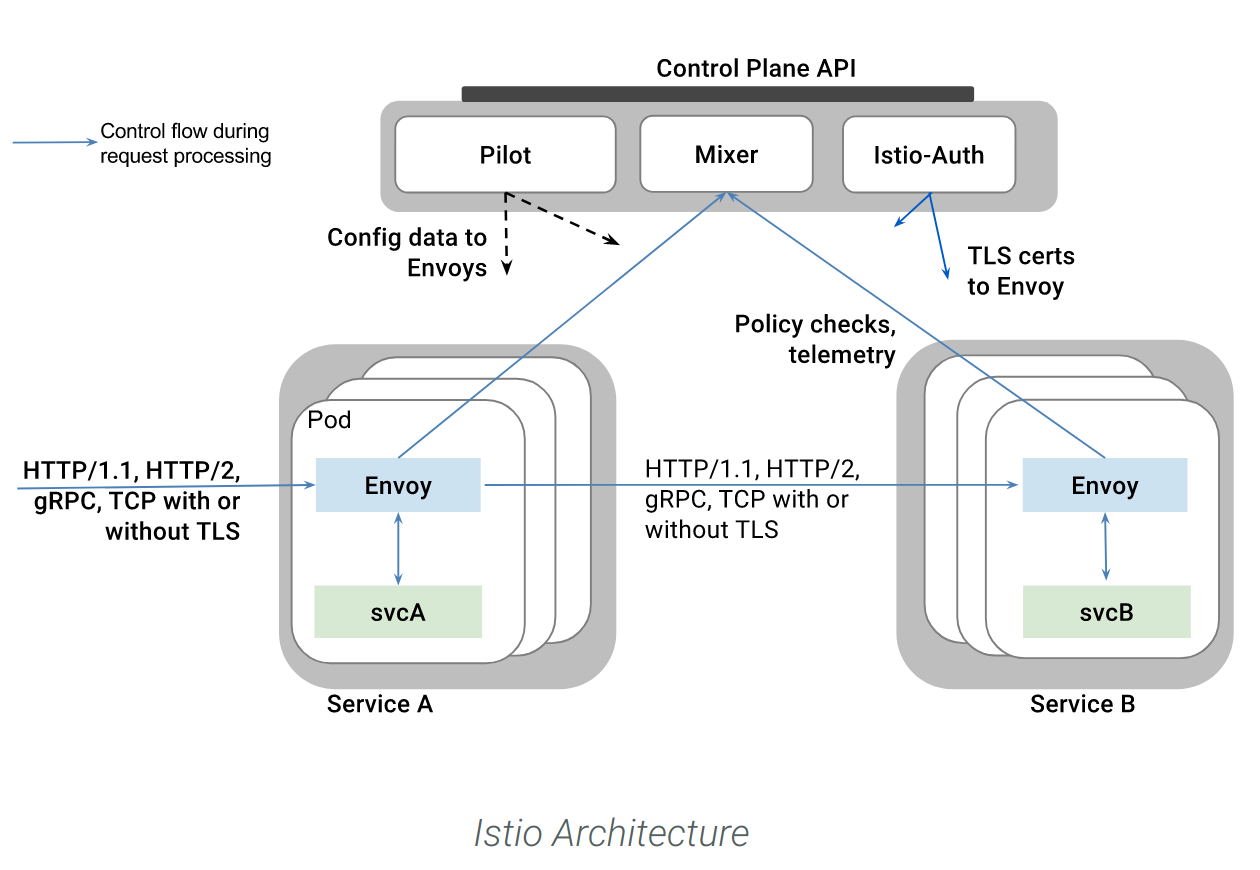
    Istio + envoy + grpc + metrics winning with service mesh in practice
    How to Deploy a gRPC Mode Istio Mixer Adapter into Kubernetes
    • Zipkin is a distributed tracing system. It helps gather timing data needed to troubleshoot latency problems in microservice architectures.

    https://zipkin.io/