Tuesday, September 26, 2017

Software-defined data center

  • Software-defined data center (SDDC; also: virtual data center, VDC) is a marketing term that extends virtualization concepts such as abstraction, pooling, and automation to all data center resources and services to achieve IT as a service (ITaaS).In a software-defined data center, "all elements of the infrastructure — networking, storage, CPU and security – are virtualized and delivered as a service.
https://en.0wikipedia.org/index.php?q=aHR0cHM6Ly9lbi53aWtpcGVkaWEub3JnL3dpa2kvU29mdHdhcmUtZGVmaW5lZF9kYXRhX2NlbnRlcg


  • What is Software-defined Storage?


HARDWARE-CENTRIC STORAGE SYSTEMS
Hardware-centric storage systems, such as dedicated appliances and NAS, have hit a wall.
They can’t cope with the massive data volumes, need for elastic scalability, and dynamic workloads of Digital Business, Big Data, and the cloud.

software-defined storage (SDS)
In this radically different approach, storage resources are decoupled from hardware, aggregated into a giant pool, and distributed dynamically to applications and users as needed

https://www.scality.com/software-defined-storage/

  • SOFTWARE-DEFINED INFRASTRUCTURE

Solutions that automate IT operations and streamline management of resources, workloads, and apps by deploying and controlling data center infrastructure as code.
https://www.hpe.com/us/en/solutions/software-defined.html

  • Hyperconvergence means more than just merging storage and compute into a single solution.

When the entire IT stack of multiple infrastructure components is combined into a software-defined platform, you can accomplish complex tasks in minutes instead of hours.
Hyperconvergence gives you the agility and economics of cloud with the enterprise capabilities of on-premises infrastructure.
https://www.hpe.com/us/en/integrated-systems/hyper-converged.html


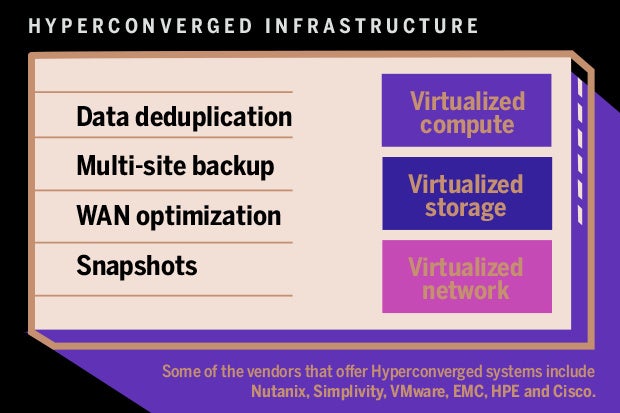
  • Hyper-converged infrastructure (HCI) is a software-defined IT infrastructure that virtualizes all of the elements of conventional "hardware-defined" systems. HCI includes, at a minimum, virtualized computing (a hypervisor), a virtualised SAN (software-defined storage) and virtualized networking (software-defined networking). HCI typically runs on commercial off-the-shelf (COTS) servers.
https://en.wikipedia.org/wiki/Hyper-converged_infrastructure

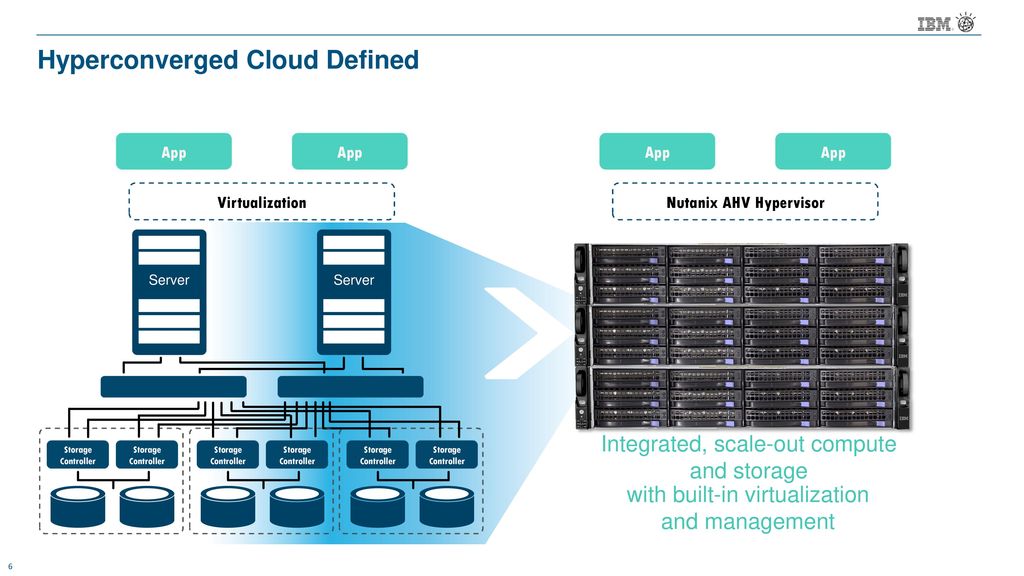
  • Hyper converged infrastructure (HCI) allows the convergence of physical storage onto industry-standard x86 servers, enabling a building block approach with scale-out capabilities. All key data center functions run as software on the hypervisor in a tightly integrated software layer – delivering services that were previously provided via hardware through software.
https://www.vmware.com/products/hyper-converged-infrastructure.html

  • VMware has made recently as competition in its core markets heats up. For example, there is its partnership with parent company EMC and Cisco on VCE on converged infrastructure.
there is also the rise of OpenStack as an open source cloud option. Spurred by the project's industry momentum, VMware now offers its own flavor of OpenStack and is betting that telcos in particular need an on-ramp to OpenStack as they explore NFV orchestration.
https://www.quali.com/blog/vmware-nutanix-and-whats-at-stake-in-the-sddc-market/


Hyper-Converged Infrastructure Explained

Comparing Traditional, Converged and Hyperconverged Infrastructure
The Reality of Software Defined Data Centers (SDDC)


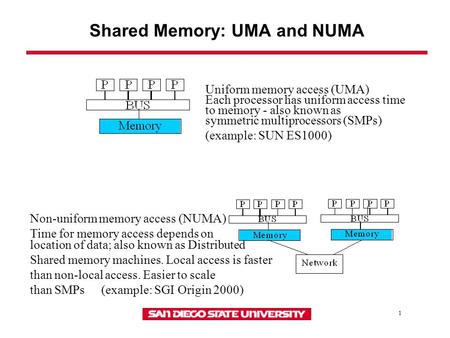
  • Non-uniform memory access (NUMA) is a computer memory design used in multiprocessing, where the memory access time depends on the memory location relative to the processor. Under NUMA, a processor can access its own local memory faster than non-local memory (memory local to another processor or memory shared between processors). The benefits of NUMA are limited to particular workloads, notably on servers where the data is often associated strongly with certain tasks or users
https://en.wikipedia.org/wiki/Non-uniform_memory_access

  • shared memory architectures

  • Non-uniform memory access (NUMA) systems are server platforms with more than one system bus. These platforms can utilize multiple processors on a single motherboard, and all processors can access all the memory on the board. When a processor accesses memory that does not lie within its own node (remote memory), data must be transferred over the NUMA connection at a rate that is slower than it would be when accessing local memory. Thus, memory access times are not uniform and depend on the location (proximity) of the memory and the node from which it is accessed
https://community.mellanox.com/docs/DOC-2491
  • The NUMA topology and CPU pinning features in OpenStack provide high-level control over how instances run on hypervisor CPUs and the topology of virtual CPUs available to instances. These features help minimize latency and maximize performance.
SMP, NUMA, and SMT
Symmetric multiprocessing (SMP)
    SMP is a design found in many modern multi-core systems. In an SMP system, there are two or more CPUs and these CPUs are connected by some interconnect. This provides CPUs with equal access to system resources like memory and input/output ports.
Non-uniform memory access (NUMA)
    NUMA is a derivative of the SMP design that is found in many multi-socket systems. In a NUMA system, system memory is divided into cells or nodes that are associated with particular CPUs. Requests for memory on other nodes are possible through an interconnect bus. However, bandwidth across this shared bus is limited. As a result, competition for this resource can incur performance penalties.
Simultaneous Multi-Threading (SMT)
    SMT is a design complementary to SMP. Whereas CPUs in SMP systems share a bus and some memory, CPUs in SMT systems share many more components. CPUs that share components are known as thread siblings. All CPUs appear as usable CPUs on the system and can execute workloads in parallel. However, as with NUMA, threads compete for shared resources.
https://docs.openstack.org/nova/pike/admin/cpu-topologies.html


  • ONAP community. As an open source project, participation in ONAP is open to all, whether you are an employee of an LF Networking (LFN) member company or just passionate about network transformation. The best way to evaluate, learn, contribute, and influence the direction of the project is to participate. There are many ways for you to contribute to advancing the state of the art of network orchestration and automatio

https://www.onap.org/home/community
  • What is IO Visor?
IO Visor brings universal IO extensibility to the Linux  Kernel and enables infrastructure/IO developers to
create, publish, and deploy applications in live systems without having to recompile or reboot kernel code.
https://www.iovisor.org/wp-content/uploads/sites/8/2016/09/io_visor_faq.pdf
  • Cgroups allow you to allocate resources — such as CPU time, system memory, network bandwidth, or combinations of these resources — among user-defined groups of tasks (processes) running on a system. You can monitor the cgroups you configure, deny cgroups access to certain resources, and even reconfigure your cgroups dynamically on a running system. The cgconfig (control group config) service can be configured to start up at boot time and reestablish your predefined cgroups, thus making them persistent across reboots.
https://access.redhat.com/documentation/en-us/red_hat_enterprise_linux/6/html/resource_management_guide/ch01

  • Prototyping kernel development
This project and GitHub repository is meant for speeding up Linux Kernel development work.
https://github.com/netoptimizer/prototype-kernel

  • The basic idea is to compile modules outside the kernel tree, but use the kernels kbuild infrastructure. Thus, this does require that you have a kernel source tree avail on your system. Most distributions offer a kernel-devel package, that only install what you need for this to work
http://netoptimizer.blogspot.com/2014/11/announce-github-repo-prototype-kernel.html

  • I/O Virtualization Goals
I/O virtualization solutions need to provide the same isolation that was found when the environment was running on a separate physical machine

I/O Virtualization (IOV) involves sharing a single I/O resource between multiple virtual machines. Approaches for IOV include  models where
sharing is done using software, where sharing is done in hardware, and hybrid approaches.

Software-Based Sharing
https://www.intel.com/content/dam/doc/application-note/pci-sig-sr-iov-primer-sr-iov-technology-paper.pdf

  • Layer 3: Software-Defined Data Center (SDDC)

Resource pooling, usage tracking, and governance on top of the Hypervisor layer give rise to the Software-Defined Data Center (SDDC).  The notion of “infrastructure as code” becomes possible at this layer through the use of REST APIs.  Users at this layer are typically agnostic to Infrastructure and Hypervisor specifics below them and have grow accustomed to thinking of compute, network, and storage resources as simply being available whenever they want.

An OSI Model for Cloud
Layer 1: Infrastructure
Layer 2: Hypervisor
Layer 3: Software-Defined Data Center (SDDC)
Layer 4: Image
Layer 5: Services
Layer 6: Applications
https://blogs.cisco.com/cloud/an-osi-model-for-cloud


  • Converged vs. Hyper-Converged Infrastructure Solutions

Traditional IT infrastructures were made up of the proverbial technology silos. They included experts in networking, storage, systems administration, and software.
Today's virtual environments can be likened to the ubiquitous smartphone. Smartphone users generally don't concern themselves with issues such as storage or systems management; everything they need is just an app.
Generally speaking, there are two approaches companies can take to building a converged infrastructure:
    The hardware-focused, building-block approach of VCE (a joint venture of EMC, Cisco, and VMware), simply known as converged infrastructure;
    The software defined approach of Nutanix, VMware, and others called hyper-converged infrastructure.

The most important difference between the two technologies is that in a converged infrastructure, each of the components in the building block is a discrete component that can be used for its intended purpose -- the server can be separated and used as a server, just as the storage can be separated and used as functional storage. In a hyper-converged infrastructure, the technology is software defined, so that the technology is, in essence, all integrated and cannot be broken out into separate components

In a non-converged architecture, physical servers run a virtualization hypervisor, which then manages each of the virtual machines (VMs) created on that server. The data storage for those physical and virtual machines is provided by direct attached storage (DAS), network attached storage (NAS) or a storage area network (SAN).
In a converged architecture, the storage is attached directly to the physical servers. Flash storage generally is used for high-performance applications and for caching storage from the attached disk-based storage.
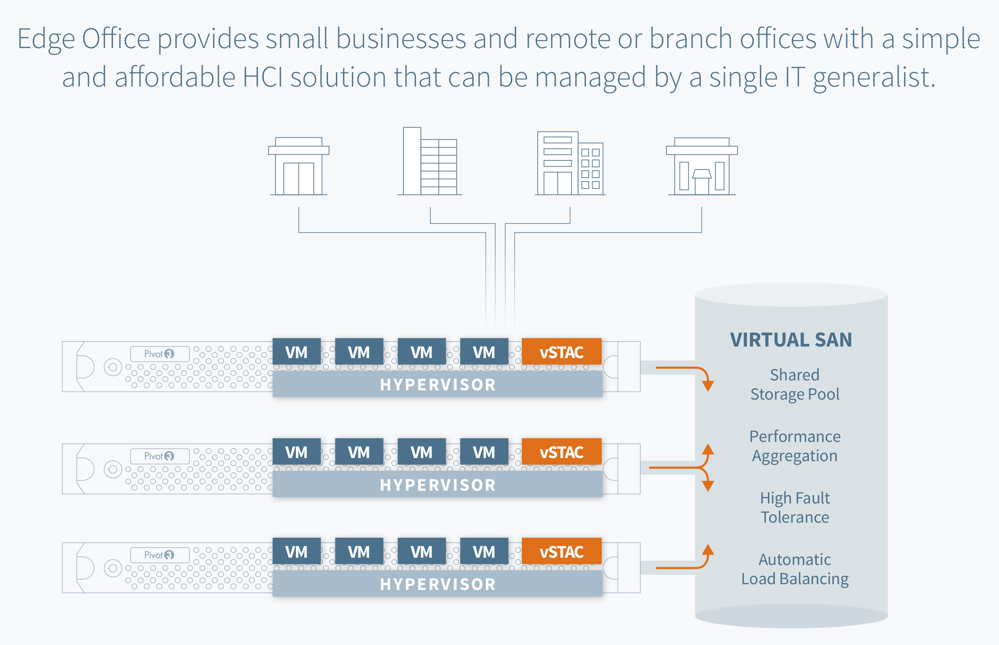
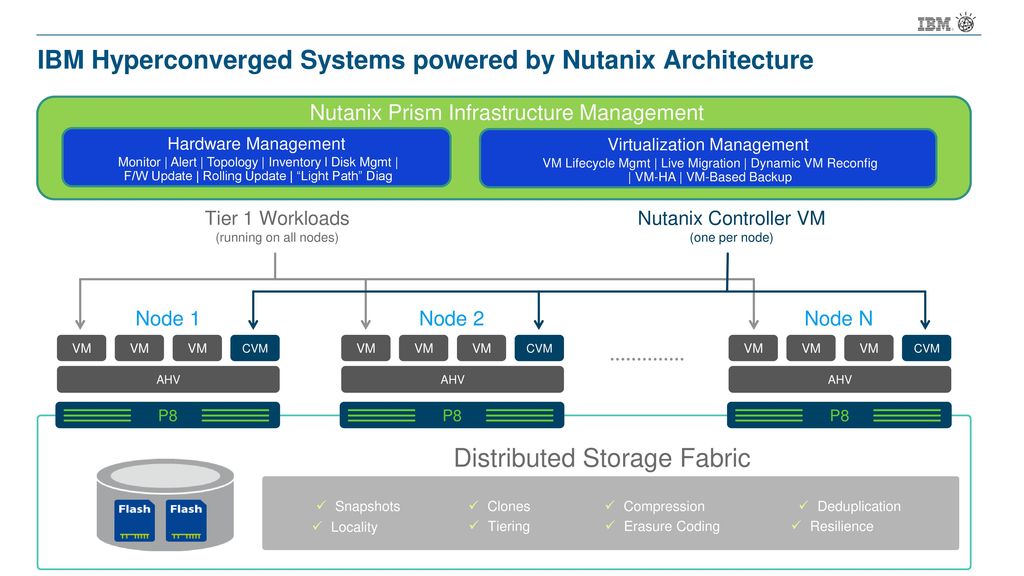
The hyper-converged infrastructure has the storage controller function running as a service on each node in the cluster to improve scalability and resilience.

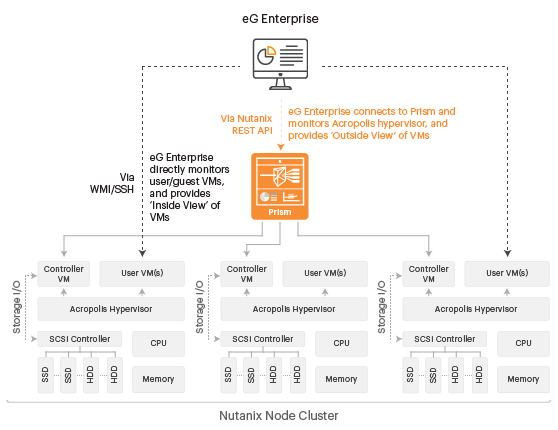
Using Nutanix as an example, the storage logic controller, which normally is part of SAN hardware, becomes a software service attached to each VM at the hypervisor level. The software defined storage takes all of the local storage across the cluster and configures it as a single storage pool. Data that needs to be kept local for the fastest response could be stored locally, while data that is used less frequently can be stored on one of the servers that might have spare capacity.

Hyper-Converged Infrastructure Costs
Like traditional infrastructures, the cost of a hyper-converged infrastructure can vary dramatically depending on the underlying hypervisor. An infrastructure built on VMware's vSphere or Microsoft's Hyper-V can have fairly costly licensing built in. Nutanix, which supports Hyper-V, also supports the free, open source KVM, the default hypervisor in OpenStack cloud software.Because the storage controller is a software service, there is no need for the expensive SAN or NAS hardware in the hyper-converged infrastructure, the company says.The hypervisor communicates to the software from the Nutanix software vendor in the same manner as it did to the SAN or NAS so there is no reconfiguring of the storage, the company says. However, the Nutanix software eliminates the need for the IT team to configure Logical Unit Numbers (LUNs), volumes or read groups, simplifying the storage management function.

Niel Miles, software defined data center solutions manager at Hewlett-Packard, described "software defined" as programmatic controls of the corporate infrastructure as a company moves forward, while speaking at the HP Discover 2014 conference in Las Vegas earlier this year. He said this approach adds "business agility," noting that it increases the company's ability to address automation, orchestration, and control more quickly and effectively. Existing technology cannot keep up with these changes, requiring the additional software layer to respond more quickly than was possible in the past.

For those looking to reuse their existing hardware to take advantage of a hyper-converged infrastructure, several companies offer approaches more similiar to the converged infrastructure approach of discrete server, storage and network devices, but with software defined technology added to improve performance and capabilities.

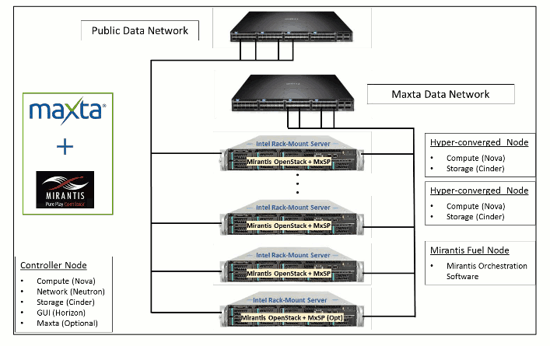
Maxta's VM-centric offering simplified IT management and reduces storage administration by enabling customers to manage VMs and not storage.

Converged Infrastructure: Main Differentiators
There are two approaches to building a converged infrastructure.
The first is using the building-block approach, such as that used in the VCE Vblock environment, where fully configured systems -- including servers, storage, networking and virtualization software -- are installed in a large chassis as a single building block. The infrastructure is expanded by adding additional building blocks.
While one of the main arguments in favor of a converged infrastructure is that it comes pre-configured and simply snaps into place, that also is one of the key arguments against this building-block technology approach as well.
The same holds true for the components themselves. Because each component is selected and configured by the vendor, the user does not have the option to choose a router or storage array customized for them. Also, the building-block approach ties the user in to updating patches on the vendor's timetable, rather than the user's. Patches must be updated in the pre-configured systems in order to maintain support.

It is possible to build a converged infrastructure without using the building block approach.
The second approach is using a reference architecture, such as the one dubbed VSPEX by EMC, which allows the company to use existing hardware, such as a conforming router, storage array or server, to build the equivalent of a pre-configured Vblock system.


https://www.business.com/articles/converged-vs-hyper-converged-infrastructure-solutions


  • Tips on choosing the best architecture for your business


    A traditional infrastructure is built out of individual units; separate storage, application servers, networking and backup appliances that are interlinked
    Each unit must be configured individually
    Each component is managed individually; usually, that requires a team of IT experts, each specialized in a different field
    Sometimes, each unit comes from a different vendor, therefore support and warranty are managed individually

Use case: Traditional infrastructures are still a good fit for companies with a stable environment that handle very large deployments. Tens of petabytes, thousands of applications, many, many users, as well as a dedicated IT staff with specialisations in different datacenter fields. Think huge datacenters and large multi-national companies.


    Application servers, storage, and networking switches are sold as a single turnkey solution by a vendor
    the entire product stack is pre-configured for a certain workload; however, it does not offer a lot of flexibility to adapt for workload changes
    as in the case of traditional infrastructures, more challenging hardware issues may have to be handled by different providers
    every appliance in the converged stack needs to be managed separately in most cases

Use case: Converged infrastructures are ideal for companies that need a lot of control over each element in their IT infrastructure, as each element can be “fine-tuned” individually. They may also be a good fit for large enterprises who are replacing their entire infrastructure, as they do not need to browse the market and purchase every component separately.


    storage, networking and compute are combined in a single unit that is centrally managed and purchased from a single vendor
    all the technology is integrated, and it takes less time to configure the whole solution
    the software layer gives you flexibility in using hardware resources and makes the deployment and management of VMs easy

Use case: Small and medium enterprises which require a cost-effective, flexible and agile infrastructure that can be managed by 1-2 IT people.


    If you have a very stable environment, a low turnover, a specialised IT staff and you also need ultra-high performance (1.000.000 IOPS), then a traditional infrastructure will work for you.
    If you need the performance and control of a traditional infrastructure but are deploying from scratch, choose a converged infrastructure to avoid the costs and troubles of hunting for many pieces of infrastructure from different vendors.
    If your business needs fast deployment, quick access to resources and a low foot print while keeping your overall IT budget low, then a hyper-converged infrastructure is the best for you.
https://syneto.eu/2016/10/03/hyper-converged-vs-traditional-infrastructures/

  • What is Hyperconverged Infrastructure?

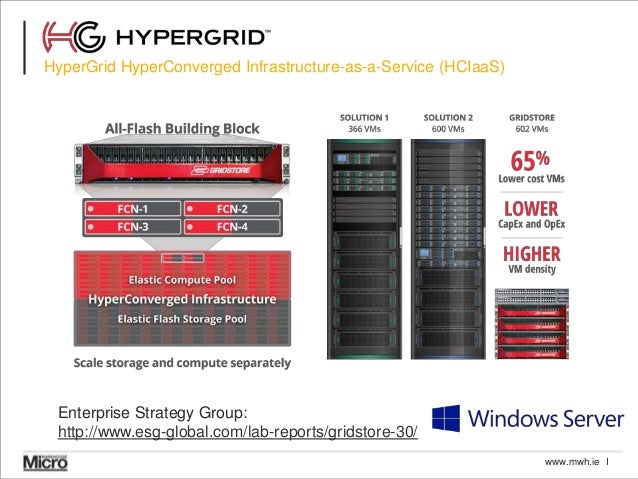
Combine compute, storage, and networking into a single system with hyperconverged infrastructure (HCI). This simplified solution uses software and x86 servers to replace purpose-built hardware so that you can simplify operations, reduce TCO, and rapidly scale.
Three-tier architecture is expensive to build complex to operate, and difficult to scale. Don't wait for IT infrastructure to support your application demands. Adopt HCI without losing control, increasing costs, or compromising security.
https://www.vmware.com/tr/products/hyper-converged-infrastructure.html
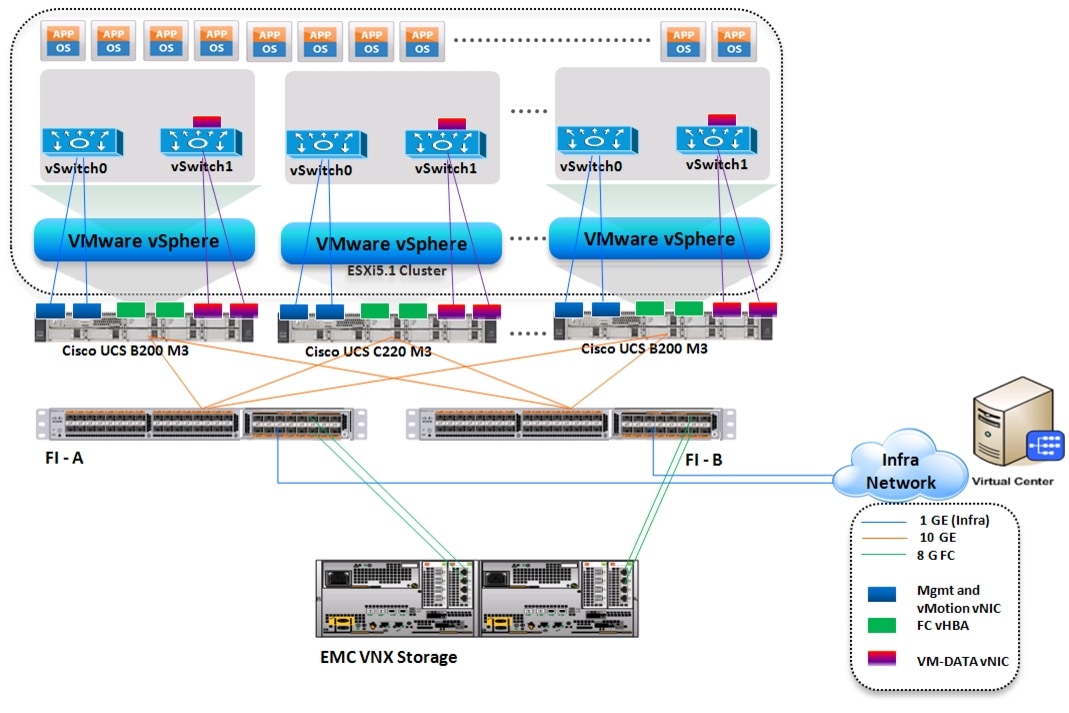
Cisco Virtualization Solution for EMC VSPEX with VMware vSphere 5.1 for 100-125 Virtual Machines 


Mbps vs MB/s

  • Mbps: Megabits per second.
MB/s: Megabytes per second.

1 Mbps is equal to 1/8th of 1 MB/s. (1 byte = 8 bits)

Internet service providers show in Mbps
speed 16 Mbps

download from internet(torrent or IDM), it is in MB/s or KB/s (Bytes).

if you are subscribing 16 Mbps plan, your maximum download speed will be 2 MB/s.

Your connection speed (download and upload) will display as megabits per second. But, you’re downloading or transferring megabytes.

https://www.quora.com/What-is-the-difference-between-Mbps-and-MBps

  • Task: Convert 35,000 Megabits per second to Megabytes per second (show work)
Formula:
Mbps ÷ 8 = MBps
Calculations:
35,000 Mbps ÷ 8 = 4,375 MBps
Result:
35,000 Mbps is equal to 4,375 MBps

Task: Convert 5 Megabytes per second to Megabits per second (show work)
Formula:
MBps x 8 = Mbps
Calculations:
5 MBps x 8 = 40 Mbps
Result:
5 MBps is equal to 40 Mbps


https://www.checkyourmath.com/convert/data_rates/per_second/megabits_megabytes_per_second.php


  • a Megabit is 1/8 as big as a Megabyte, meaning that to download a 1MB file in 1 second you would need a connection of 8Mbps. The difference between a Gigabyte (GB) and a Gigabit (Gb) is the same, with a Gigabyte being 8 times larger than a Gigabit.
https://opensignal.com/knowledgebase/the-difference-between-megabyte-and-megabit.php

https://en.wikipedia.org/wiki/Multiprotocol_Label_Switching

Rooting

  • Rooting is the process of allowing users of smartphones, tablets and other devices running the Android mobile operating system to attain privileged control (known as root access) over various Android subsystems. As Android uses the Linux kernel, rooting an Android device gives similar access to administrative (superuser) permissions as on Linux or any other Unix-like operating system such as FreeBSD or OS X.
Root access is sometimes compared to jailbreaking devices running the Apple iOS operating system. However, these are different concepts: Jailbreaking is the bypass of several types of Apple prohibitions for the end user, including modifying the operating system (enforced by a "locked bootloader"), installing non-officially approved applications via sideloading, and granting the user elevated administration-level privileges (rooting). Only a minority of Android devices lock their bootloaders, and many vendors such as HTC, Sony, Asus and Google explicitly provide the ability to unlock devices, and even replace the operating system entirely.Similarly, the ability to sideload applications is typically permissible on Android devices without root permissions. Thus, it is primarily the third aspect of iOS jailbreaking (giving users administrative privileges) that most directly correlates to Android rooting.
https://en.wikipedia.org/wiki/Rooting_(Android_OS)


  • iOS jailbreaking is the process of removing software restrictions imposed by Apple's on iOS and tvOS. It does this by using a series of software exploits. Jailbreaking permits root access to iOS, allowing the downloading and installation of additional applications, extensions, and themes that are unavailable through the official Apple App Store.
https://en.wikipedia.org/wiki/IOS_jailbreaking

Rx Tx

  •  a  different  type  of  cable  exists,  called  a ìcrossover cable. This type of cable internally crosses the TX and RX port on one end of the cable to the RX
and TX port on the other end of the cable, respectively.This type of cable allows two end Ethernet devices to communicate with each other when directly connected
as  a  point-to-point  network.
In  a  properly  configured  Ethernet  connection,  the  TX port  of  one  node  is  connected  to  the  RX  port  of  the other node, and vice-versa
an auto-crossover  capable  node  will  automatically  swap its  TX/RX  pins  between  TX  and  RX  until  a  link  is established. In this manner, either a crossover or patch
cable may be used with the node with the same results.It  is  only  necessary  that  one  node  in  a  linked  pair implement   auto-crossover.   Most   modern   switches,
routers, etc., implement auto-crossover.
http://ww1.microchip.com/downloads/en/AppNotes/01120a.pdf

loopback device

  • The first important data are the units, which are stated to be 512 bytes per sector. We take note of this value as the factor for use in the next operation.
Let's say we want to access the 7th partition, which is 10860003 sectors into the disk, according to the fdisk output. We know that each sector is 512 bytes, so:
# mount -o loop,offset=$((10860003 * 512)) disk.img /mnt
http://madduck.net/blog/2006.10.20:loop-mounting-partitions-from-a-disk-image/

  • loop device is a pseudo ("fake") device (actually just a file) that acts as a block-based device. You want to mount a file (disk1.iso) that will act as entire filesystem, so you use loop.
https://unix.stackexchange.com/questions/4535/what-is-a-loop-device-when-mounting


  • The loopback file can contain an ISO image, a disk image, a file system, or a logical volume image. For example, by attaching a CD-ROM ISO image to a loopback device and mounting it, you can access the image the same way that you can access the CD-ROM device.
A new device can also be created with the mkdev command, changed with the chdev command, and removed with the rmdev command
Use the loopmount command to create a loopback device, to bind a specified file to the loopback device, and to mount the loopback device. Use the loopumount command to unmount a previously mounted image file on a loopback device, and to remove the device.
https://www.ibm.com/support/knowledgecenter/en/ssw_aix_61/com.ibm.aix.osdevice/loopback_main.htm

Organizationally unique identifier

Organizationally unique identifier
An organizationally unique identifier (OUI) is a 24-bit number that uniquely identifies a vendor, manufacturer, or other organization.
https://en.0wikipedia.org/index.php?q=aHR0cHM6Ly9lbi53aWtpcGVkaWEub3JnL3dpa2kvT3JnYW5pemF0aW9uYWxseV91bmlxdWVfaWRlbnRpZmllcg

Atlassian Products

  • Atlassian Crowd

single sign-on and user identity that's easy to use
Centralized identity management
Manage users from multiple directories - Active Directory, LDAP, OpenLDAP or Microsoft Azure AD - and control application authentication permissions in one single location.
Seamlessly integrate all your Atlassian products - like Jira, Confluence, and Bitbucket- to give your users one simple single sign-on (SSO) experience
https://www.atlassian.com/software/crowd

  • Atlassian Jira Software
Jira Software is built for every member of your software team to plan, track, and release great software
https://www.atlassian.com/software/jira


  • Atlassian bitbucket
Distributed version control system that makes it easy for you to collaborate with your team. The only collaborative Git solution that massively scales.
https://www.atlassian.com/software/bitbucket

  • Xray - Test Management for Jira
#1 Manual & Automated Test Management App for QA in Jira. Test Case Management, Software Testing and Quality Assurance in Jira
https://marketplace.atlassian.com/plugins/com.xpandit.plugins.xray/server/overview

  • Zephyr for JIRA - Test Management
Zephyr for JIRA provides a full featured and sophisticated test management solution – all inside JIRA

https://marketplace.atlassian.com/plugins/com.thed.zephyr.je/server/overview

  • Access a complete audit trail with all code review details, down to the history of a specific review. Customize your Jira Software workflow to stop if there are any open reviews.
Review code, discuss changes, share knowledge, and identify defects across SVN, Git, Mercurial, CVS, and Perforce.
https://www.atlassian.com/software/crucible

TACACS

Terminal Access Controller Access-Control System (TACACS, usually pronounced like tack-axe) refers to a family of related protocols handling remote authentication and related services for networked access control through a centralized server. The original TACACS protocol, which dates back to 1984, was used for communicating with an authentication server, common in older UNIX networks; it spawned related protocols:
https://en.0wikipedia.org/index.php?q=aHR0cHM6Ly9lbi53aWtpcGVkaWEub3JnL3dpa2kvVEFDQUNT

Friday, April 7, 2017

Industry 4.0


  • Industry 4.0 is the current trend of automation and data exchange in manufacturing technologies. It includes cyber-physical systems, the Internet of things and cloud computing.Industry 4.0 creates what has been called a "smart factory". Within the modular structured smart factories, cyber-physical systems monitor physical processes, create a virtual copy of the physical world and make decentralized decisions. Over the Internet of Things, cyber-physical systems communicate and cooperate with each other and with humans in real time, and via the Internet of Services, both internal and cross-organizational services are offered and used by participants of the value chain

  • https://en.wikipedia.org/wiki/Industry_4.0


Friday, March 10, 2017

terms


  • The Raspberry Pi is a series of small single-board computers developed in the United Kingdom by the Raspberry Pi Foundation to promote the teaching of basic computer science in schools and in developing countries.
https://en.wikipedia.org/wiki/Raspberry_Pi


  • A UART (Universal Asynchronous Receiver/Transmitter) is the microchip with programming that controls a computer's interface to its attached serial devices.Specifically, it provides the computer with the RS-232C Data Terminal Equipment ( DTE ) interface so that it can "talk" to and exchange data with modems and other serial devices.
http://whatis.techtarget.com/definition/UART-Universal-Asynchronous-Receiver-Transmitter


  • The Universal Asynchronous Receiver/Transmitter (UART) controller is the key component of the serial communications subsystem of a computer. The UART takes bytes of data and transmits the individual bits in a sequential fashion. At the destination, a second UART re-assembles the bits into complete bytes.Serial transmission is commonly used with modems and for non-networked communication between computers, terminals and other devices.

There are two primary forms of serial transmission: Synchronous and Asynchronous.
    UART Universal Asynchronous Receiver/Transmitter
    USART Universal Synchronous-Asynchronous Receiver/Transmitter

Synchronous Serial Transmission
Synchronous serial transmission requires that the sender and receiver share a clock with one another, or that the sender provide a strobe or other timing signal so that the receiver knows when to “read” the next bit of the data.

Asynchronous Serial Transmission

Asynchronous transmission allows data to be transmitted without the sender having to send a clock signal to the receiver. Instead, the sender and receiver must agree on timing parameters in advance and special bits are added to each word which are used to synchronize the sending and receiving units.
https://www.freebsd.org/doc/en/articles/serial-uart/

network forensics

  • The Bro Network Security Monitor
Bro is a powerful network analysis framework that is much different from the typical IDS you may know
https://www.bro.org


  • GRR Rapid Response: remote live forensics for incident response
An incident response framework developed by security researchers at Google, the GRR framework analyzes specific workstations for malware footprints. Once both the server side and the agent have been deployed, they become GRR clients and can begin to receive messages from the front end servers, which makes it easy to investigate individual systems. Then the incident response team can perform various forensic tasks on the client machine, such as analyzing the memory, searching various settings and managing configuration options.
https://github.com/google/grr


  • Suricata

Suricata is a free and open source, mature, fast and robust network threat detection engine.
https://suricata-ids.org

  • NetScanTools® Pro
http://www.netscantools.com/nstpromain.html

Serial Port

  • Serial Terminal Basics

You can now use the screen command to to establish a simple serial connection.
The terminal will go blank with just a cursor. You are now connected to that port!
To disconnect, type control-a followed by control-\. The screen will then ask if you are sure you want to disconnect.

To be able to issue Serial commands, you must first enter PowerShell. Type powershell to get into PowerShell command mode.
To see a list of all the available COM ports, type
[System.IO.Ports.SerialPort]::getportnames()
Now create an instance of the port you want with this command
https://learn.sparkfun.com/tutorials/terminal-basics/command-line-windows-mac-linux

  • Using GNU screen to debug your serial port
Opening serial port (with the correct baud rate)
   
bash> screen /dev/ttyUSB0 57600
/dev/ttyUSB0 is the serial port, while 57600 sets its baud rate into 57600bps

https://embeddedfreak.wordpress.com/2008/08/12/using-gnu-screen-to-debug-your-serial-port/

  • Client Setup

1) Ensure you have a read/write permissions on /dev/ttyS0.
$ ls -l /dev/ttyS0
crw-rw---- 1 root dialout 4, 64 2007-12-20 13:56 /dev/ttyS0
$ id -Gn |grep dialout

if the last command didn't show an output add yourself to dialout group and logout/login:
sudo adduser $USER dialout


2) Install minicom
sudo apt-get install minicom

Configure minicom.
minicom -s

Configure client serial port settings: In Serial port setup, set the following options
A - Serial device: /dev/ttyS0
E - Bps/Par/Bits: 115200 8N1


Alternative serial client: screen

To install:
sudo apt-get install screen


To start:
screen /dev/ttyS0 115200

To end the session, use Ctrl-A,Shift-K.

https://help.ubuntu.com/community/SerialConsoleHowto


  • 5 Linux / Unix Commands For Connecting To The Serial Console

Find out information about your serial ports
$ dmesg | egrep --color 'serial|ttyS'

You can use setserial command which is designed to set and/or report the configuration information associated with a serial port:
$ setserial -g /dev/ttyS[0123]

The cu command is used to call up another system and act as a dial in terminal.
cu -l /dev/ttyS0 -s 19200

minicom command is a communication program which somewhat resembles the shareware program TELIX from old good MS-DOS days.

PuTTY is a free and open source gui X based terminal emulator client for the SSH, Telnet, rlogin, and raw TCP computing protocols and as a serial console clienPuTTY is a free and open source gui X based terminal emulator client for the SSH, Telnet, rlogin, and raw TCP computing protocols and as a serial console client.

The tip command is used as a serial terminal. tip command can be found under AIX/HP-UX/Solairs/*BSD/Linux operating systems.

if you forced to use MS-Windows, try the following free and open source serial communication programs:
    Putty
    TeraTerm
    Poderosa
https://www.cyberciti.biz/hardware/5-linux-unix-commands-for-connecting-to-the-serial-console/


  • Using the Raspberry Pi’s serial port
The stock Debian image for the Raspberry Pi uses the UART as a serial console.

I was able to connect to it from my Ubuntu laptop via my 3.3-volt USB FTDI TTL-232 cable. I connected Raspberry Pi’s ground pin to the ground pin of the FTDI, the Rasberry Pi’s TX pin to the FTDI’s RX pin and vice versa
Then on my Ubuntu laptop I installed minicom (sudo apt-get install minicom) and fired it up with:

    minicom -b 115200 -o -D /dev/ttyUSB0

http://www.irrational.net/2012/04/19/using-the-raspberry-pis-serial-port

  • Tutorial how to use adapter usb serial cable Ubuntu 14 04
https://www.youtube.com/watch?v=DXgvaibDJzo


  • I came across a problem recently, I needed to configure a Cisco switch and all I had was a Ubuntu machine that had a serial port. Since then I've got a Cisco 2511, with octal cable

dmesg | grep tty
the physical serial port is at ttyS0, where as usb > serial converters will show as ttyUSB0
http://lachlanmiskin.com/blog/2012/08/03/using-minicom-to-interface-with-serial-devices-on-linux

  • How to enable USB-Serial Port adapter (RS-232) in Ubuntu Linux

unplug the device and type “lsusb”
First plug in the USB-Serial Port adaptor to one of your USB port. Wait for a couple of second, then run “dmesg”.

Now we know the vendor id and the product id of the USB-Serial Port converter, this will enable us to load the linux kernel module “usbserial” to activate the device
sudo modprobe usbserial vendor=0x4348 product=0x5523
https://blog.mypapit.net/2008/05/how-to-use-usb-serial-port-converter-in-ubuntu.html

  • Testing a USB RS232 adapter
If  connected,  remove  the  USB  RS232  adapter.  In  Windows,  open  Device  Manager  and  expand  the  Ports  section.  While  Device  Manager 
is open  insert  the  USB  RS232  adapter  and  after  a  few  seconds  a  USB  Serial  Port  should  appear.  If  not,  there  is  a  problem  with  the  adapter  or driver
http://www.compsys1.com/support/docs/usb_rs232_test.pdf

Wednesday, March 8, 2017

Mobile device management - MDM

  • Mobile device management (MDM) is an industry term for the administration of mobile devices, such as smartphones, tablet computers, laptops and desktop computers. MDM is usually implemented with the use of a third party product that has management features for particular vendors of mobile devices.
https://en.wikipedia.org/wiki/Mobile_device_management


  • Configure devices during initial power on with bulk provisioning programs such as the Apple Device Enrollment Program (DEP) and Windows Out-of-Box Enrollment (OOBE)
Enable users to self-activate devices by entering their corporate credentials in a simple MDM onboarding workflow
Configure MDM policies for device restrictions, layout, settings access, notifications and more and assign based on OS or ownership type (BYO or corporate-owned)
Deploy public, internal or bulk-purchased apps to devices automatically or to an enterprise app catalog for on-demand install
Connect to enterprise email, VPN, Wi-Fi, content, intranet sites and other backend resources
http://www.air-watch.com/solutions/mobile-device-management/


  • Secure, manage, and monitor any corporate­- or employee­-owned mobile device that accesses business ­critical data. MobileIron’s mobile device management (MDM) capabilities give you the fundamental visibility and IT controls needed to securely deploy, manage, and retire devices when employees replace devices or leave the company.
https://www.mobileiron.com/en/solutions/mobile-device-management-mdm


  • With the proliferation of mobile devices in the workplace, employees can, and do, work from just about anywhere. To stay productive, this mobile workforce demands consistent access to corporate resources and data from any location on any device. This BYOD trend has introduced significant challenges for IT administrators who want to enable enterprise mobility while ensuring that corporate resources are protected from unauthorized access.
https://www.microsoft.com/en-us/cloud-platform/mobile-device-management

  • The notion of “User Focused Security” acknowledges that attacks against corporate users (e.g., phishing, malware) are the primary mechanism leading to security incidents and data breaches, and it’s one of the core principles driving our approach to corporate information security.
Stethoscope is a web application that collects information for a given user’s devices and gives them clear and specific recommendations for securing their systems
https://medium.com/netflix-techblog/introducing-netflix-stethoscope-5f3c392368e3

  • Stethoscope is a web application that collects information from existing device data sources (e.g., JAMF or LANDESK) on a given user’s devices and gives them clear and specific recommendations for securing their systems.
https://github.com/Netflix-Skunkworks/stethoscope

Tuesday, March 7, 2017

Web Scraping / Web Crawler

  • Web Scraping
Web scraping is the process of using bots to extract content and data from a website.web scraping extracts underling HTML code and, with it, data stored in a database.

Web scraping is used in a variety of digital businesses that rely on data harvesting. Legitimate use cases include:
    Search engine bots crawling a site, analyzing its content and then ranking it.
    Price comparison sites deploying bots to auto-fetch prices and product descriptions for allied seller websites.
    Market research companies using scrapers to pull data from forums and social media (e.g., for sentiment analysis).

Scraper Tools and Bots
Web scraping tools are software (i.e., bots) programmed to sift through databases and extract information. A variety of bot types are used, many being fully customizable to:
    Recognize unique HTML site structures
    Extract and transform content
    Store scraped data
    Extract data from APIs

Since all scraping bots have the same purpose—to access site data—it can be difficult to distinguish between legitimate and malicious bots.
several key differences help distinguish between the two.

    Legitimate bots are identified with the organization for which they scrape. For example, Googlebot identifies itself in its HTTP header as belonging to Google. Malicious bots, conversely, impersonate legitimate traffic by creating a false HTTP user agent.
    Legitimate bots abide a site’s robot.txt file, which lists those pages a bot is permitted to access and those it cannot. Malicious scrapers, on the other hand, crawl the website regardless of what the site operator has allowed.

A perpetrator, lacking such a budget, often resorts to using a botnet—geographically dispersed computers, infected with the same malware and controlled from a central location. Individual botnet computer owners are unaware of their participation. The combined power of the infected systems enables large scale scraping of many different websites by the perpetrator.

Malicious Web Scraping Examples

Price Scraping
In price scraping, a perpetrator typically uses a botnet from which to launch scraper bots to inspect competing business databases. The goal is to access pricing information, undercut rivals and boost sales.
Content Scraping
Content scraping comprises large-scale content theft from a given site. Typical targets include online product catalogues and websites relying on digital content to drive business.

Web Scraping Protection
granular traffic analysis.
The process involves the cross verification of factors, including:

    HTML fingerprint – The filtering process starts with granular inspection of HTML headers. These can provide clues as to whether a visitor is human or bot, and malicious or safe. Header signatures are compared against a constantly updated database of over 10 million known variants.
    IP reputation – We collect IP data from all attacks against our clients. Visits from IP addresses having a history of being used in assaults are treated with suspicion and are more likely to be scrutinized further.
    Behavior analysis – Tracking the ways visitors interact with a website can reveal abnormal behavioral patterns, such as a suspiciously aggressive rate of requests and illogical browsing patterns. This helps identify bots that pose as human visitors.
    Progressive challenges – We use a set of challenges, including cookie support and JavaScript execution, to filter out bots and minimize false positives. As a last resort, a CAPTCHA challenge can weed out bots attempting to pass themselves off as humans.
https://www.incapsula.com/web-application-security/web-scraping-attack.html

  • What is Web Scraping?

Web Scraping refers to the technique of extracting bulk data (both text and graphic) from websites and then compiling the gathered information into physical data storage units (hard disks, compact disks etc) to use it for financial gains or other business purposes. This is usually done by using artificially intelligent web scraping software programs which simulate the complete human-computer interaction to automate the process of manual data extraction (copy paste techniques) and making it easy to harvest tonnes of data quickly and efficiently into spreadsheets.

Web Scraping Software Vs Web Browser

A Web scraping software is functionally similar to a Web browser in the sense that both of them interact with the website in a similar way and have built-in capabilities to parse the HTML document object model (DOM). However, a web browser focuses on just rendering the HTML tags into a full-fledged webpage while, a web harvesting software quickly extracts the desired content(only the desired fields like name, phone no, address etc) from the HTML syntax and saves it to a local file present on the hard disk of your computer or an external database.

Web Scraping Software Vs Web Crawler
Web Scraping software usually simulates the way humans explore the web just like the web crawlers do but additionally, while crawlers just index the data for search engines, scraping software also transforms the unusable and non-readable format of data (HTML format) into usable and readable format (original content like text, images etc) that can be easily exported into spreadsheets for later analysis.
https://www.scrapesentry.com/news/web-scraping-definition-detection-prevention/

  • WebScarab
WebScarab is a framework for analysing applications that communicate using the HTTP and HTTPS protocols. It is written in Java, and is thus portable to many platforms. WebScarab has several modes of operation, implemented by a number of plugins. In its most common usage, WebScarab operates as an intercepting proxy, allowing the operator to review and modify requests created by the browser before they are sent to the server, and to review and modify responses returned from the server before they are received by the browser.
https://www.owasp.org/index.php/OWASP_WebScarab


  • What is Apache Nutch?
    Apache Nutch is a highly extensible and scalable open source web crawler software project. Stemming from Apache Lucene,
    http://nutch.apache.org/