Showing posts with label storage. Show all posts

Friday, May 14, 2021

Cloud Native Storage

  •  Understanding Cloud Native Storage


Cloud Native Storage is a solution that provides comprehensive data management for stateful applications. When you use Cloud Native Storage, you can create the containerized stateful applications capable of surviving restarts and outages. Stateful containers leverage storage exposed by vSphere while using such primitives as standard volume, persistent volume, and dynamic provisioning.


With Cloud Native Storage, you can create persistent container volumes independent of virtual machine and container life cycle. 


https://docs.vmware.com/en/VMware-vSphere/6.7/Cloud-Native-Storage/GUID-CF1D7196-E49C-4430-8C50-F8E35CAAE060.html


  • Cloud Native Storage Concepts and Terminology


Kubernetes Cluster

A cluster of VMs where Kubernetes control plane and worker services are running. On top of the Kubernetes cluster, you deploy your containerized applications. Applications can be stateful and stateless.


Pod

A pod is a group of one or more containers that share such resources as storage and network. Containers inside a pod are started, stopped, and replicated as a group.


Container Orchestrator

Open-source platforms, such as Kubernetes, for deployment, scaling, and management of containerized applications across clusters of hosts


Stateful Application

As containerized applications evolve from stateless to stateful, they require persistent storage. Unlike stateless applications that do not save data between sessions, stateful applications save data to persistent storage. The retained data is called the application's state. You can later retrieve the data and use it in the next session. Most applications are stateful. A database is as an example of a stateful application


PersistentVolume

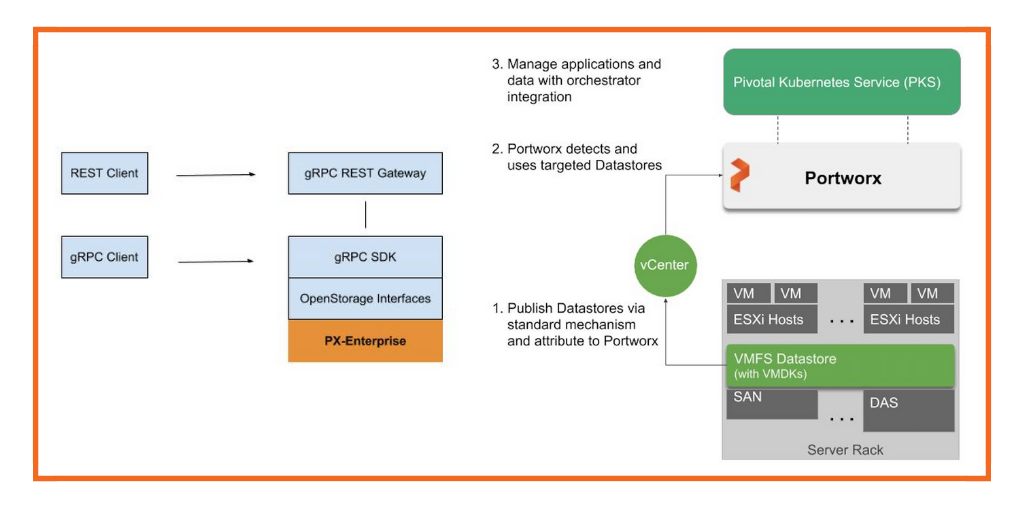
Stateful applications use PersistentVolumes to store their data. A PersistentVolume is a Kubernetes volume capable of retaining its state and data. It is independent of a pod and can continue to exist even when the pod is deleted or reconfigured. In the vSphere environment, the PersistentVolume objects use virtual disks (VMDKs) as their backing storage.


StorageClass

Kubernetes uses a StorageClass to define different tiers of storage and to describe different types of requirements for storage backing the PersistentVolume. In the vSphere environment, a storage class can be linked to a storage policy. 


PersistentVolumeClaim

Typically, applications or pods can request persistent storage through a PersistentVolumeClaim


StatefulSet

A StatefulSet manages the deployment and scaling of your stateful applications. The StatefulSet is valuable for applications that require stable identifiers or stable persistent storage.


https://docs.vmware.com/en/VMware-vSphere/6.7/Cloud-Native-Storage/GUID-6B4A87B4-F435-4410-85AD-B0B976133D62.html


  • Cloud Native Storage (CNS) provides comprehensive data management for stateful, containerized apps, enabling apps to survive restarts and outages. Stateful containers can use vSphere storage primitives such as standard volume, persistent volume, and dynamic provisioning, independent of VM and container lifecycle.

https://docs.pivotal.io/tkgi/1-9/vsphere-cns.html

  • Cloud Volumes Service is now software-defined


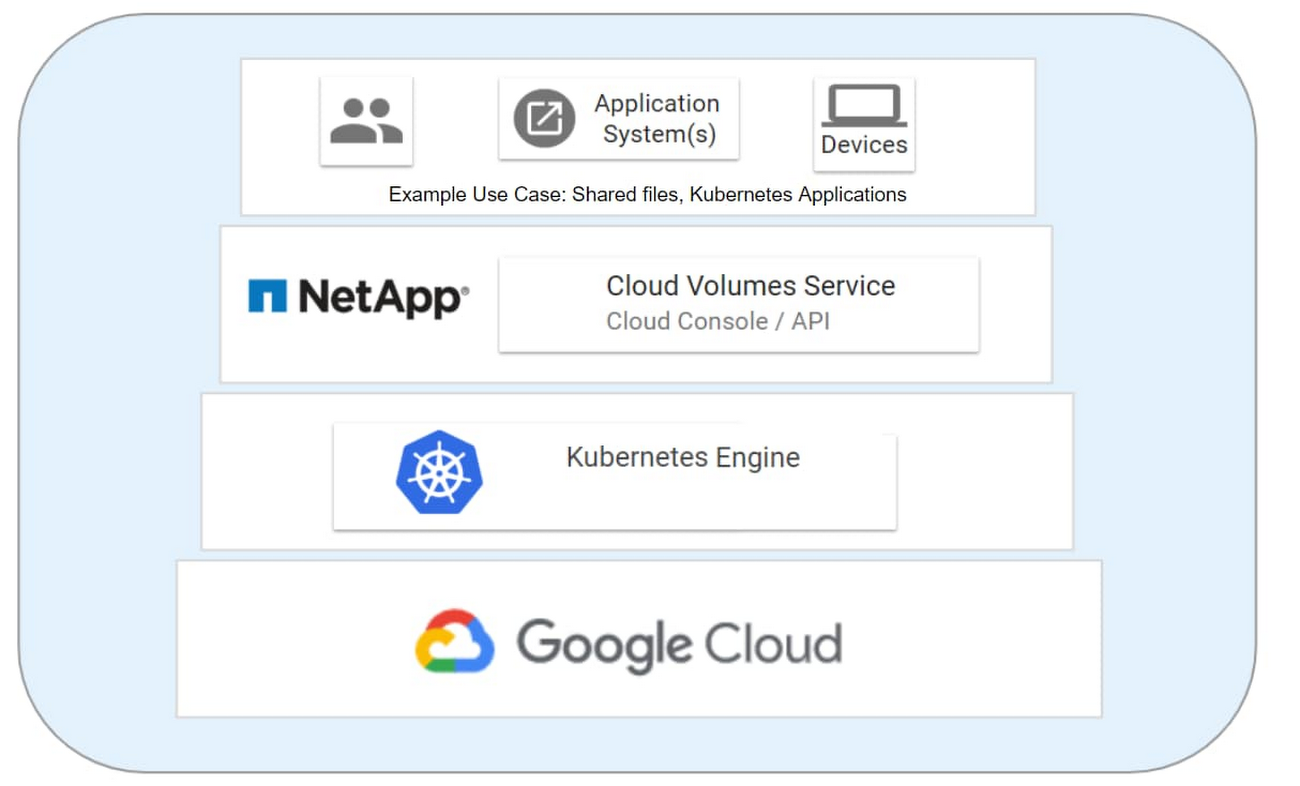
The new software-defined Cloud Volumes Service is the first enterprise storage system delivered in GKE to offer ONTAP’s application data management capabilities plus Kubernetes’ cloud-native agility and flexibility. This service was made possible through a deep collaborative engineering effort by both NetApp and Google Cloud, which is grounded in the companies’ joint commitment to modernizing enterprise infrastructure. Both emerging cloud-native and traditional enterprise applications can now enjoy cloud-native storage with enterprise-grade features such as rapid scaling, and higher availability

https://morioh.com/p/b680f947e85c

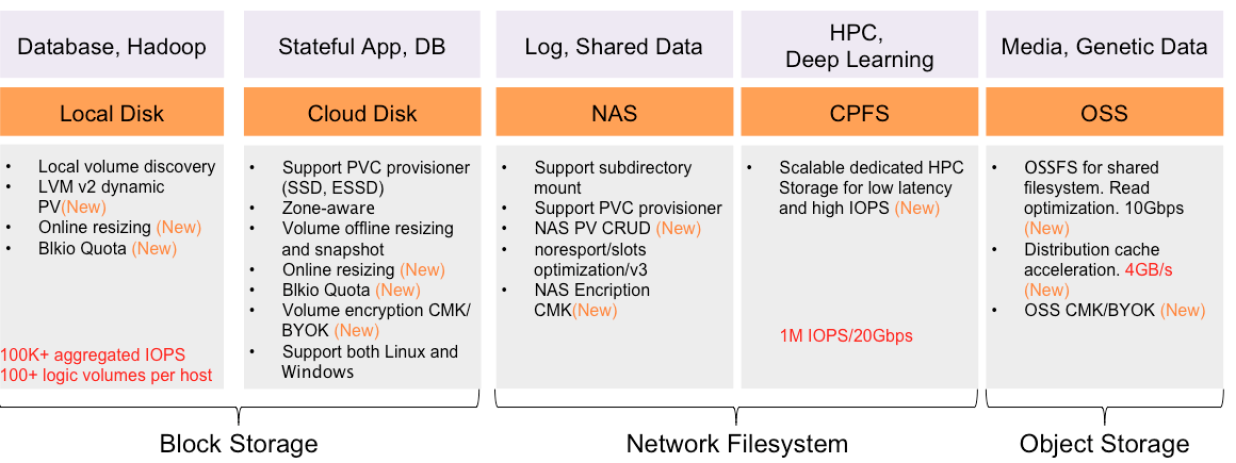
  • Storage is one of the most critical components of a Containers-as-a-Service platform. Container-native storage exposes the underlying storage services to containers and microservices. Like software-defined storage, it aggregates and pools storage resources from disparate mediums.


Container-native storage enables stateful workloads to run within containers by providing persistent volumes. Combined with Kubernetes primitives such as StatefulSets, it delivers the reliability and stability to run mission-critical workloads in production environments.


Even though Kubernetes can use traditional, distributed file systems such as network file system (NFS) and GlusterFS, we recommend using a container-aware storage fabric that is designed to address the requirements of stateful workloads running in production. 


Container-Native Storage Solutions


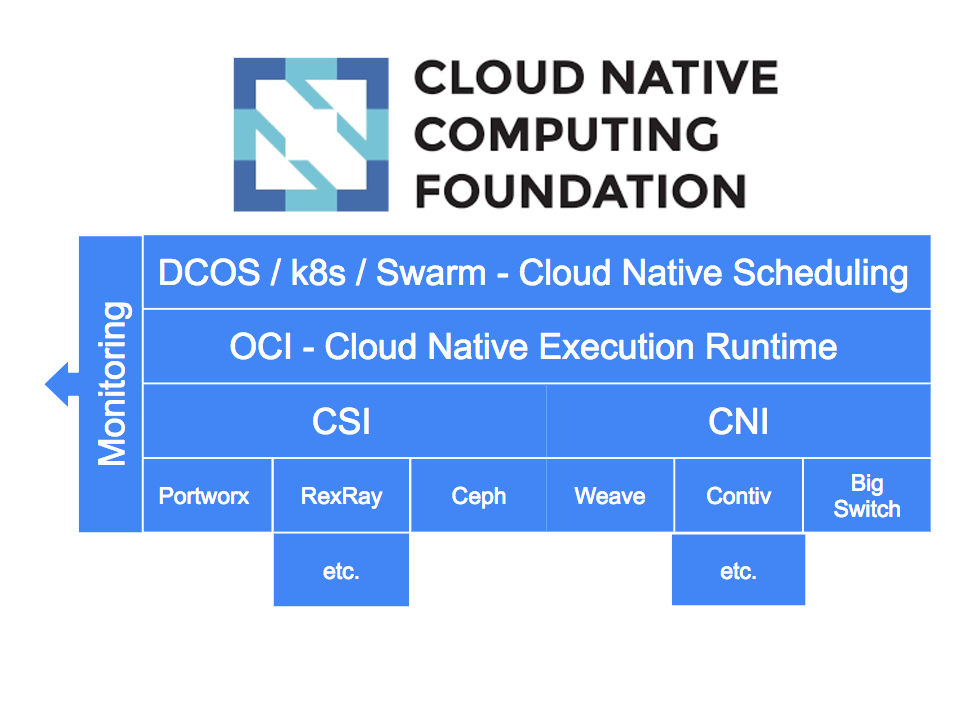
The cloud native ecosystem has defined specifications for storage through the Container Storage Interface (CSI) which encourages a standard, portable approach to implementing and consuming storage services by containerized workloads.


Ceph, Longhorn, OpenEBS and Rook are some container-native storage open source projects


https://thenewstack.io/the-most-popular-cloud-native-storage-solutions/

  • What is cloud native?


Cloud native refers less to where an application resides and more to how it is built and deployed.

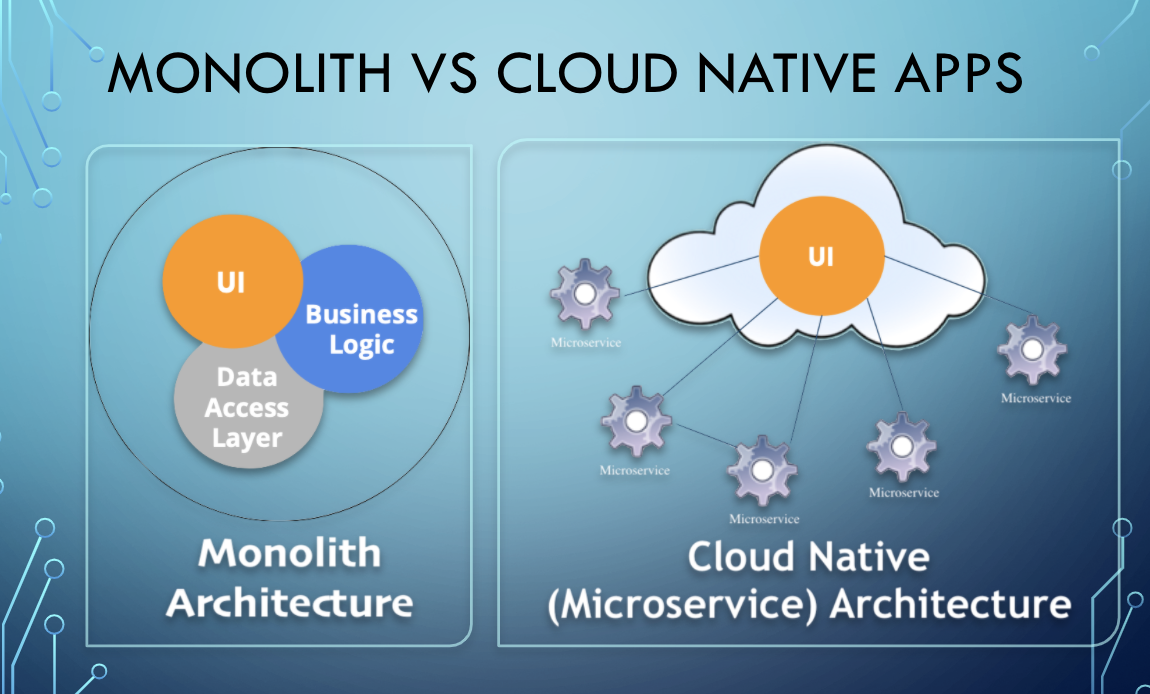
A cloud native application consists of discrete, reusable components known as microservices that are designed to integrate into any cloud environment

These microservices act as building blocks and are often packaged in containers.

Microservices work together as a whole to comprise an application, yet each can be independently scaled, continuously improved, and quickly iterated through automation and orchestration processes.


Advantages and disadvantages


Advantages

Compared to traditional monolithic apps, cloud native applications can be easier to manage as iterative improvements occur using Agile and DevOps processes.

Comprised of individual microservices, cloud native applications can be improved incrementally and automatically to continuously add new and improved application features

Improvements can be made non-intrusively, causing no downtime or disruption of the end-user experience.


Disadvantages

Although microservices enable an iterative approach to application improvement, they also create the necessity of managing more elements. Rather than one large application, it becomes necessary to manage far more small, discrete services.

Cloud native apps demand additional toolsets to manage the DevOps pipeline, replace traditional monitoring structures, and control microservices architecture.


Architecture

Cloud native applications rely on microservices architecture. This distinctive architectural approach to software development focuses on the creation of discrete, single-function services. These single-function services—or microservices—can be deployed, upgraded, improved, and automated independent of any other microservice


Cloud native microservices

A microservice is a small application with a small footprint that performs a specific function. Microservices enable an architectural approach where a much larger application is composed of discrete, independently deployed components. The microservices approach to software development can be used in multiple ways but has become closely associated with cloud native application development.


Development principles

Whether creating a new cloud native application or modernizing an existing application, developers adhere to a consistent set of principles:

Follow the microservices architectural approach

Rely on containers for maximum flexibility and scalability:

Adopt Agile methods


Storage


Cloud native applications frequently rely on containers. The appeal of containers is that they are flexible, lightweight, and portable. Early use of containers tended to focus on stateless applications that had no need to save user data from one user session to the next

as more core business functions move to the cloud, the issue of persistent storage must be addressed in a cloud native environment.


Cloud native vs. Cloud enabled


A cloud enabled application is an application that was developed for deployment in a traditional data center but was later changed so that it also could run in a cloud environment. Cloud native applications, however, are built to operate only in the cloud.


Cloud native vs. Cloud ready


In the short history of cloud computing, the meaning of "cloud ready" has shifted several times. Initially, the term applied to services or software designed to work over the internet. Today, the term is used more often to describe an application that works in a cloud environment or a traditional app that has been reconfigured for a cloud environment


Cloud native vs. Cloud based


A cloud based service or application is delivered over the internet. It’s a general term applied liberally to any number of cloud offerings. Cloud native is a more specific term. Cloud native describes applications designed to work in cloud environments. The term denotes applications that rely on microservices, continuous integration and continuous delivery (CI/CD) and can be used via any cloud platform.


Cloud native vs. Cloud first


Cloud first describes a business strategy in which organizations commit to using cloud resources first when launching new IT services, refreshing existing services, or replacing legacy technology.


https://www.ibm.com/cloud/learn/cloud-native

  • Oracle® Linux Cloud Native Environment Concepts

Oracle Linux Cloud Native Environment is a curated set of open source projects that are based on open standards, specifications and APIs defined by the Open Container Initiative (OCI) and Cloud Native Computing Foundation (CNCF) that can be easily deployed, have been tested for interoperability and for which enterprise-grade support is offered.


Oracle Linux Cloud Native Environment uses Kubernetes to deploy and manage containers. When you create an environment, in addition to Kubernetes nodes, the Oracle Linux Cloud Native Environment Platform API Server must be installed on a server, and is needed to perform a deployment and manage modules. The term module refers to a packaged software component that can be deployed to provide both core and optional cluster-wide functionality. The Kubernetes module for Oracle Linux Cloud Native Environment is the core module, and automatically installs and configures Kubernetes, CRI-O, runC and Kata Containers on the Kubernetes nodes and brings up a Kubernetes cluster.


The Oracle Linux Cloud Native Environment Platform Command-Line Interface performs the validation and deployment of modules to the nodes, enabling easy deployment of modules such as the Kubernetes module. The required software for modules is configured by the Platform CLI, such as Kubernetes, CRI-O, runC, Kata Containers, CoreDNS and Flannel.


An optional module is the Istio module for Oracle Linux Cloud Native Environment which is used to deploy a service mesh on top of the Kubernetes cluster. The Istio module requires Helm, Prometheus and Grafana, and these are also deployed along with Istio. 

https://docs.oracle.com/en/operating-systems/olcne/concepts/intro.html


  • What are cloud-native applications?

Cloud-native applications are a collection of small, independent, and loosely coupled services.

If an app is "cloud-native," it’s specifically designed to provide a consistent development and automated management experience across private, public, and hybrid clouds. 

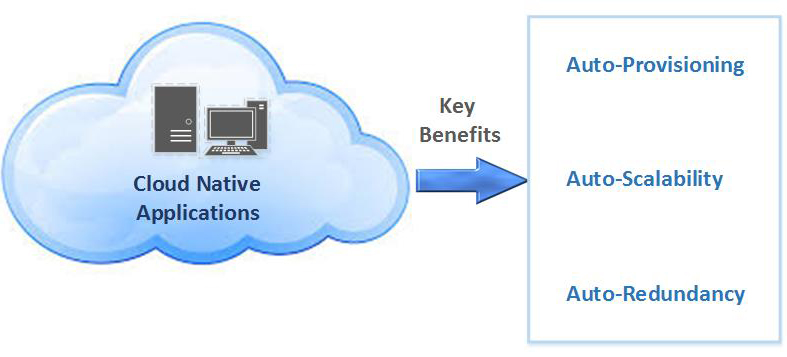
Organizations adopt cloud computing to increase the scalability and availability of apps.

These benefits are achieved through self-service and on-demand provisioning of resources, as well as automating the application life cycle from development to production.

Cloud-native development is just that—an approach to building and updating apps quickly, while improving quality and reducing risk. More specifically, it’s a way to build and run responsive, scalable, and fault-tolerant apps anywhere—be it in public, private, or hybrid cloud

https://www.redhat.com/en/topics/cloud-native-apps

  • What Is a Cloud-native App?


Cloud-native apps are loosely coupled to the underlying infrastructure needed to support them. These days that means deploying microservices via containers that can be dynamically provisioned resources based on user demand. Each microservice can communicate independently via APIs managed through a service layer. While microservices aren’t required for an app to be considered cloud-native, the perks of modularity, portability, and granular control over resources make them a natural fit for running applications in the cloud.


The Benefits of Cloud-native Development


Common benefits of going cloud-native include:


    On-demand provisioning of compute and storage resources

    Reusable modular software components, services, and APIs

    DevOps-friendly—microservices architectures are also great for setting up continuous integration and delivery (CI/CD) pipelines

    Cross-platform portability across public and private clouds or across on-premises and hybrid clouds

    Highly agile, scalable, and extensible software architecture that can grow with your business

https://www.purestorage.com/knowledge/what-is-cloud-native.html

  • 10 Key Attributes of Cloud-Native Applications


Packaged as lightweight containers: 

Developed with best-of-breed languages and frameworks:

Designed as loosely coupled microservices: 

Centered around APIs for interaction and collaboration:

Architected with a clean separation of stateless and stateful services:

Isolated from server and operating system dependencies:

Deployed on self-service, elastic, cloud infrastructure:

Managed through agile DevOps processes:

Automated capabilities:

Defined, policy-driven resource allocation:


https://thenewstack.io/10-key-attributes-of-cloud-native-applications/


Saturday, May 2, 2020

lustre


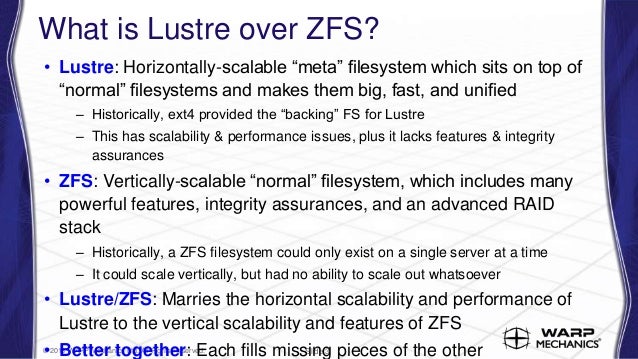
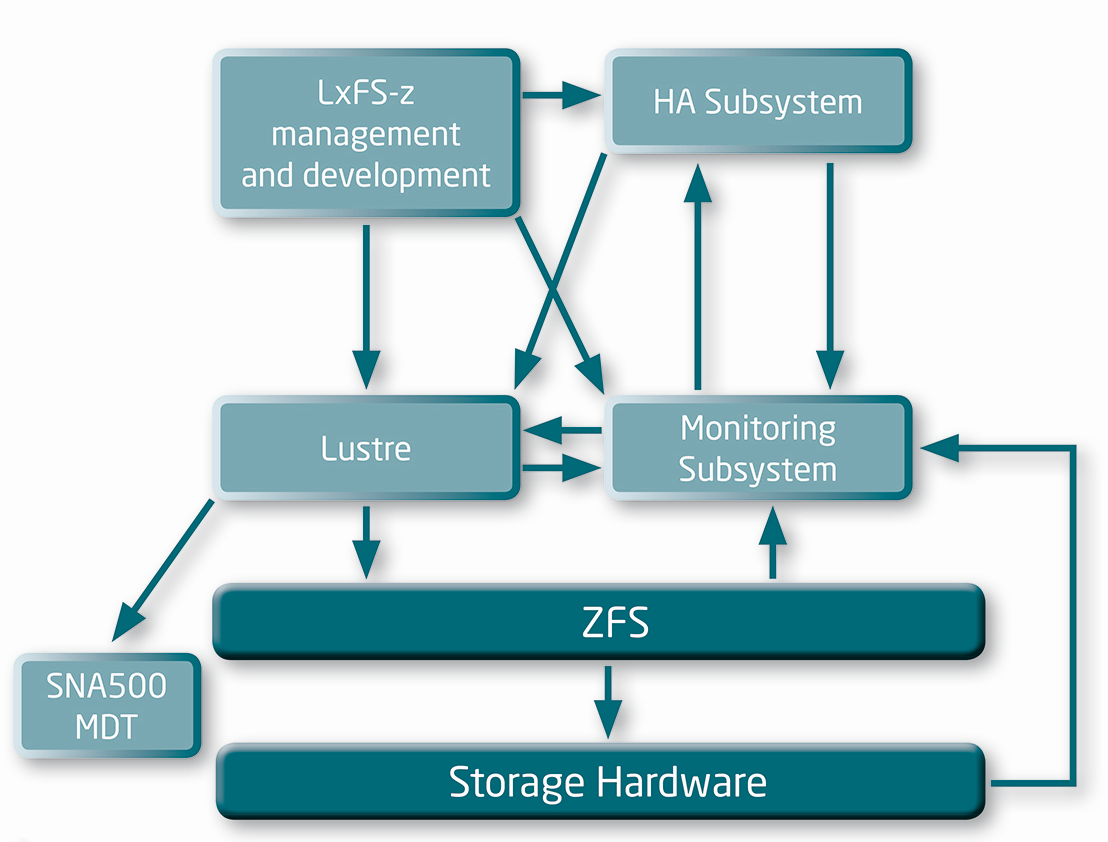
  • The Lustre file system is a parallel file system used in a wide range of HPC environments

https://it.nec.com/it_IT/global/solutions/hpc/storage/lxfs.html?


  • How the Lustre Developer Community is Advancing ZFS as a Lustre Back-end File System

    Increasing support on Lustre for a 16 MB block size—already supported by ZFS—which will increase the size of data blocks written to each disk. A larger block size will reduce disk seeks and boost read performance. This, in turn, will require supporting a dynamic OSD-ZFS block size to prevent an increase in read/modify/write operations.
    Implementing a dRAID mechanism instead of RAIDZ to boost performance when a drive fails. With RAIDZ, throughput of a disk group is limited by the spare disk’s bandwidth. dRAID will use a mechanism that distributes data to spare blocks among the remaining disks. Throughput is expected to improve even when the group is degraded because of a failed drive.
    Creating a separate Metadata allocation class to allow a dedicated high throughput VDEV for storing Metadata. Since ZFS Metadata is smaller, but fundamental, reading it faster will result in enhanced IO performance. The VDEV should be an SSD or NVRAM, and it can be mirrored for redundancy.
    https://www.codeproject.com/Articles/1191923/How-the-Lustre-Developer-Community-is-Advancing-ZF


  • ZFS OSD Hardware Considerations

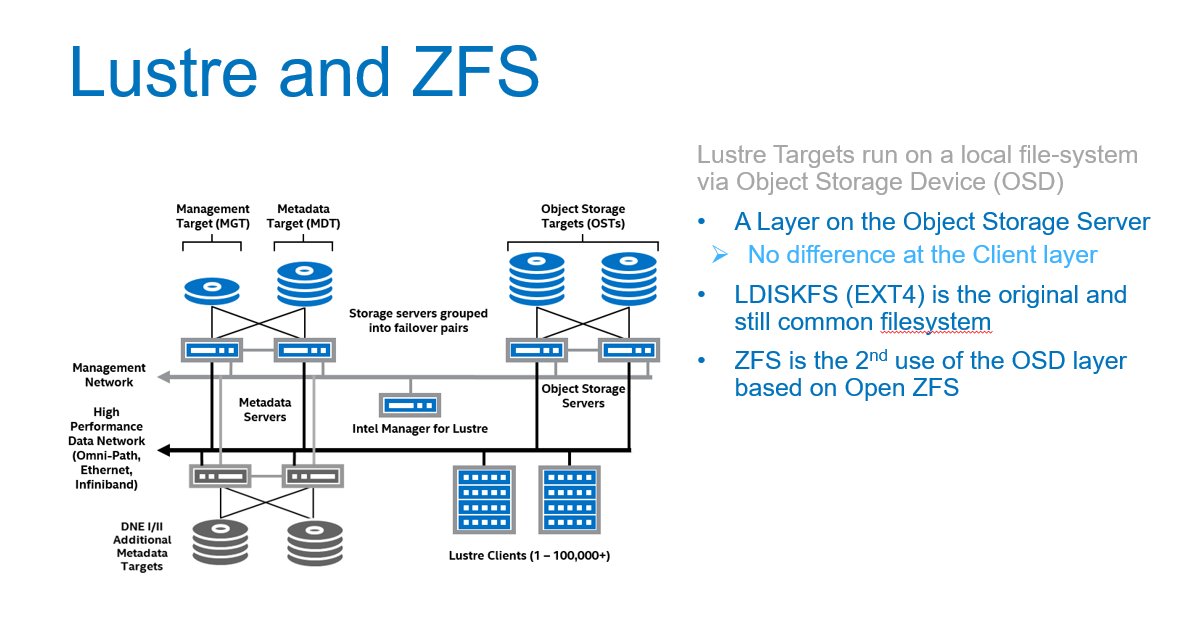
The double parity implementation in OpenZFS (RAID-Z2) recommended for object storage targets (OST) uses an algorithm similar to RAID-6, but is implemented in software and not in a RAID card or a separate storage controller.
OpenZFS uses a copy-on-write transactional object model that makes extensive use of 256-bit checksums for all data blocks, using hash algorithms like Fletcher-4 and SHA-256. This makes the choice of CPU an important consideration when designing servers that use ZFS storage.
Metadata server workloads are IOps-centric, characterized by small transactions that run at very high rates and benefit from frequency-optimized CPUs.
Object storage server workloads are throughput-centric, often with long-running, streaming transactions. Because the workloads are oriented more toward streaming IO, object storage servers are less sensitive to CPU frequency than metadata servers,
http://wiki.lustre.org/ZFS_OSD_Hardware_Considerations

Friday, May 1, 2020

iRODS


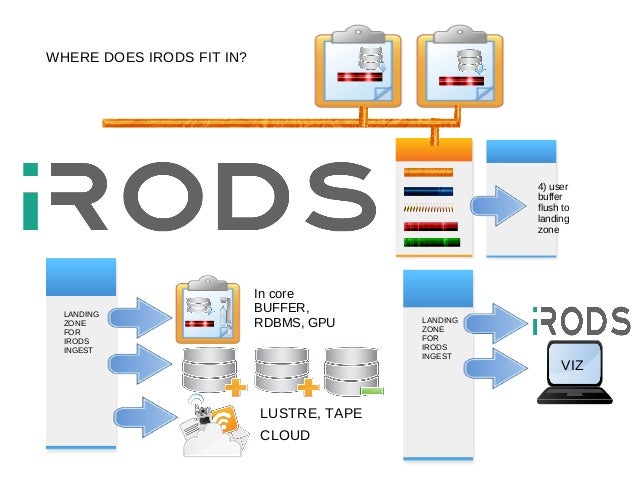
  • The integrated Rule-Oriented Data System (iRODS) is open source data management software.It virtualizes data storage resources, so users can take control of their data, regardless of where and on what device the data is stored.

Core Competencies

    iRODS implements data virtualization, allowing access to distributed storage assets under a unified namespace, and freeing organizations from getting locked in to single-vendor storage solutions.
    iRODS enables data discovery using a metadata catalog that describes every file, every directory, and every storage resource in the iRODS Zone.
    iRODS automates data workflows, with a rule engine that permits any action to be initiated by any trigger on any server or client in the Zone.
    iRODS enables secure collaboration, so users only need to log in to their home Zone to access data hosted on a remote Zone.

https://github.com/irods/irods


  • Installation


iRODS is provided in binary form in a collection of interdependent packages. There are two types of iRODS server, iCAT and Resource:

    An iCAT server manages a Zone, handles the database connection to the iCAT metadata catalog (which could be either local or remote), and can provide Storage Resources. An iRODS Zone will have exactly one iCAT server.
    A Resource server connects to an existing Zone and can provide additional storage resource(s). An iRODS Zone can have zero or more Resource servers.

An iCAT server is just a Resource server that also provides the central point of coordination for the Zone and manages the metadata.
A single computer cannot have both an iCAT server and a Resource server installed.
The simplest iRODS installation consists of one iCAT server and zero Resource servers.
https://docs.irods.org/4.1.9/manual/installation/


  • iRODS is open source data grid middleware for... 

•Data Discovery :metadata
•Workflow Automation :policies : any condition; any action
•Secure Collaboration :sharing without losing control
•Data Virtualization :file system flexibility

Using iRODS   for...
  Data Virtualiza1on with Workflow Automation
  Seamless data replication,
  automatic checksumming,
  policy-based data resource selection

Using iRODS for...
  Secure Collabora1on
  Selectively sharing data between workgroups;
  isolation for maintenance operations;
  options for defining policy on a per-group basis
  
Using iRODS for...   
Data Discovery and Workflow Automa1on
  Metadata automatically generated from original file system,
  used to enforce policy and verify integrity
Policy 1 – Validate,checksum,replicate, compress
Policy 2 – Users cannot delete files
Policy 3 – Purge files by expiration  

Using iRODS for...
Data Virtualization with Workflow Automation
  Automatically staging data for HPC and interpretation;
  using hardware from multiple vendors;

iRODS
•Metadata! 
•Vendor neutrality
–Not subject to storage vendor lock-in 
–Mitigates risk of vendor termination
•Open source 
–Mitigate risk of developer termination 
•Flexibility 
–Policy enforcement: any trigger, any action 
–Storage virtualization: layers-deep replication; local <> cloud
–User permissions 
•Sharing between workgroups

http://docplayer.net/7491516-Managing-next-generation-sequencing-data-with-irods.html


Thursday, April 30, 2020

NVMe over Fabrics

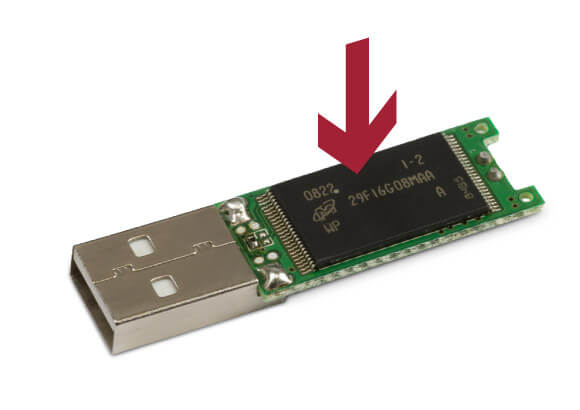
  • NAND flash memory

Flash memory is an electronic (solid-state) non-volatile computer memory storage medium that can be electrically erased and reprogrammed. The two main types of flash memory are named after the NAND and NOR logic gates.
The NAND type is found primarily in memory cards, USB flash drives, solid-state drives (those produced in 2009 or later), and similar products, for general storage and transfer of data. NAND or NOR flash memory is also often used to store configuration data in numerous digital products, a task previously made possible by EEPROM or battery-powered static RAM. One key disadvantage of flash memory is that it can only endure a relatively small number of write cycles in a specific block
https://en.wikipedia.org/wiki/Flash_memory


  • NVMe vs SSD: Speed, Storage & Mistakes to Avoid

SSD (solid-state drive) is a type of nonvolatile storage media that stores persistent data on flash memory. It has two essential parts - a NAND flash memory and a flash controller optimized to deliver high read-write performance in sequential as well as random data fetching.
SSDs offer high transfer speeds, low latency even with random data access, more durability but not for hierarchical storage use, and expectedly no sound of moving parts
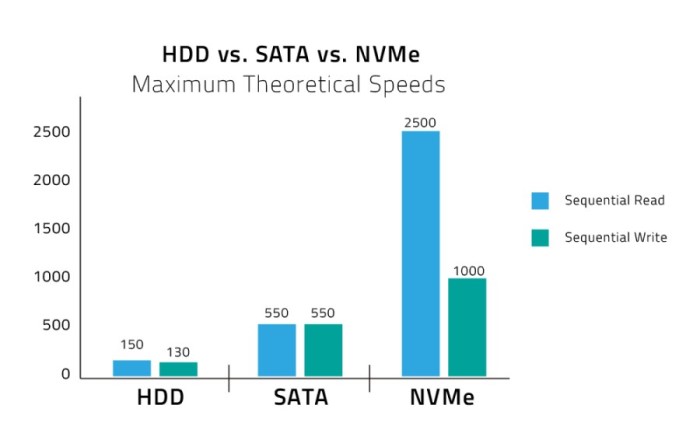
For perceived and real performance gains, storage was the last bottleneck, which was eliminated with the advent of SSD and then the high-performance NVMe SSD storage solutions. The NAND flash SSDs radically improved input-output performance, access times dropped from 6-12 milliseconds to less than 1ms.

What is SATA SSD?
SATA uses the AHCI command protocol and supports the IDE, which primarily was built for the older and sluggish spinning disk drives and not for the sturdy flash-based storage.

Mistakes to avoid
Defragmentation is not for SSDs and can negatively affect its lifespan. SSDs save data in blocks and can randomly read from any location, whether contiguous or random. You will be overkilling the flash drive when you defrag.
Don’t use the SSD to its full capacity or you risk choking it. Because its performance gets affected, mainly write speeds, it is suggested to have minimal 25 percent of your storage space free for improved performance.
Modern SSDs come with an in-built Garbage Collection Mechanism. Whether the TRIM command should be enabled or not is a question based on the specific OS you are using and needs to be looked into as it can clutter unwanted data in your drive and needs to be handled properly

What is NVMe SSD?
Non-Volatile Memory Express (NVMe) is the latest industry-standard software interface for PCIe SSDs.
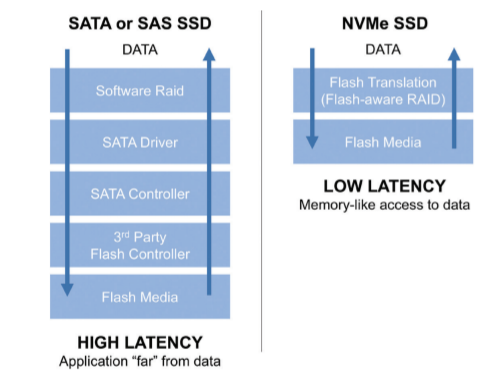
The NVMe SSD enables the flash memory to run directly through the PCI Express (PCIe) serial bus interface as it offers high bandwidth due to being directly attached to the CPU rather than function through the limiting SATA speeds.
It comes in two form factor, M.2 or PCIe expansion card, a 2.5-inch U.2 connector, but with both form factors, it directly connects electrically to the motherboard via the PCIe rather than SATA connection.

Mistakes to avoid
Remember, NVMe is a communication interface and storage protocol, not a storage media device.
Deploy pooled SSD storage across the data center, which places a cache of SSD storage before higher capacity drives to provide cost-efficient and enhanced performance.
Don’t judge an NVMe SSD on the base of price; it can cost you in endurance, quality of service, and most I/O consistency.
A cost-benefit analysis is recommended and the analysis of the performance requirements of application workloads to determine if you do need the transitioning.
Don’t deploy NVMe on top of the same architecture used for conventional flash, as the traditional controller can only handle low levels of I/O processing and create latency and cap performance.

https://www.promax.com/blog/nvme-vs-ssd-speed-storage-mistakes-to-avoid


  • NVMe, AHCI and IDE are transfer protocols (languages). They run on top of transfer interfaces such as PCIe or SATA (spoken, written).

NVMe is the latest high performance and optimized protocol which supersedes AHCI and compliments PCIe technology. It offers an optimised command and completion path for use with NVMe based storage. It was developed by a consortium of manufacturers specifically for SSDs to overcome the speed bottleneck imposed by the older SATA connection. It is akin to a more efficient language between storage device and PC: one message needs to be sent for a 4GB transfer instead of two, NVMe can handle 65,000 queues of data each with 65,000 commands, instead of one queue that with the capacity for 32 commands, and it only has seven major commands (read, write, flush etc). As well as delivering better throughput NVMe offers reduced latency
https://www.userbenchmark.com/Faq/What-s-the-difference-between-SATA-PCIe-and-NVMe/105


  • NVMe (Non-Volatile Memory Express) is an interface protocol built especially for Solid State Drives (SSDs). NVMe works with PCI Express (PCIe) to transfer data to and from SSDs. NVMe enables rapid storage in computer SSDs and is an improvement over older Hard Disk Drive (HDD) related interfaces such as SATA and SAS. The only reason SATA and SAS are used with SSDs in computers is that until recently, only slower HDDs have been used as the large-capacity storage in computers. Flash memory has been used in mobile devices such as smartphones, tablets, USB drives and SD cards. (SSDs are flash memory.)

https://www.microcontrollertips.com/why-nvme-ssds-are-faster-than-sata-ssds/


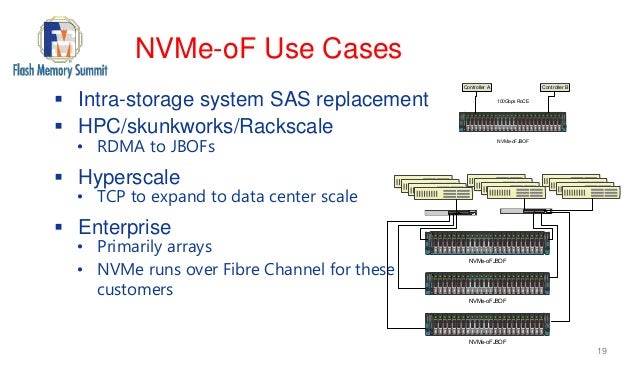
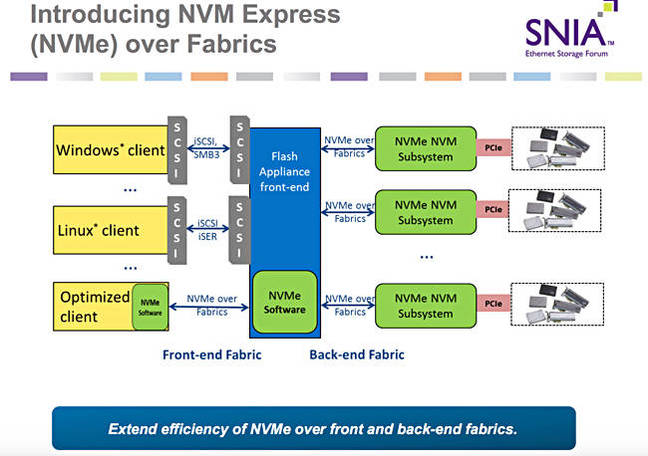
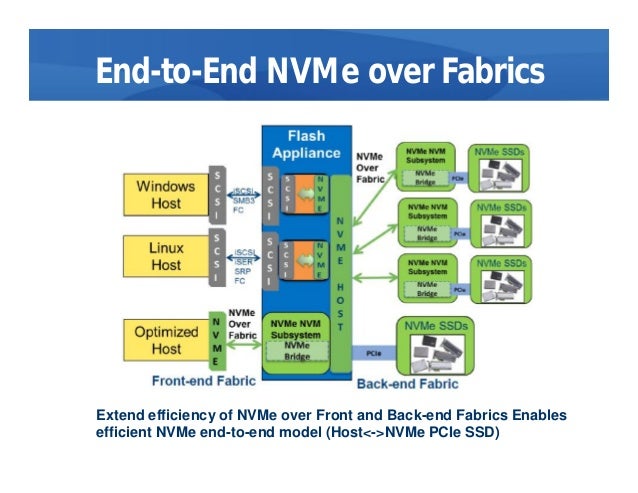
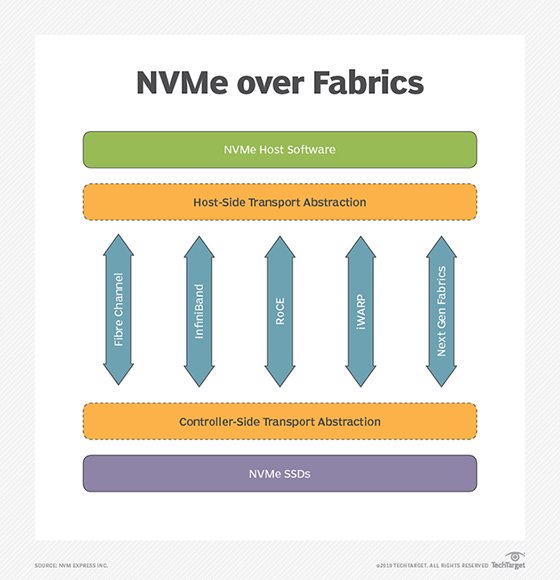
  • NVMe over Fabrics, also known as NVMe-oF and non-volatile memory express over fabrics, is a protocol specification designed to connect hosts to storage across a network fabric using the NVMe protocol.
The protocol is designed to enable data transfers between a host computer and a target solid-state storage device or system over a network -- accomplished through a NVMe message-based command. Data transfers can be transferred through methods such as Ethernet, Fibre Channel (FC) or InfiniBand.

there have been multiple implementations of the protocol, such as NVMe-oF using remote direct memory access (RDMA), FC or Transmission Control Protocol/Internet Protocol (TCP/IP).

Uses of NVMe over Fabrics
Using NVMe-oF can help provide a state-of-the-art storage protocol that can take full advantage of today's SSDs. The protocol can also help in bridging the gaps between direct-attached storage (DAS) and SANs, enabling organizations to support workloads that require high throughputs and low latencies.
NVMe over Fabrics vs. NVMe: Key differences
One of the main distinctions between NVMe and NVMe over Fabrics is the transport-mapping mechanism for sending and receiving commands or responses. NVMe-oF uses a message-based model for communication between a host and a target storage device. Local NVMe will map commands and responses to shared memory in the host over the PCIe interface protocol.

While it mirrors the performance characteristics of PCIe Gen 3, NVMe lacks a native messaging layer to direct traffic between remote hosts and NVMe SSDs in an array. NVMe-oF is the industry's response to developing a messaging layer.

NVME over Fabrics using RDMA
NVMe-oF use of RDMA is defined by a technical subgroup of the NVM Express organization. Mappings available include RDMA over Converged Ethernet (RoCE) and Internet Wide Area RDMA Protocol (iWARP) for Ethernet and InfiniBand.

RDMA is a memory-to-memory transport mechanism between two computers. Data is sent from one memory address space to another, without invoking the OS or the processor. Lower overhead and faster access and response time to queries are the result, with latency usually in microseconds (μs).

NVMe over Fabrics using Fibre Channel
The FC protocol supports access to shared NVMe flash, but there is a performance hit imposed to interpret and translate encapsulated SCSI commands to NVMe commands.

NVMe over Fabrics using TCP/IP
One of the newer developments regarding NVMe-oF includes the development of NVMe-oF using TCP/IP. NVMe-oF can now support TCP transport binding. NVMe over TCP makes it possible to use NVMe-oF across a standard Ethernet network.

https://searchstorage.techtarget.com/definition/NVMe-over-Fabrics-Nonvolatile-Memory-Express-over-Fabrics


  • Accelerating Ceph with RDMA and NVMe-oF


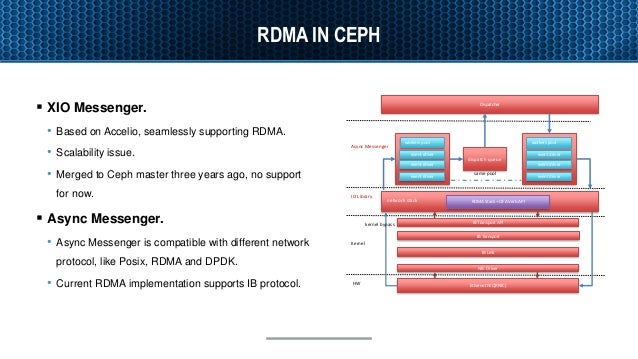
RDMA as Ceph NVMe fabrics
RDMA is a direct access from the memory of one computer into that of another without involving either one’s operating system.
RDMA supports zero-copy networking(kernel bypass)
Eliminate CPUs, memory or context switches
Reduce latency and enable fast messenger transfer.
Potential benefit for ceph
Better Resource Allocation – Bring additional disk to servers with spare CPU. 
Lower latency - generated by ceph network stack.
https://www.slideshare.net/insideHPC/accelerating-ceph-with-rdma-and-nvmeof

  • DRBD Fundamentals


The Distributed Replicated Block Device (DRBD) is a software-based, shared-nothing, replicated storage solution mirroring the content of block devices (hard disks, partitions, logical volumes etc.) between hosts.

DRBD mirrors data

    in real time. Replication occurs continuously while applications modify the data on the device.

    transparently. Applications need not be aware that the data is stored on multiple hosts.

    synchronously or asynchronously. With synchronous mirroring, applications are notified of write completions after the writes have been carried out on all hosts. With asynchronous mirroring, applications are notified of write completions when the writes have completed locally, which usually is before they have propagated to the other hosts.
https://www.linbit.com/drbd-user-guide/users-guide-drbd-8-4/


Thursday, March 12, 2020

LUN Volume


  • Volumes contain file systems in a NAS environment and LUNs in a SAN environment.

A LUN (logical unit number) is an identifier for a device called a logical unit addressed by a SAN protocol.
LUNs are the basic unit of storage in a SAN configuration
The Windows host sees LUNs on your storage system as virtual disks.
You can nondisruptively move LUNs to different volumes as needed.
https://docs.netapp.com/ontap-9/index.jsp?topic=%2Fcom.netapp.doc.dot-cm-concepts%2FGUID-372DCFC1-3C68-408F-B404-E26514BEB8F7.html

Volumes contain file systems in a NAS environment and LUNs in a SAN environment.
A LUN (logical unit number) is an identifier for a device called a logical unit addressed by a SAN protocol.
LUNs are the basic unit of storage in a SAN configuration
The Windows host sees LUNs on your storage system as virtual disks.
You can nondisruptively move LUNs to different volumes as needed.
https://docs.netapp.com/ontap-9/index.jsp?topic=%2Fcom.netapp.doc.dot-cm-concepts%2FGUID-372DCFC1-3C68-408F-B404-E26514BEB8F7.html


  • you have the computer (also called a “host,” “initiator,” or even just “CPU” sometimes.

you have the physical media (also called a “target,” “drive,” “HDD,” or “SSD,” etc.).
Hosts need Volumes, so those volumes have to be made up of something that eventually sits on a real, physical drive (whether it be spinning drives or SSDs, etc.).
From the storage’s perspective, the physical media is broken down from a physical entity (the actual drive), into a logical entity, and given a number (hence the “Logical Unit Number”, or LUN).
In between there is a very important piece of software that makes a translation between that LUN and what the host can see as a Volume, called the Volume Manager.
https://jmetz.com/2016/11/whats-the-difference-between-a-lun-and-a-volume/


  • In computer storage, a logical unit number, or LUN, is a number used to identify a logical unit, which is a device addressed by the SCSI protocol or Storage Area Network protocols which encapsulate SCSI, such as Fibre Channel or iSCSI.

A LUN may be used with any device which supports read/write operations, such as a tape drive, but is most often used to refer to a logical disk as created on a SAN.
https://en.wikipedia.org/wiki/Logical_unit_number


  • What is a LUN (Logical Unit Number)?

A logical unit number (LUN) is an identifier used for labeling and designating subsystems of physical or virtual storage. Depending on the environment, a LUN may refer to a subsection of a disk or a disk in its entirety. Different areas in physical drives are assigned LUNs so data can be read, written or fetched correctly from servers on a storage area network (SAN). In both hard disk drives (HDDs) and solid state drives (SSDs), volumes of LUNs make up the physical drive.
What a LUN is and what a LUN can do
A LUN can represent one disk, an entire redundant array of independent disks (RAID), or partitions of a disk, all of which execute I/O commands. LUNs allow users to differentiate between and manage separate shared volumes on a single SAN. They are the identifiers for building blocks of information on a physical disk drive and in some cases, virtual drives or virtual machines (VMs). LUNs are used to label slices of disk storage that are viewable from a server. They can also function as partitions, sectioning off portions of a volume from one another. They separate portions of disks that use different operating systems or have unique application requirements. Today, virtual or “thin” LUNs are provisioned on virtual disks, representing virtual storage with no association to storage on any physical drive, disk or device
Different types of LUNs
A simple LUN is the basic building block upon which other types are based. A simple LUN represents one portion of one disk or one physical disk in its entirety—that's it. On the other hand, some LUNs are larger than one physical disk, so they “span” across two or more physical disks; these are called spanned LUNs.
Mirrored LUNs do use two physical disks but only for mirroring the information and data held within one of the disks.
The striped LUN also uses two or more disks in the same way as a spanned LUN
Striped LUNs with parity offer the same convenience as the striped LUN with the safety of backup data (parity) written to physical disks simultaneously.
https://www.tintri.com/faqs/what-is-a-lun-logical-unit-number

Monday, July 29, 2019

workload managers

Slurm and Moab
Slurm and Moab are two workload manager systems that have been used to schedule and manage user jobs run on Livermore Computing (LC) clusters. Currently, LC runs Slurm natively on most clusters, and provides Moab "wrappers" now that Moab has been decommissioned. This tutorial presents the essentials for using Slurm and Moab wrappers on LC platforms

What is a Workload Manager?
The typical LC cluster is a finite resource that is shared by many users.
In the process of getting work done, users compete for a cluster's nodes, cores, memory, network, etc.
In order to fairly and efficiently utilize a cluster, a special software system is employed to manage how work is accomplished.
Commonly called a Workload Manager. May also be referred to (sometimes loosely) as:
Batch system
Batch scheduler
Workload scheduler
Job scheduler
Resource manager (usually considered a component of a Workload Manager)
Tasks commonly performed by a Workload Manager:
Provide a means for users to specify and submit work as "jobs"
Evaluate, prioritize, schedule and run jobs
Provide a means for users to monitor, modify and interact with jobs
Manage, allocate and provide access to available machine resources
Manage pending work in job queues
Monitor and troubleshoot jobs and machine resources
Provide accounting and reporting facilities for jobs and machine resources
Efficiently balance work over machine resources; minimize wasted resources
https://computing.llnl.gov/tutorials/moab/
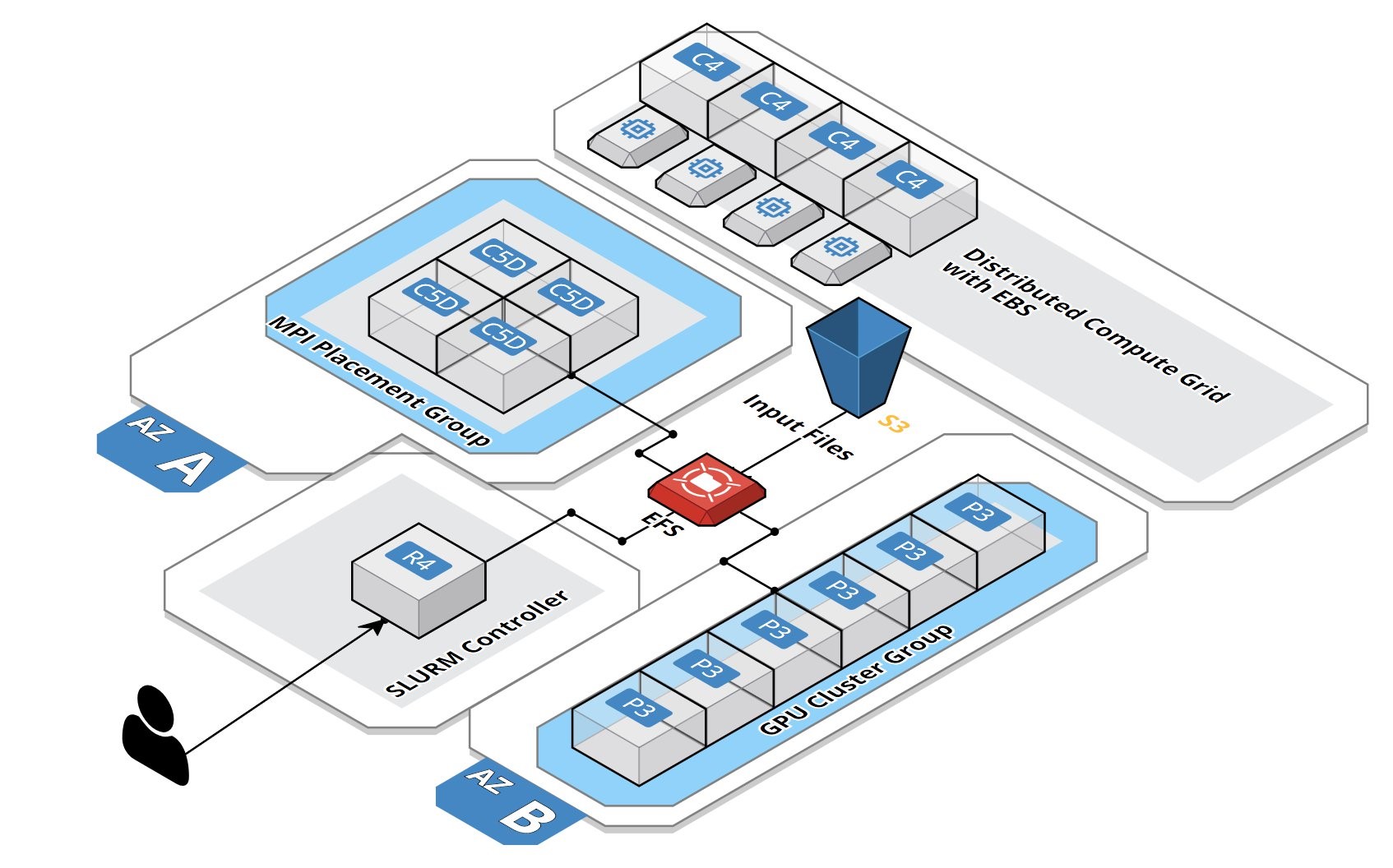
Deploying a Burstable and Event-driven HPC Cluster on AWS Using SLURM, Part 1
Google Codelab for creating two federated Slurm clusters on Google Cloud Platform
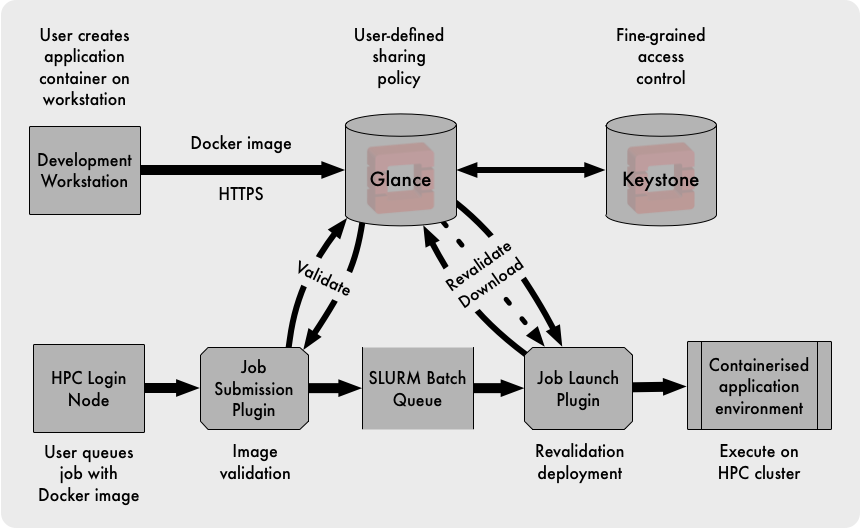
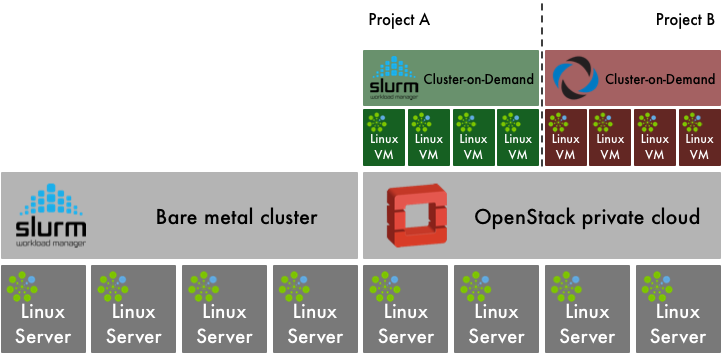
OpenStack and HPC Workload Management
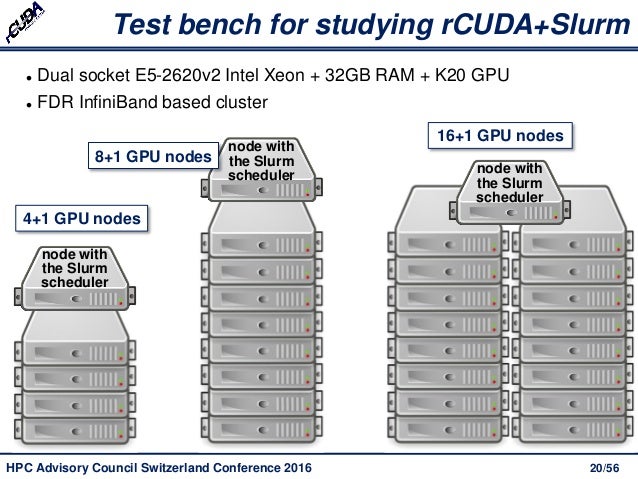
Increasing Cluster Performance by Combining rCUDA with Slurm
Docker vs Singularity vs Shifter in an HPC environment
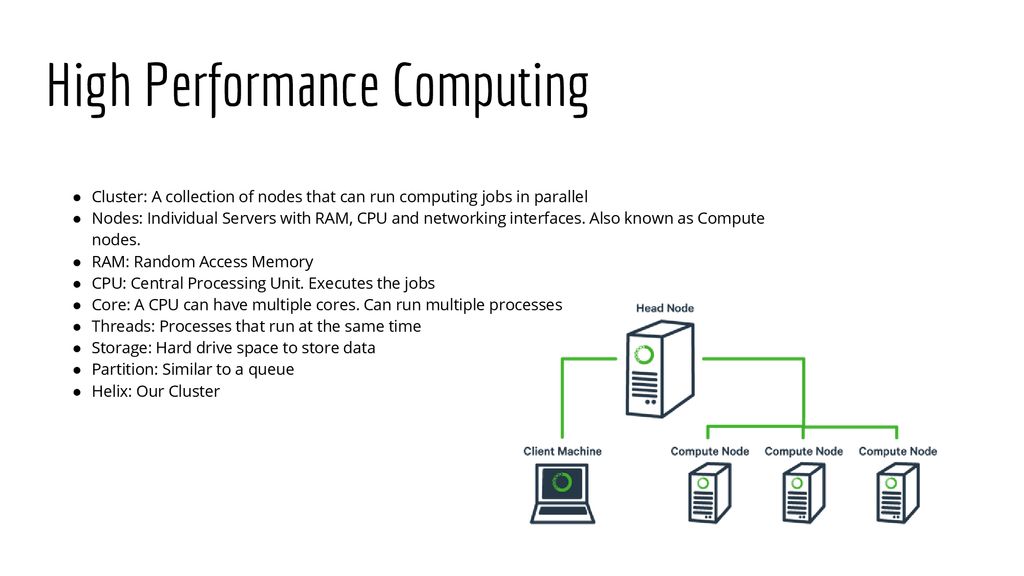
Helix - HPC/SLURM Tutorial


  • SchedMD® is the core company behind the Slurm workload manager software, a free open-source workload manager designed specifically to satisfy the demanding needs of high performance computing. 

https://www.schedmd.com/

  • Slurm vs Moab/Torque on Deepthought HPC clusters

Intro and Overview: What is a scheduler?
A high performance computing (HPC) cluster (hereafter abbreviated HPCC) like the Deepthought clusters consists of many compute nodes, but at the same time have many users submitting many jobs, often very large jobs. The HPCC needs a mechanism to distribute jobs across the nodes in a reasonable fashion; this is the task of a program called a scheduler.
This is a complicated tasks: the various jobs can have various requirements e.g. CPU, memory, diskspace, network transportation, etc. ) as well as differing priorities. And because we want to enable large parallel jobs to run, the scheduler needs to be able to reserve nodes for larger jobs (i.e. if an user submits a job requiring 100 nodes, and only 90 nodes are currently free, the scheduler might need to keep other jobs off the 90 free nodes in order that the 100 node job might eventually run). The scheduler must also account for nodes which are down, or have insufficient resources for a particular job, etc. As such, a resource manager is also needed (which can either be integrated with the scheduler or run as a separate program). The scheduler will also need to interface with an accounting system (which also can be integrated into the scheduler) to handle the charging of allocations for time used on the cluster.

The original Deepthought HPC cluster at the University of Maryland originally used the Maui scheduler for scheduling jobs, along with the Torque Resource Manager and the Gold Allocation Manager.
In 2009, we migrated to the Moab scheduler, still keeping Torque as our resource manager and Gold for allocation management.Moab derived from Maui, and so the user interface was mostly unchanged during this migration.
Slurm includes its own resource management and accounting system, so Torque and Gold are no longer used.

http://hpcc.umd.edu/hpcc/help/slurm-vs-moab.html
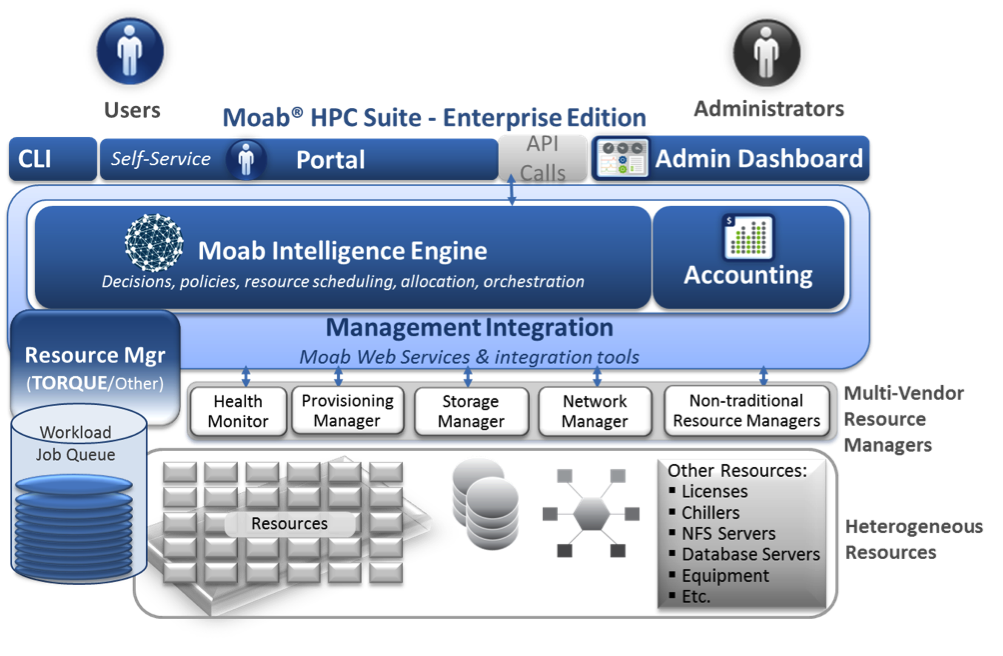
Intelligent HPC Workload Management Across Infrastructure and Organizational Complexity
Running computations on the Torque cluster
Workload Management in HPC and Cloud
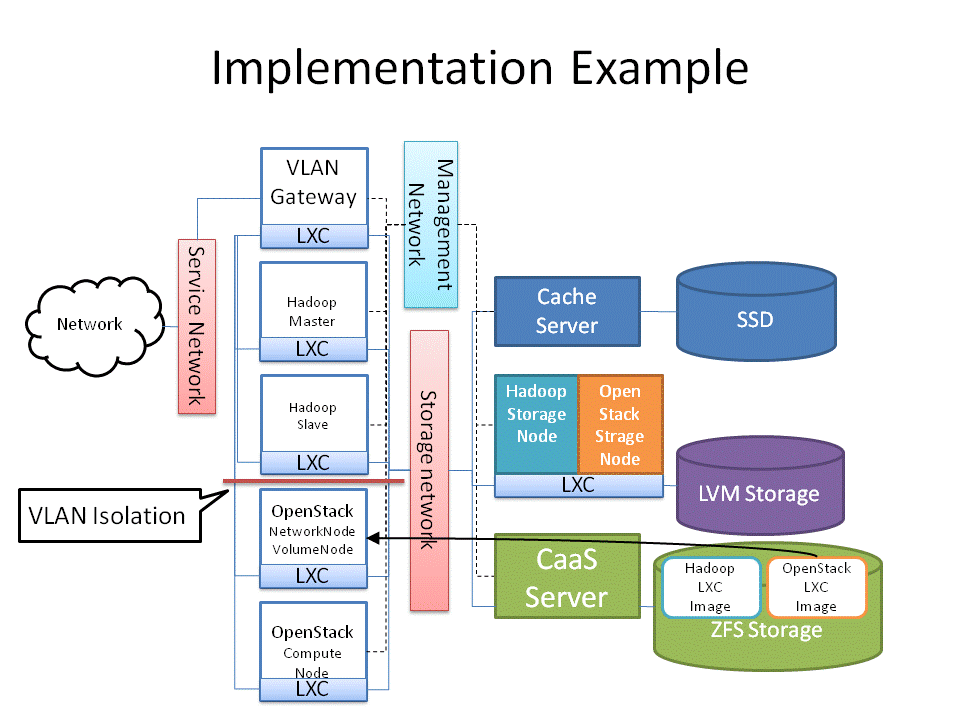
Cluster as a Service: Managing multiple clusters for openstack clouds and other diverse frameworks

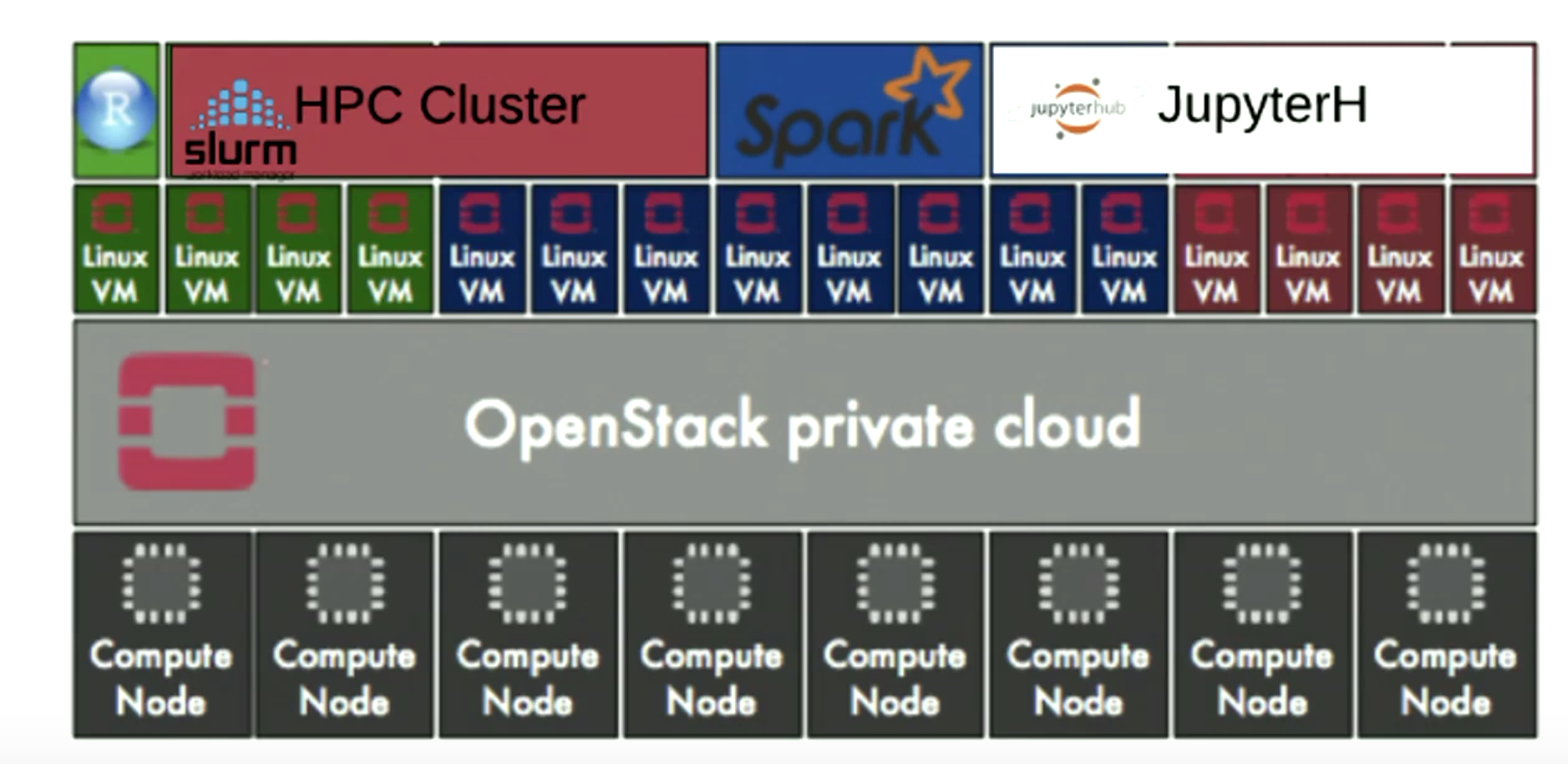
Overview of the UL HPC Viridis cluster, with its OpenStack-based private Cloud setup.

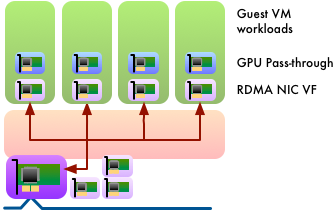
OpenStack and Virtualised HPC
How the Vienna Biocenter powers HPC with OpenStack