Tuesday, February 28, 2012

ITIL interview questions-1

ITIL interview questions


  • what is outsourcing?

If we used an external organisation to help us develop part of our service it's called outsourcing


  • What is an OLA?

The Operational Level Agreement is an agreement between an IT service provider and another part of the same organization. This could be the development team, the support team or helpdesk


  • What are the steps you would follow when a Change Request comes in?

� Record it
� Evaluate it
� Prioritize it
� Plan it
� Test it
� Finally, implement it

http://www.dumpsquestions.com/forums/viewquestion.php?question=1487&..


  • What is SLA?

A: A service level agreement or SLA is the contract between an organization and its customers. Customers can be external or internal and SLA tells the user what to expect in regards to response time and uptime of any IT technology.

What is change management?
Change management is a group of people who identify and approve changes to the system. Change management helps all parties involved to review the changes that will take place and approve them to ensure that changes to not have a severe negative impact on the system.

What does an SLA contain?
The SLA contains the amount of time a response is made when issues occur, the responsibility of each organization, target numbers and uptime percentages, the times at which support is available, and any change history or technical standards provided by the organization.

What is a service design package?
he SDP contains any major change requirements for new IT service and information when retiring any hardware or software.
http://resources.infosecinstitute.com/itil-interview-questions/


  • Difference between  ITIL v3 and v2. 

Managing services as a portfolio is a new concept in ITIL V3
Service Catalogue Management was added as a new process in ITIL V3

ITIL based models adopted by organization .
Microsoft MOF
Hewlett - Packard ( HP ITSM Reference Model)
IBM ( IT Process Model )

Define Service strategy?
How to design, develop and implement service management for organization is define under service strategy.
Ø  What are we going to provide?
Ø  Can we afford it?
Ø  Can we provide enough of it?
Ø  How do we gain competitive advantage?


Define Service Design?
How to design develop services and service management and converting service objective in to range of services.
Ø  How are we going to provide it?
Ø  How are we going to build it?
Ø  How are we going to test it?
Ø  How are we going to deploy it?

Define Service transition.
How to implement services in production as per design services.
Ø  Coordination and managing of the process
Ø  Build, test and deploy a release in to production.


Define Service operations
How to manage service on an ongoing basis to ensure their objectives are achieved.
Service operation is responsible for all ongoing activates required to support and deliver services

http://itilinterviewquestions.blogspot.com.tr/2013/06/itil-interview-part-1.html


  • ITIL Interview Questions and Answers


1. What is ITIL?
2. What are types of service provider?
3. Explain Service knowledge management system?
4. Explain Strategic/Tactical/Operational level changes?
5. Explain Change Management?
6. Service Transition?
7. Explain the availability Managements?
8. What is Service level Management?
9. Types of service catalogue?
10.Explain Service Design?
11. Return on Investment?
12. Explain Retired services?
13. Explain Service portfolio, Service catalogue and service pipeline?
14. Explain Service strategy process?
15. What is Service process management Process?
16. Define Service Management?
17. What is continues service improvement (CSI)?
18. Define Service operations?
19. Define Service transition?
20.Define Service Design?
21. Define Service strategy?
22.Explain ITIL service Life cycle model?
23.What is ITIL service management?
24.What are the ITIL based models adopted by organization?

http://tekslate.com/itil-interview-questions-and-answers


  • ITIL - Interview Questions

Q3. Can you name 3 types of SLA?

http://www.accelerated-ideas.com/free-itil-training/itil-interview-questions-11995.aspx


  • Explain a Known Error

A Known Error refers to an identified problem that has an acknowledged root cause and a solution.
It consists of the following:
Status
Error Description
Root Cause
Workaround

What is Configuration Management’s purpose in ITIL?
Its main purpose is to receive, collect, store, manage and verify data on IT assets and configurations.

What is the difference between a project and a process?
A project usually has a fixed time span whereas a process is continuous and does not have an end date.

What are the responsibilities of an ITIL Service Desk?
Responsibilities of an ITIL Service Desk are:
To log, classify and prioritize incidents
To investigate the incidents
Resolving the incident
Incident management reporting

Differentiate between proactive and reactive problem management.
proactive problem management prevents incidents from occurring by identifying potential problems and errors in the IT infrastructure
reactive problem management recognizes and eliminates the root cause of incidents that are witnessed.

Differentiate between an incident and a problem.
An incident is referred to an event that leads to disturbances and disruptions in an IT service, and a problem is the underlying cause of these incidents.

What is Post Implementation Review (PIR)?
It is usually performed after the change request is put into effect to determine if the change and its implementation were successful.

Define Operational Level Agreement (OLA)
Operational Level Agreement (OLA) is a contract which emphasizes the different IT groups in a company and how they design their services to support SLAs.

What is the difference between customers and end-users?
A customer is an entity who has the ability to choose from various products or suppliers
an end-user is the direct recipient of a product or service.

Differentiate between Service Request and an Incident
Service Requests are formal requests that are processed by a user for a service of information
Incident is an unplanned interruption to an IT service or reduction in the quality of an IT service.

Explain Service Portfolio, Service Catalog and Service pipeline
Service Portfolio is a comprehensive list consisting of all the services that are provided by a service provider to the customers.
Service Catalog is a subset of Service Portfolio which includes a list of the services that are ready to be offered to the customers.
Service Pipeline refers to services that are under development process.

Differentiate between Emergency Changes and Urgent Changes.
Emergency Changes are the highest priority changes which require fast implementation
Urgent Changes are changes that serve an important business or legal requirement but do not help to restore a service.

What is a Change Advisory Board (CAB)?
Change Advisory Board refers to a group of authoritative people who aid in carrying out the change management process with the authorization, assessment, prioritization, and scheduling of the requested changes.

What is a Freeze period in ITIL®?
a particular time period in the development procedure after which strictness and severity is observed in the rules required for making changes to the source code.

What are the ITIL models adopted by an organization?
Microsoft MOF (Microsoft Operations Framework)
Hewlett Packard (HP ITSM Reference Model)
IBM (IT Process Model)


Name the 4 P’s required for effective Service Management in ITIL
People
Processes
Products
Partners

Who protects and maintains the Known Error database?
The Problem Manager is responsible to maintain and protect the Known Error database as well as facilitates the initiation of the formal closure of all Problem records.

Define Workaround.
When the root cause of an issue or problem has not been resolved, a workaround acts as a temporary method for resolving the issue.

What is the RACI model?
• Responsible – Responsibility assigned to a particular person the complete the task.
• Accountable – Person held accountable for the given task.
• Consulted – People or groups who are consulted for the task.
• Informed – People who are kept informed about the progress of the on-going task

What is Configuration baseline?
a baseline that is used for a configuration only and has been formally agreed on and managed by the change management process.

What is Service Strategy?
Service Strategy is a set of policies and objectives that are established to achieve a service goal.

Name the four P’s of Service Strategy.
Perspective – the vision behind the strategy and its course
Pattern – method taken to implement the strategy
Position – basis on which the strategy will be completed
Plan – ways to achieve the goal

What do you understand by Service Transition?
The objective of this stage is to build and deploy IT services for different organizations.
This stage also responsible for ensuring that changes to services and service management processes are performed in a coordinated way.
It consists of the following processes:
Change Management
Change Evaluation
Project Management
Application Development
Release and Deployment Management
Service Validation and Testing
Service Asset and Configuration Management
Knowledge Management

List down the four layers of service management measurements.
Progress: This is responsible for handling the progression of the current service operations
Compliance: This mainly deals with the compliance of the trending industry process and market standards
Effectiveness: This helps in maintaining the effectiveness of the services
Efficiency: This helps with the efficiency of service maintenance and workflow

The difference between effectiveness and efficiency can be summed up shortly, – Being effective is about doing the right things, while being efficient is about doing things right.

What are the various types of Service Providers in ITIL processes?
Internal Service Provider: This type of provider deal with internal organization management.
External Service Provider:This type of provider generally deal with external organization management
Share Services: his type of provider usually has its autonomous presence inside the organization.

Explain the plan-do-check-act (PDCA) cycle?
Plan: Identifying and planning the improvements
Do: Implementation of improvements
Check: Monitoring, Measuring and Reviewing
Act: Improvements are completely implemented

https://www.edureka.co/blog/interview-questions/itil-interview-questions/

What is the difference between RMI & Corba?

What is the difference between RMI & Corba?

CORBA was made specifically for interoperability across programming languages
programs can be built to interact in multiple languages
The server could be written in C++, the business logic in Python, and the front-end written in COBOL in theory
In a multi-language CORBA environment, dynamic class loading is not possible


RMI is a total Java solution, the interfaces, the implementations and the clients, all are written in Java.
RMI allows dynamic loading of classes at runtime
The important advantage to dynamic class loading is that it allows arguments to be passed in remote invocations that are subtypes of the declared types

http://www.javabeat.net/articles/113-rmi-interview-questions-1.html

Friday, February 24, 2012

How does email work?

Lisa opens her email program (Outlook Express), uses her email account, lisa@otherisp.com, and writes an email message to bob@comentum.com.

Her Outlook Express sends the message through TCP port 25 of Lisa's Internet connection, then to the other ISP's SMTP server (still on TCP port 25).

The other ISP's SMTP server finds the destination's SMTP server (in this case, Comentum) and sends the message out to Comentum's SMTP server (through TCP port 25 of her Internet connection).

Comentum's SMTP server sends the message to Comentum's POP3 server where the message waits for Bob to pick it up.

Bob opens his email program (Outlook Express) and when he clicks Send/Recv button, his Outlook Express sends a request through Bob's Internet connection to Comentum's POP3 server (through TCP port 110) and downloads Bob's message to Bob's computer where he sees Lisa's message.


  • IMAP

For example, the client will download all the messages and store their complete contents on the local machine (just like it would if it were talking to a POP3 server). The messages still exist on the IMAP server, but you now have copies on your machine. This allows you to read and reply to e-mail even if you have no connection to the Internet. The next time you establish a connection, you download all the new messages you received while disconnected and send all the mail that you wrote while disconnected.


References:
http://www.comentum.com/how-email-works.html
http://computer.howstuffworks.com/e-mail-messaging/email5.htm

Thursday, February 23, 2012

TCP vs UDP

  • Transmission Control Protocol (TCP)

TCP is connection-oriented protocol
When a file or message send it will get delivered unless connections fails
You don't have to worry about data arriving in the wrong order.
(TCP) protocol provides extensive error checking mechanisms such as flow control and acknowledgment of data.

Examples:
World Wide Web (TCP port 80)
e-mail (SMTP TCP port 25 Postfix MTA)
File Transfer Protocol (FTP port 21)
Secure Shell (OpenSSH port 22)


  • User Datagram Protocol (UDP)

UDP is connectionless protocol.
When you a send a data or message, you don't know if it'll get there, it could get lost on the way.
If you send two messages out, you don't know what order they'll arrive in
a lot quicker, and the network card / OS have to do very little work to translate the data back from the packets
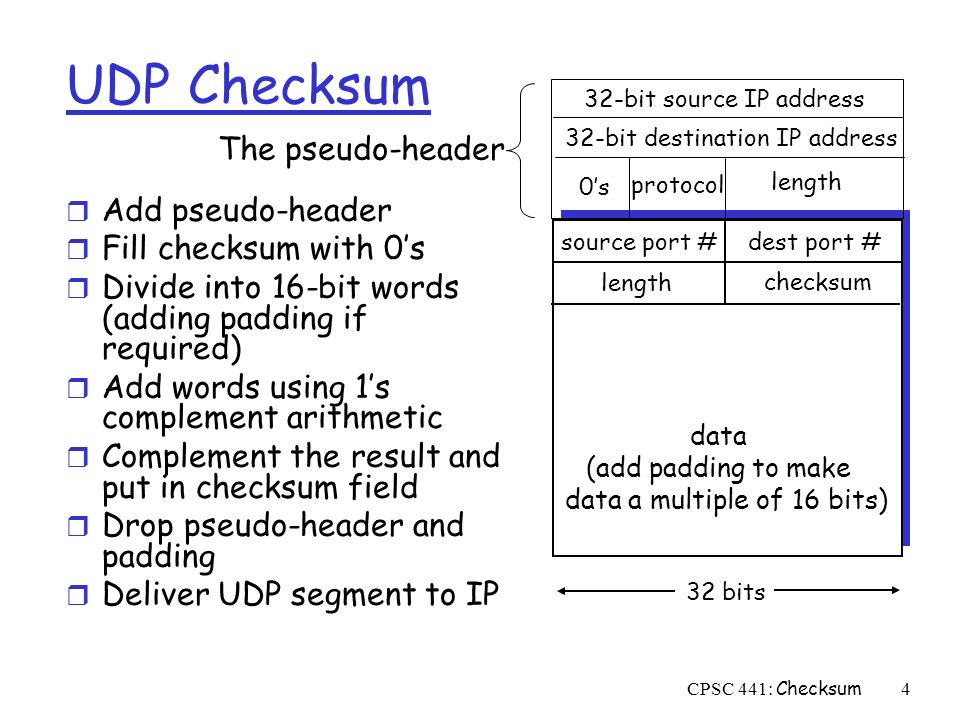
User Datagram protocol (UDP) has only the basic error checking mechanism using checksum


Examples:
Domain Name System (DNS UDP port 53)
streaming media applications such as IPTV or movies
Voice over IP (VoIP)
Trivial File Transfer Protocol (TFTP)
online multiplayer games

http://www.cyberciti.biz/faq/key-differences-between-tcp-and-udp-protocols/


  • What is the difference between TCP and UDP? When would you use each of them?


What I'm looking for: someone who not only parrots the "connectionless vs. connection-oriented" idea, but can demonstrate they understand the reasons you might choose one or the other.


what advantages does UDP have over TCP?

UDP does not include a "handshake" in its protocols, it tends to be faster than TCP. UDP assumes that error checking and correction is either not necessary or performed in the application, avoiding the overhead of such processing at the network interface level.

Time-sensitive applications often use UDP because dropping packets is preferable to waiting for delayed packets, which may not be an acceptable option in a real-time system.

UDP advantage is primarily speed - no error detection or correction is used, and handshaking is not employed either so it is a faster transport mechanism (although it is not reliable).

http://wiki.answers.com/Q/What_advantage_does_UDP_have_over_TCP


  • How do I find out running processes were associated with each open port on Linux?

How do I find out what process has open TCP port # 111 or UDP port 7000 under Linux using the CLI?
A port is nothing but an endpoint of communication used in computer networks. You have physical or wireless connections at the hardware level. At software or operating system level a port act as a logical construct that acts as communication port of network service such as SSH, HTTPD and more. TCP and UDP are the most common port.
https://www.cyberciti.biz/faq/what-process-has-open-linux-port/


  • Introducing TCP/IP concepts: Selecting sockets

You can choose among the following types of sockets:

Stream
Datagram
Raw

Stream sockets perform like streams of information. There are no record lengths or character boundaries between data, so communicating processes must agree on their own mechanisms for distinguishing information. Usually, the process sending information sends the length of the data, followed by the data itself. The process receiving information reads the length and then loops, accepting data until all of it has been transferred. Because there are no boundaries in the data, multiple concurrent read or write socket calls of the same type, on the same stream socket, will yield unpredictable results. For example, if two concurrent read socket calls are issued on the same stream socket, there is no guarantee of the order or amount of data that each instance will receive. Stream sockets guarantee to deliver data in the order sent and without duplication. The stream socket defines a reliable connection service. Data is sent without error or duplication and is received in the order sent. Flow control is built in to avoid data overruns. No boundaries are imposed on the data; the data is treated as a stream of bytes.

Stream sockets are most common because the burden of transferring the data reliably is handled by TCP/IP, rather than by the application.

The datagram socket is a connectionless service. Datagrams are sent as independent packets. The service provides no guarantees. Data can be lost or duplicated, and datagrams can arrive out of order. The size of a datagram is limited to the size able to be sent in a single transaction. Currently, the default value is 8192 bytes, and the maximum value is 65535. The maximum size of a datagram is 65535 for UDP and 65535 bytes for raw

The raw socket allows direct access to lower layer protocols, such as IP and the ICMP. This interface is often used to test new protocol implementation, because the socket interface can be extended and new socket types defined to provide additional services

https://www.ibm.com/support/knowledgecenter/en/SSLTBW_2.3.0/com.ibm.zos.v2r3.hala001/itcsocketconselsoc.htm


  • TCP/IP and UDP Comparison

Connection Versus Connectionless — TCP/IP is a connection-based protocol, while UDP is a connectionless protocol. In TCP/IP, the two ends of the communication link must be connected at all times during the communication. An application using UDP prepares a packet and sends it to the receiver's address without first checking to see if the receiver is ready to receive a packet. If the receiving end is not ready to receive a packet, the packet is lost.

Stream Versus Packet — TCP/IP is a stream-oriented protocol, while UDP is a packet-oriented protocol. This means that TCP/IP is considered to be a long stream of data that is transmitted from one end of the connection to the other end, and another long stream of data flowing in the opposite direction. The TCP/IP stack is responsible for breaking the stream of data into packets and sending those packets while the stack at the other end is responsible for reassembling the packets into a data stream using information in the packet headers. UDP, on the other hand, is a packet-oriented protocol where the application itself divides the data into packets and sends them to the other end. The other end does not have to reassemble the data into a stream. Note, some applications might present the data as a stream when the underlying protocol is UDP. However, this is the layering of an additional protocol on top of UDP, and it is not something inherent in the UDP protocol itself.

TCP/IP Is a Reliable Protocol, While UDP Is Unreliable — The packets that are sent by TCP/IP contain a unique sequence number. The starting sequence number is communicated to the other side at the beginning of communication. The receiver acknowledges each packet, and the acknowledgment contains the sequence number so that the sender knows which packet was acknowledged. This implies that any packets lost on the way can be retransmitted (the sender would know that they did not reach their destination because it had not received an acknowledgment). Also, packets that arrive out of sequence can be reassembled in the proper order by the receiver.
timeouts can be established because the sender knows (from the first few packets) how long it takes on average for a packet to be sent and its acknowledgment received. UDP, on the other hand, sends the packets and does not keep track of them. Thus, if packets arrive out of sequence, or are lost in transmission, the receiving end (or the sending end) has no way of knowing.
Note that "unreliable" is used in the sense of "not guaranteed to succeed" as opposed to "will fail a lot of the time." In practice, UDP is quite reliable as long as the receiving socket is active and is processing data as quickly as it arrives.

https://www.mathworks.com/help/instrument/tcpip-and-udp-comparison.html
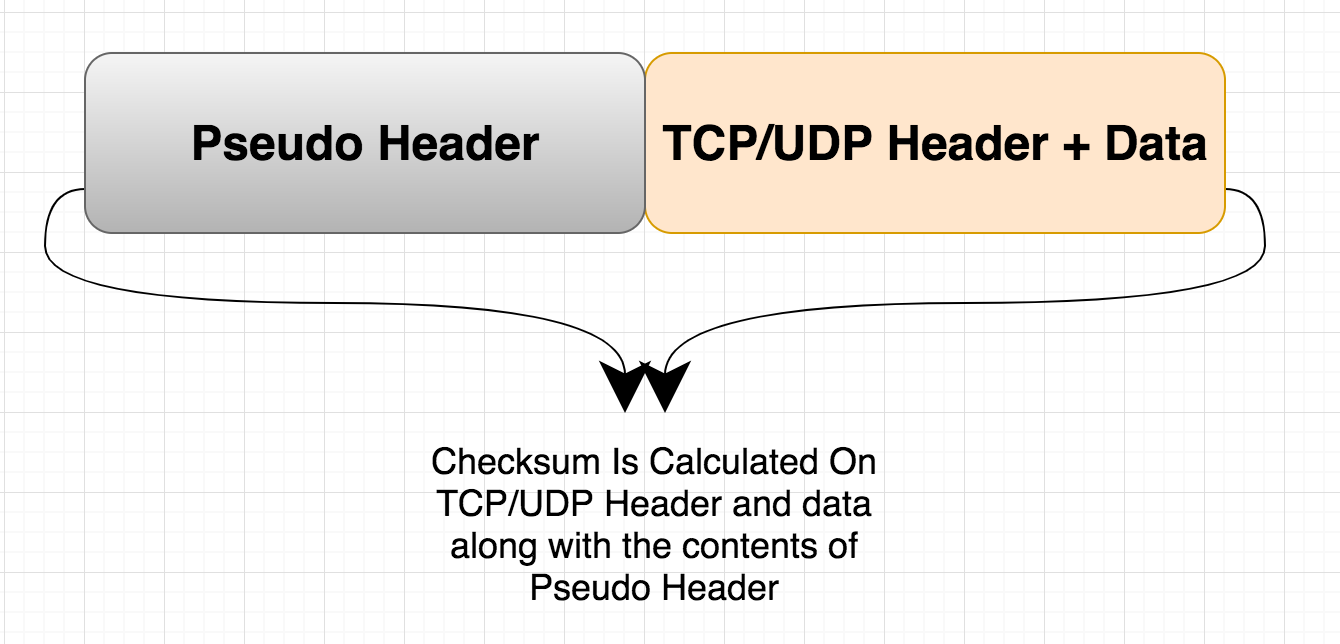
How is TCP & UDP Checksum Calculated?

Volume Shadow Copy

Volume Shadow Copy is a service that creates and maintains snapshots (“shadow copies”) of disk volumes

If you accidentally delete 10 pages of your dissertation, you can right-click the document, choose Restore previous versions, and access a previous version of it.
You can open it (in read-only mode) or copy it to a new location.

If you accidentally delete a file or folder, you can right-click the containing folder, choose Restore previous versions, and open the folder as it appeared at the time a shadow copy was made (see screenshot below).
http://blog.szynalski.com/2009/11/23/volume-shadow-copy-system-restore/

The Windows Registry

The Windows Registry is a collection of databases of configuration settings.
The Windows Registry is used to store much of the information and settings for software programs, hardware devices, user preferences, operating system configurations, and much more.
Registry Editor can be accessed by executing regedit from the Command Prompt
http://pcsupport.about.com/od/termsr/p/registrywindows.htm

DHCP

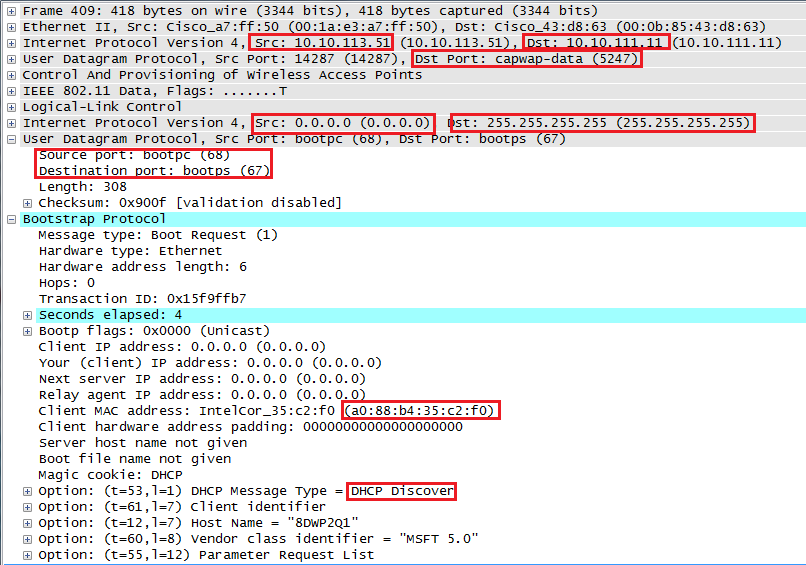
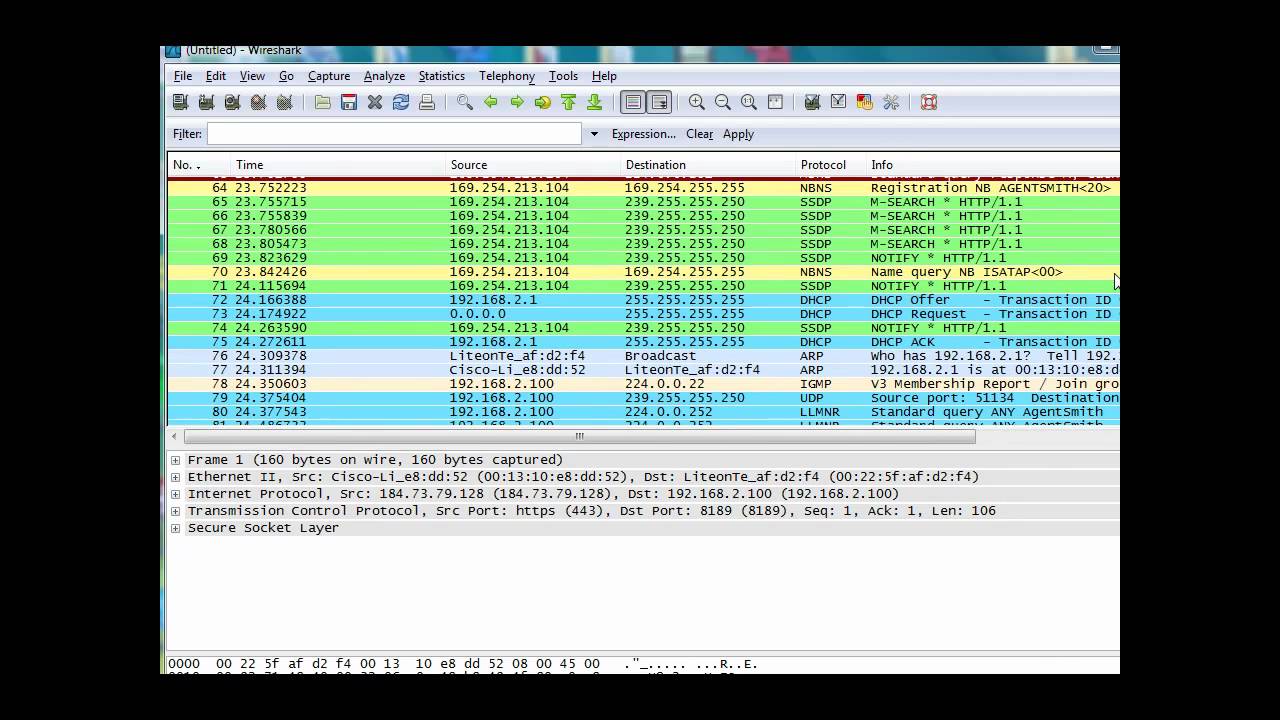
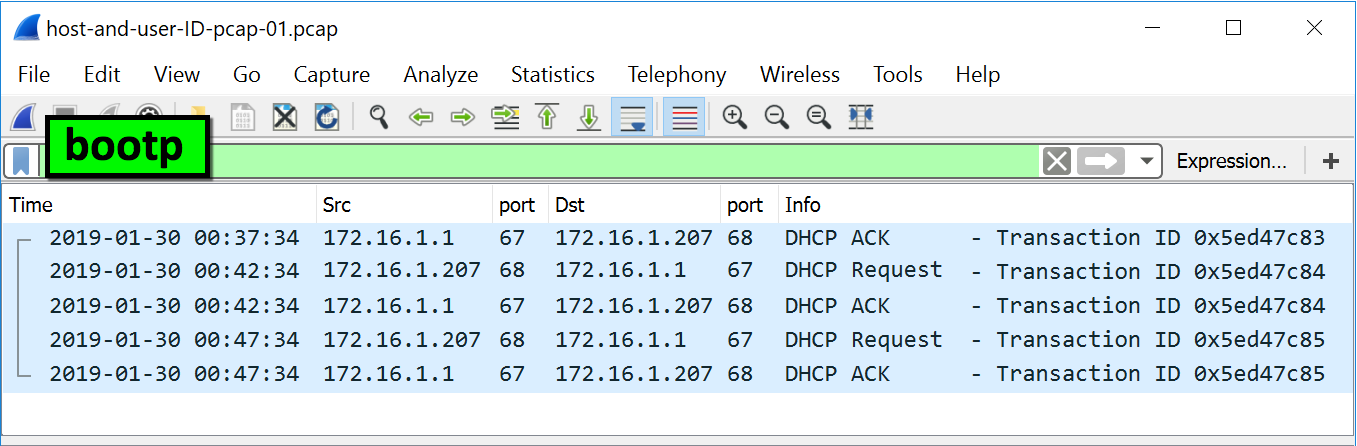
  • Dynamic Host Configuration Protocol (DHCP) is a network protocol that enables a server to automatically assign an IP address to a computer from a defined range of numbers (i.e., a scope) configured for a given network. When a computer uses a static IP address, it means that the computer is manually configured to use a specific IP address. One problem with static assignment, which can result from user error or inattention to detail, occurs when two computers are configured with the same IP address. This creates a conflict that results in loss of service. Using DHCP to dynamically assign IP addresses minimizes these conflicts. The purpose of DHCP is to ease administration of large networks. With static manual IP configuration you may get network conflict. http://kb.iu.edu/data/adov.html

  • How does client know the IP address of DHCP server to send a DHCP Discover Message?


  • DHCP Request Message


  • How does DHCP (DORA) work?


  • APIPA (Automatic Private IP Addressing)
Automatic Private IP Addressing (APIPA) is a feature in operating systems (such as Windows) that enables computers to automatically self-configure an IP address and subnet mask when their DHCP server isn’t reachable. The IP address range for APIPA is 169.254.0.1-169.254.255.254, with the subnet mask of 255.255.0.0.

https://study-ccna.com/apipa-automatic-private-ip-addressing/


Saturday, February 11, 2012

labeled and unlabeled break statements

Break should be used either with loop or switch.
Further more Break has two forms Labeled and Unlabeled.
Good example of unlabaled break is, tradional use with switch, loop.
Labeled switch can also be used if we have labeled statements.
Simply using 'break' is compilation error.


Reference:
http://docs.oracle.com/javase/tutorial/java/nutsandbolts/branch.html

Marker interface

an interface with no methods is called as marker interface

ex:
interface test{ }

Serializable, Clonable, SingleThreadModel are called marker interfaces in java. these marker interface's give additional information about the behavior of the class.


Marker interface is an empty interface. Eg is Serializable. When a class
implements this interface then only we can serialize the object. i.e
we can save in the file. In other words any class which implements
serializable can be serialized which is the additional feature when
compared with an ordianary object.

Simillarly when a class is implementing java.rmi.Remote it can be
used as a Remote object.


Reference:
http://geekexplains.blogspot.com/2009/10/marker-interface-in-java-what-why-uses.html

  • Since the ability of a Class's data to be serialized and de-serialized correctly is implementation specific, it is necessary to be able to assert whether serialization is possible for this class.
That is why the Marker Interface is provided and utilized.

For example, if your class members contain system-dependant information that is only relevant on one machine (such as hardware info) or only during the scope of one app server's life-cycle (like session Ids) then you are provide the ability to NOT mark it as serializable, so that no code will attempt to serialize and de-serialize, which would result in logic or runtime errors later on.
Whereas if your data consists of transportable data such as names or phone numbers, you can mark it serializeable, thus indicating that all manners of transport utilizing serialization and de-serialization may be employed on this data to allow it to be moved between machines etc.

http://www.linkedin.com/groups/Why-serialization-use-marker-interface-70526.S.5853381965264211970?view=&gid=70526&type=member&item=5853381965264211970&trk=eml-anet_dig-b_nd-pst_ttle-cn

Wednesday, January 11, 2012

integration frameworks

  • Apache Camel
Apache Camel is a powerful open source integration framework based on known Enterprise Integration Patterns with powerful Bean Integration.
http://camel.apache.org/

Saturday, January 7, 2012

Decision Making Skills

  • Using a DECISION MATRIX to help you to decide between alternatives:

SWOT analysis is a subjective method used to evaluate the STRENGTHS, WEAKNESSES, OPPORTUNITIES, and THREATS involved in trying to attain an objective


Reference:
http://www.kent.ac.uk/careers/sk/decisionmaking.htm#DECISION

  • PEST analysis (political, economic, social and technological) describes a framework of macro-environmental factors used in the environmental scanning component of strategic management. It is part of an external analysis when conducting a strategic analysis or doing market research, and gives an overview of the different macro-environmental factors to be taken into consideration. It is a strategic tool for understanding market growth or decline, business position, potential and direction for operations.
https://en.wikipedia.org/wiki/PEST_analysis


  • Identifying "Big Picture" Opportunities and Threats
Changes in your business environment can create great opportunities for your organization – and cause significant threats.PEST Analysis is a simple and widely used tool that helps you analyze the Political, Economic, Socio-Cultural, and Technological changes in your business environment. This helps you understand the "big picture" forces of change that you're exposed to, and, from this, take advantage of the opportunities that they present.PEST Analysis is often linked with SWOT Analysis [Add to My Personal Learning Plan] , however, the two tools have different areas of focus. PEST Analysis looks at "big picture" factors that might influence a decision, a market, or a potential new business. SWOT Analysis explores these factors at a business, product-line or product level.These tools complement one another and are often used together.
https://www.mindtools.com/pages/article/newTMC_09.htm

business analyst role

What are the challenges a BA may need to overcome to respond to the increased expectations of companies who hire business analysts not just to manage requirements, but

also to perform project management and participate on decision-making processes?


To be truly effective, a BA must consider the project requirements their primary concern, from the development of a product vision and scope to detailed user and

software requirements specifications and the change control processes that will be used to manage requirements during the lifetime of the proj


Reference:
http://www.bridging-the-gap.com/expanding-the-business-analyst-role-good-or-bad/

preparation

Top 5 Job Interview Tips
http://career-advice.monster.co.uk/job-interview/preparing-for-job-interviews/top-5-job-interview-tips/article.aspx


Marketing Yourself Successfully - Video Advice
http://career-advice.monster.co.uk/job-interview/job-interview-behaviour/marketing-yourself-successfully-video/article.aspx

What is the difference between an incremental backup and a differential backup?

An Incremental backup backs up only the selected files that have their archive bit set to ON, setting them back to OFF.
a backup of all files that are new or changed since the last backup whether it was a full or an incremental.
The advantage of an Incremental is that it takes the least amount of time and media of all the backup methods.
In the case of restoring with Incremental backups, all the Incremental backups since the last full backup plus the last full backup would be necessary.


A Differential backup backs up only the selected files that have their archive bit set to ON but does not set the archive bit back to OFF.
A Differential backup will back up all selected files that are new and changed since the last full backup.
at restore time; you'll need only the last full backup and the last differential to get a complete restore

Reference:
http://wiki.answers.com/Q/What_is_the_difference_between_an_incremental_backup_and_a_differential_backup


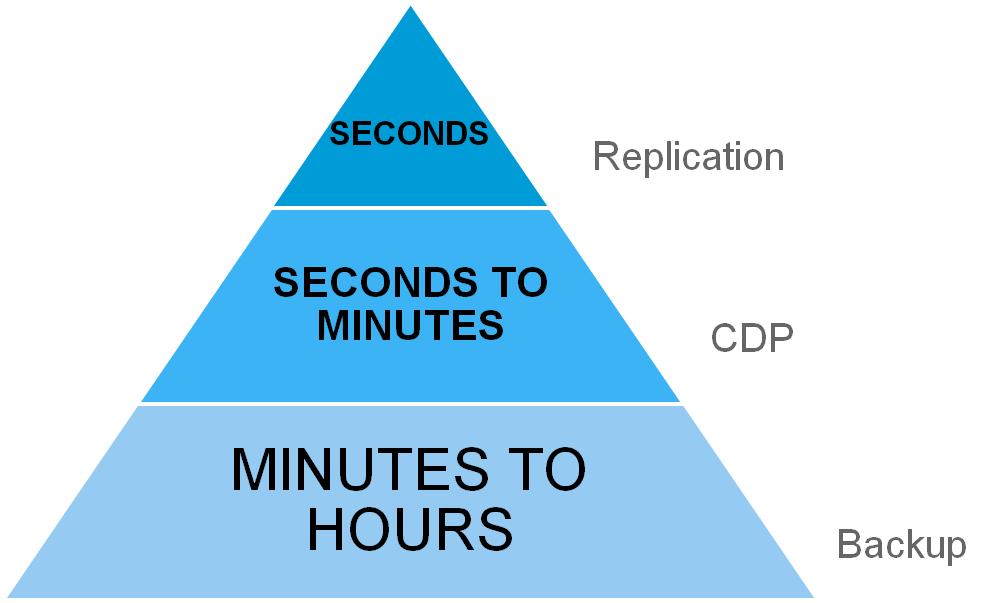
  • Continuous data protection (CDP), also called continuous backup or real-time backup, refers to backup of computer data by automatically saving a copy of every change made to that data, essentially capturing every version of the data that the user saves. In its true form it allows the user or administrator to restore data to any point in time

https://en.wikipedia.org/wiki/Continuous_Data_Protection


Simply stated, continuous data protection (CDP), also called continuous backup, is a storage system that backs up data whenever any change is made in it. In effect, CDP creates an electronic journal of complete storage snapshots, one for every instant in time that data modification occurs.

Why continuous data protection?
IT complexity: Continuous data protection helps ensure continuous availability of the varied, cross-platform environments.
Administrative capability:
Cost factor:Continuous data protection may prove to be a cheaper solution than traditional backup and recovery solutions. Software-based continuous data protection solutions today are easy to deploy and manage,
Data growth:  Remote users in geographically dispersed locations have access to email, core systems and other mission-critical applications. In such cases, continuous data protection makes perfect sense for enterprises with locations in multiple geographies.
Criticality of data:Continuous data protection technologies enable seamless backup and restore at the backend without affecting end users. Many continuous data protection solutions can recover data from any point in time within less than a minute.

Most of the challenges with continuous data protection emanate from the environment being targeted. A true continuous data protection solution will support real-time protection rather than scheduled snapshots. The change rate of the data sets that are being protected could pose challenges to the continuous data protection solution.
https://www.computerweekly.com/tip/Continuous-data-protection-Do-you-need-it

SQL JOIN

  • ChatGPT

SQL JOINs are used to combine rows from two or more tables based on a related column between them. Here’s an explanation of different types of SQL JOINs with Venn diagrams and examples:

1. INNER JOIN

Definition: An INNER JOIN returns records that have matching values in both tables. It retrieves only the rows that satisfy the join condition.

Venn Diagram:

  • A (left table) ∩ B (right table) = Intersection

Example:

Consider two tables:


  • Employees

    IDName
    1Alice
    2Bob
    3Charlie
  • Departments

    IDEmployeeIDDepartment
    11HR
    22IT
    34Finance


  • SELECT Employees.Name, Departments.Department
    FROM Employees
    INNER JOIN Departments ON Employees.ID = Departments.EmployeeID;


    Result:

    NameDepartment
    AliceHR
    BobIT

    2. LEFT OUTER JOIN

    Definition: A LEFT OUTER JOIN returns all records from the left table and the matched records from the right table. If there is no match, the result is NULL on the side of the right table.

    Venn Diagram:

    • A (left table) ∪ (A ∩ B) = Left table plus the intersection
    SELECT Employees.Name, Departments.Department
    FROM Employees
    LEFT OUTER JOIN Departments ON Employees.ID = Departments.EmployeeID;


    3. RIGHT OUTER JOIN

    Definition: A RIGHT OUTER JOIN returns all records from the right table and the matched records from the left table. If there is no match, the result is NULL on the side of the left table.

    Venn Diagram:

    • B (right table) ∪ (A ∩ B) = Right table plus the intersection

    SELECT Employees.Name, Departments.Department
    FROM Employees
    RIGHT OUTER JOIN Departments ON Employees.ID = Departments.EmployeeID;

    4. FULL OUTER JOIN

    Definition: A FULL OUTER JOIN returns all records when there is a match in either left or right table. It combines the results of both LEFT OUTER JOIN and RIGHT OUTER JOIN.

    Venn Diagram:

    • A (left table) ∪ B (right table) = Union of both tables

    Example:

    SQL Query:


    SELECT Employees.Name, Departments.Department
    FROM Employees
    FULL OUTER JOIN Departments ON Employees.ID = Departments.EmployeeID;

    Summary

    • INNER JOIN: Retrieves only the rows with matching values in both tables (intersection).
    • LEFT OUTER JOIN: Retrieves all rows from the left table and matching rows from the right table (left table plus intersection).
    • RIGHT OUTER JOIN: Retrieves all rows from the right table and matching rows from the left table (right table plus intersection).
    • FULL OUTER JOIN: Retrieves all rows from both tables, with NULL where there are no matches (union of both tables).

    • The SQL JOIN clause is used whenever we have to select data from 2 or more tables.

    There are 2 types of SQL JOINS – INNER JOINS and OUTER JOINS.

    The INNER JOIN will select all rows from both tables as long as there is a match between the columns we are matching on.

    SQL OUTER JOIN and it has 2 sub-types called LEFT OUTER JOIN and RIGHT OUTER JOIN.


    The LEFT OUTER JOIN or simply LEFT JOIN (you can omit the OUTER keyword in most databases),
    selects all the rows from the first table listed after the FROM clause, no matter if they have matches in the second table.

    The RIGHT OUTER JOIN or just RIGHT JOIN behaves exactly as SQL LEFT JOIN, except that it returns all rows from the second table (the right table in our SQL JOIN statement).


    References:
    http://www.sql-tutorial.net/SQL-JOIN.asp
    http://www.quackit.com/sql/tutorial/sql_outer_join.cfm
    http://www.tizag.com/sqlTutorial/sqljoin.php
    http://www.sqltutorial.org/sqljoin-innerjoin.aspx


    • INNER JOIN
    Inner join shows matches only when they exist in both tables.this SQL will only give you result with customers who have orders. If the customer does not have order, it will not display that record
    SELECT Customers.*, Orders.* FROM Customers INNER JOIN Orders ON Customers.CustomerID =Orders.CustomerID

    There is another way to visualize the SQL INNER JOIN by using the Venn diagrams

    • LEFT OUTER JOIN
    Left join will display all records in left table of the SQL statement. In SQL below customers with or without orders will be displayed. Order data for customers without orders appears as NULL values
    SELECT Customers.*, Orders.* FROM Customers LEFT OUTER JOIN Orders ON Customers.CustomerID =Orders.CustomerID

    There is another way to visualize the SQL INNER JOIN by using the Venn diagrams

    • RIGHT OUTER JOIN
    Right join will display all records in right table of the SQL statement. In SQL below all orders with or without matching customer records will be displayed. Customer data for orders without customers appears as NULL values
    SELECT Customers.*, Orders.* FROM Customers RIGHT OUTER JOIN Orders ON Customers.CustomerID =Orders.CustomerID

    There is another way to visualize the SQL INNER JOIN by using the Venn diagrams

    • FULL OUTER JOIN
    Full outer join it will return all records from left table and from right table.
    There is another way to visualize the SQL INNER JOIN by using the Venn diagrams


    • JOIN SCHEMA


    • Using Cross Joins

    A cross join that does not have a WHERE clause produces the Cartesian product of the tables involved in the join. The size of a Cartesian product result set is the number of rows in the first table multiplied by the number of rows in the second table.

    The result set contains 170 rows (SalesPerson has 17 rows and SalesTerritory has 10; 17 multiplied by 10 equals 170).

    http://msdn.microsoft.com/en-us/library/ms190690%28v=sql.105%29.aspx


    The SQL CROSS JOIN produces a result set which is the number of rows in the first table multiplied by the number of rows in the second table, if no WHERE clause is used along with CROSS JOIN. This kind of result is called as Cartesian Product
    http://www.w3resource.com/sql/joins/cross-join.php


    • Cross join

    CROSS JOIN returns the Cartesian product of rows from tables in the join. In other words, it will produce rows which combine each row from the first table with each row from the second table


    CREATE TABLE department
    (
     DepartmentID INT,
     DepartmentName VARCHAR(20)
    );

    CREATE TABLE employee
    (
     LastName VARCHAR(20),
     DepartmentID INT
    );


    INSERT INTO department(DepartmentID, DepartmentName) VALUES(31, 'Sales');
    INSERT INTO department(DepartmentID, DepartmentName) VALUES(33, 'Engineering');
    INSERT INTO department(DepartmentID, DepartmentName) VALUES(34, 'Clerical');
    INSERT INTO department(DepartmentID, DepartmentName) VALUES(35, 'Marketing');

    INSERT INTO employee(LastName, DepartmentID) VALUES('Rafferty', 31);
    INSERT INTO employee(LastName, DepartmentID) VALUES('Jones', 33);
    INSERT INTO employee(LastName, DepartmentID) VALUES('Steinberg', 33);
    INSERT INTO employee(LastName, DepartmentID) VALUES('Robinson', 34);
    INSERT INTO employee(LastName, DepartmentID) VALUES('Smith', 34);
    INSERT INTO employee(LastName, DepartmentID) VALUES('John', NULL);

    Example of an explicit cross join:

    SELECT *
    FROM employee
    CROSS JOIN department;

    Example of an implicit cross join:

    SELECT *
    FROM employee, department;


    Inner join

    SELECT *
    FROM employee
    INNER JOIN department ON employee.DepartmentID = department.DepartmentID;

    The following example is equivalent to the previous one, but this time using implicit join notation:

    SELECT *
    FROM employee, department
    WHERE employee.DepartmentID = department.DepartmentID;


    Left outer join

    SELECT *
    FROM employee
    LEFT OUTER JOIN department ON employee.DepartmentID = department.DepartmentID;


    Right outer join

    SELECT *
    FROM employee
    RIGHT OUTER JOIN department ON employee.DepartmentID = department.DepartmentID;


    Full outer join

    SELECT *
    FROM employee
    FULL OUTER JOIN department ON employee.DepartmentID = department.DepartmentID;


    Self-join
    A self-join is joining a table to itself

    SELECT F.EmployeeID, F.LastName, S.EmployeeID, S.LastName, F.Country
    FROM Employee F
    INNER JOIN Employee S ON F.Country = S.Country
    WHERE F.EmployeeID < S.EmployeeID
    ORDER BY F.EmployeeID, S.EmployeeID;


    http://en.wikipedia.org/wiki/Join_%28SQL%29

    • JOIN Three Tables

    method 1

    SELECT Orders.OrderID, Customers.CustomerName, Shippers.ShipperName
    FROM ((Orders
    INNER JOIN Customers ON Orders.CustomerID = Customers.CustomerID)
    INNER JOIN Shippers ON Orders.ShipperID = Shippers.ShipperID);

    method 2
    SELECT tablo1.OrderID, tablo1.CustomerName, Shippers.ShipperName
    FROM (select * from Orders INNER JOIN Customers ON Orders.CustomerID = Customers.CustomerID) 
    as tablo1
    INNER JOIN Shippers ON tablo1.ShipperID = Shippers.ShipperID;

    https://www.w3schools.com/sql/sql_join_inner.asp


    Friday, January 6, 2012

    The Key Differences Between SAN, DAS, and NAS

    • Direct-Attached Storage(DAS)

    The most common form of server storage today is still direct attached storage.
    The disks may be internal to the server or they may be in an array that is connected directly to the server
    Either way, the storage can be accessed only through that server.
    An application server will have its own storage; the next application server will have its own storage;
    and the file and print servers will each have their own storage


    • Storage Area Networks(SAN)

    A SAN allows more than one application server to share storage.
    Data is stored at a block level and can therefore be accessed by an application, not directly by clients
    The physical elements of the SAN (servers, switches, storage arrays, etc.) are typically connected with Fibre-Channel – an interconnect technology that permits high-performance resource sharing
    Storage can be added without disrupting the applications, and different types of storage can be added to the pool.


    A storage area network (SAN) is a dedicated network that provides access to consolidated, block level data storage. SANs are primarily used to make storage devices, such as disk arrays, tape libraries, and optical jukeboxes, accessible to servers so that the devices appear like locally attached devices to the operating system. A SAN typically has its own network of storage devices that are generally not accessible through the local area network by other devices
    In storage networking terminology, a Storage Area Network (SAN) is a high-speed subnetwork of shared storage devices. A storage device is a machine that contains nothing but a disk or disks for storing data.

    A SAN's architecture works in a way that makes all storage devices available to all servers on a LAN or WAN. As more storage devices are added to a SAN, they too will be accessible from any server in the larger network. In this case, the server merely acts as a pathway between the end user and the stored data.

    Because stored data does not reside directly on any of a network's servers, server power is utilized for business applications, and network capacity is released to the end user.


    • Network Attached Storage(NAS)

    A NAS appliance is a simplified form of file server; it is optimized for file sharing in an organization.
    Authorized clients can see folders and files on the NAS device just as they can on their local hard drive
    NAS devices are frequently used to consolidate file services.
    To prevent the proliferation of file servers, a single NAS appliance can replace many regular file servers, simplifying management and reducing cost and workload for  the systems administrator.
    NAS appliances are also multiprotocol, which means that they can share files among clients using Windows® and UNIX®-based operating systems.

    Reference:
    http://smbtechconnect.securelement.com/2008/03/key-differences-between-san-das-and-nas.html


    • An optical jukebox is a robotic data storage device that can automatically load and unload optical discs, such as Compact Disc, DVD, Ultra Density Optical or Blu-ray disc and can provide terabytes (TB) and petabytes (PB) of tertiary storage.

    https://en.wikipedia.org/wiki/Optical_jukebox

    spring interview questions


    • What is IOC (or Dependency Injection)?


    The basic concept of the Inversion of Control pattern (also known as dependency injection) is that you do not create your objects but describe how they should be created
    You don't directly connect your components and services together in code but describe which services are needed by which components in a configuration file


    • What is Spring ?

    Spring is an open source framework created to address the complexity of enterprise application development.
    Spring is a lightweight inversion of control and aspect-oriented container framework.


    • What are the advantages of Spring framework?

    Spring has layered architecture.
    Use what you need and leave you don't need now.
    Spring Enables POJO Programming.
     POJO programming enables continuous integration and testability.
    Dependency Injection and Inversion of Control Simplifies JDBC


    • What are features of Spring ?
    Inversion of control (IOC):


    Loose coupling is achieved in spring using the technique Inversion of Control.
    The objects give their dependencies instead of creating or looking for dependent objects

    Aspect oriented (AOP):
    Spring supports Aspect oriented programming and enables cohesive development by separating application business logic from system services.

    MVC Framework:
    Spring comes with MVC web application framework, built on core Spring functionality.
    This framework is highly configurable via strategy interfaces, and accommodates multiple view technologies like JSP, Velocity, Tiles, iText, and POI.
    But other frameworks can be easily used instead of Spring MVC Framework.

    JDBC Exception Handling:
    The JDBC abstraction layer of the Spring offers a meaningful exception hierarchy, which simplifies the error handling strategy.
    Integration with Hibernate, JDO, and iBATIS:
    Spring provides best Integration services with Hibernate, JDO and iBATIS


    • What are the different modules in Spring framework?

    The Core container module
    Application context module
    AOP module (Aspect Oriented Programming)
    JDBC abstraction and DAO module
    O/R mapping integration module (Object/Relational)
    Web module
    MVC framework module

    Reference:
    http://www.developersbook.com/spring/interview-questions/spring-interview-questions-faqs.php
    http://www.javabeat.net/articles/103-spring-framework-interview-questions-1.html


    • Model-view-controller framework

    The Spring Framework features its own MVC web application framework, which wasn't originally planned. The Spring developers decided to write their own web framework as a reaction to what they perceived as the poor design of the (then) popular Jakarta Struts web framework,
    Like Struts, Spring MVC is a request-based framework
    MVC paves the way for cleaner front end code. All interfaces are tightly coupled to the Servlet API.
    This tight coupling to the Servlet API is seen by some as a failure on the part of the Spring developers to offer a high-level abstraction for web-based applications[citation needed].
    However, this coupling makes sure that the features of the Servlet API remain available to developers while offering a high abstraction framework to ease working with said API.
    http://en.wikipedia.org/wiki/Spring_Framework#Model-view-controller_framework


    • With desktop Java apps, you can have a single piece of 

    code that instantiates the container and gets beans
    • I.e., driver class that calls instantiates
    ClassPathXmlApplicationContext and calls getBean
    – With Web apps, each servlet wants access to beans
    • But you want to instantiate container once only


    bean scopes
    – Standard Spring supports singleton and prototypeStandard Spring supports singleton and prototype
    – Web apps also want request, session, and application


    Regular Web Apps
    Put bean definitions in WEB-INB/applicationContext.xml
    • request and session scope now supported• request and session scope now supported
    Declare two listeners in web.xml
    • Container will be instantiated when app is loaded

    JSF Apps
    Same approach for JAR files, bean defn file, and listenerspp , ,
    – Declare variable-resolver in faces-config.xml
    Can declare beans in applicationContext or faces-config


    applicationContext.xml
    – Put “empty” file (with header and py (
    <beans..></beans> only) in WEB-INF
    • Unlike in desktop apps, the filename matters. The
    standard loading utility assumes that name and location

    /WEB-INF/applicationContext.xml
    • If you want to change this default name/location, set a
    context param called contextConfigLocation to override it


    ContextLoaderListener
    – This listener runs when the app is firs
    instantiates the ApplicationContext (f
    WEB-INF/applicationContext.xml) and places aWEB INF/applicationContext.xml) an
    reference to it in the ServletContext
    You can retrieve this reference with the static
    tR i dW bA li ti C t t th d fgetRequiredWebApplicationContext method of
    WebApplicationContextUtils


    RequestContextListener
    – This listener is needed if you declare any of your beans to
    be request-scoped or session-scoped
    IWb itdfth lSi f• I.e., Web scopes instead of the usual Spring scopes of
    singleton or prototype


    Not good to call getBean
    – It would be technically legal to get the
    ApplicationContext and call getBean explicitly (probably
    from the backing bean’s action controller method). Butfrom the backing bean s action controller method). But
    this is a bad idea since JSF is geared around declaring
    beans in config files only


    JSF already supports dependency injection
    – The managed-property element lets you insert other beans
    inside newly created ones.inside newly created ones.
    • The only trick is to be able to refer to Spring beans


    Use DelegatingVariableResolver
    – Declare in faces-config.xml. Now, whenever JSF sees a
    bean name, it uses JSF rules first, then Spring rules next.


    Regular Web Apps
    • Two JAR files
    – Put Spring JAR files in WEB-INF/lib
    • Bean definition file
    PliiC liWEB INF– Put applicationContext.xml in WEB-INF
    • Scopes now include request and session in addition to
    singleton and prototype
    • Listeners
    – Two listener definitions in web.xml
    G tti b• Getting beans
    – Access ApplicationContext with static
    getRequiredWebApplicationContext method ofgetRequiredWebApplicationContext method of
    WebApplicationContextUtils
    – Call getBean normally


    JSF-Based Apps
    • Basic setup
    – Start with same setup as regular Web apps
    – Use normal JSF definition of FacesServlet in web.xml
    faces config xml• faces-config.xml
    – Declare DelegatingVariableResolver
    • Option 1• Option 1
    – Declare Spring beans in applicationContext.xml
    – Declare backing beans in faces-config.xmlg g
    • Refer to Spring beans with managed-bean-property
    • Option 2
    – Declare all beans in applicationContext.xml
    • Refer to other beans with ref and normal Spring syntax


    Gets the Spring bean called sampleLookupService
    and passes it to the setLookupService method of the
    JSF backing bean called formBean (i.e., injects it
    into the lookupService property).
    into the lookupService property).


    03-Spring-in-Web-Apps.pdf
    http://courses.coreservlets.com/Course-Materials/spring.html