Monday, June 20, 2016

Agile Vs. Lean: Yeah Yeah, What’s the Difference?

  • Lean
Lean comes from Lean Manufacturing and is a set of principles for achieving quality, speed & customer alignment
Agile
Agile refers to a set of values and principles put forth in the Agile Manifesto. The Manifesto was a reaction against heavyweight methodologies that were popular, yet crippling software projects from actually doing what they needed to do
http://hackerchick.com/agile-vs-lean-yeah-yeah-whats-the-difference

Credential Theft

  • Credential Theft and How to Secure Credentials
Prevent network logon for local accounts
Prevent access to in-memory credentials
Prevent credentials from remaining in-memory when connecting remotely
Leverage protected users and control privileged users
https://technet.microsoft.com/en-us/security/dn920237.aspx

  • Unofficial Guide to Mimikatz & Command Reference
Mimikatz is one of the best tools to gather credential data from Windows systems
https://adsecurity.org/?page_id=1821
  • Credential stuffing
Credential stuffing is the automated injection of breached username/password pairs in order to fraudulently gain access to user accounts. This is a subset of the brute force attack category: large numbers of spilled credentials are automatically entered into websites until they are potentially matched to an existing account, which the attacker can then hijack for their own purposes.

Anatomy of Attack

    The attacker acquires spilled usernames and passwords from a website breach or password dump site.
    The attacker uses an account checker to test the stolen credentials against many websites (for instance, social media sites or online marketplaces).
    Successful logins (usually 0.1-0.2% of the total login attempts) allow the attacker to take over the account matching the stolen credentials.
    The attacker drains stolen accounts of stored value, credit card numbers, and other personally identifiable information
    The attacker may also use account information going forward for other nefarious purposes (for example, to send spam or create further transactions)

https://www.owasp.org/index.php/Credential_stuffing

Difference Between CPU and MicroProcessor

  • Difference Between CPU and MicroProcessor
The technology of the microprocessor has become so advanced that it has the ability to contain not just one but up to four CPUs inside it
The GPU (Graphics Processing Unit) is also contained in a microprocessor
All CPUs are microprocessors, but not all microprocessors are CPUs.
http://www.differencebetween.net/technology/difference-between-cpu-and-microprocessor

  • The CPU is combined with memory and I/O on the same chip, creating a complete computer on a single chip. This is called a microcontroller (uC).
http://electronics.stackexchange.com/questions/44740/whats-the-difference-between-a-microprocessor-and-a-cpu

Manually creating a shortcut for the Web Start client

  • Manually creating a shortcut for the Web Start client
On Windows, the Web Start executable file for the default Java™ JVM is copied to a Windows system directory. When you let Web Start create a short cut for launching the desktop client, it uses the file in the system directory as the target. You can create a shortcut manually.
http://www.ibm.com/support/knowledgecenter/SSATHD_7.7.0/com.ibm.itm.doc_6.3/install/webstart_shortcut.htm

Virtualization Security

  • Microsoft fixes Hyper-V bug in Windows
Guests on a Hyper-V system could trigger the flaw in the CPU chip set to issue instructions that could place the host system into a nonresponsive state, resulting in a denial-of-service condition for guest operating systems. The attacker would have to first secure kernel-mode code execution privileges on the guest operating system in order to trigger this denial-of-service condition.
Unlike Xen and VMware, Hyper-V functions only on systems with hardware support for virtualization, such as servers with Intel VT-x and AMD-V hardware virtualization extensions. As a result, Hyper-V is typically not at risk for escape attacks, where the attackers target the guest system in order to compromise the host.
http://www.infoworld.com/article/3005238/security/microsoft-fixes-hyper-v-bug-in-windows.html


  • Common Virtualization Vulnerabilities and How to Mitigate Risks

VM escape:A guest OS escapes from its VM encapsulation to interact directly with the hypervisor.This gives the attacker access to all VMs and, if guest privileges are high enough, the host machine as well. Although few if any instances are known, experts consider VM escape to be the most serious threat to VM security.

How to Mitigate Risk
VM traffic monitoring:The ability to monitor VM backbone network traffic is critical.Conventional methods will not detect VM traffic because it is controlled by internal soft switches.However, hypervisors have effective monitoring tools that should be enabled and tested.
https://pentestlab.wordpress.com/2013/02/25/common-virtualization-vulnerabilities-and-how-to-mitigate-risks/

  • Top Virtualization Security Mistakes (and How to Avoid Them)
Mistake #1: Misconfiguring virtual hosting platforms, guests, and networks
Mistake #2: Failure to properly separate duties and deploy least privilege controls
Mistake #3: Failure to integrate into change/lifecycle management
Mistake #4: Failure to educate other groups, particularly risk management and compliance staff 
Mistake #5: Lack of availability or integration with existing tools and policies
Mistake #6: Lack VM visibility across the enterprise
Mistake #7: Failure to work with an open ecosystem
Mistake #8: Failure to coordinate policy between virtual machines and network connections   
Mistake #9: Failure to consider hidden costs
Mistake #10: Failure to consider user-installed VMs
https://www.sans.org/reading-room/whitepapers/analyst/top-virtualization-security-mistakes-and-avoid-them-34800

  • Kernel exploits
Unlike in a VM, the kernel is shared among all containers and the host, magnifying the importance of any vulnerabilities present in the kernel. Should a container cause a kernel panic, it will take down the whole host. In VMs, the situation is much better: an attacker would have to route an attack through both the VM kernel and the hypervisor before being able to touch the host kernel.
Denial-of-service attacks
If one container can monopolize access to certain resources–including memory and more esoteric resources such as user IDs (UIDs)—it can starve out other containers on the host, resulting in a denial-of-service (DoS), whereby legitimate users are unable to access part or all of the system.
Container breakouts
By default, users are not namespaced, so any process that breaks out of the container will have the same privileges on the host as it did in the container; if you were root in the container, you will be root on the host.2 This also means that you need to worry about potential privilege escalation attacks–whereby a user gains elevated privileges such as those of the root user, often through a bug in application code that needs to run with extra privileges.
Poisoned images
If an attacker can trick you into running his image, both the host and your data are at risk. Similarly, you want to be sure that the images you are running are up-to-date and do not contain versions of software with known vulnerabilities.
https://www.oreilly.com/ideas/five-security-concerns-when-using-docker

User and Entity Behavior Analytics ("UEBA")

  • User and Entity Behavior Analytics ("UEBA")
User Behavior Analytics ("UBA") as defined by Gartner, is a cybersecurity process about detection of insider threats, targeted attacks, and financial fraud. UBA solutions look at patterns of human behavior, and then apply algorithms and statistical analysis to detect meaningful anomalies from those patterns - anomalies that indicate potential threats
User and Entity Behavior Analytics ("UEBA"). This expanded definition includes devices, applications, servers, data, or anything with an IP address.
https://en.wikipedia.org/wiki/User_behavior_analytics

  • user behavior analytics (UBA)
User behavior analytics (UBA) is the tracking, collecting and assessing of user data and activities using monitoring systems.
user behavior analytics tools have more advanced profiling and exception monitoring capabilities than SIEM systems and are used for two main functions. First, UBA tools determine a baseline of normal activities specific to the organization and its individual users. Second, they identify deviations from normal. UBA uses big data and machine learning algorithms to assess these deviations in near-real time.
http://searchsecurity.techtarget.com/definition/user-behavior-analytics-UBA

  • User Behavior Analytics ("UBA") as defined by Gartner, is a cybersecurity process about detection of insider threats, targeted attacks, and financial fraud. UBA solutions look at patterns of human behavior, and then apply algorithms and statistical analysis to detect meaningful anomalies from those patterns - anomalies that indicate potential threats
https://en.wikipedia.org/wiki/User_behavior_analytics

  • Defending Against Pass-The-Ticket Attacks
How Pass-the-Ticket Attacks Are Launched
Pass-the-Ticket attacks are typically launched in one of two ways:
The hacker steals a Ticket Granting Ticket or Service Ticket from a Windows machine and uses the stolen ticket to impersonate a user, or
The hacker steals a Ticket Granting Ticket or Service Ticket by compromising a server that performs authorization on the users’ behalf.
http://www.identityweek.com/defending-against-pass-the-ticket-attacks/

  • Windows Credentials Editor (WCE) – List, Add & Change Logon Sessions
Perform Pass-the-Hash on Windows
‘Steal’ NTLM credentials from memory (with and without code injection)
‘Steal’ Kerberos Tickets from Windows machines
Use the ‘stolen’ kerberos Tickets on other Windows or Unix machines to gain access to systems and services
Dump cleartext passwords stored by Windows authentication packages
http://www.darknet.org.uk/2015/02/windows-credentials-editor-wce-list-add-change-logon-sessions


  • Windows Credentials Editor
Windows Credentials Editor (WCE) is a security tool to list logon sessions and add, change, list and delete associated credentials (ex.: LM/NT hashes, plaintext passwords and Kerberos tickets).
This tool can be used, for example, to perform pass-the-hash on Windows, obtain NT/LM hashes from memory (from interactive logons, services, remote desktop connections, etc.), obtain Kerberos tickets and reuse them in other Windows or Unix systems and dump cleartext passwords entered by users at logon.
WCE is a security tool widely used by security professionals to assess the security of Windows networks via Penetration Testing. It supports Windows XP, 2003, Vista, 7, 2008 and Windows 8.
http://www.ampliasecurity.com/research/windows-credentials-editor/

  • Using WCE (Windows Credential Editor)

C:\Users\Ale\Desktop>wce -l

WCE v1.4beta (X64) (Windows Credentials Editor) – (c) 2010-2013 Amplia Security

– by Hernan Ochoa (hernan@ampliasecurity.com)

Ale:WIN71_64:960407EE2F0ED879AAD3B435B51404EE:95947E88DC144165EEC12CC2039E56B6


C:\Users\Ale\Desktop>wce -w

WCE v1.4beta (X64) (Windows Credentials Editor) – (c) 2010-2013 Amplia Security

– by Hernan Ochoa (hernan@ampliasecurity.com)

Ale\WIN71_64:ceh123!
https://alexandreborges.org/2014/02/14/using-wce-windows-credential-editor


  • Pass the hash
In cryptanalysis and computer security, pass the hash is a hacking technique that allows an attacker to authenticate to a remote server/service by using the underlying NTLM and/or LanMan hash of a user's password, instead of requiring the associated plaintext password as is normally the case.
https://en.wikipedia.org/wiki/Pass_the_hash


  • UEBA is new class of security technology that is designed to identify next-generation security threats that have penetrated traditional firewalls and other perimeter systems. 
"User and Entity Behavior Analytics offers profiling and anomaly detection based on a range of analytics approaches, usually using a combination of basic analytics methods and advanced analytics…
Examples of these activities include unusual access to systems and data by trusted insiders or third parties, and breaches by external attackers evading preventative security controls.
The Niara behavioral analytics solution seamlessly integrates with the ClearPass network security platform to create the industry's most complete visibility and attack detection system.
The Niara behavioral analytics solution seamlessly integrates with the ClearPass network security platform to create the industry's most complete visibility and attack detection system.   
http://www.marketwired.com/press-release/hpe-acquires-niara-to-enhance-security-at-the-intelligent-edge-nyse-hpe-2192822.htm

pcap analysis

  • Exposing One of China’s Cyber Espionage Units
aPt1: attaCk LIFeCyCLe
They begin with aggressive spear phishing, proceed to deploy custom digital weapons, and end by exporting compressed bundles of files to China – before beginning the cycle again.
These attacks fit into a cyclic pattern of activity that we will describe in this section within the framework of Mandiant’s
Attack Lifecycle model. In each stage we will discuss APT1’s specific techniques to illustrate their tenacity and the
scale at which they operate.
http://intelreport.mandiant.com/Mandiant_APT1_Report.pdf

  • 8 cyber security technologies DHS is trying to commercialize

REnigma
This software runs malware within a virtual machine and records what it does so it can be played back and analyzed in detail.

Socrates
This software platform automatically seeks patterns in data sets, and can tease out those that represent cyber threats.

PcapDB
This is a software database system that captures packets to analyze network traffic by first organizing packet traffic into flows.

REDUCE
This is a software analysis tool to reveal relationships between malware samples and to develop signatures that can be used to identify threats.

Dynamic Flow Isolation
DFI leverages software defined networking to apply security policies on-demand based on current operational state or business needs.

TRACER
Timely Randomization Applied to Commodity Executables at Runtime (TRACER) is a means to alter the internal layout and data of closed-source Windows applications such as Adobe Reader, Internet Explorer, Java and Flash.

FLOWER
Network FLOW AnalyzER inspects IP packet headers to gather data about bi-directional flows that can be used to identify baseline traffic and abnormal flows as a way to spot potential breaches and insider threats.

SilentAlarm
This platform analyzes network behaviors to identify likely malicious behavior to stop attacks including zero-days for which there are no signatures.

http://www.networkworld.com/article/3056624/security/8-cyber-security-technologies-dhs-is-trying-to-commercialize.html


  • Inspection of packet captures

PCAP-for signs of intrusions, is a typical everyday task for security analysts and an essential skill analysts should develop. Malwares have many
ways to hide their activities on the system level (i.e. Rootkits), but at the end, they must leave a visible trace on the network level, regardless if it's obfuscated or encrypted. This paper guides the reader through a structured way to analyze a PCAP trace, dissect it using Bro Network Security Monitor (Bro) to facilitate active threat hunting in an efficient time to detect possible intrusions. The detection arm itself can be broken down into two major parts, reactive and proactive On the network level –the scope of this paper, one widespread reactive detection example is SNORT (SANS, n.d.), which used to be an effective approach, but it has two significant shortcomings.Firstly, SNORT depends on static signatures, which determined attackers could easily bypass. The second is that security analysts operate into
a more passive mode, waiting for something malicious to happen that might –or might not- trigger an alert and only then, an investigatio attacks have evolved and require more than traditional NIDS –reactive detection- to detect adversaries (Ashford, n.d.). Active detection (aka threat hunting) was
introduced to fill this gap.

https://www.sans.org/reading-room/whitepapers/threathunting/hunting-threats-packet-captures-37765


  • Source Routing
Source Routing is a technique whereby the sender of a packet can specify the route that a packet should take through the network
network administrators block all source-routed packets at their border routers.

Unless a network depends on it, source routing should be disabled.
Source routing is a technique whereby the sender of a packet can specify the route that a packet should take through the network. As a packet travels through the network, each router will examine the destination IP address and choose the next hop to forward the packet to. In source routing, the "source" (i.e., the sender) makes some or all of these decisions.
Attackers can use source routing to probe the network by forcing packets into specific parts of the network. Using source routing, an attacker can collect information about a network's topology, or other information that could be useful in performing an attack. During an attack, an attacker could use source routing to direct packets to bypass existing security restrictions.
https://superuser.com/questions/924633/why-doesnt-ping-j-work

  • Source routing has been around for a very long time. In fact, it’s a part of the specification of the IP protocol.
many network engineers fail to understand the potential dangers in allowing source routed packets to pass through internal routers.
http://www.enclaveforensics.com/Blog/files/dbe04629c14a2d07495a38bbf2fc98d9-5.html

  • Wireshark
Wireshark is the world's foremost network protocol analyzer. It lets you see what's happening on your network at a microscopic level.
http://www.wireshark.org
  • Wireshark shows all the action in the bottom pane like this:
    Frame (Physical Layer)
    Ethernet II (Data Link Layer)
    Internet Protocol Version 4 (Network Layer)
    User Datagram Protocol (Transport Layer)
    Domain Name System (response) Application Layer

So here’s the big review:

    Routers are layer 3 devices because they make forwarding decisions based on layer 3 addresses.
    Switches are considered layer 2 devices because they make forwarding decisions based on layer 2 addresses.
    Hubs, NICS, Wi-Fi cards, cables, and connectors are at layer 1.

Layer 2 has MAC addresses, the NIC is also a Layer 2 device because it has the MAC address.  Switches are bridges with more ports they also work at layer 2 since they understand physical addresses.

At Layer 3 we use IPv4 and IPv6.  Routers live here and the protocol data units (PDUs) used here are called Packets.

And here’s a quick review of the terms:

    MAC address and Physical Address and Layer 2 addresses are the same thing.
    Frames are Protocol Data Units (PDUs) at Layer 2
    Packets are PDUs at Layer 3
    Segments are PDUs at Layer 4
    Data is just called a PDU at the Application Layer


http://www.fixedbyvonnie.com/2015/05/networking-101-layers-part-3-of-3/#.WhVetjdRWUk


  • wireshark
Use ping -l 2500 <default gateway address> to ping the default gateway address with a 2,500 byte packet. Notice that because the default maximum transmission unit (MTU) for Ethernet frames is 1,500 bytes, this should generate fragmented packets
https://en.wikiversity.org/wiki/Wireshark/IPv4_fragments

  • Packets 8, 9, 10, 11
These are the four “handshake” WPA packets.
These are the four critical packets required by aircrack-ng to crack WPA using a dictionary.
The first pair of packets has a “replay counter” value of 1.
The second pair has a “replay counter” value of 2.
Packets with the same “replay counter” value are matching sets.

 If you have only one packet for a specific “replay counter” value then you are missing it from the capture and packet you do have cannot be used by aircrack-ng. That is why sometimes you have four EAPOL packets in your capture but aircrack-ng still says there are “0” handshakes. You must have matching pairs.

EAPOL packets 1 and 3 should have the same nonce value. If they don't, then they are not part of the matching set.

Aircrack-ng also requires a valid beacon. Ensure this beacon is part of the same packet sequence numbers. For example, if the beacon packet sequence number is higher then the EAPOL packet sequence numbers from the AP, the handshake will be ignored. This is because the aircrack-ng “resets” handshake sets when association packets and similar are seen.

Packets 12, 13, 14, 15
These are data packets to/from the wireless client to the LAN via the AP. You can view the TKIP Parameters field to confirm that WPA is used for these packets:

In Wireshark, use “eapol” as a filter. This will show only handshake packets and is useful for analyzing why you don't have the full handshake

http://aircrack-ng.org/doku.php?id=wpa_capture

  • tcpdump -nnvvS src 172.5.2.3 and dst port 3389


tcpdump -nnvvS src 172.22.92.62 and dst port 80

tcpdump -nnvvS src 172.22.92.62 and dst port 80 -w capture2 -i wlo1

tcpdump -nnvvS not src 172.22.92.62 and dst port 80 -w capture2

tcpdump -i wlo1 port 80 -w capture1

sudo tcpdump -i wlo1 port 80 -w capture1

  • netcat

Netcat is a computer networking service for reading from and writing network connections using TCP or UDP. Netcat is designed to be a dependable “back-end” device that can be used directly or easily driven by other programs and scripts
http://en.wikipedia.org/wiki/Netcat

Port Scanning with Netcat
For port scanning with Netcat use the following syntax:

nc –[options] hostname [ports]

As we said, you scan use range, commas and name of port for scanning. Below we show you some examples:

nc –v 192.168.1.4 21, 80, 443
nc –v 192.168.1.4 1-200
nc –v 192.168.1.4 http

http://linux.devicegadget.com/attack/netcat/167/


  • hping
hping is a command-line oriented TCP/IP packet assembler/analyzer.
http://www.hping.org/ 


  • PassiveDNS sniffs traffic from an interface or reads a pcap-file and outputs

the DNS-server answers to a log file. PassiveDNS can cache/aggregate duplicate
DNS answers in-memory, limiting the amount of data in the logfile without
losing the essence in the DNS answer.

https://github.com/gamelinux/passivedns

  • CIRCL Passive DNS is a database storing historical DNS records from various resources including malware analysis or partners. The DNS historical data is indexed, which makes it searchable for incident handlers, security analysts or researchers.

https://www.circl.lu/services/passive-dns/
  • TCP reset attack
TCP reset attack, also known as "forged TCP resets", "spoofed TCP reset packets" or "TCP reset attacks", is a way to tamper and terminate the Internet connection by sending a forged TCP reset packet. This tampering technique can be used by a firewall in goodwill, or abused by a malicious attacker to interrupt Internet connections.
https://en.wikipedia.org/wiki/TCP_reset_attack

Sunday, June 12, 2016

email clients


  • Claws Mail is an email client 

http://www.claws-mail.org


  • Evolution provides integrated mail, address-book and calendaring functionality to users of the GNOME desktop

https://en.opensuse.org/Evolution

EMC products


  • Inside the EMC ECS Appliance 

https://www.youtube.com/watch?v=vwI787rMIcE


  • EMC Atmos Cloud Storage Platform 

https://www.youtube.com/watch?v=jXZC8RDca5A


  • ECS 2.0 – New features in ECS 2.0 

http://www.emc.com/techpubs/ecs/ecs_new_features-1.htm


  • ECS 2.0 – What is ECS? 

http://www.emc.com/techpubs/ecs/ecs_what_is_ecs-1.htm

Cloud Computing

  • What is Cloud Computing?

  • Cloud computing is the access to computers and their functionality via the Internet or a local area network. Users of a cloud request this access from a set of web services that manage a pool of computing resources (i.e., machines, network, storage, operating systems, application development environments, application programs). When granted, a fraction of the resources in the pool is dedicated to the requesting user until he or she releases them.

    It is called "cloud computing" because the user cannot actually see or specify the physical location and organization of the equipment hosting the resources they are ultimately allowed to use. That is, the resources are drawn from a "cloud" of resources when they are granted to a user and returned to the cloud when they are released.

    A "cloud" is a set of machines and web services that implement cloud computing.


    Cloud Computing: What is Cloud Computing?
    The Three Ways to Cloud Compute 


    • What is the Relationship Between Virtualization and Cloud Computing?

    Virtualization is the ability to run "virtual machines" on top of a "hypervisor." A virtual machine (VM) is a software implementation of a machine (i.e., a computer) that executes programs like a physical machine. Each VM includes its own kernel, operating system, supporting libraries and applications. A hypervisor provides a uniform abstraction of the underlying physical machine.

    Multiple VMs can execute simultaneously on a single hypervisor. The decoupling of the VM from the underlying physical hardware allows the same VM to be started on different physical machines. Thus virtualization is seen as an enabler for cloud computing, allowing the cloud computing provider the necessary flexibility to move and allocate the computing resources requested by the user wherever the physical resources are available.


    • How Are Clouds Classified?

    Given the broad definition of the term "cloud," the current taxonomy differentiates clouds both in terms of cloud service offerings and cloud types. When categorizing cloud service offerings, we often refer to clouds in terms of "service style" depending on the portion of the software stack delivered as a service.

    The most common service styles are referred to by the acronyms *Iaas, Paas, and Saas.

    Cloud "types" (including public, private, and hybrid) refer to the nature of access and control with respect to use and provisioning of virtual and physical resources.


    • What Are the Most Popular Cloud Service Styles?

    Infrastructure as a Service (IaaS)
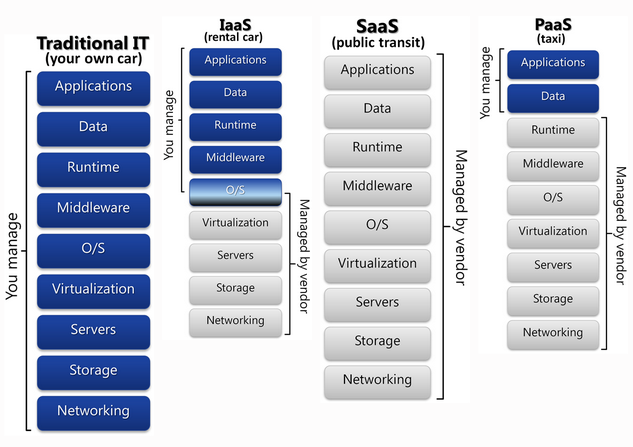
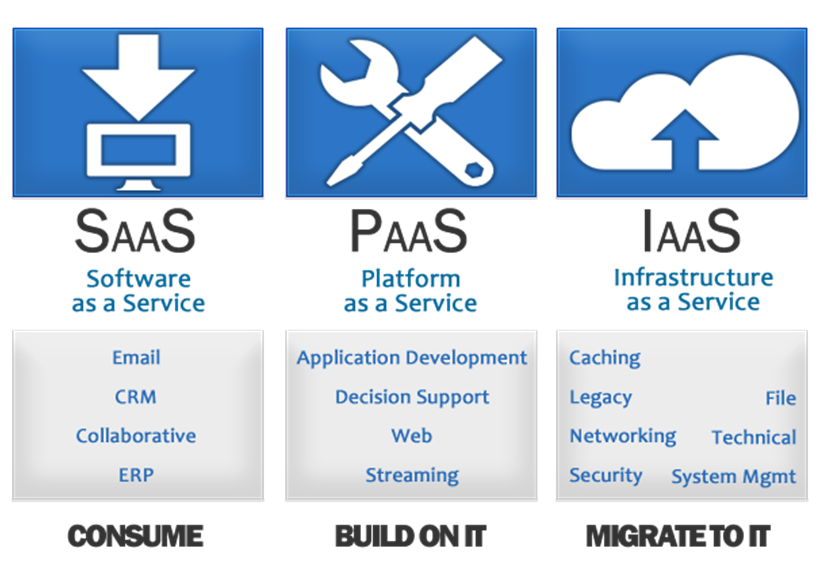
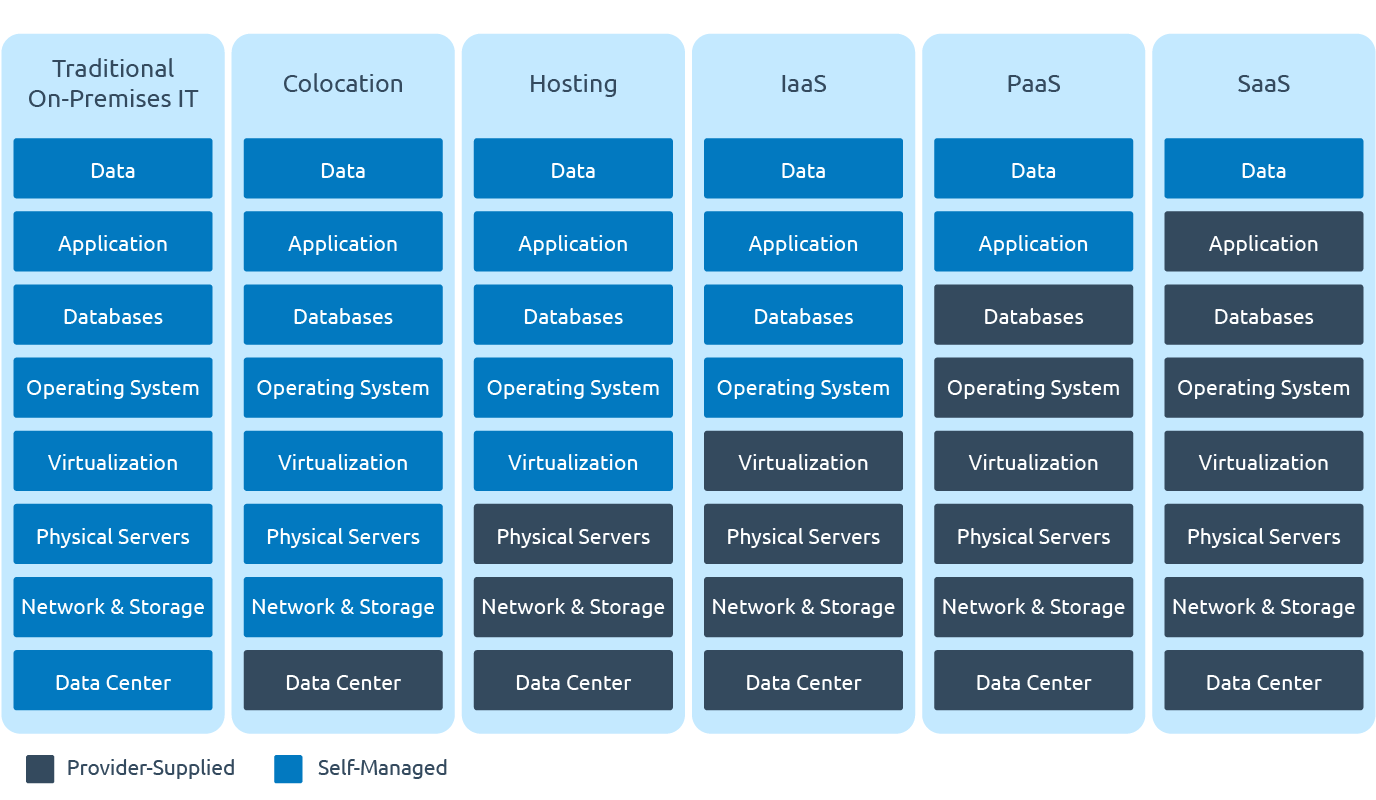
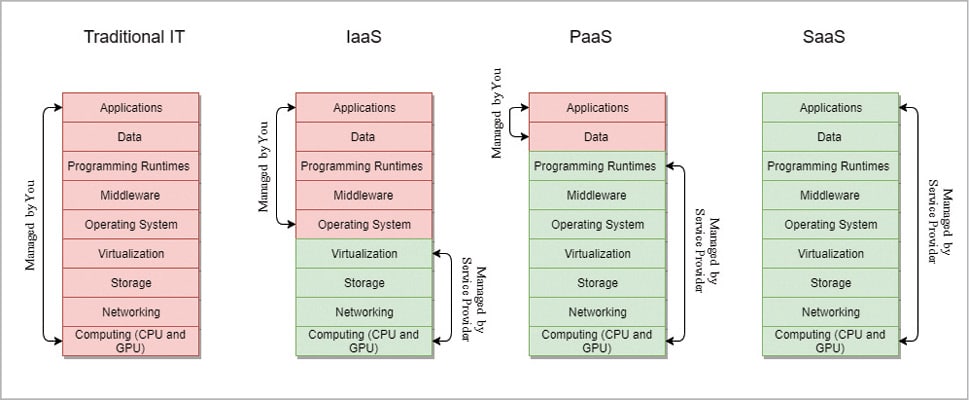
    IaaS clouds provide access to collections of virtualized computer hardware resources, including machines, network, and storage. With IaaS, users assemble their own virtual cluster on which they are responsible for installing, maintaining, and executing their own software stack.

    Platform as a Service (PaaS)
    PaaS style clouds provide access to a programming or runtime environment with scalable compute and data structures embedded in it. With PaaS, users develop and execute their own applications within an environment offered by the service provider.

    Software as a Service (SaaS)
    SaaS style clouds deliver access to collections of software application programs. SaaS providers offer users access to specific application programs controlled and executed on the provider's infrastructure. SaaS is often referred to as "Software on Demand."


    • PUBLIC CLOUDS

    Public clouds provide access to computing resources for the general public over the Internet. The public cloud provider allows customers to self-provision resources typically via a web service interface. Customer's rent access to resources as needed on a pay-as-you-go basis. Public clouds offer access to large pools of scalable resources on a temporary basis without the need for capital investment in data center infrastructure
    http://www.eucalyptus.com/learn/what-is-cloud-computing/public-clouds


    • ON-PREMISE CLOUDS

    Private clouds give users immediate access to computing resources hosted within an organization's infrastructure. Users self-provision and scale collections of resources drawn from the private cloud, typically via web service interface, just as with a public cloud. However, because it is deployed within the organization's existing data center—and behind the organization's firewall—a private cloud is subject to the organization's physical, electronic, and procedural security measures and thus offers a higher degree of security over sensitive code and data. In addition, private clouds consolidate and optimize the performance of physical hardware through virtualization, and can thus markedly improve data center efficiency while reducing operational expense.
    http://www.eucalyptus.com/learn/what-is-cloud-computing/on-premise-clouds

  • Colocation vs Cloud: Why Not Both?

  • The Difference Between Cloud and Colocation
    Colocation is where you provide the equipment, and the colocation provider hosts it in their data center and provides the space, power, rack, and bandwidth. The cloud is not a place, rather software and/or hardware available via the Internet.

    Smaller operations and startups usually opt for the cloud because of the scalable cost, low overheard, and no need for an IT staff. Larger enterprises often go the colocation route to house their servers because it saves money in the long run, and it offers the benefit and flexibility that comes with total server control.

    HYBRID CLOUD: This is a co-existence of public cloud and private cloud environments. Hybrid combines on-premises or colocation servers with public clouds so that data and applications can move between the two clouds for increased agility, security, and cost-effectiveness.

    https://www.hostdime.com/blog/colocation-vs-cloud/

    • HYBRID CLOUDS

    A hybrid cloud combines computing resources (e.g., machines, network, storage, etc.) drawn from one or more public clouds and one or more private clouds at the behest of its users.
    http://www.eucalyptus.com/learn/what-is-cloud-computing/hybrid-clouds


    • Cloud computing
    Cloud computing is the delivery of computing as a service rather than a product, whereby shared resources, software, and information are provided to computers and other devices as a utility (like the electricity grid) over a network (typically the Internet).
    http://en.wikipedia.org/wiki/Cloud_computing


    • Public Clouds
    A public cloud is one in which the services and infrastructure are provided off-site over the Internet
    A public cloud is the obvious choice when
    Your standardized workload for applications is used by lots of people, such as e-mail.
    You need to test and develop application code.
    You have SaaS (Software as a Service) applications from a vendor who has a well-implemented security strategy.
    You need incremental capacity (the ability to add computer capacity for peak times).
    You’re doing collaboration projects.
    You’re doing an ad-hoc software development project using a Platform as a Service (PaaS) offering cloud

    Private Clouds
    A private cloud is one in which the services and infrastructure are maintained on a private network.
    the company to still purchase and maintain all the software and infrastructure
    A private cloud is the obvious choice when
    Your business is part of an industry that must conform to strict security and data privacy issues.

    Hybrid Clouds
    You can use a public cloud to interact with the clients but keep their data secured within a private cloud.
    Your company wants to use a SaaS application but is concerned about security.
    Your SaaS vendor can create a private cloud just for your company inside their firewall.
    They provide you with a virtual private network (VPN) for additional security.

    http://www.dummies.com/how-to/content/comparing-public-private-and-hybrid-cloud-computin.html

    • cloud computing key benefits include scalability, instant provisioning, virtualized resources and ability to expand the server base quickly.

    Public Cloud Computing
    the public cloud is by definition a multi-tenant environment
    pay-as-you-go model
    No Contracts –you’re only paying by the hour – if you want to shut down your server after only 2 hours of use, there is no contract requiring your ongoing use of the server.

    Private Cloud Computing
    Compliance – Sarbanes Oxley(SOX), PCI and HIPAA compliance can not be delivered through a public cloud deployment.
    Hybrid Deployments – If a dedicated server is required to run a high speed database application, that hardware can be integrated into a private cloud, in effect, hybridizing the solution between virtual servers and dedicated servers. This can’t be achieved in a public cloud.

    http://www.onlinetech.com/resources/references/public-vs-private-cloud-computing

    • There are two variations of private clouds:

    On-Premise Private Cloud:
    also known as an “internal cloud,” is hosted within an organization’s own data center.
    On-premise private clouds are best used for applications that require complete control and configurability of the infrastructure and security.

    Externally-Hosted Private Cloud:
    This private cloud model is hosted by an external cloud computing provider (such as Eze Castle Integration).
    recommended for organizations that prefer not to use a public cloud infrastructure due to the risks associated with the sharing of physical resources.
    http://www.eci.com/cloudforum/private-cloud-explained.html


    • How is virtualization different from cloud computing? 

    Virtualization software makes it possible to run multiple operating systems and multiple applications on the same server at the same time
    virtualization is software that separates physical infrastructures to create various dedicated resources
    virtualization is software that manipulates hardware, while cloud computing refers to a service that results from that manipulation.
    http://www.businessnewsdaily.com/5791-virtualization-vs-cloud-computing.html

  • Platform as a service (PaaS)
  • Platform as a service (PaaS) is the delivery of a computing platform and solution stack as a service. PaaS offerings facilitate deployment of applications without the cost and complexity of buying and managing the underlying hardware and software and provisioning hosting capabilities,providing all of the facilities required to support the complete life cycle of building and delivering web applications and services entirely available from the Internet
    http://en.wikipedia.org/wiki/Platform_as_a_service

  • infrastructure as a service(IaaS)
Cloud infrastructure services, also known as "infrastructure as a service" (IaaS), deliver computer infrastructure – typically a platform virtualization environment – as a service, along with raw (block)  storage and networking. Rather than purchasing servers, software, data-center space or network equipment, clients instead buy those resources as a fully outsourced service. Suppliers typically bill such services on a utility computing basis; the amount of resources consumed (and therefore the cost) will typically reflect the level of activity.
http://en.wikipedia.org/wiki/Cloud_computing


Infrastructure as a Service is a provision model in which an organization outsources the equipment used to support operations, including storage, hardware, servers and networking components. The service provider owns the equipment and is responsible for housing, running and maintaining it. The client typically pays on a per-use basis

IaaS is one of three main categories of cloud computing service. The other two are Software as a Service (SaaS) and Platform as a Service (PaaS).
http://searchcloudcomputing.techtarget.com/definition/Infrastructure-as-a-Service-IaaS


  • Infrastructure as a service (IaaS)

In the most basic cloud-service model & according to the IETF (Internet Engineering Task Force), providers of IaaS offer computers – physical or
(more often) virtual machines – and other resources. (A hypervisor, such as XenOracle VirtualBoxKVMVMware ESX/ESXi, or Hyper-V runs the virtual machines as guests. Pools of hypervisors within the cloud operational support-system can support large numbers of virtual machines and the ability to scale services up and down according to customers' varying requirements.)
IaaS clouds often offer additional resources such as a virtual-machine disk image library, raw block storage, and file or object storage, firewalls, load balancers, IP addresses, virtual local area networks (VLANs), and software bundles. IaaS-cloud providers supply these resources on-demand from their large pools installed in data centers.
  • IaaS vs. PaaS vs. SaaS 


  • On-premises software (sometimes abbreviated as "on-prem") is installed and runs on computers on the premises (in the building) of the person or organization using the software, rather than at a remote facility such as a server farm or cloud. On-premises software is sometimes referred to as “shrinkwrap” software, and off-premises software is commonly called “software as a service” ("SaaS") or “cloud computing”.


  • Software as a service (SaaS)
Software as a service (SaaS) is a software licensing and delivery model in which software is licensed on a subscription basis and is centrally hosted.
It is sometimes referred to as "on-demand software".
SaaS is typically accessed by users using a thin client via a web browser.


  • SaaS provides a complete software solution which you purchase on a pay-as-you-go basis from a cloud service provider.

You rent the use of an app for your organisation and your users connect to it over the Internet, usually with a web browser.
All of the underlying infrastructure, middleware, app software and app data are located in the service provider’s data center.
The service provider manages the hardware and software and with the appropriate service agreement, will ensure the availability and the security of the app and your data as well.
https://azure.microsoft.com/en-in/overview/what-is-saas/


  • Software as a service (SaaS) allows users to connect to and use cloud-based apps over the Internet. Common examples are email, calendaring and office tools (such as Microsoft Office 365).

https://azure.microsoft.com/en-in/overview/what-is-saas/

  • Software as a service (SaaS) is a way of delivering centrally hosted applications over the Internet—as a service

SaaS applications are sometimes called web-based software, on-demand software, or hosted software
Whatever the name, SaaS applications run on a SaaS provider’s servers
Instead of installing and maintaining software, you simply access it via the Internet, freeing yourself from complex software and hardware management.
The provider manages access to the application, including security, availability, and performance

What are the Advantages of SaaS?

    High adoption
    Lower initial costs
    Painless upgrades
    Seamless integration

SaaS customers have no hardware or software to buy, install, maintain, or update.

SaaS Characteristics
A good way to understand the SaaS model is by thinking of a bank, which protects the privacy of each customer while providing service that is reliable and secure—on a massive scale. A bank’s customers all use the same financial systems and technology without worrying about anyone accessing their personal information without authorization.
https://www.salesforce.com/saas/


  • Software as a service (SaaS)

Software as a service is a software licensing and delivery model in which software is licensed on a subscription basis and is centrally hosted
It is sometimes referred to as "on-demand software"
formerly referred to as "software plus services" by Microsoft
SaaS is typically accessed by users using a thin client via a web browser.
a common delivery model for many business applications, including office software, messaging software, payroll processing software, etc
https://en.wikipedia.org/wiki/Software_as_a_service

  • OpenSaaS is open source software that is also available as software-as-a-service.

Examples have been around for some time, such as WordPress.
Our first product, NuData, is the turnkey hosted and enterprise supported version of DKAN, an open source configuration (or "distribution") of Drupal that provides a robust government open data publishing platform. DKAN is open source, collaboratively built and hosted on Drupal.org (as well as mirrored on GitHub).
Our second product is NuApps, a turnkey SaaS version of OpenCivic, a Drupal distribution for managing hackathons, app stores and app contests.
https://opensource.com/government/14/1/opensaas-and-government-innovation


  • SaaS does not provide users with a copy of the executable file; they can’t touch it or see it. Therefore, it’s pretty impossible for users to see what it does or change it. Open source code, on the other hand, is openly available to anyone and is a huge accelerator of growth, since it encourages collaborative effort from thousands of developers.

OpenSaaS basically provides customers with the best of both worlds: 
    It’s open source so you can build your own platforms with it and customize all you want.
    It’s SaaS, which means you can choose not to manage the platform at all, you can simply pay your software provider.
https://www.getopensocial.com/blog/community-management/opensaas-platform
  • XaaS is a general, collective term that refers to the delivery of anything as a service. https://searchcloudcomputing.techtarget.com/definition/XaaS-anything-as-a-service

  • This model is usually called XaaS or Anything-as-a-service. It includes all the services in a cloud that customers
can order over the Internet. "X" can be changed: IaaS refers to infrastructure as a service,
PaaS — a platform for development, SaaS a software as a service.
Other kinds of XaaS Database as a service (DBaaS), Storage-as-a-Service), desktop as a service (DaaS), communications
as a service (CaaS), monitoring as a service (MaaS) and even malware as a service (MaaS). https://www.ispsystem.com/news/xaas


As-a-Service is a computing model where services and technology are made available on demand over a network to a consumer.
Typically content services involve three stages: creating or acquiring content, managing or processing content and delivering or publishing content.
For the purposes of this discussion, we can define content as structured content like news articles, product catalogs or blog posts as well as file-based or unstructured content that includes digital assets and static files such as documents, images or videos

A CDAAS solution would provide at least the following capabilities:
Content API for searching a content repository and reading/fetching various types of content in a modular fashion.
API services like throttling, security policies, rights management, independently scalable calls, response transformation capabilities etc.
Caching, CDN support for file-based content delivery and webhooks/triggers to refresh cached content.
API discovery, documentation, SDKs and a developer portal for API.
Content analytics, reporting and real-time monitoring of API with alerts based on usage trends.

The target audience for CDAAS could be internal customers of a business who need to build content-rich web,  mobile, chatbot, IOT or other applications, partners or customers who need syndicated content for their own systems or an API team that builds out content-based microservices for various business initiatives.

https://www.linkedin.com/pulse/what-content-delivery-service-cdaas-jairam-panickssery/

  • Desktop as a Service (DaaS)
Desktop virtualization is software technology that separates the desktop environment and associated application software from the physical client device that is used to access it.
Desktop virtualization can be used in conjunction with application virtualization and (Windows) user profile management systems, now termed "user virtualization," to provide a comprehensive desktop environment management system