AWS CloudTrail is a service that enables governance, compliance, operational auditing, and risk auditing of your AWS account. With CloudTrail, you can log, continuously monitor, and retain account activity related to actions across your AWS infrastructure
https://aws.amazon.com/cloudtrail/
AWS specific tactics to automate your infrastructure
http://dumay.info/pdf/S3/5.pdf
Virtual Private Cloud (VPC)
A VPC is a set of contained subnets with a common Classless Inter-Domain Routing (CIDR) block (up to a /16 netmask) running in a single geographic area (Region) across multiple data centers (Availability Zones). A VPC is like a virtual data center, except that it’s physically spread out across Availability Zones. VPCs have network connectivity within the Region in which they are created. You can use Internet connectivity, virtual private network (VPN) connectivity, and VPC peering to connect VPCs to other networks
https://aws.amazon.com/blogs/apn/amazon-vpc-for-on-premises-network-engineers-part-one/
Scenario 2: Extend On-Premises AD DS Installation to the AWS Cloud
This scenario is for users who want to use their existing installation of AD DS and extend their on-premises network to the VPC, when a new deployment of AD DS is not an option
https://docs.aws.amazon.com/quickstart/latest/active-directory-ds/scenario-2.html
AWS CloudFormation provides a common language for you to describe and provision all the infrastructure resources in your cloud environment. CloudFormation allows you to use a simple text file to model and provision, in an automated and secure manner, all the resources needed for your applications across all regions and accounts
https://aws.amazon.com/cloudformation/
This Quick Start automates the deployment of a Puppet master and Puppet agents from scratch, using AWS CloudFormation templates.
The configuration for this scenario includes a virtual private cloud (VPC) with a public subnet and a private subnet. We recommend this scenario if you want to run a public-facing web application, while maintaining back-end servers that aren't publicly accessible
A common example is a multi-tier website, with the web servers in a public subnet and the database servers in a private subnet. You can set up security and routing so that the web servers can communicate with the database servers.
The instances in the public subnet can send outbound traffic directly to the Internet, whereas the instances in the private subnet can't.
https://docs.aws.amazon.com/vpc/latest/userguide/VPC_Scenario2.html
This topic explains how to use the AWS Management Console to upload one or more files or entire folders to an Amazon S3 bucket.
Before you can upload files and folders to an Amazon S3 bucket, you need write permissions for the bucket.
When you upload a file to Amazon S3, it is stored as an S3 object. Objects consist of the file data and metadata that describes the object. You can have an unlimited number of objects in a bucket.
You can upload files by dragging and dropping or by pointing and clicking. To upload folders, you must drag and drop them. Drag and drop functionality is supported only for the Chrome and Firefox browsers.
https://docs.aws.amazon.com/AmazonS3/latest/user-guide/upload-objects.html
Running Kubernetes on AWS EC2
To create a Kubernetes cluster on AWS, you will need an Access Key ID and a Secret Access Key from AWS
conjure-up is an open-source installer for Kubernetes that creates Kubernetes clusters with native AWS integrations on Ubuntu
https://kubernetes.io/docs/setup/turnkey/aws/
There are two main ways to use Kubernetes on AWS, run it yourself on Amazon EC2 virtual machine instances, or use the Amazon EKS service
https://aws.amazon.com/kubernetes/
Amazon Elastic Container Service (Amazon ECS) is a highly scalable, high-performance container orchestration service that supports Docker containers and allows you to easily run and scale containerized applications on AWS.
Amazon ECS eliminates the need for you to install and operate your own container orchestration software, manage and scale a cluster of virtual machines, or schedule containers on those virtual machines.
https://aws.amazon.com/ecs/
as explained in the Kubernetes documentation either using conjure-up, Kubernetes Operations (kops), CoreOS Tectonic or kube-aws. Out of those options I found kops extremely easier to use and its nicely designed for customizing the installation, executing upgrades and managing the Kubernetes clusters over time. In this article I will explain how to use Kubernetes Operations tool to install a Kubernetes Cluster on AWS in few minutes.
Amazon Kinesis makes it easy to collect, process, and analyze real-time, streaming data so you can get timely insights and react quickly to new information.
It’s a set of guidelines that helps you deliver useful, valuable increments of software to customers at the end of each sprint (like two weeks). It is done by constantly re-prioritizing the backlog of requirements and reviewing incremental progress with the product owner.
What are the differences between Agile and traditional project management (Waterfall)?
Agile encourages that a little of everything, including design, development, and testing is done at the same time. Conversely, the traditional approach to projects closes and completes one phase before the next begins. Agile encourages short, frequent feedback loops and embraces changes to requirements. In Waterfall, feedback is usually not collected until the very end of the project, and changes are discouraged
When should you use Waterfall over Scrum?
Use waterfall if the requirements are simple, predictable, fully defined and understood, and will not change.
Name some other Agile frameworks.
such as Kanban, Test Driven Development, and Feature Driven Development.
What are the most important components of Agile?
Daily stand-up meetings.
CRC (Class Responsibilities and Collaborators) cards
timeboxed task boards.
TDD (Test Driven Development), Continuous Integration, regular code reviews, pair programming, automated builds, continuous deployment and delivery, etc.
You have iteration planning meetings and carry out iterative development.
How study Board can be defined in agile?
A Story Board is a visual representation of a software project’s progress. There are generally four columns ‘To do’, In Progress’, ‘Test’, and ‘Done’. Different colored post, its notes are placed in each column indicating the progress of individual development items. A story board is typically used in agile development.
What do daily stand up meetings entail?
This meeting addresses SCRUM’s three questions listed below.
– What have you completed since the last meeting?
– What do you plan to complete by the next meeting?
– What is getting in your way?
What is the Daily Stand-Up?
Every day, preferably in the morning, the team meets for no more than 15 minutes to answer three questions:
What did you do yesterday?
What do you plan on doing today?
Are there any blocks or impediments that keep you from doing your work?
This Scrum ceremony is not meant to be a status meeting for stakeholders, but a way to energize the team and get them to set focus for the day.
What is a Release candidate?
A Release candidate is a build or version of software that can be released to production.
Further, testing such as UAT may be performed on this version of the product.
What is difference between Epic, User stories & Tasks?
Epic is a group of related user stories.
User Stories define the actual business requirement. Generally created by the business owner.
Task: To accomplish the business requirements, development team create tasks.
Explain Velocity in Agile?
Velocity is a metric that is calculated by addition of all efforts estimates associated with user stories completed in one iteration. It predicts how much work Agile can complete in a sprint and how much time will it require to complete a project.
What is velocity?
Velocity is the average number of points from that past 3 – 4 sprints. It is used to help predict when backlog items will be delivered.
How the velocity of sprint is measured?
If capacity is measured as a percentage of 40 hours weeks then
completed= story points * team capacity
If capacity is measured in man hours then
completed story points / team capacity.
Have you ever tracked velocity? How would you determine a teams Sprint velocity?
Team velocity is tracked, using the number of estimated story points, over the actual completed story points.
This can be measured on the burndown chart. You can guess your team velocity overtime, from the previous sprints
Explain what is a product backlog in Scrum?
Before the scrum sprint initiates, product owner reviews the list of all new features, change requests, enhancements and bug reports and determines the priority.
What type of metrics or reports have you used?
Sprint, release burn-down and burn-up charts are standard reports
What does a scrum burn down chart comprise?
A scrum burn down chart should consist of
X-axis that displays working days
Y-axis that displays remaining effort
Ideal effort as guideline
Real progress of effort
What is a burn-down chart?
A burn-down chart displays the amount of work a team has burned through—such as hours during the sprint
What is a retrospective?
A retrospective is a meeting to inspect and adapt the process
What is Scrum Sprint?
A Scrum Sprint is a regular, repeated work cycle in scrum methodology during which work is completed and made ready for review.
Generally, scrum sprints are less than 30 days long.
Describe what happens in the Sprint planning meeting.
In Sprint planning, the Product Owner presents the goal of the sprint and discusses the high priority product backlog items. The Delivery team then chooses the amount of work for the next sprin
What are the roles in Scrum?
Scrum prescribes only three roles: the Product Owner, Scrum Master, and the Delivery Team.
These roles should ideally be cross-functional and not shared among other projects.
What is the role of the Scrum Master?
The Scrum Master serves the team and shields them from any distractions that could prevent them from completing a sprint goal.
They also remove blocks, teach the team to become self-organized and serve as a coach who teaches Agile and Scrum values and principles
How many Scrum teams have you managed at one time?
Notice the use of the word “managed” versus “led.” Scrum Masters do not manage, they lead teams.you may be required to lead more than one team
What are the artifacts of Scrum process?
Sprint backlog – The Sprint Backlog is the set of Product Backlog items selected for the Sprint, plus a plan for delivering the product Increment and realizing the Sprint Goal. The Sprint Backlog is a forecast by the Development Team about what functionality will be in the next Increment and the work needed to deliver that functionality into a “Done” Increment
Product backlog – The Product Backlog is an ordered list of everything that might be needed in the product and is the single source of requirements for any changes to be made to the product. The Product Owner is responsible for the Product Backlog, including its content, availability, and ordering.
Velocity chart- A velocity chart shows the sum of estimates of the work delivered across all iterations
Burn-down chart – It is a chart that shows how quickly you and your team are burning through your customer’s user stories. It shows the total effort against the amount of work we deliver on each iteration.
Kanban is a method for managing the creation of products with an emphasis on continual delivery while not overburdening the development team. Like Scrum, Kanban is a process designed to help teams work together more effectively.
Kanban is based on 3 basic principles:
Visualize what you do today (workflow): seeing all the items in context of each other can be very informative
Limit the amount of work in progress (WIP): this helps balance the flow-based approach so teams don€™t start and commit to too much work at once
Enhance flow: when something is finished, the next highest thing from the backlog is pulled into play
Scrum is an agile framework for managing work with an emphasis on software development.
It is designed for development teams of between three to nine members who break their work into actions that can be completed within timeboxed iterations, called sprints (30 days or less, most commonly two weeks) and track progress and re-plan in 15-minute stand-up meetings, called daily scrums
Scrum is an iterative and incremental agile software development framework for managing product development.
https://en.wikipedia.org/wiki/Scrum_(software_development)
Product Backlog: an ordered list of the work to be done in order to create, maintain and sustain a product. Managed by the Product Owner.
Sprint Planning: time-boxed event of 8 hours, or less, to start a Sprint. It serves for the Scrum Team to inspect the work from the Product Backlog that’s most valuable to be done next and design that work into Sprint backlog.
Sprint Review: time-boxed event of 4 hours, or less, to conclude the development work of a Sprint. It serves for the Scrum Team and the stakeholders to inspect the Increment of product resulting from the Sprint, assess the impact of the work performed on overall progress and update the Product backlog in order to maximize the value of the next period.
Daily Scrum: daily time-boxed event of 15 minutes, or less, for the Development Team to re-plan the next day of development work during a Sprint. Updates are reflected in the Sprint Backlog.
Sprint Retrospective: time-boxed event of 3 hours, or less, to end a Sprint. It serves for the Scrum Team to inspect the past Sprint and plan for improvements to be enacted during the next Sprint.
Sprint: time-boxed event of 30 days, or less, that serves as a container for the other Scrum events and activities. Sprints are done consecutively, without intermediate gaps.
Scrum Team: a self-organizing team consisting of a Product Owner, Development Team and Scrum Master.
Scrum Master: the role within a Scrum Team accountable for guiding, coaching, teaching and assisting a Scrum Team and its environments in a proper understanding and use of Scrum
Product Owner: the role in Scrum accountable for maximizing the value of a product, primarily by incrementally managing and expressing business and functional expectations for a product to the Development Team(s).
Burn-down Chart: a chart showing the evolution of remaining effort against time. Burn-down charts are an optional implementation within Scrum to make progress transparent.
Velocity: an optional, but often used, indication of the average amount of Product Backlog turned into an Increment of product during a Sprint by a Scrum Team, tracked by the Development Team for use within the Scrum Team
Increment: a piece of working software that adds to previously created Increments, where the sum of all Increments -as a whole - form a product.
The Scrum Team consists of a Product Owner, the Development Team, and a Scrum Master.
Scrum Teams are self-organizing and cross-functional.
Self-organizing teams choose how best to accomplish their work, rather than being directed by others outside the team
Cross-functional teams have all competencies needed to accomplish the work without depending on others not part of the team
https://www.scrum.org/resources/what-is-scrum
Professional Scrum Developer™ (PSD) is a 3-day course where students make up an entire Scrum Team where they concurrently do requirements engineering, design, development, testing, integration and deployment within a single iteration.
Course Topics
Using Scrum
Working within a Scrum Team
Definition of Done
Development Practices
Test Driven Development
Pair Programming
Code Review
Using ALM tools with Scrum
Prescribed events are used in Scrum to create regularity and to minimize the need for meetings not defined in Scrum
All events are time-boxed.
Once a Sprint begins, its duration is fixed and cannot be shortened or lengthened.
Sprint
Sprint Planning
Daily Scrum
Sprint Review
Sprint Retrospective
Scrum Artifacts
Scrum’s artifacts represent work or value to provide transparency and opportunities for inspection and adaptation.
Product Backlog
Sprint Backlog
Increment
https://www.scrum.org/resources/what-is-scrum
iceScrum is a web application for using Scrum while keeping the spirit of a collaborative workspace. It also offers virtual boards with post-its for sprint backlog, product backlog and others.
https://github.com/icescrum/iceScrum
Planning Poker® is a consensus-based estimating technique. Agile teams around the world use Planning Poker to estimate their product backlogs
To start a poker planning session, the product owner or customer reads an agile user story or describes a feature to the estimators.
Each estimator is holding a deck of Planning Poker cards with values like 0, 1, 2, 3, 5, 8, 13, 20, 40 and 100, which is the sequence we recommend. The values represent the number of story points, ideal days, or other units in which the team estimates.
The estimators discuss the feature, asking questions of the product owner as needed. When the feature has been fully discussed, each estimator privately selects one card to represent his or her estimate. All cards are then revealed at the same time.
If all estimators selected the same value, that becomes the estimate. If not, the estimators discuss their estimates. The high and low estimators should especially share their reasons. After further discussion, each estimator reselects an estimate card, and all cards are again revealed at the same time.
The poker planning process is repeated until consensus is achieved or until the estimators decide that agile estimating and planning of a particular item needs to be deferred until additional information can be acquired.
How does poker planning work with a distributed team?
Simple: go to PlanningPoker.com. A product owner, ScrumMaster or agile coach can log in and preload a set of items to be estimated. A private URL can then be shared with estimators who log in and join a conference call or Skype session. Agile estimating and planning then proceeds as it would in person.
Sometimes a story is too large or overly complex. Perhaps the implementation or a 3rd party tool or library is poorly understood. The team can’t estimate the story. Perhaps we’re unsure if we’ll be able to complete the story due to some potential blocker.
In these cases, we might want to build a functional or technical experiment to figure it out. We might want to look into something for a day. We might want to look up alternatives. Do some googling. Do an experiment with some other library or software package. Consider alternative refactoring paths.
In these cases, we might want to build a functional or technical experiment to figure it out. We might want to look into something for a day. We might want to look up alternatives. Do some googling. Do an experiment with some other library or software package. Consider alternative refactoring paths.
https://www.leadingagile.com/2016/09/whats-a-spike-who-should-enter-it-how-to-word-it/
The first sprint
Now that the prep work?whether in the form of a DAD Inception phase, a "sprint zero," or a "project before the project"?has been completed, it's time for that first sprint.
Your first agile sprint is a baseline and getting everything "right" isn't as important as getting the team to understand the general spirit of agile. The iterations are short so the team should be able to quickly gather feedback and continue to adapt and improve over time.
Weighted Shortest Job First is a technique for a) assigning a weight, or value, to each job, and then b) dividing that by the length of the job, in order to c) determine a relative ranking
Weighted Shortest Job First (WSJF) is a technique for backlog prioritization recommended by Dean Leffingwell. The calculation involves measures for User Value, Time Value, Risk Reduction / Opportunity Enablement Value, and Job Size::
WSJF = (User Value + Time Value + RROE Value) / Job Size
https://www.scrum.org/forum/scrum-forum/5509/weighted-shortest-job-first
Velocity is calculated at the end of the Sprint by totaling the Points for all fully completed User Stories.
https://www.scruminc.com/velocity/
Large-Scale Scrum (LeSS)
a lightweight (agile) framework for scaling Scrum to more than one team.
LeSS consists of the LeSS Principles, the Framework, the Guides and a set of experiments. The LeSS framework is divided into two frameworks: basic LeSS for 2-8 teams and LeSS Huge for 8+ teams.
https://www.agilealliance.org/resources/sessions/introduction-to-large-scale-scrum-less/
Scaling Scrum starts with understanding standard one-team Scrum. From that point, your organization must be able to understand and adopt LeSS, which requires examining the purpose of one-team Scrum elements and figuring out how to reach the same purpose while staying within the constraints of the standard Scrum rules.
LeSS provides two different large-scale Scrum frameworks.
The two frameworks – which are basically single-team Scrum scaled up – are:
LeSS: Up to eight teams (of eight people each).
LeSS Huge: Up to a few thousand people on one product.
In LeSS, you will find:
a single Product Backlog (because it’s for a product, not a team),
one Definition of Done for all teams,
one Potentially Shippable Product Increment at the end of each Sprint,
one Product Owner,
many complete, cross-functional teams (with no single-specialist teams),
one Sprint
https://less.works/less/framework/index.html
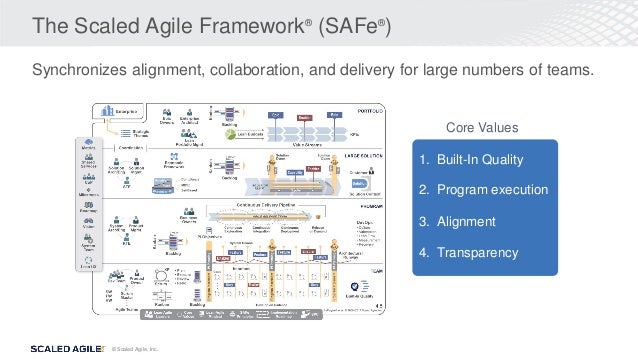
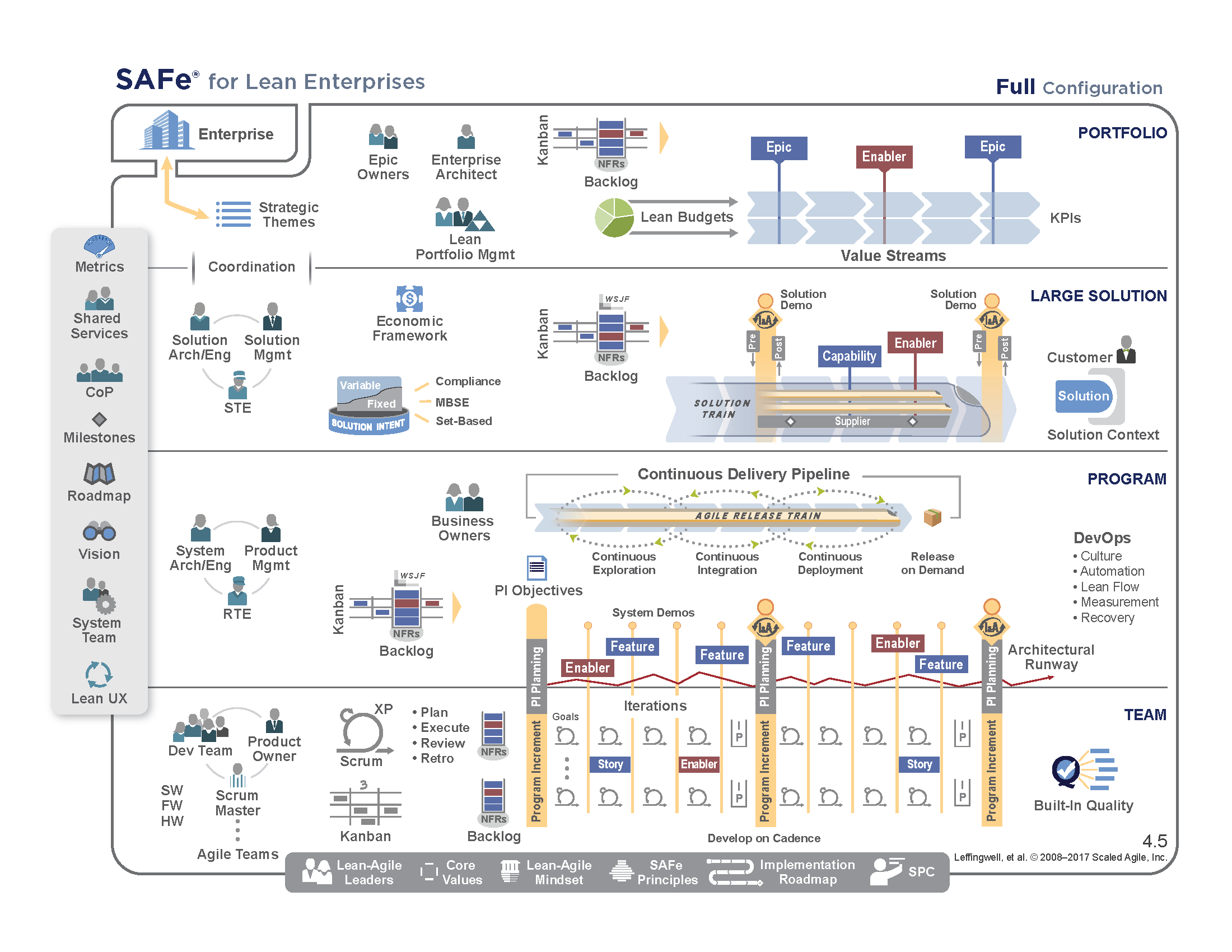
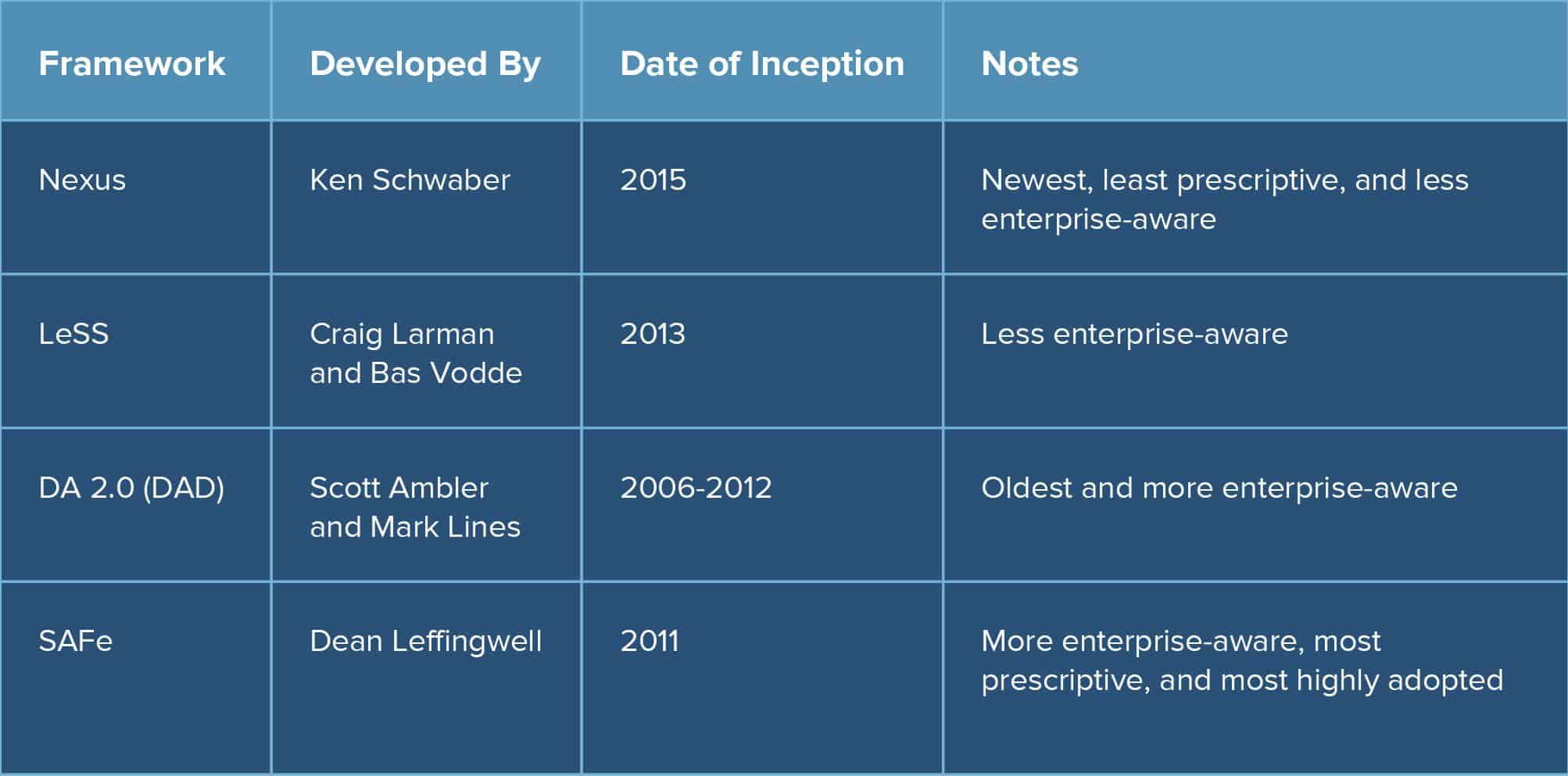
Scaled Agile Framework® (SAFe®) empowers complex organizations to achieve the benefits of Lean-Agile software and systems development at scale. SAFe is designed to help businesses continuously and more efficiently deliver value on a regular and predictable schedule. It provides a knowledge base of proven, integrated principles and practices to support enterprise agility.
https://www.scaledagileframework.com/
The Scaled Agile Framework (abbreviated as SAFe), is a set of organization and workflow patterns intended to guide enterprises in scaling lean and agile practices.
https://en.wikipedia.org/wiki/Scaled_agile_framework
In traditional scaling frameworks, specific practices (e.g. daily standups) are how the framework is executed, whereas the Spotify model focuses on how businesses can structure an organization to enable agility.
Key elements of the Spotify model
Squads
Similar to a scrum team, Squads are cross-functional, autonomous teams (typically 6-12 individuals) that focus on one feature area. Each Squad has a unique mission that guides the work they do, an agile coach for support, and a product owner for guidance. Squads determine which agile methodology/framework will be used.
Tribes
When multiple Squads coordinate within each other on the same feature area, they form a Tribe. Tribes help build alignment across Squads and typically consist of 40 - 150 people in order to maintain alignment.Each Tribe has a Tribe Lead who is responsible for helping coordinate across Squads and for encouraging collaboration.
Chapter
Even though Squads are autonomous, it’s important that specialists (e.g. Javascript Developer, DBAs) align on best practices. Chapters are the family that each specialist has, helping to keep engineering standards in place across a discipline. Chapters are typically led by a senior technology lead, who may also be the manager for the team members in that Chapte
Guild
Team members who are passionate about a topic can form a Guild, which essentially is a community of interest. Anyone can join a Guild and they are completely voluntary. Whereas Chapters belong to a Tribe, Guilds can cross different Tribes. There is no formal leader of a Guild. Rather, someone raises their hand to be the Guild Coordinator and help bring people together.
Trio
The Trio (aka TPD Trio) is a combination of a Tribe Lead, product lead, and design lead. Each Tribe has a Trio in place to ensure there is continuous alignment between these three perspectives when working on features areas.
Alliance
As organizations scale, sometimes multiple Tribes need to closely work together to accomplish a goal. Alliances are a combination of Tribe Trios (typically three or more) that work together to help their Tribes collaborate on a goal that is bigger than any one Tribe.
Squads may have ceremonies like sprint planning and retrospectives, but the focus of the Spotify model is on how teams organize around work. It’s up to Squads to figure out the best way to get the job done.
The benefits of the Spotify model
Less formal process and ceremony
More self-management and autonomy
The Spotify model focuses on decentralizing decision making and transferring that responsibility to Squads, Tribes, Chapters, and Guilds.
The challenges of the Spotify model
Some organizations experienced more success than others, but it’s likely no organization experienced the same success as Spotify. The reason? Like any way of working, an organization's current culture and structure need to be taken into account. The model is simple, but the environment it's implemented in is complex.
To some, it may seem like a simple matrix organizational structure where people report to a functional area (Chapter), but work with a cross-functional team (Squad).
Although it may look like a matrix organization, the key cultural elements of the model need to be in place to allow the structure to thrive, such as trust and autonomy.
If an organization doesn’t shift its behaviors (and ultimately its culture), the benefits of the Spotify model will never be realized.
Spotify model best practices
Don’t copy the model
Seek to understand the structure, practices, and mindset behind Spotify’s approach. With that understanding, tweak the aspects of the model to fit your own environment. Your goal is not to be Spotify, but to leverage their model to improve how your organization works together.
Autonomy and trust is key
Allowing teams to pick their own development tools and modify another team's code are just some examples. Within your organization, determine if there are decisions that can be pushed to the teams instead of being mandated by parts of the organization that are disconnected from the day-to-day work.
Transparency with community
Establish your first Guild around the Spotify model adoption and encourage participation from everyone in the organization. Build trust by creating transparent, inclusive ways to gather feedback, and gain alignment on how your organization wants to work in the future.
Encourage mistakes
Spotify doesn’t leverage the original implementation of the Spotify model anymore; they evolved and adapted the model to fit their changing organization. Trios and Alliances are actually newer elements in Spotify as they were brought about to solve new problems the organization faced as it grew larger.
Dunbar's number is a suggested cognitive limit to the number of people with whom one can maintain stable social relationships—relationships in which an individual knows who each person is and how each person relates to every other person
https://en.wikipedia.org/wiki/Dunbar%27s_number
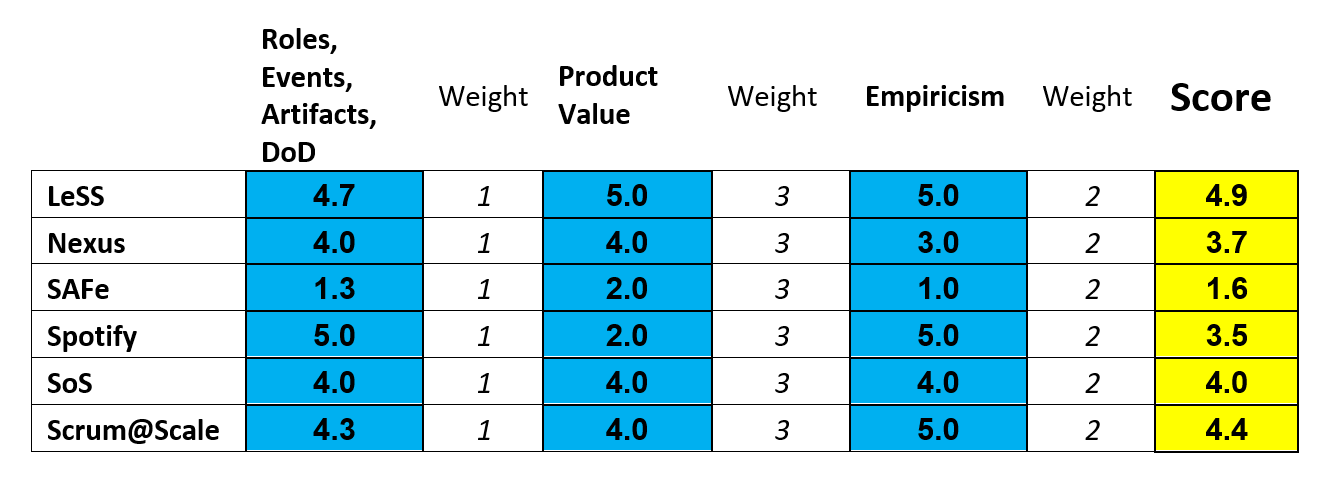
Scaled Agile Framework (SAFe):
The current version is SAFe 5.1, which got revised in February 2021. It has four constructs — Essential SAFe, Large Solution SAFe, Portfolio SAFe, and Full SAFe. It would be best if you had either portfolio or full SAFe to achieve business agility through SAFe. The SAFe structure grows when you move from one level to another by adding new roles and responsibilities.
Large-Scale Scrum (LeSS):
It developed by taking Scrum and trying many different experiments to discover what works. In 2013, the experiments were solidified into the LeSS framework rules.
Opposite to SAFe, LeSS talks about descaling Structure and organizational complexity to enable simplicity at scale.
Spotify Model Framework:
Spotify model talks about Squad, tribe, chapter, and gild, where the squad is a cross-functional team designed based on the customer journey.
The tribe is a collection of squads, and the chapter is more like a community of practices. However, the definition of chapter and tribe has changed a lot lately, where it gives a feeling of a matrix organization. The Spotify model doesn’t have any rules or guidelines publicly available like SAFe and LeSS. It gives many organizations a quick win because of multiple factors, including renaming the existing team as a squad. In the Spotify model, teams usages LeSS, SAFe, Scrum, or Kanban at the squad or tribe level.
Nexus Framework
Nexus is similar to LeSS from outside minus nexus integration team. It is a framework build upon Scrum but keeps Scrum untouched. If multiple teams work on the same product and experience coordination chaos, then Nexus may be helpful. A Nexus is a group of approximately three to nine Scrum Teams who work together to deliver a single product; it connects people and things. A Nexus has a single Product Owner who manages a single Product Backlog from which the Scrum Teams work. Unlike LeSS, Nexus doesn’t come up with its principles and uses the Scrum framework’s principles.
Look at some simple parameters to decide:
Is it about product development or service delivery?
Scrum@Scale is Scrum scaled for the whole organisation
Spotify Engineering Culture may be a best fit for component teams
SAFe puts the purpose of Scrum under heavy pressure due to it’s top-down approach, additional layers and as a result additional roles, events and artifacts.
Spotify allows for a lot of autonomy for the teams to work according to Scrum. The focus on small decoupled systems however is a different perspective than Scrum’s perspective of optimizing the value of a product. Spotify can be your scaling approach of choice if you don’t have the concerns of systems vs product.
It is essential to note that SAFe® is intended to accommodate DevOps, a process frequently deemed for future-proof Agile organizations.
It is most desirable for large organizations to retain as much organizational and process structure as possible while reaping the advantages of a decentralized Agile method.
SAFe® is not as efficiently customizable as Scrum at Scale
Scrum@Scale
The Scrum@Scale structure is easily manageable but hard to master. It is made up of 2 cycles, the Scrum Master cycle and Product Owner cycle, and 12 components necessary to execute Scrum at scale.
SAFe® vs. Large-Scale Scrum (LeSS)
Scaled Agile Framework
Benefits of SAFe®
SAFe® separates business strategies into actions, then features, then stories of work at the team level, and maps the pathway.
Drawbacks of SAFe®
The implementation pathway is required to be tweaked to meet the requirements of your organization
Large Scale Scrum (LeSS)
A necessary characteristic of LeSS comprises redirecting team awareness over the entire organization.
Limitations of LeSS
Scaling only works for an organization which has an extensive Scrum foundation
LeSS is formed around Scrum and is not a straightforward extension of other methodologies.
A single Product Owner may attempt to control multiple teams
SAFe® vs Spotify
Spotify: a lightweight framework
Unlike SAFe®, the Spotify model is not considered an extensive toolbox. The Spotify model contributes a relatively lightweight framework that stresses the necessity to generate many interactions to limit the silo side formed by teams.
It would be essential to determine how every team must work in a standard way or have 100% freedom provided to the groups. Moreover, the Spotify model doesn’t deliver any solution to control the Portfolio like SAFe®.
SAFe® a heavy framework
Unlike the Spotify model, everything is already fixed, and only an expert can be expected to have the imagination to improve it.
Challenges of scaling agile principles and practices
The Scaled Agile Framework discusses the obstacles encountered when scaling agile beyond a single team.
This practice of practicing a routine until it became a refined habit now extends beyond martial arts and into business.
the Toyota Motor Corporation developed continuous improvement through practiced patterns.
This technique, called Improvement Kata
Improvement Kata is a method where team leaders and members continually practice a kata routine that develops and channels their abilities to problem-solve. Over time, the practices become second nature.
It seeks to do so with a four-part model:
Understand the direction or challenge
Grasp the current condition
Define the target destination
Move toward the target iteratively, which reveals obstacles to overcome
These techniques are particularly helpful when the route to a destination is unclear, as experimentation can help you better understand the problem and find unique solutions.
What are the benefits of Improvement Kata?
Teams aligned toward a single goal
Experimentation leads to results
Reduce waste significantly
What are some examples of Improvement Kata?
Say you want to build a new service based on an idea, but you’re not sure whether it will work. Rather than trying to get every layer perfectly worked out and incrementally expanding it until it’s feature-complete, try picking a target that delivers some value and brings you closer to the system you envisioned. You’ll probably have lots of unknowns, but you can learn a lot from challenges, and experiment with different ideas to find one that works. Once it does, reevaluate where you are, pick your next target, iterate, and reflect on your progress.
What are the differences between Improvement Kata and lean?
Kata and lean are different, yet compliment each other. Kata and Lean are different in many ways. Lean refers to processes to be implemented while kata refers to techniques to be practiced. Thus, kata became a mainstream business practice when Toyota adopted it into its lean production system. When combined into a unified approach, these concepts provide powerful results.
Python, an interpreted, interactive, object-oriented, extensible programming language.
http://www.python.org/
Data Science and Machine Learning
Connect to your big data and databases including Hadoop, Redis, MongoDB, MySQL, ODBC
Prepare, analyze and visualize your data with NumPy, SciPy, Pandas, MatPlotLib and more
Build and train machine learning models with TensorFlow, Theano and Keras Accelerate your numerical computations with the Intel Math Kernel Library (MKL)
Get up and running in minutes whether an individual or large team
Develop web applications with frameworks like Django and Flask
Deploy to AWS or Google Cloud
Secure your applications with pyOpenSSL, Cryptography and OAuthLib
Test and ensure code quality with pytest, nose, selenium, coverage and flake8
https://www.activestate.com/activepython
Dask.distributed
Dask.distributed is a lightweight library for distributed computing in Python.
Architecture
Dask.distributed is a centrally managed, distributed, dynamic task scheduler. The central dask-scheduler process coordinates the actions of several dask-worker processes spread across multiple machines and the concurrent requests of several clients.
http://distributed.dask.org/en/latest/
Distributed Pandas on a Cluster with Dask DataFrames
Summary
Dask Dataframe extends the popular Pandas library to operate on big data-sets on a distributed cluster.
Introduction: Pandas is intuitive and fast, but needs Dask to scale
Read CSV and Basic operations
Read CSV
Basic Aggregations and Groupbys
Joins and Correlations
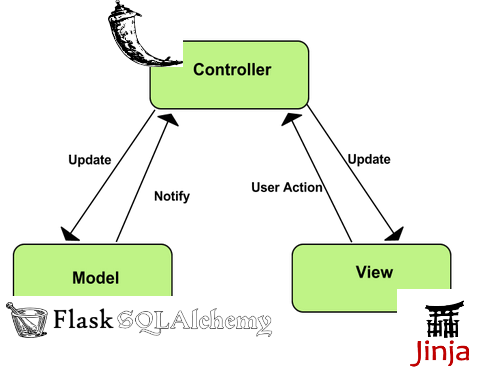
Flask is a microframework for Python based on Werkzeug, Jinja 2 and good intentions
http://flask.pocoo.org/
The main reason why need an API is because client-side Javascript libraries like ReactJS cannot communicate directly with your database (which resides on the server) directly. Though Server side Javascript like NodeJS can do that.
Buidling a database driven RESTFUL JSON API in Python 3 with Flask Flask-Restful and SQLAlchemy
What is REST?
REST is a programming style which describes how data should be transferred between two systems on the Internet
The key principles of REST are as follows:
Client–server : There must be a clear separation between client and server such that clients are not concerned with data storage and servers are not concerned with the User Interface.
Stateless: State information is not stored on the server. A client request must contain all information like session to service the request.
Cacheable : The server must indicate if request data is cacheable.
Layered system: To improve performance instead of an API server intermediaries like load balancers must be able to serve requests.
Uniform interface : The communication method between the client and server must be uniform.
Code on demand (optional) : Servers can provide executable code for the client to download and execute.
It is also important to note that REST is not a standard but encourages the use of standards such as the JSON API
Flask-Restful: will be used to define our API endpoints and bind them to Python Classes.
Flask-SQLAlchemy: will be used to define our database models using the underlying SQLAlchmey ORM framework.
Marshmallow: is used to Serailize/Deserialize JSON data to python objects and vice versa. We will also use it for validation.
Marshmallow-jsonapi: Is a modified version of Marshmallow which will produce JSON API-compliant data.
Psycopg2 : Python database driver for PostgresSQL, if you are using MySQL then you can install PyMySQL
Flask-Migrate and Flask-Script: will be used for database migrations.
Installation
Flask-Restful: will be used to define our API endpoints and bind them to Python Classes.
Flask-SQLAlchemy: will be used to define our database models using the underlying SQLAlchmey ORM framework.
Marshmallow: is used to Serailize/Deserialize JSON data to python objects and vice versa. We will also use it for validation.
Marshmallow-jsonapi: Is a modified version of Marshmallow which will produce JSON API-compliant data.
Psycopg2 : Python database driver for PostgresSQL
if you are using MySQL then you can install PyMySQL
Flask-Migrate and Flask-Script: will be used for database migrations.
Defining Database Models and Validation Schema with Flask-SQLAlchemy and Marshmallow_jsonapi
Flask-SQLAlchemy's provides access to the SQLAlchemy Object Relation Mapper (ORM) .
Sanic is a Flask-like Python 3.5+ web server that’s written to go fast.
Sanic supports async request handlers.
This means you can use the new shiny async/await syntax from Python 3.5, making your code non-blocking and speedy.
https://sanic.readthedocs.io/en/latest/
Domain and codomain simplified
Domain is a set where x values are stored and the codomain is a set where y values are stored.
Injection: the injection class means that each x value/element of the 2d coordinate system has a corresponding y value of the coordinate system, in other words every x value in a set (this set is called the domain) is connected to an appropriate/corresponding y value in the other set (this set is called the codomain).
In order for a function to be injectiveall of the values from x must be connected to all of the appropriate/corresponding values to y. Injection is also calledone to one relationship since every x value MUST match the corresponding y value.
If a value remains without a connection in any of the sets (domain & codomain) or if there are multiple connections for example from the x values/elements from the domain to one y value from the codomain (vice versa) then the function is NOT injective.
the surjection class means that each x value/element in the domain of the 2d coordinate system has AT LEAST ONE (but can have multiple, most often two) corresponding values/elements in the codomain. Surjection is also called onto function.
the bijection function class represents the injection and surjection combined, both of these two criteria’s have to be met in order for a function to be bijective
If a function is neither injective, surjective nor bijective, then the function is just called: General function
Horizontal lines actually tell us which class does NOT BELONG TO THE FUNCTION (injection, surjection)
Vertical lines are test which evaluate the existence of the function. This means that they determine if the graph inside a coordinate system is really a function or it isn’t.
https://programmingcroatia.com/2016/02/11/math-functions-classes-injections-surjection-bijection/
A function f from A to B is an assignment of exactly one element of B to each element of A (A and B are non-empty sets). A is called Domain of f and B is called co-domain of f. If b is the unique element of B assigned by the function f to the element a of A, it is written as f(a) = b. f maps A to B. means f is a function from A to B, it is written as f: A -.> B
Terms related to functions:
Domain and co-domain – if f is a function from set A to set B, then A is called Domain and B is called co-domain.
Range – Range of f is the set of all images of elements of A. Basically Range is subset of co- domain.
Image and Pre-Image – b is the image of a and a is the pre-image of b if f(a) = b.
https://www.geeksforgeeks.org/functions-properties-and-types-injective-surjective-bijective/
(If we want to encode information without losing data, we need to make sure that no two keys map to the same value, i.e. the mapping has to be injective. Later, we want to reverse the mapping -- to decode a coded message -- and will need that the mapping has to be bijective, i.e. there has to be a one-to-one correspondence between input and output sets.)
The true strength of Go is that it's succinct and minimalistic and fast
Go is much more verbose than Python. It just takes so much more lines to say the same thing. Goroutines are awesome. They're a million times easier to grok than Python's myriad of similar solutions.
Go doesn't have the concept of "truthy" which I already miss. I.e. in Python you can convert a list type to boolean and the language does this automatically by checking if the length of the list is 0.
Go gives you very few choices (e.g. there's only one type of loop and it's the for loop) but you often have a choice to pass a copy of an object or to pass a pointer. Those are different things but sometimes I feel like the computer could/should figure it out for me.
I love the little defer thing which means I can put "things to do when you're done" right underneath the thing I'm doing. In Python you get these try: ...20 lines... finally: ...now it's over... things.
Everything about Go and Go tools follow the strict UNIX pattern to not output anything unless things go bad.
https://www.peterbe.com/plog/govspy
Differences Between To Python vs Go
Python is a general-purpose programming language
Python supports multiple programming paradigms and comes up with a large standard library, paradigms included are object-oriented, imperative, functional and procedural.
the most wanted scripting language in modern software development which varies from infrastructure management to data analysis
Go supports multi-paradigm like procedural, functional and concurrent. Its syntax is traditionally coming from C
Most of the features about Go and its tools follow the UNIX pattern
You don’t have to compile your Go code to run it. It will be automatically compiled and run.
Although Go is not a scripting language like Python but people do write a lot of scripts with it.
Go can act as a very powerful tool when it comes to web-programming, micro-services or mobile development.
In many use cases, Go web development has proved to be more rapid than Python.
Concurrency is very different between Python and Go. Python includes lots of solid concurrency libraries but at the same time, it requires the developer to be clean about side effects and isolation. With Go one can write concurrent programs which operate on multiple cores easily, similar to Python, the developer is responsible for side effects and isolation issues. Python concurrency process is more resource demanding as compare to Go, hence Go saves the resources of CPU and memory efficiently.
Key Differences Between Python vs Go
Python being a scripting language has to be interpreted whereas Go is faster most of the time since it does not have to consider anything at runtime.
Python does not provide built-in concurrency mechanism whereas Go has built-in concurrency mechanism. When it comes to safety, Python is a strongly typed language which is compiled, hence adding a layer of security whereas Go is very decent since every variable must have a type associated with it. It means a developer cannot let away the details which will further lead to bugs.
Python is less verbose than Go to achieve the same functionality.
Python is still a favorite language when it comes to solving data science problems whereas Go is more ideal for system programming.
Python is dynamically typed language whereas Go is a statically typed language, which actually helps catch bugs at compile time which can further reduce serious bugs later in the production.
Python is great for basic programming, using it can become complicated if one wishes to build complex systems whereas, with Go, the same task can be accomplished rapidly without going into subtleties of programming language.
Both Python and Go can be immediately installed regardless of operating system, thus bringing in a cross-platform feature.
Python can be virtually utilized across domains like web development, animation, graphics, machine learning. It is mainly used in data science and holds a good number of libraries for scientific computing.
On the other hand, when it comes to networking services, Go has become a breather. It started as a system language but over a period, has built a reputation when it comes to networking services.
https://www.educba.com/python-vs-go/
the main 5 reasons why we choose Go over Python Django
#1 It Compiles Into Single Binary
Golang built as a compiled language
sing static linking it actually combining all dependency libraries and modules into one single binary file based on OS type and architecture.
#2 Static Type System
Go will let you know about this issue during compile time as a compiler error
#3 Performance
in most of the application cases Go is faster than Python (2 and 3)
For our case Go performed better because of his concurrency model and CPU scalability
Whenever we need to process some internal request we are doing it with separate Goroutine, which are 10x cheaper in resources than Python Threads
#4 You Don’t Need Web Framework For Go
For example it has http, json, html templating built in language natively and you can build very complex API services without even thinking about finding library on Github
#5 Great IDE support and debugging
We got about 30% more performance on our Backend and API services. And now we can handle logging real time, transfer it to database and make a streaming with Websocket from single or multiple services
A virtual environment is a way of giving each of your Python projects a separate and isolated world to run in, with its own version of Python and installed libraries.
Using a Virtual Environment
When working at the command line, you can put the virtual environment's "bin" directory first on your PATH, what we call "activating" the environment, and from then on, anytime you run python, you'll be running in the environment
#!/usr/bin/env python
By using the "/usr/bin/env" version, you'll get the first copy of Python that's on your PATH, and if you've activated a virtual environment, your script will run in that environment.)
Virtual environments provide a "bin/activate" script that you can source from your shell to activate them
Consider the following scenario where you have two projects: ProjectA and ProjectB, both of which have a dependency on the same library, ProjectC. The problem becomes apparent when we start requiring different versions of ProjectC. Maybe ProjectA needs v1.0.0, while ProjectB requires the newer v2.0.0, for example.
This is a real problem for Python since it can’t differentiate between versions in the site-packages directory. So both v1.0.0 and v2.0.0 would reside in the same directory with the same name:
Since projects are stored according to just their name, there is no differentiation between versions. Thus, both projects, ProjectA and ProjectB, would be required to use the same version,
What Is a Virtual Environment?
This means that each project can have its own dependencies, regardless of what dependencies every other project has
The great thing about this is that there are no limits to the number of environments you can have since they’re just directories containing a few scripts.
created using the virtualenv or pyenvcommand line tools.
Using Virtual Environments
if you’re not using Python 3, you’ll want to install the virtualenv tool with pip:
pip install virtualenv
If you are using Python 3, then you should already have the venv module from the standard library installed
Start by making a new directory to work with:
$ mkdir python-virtual-environments && cd python-virtual-environments
Create a new virtual environment inside the directory:
# Python 2:
$ virtualenvenv
# Python 3
$ python3 -mvenvenv
By default, this will not include any of your existing site packages
The Python 3 venv approach has the benefit of forcing you to choose a specific version of the Python 3 interpreter that should be used to create the virtual environment. This avoids any confusion as to which Python installation the new environment is based on.
More interesting are the activate scripts in the bin directory. These scripts are used to set up your shell to use the environment’s Python executable and its site-packages by default.
In order to use this environment’s packages/resources in isolation, you need to “activate” it
$ source env/bin/activate
(env) $
Let’s say we have bcrypt installed system-wide but not in our virtual environment.
Before we test this, we need to go back to the “system” context by executing deactivate
(env) $ deactivate
$
Now your shell session is back to normal, and the python command refers to the global Python
Now, install bcrypt and use it to hash a password
$ pip -q install bcrypt
$ python -c "import bcrypt; print(bcrypt.hashpw('password'.encode('utf-8'), bcrypt.gensalt()))"
$2b$12$vWa/VSvxxyQ9d.WGgVTdrell515Ctux36LCga8nM5QTW0.4w8TXXi
if we try the same command when the virtual environment is activated:
$ source env/bin/activate
(env) $ python -c "import bcrypt; print(bcrypt.hashpw('password'.encode('utf-8'), bcrypt.gensalt()))"
In one instance, we have bcrypt available to us, and in the next we don’t. This is the kind of separation we’re looking to achieve with virtual environments
let’s first check out the locations of the different python executables. With the environment “deactivated,”
$ which python
/usr/bin/python
activate it and run the command again
$ source env/bin/activate
(env) $ which python
What’s the difference between these two executables anyway? This can be explained by how Python starts up and where it is located on the system. There actually isn’t any difference between these two Python executables. It’s their directory locations that matter.When Python is starting up, it looks at the path of its binary. In a virtual environment, it is actually just a copy of, or symlink to, your system’s Python binary.It then sets the location of sys.prefix and sys.exec_prefix based on this location, omitting the bin portion of the path.
How is the virtual environment’s Python executable able to use something other than the system’s site-packages?
The path located in sys.prefix is then used for locating the site-packages directory by searching the relative path lib/pythonX.X/site-packages/, where X.X is the version of Python you’re using. Managing Virtual Environments With virtualenvwrapper It’s just some wrapper scripts around the main virtualenv tool. Organizes all of your virtual environments in one location
Provides methods to help you easily create, delete, and copy environments
Provides a single command to switch between environments
download the wrapper with pip $ pip install virtualenvwrapper $ which virtualenvwrapper.sh start a new project $ mkvirtualenv my-new-project (my-new-project) $ stop using that environment (my-new-project) $ deactivate $ list environments $ workon my-new-project my-django-project web-scraper $ workon web-scraper (web-scraper) $
virtualenv has a parameter -p that allows you to select which version of Python to use create a new Python 3 environment $ virtualenv -p $(which python3) blog_virtualenv substitute python3 for python2 (or python if you system defaults to python2). Using Different Versions of Python Unlike the old virtualenv tool, pyvenv doesn’t support creating environments with arbitrary versions of Python, which means you’re stuck using the default Python 3 installation for all of the environments you create.
There are quite a few ways to install Python, but few of them are easy enough or flexible enough to frequently uninstall and re-install different versions of the binary. This is where pyenv comes in to play. Despite the similarity in names (pyvenv vs pyenv), pyenv is different in that its focus is to help you switch between Python versions on a system-level as well as a project-level. While the purpose of pyvenv is to separate out modules, the purpose of pyenv is to separate Python versions.
What is Virtualenv?
A Virtual Environment is an isolated working copy of Python which
allows you to work on a specific project without worry of affecting other projects
It enables multiple side-by-side installations of Python
It doesn’t actually install separate copies of Python
it does provide a clever way to keep different project environments isolated.
(add --no-site-packages if you want to isolate your environment from the main site
packages directory)
What did Virtualenv do?
Packages installed here will not affect the global Python installation. Virtualenv does not create every file needed to get a whole new python environment
It uses links to global environment files instead of in order to save disk space end
speed up your virtualenv.
Therefore, there must already have an active python environment installed on your
system.
You don't have to use sudo since the files will all be installed in the virtualenv
/lib/python2.7/site-packages directory which was created as your own user account
virtualenvwrapper should be installed into the same global site-packages area where virtualenvis installed. You may need administrative privileges to do that.
virtualenv lets you create many different Python environments. You should only ever install virtualenv and virtualenvwrapper on your base Python installation (i.e. NOT while a virtualenv is active) so that the same release is shared by all Python environments that depend on it.
The headaches of dependency management are common to developers. One errant update requires hours of research to correct. Often multiple applications overlap on library dependency requirements. This could cause two applications running in the same environment to require twoversion of the same library. These type of conflicts could cause a number of issues both in development and production.Enter Virtualenv. Virtualenv is a tool that creates dependency silos. It allows you to deploy applications to a single environment with isolated dependencies. Docker employs a similar strategy at the OS level. Virtualenv segregates only at the Python and library level — that is, the environments Python executable and libraries are unique to that virtual environment. So instead of using the libraries installed at the OS environment level, you can separate Python versions and libraries into siloed virtual environments. This allows you to deploy multiple applications in the same OS environment with different versions of the same dependencies.
https://linuxhint.com/python-virtualenv-tutorial/
The venv module provides support for creating lightweight “virtual environments” with their own site directories, optionally isolated from system site directories. Each virtual environment has its own Python binary (which matches the version of the binary that was used to create this environment) and can have its own independent set of installed Python packages in its site directories.
https://docs.python.org/3/library/venv.html
pip
Let's dive in. pip is a tool for installing Python packages from the Python Package Index.
PyPI (which you'll occasionally see referred to as The Cheeseshop) is a repository for open-source third-party Python packages. It's similar to
RubyGems in the Ruby world,
PHP's Packagist,
CPAN for Perl, and
NPM for Node.js.
Python actually has another, more primitive, package manager called easy_install, which is installed automatically when you install Python itself
virtualenv
virtualenv solves a very specific problem: it allows multiple Python projects that have different (and often conflicting) requirements, to coexist on the same computer.
How does virtualenv help?
virtualenv solves this problem by creating a completely isolated virtual environment for each of your programs. An environment is simply a directory that contains a complete copy of everything needed to run a Python program, including a copy of the python binary itself, a copy of the entire Python standard library, a copy of the pip installer, and (crucially) a copy of the site-packages directory mentioned above. When you install a package from PyPI using the copy of pip that's created by the virtualenv tool, it will install the package into the site-packages directory inside the virtualenv directory.
Usually pip and virtualenv are the only two packages you ever need to install globally, because once you've got both of these you can do all your work inside virtual environments.
In fact, virtualenv comes with a copy of pip which gets copied into every new environment you create, so virtualenv is really all you need
How do I use my shiny new virtual environment?
The one you care about the most is bin. This is where the local copy of the python binary and the pip installer exists
Instead of typing env/bin/python and env/bin/pip every time, we can run a script to activate the environment.
Requirements files
virtualenv and pip make great companions, especially when you use the requirements feature of pip. Each project you work on has its own requirements.txt file, and you can use this to install the dependencies for that project into its virtual environment:
Pipenv is a dependency manager for Python projects. If you’re familiar with Node.js’ npm or Ruby’s bundler, it is similar in spirit to those tools.
Lower level: virtualenv virtualenv is a tool to create isolated Python environments. virtualenv creates a folder which contains all the necessary executables to use the packages that a Python project would need. It can be usedstandalone, in place of Pipenv.
virtualenvwrapper virtualenvwrapper provides a set of commands which makes working with virtual environments much more pleasant. It also places all your virtual environments in one place.
https://docs.python-guide.org/dev/virtualenvs/
Logically, a Requirements file is just a list of pip install arguments placed in a file.
there are 4 common uses of Requirements files:
1-Requirements files are used to hold the result from pip freeze for the purpose of achieving repeatable installations. In this case, your requirement file contains a pinned version of everything that was installed when pip freeze was run.
2-Requirements files are used to force pipto properly resolve dependencies. As it is now, pip doesn’t have true dependency resolution, but instead simply uses the first specification it finds for a project.
3-Requirements files are used to force pip to install an alternate version of a sub-dependency.
4-Requirements files are used to override a dependency with a local patch that lives in version control
Constraints Files
Constraints files are requirements files that only control which version of a requirement is installed, not whether it is installed or not. Their syntax and contents is nearly identical to Requirements Files. There is one key difference: Including a package in a constraints file does not trigger the installation of the package. Constraints files are used for exactly the same reason as requirements files when you don’t know exactly what things you want to install. For instance, say that the “helloworld” package doesn’t work in your environment, so you have a locally patched version. Some things you install depend on “helloworld”, and some don’t.
One way to ensure that the patched version is used consistently is to manually audit the dependencies of everything you install, and if “helloworld” is present, write a requirements file to use when installing that thing.
Constraints files offer a better way: write a single constraints file for your organisation and use that everywhere. If the thing being installed requires “helloworld” to be installed, your fixed version specified in your constraints file will be used.
https://pip.pypa.io/en/latest/user_guide/#requirements-files
Installing Python Modules
Alternate Installation
Often, it is necessary or desirable to install modules to a location other than the standard location for third-party Python modules. For example, on a Unix system you might not have permission to write to the standard third-party module directory.
Or you might wish to try out a module before making it a standard part of your local Python installation. This is especially true when upgrading a distribution already present: you want to make sure your existing base of scripts still works with the new version before actually upgrading.
Note that the various alternate installation schemes are mutually exclusive: you can pass --user, or --home, or --prefix and --exec-prefix, or --install-base and --install-platbase, but you can’t mix from these groups.
Alternate installation: the user scheme
This scheme is designed to be the most convenient solution for users that don’t have write permission to the global site-packages directory or don’t want to install into it. It is enabled with a simple option:
With Python 2.6 came the “user scheme” for installation, which means that all Python distributions support an alternative install location that is specific to a user. The default location for each OS is explained in the python documentation for the site.USER_BASE variable. This mode of installation can be turned on by specifying the –user option to pip install.
Moreover, the “user scheme” can be customized by setting the PYTHONUSERBASE environment variable, which updates the value of site.USER_BASE.
Pinned Version Numbers
Pinning the versions of your dependencies in the requirements file protects you from bugs or incompatibilities in newly released versions:
virtualenv is a tool to create isolated Python environments. virtualenv creates a folder which contains all the necessary executables to use the packages that a Python project would need.
https://github.com/thinkst/opencanary
JSON supports primitive types, like strings and numbers, as well as nested lists and objects.
JSON stands for JavaScript Object notation and is an open standard human readable data format.
Popular alternatives to JSON are YAML and XML.
An empty JSON file simply contains two curly braces {}
https://codingnetworker.com/2015/10/python-dictionaries-json-crash-course/
Gensim is a FREE Python library
Scalable statistical semantics
Analyze plain-text documents for semantic structure
https://radimrehurek.com/gensim/
statsmodels is a Python module that provides classes and functions for the estimation of many different statistical models, as well as for conducting statistical tests, and statistical data exploration
http://www.statsmodels.org/stable/index.html
Nilearn is a Python module for fast and easy statistical learning on NeuroImaging data.
https://nilearn.github.io/
Numenta Platform for Intelligent Computing is an implementation of Hierarchical Temporal Memory (HTM), a theory of intelligence based strictly on the neuroscience of the neocortex
https://numenta.org/
PyMC is a python module that implements Bayesian statistical models and fitting algorithms, including Markov chain Monte Carlo.
https://pymc-devs.github.io/pymc/README.html
NumPy, which stands for Numerical Python, is a library consisting of multidimensional array objects and a collection of routines for processing those arrays. Using NumPy, mathematical and logical operations on arrays can be performed.
https://www.tutorialspoint.com/numpy/index.htm
Using NumPy, a developer can perform the following operations −
Mathematical and logical operations on arrays.
Fourier transforms and routines for shape manipulation.
Operations related to linear algebra. NumPy has in-built functions for linear algebra and random number generation.
NumPy – A Replacement for MatLab NumPy is often used along with packages like SciPy (Scientific Python) and Mat−plotlib (plotting library). This combination is widely used as a replacement for MatLab, a popular platform for technical computing.
https://www.tutorialspoint.com/numpy/numpy_introduction.htm
Standard Python distribution doesn't come bundled with NumPy module. A lightweight alternative is to install NumPy using popular Python package installer, pip.
The best way to enable NumPy is to use an installable binary package specific to your operating system. These binaries contain full SciPy stack (inclusive of NumPy, SciPy, matplotlib, IPython, SymPy and nose packages along with core Python).
NumPy’s main object is the homogeneous multidimensional array. It is a table of elements (usually numbers), all of the same type, indexed by a tuple of positive integers. In NumPy dimensions are called axes.
SymPy is a computer algebra system written in the Python programming language. Among its many features are algorithms for computing derivatives, integrals, and limits; functions for manipulating and simplifying expressions; functions for symbolically solving equations and ordinary and partial differential equations; two- and three-dimensional (2D and 3D) plotting
Python is a great general-purpose programming language on its own, but with the help of a few popular libraries (numpy, scipy, matplotlib) it becomes a powerful environment for scientific computing.
http://cs231n.github.io/python-numpy-tutorial/
NumPy is an open source library available in Python that aids in mathematical, scientific, engineering, and data science programming
For any scientific project, NumPy is the tool to know. It has been built to work with the N-dimensional array, linear algebra, random number, Fourier transform, etc. It can be integrated to C/C++ and Fortran.
In this part, we will review the essential functions that you need to know for the tutorial on 'TensorFlow.'
https://www.guru99.com/numpy-tutorial.html
SciPy, a scientific library for Python is an open source, BSD-licensed library for mathematics, science and engineering. The SciPy library depends on NumPy, which provides convenient and fast N-dimensional array manipulation
https://www.tutorialspoint.com/scipy/s
Nose Testing - Framework
It was written by Jason Pellerin to support the same test idioms that had been pioneered by py.test, but in a package that is easier to install and maintain.
https://www.tutorialspoint.com/unittest_framework/nose_testing_framework.htm
Nose’s tagline is “nose extends unit test to make testing easier”.
It’s is a fairly well-known python unit test framework, and can run doc tests, unit tests, and “no boilerplate” tests.
http://pythontesting.net/framework/nose/nose-introduction/
Beautiful Soup is a Python library for pulling data out of HTML and XML files.
One common task is extracting all the URLs found within a page’s 'a' tags
Another common task is extracting all the text from a page
let's grab all the links from Reddit
https://www.pythonforbeginners.com/beautifulsoup/beautifulsoup-4-python
Scrapy is an application framework for crawling web sites and extracting structured data which can be used for a wide range of useful applications, like data mining, information processing or historical archival.
Even though Scrapywas originally designed for web scraping, it can also be used to extract data using APIs (such as Amazon Associates Web Services) or as a general purpose web crawler.
https://scrapy.readthedocs.io/en/latest/intro/overview.html
Django
Django is a high-level Python Web framework that encourages rapid development and clean, pragmatic design.
https://www.djangoproject.com/
web2py
Free open source full-stack framework for rapid development of fast, scalable, secure and portable database-driven web-based applications.
Written and programmable in Python.
http://www.web2py.com/
The Python SQL Toolkit and Object Relational Mapper
SQLAlchemy is the Python SQL toolkit and Object Relational Mapper that gives application developers the full power and flexibility of SQL.
It provides a full suite of well known enterprise-level persistence patterns, designed for efficient and high-performing database access, adapted into a simple and Pythonic domain language.
https://www.sqlalchemy.org/
Distributed Evolutionary Algorithms in Python
DEAP is a novel evolutionary computation framework for rapid prototyping and testing of
ideas. It seeks to make algorithms explicit and data structures transparent.
https://pypi.org/project/deap/
Gunicorn
Gunicorn 'Green Unicorn' is a Python WSGI HTTP Server for UNIX. It's a pre-fork worker model ported from Ruby's Unicorn project.
http://gunicorn.org/
Asynchronous HTTP Client/Server for asyncio and Python.
https://aiohttp.readthedocs.io/en/stable/
Why do I need Anaconda Distribution?
Installing Python in a terminal is no joy. Many scientific packages require a specific version
of Python to run, and it's difficult to keep them from interacting with each other. It is even
harder to keep them updated. Anaconda Distribution makes getting and maintaining
these packages quick and easy
What is
Anaconda Distribution?
It is an open source, easy-to-install high performance Python and R distribution, with the conda package and environment manager and collection of 1,000+ open source packages
with free community support.
what is Miniconda
It’s Anaconda Distribution without the collection of 1,000+ open source packages.
With Miniconda you install only the packages you want with the conda command, conda install PACKAGENAME
Example: conda install anaconda-navigator
There are two variants of the installer: Miniconda is Python 2 based and Miniconda3 is Python 3 based. Note that the choice of which Miniconda is installed only affects the root environment. Regardless of which version of Miniconda you install, you can still install both Python 2.x and Python 3.x environments.
https://conda.io/miniconda.html
Choose Anaconda if you:
Are new to conda or Python.
Like the convenience of having Python and over 150 scientific packages automatically installed at once.
Have the time and disk space—a few minutes and 300 MB.
Do not want to individually install each of the packages you want to use.
Choose Miniconda if you:
Do not mind installing each of the packages you want to use individually.
Do not have time or disk space to install over 150 packages at once.
Want fast access to Python and the conda commands and you wish to sort out the other programs later
GUI versus command line installer
Both GUI and command line installers are available for Windows, macOS and Linux:
If you do not wish to enter commands in a Terminal window, choose the GUI installer.
If GUIs slow you down, choose the command line version.
Choosing a version of Python
The last version of Python 2 is 2.7, which is included with Anaconda and Miniconda.
The newest stable version of Python is 3.6, which is included with Anaconda3 and Miniconda3.
You can easily set up additional versions of Python such as 3.5 by downloading any version and creating a new environment with just a few clicks
With over 6 million users, the open source Anaconda Distribution is the fastest and easiest way to do Python and R data science and machine learning on Linux, Windows, and Mac OS X. It's the industry standard for developing, testing, and training on a single machine.
https://www.anaconda.com/what-is-anaconda/
Easily install 1,400+ data science packages for Python/R and manage your packages, dependencies, and
environments—all with the single click of a button. Free and open source
https://www.anaconda.com/distribution/
Anaconda is an open-source package manager, environment manager, and distribution of the Python and R programming languages.
Anaconda offers a collection of over 720 open-source packages, and is available in both free and paid versions. The Anaconda distribution ships with the conda command-line utility.
Installing Anaconda
The best way to install Anaconda is to download the latest Anaconda installer bash script, verify it, and then run it.
Setting Up Anaconda Environments
Anaconda virtual environments allow you to keep projects organized by Python versions and packages needed.
For each Anaconda environment you set up, you can specify which version of Python to use and can keep all of your related programming files together within that directory.
Since we are using the Anaconda with Python 3 in this tutorial, you will have access only to the Python 3 versions of packages.
copy the hash from the site
echo "HASH GOES HERE" > hashcheck.txt
sha256sum Anaconda3-5.0.1-Linux-x86_64.sh | awk '{print $1;}' >> hashcheck.txt
[optional] less hashcheck.txt
cat hashcheck.txt | uniq | wc -l
Comments:
1 - pretty obvious.
2 - this creates hashcheck.txt with the hash as the only line of content.
3 - this runs the checksum, but then pipes (passes) that result to the awk command, which here takes everything up to the first space (in this case, the hash resulting from the checksum), and then appends that result to the hashcheck.txt file.
4 - [optional] this just displays the contents of the file so you can give it the eye test.
5 - if you don't trust your eyes with those long hash strings, even when mashed together in the file, run this command. this passes the contents of the file to check uniqueness, by line. The output is thus: 1 == they match, 2 == they do not match, and you should run away. :)
Package, dependency and environment management for any language—Python, R, Ruby, Lua, Scala, Java, JavaScript, C/ C++, FORTRAN
Conda is an open source package management system and environment management system that runs on Windows, macOS and Linux.
Conda quickly installs, runs and updates packages and their dependencies.
Conda easily creates, saves, loads and switches between environments on your local computer.
It was created for Python programs, but it can package and distribute software for any language
Conda as a package manager helps you find and install packages. If you need a package that requires a different version of Python, you do not need to switch to a different environment manager, because conda is also an environment manager. With just a few commands, you can set up a totally separate environment to run that different version of Python, while continuing to run your usual version of Python in your normal environment.
Conda can be combined with continuous integration systems such as Travis CI and AppVeyor to provide frequent, automated testing of your code.
Conda is also available on PyPI
s
https://conda.io/docs/index.html
Package, dependency and environment management for any language—Python, R, Ruby, Lua, Scala, Java, JavaScript, C/ C++, FORTRAN
Conda is an open source package management system and environment management system that runs on Windows, macOS and Linux.
Conda easily creates, saves, loads and switches between environments on your local computer
Conda as a package manager helps you find and install packages. If you need a package that requires a different version of Python, you do not need to switch to a different environment manager, because conda is also an environment manager.
https://conda.io/docs/
The Jupyter Notebook is an open-source web application that allows you to create and share documents that contain live code, equations, visualizations and narrative text. Uses include: data cleaning and transformation, numerical simulation, statistical modeling, data visualization, machine learning, and much more
http://jupyter.org/
IntelliJ IDEA Community Edition is the open source version of IntelliJ IDEA, an IDE (Integrated Development Environment) for Java, Groovy and other programming languages such as Scala or Clojure. It is made by JetBrains, maker of PyCharm Python IDE.
You should have both Miniconda and IntelliJ installed and working.
http://docs.anaconda.com/anaconda/user-guide/tasks/integration/intellij/
Eclipse and PyDev
Eclipse is an open source platform that provides an array of convenient and powerful code-editing and debugging tools. PyDev is a Python IDE that runs on top of Eclipse.
After you have Eclipse, PyDev, and Anaconda installed, set Anaconda Python as your default:
http://docs.anaconda.com/anaconda/user-guide/tasks/integration/eclipse-pydev/
Python for Visual Studio Code
Visual Studio Code (VSC) is a free cross-platform source code editor. The Python for Visual Studio Code extension allows VSC to connect to Python distributions installed on your computer.
If you’ve installed Anaconda as your default Python installation and installed Python for Visual Studio Code, your VSC installation is already set to use Anaconda’s Python interpreter.
http://docs.anaconda.com/anaconda/user-guide/tasks/integration/python-vsc/
Spyder, the Scientific PYthon Development EnviRonment, is a free integrated development environment (IDE) that is included with Anaconda. It includes editing, interactive testing, debugging and introspection features.
R is one of the most popular languages in the world for data science. Built specifically for working with data, R provides an intuitive interface to the most advanced statistical methods available today. Here are a few highlights of the language:
https://www.datacamp.com/onboarding
Installation of Python, Spyder, Numpy, Sympy, Scipy, Pytest, Matplotlib via Anaconda (2016)
we suggest to use the Anaconda Python distribution.
numpy (NUMeric Python): matrices and linear algebra
scipy (SCIentific Python): many numerical routines
matplotlib: (PLOTting LIBrary) creating plots of data
sympy (SYMbolic Python): symbolic computation
pytest (Python TESTing): a code testing framework
The packages numpy, scipy and matplotlib are building stones of computational work with Python and extremely widely spread. Sympy has a special role as it allows SYMbolic computation rather than numerical computation. The pytest package and tool supports regression testing and test driven development -- this is generally important, and particularly so in best practice software engineering for computational studies and research. Spyder (home page) is s a powerful interactive development environment for the Python language with advanced editing, interactive testing, debugging and introspection features. The name SPYDER derives from "Scientific PYthon Development EnviRonment" (SPYDER). Useful features include
provision of the IPython (Qt) console as an interactive prompt, which can display plots inline
ability to execute snippets of code from the editor in the console
continuous parsing of files in editor, and provision of visual warnings about potential errors
step-by-step execution
variable explorer Anaconda is one of several Python distributions. Python distributions provide the Python interpreter, together with a list of Python packages and sometimes other related tools, such as editors. Running the tests with Spyder
http://www.southampton.ac.uk/~fangohr/blog/installation-of-python-spyder-numpy-sympy-scipy-pytest-matplotlib-via-anaconda.html
How to Install sklearn, numpy, & scipy with Anaconda on Windows 10 64-bit
Jupyter Notebook Tutorial: Introduction, Setup, and Walkthrough
What Is A Jupyter Notebook?
In this case, "notebook" or "notebook documents" denote documents that contain both code and rich text elements, such as figures, links, equations,
the ideal place to bring together an analysis description and its results as well as they can be executed perform the data analysis in real time.
"Jupyter" is a loose acronym meaning Julia, Python, and R. These programming languages were the first target languages of the Jupyter application
What Is The Jupyter Notebook App?
As a server-client application, the Jupyter Notebook App allows you to edit and run your notebooks via a web browse
Its two main components are the kernels and a dashboard.
A kernel is a program that runs and introspects the user’s code. The Jupyter Notebook App has a kernel for Python code, but there are also kernels available for other programming languages.
Project Jupyter started as a spin-off project from IPython. IPython is now the name of the Python backend, which is also known as the kernel.
How To Install Jupyter Notebook
Running Jupyter Notebooks With The Anaconda Python Distribution
Running Jupyter Notebook The Pythonic Way: Pip
Running Jupyter Notebooks in Docker Containers
To run the official Jupyter Notebook image in your Docker container, give in the following command in your Docker Quickstart Terminal:
docker run --rm -it -p 8888:8888 -v "$(pwd):/notebooks" jupyter/notebook
The "Files" tab is where all your files are kept, the "Running" tab keeps track of all your processes and the third tab, "Clusters", is provided by IPython parallel, IPython's parallel computing framework. It allows you to control many individual engines, which are an extended version of the IPython kernel.
Toggling Between Python 2 and 3 in Jupyter Notebooks
One of the most common question people ask is which IDE / environment / tool to use, while working on your data science projects
there is no dearth of options available – from language specific IDEs like R Studio, PyCharm to editors like Sublime Text or Atom
Jupyter Notebooks (previously known as iPython notebooks as well)
Jupyter Notebooks allow data scientists to create and share their documents, from codes to full blown reports.
Jupyter Notebook is an open-source web application that allows us to create and share codes and documents.
It provides an environment, where you can document your code, run it, look at the outcome, visualize data and see the results without leaving the environment
This makes it a handy tool for performing end to end data science workflows – data cleaning, statistical modeling, building and training machine learning models, visualizing data
Jupyter Notebooks really shine when you are still in the prototyping phase. This is because your code is written in indepedent cells, which are executed individually. This allows the user to test a specific block of code in a project without having to execute the code from the start of the scrip
allow you to run other languages besides Python, like R, SQL, etc
How to install Jupyter Notebook
you need to have Python installed on your machine first. Either Python 2.7 or Python 3.3 (or greater)
For new users, the general consensus is that you should use the Anaconda distribution to install both Python and the Jupyter notebook.
Anaconda installs both these tools and includes quite a lot of packages commonly used in the data science and machine learning community.
The pip method
you decide not to use Anaconda, then you need to ensure that your machine is running the latest pip version.
Jupyter notebook will open up in your default web browser with the below URL
http://localhost:8888/tree
You can even use other languages in your Notebook, like R, Julia, JavaScript, etc
JupyterLab enables you to arrange your work area with notebooks, terminals, text files and outputs – all in one window
IPython notebooks (more recently known as Jupyter notebooks) for the programming assignments. An IPython notebook lets you write and execute Python code in your web browser. IPython notebooks make it very easy to tinker with code and execute it in bits and pieces; for this reason IPython notebooks are widely used in scientific computing.
http://cs231n.github.io/ipython-tutorial/
Start IPython by issuing the ipython command from your shell, you should be greeted by the following:
Unlike the Python REPL, you will see that the input prompt is In [N]: instead of >>>.
The source code for an R Markdown notebook is an .Rmd file.
when you save a notebook, an .nb.html file is created alongside it.
This HTML file is an associated file that includes a copy of the R Markdown source code and the generated output.
You can publish your R Markdown notebook on any web server, GitHub or as an email attachment.
To share the notebooks you make in the Jupyter application, you can export the notebooks as slideshows, blogs, dashboards, etc
Code Execution
when you’re working with R because the R Markdown Notebook allows all R code pieces to share the same environment. However, this can prove to be a huge disadvantage if you’re working with non-R code pieces, as these don’t share environments.
in the Jupyter application,The code environment is shared between code cells.
Version control
The R Markdown notebooks seem to make this issue a bit easier to handle, as they have associated HTML files that save the output of your code and the fact that the notebook files are essentially plain text files, version control will be much easier. You can choose to only put your .Rmd file on GitHub or your other versioning system, or you can also include the .nb.html file.
Project Management
the Jupyter project is not native to any development kit: in that sense, it will cost some effort to integrate this notebook seamlessly with your projects.
R includes a powerful and flexible system (Sweave) for creating dynamic reports and reproducible research using LaTeX. Sweave enables the embedding of R code within LaTeX documents to generate a PDF file that includes narrative and analysis, graphics, code, and the results of computations.
knitr is an R package that adds many new capabilities to Sweave and is also fully supported by RStudio.
To use Sweave and knitr to create PDF reports, you will need to have LaTeX installed on your system. LaTeX can be installed following the directions on the LaTeX project page.
https://support.rstudio.com/hc/en-us/articles/200552056-Using-Sweave-and-knitr
Use R Markdown to publish a group of related data visualizations as a dashboard.
https://rmarkdown.rstudio.com/flexdashboard/
Write HTML, PDF, ePub, and Kindle books with R Markdown
https://bookdown.org/
A dashboard has three parts: a header, a sidebar, and a body. Here’s the most minimal possible UI for a dashboard page.
Python(x,y) is a free scientific and engineering development software for numerical computations, data analysis and data visualization based on Python programming language, Qt graphical user interfaces and Spyder interactive scientific development environment.
https://python-xy.github.io/
Anaconda: A free distribution of Python with scientific packages. Supports Linux, Windows and Mac.
Enthought Canopy: The free and commercial versions include the core scientific packages. Supports Linux, Windows and Mac.
Python(x,y): A free distribution including scientific packages, based around the Spyder IDE. Windows and Ubuntu; Py2 only.
WinPython: Another free distribution including scientific packages and the Spyder IDE. Windows only, but more actively maintained and supports the latest Python 3 versions.
Pyzo: A free distribution based on Anaconda and the IEP interactive development environment. Supports Linux, Windows and Mac.
https://scipy.org/install.html
Spyder is an Integrated Development Environment (IDE) for scientific computing, written in and for the Python programming language. It comes with an Editor to write code, a Console to evaluate it and view the results at any time, a Variable Explorer to examine the variables defined during evaluation
Anaconda, Jupyter Notebook, TensorFlow and Keras for Deep Learning
There are different ways of installing TensorFlow:
“native” pip or install from source
install in a virtual environment with Virtualenv, Anaconda, or Docker.
Anaconda will enable you to create virtual environments and install packages needed for data science and deep learning. With virtual environments you can install specific package versions for a particular project or a tutorial without worrying about version conflicts.
Conda is a package manager to manage virtual environment and install packages.
Conda vs Pip install
You can use either conda or pip for installation in an virtual environment created with conda.
IronPython is an open-source implementation of the Python programming language which is tightly integrated with the .NET Framework. IronPython can use the .NET Framework and Python libraries, and other .NET languages can use Python code just as easily.
http://ironpython.net/
Jython: Python for the Java Platform
How to use Java from Jython?
Using Java from Jython is as simple as importing the Java package that you'd like to use.
There are a variety of ways to use Jython from within Java. Perhaps the most widely used solution is to create an object factory in Java that coerces the Jython object into Java code. There are a multitude of ways create such a factory. Object factories can be created one-to-one with Jython classes, or they can be more loosely-coupled such that one factory implementation would work for any Jython object
http://www.jython.org
PyPy is a fast, compliant alternative implementation of the Python language (2.7.13 and 3.5.3). It has several advantages and distinct features:
http://pypy.org/
tox aims to automate and standardize testing in Python. It is part of a larger vision of easing the packaging, testing and release process of Python software.
automatic customizable (re)creation of virtualenv test environments
installs your setup.py based project into each virtual environment
test-tool agnostic: runs pytest, nose or unittests in a uniform manner
Basic example First, install tox with pip install tox. Then put basic information about your project and the test environments you want your project to run in into a tox.ini file residing right next to your setup.py file: You can also try generating a tox.ini file automatically, by running tox-quickstart and then answering a few simple questions.
Invoke is a general-purpose task execution library, similar to Make. Invoke is far more general-purpose than tox but it does not contain the Python testing-specific features that tox specializes in.
Nox is a project similar in spirit to tox but different in approach. Nox’s key difference is that it uses Python scripts instead of a configuration file. Nox might be useful if you find tox’s configuration too limiting but aren’t looking to move to something as general-purpose as Invoke or Make.
https://tox.readthedocs.io/en/latest/
tox is a generic virtualenv management and test command line tool you can use for:
- checking your package installs correctly with different Python versions and interpreters
- running your tests in each of the environments, configuring your test tool of choice
- acting as a frontend to Continuous Integration servers, greatly reducing boilerplate and merging CI and shell-based testing. This is a really simple example, envlist in the tox section specifies that we want to run the commands of the testenv section against two versions of python, in the example, our targets are 2.7 and 3.5. Tox will work by creating a separate virtualenv for each version and installing our package in both of them. https://medium.com/@alejandrodnm/testing-against-multiple-python-versions-with-tox-9c68799c7880
However, it repeats a section (the list of available environments) from my tox.ini file, which is sad. I could get around this by giving up having individual build jobs, or by just saying that I’ll fix the file when I add an environment to tox to test.
Some projects are large enough that running an sdist, followed by an install every time can be prohibitively costly. To solve this, there are two different options you can add to the tox section. First, you can simply ask tox to please not make an sdist:
https://tox.readthedocs.io/en/latest/example/general.html#avoiding-expensive-sdist
envlist(comma separated values)
Determining the environment list that tox is to operate on happens in this order (if any is found, no further lookups are made):
KNIME makes understanding data and designing data science workflows and reusable components accessible to everyone.
KNIME Analytics Platform is the open source software for creating data science applications and services.
Build end to end data science workflows
Open and combine simple text formats (CSV, PDF, XLS, JSON, XML, etc), unstructured data types (images, documents, networks, molecules, etc), or time series data
Leverage Machine Learning and AI
Build machine learning models for classification, regression, dimension reduction, or clustering, using advanced algorithms including deep learning, tree-based methods, and logistic regression.
https://www.knime.com/knime-software/knime-analytics-platform