- Using ATT&CK to Advance Cyber Threat Intelligence – Part 1
The ATT&CK knowledge base
is used as a foundation for the development of specific threat models and methodologies in the private sector, in government, and in the cybersecurity product and service community.
This post outlines how ATT&CK can help analysts improve how we perform cyber threat intelligence.
A Traditional Cyber Threat Intelligence Approach
we define cyber threat intelligence as
the process of analyzing information about adversaries,
as well as the output of that analysis,
in a way that can be applied to help network defenders and
decisionmakers.
Indicator extraction tools and machine-to-machine sharing through structured languages like STIX can help remove the need for manual analyst processing.
The Pyramid of Pain encourages us to focus on actor tactics, techniques, and procedures (TTPs), which cause the most pain (or hassle) for an adversary to change.
While the community largely accepts that we need to move to TTPs, analysts struggle with how to track them in a way that facilitates actionable detection and mitigation.
How ATT&CK Can Help
ATT&CK gives us a structured way to describe adversary TTPs and behavior.
This structure allows us to compare adversary groups to themselves, to other groups, and
to defenses in a way that addresses
some of the challenges discussed earlier. Analysts and defenders can both structure their information using ATT&CK: analysts can structure intelligence about adversary behavior, and defenders can structure information about what behavior they can detect and mitigate.
This concept applies to all flavors of ATT&CK, including Enterprise ATT&CK, PRE-ATT&CK, and Mobile ATT&CK
ATT&CK also provides a common language for analysts to use when describing adversary behavior.
ATT&CK gives analysts a set of definitions for behavior they can use to be sure that they
clearly communicate. This normalization allows analysts to use reports from a variety of sources to
perform analysis of ATT&CK techniques.
Structuring TTPs gives us a way to count them, which helps make adversaries and defenses measurable. Metrics about TTPs provide an easy supplement to indicator counts that some organizations rely on to
demonstrate the value of CTI.
https://www.mitre.org/capabilities/cybersecurity/overview/cybersecurity-blog/using-attck-to-advance-cyber-threat
- Using ATT&CK to Advance Cyber Threat Intelligence – Part 2
We regularly comb through open source reporting to find examples of Groups and Software samples to add to the ATT&CK website.
The process of converting unstructured prose reporting into structured ATT&CK technique examples allows analysts to do valuable comparisons of threat groups to each other or threat groups to
defenses
Figure
Out Where to Store It
Before you get started,
you should determine where to store the results of your analysis. If you already have an existing threat intelligence repository or database, we'd suggest
modifying it to allow you to enter ATT&CK technique information. ATT&CK in STIX/TAXII 2.0 format could help you pull the data you would need to start those modifications.
You could also consider using a threat intelligence platform such as MISP1
-- in fact, MISP has an existing ATT&CK galaxy that could help you out.
Use our Website
Before getting started, we highly recommend you take a careful look at our ATT&CK website. Skim through the descriptions of the tactics (the adversary’s goals) and techniques (how the adversary accomplishes those goals) so you
have an idea of what’s available to you to "bin" information about adversary
behavior
Start at the Tactic Level
here are only 11 tactics in Enterprise ATT&CK, which is much easier to track. Once you’ve decided on the tactic, bring up the page to view techniques that fall under that tactic, and make a selection from there.
Choose
Appropriate Information
Certain types of reporting, such as information about API calls in static malware analysis, are usually not fruitful when analyzing for ATT&CK techniques.
Dynamic malware analysis that includes malware behavior can also be useful to apply techniques to Software samples.
Examples from the Community
Palo Alto's Unit 422 recently published Adversary Playbooks for OilRig and
Sofacy that use PRE-ATT&CK and ATT&CK techniques to describe the groups.
McAfee has also started listing ATT&CK techniques along with indicator lists at the end of some blog posts.
https://www.mitre.org/capabilities/cybersecurity/overview/cybersecurity-blog/using-attck-to-advance-cyber-threat-0
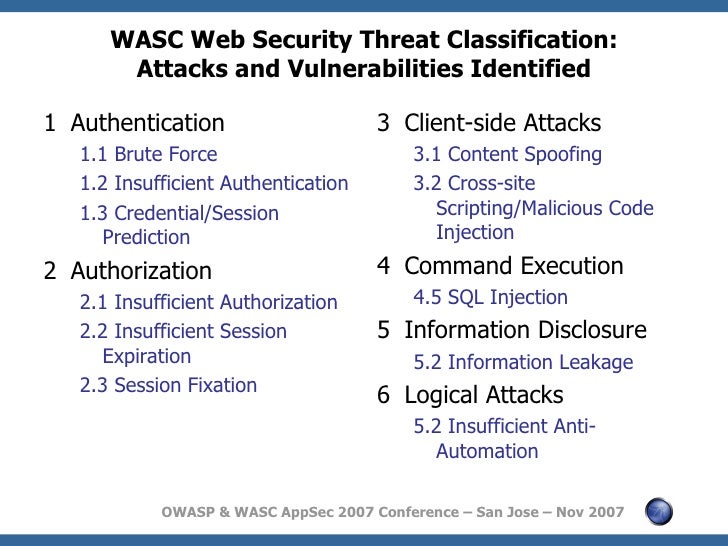
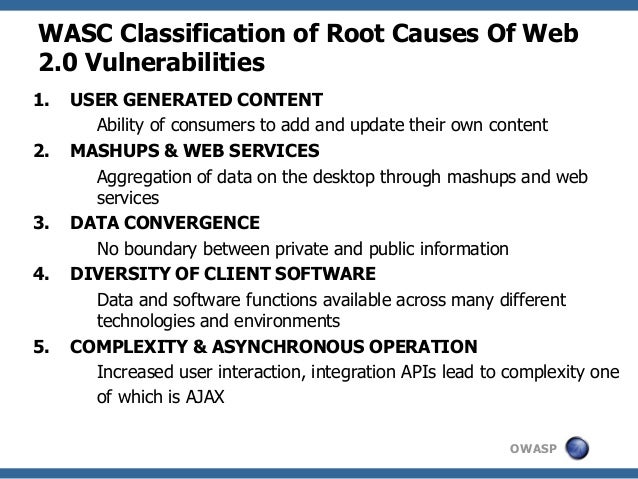
- The WASC Threat Classification v2.0
Description
The WASC Threat Classification is a cooperative effort to clarify and organize the threats to the security of a
web site. The members of the Web Application Security Consortium have created this project to develop and promote
industry standard terminology for describing these issues.
http://projects.webappsec.org/w/page/13246978/Threat%20Classification
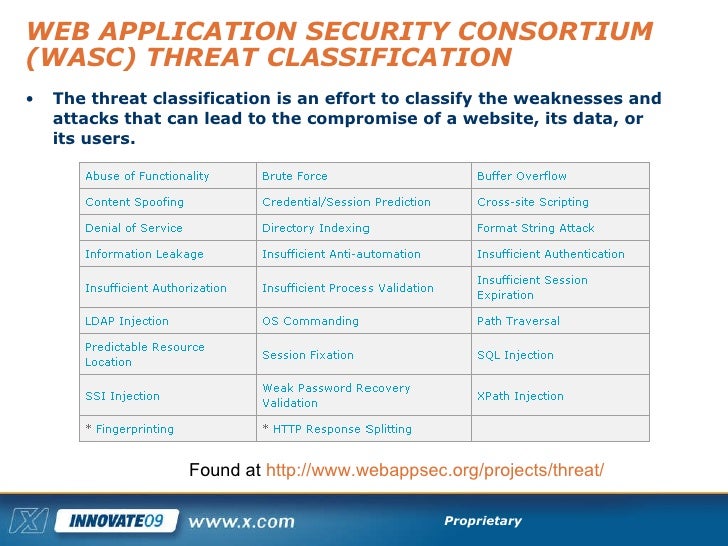
WASC Threat Classification v2.0 report
This report displays WASC threat classification issues found on your site.
WASC web application threat classification list
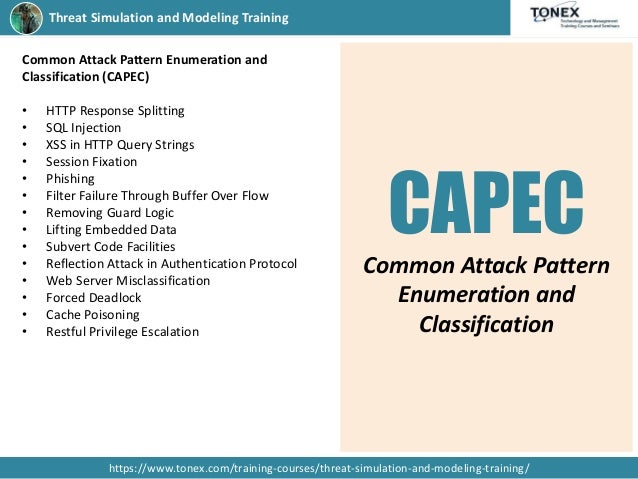
Abuse of Functionality: Abuse of Functionality is an attack technique that uses a website's own features and functionality to consume, defraud or circumvent access control mechanisms.
Brute Force: A Brute Force attack is an automated process of trial and error used to guess a person's username, password, credit-card number or cryptographic key.
Buffer Overflow: Buffer Overflow exploits are attacks that alter the flow of an application by overwriting parts of the memory.
Content Spoofing: Content Spoofing is an attack technique used to trick a user into believing that certain content appearing on a website is legitimate and not from an external source.
Credential/Session Prediction: Credential/Session Prediction is a method of hijacking or impersonating a website user. Deducing or guessing the unique value that identifies a particular session or user accomplishes the attack.
Cross-site Scripting: Cross-site Scripting (XSS) is an attack technique that forces a website to echo attacker-supplied executable code, which loads in a user's browser. A Cross-site Scripted user might have his account hijacked (cookie theft), their browser redirected to another location, or possibly shown fraudulent content delivered by the website they are visiting.
Denial of Service: Denial of Service (DoS) is an attack technique
with the intent of preventing a website from serving normal user activity.
Directory Indexing: Automatic directory listing/indexing is a server function that lists
all of the files within a requested directory if the normal base file (index.html/home.html/default.htm) is not present.
Format String Attack: Format String Attacks alter the flow of an application by using string formatting library features to access other memory space.
Information Leakage: Information Leakage is when a website reveals sensitive data, such as developer comments or error messages, which might aid an attacker in exploiting the system.
Insufficient Anti-automation: Insufficient Anti-automation is when a website permits an attacker to automate a process that should only
be performed manually.
Insufficient Authentication: Insufficient Authentication occurs when a website permits an attacker to access sensitive content or functionality without properly authenticating his access permissions.
Insufficient Authorization: Insufficient Authorization is when a website permits access to sensitive content or functionality that should require increased access control restrictions.
Insufficient Process Validation: Insufficient Process Validation is when a website permits an attacker to bypass or circumvent the intended flow control of an application.
Insufficient Session Expiration: Insufficient Session Expiration is when a website permits an attacker to reuse old session credentials or session IDs for authorization. Insufficient Session Expiration increases a website's exposure to attacks that steal or impersonate other users.
LDAP Injection: LDAP Injection is an attack technique used to exploit websites that construct Lightweight Directory Access Protocol (LDAP) statements from user-supplied input.
OS Commanding: OS Commanding is an attack technique used to exploit websites by executing Operating System commands through manipulation of application input.
Path Traversal: The Path Traversal attack technique forces access to files, directories, and commands that
may potentially be located outside the document root directory. An attacker might manipulate a URL in such a way that the website will run or reveal the contents of arbitrary files anywhere on the web server.
Predictable Resource Location: Predictable Resource Location is an attack technique used to uncover hidden website content and functionality. By making educated guesses, the attack is a brute force search looking for content that
is not intended for public viewing. Temporary files, backup files, configuration files, and sample files are all examples of potentially leftover files.
Session Fixation: Session Fixation is an attack technique that forces a user's session ID to an explicit value.
SQL Injection: SQL Injection is an attack technique used to exploit websites that construct SQL statements from user-supplied input.
SSI Injection: SSI Injection (Server-side Include) is a server-side exploit technique that allows an attacker to send code into
a application, which will later
be executed locally by the web server.
Weak Password Recovery Validation: Weak Password Recovery Validation is when a website permits an attacker
to illegally obtain, change or recover another user's password.
XPath Injection:
XPath Injection is an attack technique used to exploit websites that construct
XPath queries from user-supplied input.
https://www.ibm.com/support/knowledgecenter/SSW2NF_9.0.3/com.ibm.ase.help.doc/topics/r_wasc_threat_classifications_report.html?view=embed
- OWASP Automated Threat Handbook Web Applications
Use Case Scenarios
Scenario: Defining application development security requirements
Scenario: Sharing intelligence within a sector
Scenario: Exchanging threat data between CERTs
Scenario: Enhancing application penetration test findings
Scenario: Specifying service acquisition needs
Scenario: Characterising vendor services
https://www.owasp.org/images/3/33/Automated-threat-handbook.pdf
- Software Security AssuranceState-of-the-Art Report (SOAR)July 31, 2007
there have been
severalattempts at categorizing and classifying software based attack patterns, including
CAPEC:
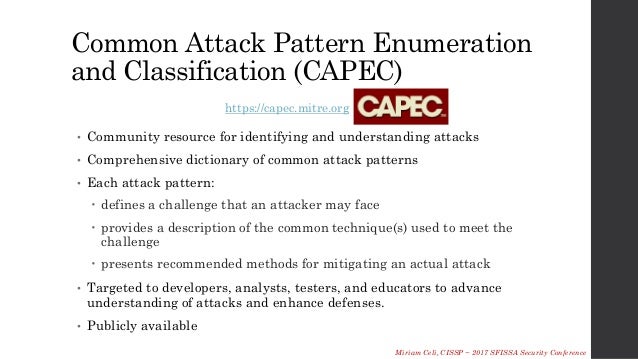
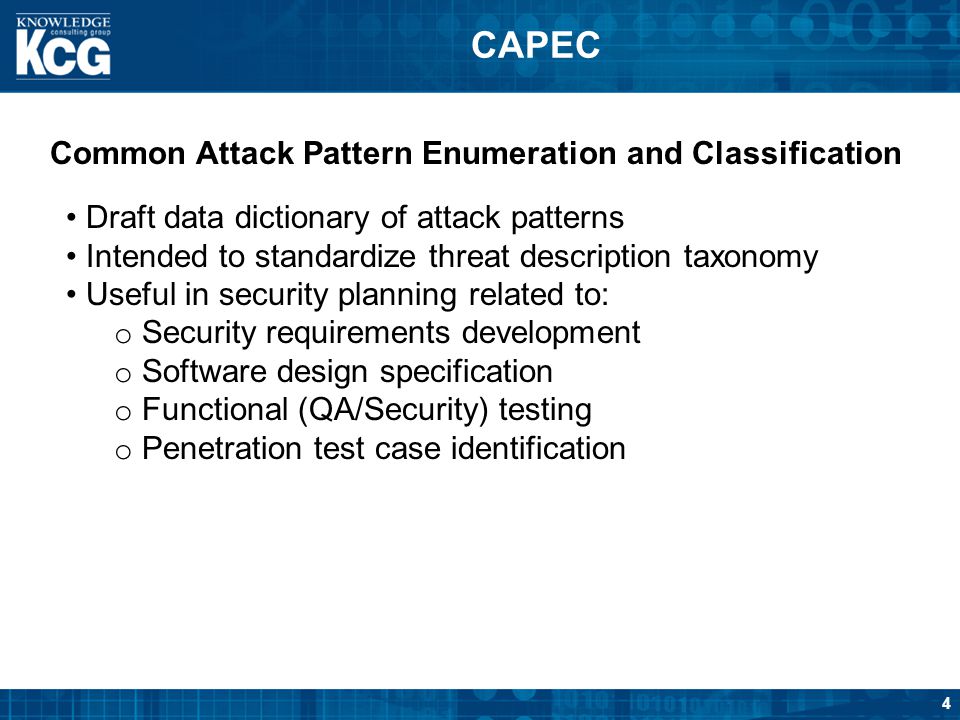
Initiated by the DHS Software Assurance Program in 2006, the Common Attack Pattern Enumeration and Classification (CAPEC) project will define a standard taxonomy of definitions, classifications, and categorizations of software-targeting attack patterns.
WASC Threat Classification: An effort by members of Web Application Security Consortium (WASC) to classify and describe security threats to web applications. The main
objective of the threat classification effort is
“to develop and promote
industry standard terminology for describing these issues. Application developers, security professionals, software vendors, and compliance auditors will have the ability to access a consistent language for web
security related issues
SearchSecurity.com Web Application Attacks Learning Guide: [59
]An informal taxonomy of
web application and web service attacks
that is tutorial
in nature.
https://cwe.mitre.org/documents/iatac_swa_soar.pdf
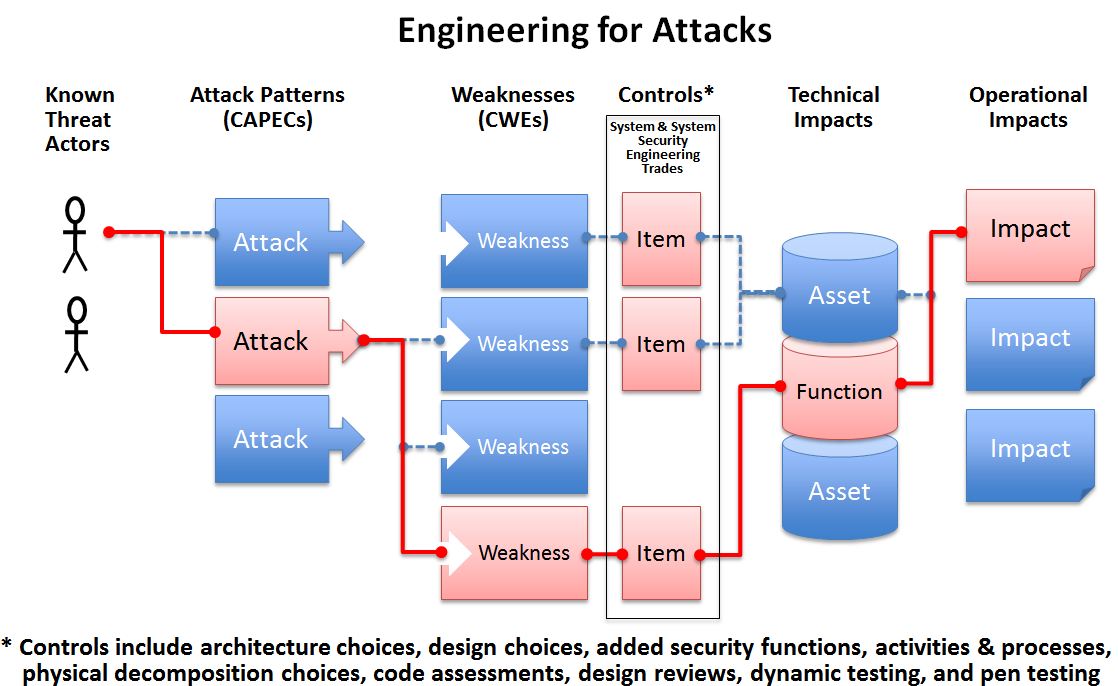
- Understanding how the adversary operates is essential to effective cyber security. CAPEC™ helps by providing a comprehensive dictionary of known patterns of attack employed by adversaries to exploit known weaknesses in cyber-enabled capabilities.
https://capec.mitre.org/


- How to install and configure AlienVault OSSIM 5.5 on VirtualBox
Event collection: AlienVault
has the ability to collect logs from various sources in your environment, host servers and systems, applications running on servers, network devices, such as firewalls and routers, name them endpoints in your environment.
Event normalization: The attributes of the collected logs
are extracted and stored in the common data fields hat define an event such as IP addresses,
hostnames, usernames,
interfac- names, ports, programs
etc. This allows analysts to run queries across collected events for better and quicker analysis.
Event correlation: This involves analyzing relationships between the collected events to identify the pattern of events.
OSSIM provides a unified platform that bundles together security capabilities such as Asset discovery, Host Intrusion Detection, Network Intrusion Detection, Behavioral monitoring, Asset Discovery, Vulnerability Assessment, Log management. It also leverages the power of the AlienVault Open Threat Exchange (OTX), the open threat intelligence community delivers community-generated threat data, enables collaborative research, and automates
the process of updating your security infrastructure with threat data from any source.
https://kifarunix.com/how-to-install-and-configure-alienvault-ossim-5-5-on-virtualbox/
What Are the Phases of the Threat Intelligence Lifecycle?
https://www.recordedfuture.com/threat-intelligence-lifecycle-phases/
- OASIS Cyber Threat Intelligence (CTI) TC
Supporting automated information sharing for cybersecurity situational awareness, real-time network defense, and sophisticated threat analysis
https://www.oasis-open.org/committees/tc_home.php?wg_abbrev=cti
Kusto Query Language is a simple yet powerful language to query structured, semi-structured and unstructured data.
https://github.com/microsoft/Kusto-Query-Language
- KQL stands for Kusto Query Language. It’s the language used to query the Azure log databases: Azure Monitor Logs, Azure Monitor Application Insights and others.
https://squaredup.com/blog/kusto-101-a-jumpstart-guide-to-kql/
- The Ariel Query Language (AQL) is a structured query language that you use to communicate with the Ariel databases. You can use AQL to extract, filter, and perform actions on event and flow data that you extract from the Ariel database in IBM Security QRadar
https://www.ibm.com/support/knowledgecenter/SS42VS_7.3.2/com.ibm.qradar.doc/b_qradar_aql.pdf
- The Seven-Step Information Gathering Process
The EC-Council divides footprinting and scanning into seven basic steps
Information gathering
Determining the network range
Identifying active machines
Finding open ports and access points
OS fingerprinting
Fingerprinting services
Mapping the network
http://www.pearsonitcertification.com/articles/article.aspx?p=472323&seqNum=5
- OpenIOC: Back to the Basics
One challenge investigators face during incident response is finding a way to organize information about an attackers' activity, utilities, malware and other indicators of compromise, called IOCs.
OpenIOC provides a standard format and terms for describing the artifacts encountered during the course of an investigation. In this post we're going to provide a high-level overview of IOCs, including IOC use cases, the structure of an IOC and IOC logic.
Before we continue, it's important to mention that IOCs are not signatures, and they aren't meant to function as a signature would. It is often understated, but an IOC is meant to be used in combination with human intelligence. IOCs are designed to aid in your investigation, or the investigations of others with whom you share threat intelligence.
IOC Use Cases:
Find malware/utility: This is the most common use case. Essentially, this is an IOC written to find some type of known malware or utility, either by looking for attributes of the binary, itself, or for some artifact created upon execution, such as a prefetch file or registry key.
Methodology: Unlike an IOC written to identify malware or utilities, these IOCs find things you don't necessarily know about, in order to generate investigative leads. For example, if you wanted to identify any service DLL that wasn't signed and which was loaded from any directory that did not include the path "windowssystem32", you could write an IOC to describe that condition. Another good example of a methodology IOC is an IOC that looks for the Registry text value of all "Run" keys for a string ending ".jpg". This represents an abnormal condition which upon investigation may lead to evidence of a compromise.
Bulk: You may already be using this kind of IOC. Many organizations subscribe to threat intelligence feeds that deliver a list of MD5s or IP addresses; a bulk IOC can represent a collection of those indicators. These kinds of IOCs are very black and white and are typically only good for an exact match.
Investigative: As you investigate systems in an environment and identify evidence of malicious activity such as metadata related to the installation of backdoors, execution of tools, or files being staged for theft, you can track that information in an IOC. These IOCs are similar to bulk IOCs; however, an investigative IOC only contains indicators from a single investigation. Using this type of IOC can help you to prioritize which systems you want to analyze.
Definition: This is the content of the IOC, containing the artifacts that an investigator decided to codify in the IOC. For example, these may include the MD5 of a file, a registry path or something found in process memory. Inside the definition, indicators are listed out or combined into expressions that consist of two terms and some form of Boolean logic.
One thing about the OpenIOC format that makes it particularly useful is the ability to combine similar terms using Boolean AND & OR logic. The previous example shows how this type of logic can be used.
https://www.fireeye.com/blog/threat-research/2013/10/openioc-basics.html
- Prefetch is a feature, introduced in Windows XP and still used in Windows 10, that stores specific data about the applications you run in order to help them start faster
Superfetch is a feature that attempts to determine which applications you will launch and then loads up all the necessary files and data into memory. Both of these features require quite a few read and write operations in order to work.
https://helpdeskgeek.com/help-desk/delete-disable-windows-prefetch/
I suggest that the place to start is not with Regedit, but in the Windows\Prefetch folder. A quick inspection will reveal: NTOSBOOT-B00DFAAD.pf and probably other .pf (PreFetch) files. As the machine boots, or applications open, so the Cache Manager monitors the disk access. The idea is that the next time the machine starts or an application executes, the Cache Manager reads the file the appropriate .pf file with its prediction of the disk areas that will be needed in the first 10 seconds of starting.
https://www.computerperformance.co.uk/registry/registry-hacks-prefetch/
- OpenIOC is designed to fill a void that currently exists for organizations that want to share threat information both internally and externally in a machine-digestible format. OpenIOC is an extensible XML schema that enables you to describe the technical characteristics that identify a known threat, an attacker’s methodology, or other evidence of compromise.
Why OpenIOC
Sophisticated Indicators – Traditional methods of identifying security breaches no longer work. Simple signatures are too easy for an intruder to circumvent. Organizations need to be able to communicate how to find attackers on their networks and hosts using a machine digestible format that removes human delay from intelligence sharing.
Extendable & Customizable – By allowing for extensions and customization, OpenIOC offers your organization the option of using MANDIANT’s field tested Indicators of Compromise, as well as creating your own custom sets of indicators, and any combination thereof that you need to complete your mission.
The Framework Schema
It’s Really Simple – The base OpenIOC schema is a simple framework that is written in XML to document and categorize forensic artifacts of an intrusion that can be identified on a host or network. You can easily extend the base schema to include additional indicators from a variety of sources.
Mandiant Indicators – OpenIOC ships with a base set of indicators provided by MANDIANT.
https://www.darknet.org.uk/2016/06/openioc-sharing-threat-intelligence/
- Structured Threat Information Expression (STIX™) is a language and serialization format used to exchange cyber threat intelligence (CTI).
STIX is designed to improve many different capabilities, such as collaborative threat analysis, automated threat exchange, automated detection and response, and more.
Trusted Automated Exchange of Intelligence Information (TAXII™) is an application layer protocol for the communication of cyber threat information in a simple and scalable manner.
TAXII is a protocol used to exchange cyber threat intelligence (CTI) over HTTPS. TAXII enables organizations to share CTI by defining an API that aligns with common sharing models.
https://oasis-open.github.io/cti-documentation/
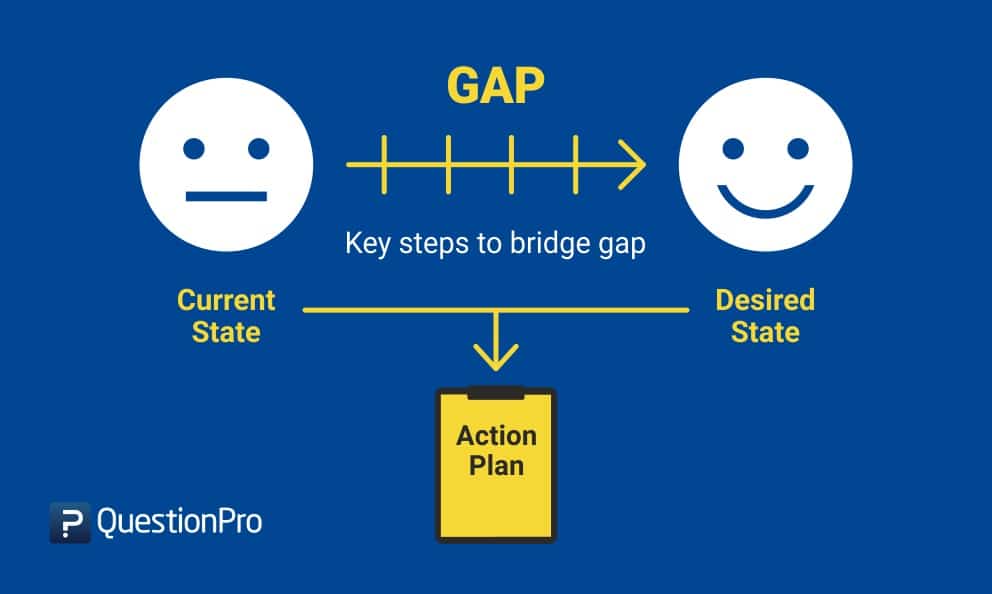
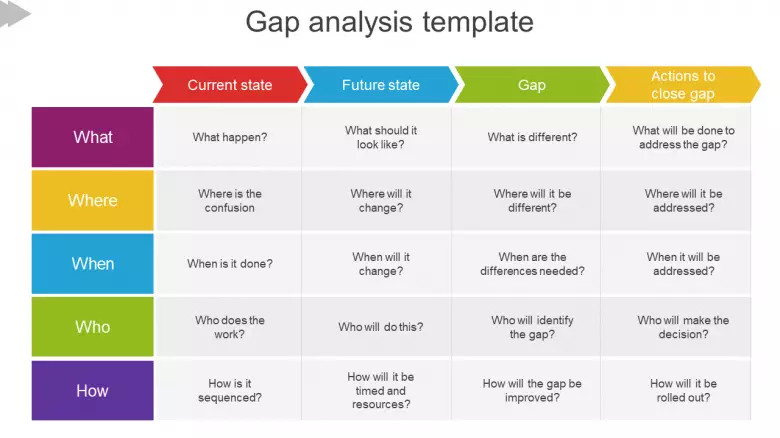
A gap analysis is an examination and assessment of your current performance for the purpose of identifying the differences between your current state of business and where you’d like to be. It can be boiled down into a few questions:
Where are we now?
Where do we wish we were?
How are we going to close the gap?
https://www.clearpointstrategy.com/gap-analysis-template/
- In management literature, gap analysis involves the comparison of actual performance with potential or desired performance
Gap analysis identifies gaps between the optimized allocation and integration of the inputs (resources), and the current allocation-level.
This reveals areas that can be improved. Gap analysis involves determining, documenting and improving the difference between business requirements and current capabilities.
Gap analysis naturally flows from benchmarking and from other assessments
https://en.wikipedia.org/wiki/Gap_analysis

- What Is Threat Intelligence?
“Threat intelligence is evidence-based knowledge, including context, mechanisms, indicators, implications and action-oriented advice about an existing or emerging menace or hazard to assets. This intelligence can be used to inform decisions regarding the subject’s response to that menace or hazard.”
The Threat Intelligence Lifecycle
1. Planning and Direction
The first step to producing actionable threat intelligence is to ask the right question.
The questions that best drive the creation of actionable threat intelligence focus on a single fact, event, or activity — broad, open-ended questions should usually be avoided.
2. Collection
3. Processing
4. Analysis
5. Dissemination
6. Feedback
The Types of Threat Intelligence
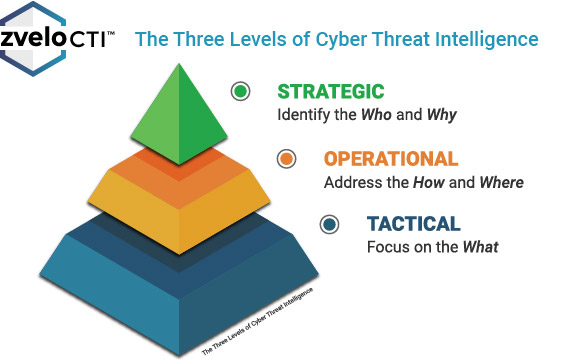
Threat intelligence is often broken down into three subcategories:
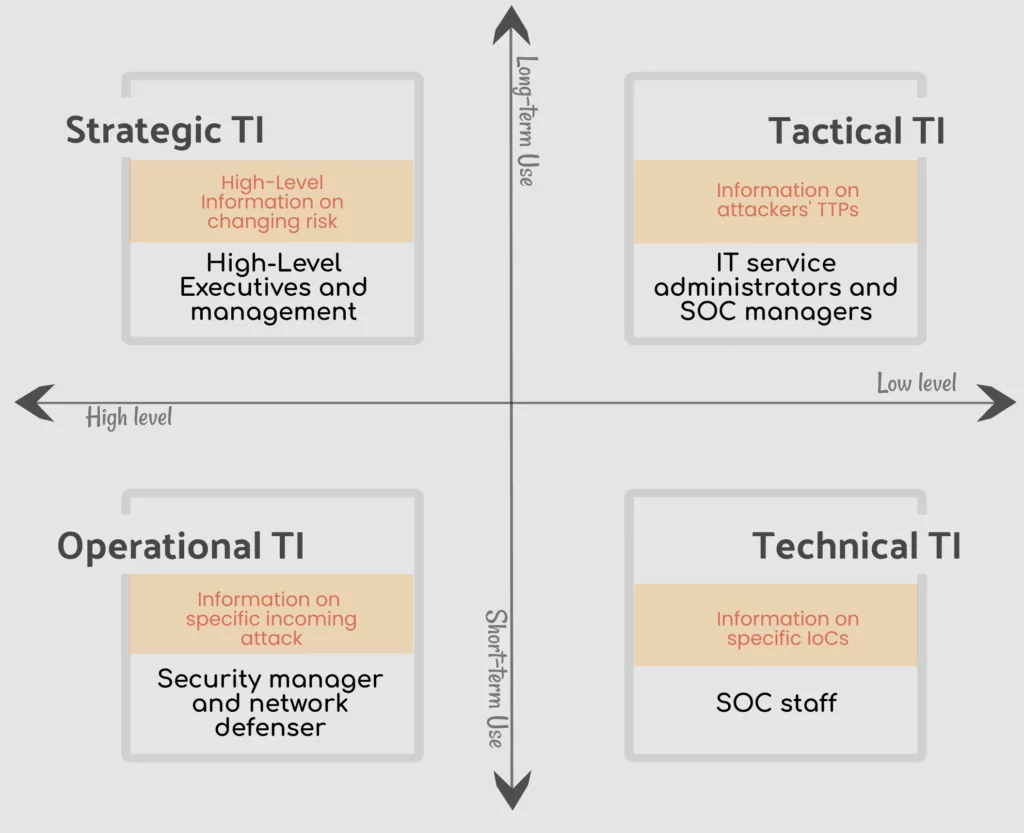
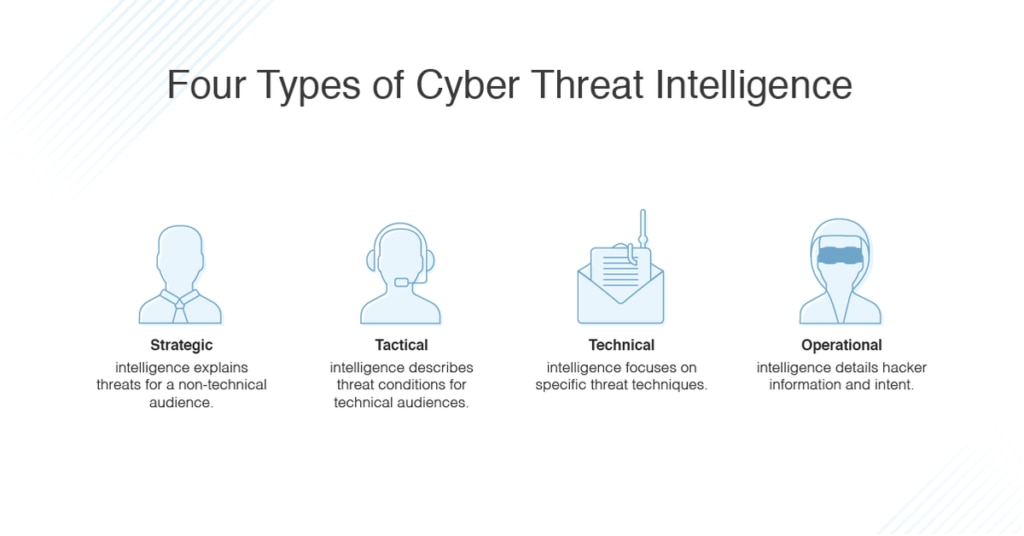
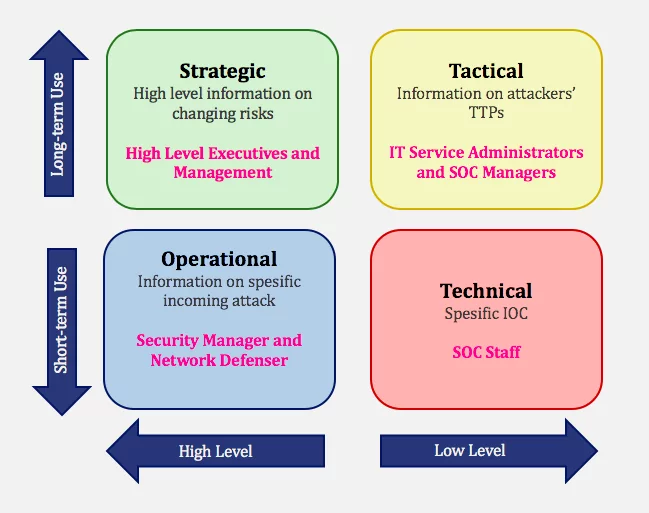
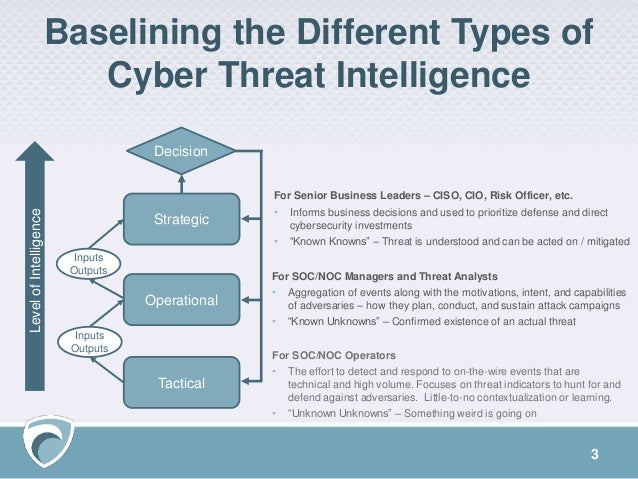
Strategic — Broader trends typically meant for a non-technical audience
Tactical — Outlines of the tactics, techniques, and procedures of threat actors for a more technical audience
Operational — Technical details about specific attacks and campaigns
Strategic Threat Intelligence
the content is generally less technical and is presented through reports or briefings.
Good strategic intelligence should provide insight into areas like the risks associated with certain lines of action, broad patterns in threat actor tactics and targets, and geopolitical events and trends
Common sources of information for strategic threat intelligence include:
Policy documents from nation-states or nongovernmental organizations
News from local and national media, industry- and subject-specific publications, or other subject-matter experts
White papers, research reports, and other content produced by security organizations
Tactical Threat Intelligence
Tactical threat intelligence outlines the tactics, techniques, and procedures (TTPs) of threat actors. I
in specific terms, how their organization might be attacked and the best ways to defend against or mitigate those attacks.
It usually includes technical context, and is used by personnel directly involved in the defense of an organization, such as system architects, administrators, and security staff.
Reports produced by security vendors are often the easiest way to get tactical threat intelligence
Look for information in reports about the attack vectors, tools, and infrastructure that attackers are using, including specifics about what vulnerabilities are being targeted and what exploits attackers are leveraging, as well as what strategies and tools that they may be using to avoid or delay detection.
Operational Threat Intelligence
Operational intelligence is knowledge about cyber attacks, events, or campaigns
A common source of technical information is threat data feeds, which usually focus on a single type of indicator, like malware hashes or suspicious domains.
https://www.recordedfuture.com/threat-intelligence/
- What Is Tactical Threat Intelligence?
Tactical threat intelligence provides information about the tactics, techniques, and procedures (TTPs) used by threat actors to achieve their goals (e.g., to compromise networks, exfiltrate data, and so on). It’s intended to help defenders understand how their organization is likely to be attacked, so they can determine whether appropriate detection and mitigation mechanisms exist or whether they need to be implemented.
Unlike strategic threat intelligence, which is almost exclusively non-technical, tactical threat intelligence is intended for a predominantly technical audience, and usually includes some technical context. In particular, tactical threat intelligence is consumed by personnel directly involved in the defense of an organization, such as system architects, administrators, and security staff, although it does also play a role in higher-level security decision making.
Since threat actor TTPs change all the time, tactical threat intelligence is usually gathered during the course of normal intelligence operations, rather than on request.
Sources of Tactical Threat Intelligence
For the typical organization, reports produced by security vendors and other industry players are the most easily accessible source of tactical threat intelligence. In many cases, these reports focus on a specific threat group or attack campaign, and provide key tactical information such as:
Locations and industries targeted
Attack vectors employed (e.g., spear phishing, SQL injection, etc.)
Tools and technical infrastructure used
While these reports can be extremely valuable, they are produced for a wide audience, and consequently only a small proportion will be relevant to any specific organization. For this reason, industry reports are at best an incomplete source of tactical threat intelligence
A more thorough and reliable stream of tactical threat intelligence requires an active gathering process, which can include any or all of the following sources:
Open source
Honeypots and darknets
Telemetry data
Scanning and crawling
Malware analysis
Closed source
Human relationships
For most organizations, purchasing tactical threat intelligence from dedicated security vendors is a more realistic proposition.
Discerning Threat Actor TTPs
Tactical threat intelligence falls into four primary categories:
1. Attack Vectors
2. Tools
3. Infrastructure
4. Forensic Avoidance Strategies
https://www.recordedfuture.com/tactical-threat-intelligence/
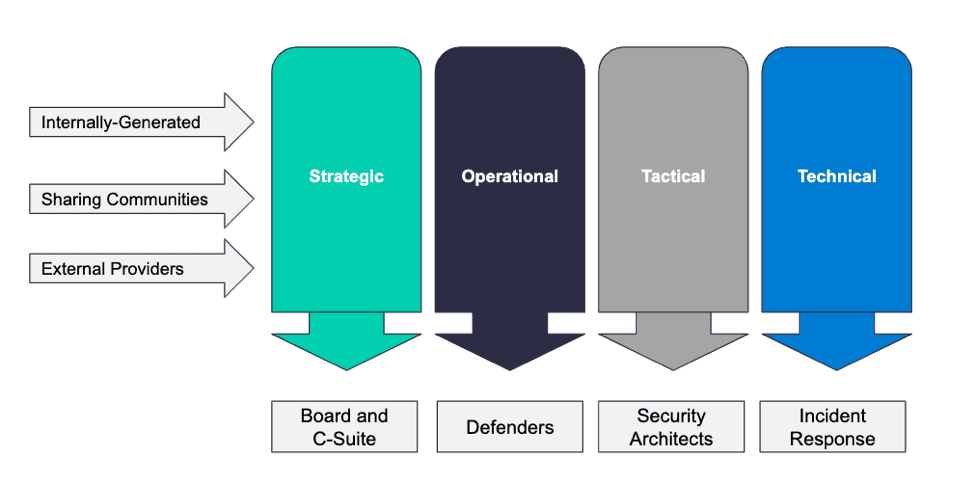
- 1. Strategic Threat Intelligence :
Strategic threat intelligence provides high-level information relating to cyber security posture, threats
2. Tactical Threat Intelligence :
Tactical threat intelligence plays a serious role in protective the resources of the organization. It provides info related to TTPs used by threat actors (attackers) to perform attacks. Tactical threat intelligence is consumed by cyber security professionals such as IT service managers, security operations managers, network operations center {NOC) employees, administrators, and architects.
3. Operational Threat Intelligence :
Operational threat intelligence provides info above specific threats against the organization. It provides contextual info above security events and incidents that help defenders disclose potential risks, offer bigger insight into offender methodologies, establish past malicious activities, and perform investigations on malicious activity in a very more economical way
4. Technical Threat Intelligence:
Technical threat intelligence provides information above an attacker’s resources that are used to perform the attack; this includes command and control channels, tools, etc
It has a shorter lifespan compared to tactical threat intelligence and mainly focuses on a specific loC
https://info-savvy.com/types-of-threat-intelligence/
- Types of threat intelligence
1. Strategic threat intelligence
Strategic threat intelligence provides high-level analysis typically reserved for non-technical audiences such as stakeholders or board members
Strategic threat intelligence sources are unlike other intelligence categories because the majority of the data comes from open sources, meaning it can be accessed by anyone. A few examples include local and national media, white papers and reports, online activity and articles, and security ratings
2. Tactical threat intelligence
Tactical threat intelligence focuses on the immediate future and helps teams determine whether or not existing security programs will be successful in detecting and managing risk.
Tactical intelligence highlights indicators of compromise (IOCs) and allows responders to search for and eliminate specific threats within a network
Tactical intelligence is the most basic form of threat intelligence and is typically automated because it can be easily generated. For this same reason, tactical intelligence usually has a short lifespan as many IOCs become obsolete in a matter of hours.
3. Operational threat intelligence
Operational threat intelligence aims to answer the questions, “who?”, “what?”, and “how?” and is gained by examining the details of past known attacks. . It helps security teams understand the details surrounding specific cyber-attacks by providing context for factors such as intent, timing, and sophistication.
https://securityscorecard.com/blog/what-is-cyber-threat-intelligence-3-types-and-examples




- MITRE ATT&CK vs. Cyber Kill Chain vs. Diamond Model
The Cyber Kill Chain, as it is currently called, breaks down an intrusion into a well-defined sequence of seven phases from Reconnaissance to Actions on Objectives.
The Diamond Model emphasizes the relationships and characteristics of an intrusion’s four core features: adversary, infrastructure, capability, and victim.
Cyber Kill Chain and MITRE ATT&CK both follow the typical narrative of an attack — for example, break in, be stealthy, steal some data. However, while the Cyber Kill Chain has a clearly defined linear sequence of phases, the ATT&CK Framework is a matrix of intrusion techniques that is not confined to a specific order of operations.
https://medium.com/cycraft/cycraft-classroom-mitre-att-ck-vs-cyber-kill-chain-vs-diamond-model-1cc8fa49a20f
- Roles that Use Threat Intelligence Platforms
Security analyst and IT analyst
Use threat intelligence to optimize prevention and detection capabilities and develop stronger defenses
Analyst use cases
Integrate threat intelligence feeds with other security products
Block bad IPs, URLs, domains, files, and more
Security Operations Center (SOC)
Prioritize incident response based on risk and impact to the organization.
SOC use cases
Use threat intel to enrich alerts
Link alerts into incidents
Reduce false positives and alert fatigue
Computer Security Incident Response Team (CSIRT)
Speeds the investigation, management, and prioritization of a security event.
CSIRT use cases
Look for information on the motives, attributions and tactics, techniques and procedures (TTPs) of an incident
Analyze root cause to determine the scope of an inciden
Intel analyst
Uncovers and tracks threat activity targeting the organization, thereby gaining a better understanding of the relevant aspects of the current threat landscape and performing advanced analysis to understand quickly the context organizational alerts across known actors, campaigns, incidents, malware, signatures, TTPs and vulnerabilities.
Intel analyst use cases
Aggregate structured and unstructured data (reports) related to threat actors to learn to detect them better
Enables Alert Triage and incident response
Directs Vulnerability patch prioritization
https://www.crowdstrike.com/cybersecurity-101/threat-intelligence/threat-intelligence-platforms/
- If you apply Pereto’s Principal (the 80/20 rule) to network security, about 80% of incidents are caused by known threats that are easily identified by signature-based rules system and 20% come from previously unknown threats, which are often the most damaging and costly.
Suricata and Zeek perform two different types of network protection and both are needed if you want to find known and unknown threats.
Suricata is the gold standard of signature-based threat detection engines
Suricata enables high performance traffic inspection and quickly processes many rules against large volumes of network traffic.
Suricata is compatible with the vast repositories of Snort rules and supports the LUA scripting language so users can create rules to detect complex threats.
Zeek was initially designed to be a Swiss Army knife for network metadata monitoring
It monitors traffic streams and produces logs that record everything it understands about the network activity and other metadata that is useful for analyzing and understanding the context of network behavior
Much of the metadata Zeek produces was previously available only from packet capture (PCAP) data
Suricata is far more efficient than Zeek at monitoring traffic for known threats and producing alerts when they are detected. Another benefit is that new threat intelligence is often available first in a format compatible with Suricata.
Zeek delivers the large volumes of high-quality data needed to provide comprehensive network traffic visibility and context, and enable network baselining, host and service profiling, passive inventory collection, policy enforcement, anomaly detection and threat hunting efforts.
https://bricata.com/blog/suricata-or-zeek-the-answer-is-both/