Thursday, April 30, 2020

NVMe over Fabrics

  • NAND flash memory

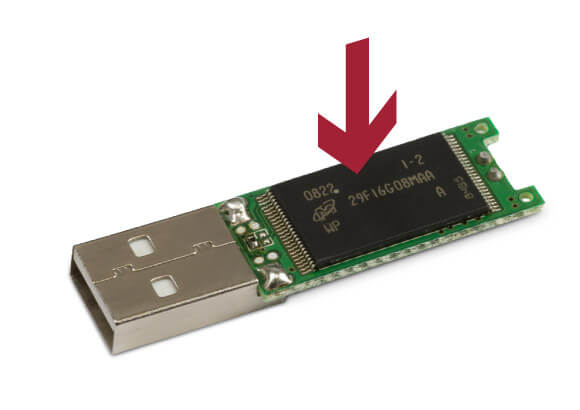
Flash memory is an electronic (solid-state) non-volatile computer memory storage medium that can be electrically erased and reprogrammed. The two main types of flash memory are named after the NAND and NOR logic gates.
The NAND type is found primarily in memory cards, USB flash drives, solid-state drives (those produced in 2009 or later), and similar products, for general storage and transfer of data. NAND or NOR flash memory is also often used to store configuration data in numerous digital products, a task previously made possible by EEPROM or battery-powered static RAM. One key disadvantage of flash memory is that it can only endure a relatively small number of write cycles in a specific block
https://en.wikipedia.org/wiki/Flash_memory


  • NVMe vs SSD: Speed, Storage & Mistakes to Avoid

SSD (solid-state drive) is a type of nonvolatile storage media that stores persistent data on flash memory. It has two essential parts - a NAND flash memory and a flash controller optimized to deliver high read-write performance in sequential as well as random data fetching.
SSDs offer high transfer speeds, low latency even with random data access, more durability but not for hierarchical storage use, and expectedly no sound of moving parts
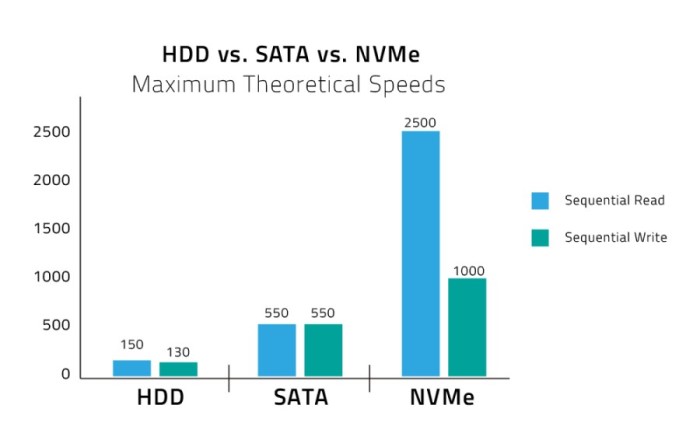
For perceived and real performance gains, storage was the last bottleneck, which was eliminated with the advent of SSD and then the high-performance NVMe SSD storage solutions. The NAND flash SSDs radically improved input-output performance, access times dropped from 6-12 milliseconds to less than 1ms.

What is SATA SSD?
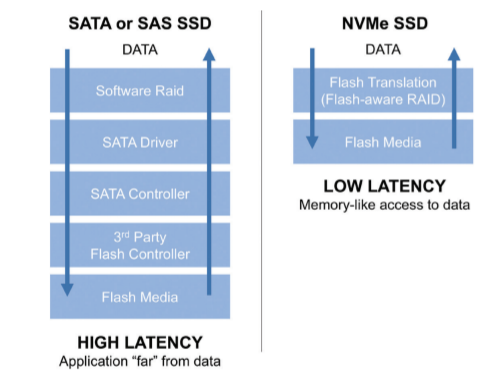
SATA uses the AHCI command protocol and supports the IDE, which primarily was built for the older and sluggish spinning disk drives and not for the sturdy flash-based storage.

Mistakes to avoid
Defragmentation is not for SSDs and can negatively affect its lifespan. SSDs save data in blocks and can randomly read from any location, whether contiguous or random. You will be overkilling the flash drive when you defrag.
Don’t use the SSD to its full capacity or you risk choking it. Because its performance gets affected, mainly write speeds, it is suggested to have minimal 25 percent of your storage space free for improved performance.
Modern SSDs come with an in-built Garbage Collection Mechanism. Whether the TRIM command should be enabled or not is a question based on the specific OS you are using and needs to be looked into as it can clutter unwanted data in your drive and needs to be handled properly

What is NVMe SSD?
Non-Volatile Memory Express (NVMe) is the latest industry-standard software interface for PCIe SSDs.
The NVMe SSD enables the flash memory to run directly through the PCI Express (PCIe) serial bus interface as it offers high bandwidth due to being directly attached to the CPU rather than function through the limiting SATA speeds.
It comes in two form factor, M.2 or PCIe expansion card, a 2.5-inch U.2 connector, but with both form factors, it directly connects electrically to the motherboard via the PCIe rather than SATA connection.

Mistakes to avoid
Remember, NVMe is a communication interface and storage protocol, not a storage media device.
Deploy pooled SSD storage across the data center, which places a cache of SSD storage before higher capacity drives to provide cost-efficient and enhanced performance.
Don’t judge an NVMe SSD on the base of price; it can cost you in endurance, quality of service, and most I/O consistency.
A cost-benefit analysis is recommended and the analysis of the performance requirements of application workloads to determine if you do need the transitioning.
Don’t deploy NVMe on top of the same architecture used for conventional flash, as the traditional controller can only handle low levels of I/O processing and create latency and cap performance.

https://www.promax.com/blog/nvme-vs-ssd-speed-storage-mistakes-to-avoid


  • NVMe, AHCI and IDE are transfer protocols (languages). They run on top of transfer interfaces such as PCIe or SATA (spoken, written).

NVMe is the latest high performance and optimized protocol which supersedes AHCI and compliments PCIe technology. It offers an optimised command and completion path for use with NVMe based storage. It was developed by a consortium of manufacturers specifically for SSDs to overcome the speed bottleneck imposed by the older SATA connection. It is akin to a more efficient language between storage device and PC: one message needs to be sent for a 4GB transfer instead of two, NVMe can handle 65,000 queues of data each with 65,000 commands, instead of one queue that with the capacity for 32 commands, and it only has seven major commands (read, write, flush etc). As well as delivering better throughput NVMe offers reduced latency
https://www.userbenchmark.com/Faq/What-s-the-difference-between-SATA-PCIe-and-NVMe/105


  • NVMe (Non-Volatile Memory Express) is an interface protocol built especially for Solid State Drives (SSDs). NVMe works with PCI Express (PCIe) to transfer data to and from SSDs. NVMe enables rapid storage in computer SSDs and is an improvement over older Hard Disk Drive (HDD) related interfaces such as SATA and SAS. The only reason SATA and SAS are used with SSDs in computers is that until recently, only slower HDDs have been used as the large-capacity storage in computers. Flash memory has been used in mobile devices such as smartphones, tablets, USB drives and SD cards. (SSDs are flash memory.)

https://www.microcontrollertips.com/why-nvme-ssds-are-faster-than-sata-ssds/
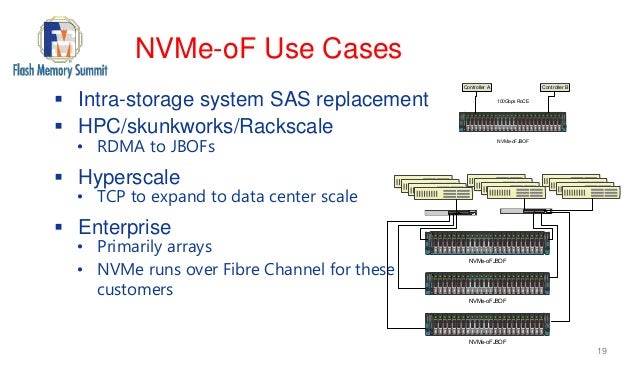

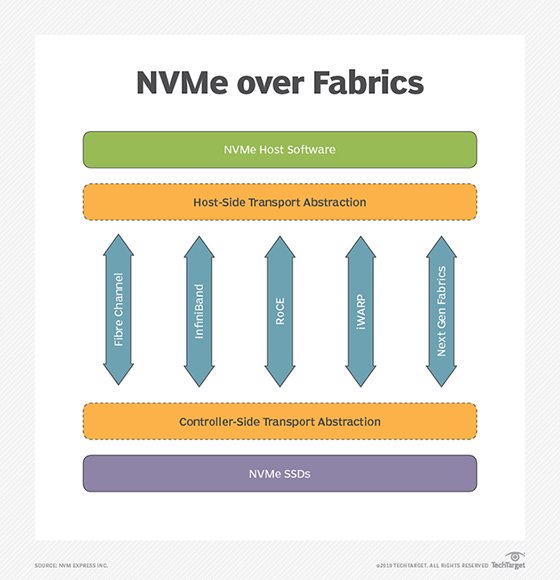
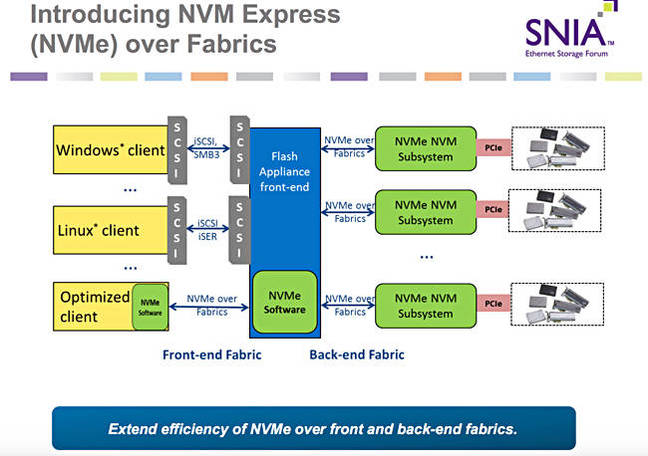
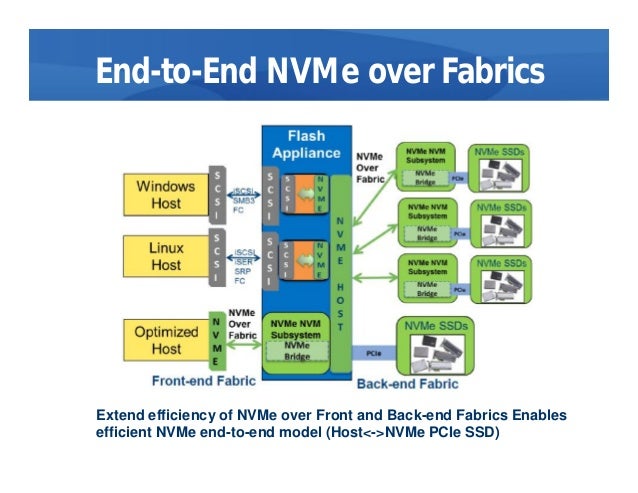
  • NVMe over Fabrics, also known as NVMe-oF and non-volatile memory express over fabrics, is a protocol specification designed to connect hosts to storage across a network fabric using the NVMe protocol.
The protocol is designed to enable data transfers between a host computer and a target solid-state storage device or system over a network -- accomplished through a NVMe message-based command. Data transfers can be transferred through methods such as Ethernet, Fibre Channel (FC) or InfiniBand.

there have been multiple implementations of the protocol, such as NVMe-oF using remote direct memory access (RDMA), FC or Transmission Control Protocol/Internet Protocol (TCP/IP).

Uses of NVMe over Fabrics
Using NVMe-oF can help provide a state-of-the-art storage protocol that can take full advantage of today's SSDs. The protocol can also help in bridging the gaps between direct-attached storage (DAS) and SANs, enabling organizations to support workloads that require high throughputs and low latencies.
NVMe over Fabrics vs. NVMe: Key differences
One of the main distinctions between NVMe and NVMe over Fabrics is the transport-mapping mechanism for sending and receiving commands or responses. NVMe-oF uses a message-based model for communication between a host and a target storage device. Local NVMe will map commands and responses to shared memory in the host over the PCIe interface protocol.

While it mirrors the performance characteristics of PCIe Gen 3, NVMe lacks a native messaging layer to direct traffic between remote hosts and NVMe SSDs in an array. NVMe-oF is the industry's response to developing a messaging layer.

NVME over Fabrics using RDMA
NVMe-oF use of RDMA is defined by a technical subgroup of the NVM Express organization. Mappings available include RDMA over Converged Ethernet (RoCE) and Internet Wide Area RDMA Protocol (iWARP) for Ethernet and InfiniBand.

RDMA is a memory-to-memory transport mechanism between two computers. Data is sent from one memory address space to another, without invoking the OS or the processor. Lower overhead and faster access and response time to queries are the result, with latency usually in microseconds (μs).

NVMe over Fabrics using Fibre Channel
The FC protocol supports access to shared NVMe flash, but there is a performance hit imposed to interpret and translate encapsulated SCSI commands to NVMe commands.

NVMe over Fabrics using TCP/IP
One of the newer developments regarding NVMe-oF includes the development of NVMe-oF using TCP/IP. NVMe-oF can now support TCP transport binding. NVMe over TCP makes it possible to use NVMe-oF across a standard Ethernet network.

https://searchstorage.techtarget.com/definition/NVMe-over-Fabrics-Nonvolatile-Memory-Express-over-Fabrics


  • Accelerating Ceph with RDMA and NVMe-oF


RDMA as Ceph NVMe fabrics
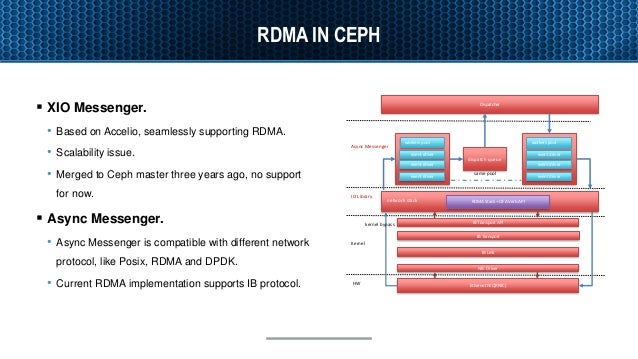
RDMA is a direct access from the memory of one computer into that of another without involving either one’s operating system.
RDMA supports zero-copy networking(kernel bypass)
Eliminate CPUs, memory or context switches
Reduce latency and enable fast messenger transfer.
Potential benefit for ceph
Better Resource Allocation – Bring additional disk to servers with spare CPU. 
Lower latency - generated by ceph network stack.
https://www.slideshare.net/insideHPC/accelerating-ceph-with-rdma-and-nvmeof

  • DRBD Fundamentals


The Distributed Replicated Block Device (DRBD) is a software-based, shared-nothing, replicated storage solution mirroring the content of block devices (hard disks, partitions, logical volumes etc.) between hosts.

DRBD mirrors data

    in real time. Replication occurs continuously while applications modify the data on the device.

    transparently. Applications need not be aware that the data is stored on multiple hosts.

    synchronously or asynchronously. With synchronous mirroring, applications are notified of write completions after the writes have been carried out on all hosts. With asynchronous mirroring, applications are notified of write completions when the writes have completed locally, which usually is before they have propagated to the other hosts.
https://www.linbit.com/drbd-user-guide/users-guide-drbd-8-4/


Monday, April 20, 2020

fourth-generation language


  • fourth-generation language

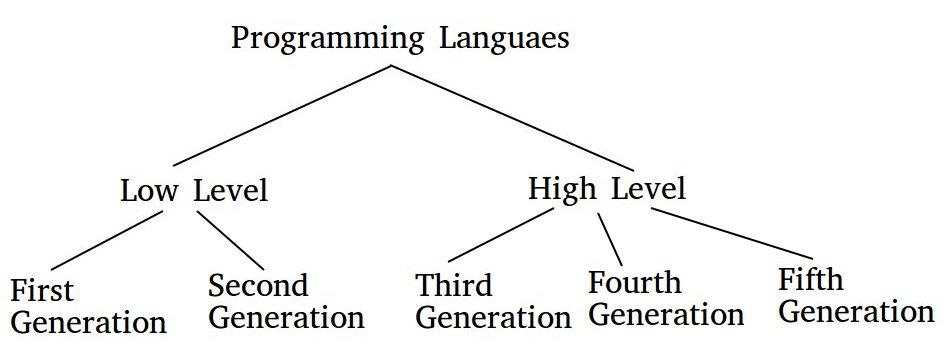
A non-procedural programming language that requires less coding than lower-level languages. Command-line languages that come with operating systems and database management systems (DBMSs) are fourth-generation languages (4GLs), as are query languages and report writers. Any language with English-like commands that does not require traditional input-process-output logic falls into this category.

First-, Second- and Third-Generation Languages
First-generation languages are binary machine languages. Second-generation languages are machine-dependent assembly languages, and third-generation languages (3GLs) are high-level programming languages, such as FORTRAN, COBOL, BASIC, Pascal, C/C++ and Java.

https://www.pcmag.com/encyclopedia/term/fourth-generation-language


Data Driven Testing


  • What is Data Driven Testing?

Data Driven Testing is an Automation framework where we can alliteratively run multiple data set from an external source like a table for the same test script-instead of hard coding.
Multiple data sets and test environment can be controlled and run without hard coding and results obtained can be compared.

Types of Data Driven Testing
Data-driven testing can be broadly classified into three parts:
Data-driven scripts: Data-Driven Scripts are application-specific scripts (like JavaScript) that are coded to include variable data sets.
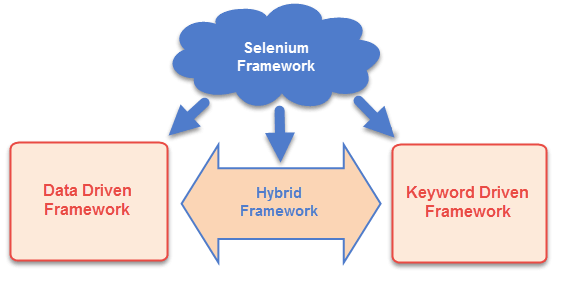
Keyword-driven test automation: Keyword Driven Test Automation is also known as Table Driven Test Automation. In keyword Driven test automation a data table using keyword id deployed for testing
Hybrid Test automation: It is a blend of Data-Driven and Keyword Driven Automation Frameworks.
Why Data Driven Testing?
Data-Driven testing tests application with multiple data sets ensuring extensive testing.
It also allows in organizing Test data and validation data in a single file.

Example:
For example, we have a login system that has to be tested for multiple input fields with different data sets.
Approach 1) For every data set creates separate scripts and execute each of it one by one.
Approach 2) Every time you have to run the test case for different data set, annually change it in the test script and execute it for all required number of data sets.
Approach 3) Import the data in an excel sheet and fetch this data one by one from the excel and run the script.
Executing the test scripts using approach 1 and 2 are very time consuming and lengthy process, the third method or what we call data-driven framework is ideal for such scenarios.

Data Provider
Data can be fed in different forms. Few popular ones are
    Internal table
    Spreadsheet
    CSV file
    XML file

What is the Difference between Keyword Driven Testing and Data Driven Testing?
In Data driven testing test scripts are executed for a different set of data to validate proper working of application with different variable values.
On the other hand, in Keyword-driven testing, a keyword represents action. A set of keywords drives a script. These keywords build test scripts.

Automation Framework For Data Driven Testing
This method can be used integrating with various Test Automation Tools like Selenium, QTP, TestComplete, TestNG etc 

https://www.testbytes.net/blog/data-driven-testing/


  • What is Data Driven Testing?

Data-driven is a test automation framework which stores test data in a table or spread spreadsheet format.
In Data-driven test automation framework, input data can be stored in single or multiple data sources like xls, XML, csv, and databases.
To create an individual test for each data set is a lengthy and time-consuming process. Data Driven Testing framework resolves this issue by keeping the data separate from Functional tests.
In Data Driven Testing, it is an ideal option to use realistic information
It allows testing application with multiple sets of data values during Regression testing
Drawback of this method is that it is depended on the automation skills of the Implementing team
https://www.guru99.com/data-driven-testing.html


  • Open Data Kit

Our community produces two suites of software: ODK and ODK-X (formerly ODK 2).
ODK: Tools for the common case
ODK-X: Tools for complex workflows
https://opendatakit.org/software/


  • ODK: Tools for the common case

https://opendatakit.org/software/odk/


  • Open Source Data Management Software

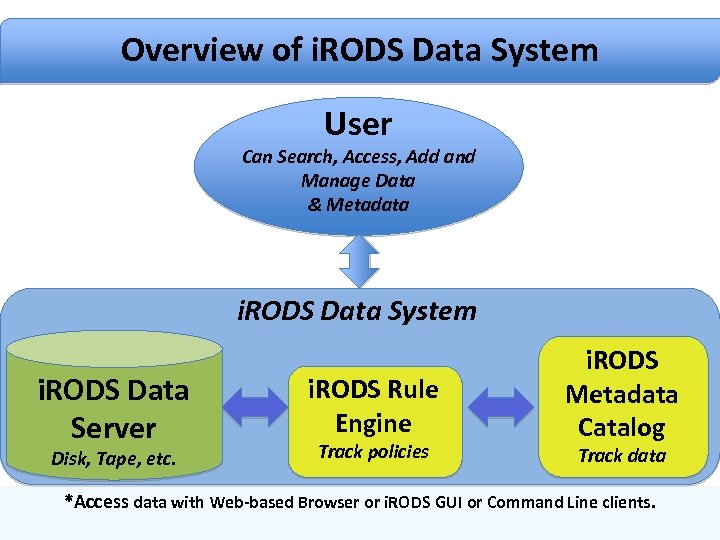
The Integrated Rule-Oriented Data System (iRODS) is open source data management software used by research, commercial, and governmental organizations worldwide.

The Four Core Competencies of iRODS
Data Virtualization
Data Discovery
Workflow Automation
Secure Collaboration
https://irods.org/

Tuesday, April 14, 2020

Time Series Database


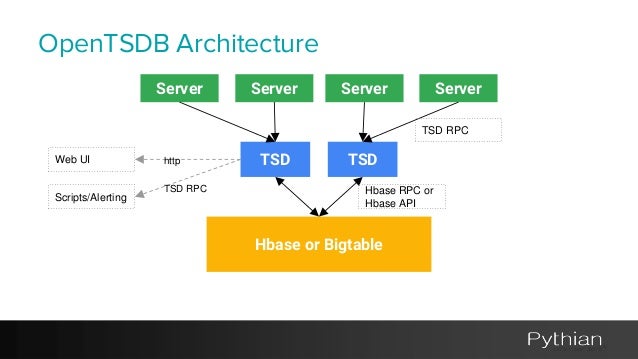
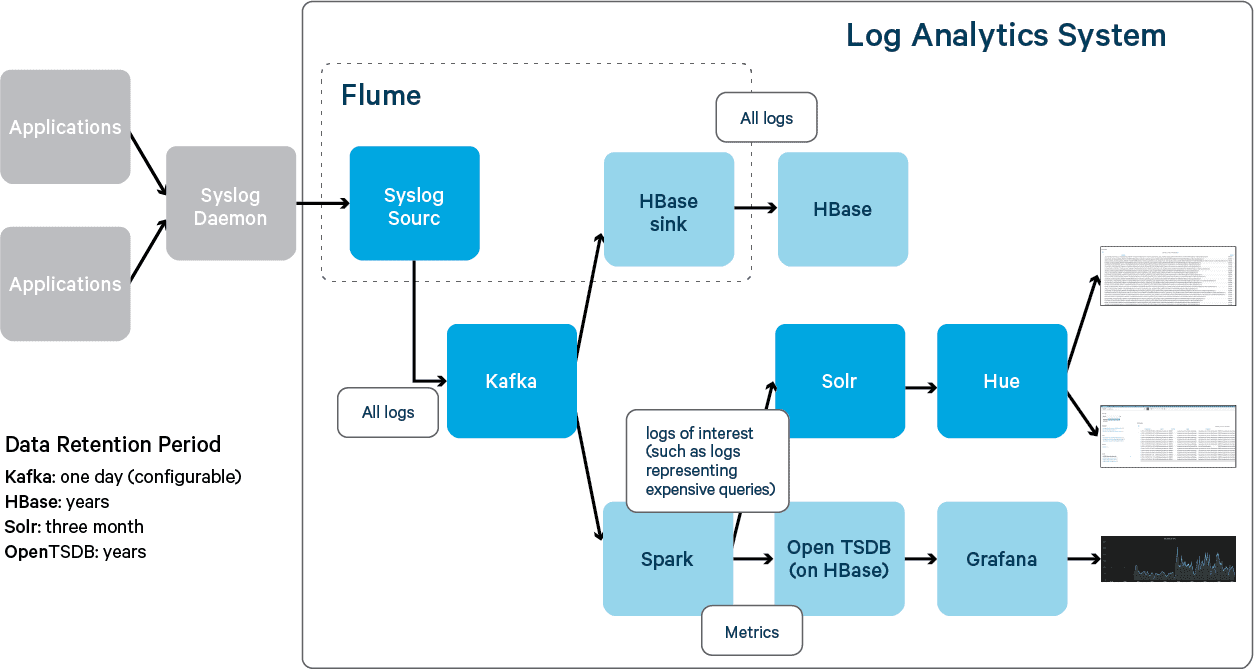
  • Data is stored exactly as you give it.Runs on Hadoop and HBase.Generate graphs from the GUI

http://opentsdb.net/


  • OpenTSDB is a distributed, scalable Time Series Database (TSDB) written on

top of HBase.
https://github.com/OpenTSDB/opentsdb


Thursday, March 12, 2020

LUN Volume


  • Volumes contain file systems in a NAS environment and LUNs in a SAN environment.

A LUN (logical unit number) is an identifier for a device called a logical unit addressed by a SAN protocol.
LUNs are the basic unit of storage in a SAN configuration
The Windows host sees LUNs on your storage system as virtual disks.
You can nondisruptively move LUNs to different volumes as needed.
https://docs.netapp.com/ontap-9/index.jsp?topic=%2Fcom.netapp.doc.dot-cm-concepts%2FGUID-372DCFC1-3C68-408F-B404-E26514BEB8F7.html

Volumes contain file systems in a NAS environment and LUNs in a SAN environment.
A LUN (logical unit number) is an identifier for a device called a logical unit addressed by a SAN protocol.
LUNs are the basic unit of storage in a SAN configuration
The Windows host sees LUNs on your storage system as virtual disks.
You can nondisruptively move LUNs to different volumes as needed.
https://docs.netapp.com/ontap-9/index.jsp?topic=%2Fcom.netapp.doc.dot-cm-concepts%2FGUID-372DCFC1-3C68-408F-B404-E26514BEB8F7.html


  • you have the computer (also called a “host,” “initiator,” or even just “CPU” sometimes.

you have the physical media (also called a “target,” “drive,” “HDD,” or “SSD,” etc.).
Hosts need Volumes, so those volumes have to be made up of something that eventually sits on a real, physical drive (whether it be spinning drives or SSDs, etc.).
From the storage’s perspective, the physical media is broken down from a physical entity (the actual drive), into a logical entity, and given a number (hence the “Logical Unit Number”, or LUN).
In between there is a very important piece of software that makes a translation between that LUN and what the host can see as a Volume, called the Volume Manager.
https://jmetz.com/2016/11/whats-the-difference-between-a-lun-and-a-volume/


  • In computer storage, a logical unit number, or LUN, is a number used to identify a logical unit, which is a device addressed by the SCSI protocol or Storage Area Network protocols which encapsulate SCSI, such as Fibre Channel or iSCSI.

A LUN may be used with any device which supports read/write operations, such as a tape drive, but is most often used to refer to a logical disk as created on a SAN.
https://en.wikipedia.org/wiki/Logical_unit_number


  • What is a LUN (Logical Unit Number)?

A logical unit number (LUN) is an identifier used for labeling and designating subsystems of physical or virtual storage. Depending on the environment, a LUN may refer to a subsection of a disk or a disk in its entirety. Different areas in physical drives are assigned LUNs so data can be read, written or fetched correctly from servers on a storage area network (SAN). In both hard disk drives (HDDs) and solid state drives (SSDs), volumes of LUNs make up the physical drive.
What a LUN is and what a LUN can do
A LUN can represent one disk, an entire redundant array of independent disks (RAID), or partitions of a disk, all of which execute I/O commands. LUNs allow users to differentiate between and manage separate shared volumes on a single SAN. They are the identifiers for building blocks of information on a physical disk drive and in some cases, virtual drives or virtual machines (VMs). LUNs are used to label slices of disk storage that are viewable from a server. They can also function as partitions, sectioning off portions of a volume from one another. They separate portions of disks that use different operating systems or have unique application requirements. Today, virtual or “thin” LUNs are provisioned on virtual disks, representing virtual storage with no association to storage on any physical drive, disk or device
Different types of LUNs
A simple LUN is the basic building block upon which other types are based. A simple LUN represents one portion of one disk or one physical disk in its entirety—that's it. On the other hand, some LUNs are larger than one physical disk, so they “span” across two or more physical disks; these are called spanned LUNs.
Mirrored LUNs do use two physical disks but only for mirroring the information and data held within one of the disks.
The striped LUN also uses two or more disks in the same way as a spanned LUN
Striped LUNs with parity offer the same convenience as the striped LUN with the safety of backup data (parity) written to physical disks simultaneously.
https://www.tintri.com/faqs/what-is-a-lun-logical-unit-number

Wednesday, February 26, 2020

HyperV interview questions


  • HyperV  interview questions


Server Virtualization:
Server Virtualization enables multiple operating systems can run on a single hosting server.
In Server virtualization, physical server resources are abstracted logically to create and run virtual machines. (ESXi, KVM, Hyper-V).

Storage Virtualization:
Storage virtualization enables grouping of multiple physical storage disks into single logical storage and it will be presented as single storage to all the servers. VMware vSAN is the best example of storage virtualization.

Network Virtualization:
Network Virtualization allows making a complete software-defined network (SDN) by decoupling the virtual network from the underlying network resources. Network virtualization is the process of combining hardware network resources and software network resources in a single software-based administrative entity.

Desktop Virtualization:
It enables to deploy multiple desktops on few server hardware and accessed by users from any location. VMware Horizon View is the best example for desktop virtualization.

Application Virtualization:
Application virtualization enables to use of the application anywhere without installing the software our device.

What is Type 1 Hypervisor?
Type 1 is called as bare metal Hypervisor which directly installed on physical servers. It offers high-performance and lower resource usage. Example: VMware ESXi, Xen Servers, Hyper-V

What is Type 2 Hypervisor?
Type 2 is called as Hosted Hypervisor which runs on top of operating systems. This type of hypervisor will be installed as an application. It offers moderate performance. But it’s very easy to setup and manages the environment. Example: VMware Workstation, Oracle Virtual Box.

https://www.unixarena.com/2019/08/virtualization-hypervisor-basic-interview-questions.html/

VMware Interview Questions


  • VMware Interview Questions


Explain what is hypervisor
A hypervisor is a program that enables multiple operating systems to share a single hardware host.
The hypervisor controls the resources and host processor, allocating what is required for each operating system in turn and make sure that the guest operating system cannot disrupt each other.

Explain VMware DRS?
VMware DRS stands for Distributed Resource Scheduler; it dynamically balances resources across various host under a cluster or resource pool.

Define the term ’VMKenel’.
VMWare Kernel is a proprietary kernel of VMware. It needs an operating system to boot and manage the kernel. A service console is being offered whenever VMWare kernel is booted.

 What is the use of Promiscuous Mode?
Promiscuous mode is useful when you want to run a virtual machine with network sniffers helps you to capture packet of that network. Moreover, if the promiscuous mode set to accept, all the communication is visible to all the virtual machines.

What is Cold and Hot Migration?
When you migrate powered off or suspended, it is known as cold migration. When you migrate your running power on virtual machines, it is known as hot migration.

What is Virtual Desktop Infrastructure?
Virtual Desktop Infrastructure which also known as VDI allows you to host the desktop operating system on the centralized window server in a data center. It is also known as server-based computing as it is the variation on the client-server computing model.

Explain the importance of snapshot in VMWare
A VMWare snapshot is a copy of a virtual machine disk file which is used to restore a VM to a specific point in time when the system fails, or system error occurs.

What is VVol?
Virtual Volume known as VVol is a new VM disk management feature concept introduced in vSphere 6.0. It enables array-based operation at the virtual disk level.  It is automatically created when a virtual disk is created in a virtual environment.

Can we do vMotion between two data centers?
Yes, we can do vMotion between two datacenters. However,  for this VM should be powered off.

What is RDM?
RDM is a sort form of Raw Device Mapping. It is a file stored in VMFS volume which acts as a proxy for a raw physical device. It allows you to store virtual machine data directly on LUN.

What is NFS?
NFS is a Network file system. It is a file sharing protocol which ESXI host used to communicate with the NAS device. It is a specialized store device which connects to a network and can provide file aces service to ESXI hosts.

https://career.guru99.com/top-15-vmware-interview-questions/


  • Explain what happens to a Virtual Machine after the host which it is running on, fails.


First, you should explain that the VM is forcefully powered off.
Next, ask if the host was in a correctly configured HA cluster (If it isn’t then nothing else happens to the VM)
If the Host is HA enabled, then ask what the Virtual Machine restart policy is. If it’s disabled then the VM will not be restarted on other hosts.
Ignoring the HA master election process, the simple answer is that the Virtual Machine will be rebooted on another ESXi host in the cluster.
Mention that there are things that will stop a Virtual Machine from being restarted on other hosts such as Admission Control settings & resource availability on the host.
The key thing to remember is that HA does NOT trigger a vMotion.

When should Promiscuous Mode be enabled on a Virtual Switch

Promiscuous Mode is a vSwitch and Portgroup setting that allows for Virtual Machines to receive all traffic within the same vSwitch or Portgoup (depending on where you set the configuration)
Typical use cases for this are packet sniffing applications.

Name 3 benefits of installing VMware Tools on Virtual Machines

Enables features such as Guest Introspection for NSX / agentless antivirus
Installs the VMXNET3 driver for improved network performance.
Allows the ability to copy and paste between the VM and desktop (some other settings might need to be enabled first)

What techniques are available to ESXi to reclaim memory?

Transparent Page Sharing (TPS) – Note that as of vSphere 6.0, this is disabled by default.
Ballooning – Requests VMware tools to “inflate a memory balloon” inside the VM until excess memory is released back to ESXi.
Memory Compression.
Swapping – This is the last option that ESXi will use to reclaim memory because it is the most disruptive to performance as memory gets swapped out from real memory onto disk

What is the impact of using Thick Eager Zeroed disk provisioning for VMDKs?
This disk type will zero out all data on the disk before allocating the VMDK to the Virtual Machine.
This has some performance benefit to the VM because it doesn’t have to zero a block before it can be written to.
The negative side is that it takes longer to provision the VMDK to the VM (since it has to zero all blocks first) and it has a measurable, sustained IO hit on the storage system

What are the main benefits of a Distributed Switch?
    Central Management of all ESXi host’s networking, meaning that there is only one switch to manage rather than one per host.
    The ability to enable Network IO Control (NIOC)
    NetFlow support.

Name 3 Virtual Machine Files

    VMX – The Virtual Machine configuration file
    NVRAM – The VM’s BIOS file
    VMEM – The VM’s pagefile
    VMSD – VM Snapshot state file


https://virtualg.uk/10-vmware-interview-questions-and-answers/

docker interview questions

What are the main drawbacks of Docker?
Some notable drawbacks of Docker are:
    Doesn't provide a storage option
    Offer a poor monitoring option.
    No automatic rescheduling of inactive Nodes
    Complicated automatic horizontal scaling set up

What is Docker Engine?
Docker daemon or Docker engine represents the server. The docker daemon and the clients should be run on the same or remote host, which can communicate through command-line client binary and full RESTful API

Docker Engine is supported by the following components:

  • Docker Engine REST API
  • Docker Command-Line Interface (CLI)
  • Docker Daemon
Explain the Docker components
Docker Client: This component executes build and run operations to communicate with the Docker Host.
Docker Host: This component holds the Docker Daemon, Docker images, and Docker containers. The daemon sets up a connection to the Docker Registry.
Docker Registry: This component stores Docker images. It can be a public registry, such as Docker Hub or Docker Cloud, or a private registry.

What is memory-swap flag?
Memory-swap is a modified flag that only has meaning if- memory is also set. Swap allows the container to write express memory requirements to disk when the container has exhausted all the RAM which is available to it.

Explain Docker Swarm?
Docker Swarm is native gathering for docker which helps you to a group of Docker hosts into a single and virtual docker host. It offers the standard docker application program interface.
Docker Swarm is native clustering for Docker.It turns a pool of Docker hosts into a single, virtual Docker host.
Docker Swarm is an open-source container orchestration tool that is integrated with the Docker engine and CLI. If you want to use Docker Swarm, you should use the overlay network driver. Using an overlay network enables the Swarm service by connecting multiple docker host daemons together.

What is Docker hub?
Docker hub is a cloud-based registry that which helps you to link to code repositories. It allows you to build, test, store your image in Docker cloud.

Explain Docker object labels
Docker object labels is a method for applying metadata to docker objects including, images, containers, volumes, network, swam nodes, and services.

You can use labels to organize your images, record licensing information, annotate relationships between containers, volumes, and networks, or in any way that makes sense for your business or application.

How can you run multiple containers using a single service?
By using docker-compose, you can run multiple containers using a single service. All docker-compose files uses yaml language.

Does Docker offer support for IPV6?
Yes, Docker provides support IPv6. IPv6 networking is supported only on Docker daemons runs on Linux hosts.

Can you lose data when the container exits?
No, any data that your application writes to disk get stored in container. The file system for the contain persists even after the container halts.


  • What is the use of the docker save and docker load commands?

A Docker image can be exported as an archive via the docker save command.
The exported Docker image can then be imported to another Docker host via the docker load command:

What is the default Docker network driver, and how can you change it when running a Docker image?
Docker provides different network drivers like bridge, host, overlay, and macvlan. bridge is the default.


What is a Docker image? What is a Docker image registry?
A Docker image consists of many layers. Each layer corresponds to a command in an image’s Dockerfile. This image provides isolation for an application when you run a Docker image as a container.
A Docker image registry is a storage area for Docker images. You can get images from them instead of building them.

What is a DockerFile?
Docker uses the instructions in the Dockerfile to automatically build images.

Is there any problem with just using the latest tag in a container orchestration environment? What is considered best practice for image tagging?
The problem is if you push a new image with just the latest tag, you lose your old image and your deployments will use the new image.

What is Docker Compose?
Docker Compose is a tool that lets you define multiple containers and their configurations via a YAML or JSON file.
Docker Compose is a YAML file which contains details about the services, networks, and volumes for setting up the Docker application. So, you can use Docker Compose to create separate containers, host them and get them to communicate with each other.
use a JSON file instead of a YAML file for the Docker Compose file. 

  • What is a Docker Container?

Docker containers include the application and all of its dependencies. It shares the kernel with other containers, running as isolated processes in user space on the host operating system.Docker containers are basically runtime instances of Docker images.
  • think of containers as runtime instances of Docker images.
  • use the underlying system’s CPU and memory to perform tasks.
  • any containerized application can run on any platform regardless of the underlying operating system
Docker containers wrap a piece of software in a complete filesystem that contains everything needed to run: code, runtime, system tools, system libraries – anything that can be installed on a server.

Docker containers include the application and all of its dependencies. It shares the kernel with other containers, running as isolated processes in user space on the host operating system

  • What are Docker Images?
Docker images are used to create containers. When a user runs a Docker image, an instance of a container is created. These docker images can be deployed to any Docker environment.


  • Will you lose your data, when a docker container exists?
Any data that your application writes to the container gets preserved on the disk until you explicitly delete the container.
The file system for the container persists even after the container halts.

What is Docker Machine?
Docker machine is a tool that lets you install Docker Engine on virtual hosts.Docker machine also lets you provision Docker Swarm Clusters.

What’s the difference between virtualization and containerization?
Virtualization helps us run and host multiple operating systems on a single physical server. In virtualization, hypervisors give a virtual machine to the guest operating system. The VMs form an abstraction of the hardware layer so each VM on the host can act as a physical machine.
Containers form an abstraction of the application layer, so each container represents a different application.
Containerization provides us with an isolated environment for running our applications.

  • What is the functionality of a hypervisor?
A hypervisor, or virtual machine monitor, is software that helps us create and run virtual machines
Native: Native hypervisors, or bare-metal hypervisors, run directly on the underlying host system. It gives us direct access to the hardware of the host system and doesn’t require a base server operating system.
Hosted: Hosted hypervisors use the underlying host operating system.

A vCPU is a VM thread (see cpu in the “VM Configuration Reference” chapter). These vCPUs appear to a guest just like physical CPUs. A guest's scheduling algorithm can't know that when it is migrating execution between vCPUs it is switching threads, not physical CPUs
This switching between threads can degrade performance of all the guests and the overall system. This is especially common when VMs are configured with more vCPUs than there are physical CPUs on the hardware.
Specifically, if in the hypervisor host there are more threads (including vCPU threads) ready to run than there are physical CPUs available to run them, the hypervisor host scheduler must apply its priority and scheduling policies (round-robin, FIFO, etc.) to decide which threads to run. These scheduling policies may employ preemption and time slicing to manage threads competing for physical CPUs.
Every preemption requires a guest exit, context switch and restore, and a guest entrance (see “Guest exits”). Thus, inversely to what usually occurs with physical CPUs, reducing the number of vCPUs in a VM can improve overall performance: less threads will compete for time on the physical CPUs, so the hypervisor will not be obliged to preempt threads (with the attendant guest exits) as often. In brief, fewer vCPUs in a VM may sometimes yield the best performance.

Virtual CPU’s can be allocated to a virtual machine.  The amount of virtual processors available are determined by the number of cores available on the hardware. 

It is important not to allow a running container to consume too much of the host machine’s memory. On Linux hosts, if the kernel detects that there is not enough memory to perform important system functions, it throws an OOME, or Out Of Memory Exception, and starts killing processes to free up memory. Any process is subject to killing, including Docker and other important applications. This can effectively bring the entire system down if the wrong process is killed.

By default, Docker does not apply any CPU limitations. Containers can all of the hosts given CPU power.


Virtual machines are considered a suitable choice in a production environment, rather than Docker containers since they run on their own OS without being a threat to the host computer. But if the applications are to be tested then Docker is the choice to go for, as Docker provides different OS platforms for the thorough testing of the software or an application.

  • Sharing sockets with docker-compose
    Create common volume
    Connect the socket position of the container with the socket you want to refer to the common volume
    Mount the common volume on the referencing container
The following is an example of connecting a certain API server to MySQL.

a want to run a bunch of applications that inside containers (for security and management reasons), and these applications need to speak to a mysql server (via a unix domain socket – which just appears to be a file on the filesystem.
I also want to run the mysql server inside a container – so the mechanics of getting a socket shared between them are a little non-trivial.

A Unix domain socket or IPC socket (inter-process communication socket) is a data communications endpoint for exchanging data between processes executing on the same host operating system

/var/run/docker.sock is the Unix domain socket . Sockets are used in your favorite Linux distribution, allowing different processes to communicate with each other. Like everything in Unix, sockets are files. In Docker,/var/run/docker.sock is the way to communicate with the main Docker process. Because it is a file, we can share it with other containers.

When you start Docker and share the socket, you give the container permission to manipulate the Docker host. Your container can now start or stop other containers, drag in or create images on the Docker host, and even write to the host file system


X11 applications may fail due to failures in sharing sockets with containers created by the master container.  There seems to be no problem sharing sockets between the vnc container and the master, but when the master creates a container and names its volume, the socket is not functional.

Didn’t know that sockets could be mounted.
I’m starting the Jenkins container with the following command
Jenkins is running and “sees” a change in the repository
It thens tries to build and run a docker container by using the binded Docker socket.


 /var/run/docker.sock is a Unix domain socket. Sockets are used in your favorite Linux distro to allow different processes to communicate with one another. Like everything in Unix, sockets are files, too. In the case of Docker, /var/run/docker.sock is a way to communicate with the main Docker process and, because it's a file, we can share it with containers.

  • Differentiate between COPY and ADD commands that are used in a Dockerfile?
COPY provides just the basic support of copying local files into the container whereas ADD provides additional features like remote URL and tar extraction support

Can a container restart by itself?
it is possible only while using certain docker-defined policies while using the docker run command. 

Can you tell the differences between a docker Image and Layer?
Image: This is built up from a series of read-only layers of instructions. An image corresponds to the docker container and is used for speedy operation due to the caching mechanism of each step.
Layer: Each layer corresponds to an instruction of the image’s Dockerfile. In simple words, the layer is also an image but it is the image of the instructions run.

What is the purpose of the volume parameter in a docker run command?
docker run -v /data/app:usr/src/app myapp
mounts the directory  /data/app in the host to the usr/src/app directory.
The volume parameter is used for syncing a directory of a container with any of the host directories
sync the container with the data files from the host without having the need to restart it
ensures data security in cases of container deletion
even if the container is deleted, the data of the container exists in the volume mapped host location making it the easiest way to store the container data.

Where are docker volumes stored in docker?
Volumes are created and managed by Docker and cannot be accessed by non-docker entities. 
 
Can you differentiate between Daemon Logging and Container Logging?
Daemon Level: This kind of logging has four levels- Debug, Info, Error, and Fatal.
Container Level:
docker logs <container_id>

What is the best way of deleting a container?
- docker stop <container_id>
- docker rm <container_id>

  • Can you tell the difference between CMD and ENTRYPOINT?

CMD command provides executable defaults for an executing container.

ENTRYPOINT specifies that the instruction within it will always be run when the container starts.
This command provides an option to configure the parameters and the executables
If the DockerFile does not have this command, then it would still get inherited from the base image mentioned in the FROM instruction

  • Docker Layer Caching (DLC) can reduce Docker image build times on CircleCI.
Docker Layer Caching (DLC) is a great feature to use if building Docker images is a regular part of your CI/CD process. DLC will save image layers created within your jobs, rather than impact the actual container used to run your job.

DLC caches the individual layers of any Docker images built during your CircleCI jobs, and then reuses unchanged image layers on subsequent CircleCI runs, rather than rebuilding the entire image every time. In short, the less your Dockerfiles change from commit to commit, the faster your image-building steps will run.


As Docker is processing your Dockerfile to determine whether a particular image layer is already cached it looks at two things: the instruction being executed and the parent image.
Docker will scan all of the children of the parent image and looks for one whose command matches the current instruction. If a match is found, docker skips to the next instruction and repeats the process.
If a matching image is not found in the cache, a new image is created
Since the cache relies on both the instruction being executed and the image generated from the previous instruction it should come as no surprise that changing any instruction in the Dockerfile will invalidate the cache for all of the instructions that follow it. Invalidating an image also invalidates all the children of that image.


How to reduce the size of Docker Images
    Use a .dockerignore file to remove unnecessary content from the build context
    Try to avoid installing unnecessary packages and dependencies
    Keep the layers in the image to a minimum
    Use alpine images wherever possible
    Use Multi-Stage Builds, which I am going to talk about in this article.


The multi-stage build is the dividing of Dockerfile into multiple stages to pass the required artifact from one stage to another and eventually deliver the final artifact in the last stage.

Previously, when we didn’t have the multi-stage builds feature, it was very difficult to minimize the image size. We used to clean up every artifact (which isn’t required) before moving to the next instruction as every instruction in Dockerfile adds the layer to the image. We also used to write bash/shell scripts and apply hacks to remove the unnecessary artifacts.

https://blog.logrocket.com/reduce-docker-image-sizes-using-multi-stage-builds/
https://circleci.com/docs/2.0/docker-layer-caching/
https://www.ctl.io/developers/blog/post/caching-docker-images
https://www.edureka.co/blog/interview-questions/docker-interview-questions/#DockerAdvancedQuestions
https://www.toptal.com/docker/interview-questions
https://www.guru99.com/docker-interview-questions.html
https://www.educative.io/blog/top-40-docker-interview-questions
https://www.interviewbit.com/docker-interview-questions/
https://raw.githubusercontent.com/kubernetes/website/master/content/en/examples/application/nginx-app.yaml
https://www.ctl.io/developers/blog/post/tutorial-understanding-the-security-risks-of-running-docker-containers
https://forums.docker.com/t/using-docker-in-a-dockerized-jenkins-container/322/9
https://nps.edu/web/c3o/support1
https://blog.fearcat.in/a?ID=01000-18e50b57-7ac9-4466-83ce-e3904cca07bc
https://en.wikipedia.org/wiki/Unix_domain_socket
http://bobtfish.github.io/blog/2013/10/06/read-only-bind-mounts-and-docker/
https://titanwolf.org/Network/Articles/Article?AID=33d13422-4d43-4955-9610-c0461ea53678
https://cloudacademy.com/blog/docker-vs-virtual-machines-differences-you-should-know/
https://docs.docker.com/config/containers/resource_constraints/
https://www.fastvue.co/tmgreporter/blog/understanding-hyper-v-cpu-usage-physical-and-virtual/
https://www.qnx.com/developers/docs/7.0.0/#com.qnx.doc.hypervisor.user/topic/perform/vcpu.html
https://stackoverflow.com/questions/41582969/how-does-docker-images-and-layers-work
https://www.edureka.co/blog/interview-questions/docker-interview-questions/


Sunday, February 23, 2020

SSL termination SSL offloading SSL acceleration


  • SSL termination refers to the process of decrypting encrypted traffic before passing it along to a web server.

What is SSL termination?
decrypting all that encrypted traffic takes a lot of computational power—and the more encrypted pages your server needs to decrypt, the larger the burden.
SSL termination (or SSL offloading) is the process of decrypting this encrypted traffic. Instead of relying upon the web server to do this computationally intensive work, you can use SSL termination to reduce the load on your servers, speed up the process, and allow the web server to focus on its core responsibility of delivering web content.
https://www.f5.com/services/resources/glossary/ssl-termination


  • SSL acceleration refers to off-loading processor-intensive SSL encryption and decryption from a server to a device configured to accelerate the SSL encryption/decryption routine.

https://www.f5.com/services/resources/glossary/ssl-acceleration


  • SSL offloading is the process of removing the SSL-based encryption from incoming traffic to relieve a web server of the processing burden of decrypting and/or encrypting traffic sent via SSL. The processing is offloaded to a separate device designed specifically for SSL acceleration or SSL termination.

SSL termination is particularly useful when used with clusters of SSL VPNs, because it greatly increases the number of connections a cluster can handle.
https://www.f5.com/services/resources/glossary/ssl-offloading