Friday, October 7, 2011

testing tools

  • Selenium (software)
Selenium is a portable software testing framework for web applications.
Selenium provides a record/playback tool for authoring tests without learning a test scripting language (Selenium IDE)
It also provides a test domain-specific language (Selenese) [1] to write tests in a number of popular programming languages, including Java, C#, Groovy, Perl, PHP, Python and Ruby.
The tests can then be run against most modern web browsers. Selenium deploys on Windows, Linux, and Macintosh platforms.
Selenium IDE is a complete integrated development environment (IDE) for Selenium tests.
It is implemented as a Firefox extension, and allows recording, editing, and debugging tests.
It was previously known as Selenium Recorder.
http://en.wikipedia.org/wiki/Selenium_%28software%29

What is Selenium?
Selenium automates browsers. That's it. What you do with that power is entirely up to you. Primarily it is for automating web applications for testing purposes, but is certainly not limited to just that. Boring web-based administration tasks can (and should!) also be automated as well.
http://seleniumhq.org/


  • What is Winium:
Winium is wrapper over a Selenium-Webdriver which we can use to automate Native/Hybrid applications on windows-based platforms like Windows 8/Windows 10 mobiles as well as windows desktop machines.
https://www.linkedin.com/pulse/selenium-windows-applicationswinium-tools-pranoday-dingare
  • DbUnit

dbunit.sourceforge.net
A JUnit extension that puts a database into a known state between test runs. It can export and import a database (or parts) to and from XML datasets
  • HttpUnit

what if you want to test a web application? Or what if you simply want to use a web-site as part of a distributed application?
In either case, you need to be able to bypass the browser and access your site from a program.
HttpUnit makes this easy.
Written in Java, HttpUnit emulates the relevant portions of browser behavior, including form submission, JavaScript, basic http authentication, cookies and automatic page redirection, and allows Java test code to examine returned pages either as text, an XML DOM, or containers of forms, tables, and links.
When combined with a framework such as JUnit, it is fairly easy to write tests that very quickly verify the functioning of a web site
Automated testing is a great way to ensure that code being maintained works. The Extreme Programming (XP) methodology relies heavily on it, and practitioners have available to them a range of testing frameworks, most of which work by making direct calls to the code being tested. But what if you want to test a web application? Or what if you simply want to use a web-site as part of a distributed application?

In either case, you need to be able to bypass the browser and access your site from a program. HttpUnit makes this easy. Written in Java, HttpUnit emulates the relevant portions of browser behavior, including form submission, JavaScript, basic http authentication, cookies and automatic page redirection, and allows Java test code to examine returned pages either as text, an XML DOM, or containers of forms, tables, and links. When combined with a framework such as JUnit, it is fairly easy to write tests that very quickly verify the functioning of a web site.

The same techniques used to test web sites can be used to test and develop servlets without a servlet container using ServletUnit, included in the download.
http://httpunit.sourceforge.net/


  • Cactus

Cactus is a simple test framework for unit testing server-side java code (Servlets, EJBs, Tag Libs, Filters, ...).
The intent of Cactus is to lower the cost of writing tests for server-side code. It uses JUnit and extends it.
Cactus implements an in-container strategy, meaning that tests are executed inside the container.
http://jakarta.apache.org/cactus/

  • Apache JMeter

Apache JMeter is open source software, a 100% pure Java desktop application designed to load test functional behavior and measure performance. It was originally designed for testing Web Applications but has since expanded to other test functions.
http://jakarta.apache.org/jmeter/

  • What is Locust?

Locust is an easy-to-use, distributed, user load testing tool. It is intended for load-testing web sites (or other systems) and figuring out how many concurrent users a system can handle.
https://docs.locust.io/en/stable/what-is-locust.html


  • Gatling

WHAT DOES "LOAD TESTING" MEAN?
Load testing for web applications consists in:
1/ simulating a large number of users with complex behaviors
2/ collecting and aggregating all the requests' response times
3/ creating reports & analyzing data
We developed our own Domain Specific Language (DSL), in order to make your scenarios easy-to-read for everyone.
https://gatling.io/load-testing-and-continuous-integration/

  • Canoo WebTest

Canoo WebTest is a free Open Source tool for automated testing of web applications in a very effective way. Look at for a features' overview.
webtest.canoo.com


  • JUnit 
This site is dedicated to software developers and testers using the JUnit testing framework
automated testing, tools and extensions for JUnit, and articles on Test Driven Development and other testing topics.

http://www.junit.org/

  • Chai is a BDD / TDD assertion library for node and the browser that can be delightfully paired with any javascript testing framework.

https://www.chaijs.com/


  • TestNG

TestNG is a testing framework inspired from JUnit and NUnit but introducing some new functionalities that make it more powerful and easier to use
http://testng.org/doc/index.html

TestNg Tutorials
http://www.mkyong.com/tutorials/testng-tutorials/


  • Arquillian Guides

Designed exclusively to teach you how to use Arquillian to write real tests.Testing Java Microservices
http://arquillian.org/


  • Reduce the programming skill required and make load testing of Web 2.0 and mobile web applications faster, easier, and more comprehensive by using interactive recording and scripting.
http://www8.hp.com/us/en/software-solutions/loadrunner-load-testing/
  • Infinitest

Infinitest is a Continuous Testing plugin for Eclipse and IntelliJ. Each time a change is made on the source code, Infinitest runs all the tests that might fail


infinitest.github.io

  • BackTrack

BackTrack) was a distribution based on the Debian GNU/Linux distribution aimed at digital forensics and penetration testing use.
It was named after backtracking, a search algorithm. In March 2013 the BackTrack team later replaced it with a successor product, Kali Linux.
http://en.wikipedia.org/wiki/BackTrack

  • ixia BreakingPoint VE
Virtualized security resilience testing for enterprise-wide networks
https://www.ixiacom.com/products/breakingpoint-ve

  • Security Testing and Vendor Selection with BreakingPoint
Ixia-S-WP-Product-Review_Ixia


enterprise traffic simulation tool that
helps networking teams ensure their equipment is prime-time ready
helps security teams simulate adversarial attacks
multifaceted tool that provides actionable data for network security testing and infrastructure validation.
BreakingPoint works by simulating traffic aimed at your network appliances and applications.
Because BreakingPoint initiates the flow of traffic, security teams can measure network saturation and endpoint responsiveness under extreme load
Having the ability to thoroughly test equipment during a proof-of-concept (PoC) phase
Integration with  a DevOps Continuous Integration (CI)/Continuous Deployment (CD) pipeline can be handled via the REST API and tweaked via the scripting options built into the device.
The virtual appliance consists of two OVA files: a virtual blade and a virtual controller.
We deployed the virtual appliance using VMware ESXi and proceeded to configure the virtual blades.
Analysts can use BreakingPoint to test the networking capabilities and capacity of other enterprise appliances by simulating malware, DDoS, application fuzzing and legitimate
packets.
We spent more than a month with BreakingPoint, and as our familiarity with the tool increased, we identified three business objectives that use of the tool contributed to:
security assessments, technology/vendor selection and as an agent of change.
businesses do not typically test for DoS during penetration testing.
We found that BreakingPoint fits into the vulnerability management and penetration testing area as a complementary assessment too.
“Quick Test” options to explore fuzzing capabilities to test applications and the web application firewall’s (WAF) ability to detect and block malicious traffic.
We wanted to use the tool to send malicious payloads and verify that the target device/application successfully blocked the attacks.

From a security assessment perspective, another use case we wanted to test was leveraging BreakingPoint to test device patch level or otherwise identify
vulnerable systems. At first blush, it didn’t seem that BreakingPoint was the right tool for the job in terms of running
vulnerability scans. Interestingly, however, we used BreakingPoint to do exactly that, and this is how it works.
Initially setting up BreakingPoint to identify whether a system is vulnerable to Heartbleed, for example, is similar
to configuring the tool to tackle any other type of test: Define the criteria to test for and the targets to test and save
them to easily run future tests. The results of testing provided in Figure 5 quickly showed that the target systems did not, in fact, “pass the test.”
At this point, we had done enough testing to develop a level of confidence that BreakingPoint can help identify how well a WAF is tuned and even identify
vulnerable assets not protected by the WAF.
In addition, we wanted to use this tool to perform application simulation for token randomization, brute force attacks,
dynamic file generation and other such attacks to assist with some components of web app pen testing.
we test web applications that are mature and in scope for the likes of PCI or are otherwise required to be tested and, conversely, applications
that are pre-production or in various stages of the software development life cycle.
for new applications, or at least applications that are not on well-defined networks, we needed to manually define targets on a case-by-case basis.
This is relevant because it takes tuning the DevOps process to ensure a group of static networks and IPs for consistent testing with BreakingPoint as
applications moved through the pipeline.
The “Strike List” was a good starting point, but with no matches for Open Web Application Security Project (OWASP) and a multitude of vulnerability-
specific exploit codes, the list was not ideal for session fuzzing, account brute forcing or logic attacks.
Regardless of OWASP not specifically being called out by name in the various strikes, several OWASP Top 10 vulnerability
categories are present and custom strike lists can be crafted or uploaded.
One of the strong points of BreakingPoint is that it allows the tester to synthesize real-world traffic and real-world conditions customized to the environment in which the devices will
be operating.This concept is relevant in situations where a business has identified the need to purchase hardware and has one or more solutions in the PoC phase actively
deployed on the network.Most enterprises in a PoC phase don’t have the ability to failover a production load to an untested device.
From within the BreakingPoint interface, we configured a test applicable to what the firewall would encounter in the live
environment and simply turned up the data rate and configured the “Target Minimum Simultaneous Super Flows” to serve as the criteria to define pass/fail.

Specifically, we wanted to make sure that these database activity monitoring devices are capable of handling the amount of throughput currently being gathered in production.
As a rule of thumb, users should determine how much capacity is needed and then test for at least one and half times that amount. At this point, we knew by looking at NetFlow
data and local packet capture information that we could expect a baseline of 300Mbps of raw SQL logs. Thus, we wanted to configure BreakingPoint to test for this.
There are cases in which traffic is unique, such as proprietary protocols, and you can account for this by using BreakingPoint’s “re-create” feature, which
essentially allows you to upload a pcap with the exact traffic you want to simulate, as illustrated.This complements the built-in options for
sending application- and protocol-specific traffic.

Let’s shift the discussion to measuring the performance impact of turning on SSL “HTTPS Everywhere” or only allowing TLS 1.2 for PCI standards on devices responsible for
the encryption overhead.we found BreakingPoint to be close to ideal as a solution to help us understand the performance impact of
enforcing TLS 1.2 across the network.

BreakingPoint can help as an agent of change as part of the DevOps process by verifying that infrastructure changes don’t degrade performance and validating that
new application implementations are ready for production.
there are two primary ways of interacting with BreakingPoint that lend themselves to DevOps norms.The first is a RESTful API, which is simple to use and consists of about two dozen different
tasks that can be implemented with POST and GET requests utilizing JSON.The second is the Enhanced Shell.


  • The UI Automator testing framework provides a set of APIs to build UI tests that perform interactions on user apps and system apps. The UI Automator APIs allows you to perform operations such as opening the Settings menu or the app launcher in a test device

https://developer.android.com/training/testing/ui-automator


  • Serenity is an Open Source project. Source code is hosted on GitHub, and the binaries are published to JCenter and the Maven Central Repository.

Serenity BDD helps you write better, more effective automated acceptance tests, and use these acceptance tests to produce world-class test reports and living documentation
http://www.thucydides.info/#/


  • JUnit 5 is the next generation of JUnit. The goal is to create an up-to-date foundation for developer-side testing on the JVM. This includes focusing on Java 8 and above, as well as enabling many different styles of testing.

https://junit.org/junit5/


  • Taurus improves experience of JMeter, Selenium and others.

Automation-friendly framework for Continuous Testing
Taurus tool is an Open Source test automation framework, providing simple YAML-based configuration format with DSL
https://gettaurus.org/


  • The main goal for Karma is to bring a productive testing environment to developers. The environment being one where they don't have to set up loads of configurations, but rather a place where developers can just write the code and get instant feedback from their tests.

https://karma-runner.github.io/latest/index.html


  • Robot Framework is a generic test automation framework for acceptance testing and acceptance test-driven development (ATDD). It has easy-to-use tabular test data syntax and it utilizes the keyword-driven testing approach.

http://robotframework.org/


  • ScalaTest is the most flexible and most popular testing tool in the Scala ecosystem. With ScalaTest, you can test Scala, Scala.js (JavaScript), and Java code. By offering deep integration with tools such as JUnit, TestNG, Ant, Maven, sbt, ScalaCheck, JMock, EasyMock, Mockito, ScalaMock, Selenium, Eclipse, NetBeans, and IntelliJ, ScalaTest makes it easy to take your testing to a higher, more productive level in new or existing Scala, Scala.js, or Java projects.

http://www.scalatest.org/

  • Appium is an open source test automation framework for use with native, hybrid and mobile web apps.It drives iOS, Android, and Windows apps using the WebDriver protocol.
http://appium.io

  • Use Espresso to write concise, beautiful, and reliable Android UI tests.

https://developer.android.com/training/testing/espresso
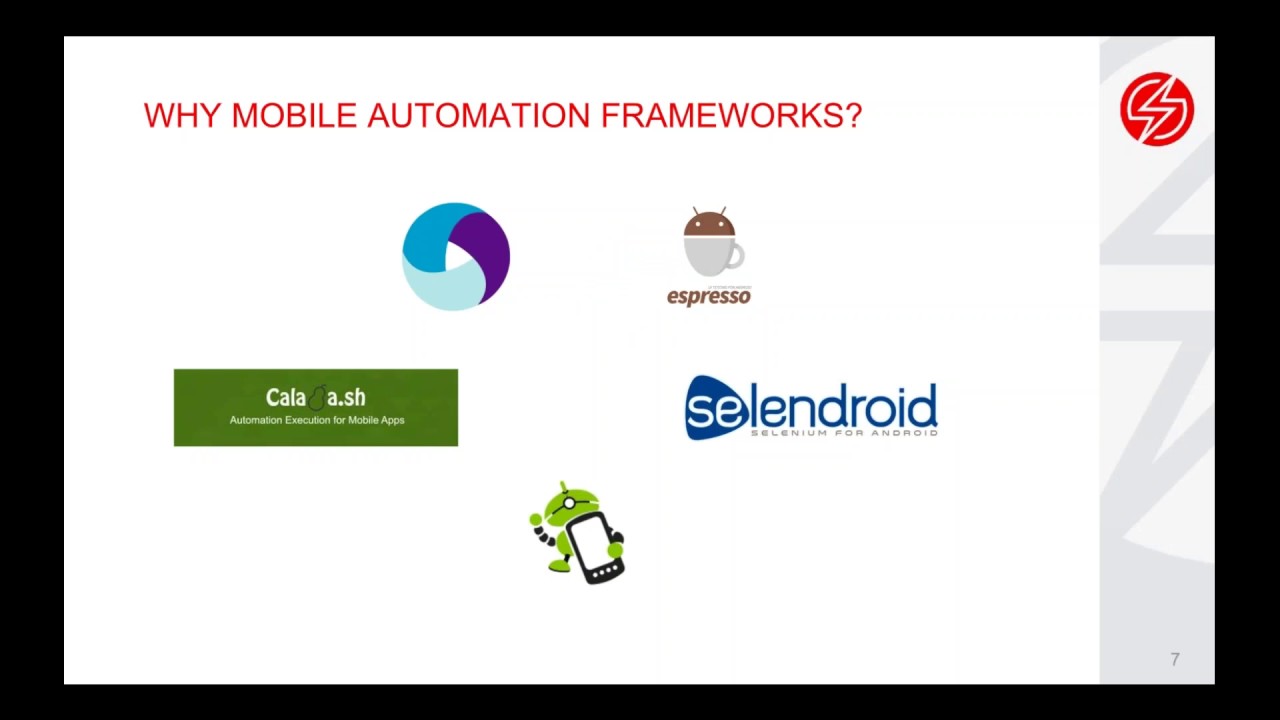
Family of Open Test Framework for Android App Automation
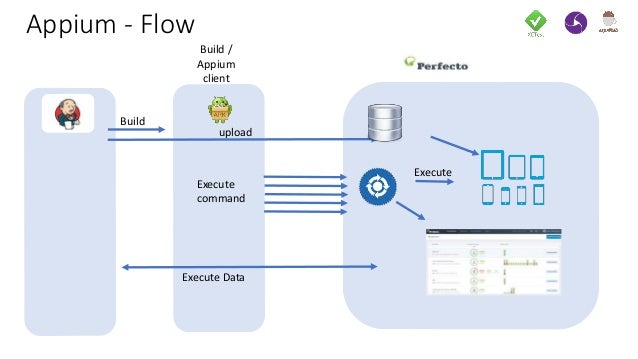
Appium vs Espresso and XCUI Test
Continuous testing on emulators using the espresso test automation framework
Top 5 Android UI Frameworks for Automation Testing


  • Key Differentiators


Espresso is inside the application, and is written by Google for the sole purpose of functional testing of an Android UI. In terms of testing style, the Espresso description mentions “white box testing.” As Espresso is inside the application, it has access to and knows how to use the code that actually runs the application for more thorough testing of each element.

Appium is designed to be a cross-platform test platform. As such, one of the trade-offs focuses on “black box testing” which only tests what has been exposed externally to the application. Using the Android UIAutomator framework, Appium can access all the UI elements that a user will see
https://saucelabs.com/blog/appium-vs-espresso
  • OWASP Mobile Security Testing Guide

Mobile Security Testing Guide (MSTG)
the MSTG is a comprehensive manual for mobile app security testing and reverse engineering for iOS and Android mobile security testers with the following content:
Mobile platform internals
Security testing in the mobile app development lifecycle
Basic static and dynamic security testing
Mobile app reverse engineering and tampering
Assessing software protections
Detailed test cases that map to the requirements in the MASVS.

https://www.owasp.org/index.php/OWASP_Mobile_Security_Testing_Guide

  • Built on the top of Selenium and Appium, Katalon Studio is a free and powerful automated testing tool for Web testing, API testing, and Mobile testing


https://www.katalon.com/

GUI

  • JFace
JFace is a UI toolkit with classes for handling many common UI programming tasks. JFace is window-system-independent in both its API and implementation, and is designed to work with SWT without hiding it.
http://wiki.eclipse.org/index.php/JFace

  • Struts Tiles
Struts Tiles component is a templating system. (Include on steriods.) It can be used to create a common look and feel for a web application. Tiles can also be used to create reusable view components.
http://struts.apache.org/1.x/struts-tiles/

Thursday, October 6, 2011

AJAX Frameworks

  • Dojo Toolkit
Dojo saves you time, delivers powerful performance, and scales with your development process. It’s the toolkit experienced developers turn to for building superior desktop and mobile web experiences
http://dojotoolkit.org/

  • GWT (Google Web Toolkit)

Google Web Toolkit (GWT) is a development toolkit for building and optimizing complex browser-based applications
http://code.google.com/webtoolkit/

  • Wicket

With proper mark-up/logic separation, a POJO data model, and a refreshing lack of XML, Apache Wicket makes developing web-apps simple and enjoyable again
http://wicket.apache.org/
http://www.youtube.com/watch?v=AB8fotMumW4

  • jQuery
jQuery is a cross-browser JavaScript library designed to simplify the client-side scripting of HTML
http://en.wikipedia.org/wiki/JQuery

jQuery is a JavaScript Library.
jQuery greatly simplifies JavaScript programming.
jQuery is easy to learn.
 http://www.w3schools.com/jquery/default.asp


jQuery is a fast and concise JavaScript Library that simplifies HTML document traversing, event handling, animating, and Ajax interactions for rapid web development
http://jquery.com/


  • AJAX = Asynchronous JavaScript and XML.
AJAX is not a new programming language, but a new way to use existing standards.
AJAX is the art of exchanging data with a server, and updating parts of a web page - without reloading the whole page.
 http://www.w3schools.com/ajax/default.asp

Ajax (also AJAX acronym for Asynchronous JavaScript and XML) is a group of interrelated web development techniques used on the client-side to create asynchronous web applications.
With Ajax, web applications can send data to, and retrieve data from, a server asynchronously (in the background) without interfering with the display and behavior of the existing page.
Data can be retrieved using the XMLHttpRequest object.
Despite the name, the use of XML is not required (JSON is often used instead), and the requests do not need to be asynchronous.
http://en.wikipedia.org/wiki/Ajax_%28programming%29


  • JSON 

JSON (JavaScript Object Notation) is a lightweight data-interchange format.
It is easy for humans to read and write. It is easy for machines to parse and generate.
It is based on a subset of the JavaScript Programming Language
http://www.json.org/


JSON
JSON or JavaScript Object Notation, is a text-based open standard designed for human-readable data interchange. It is derived from the JavaScript scripting language for representing simple data structures and associative arrays, called objects.
Despite its relationship to JavaScript, it is language-independent, with parsers available for many languages.
http://en.wikipedia.org/wiki/JSON


  • Vaadin
Vaadin is a web application framework for Rich Internet Applications (RIA). In contrast to Javascript libraries and browser-plugin based solutions, it features a robust server-side architecture. This means that the largest part of the application logic runs securely on the server. Google Web Toolkit (GWT) is used on the browser side to ensure a rich and fluent user experience.
https://vaadin.com


  • jsoup

Java HTML Parser.jsoup is a Java library for working with real-world HTML. It provides a very convenient API for extracting and manipulating data, using the best of DOM, CSS, and jquery-like methods.
http://jsoup.org/


  • ExtJS

Ext JS (pronounced E-X-T-J-S) is a JavaScript library for building interactive web applications[1] using techniques such as Ajax, DHTML and DOM scripting.
http://en.wikipedia.org/wiki/Ext_JS


  • Sencha Ext JS JavaScript Framework for Rich Apps in Every Browser
With an advanced MVC architecture, plugin-free charting, and modern UI widgets, Sencha Ext JS is the industry's most powerful desktop application development platform. Sencha Ext JS provides unparalleled cross-browser compatibility enabling you to develop incredible web apps for any browser.

http://www.sencha.com/products/extjs/


  • ZK Framework

A Java Web framework for building rich Ajax and mobile applications.
http://www.zkoss.org/


  • Apache Shindig

Apache Shindig's goal is to allow new sites to start hosting social apps in under an hour's worth of work. Apache Shindig is a container for hosting social application consisting of four parts
http://shindig.apache.org/


  • WaveMaker

WaveMaker is a visual development tool that lets everyone quickly build and deploy great-looking web and cloud applications. With WaveMaker, you can build a complete, 3-tier web application in minutes
http://www.wavemaker.com/


  • Eureka Streams

Eureka Streams is a free, open source enterprise social networking platform developed by Lockheed Martin.
Activity streams and gadgets make up its core functionality. Content within Eureka Streams consists primarily of microblogs and internal and external web feeds.
Users typically provide links to other content, such as wikis, blogs, and shared documents housed in a content management system.
https://en.wikipedia.org/wiki/Eureka_Streams

Eureka Streams Documentation
http://eurekastreams.org/


  • Kendo UI
Comprehensive HTML5, JavaScript framework for modern web and mobile app development
http://www.kendoui.com/


  • AngularJS 

Other frameworks deal with HTML’s shortcomings by either abstracting away HTML, CSS, and/or JavaScript or by providing an imperative way for manipulating the DOM. Neither of these address the root problem that HTML was not designed for dynamic views.
AngularJS is a toolset for building the framework most suited to your application development
http://angularjs.org/


  • EmberJS

Ember makes Handlebars templates even better, by ensuring your HTML stays up-to-date when the underlying model changes. To get started, you don't even need to write any JavaScript.
http://emberjs.com/


  • Backbone.js

Backbone.js gives structure to web applications by providing models with key-value binding and custom events, collections with a rich API of enumerable functions, views with declarative event handling, and connects it all to your existing API over a RESTful JSON interface.

http://backbonejs.org/

Backbone.js is basically an uber-light framework that allows you to structure your Javascript code in an MVC(Model, View, Controller)
Model is part of your code that retrieves and populates the data
View is the HTML representation of this model(views change as models change, etc)
Controller that in this case allows you to save the state of your javascript application via a hashbang url

http://stackoverflow.com/questions/5418369/what-is-the-purpose-of-backbone-js


  • knockout.js helps you simplify dynamic JavaScript UIs using the Model-View-ViewModel (MVVM) pattern.
http://knockoutjs.com/

JSF Technologies

  • JSF(Java Server FaceS)

JavaServer Faces technology establishes the standard for building server-side user interfaces
http://www.oracle.com/technetwork/java/javaee/javaserverfaces-139869.html

  • Prime Faces

PrimeFaces is a lightweight open source component suite for Java Server Faces 2.0 featuring 100+ rich set of JSF components
http://www.primefaces.org/

  • RichFaces

The RichFaces project is an advanced UI component framework for easily integrating Ajax capabilities into business applications using JSF.
http://www.jboss.org/richfaces

  • ICEfaces

As a leading open source Ajax framework, ICEfaces is more than a Ajax JSF component library, it's an J2EE Ajax framework for developing and deploying rich enterprise applications (REAs).
http://www.icefaces.org/main/home/


  • Apache MyFaces is a project of the Apache Software Foundation, and hosts several sub-projects relating to the JavaServer™ technology. If you want to know more about how JavaServer™ Faces works, take a look at the MyFaces introduction to JSF


The Apache MyFaces project provides:

    a JavaServer™ Faces implementation (MyFaces Core, providing api/impl and bundle modules)
    several component libraries containing UI widgets for building web-applications with JSF (e.g. MyFaces Tomahawk, MyFaces Trinidad, MyFaces Tobago)
    extension packages to JavaServer™ Faces (e.g. MyFaces Orchestra, MyFaces Extensions Validator, MyFaces Extensions CDI)
    integration modules to other technologies and standards (e.g. MyFaces Portlet Bridge for integration with the portlet-standard)

http://myfaces.apache.org/


  • MyFaces Tomahawk

MyFaces provides a series of JSF components that go beyond the JSF specification. These components are 100% compatible with the Sun JSF 1.1 Reference Implementation (RI) or any other JSF 1.1 compatible implementation. Of course the custom components can also be used with the Apache MyFaces JSF implementation.

Although we try to make Tomahawk as "portable" as possible, not all Tomahawk releases are compatible with all MyFaces or Sun Mojarra (formerly RI) releases. A Tomahawk release is always compatible with the latest MyFaces Core release available at the time that Tomahawk version was released
http://myfaces.apache.org/tomahawk/index.html


  • MyFaces Trinidad

Apache MyFaces Trinidad is a JSF framework including a large, enterprise quality component library, supporting critical features such as accessibility (e.g. Section 508), right-to-left languages, etc. It also includes a set of framework features, including :

    Partial-page rendering support for the entire component set
    Integrated client-side validation
    A dialog framework
    pageFlowScope, for communicating between pages

Apache MyFaces Trinidad currently supports the following JSF versions:

    JSF 1.1: supported by the Apache MyFaces Trinidad 1.0.x line
    JSF 1.2: supported by the Apache MyFaces Trinidad 1.2.x line
    JSF 2.0: supported by the Apache MyFaces Trinidad 2.0.x line

http://myfaces.apache.org/trinidad/index.html


  • Apache Tobago

The goal of Apache Tobago™ is to provide the community with a well designed set of user interface components based on JSF and run on MyFaces.

Tobago is more than just a tag library. The following statements characterize Tobago and make it different from other frameworks:

    The focus of Tobago is to create business applications without the need for HTML design. The development of Tobago pages follows more the development of conventional user interfaces than the creation of web pages.
    The UI components are abstracted from HTML and any layout information that does not belong to the general page structure. The final output format is determined by the client/user-agent.
    A theming mechanism makes it easy to change the look and feel and to provide special implementations for certain browsers. A fallback solution ensures that as much code is reused for new themes as possible.
    A layout manager is used to arrange the components automatically. This means, no manual laying out with HTML tables or other constructs is needed.

http://myfaces.apache.org/tobago/index.html


  • Apache Tiles

Apache Tiles is a templating framework built to simplify the development of web application user interfaces.
Tiles allows authors to define page fragments which can be assembled into a complete page at runtime. These fragments, or tiles, can be used as simple includes in order to reduce the duplication of common page elements or embedded within other tiles to develop a series of reusable templates. These templates streamline the development of a consistent look and feel across an entire application.
Tiles grew in popularity as a component of the popular Struts framework. It has since been extracted from Struts
http://tiles.apache.org/


  • Shale Framework

Shale is a modern web application framework, fundamentally based on JavaServer Faces. Architecturally, Shale is a set of loosely coupled services that can be combined as needed to meet particular application requirements. Shale provides additional functionality such as application event callbacks, dialogs with conversation-scoped state, a view technology called Clay, annotation-based functionality to reduce configuration requirements and support for remoting. Shale also provides integration links for other frameworks, to ease development when combinations of technologies are required.
http://shale.apache.org/

Rich, Thin,Thick client

  • fat (heavy, rich,thick) client 


A fat client (also called heavy, rich, or thick client) is a computer (client) in client–server architecture or networks that typically provides rich functionality independent of the central server. Originally known as just a "client" or "thick client"[1] the name is contrasted to thin client, which describes a computer heavily dependent on a server's applications.

http://en.wikipedia.org/wiki/Fat_client

  • Rich Client

The Rich Client mixes the characteristics of classical web applications and RIAs.
The web application is client-centric (i.e. the user interface is loaded to client at the start of the application).
The view uses HTML widgets, thus no plugin is required.
Contrary to RIAs, the goal of a Rich Client is NOT to offer a modern looking user interface, but to improve the usability of an already widespread and accepted view

http://www.kai-waehner.de/blog/2010/12/30/categorization-of-web-frameworks-in-the-java-environment/


  • What is a thin client?

A thin client is a lightweight interface to the application that does not have such operations like query databases, execute complex business rules, or connect to  legacy applications.


  • Thick vs. Thin Client Applications

A thin client machine is going to communicate with a central processing server, meaning there is little hardware and software installed on the user's machine. At times, thin may be defined as simply not needing the software or operating system installed on the user machine. This allows all end users' systems to be centrally managed and software deployed on a central server location as opposed to installed on each individual system.
Thin clients are really best-suited to environments in which the same information is going to be accessed by the clients, making it a better solution for public environments. For this reason, thin clients are often deployed in hotels and airports, where installing software to all systems wouldn't make sense. It would be a massive headache for IT to both deploy and maintain.

When using thin clients, compared to a feature-rich desktop PCs today, they often tend to look a bit primitive and outdated. Since many thin clients run on very little hardware, it is impossible to incorporate rich graphical user interfaces. To use the client, an input device (keyboard) and viewing device (display) is usually the basic requirements. Some may not even require a mouse.

In contrast, a thick client will provide users with more features, graphics and choices making the applications more customizable. Unlike thin clients, thick clients do not rely on a central processing server because the processing is done locally on the user system, and the server is accessed primarily for storage purposes. For that reason, thick clients often are not well-suited for public environments. To maintain a thick client, IT needs to maintain all systems for software deployment and upgrades, rather than just maintaining the applications on the server.  Additionally, thick clients often require operating specific applications, again posing more work and limitations for deployment. The trade-off is a more robust and local computing environment.


http://www.webopedia.com/DidYouKnow/Hardware_Software/2006/thin_client_applications.as


Database Products

  • sqlite db
SQLite is a software library that implements a self-contained, zero-configuration, transactional SQL database engine.
http://www.sqlite.org/

  • Borland Interbase
Easy installation, small footprint, automatic crash recovery, self-tuning, Unicode, SMP support, SQL 92 compliance, and near zero maintenance makes InterBase 2007 the ideal database for embedded and business-critical small-to-medium enterprise server applications
http://www.borland.com/fr/products/interbase/index.html

  • MariaDB
MariaDB is a database server that offers drop-in replacement functionality for MySQL. MariaDB is built by some of the original authors of MySQL, with assistance from the broader community of Free and open source software developers
http://mariadb.org/


  • Versant

The Versant Object Oriented Database can be customized for your application architecture and production environment based on the particular requirements.
http://www.versant.com/products/Versant_Database_Engine.aspx


Wednesday, October 5, 2011

VA-Scanner vulnerability assessment (VA)

  • nmap

Nmap Free Security Scanner For Network Exploration & Hacking

http://nmap.org/

  • Closed Port: If you send a SYN to a closed port, it will respond back with a RST.
Filtered Port: Presumably, the host is behind some sort of firewall. Here, the packet is simply dropped and you receive no response (not even a RST).
Open Port: If you send a SYN to an open port, you would expect to receive SYN/ACK.

http://www.madhur.co.in/blog/2011/09/18/filteredclosed.html

  • The six port states recognized by Nmap

open
An application is actively accepting TCP connections, UDP datagrams or SCTP associations on this port. Finding these is often the primary goal of port scanning. Security-minded people know that each open port is an avenue for attack. Attackers and pen-testers want to exploit the open ports, while administrators try to close or protect them with firewalls without thwarting legitimate users. Open ports are also interesting for non-security scans because they show services available for use on the network


closed
A closed port is accessible (it receives and responds to Nmap probe packets), but there is no application listening on it. They can be helpful in showing that a host is up on an IP address (host discovery, or ping scanning), and as part of OS detection. Because closed ports are reachable.Administrators may want to consider blocking such ports with a firewall

filtered
Nmap cannot determine whether the port is open because packet filtering prevents its probes from reaching the port. The filtering could be from a dedicated firewall device, router rules, or host-based firewall software. These ports frustrate attackers because they provide so little information. Sometimes they respond with ICMP error messages such as type 3 code 13 (destination unreachable: communication administratively prohibited), but filters that simply drop probes without responding are far more common. This forces Nmap to retry several times just in case the probe was dropped due to network congestion rather than filtering. This slows down the scan dramatically

https://nmap.org/book/man-port-scanning-basics.html
  • Metasploit integrates with Nexpose to verify vulnerabilities
https://www.metasploit.com/
  • Microsoft Baseline Security Analyzer 2.3
The Microsoft Baseline Security Analyzer provides a streamlined method to identify missing security updates and common security misconfigurations.,
https://docs.microsoft.com/en-us/windows/security/threat-protection/mbsa-removal-and-guidance


  • Nessus is the most trusted vulnerability scanning platform for auditors and security analysts. Users can schedule scans across multiple scanners, use wizards to easily and quickly create policies, schedule scans and send results via email.
http://www.tenable.com/products/nessus/select-your-operating-system#tos 


  • Lynis is an open source security auditing tool. Used by system administrators, security professionals, and auditors, to evaluate the security defenses of their Linux/Unix-based systems.

https://cisofy.com/lynis/

Unified Communications Systems

  • Microsoft Lync
Microsoft Lync Server (previously Microsoft Office Communications Server) is an enterprise real-time communications server, providing the infrastructure for enterprise instant messaging, presence, file transfer, peer-to-peer and multiparty voice and video calling, ad hoc and structured conferences (audio, video and web) and, through a 3rd party gateway or SIP trunk, PSTN connectivity.
http://en.wikipedia.org/wiki/Microsoft_Lync_Server
http://lync.microsoft.com/en-us/Pages/default.aspx

Business Intelligence

  • IBM Cognos
Cognos Business Intelligence software to gain a complete perspective of their business and to understand performance and Cognos Financial Performance Management to set targets and allocate the resources to achieve them
http://www-01.ibm.com/software/analytics/cognos/

  • SAP Business Objects
functionality that can streamline your business processes and help you manage your enterprise – so you can focus on sustainable growth.
http://www.sap.com/solutions/sapbusinessobjects/index.epx

  • Oracle Hyperion
In 2007, Oracle acquired Hyperion, a leading provider of performance management software.

After the acquisition, we introduced a new product family called Oracle Business Intelligence Enterprise Edition Plus.This integrated suite includes all of the Oracle and Hyperion reporting and analysis tool
http://www.oracle.com/us/corporate/Acquisitions/hyperion/index.html?origref=http://www.google.com/search?q=oracle+hyperion&ie=utf-8&oe=utf-8&aq=t&rls=org.mozilla:en-US:official&client=firefox-a

In 2010, we released Oracle Business Intelligence 11g
http://www.oracle.com/us/corporate/press/143363


  • Oracle Essbase
Oracle Essbase is the industry-leading multi-dimensional online analytical processing (OLAP) server, providing a rich environment for effectively developing custom analytic and enterprise performance management applications
http://www.oracle.com/us/solutions/ent-performance-bi/business-intelligence/essbase/index.html


  • What is business intelligence?
Business intelligence (BI) simplifies information discovery and analysis, making it possible for decision-makers at all levels of an organization to more easily access, understand, analyze, collaborate, and act on information, anytime and anywhere
http://technet.microsoft.com/en-us/library/cc811595%28v=office.12%29.aspx


Business intelligence
Business intelligence (BI) is a set of theories, methodologies, architectures, and technologies that transform raw data into meaningful and useful information for business purposes

Business Intelligence is made up of an increasing number of components

    Multidimensional aggregation and allocation
    Denormalization, tagging and standardization
    Realtime reporting with analytical alert
    Interface with unstructured data source
    Group consolidation, budgeting and rolling forecast
    Statistical inference and probabilistic simulation
    Key performance indicators optimization
    Version control and process management
    Open item management
   
    Common functions of business intelligence technologies are reporting, online analytical processing, analytics, data mining, process mining, complex event processing, business performance management, benchmarking, text mining, predictive analytics and prescriptive analytics.
   
    Business intelligence and data warehousing
    Often BI applications use data gathered from a data warehouse or a data mart.
    A data warehouse is a copy of analytical data that facilitates decision support. However, not all data warehouses are used for business intelligence, nor do all business intelligence applications require a data warehouse.
   
http://en.wikipedia.org/wiki/Business_intelligence

  •  Qlikview
The QlikView Business Discovery platform delivers true self-service BI that empowers business users by driving innovative decision-making.
http://www.qlik.com/us/explore/products/qlikview

  • Birst
2-Tier BI and Analytics is a fundamentally new approach to enterprise BI. It leverages Birst’s unique 2-Tier BI and Analytics technology, which automatically unifies and refines all data across your enterprise, whether generated by de-centralized business users or centralized BI teams and systems.
https://www.birst.com/product/

Tuesday, October 4, 2011

Web Application Software

  • Microsoft IIS
http://www.iis.net/overview

  • IBM Websphere
http://www-01.ibm.com/software/websphere/

  • Oracle WebLogic Server
http://www.oracle.com/technetwork/middleware/weblogic/overview/index.html


  • Apache Tomcat
http://tomcat.apache.org

  • The Apache Software
http://www.apache.org/

  • Apache Geronimo

Apache Geronimo is an open source application server developed by the Apache Software Foundation and distributed under the Apache license.
Geronimo 2 is currently compatible with the Java Enterprise Edition (Java EE) 5.0 specification such as JDBC, RMI, e-mail, JMS, web services, XML, Enterprise JavaBeans, Connectors, servlets, portlets and JavaServer Pages.
This allows developers to create enterprise applications that are portable and scalable, and that integrate with legacy technologies. Geronimo 3 is compatible with Java EE 6.0.
http://en.wikipedia.org/wiki/Apache_Geronimo


Apache Geronimo
Apache Geronimo is an open source server runtime that integrates the best open source projects to create Java/OSGi server runtimes that meet the needs of enterprise developers and system administrators.
Our most popular distribution is a fully certified Java EE 6 application server runtime.
http://geronimo.apache.org/


  • JBoss AS 7

Boss Enterprise Application Platform (EAP) is the productized version of JBoss Application Server (AS)
http://www.jboss.org/jbossas


  • Jetty
Jetty provides an HTTP server, HTTP client, and javax.servlet container. These components are open source and available for commercial use and distribution
http://jetty.codehaus.org/jetty/

  • Glassfish
Free community-supported application server
http://glassfish.java.net/


  • nginx

NGINX functionality includes HTTP server, HTTP and mail reverse proxy, caching, load balancing, compression, request throttling, connection multiplexing and reuse, SSL offload and HTTP media streaming

http://nginx.com/
http://nginx.org/


  • LAMP

David Axmark and Monty Widenius of the MySQL team visited us in Sebastopol and they dropped a new term in our laps: LAMP. This term was popular in Germany, they said, to define how MySQL was used in conjunction with Linux, Apache, and either Perl, Python, or PHP. Their explanation of LAMP made a lightbulb go off in my head.
http://onlamp.com/pub/a/onlamp/2001/01/25/lamp.html


  • mod_perl

mod_perl  is more than CGI scripting
It is a whole new way to create dynamic content by utilizing the full power of the Apache web server to create stateful sessions, customized user authentication systems, smart proxies and much more
magically, your old CGI scripts will continue to work and work very fast indeed
mod_perl gives you a persistent Perl interpreter embedded in your web server

http://perl.apache.org/


  • CGI

The Common Gateway Interface (CGI) is a standard method for web server software to delegate the generation of web pages to executable files.
Such files are known as CGI scripts; they are programs, often stand-alone applications, usually written in a scripting language.
A web server that supports CGI can be configured to interpret a URL that it serves as a reference to a CGI script
A common convention is to have a cgi-bin/ directory at the base of the directory tree and treat all executable files within it as CGI scripts
Another popular convention is to use filename extensions; for instance, if CGI scripts are consistently given the extension .cgi, the web server can be configured to interpret all such files as CGI scripts.
In the case of HTTP PUT or POSTs, the user-submitted data is provided to the program via the standard input. The web server creates a small and efficient subset of the environment variables passed to it and adds details pertinent to the execution of the program.

http://en.wikipedia.org/wiki/Common_Gateway_Interface


  • Apache Felix

Apache Felix is a community effort to implement the OSGi R4 Service Platform and other interesting OSGi-related technologies under the Apache license
https://felix.apache.org/


  • lighttpd

Security, speed, compliance, and flexibility -- all of these describe lighttpd (pron. lighty) which is rapidly redefining efficiency of a webserver; as it is designed and optimized for high performance environments. With a small memory footprint compared to other web-servers, effective management of the cpu-load, and advanced feature set (FastCGI, SCGI, Auth, Output-Compression, URL-Rewriting and many more) lighttpd is the perfect solution for every server that is suffering load problems.
http://www.lighttpd.net


what is snmp? how is it used?

  • what's snmp?
Simple Network Management Protocol (SNMP) is an "Internet-standard protocol for managing devices on IP networks. Devices that typically support SNMP include routers, switches, servers, workstations, printers, modem racks, and more. It is used mostly in network management systems to monitor network-attached devices for conditions that warrant administrative attention
http://en.wikipedia.org/wiki/Simple_Network_Management_Protocol


  • Mibble MIB Parser
An open-source SNMP MIB parser library for Java.
http://www.mibble.org/download/stable/index.html

  • MIB Browser Free Personal Edition
http://ireasoning.com/downloadmibbrowserfree.php


  • IT organizations can typically rely on having access to management data from SNMP MIBs on network devices such as switches and routers. SNMP data, however, does not provide the network manager with information about the applications involved, the servers the data is coming from or the user to whom the data is being delivered. In addition, SNMP data does not provide any insight into such things as class of service, which is important for QoS management.
For more granular information, many organizations turn to NetFlow. Within NetFlow, a flow is defined as a unidirectional sequence of packets between a given source and destination. Flow-based analysis can then be used to perform tasks such as quantifying overall link utilization and identifying which network users or applications are consuming bandwidth. In particular, flow-based analysis contains information that gives the IT organization answers to questions such as:

    Where does the traffic originate? Who’s affected?
    What application is involved? Is it one of the critical applications that business managers care about?
    How much traffic has been transmitted?
NetFlow, however, has its limitations. For example, NetFlow cannot provide real-time insight into the operations of the network.
http://enterprise.netscout.com/The-Importance-of-Flow-Based-Monitoring
  • MIB browsers equip you to keep tabs on your SNMP-enabled devices and to quickly troubleshoot issues before they affect your end users. Using an MIB browser to troubleshoot SNMP issues—for example, by querying SNMP variables on the devices you’re using, assessing response times, or checking whether a variable has been implemented at all—can help ensure all of your SNMP-enabled devices are available and functioning well at all times.

https://www.dnsstuff.com/mib-browsers