Monday, July 29, 2019

workload managers

Slurm and Moab
Slurm and Moab are two workload manager systems that have been used to schedule and manage user jobs run on Livermore Computing (LC) clusters. Currently, LC runs Slurm natively on most clusters, and provides Moab "wrappers" now that Moab has been decommissioned. This tutorial presents the essentials for using Slurm and Moab wrappers on LC platforms

What is a Workload Manager?
The typical LC cluster is a finite resource that is shared by many users.
In the process of getting work done, users compete for a cluster's nodes, cores, memory, network, etc.
In order to fairly and efficiently utilize a cluster, a special software system is employed to manage how work is accomplished.
Commonly called a Workload Manager. May also be referred to (sometimes loosely) as:
Batch system
Batch scheduler
Workload scheduler
Job scheduler
Resource manager (usually considered a component of a Workload Manager)
Tasks commonly performed by a Workload Manager:
Provide a means for users to specify and submit work as "jobs"
Evaluate, prioritize, schedule and run jobs
Provide a means for users to monitor, modify and interact with jobs
Manage, allocate and provide access to available machine resources
Manage pending work in job queues
Monitor and troubleshoot jobs and machine resources
Provide accounting and reporting facilities for jobs and machine resources
Efficiently balance work over machine resources; minimize wasted resources
https://computing.llnl.gov/tutorials/moab/
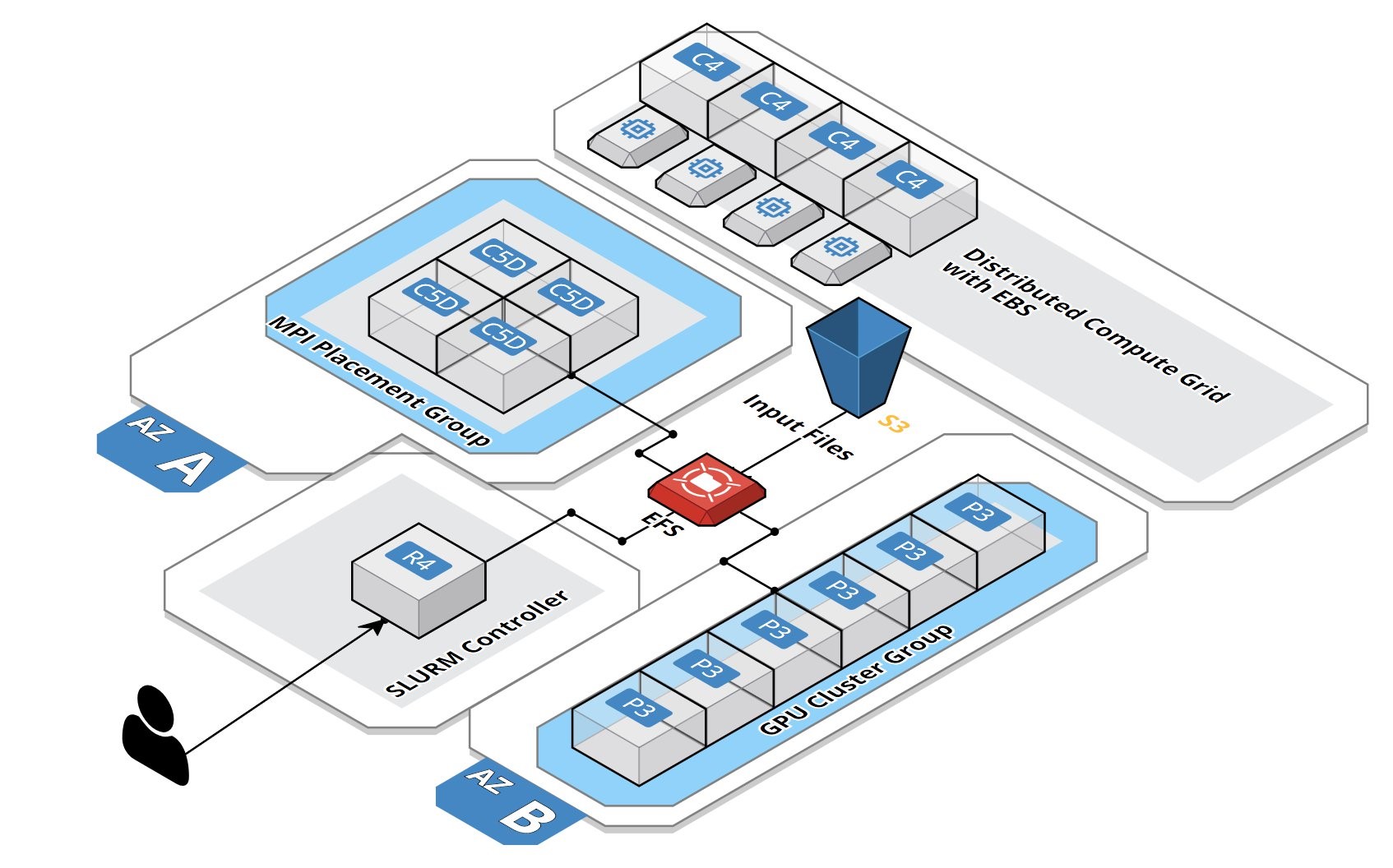
Deploying a Burstable and Event-driven HPC Cluster on AWS Using SLURM, Part 1
Google Codelab for creating two federated Slurm clusters on Google Cloud Platform
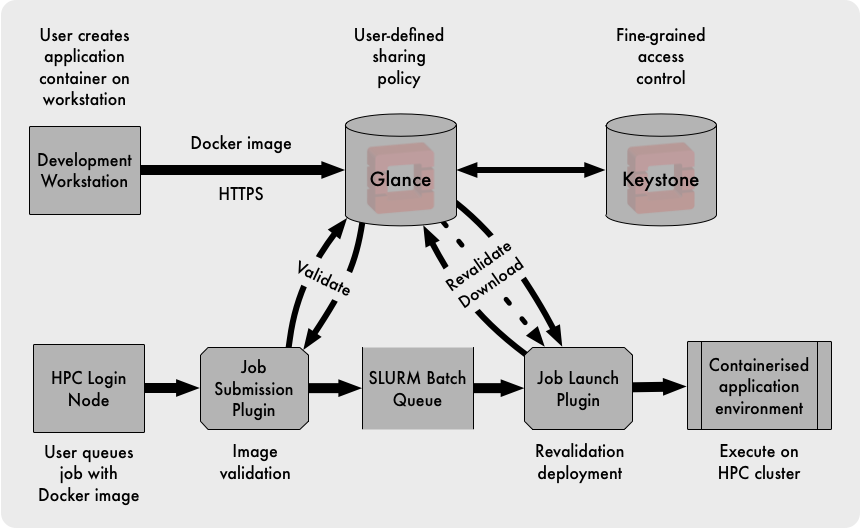
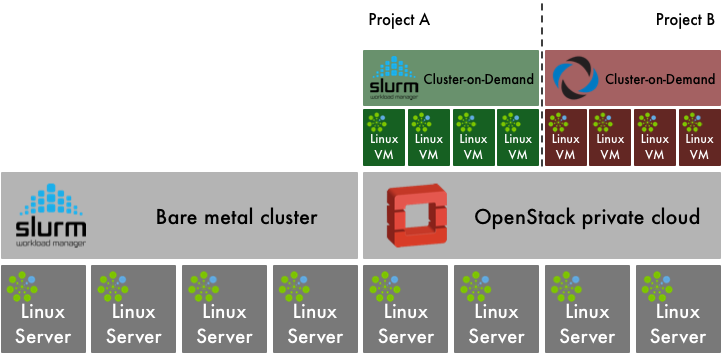
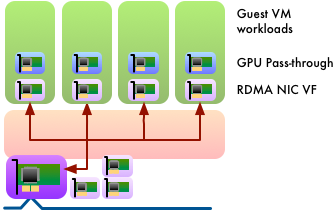
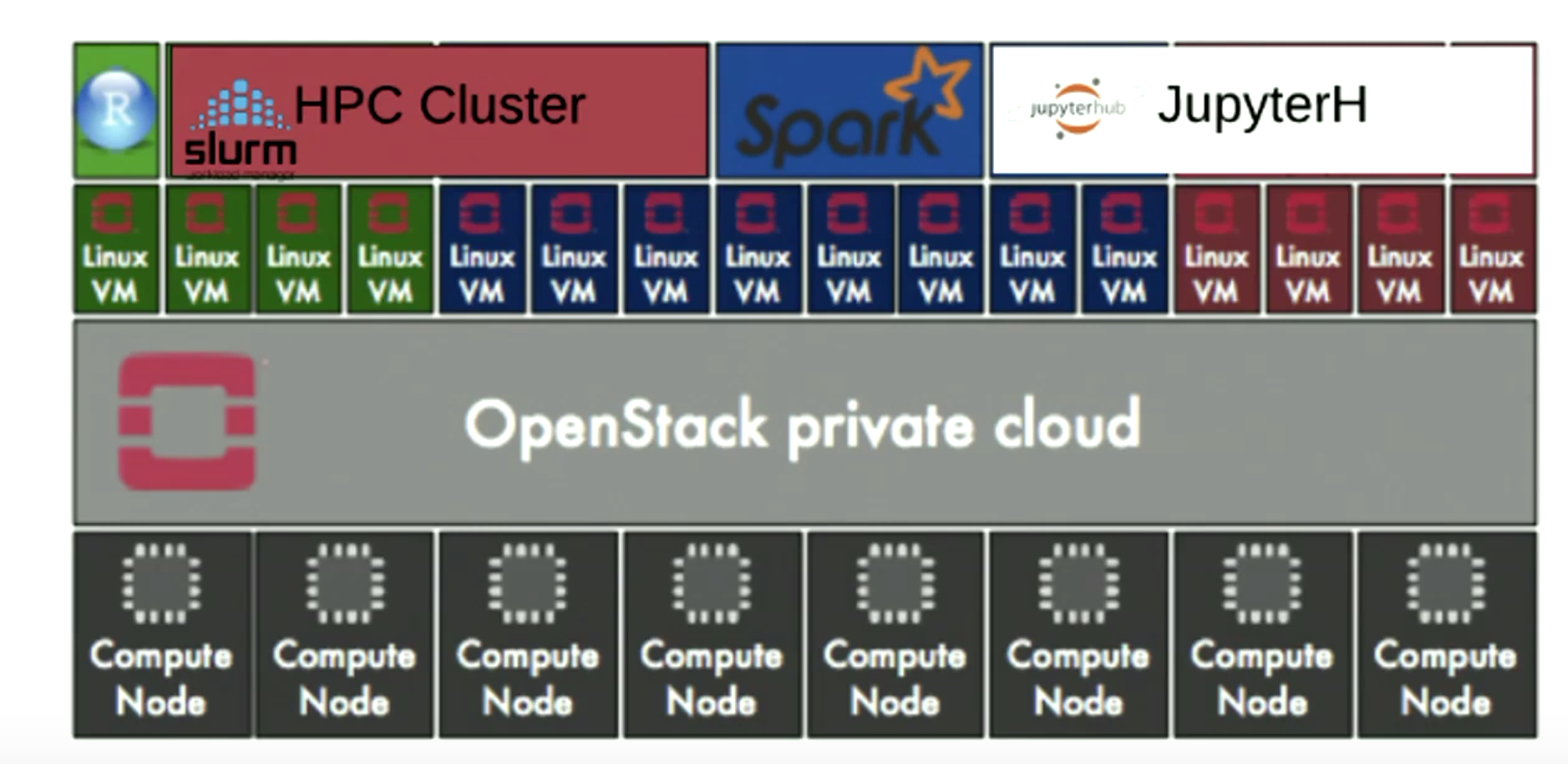
OpenStack and HPC Workload Management
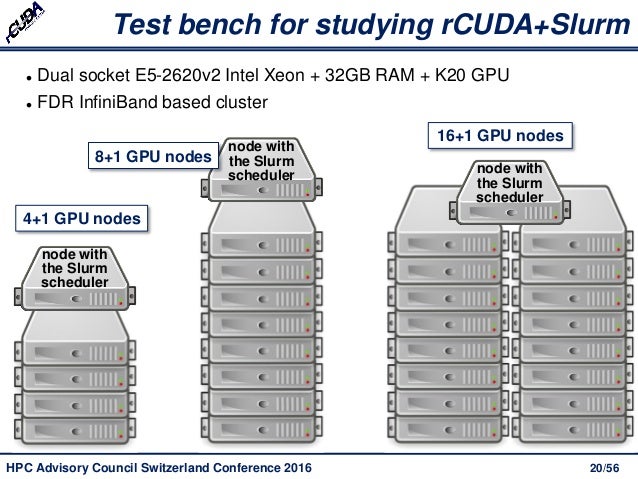
Increasing Cluster Performance by Combining rCUDA with Slurm
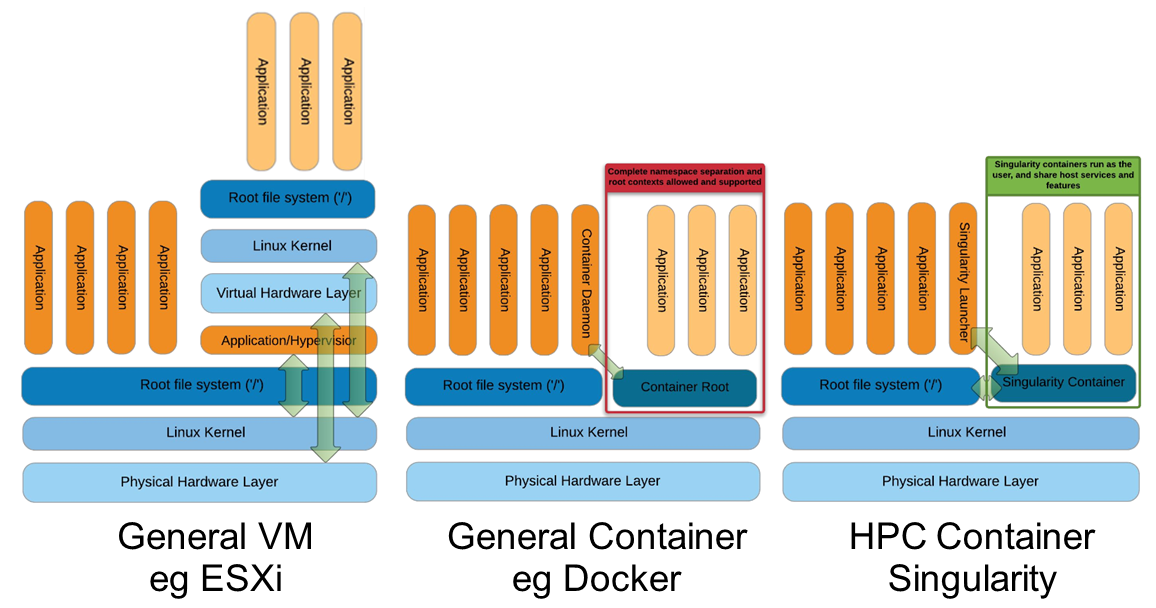
Docker vs Singularity vs Shifter in an HPC environment
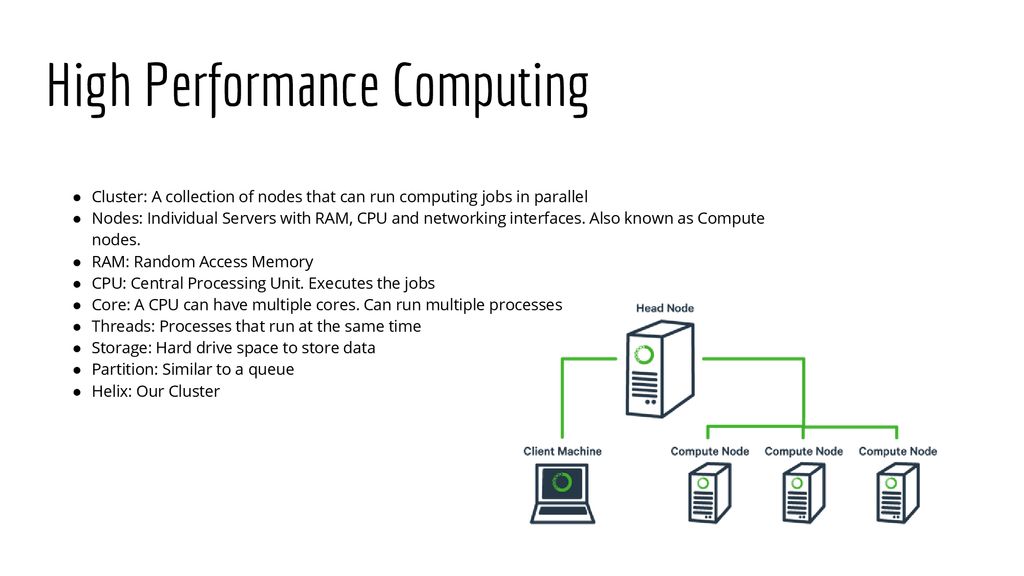
Helix - HPC/SLURM Tutorial


  • SchedMD® is the core company behind the Slurm workload manager software, a free open-source workload manager designed specifically to satisfy the demanding needs of high performance computing. 

https://www.schedmd.com/

  • Slurm vs Moab/Torque on Deepthought HPC clusters

Intro and Overview: What is a scheduler?
A high performance computing (HPC) cluster (hereafter abbreviated HPCC) like the Deepthought clusters consists of many compute nodes, but at the same time have many users submitting many jobs, often very large jobs. The HPCC needs a mechanism to distribute jobs across the nodes in a reasonable fashion; this is the task of a program called a scheduler.
This is a complicated tasks: the various jobs can have various requirements e.g. CPU, memory, diskspace, network transportation, etc. ) as well as differing priorities. And because we want to enable large parallel jobs to run, the scheduler needs to be able to reserve nodes for larger jobs (i.e. if an user submits a job requiring 100 nodes, and only 90 nodes are currently free, the scheduler might need to keep other jobs off the 90 free nodes in order that the 100 node job might eventually run). The scheduler must also account for nodes which are down, or have insufficient resources for a particular job, etc. As such, a resource manager is also needed (which can either be integrated with the scheduler or run as a separate program). The scheduler will also need to interface with an accounting system (which also can be integrated into the scheduler) to handle the charging of allocations for time used on the cluster.

The original Deepthought HPC cluster at the University of Maryland originally used the Maui scheduler for scheduling jobs, along with the Torque Resource Manager and the Gold Allocation Manager.
In 2009, we migrated to the Moab scheduler, still keeping Torque as our resource manager and Gold for allocation management.Moab derived from Maui, and so the user interface was mostly unchanged during this migration.
Slurm includes its own resource management and accounting system, so Torque and Gold are no longer used.

http://hpcc.umd.edu/hpcc/help/slurm-vs-moab.html
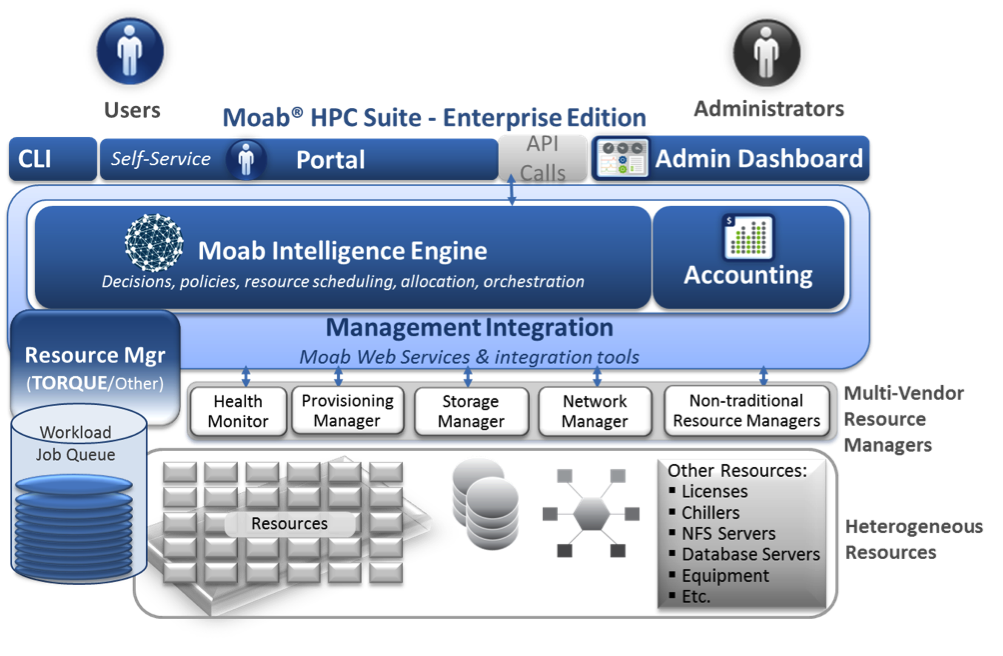
Intelligent HPC Workload Management Across Infrastructure and Organizational Complexity
Running computations on the Torque cluster
Workload Management in HPC and Cloud
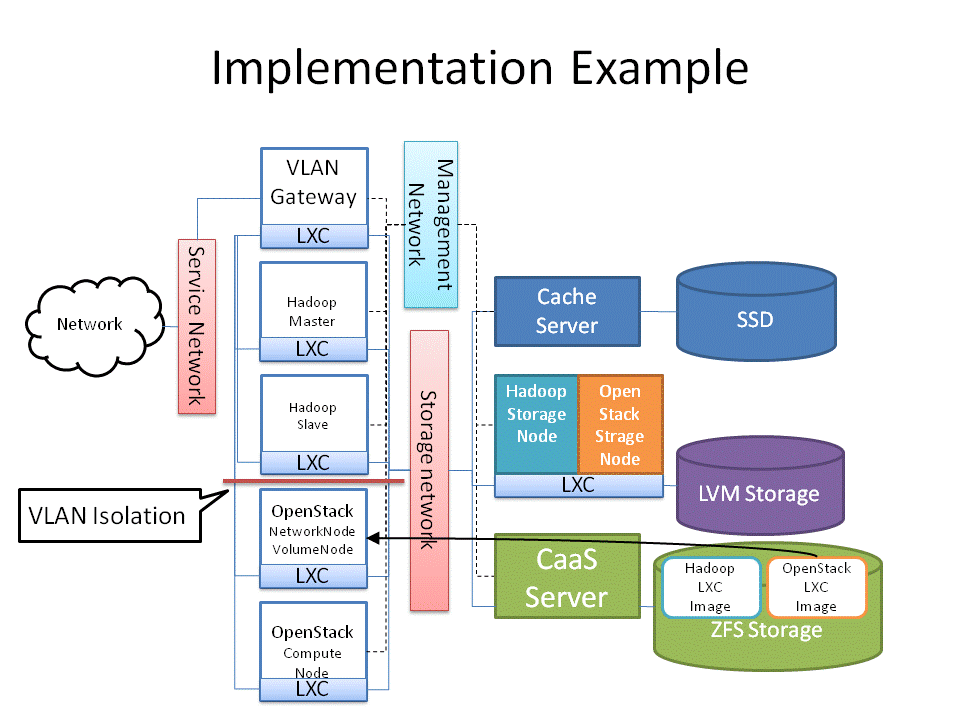
Cluster as a Service: Managing multiple clusters for openstack clouds and other diverse frameworks

Overview of the UL HPC Viridis cluster, with its OpenStack-based private Cloud setup.

OpenStack and Virtualised HPC
How the Vienna Biocenter powers HPC with OpenStack

Tuesday, July 9, 2019

How Emails Work

  • How Emails Work

First the sender needs to enter the email address of the recipient along with the message using an email application. This should be done at the local computers. Once it is finished and the “Send” button is clicked, the email will be going to the MTA (The Mail Transfer Agent). This communication is done via the SMTP protocol.

The next step is DNS lookup. The system sends a request to find out the corresponding MTA of the recipient. This will be done with the help of the MX record. In the DNS zone, for the receiver address’ domain, there will be an MX record (stands for Mail Exchanger record). This is a DNS resource record which specifies the mail server of a domain. So, after the DNS lookup, a response is given to the requested mail server with the IP address of the recipient’s mail server. This way the ‘to’ mail server is identified.

The next step is transferring the message between the mail servers. The SMTP protocol is used for this communication. Now our message is with the recipient mail server (MTA).

Now, this message is transferred to the Mail Delivery Agent and then it is transferred to the recipient’s local computer. As we have seen earlier, two protocols can be used here. If we use POP3, then the whole email will be downloaded to the local computer and the copy at the server gets deleted. If the protocol used is IMAP, then the email message is stored in the mail server itself, but the user can easily manipulate the emails on the mail server as in the local computer. This is the difference when using both the protocols and this is how your email gets delivered. If some error occurred to send the email, the emails will be delayed. There is a mail queue in every mail server. These mails will be pending in the mail queue. The mail server will keep trying to resend the email. Once the email sending fails permanently, the mail server may send a bounce back email message to the sender’s email address.

This explains why you maybe getting bounce back emails sometimes. The reason for bouncing back will be explained in the message. There are many reasons for getting an email to bounce back such as as incorrect email address in the ‘to’ field.
https://www.interserver.net/tips/kb/exactly-emails-works-steps-explanation/

  • What is SMTP?


SMTP is part of the application layer of the TCP/IP protocol. Using a process called "store and forward," SMTP moves your email on and across networks. It works closely with something called the Mail Transfer Agent (MTA) to send your communication to the right computer and email inbox.

SMTP spells out and directs how your email moves from your computer's MTA to an MTA on another computer, and even several computers. Using that "store and forward" feature mentioned before, the message can move in steps from your computer to its destination.
https://whatismyipaddress.com/smtp

  • 250 – This SMTP server response simply means everything went well and your message was delivered to the recipient server.

450 – Your message was not delivered because the other user mailbox was not available. This can happen if the mailbox is locked or is not routable
https://sendgrid.com/blog/smtp-server-response-codes-explained/

  • Mail servers can be expressed in DNS servers with the MX records. MX stands for Mail Exchanger. MX records specified the Domain name related mail server IP address. This mail server accepts mail with smtp protocol from senders.

https://www.poftut.com/linux-dig-command-tutorial-examples/


  • To retrieve domain MX records simply use MX option in combination to domain name you wish to query.

Use the +short option to retrieve only mail exchange (MX) records:

If you need to troubleshoot your own DNS server locally while the domain's name server is not yet set, you can point dig to any local or remote DNS server you wish to query by using @HOST/IP syntax.
https://linuxconfig.org/how-to-check-domain-s-mx-mail-exchange-records-using-dig-command-on-linux
Email Client
SMTP Server - mail carrier
Hello Command
MTA - local post office
DNS - to map out path
SMTP Server
Email Client
user agent(UA) - email application such as outlook, thunderbird
web-based email - gmail etc
private email system - thunderbird outlook etc
UA - MTA1 - MTA2 - UA
MTA uses SMTP to communicate each other
MIME Header - what the email contains, txt image etc

Tuesday, June 25, 2019

Data Diode


  • What Is Data Diode Technology & How Does It Work?


A data diode is a communication device that enables the safe, one-way transfer of data between segmented networks. Intelligent data diode design maintains physical and electrical separation of source and destination networks, establishing a non-routable, completely closed one-way data transfer protocol between networks. Intelligent data diodes effectively eliminate external points of entry to the sending system, preventing intruders and contagious elements from infiltrating the network. Securing all of a network’s data outflow with data diodes makes it impossible for an insecure or hostile network to pass along malware, access your system, or accidentally make harmful changes.
A data diode also creates a physical barrier or “air gap” between the two points. This one-way connection prevents data leakage, eliminates the threat of malware, and fully protects the process control network. Moreover, a single data diode can handle data transfers from multiple servers or devices simultaneously, without bottlenecking.
https://owlcyberdefense.com/what-is-data-diode-technology-how-does-it-work
In order to protect highly sensitive data and networks, such as military networks and critical infrastructure control systems, the most commonly used security measure is to completely disconnect the system from other networks. These disconnected networks are also called isolated or air-gapped networks.This has been the use case for critical infrastructure and SCADA systems as well as military networks, but is becoming more and more problematic as the need to import and export data from the isolated networks is increasing. The manual transfer of data not only generates a security risk but also a huge work load, and is prone to human error.
we call the sending server the 'pitcher' and the receiving server the 'catcher'. No data can be transported from the receiving network to the transmitting network (i.e from the catcher back to the pitcher); since the data diode has a single fiber-optic cable, it is impossible to reverse transmissions due to the basic laws of physics (no covert channel is possible).
https://www.opswat.com/blog/why-data-diodes-are-essential-isolated-and-classified-networks
 Due to the use of fiber optics the data transfer speed keeps to the highest possible making Data Diode the preferred solution for real-time applications. It can also be used in any ethernet application using fiber or copper connectivity.

– No physical risk of sending data in wrong or false direction
– Sending video streams from sensitive video equipment / cameras
– Time synchronization in secure networks
– Sending/receiving alerts or alarms
– Ethernet based, UDP support (Syslog, NTP, SNMP traps)
https://www.fibersystem.com/data-diodes/
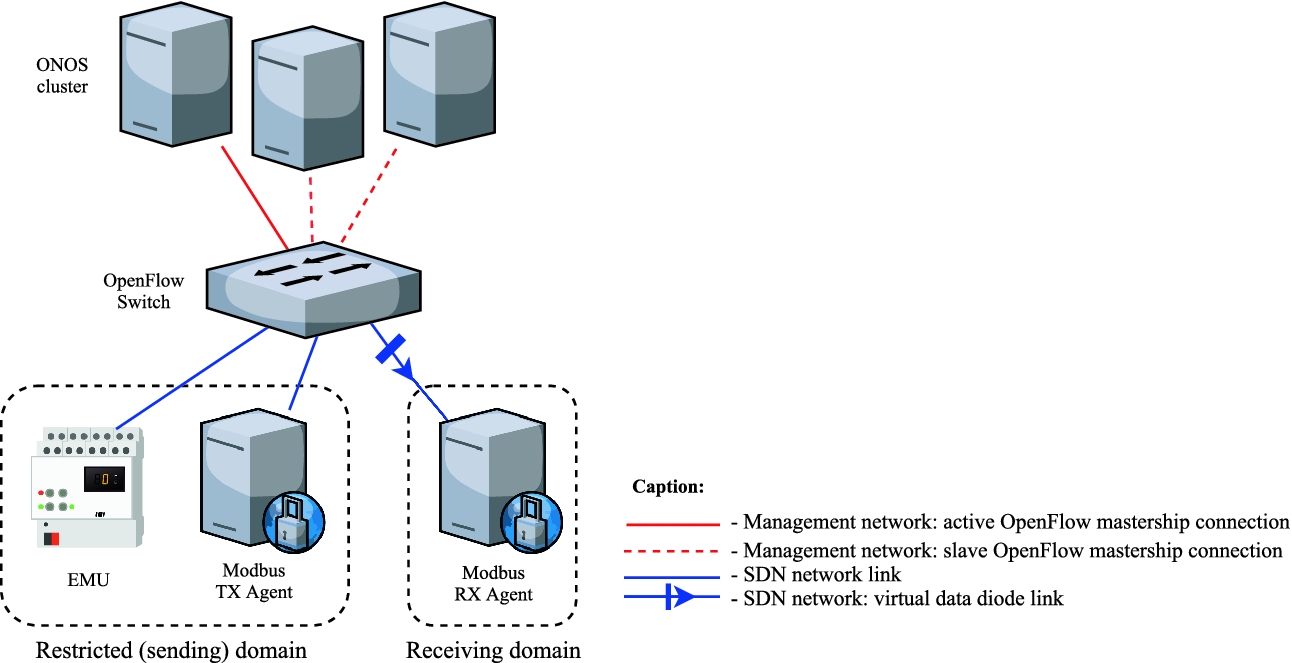
SDN-Enabled Virtual Data Diode

Monday, June 24, 2019

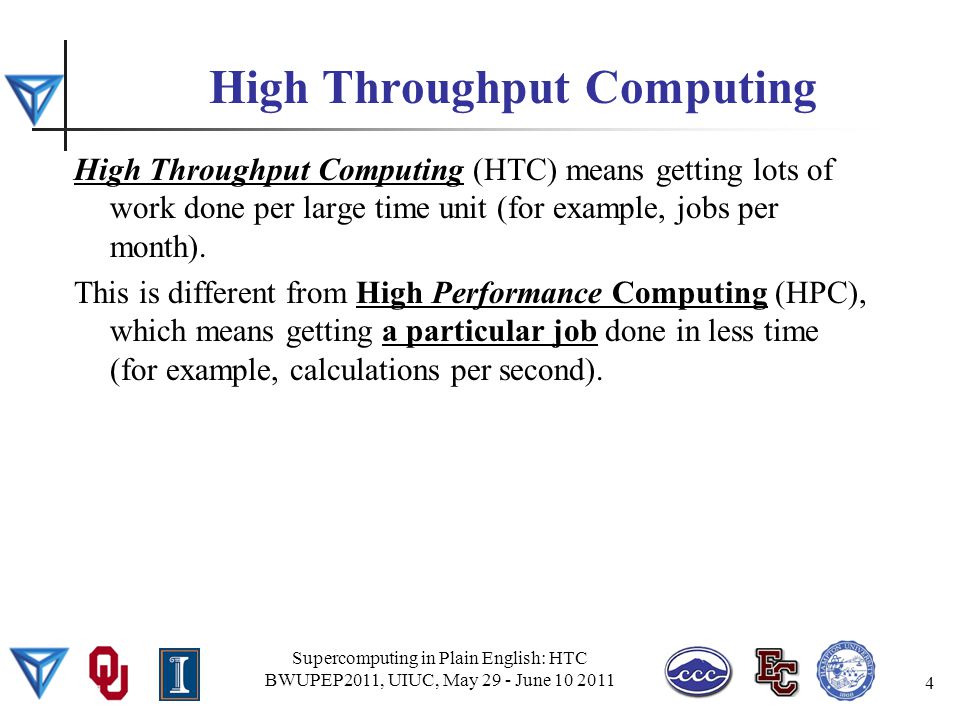
High Throughput Computing (HTC)

  • What is HTCondor?
HTCondor is a specialized workload management system for compute-intensive jobs. Like other full-featured batch systems, HTCondor provides a job queueing mechanism, scheduling policy, priority scheme, resource monitoring, and resource management. Users submit their serial or parallel jobs to HTCondor, HTCondor places them into a queue, chooses when and where to run the jobs based upon a policy, carefully monitors their progress, and ultimately informs the user upon completion.
https://research.cs.wisc.edu/htcondor/description.html

  • High Throughput Computing (HTC) 
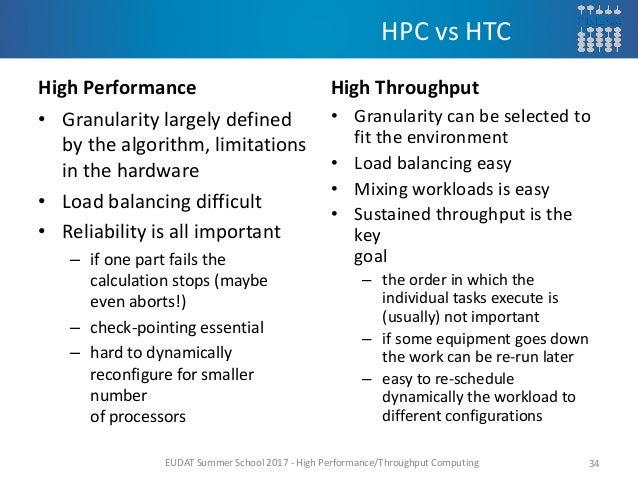
For many scientists, the quality of their research is heavily dependent on computing throughput. It is not uncommon to find problems that require weeks or months of computation to solve. Scientists involved in this type of research need a computing environment that delivers large amounts of computational power over a long period of time. Such an environment is called a High-Throughput Computing (HTC) environment. In contrast, High-Performance Computing (HPC) environments deliver a tremendous amount of power over a short period of time. HPC environments are often measured in terms of FLoating point OPerations per Second (FLOPS). Many scientists today do not care about FLOPS; their problems are on a much larger scale. These people are concerned with floating point operations per month or per year. They are interested in how many jobs they can complete over a long period of time.

As computers became smaller, faster and less expensive, scientists moved away from mainframes and purchased personal computers or workstations. An individual or a small group could afford a computing resource that was available whenever they wanted it. The resource might be slower than the mainframe, but it provided exclusive access. Recently, instead of one large computer for an institution, there are many workstations. Each workstation is owned by its user. This is distributed ownership. While distributed ownership is more convenient for the users, it is also less efficient. Machines sit idle for long periods of time, often while their users are busy doing other things. HTCondor takes this wasted computation time and puts it to good use. The situation today matches that of yesterday, with the addition of clusters in the list of resources. These machines are often dedicated to tasks. HTCondor manages a cluster's effort efficiently, as well as handling other resources.

To achieve the highest throughput, HTCondor provides two important functions. First, it makes available resources more efficient by putting idle machines to work. Second, it expands the resources available to users, by functioning well in an environment of distributed ownership.

http://research.cs.wisc.edu/htcondor/overview/
High Throughput Computing Facilities

High throughput computing(HTC) is an efficient and effective way to solve many research problems – by breaking the problems up into numerous small, independent sub-tasks and distributing work across a grid of many different computers. HTC is a complement to supercomputing and is particularly well suited to applications in which there is much data to be analyzed but little need for communication - such as data mining, molecular docking, etc.
https://www.its.hku.hk/services/research/htc/system
What Is High Throughput Distributed Computing
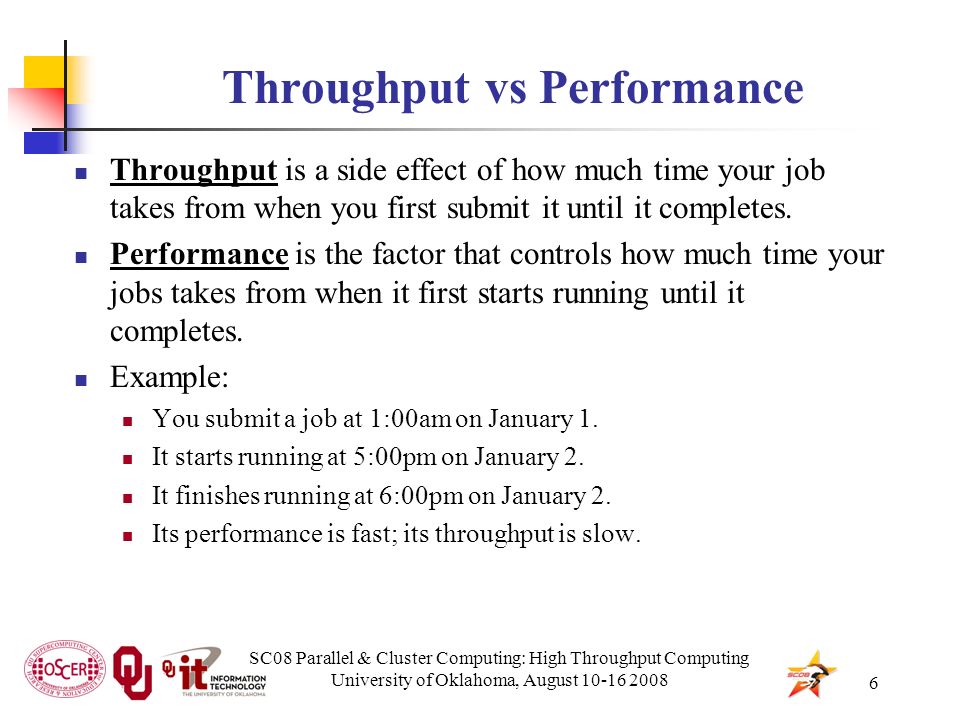
Parallel & Cluster Computing High Throughput Computing

  • In this tutorial, we will learn how to apply DAGMan to help us manage jobs and job interdependencies. First, we will revisit the optimization example from in the previous section. Second, we will manage a set of molecular dynamics (MD) simulations using the NAMD program. NAMD is conventionally used in highly parallel HPC settings, scaling to thousands of cores managed by a single job. One can achieve the same scaling and ease of management in HTC systems using thousands of individual jobs using workflow tools such as DAGMan. 

https://swc-osg-workshop.github.io/OSG-UserTraining-Internet2-2018/novice/DHTC/04-dagman.html

  • DAGMan (Directed Acyclic Graph Manager) is a meta-scheduler for HTCondor. It manages dependencies between jobs at a higher level than the HTCondor Scheduler.

https://research.cs.wisc.edu/htcondor/dagman/dagman.html


Friday, June 14, 2019

80/20 Principle


  • Applying 80/20 Principle in Our Life

The 80/20 rule tells us that a large proportion of effects is due to a small portion of causes.

20% of causes lead to 80% of results. These are what I call the 20% high-value tasks. High-value because they lead to high-impact results.
On the other hand, 80% of causes lead to 20% of results. These are what I call the 80% low-value tasks.
It doesn’t have to be a literal 80-20 ratio — for example, 70% of the effects can be contributed by 15% of the causes, or 60% of effects can be contributed by 30% of the causes. The percentages of effects and causes don’t have to add up to 100% either — 80% refers to the effect while 20% refers to the cause, meaning they are not of the same denominato

The point of the 80/20 rule is to know that (a) the relationship between cause and effect is often not 1:1, and (b) some causes have more weight than others.

Fact #1: Understanding that Less is More
Firstly, not everything is equal. No matter what you do, there are always a few vital tasks that matter. You want to focus on the vital few, the 20% high-value tasks, rather than spread yourself thin across everything. This is also known as “Less is More” where doing less will net you more results
Applying “Less is More” means asking yourself:

How can I remove the tasks that do not create as much value?
How can I focus my energy on activities that make me happier and more fulfilled?

Fact #2: Achieving More with Less

What if we don’t achieve “More with More”? What if we really achieve “More with Less”? Where we make more progress by focusing on the vital few? By channeling all our energy to the things that matter — not by trying to chase every shiny thing?
The 80/20 rule is about how to get more out of your life.
https://personalexcellence.co/blog/80-20/

  • The Pareto principle (also known as the 80/20 rule) is a phenomenon that states that roughly 80% of outcomes come from 20% of causes
In other words, a small percentage of causes have an outsized effect

But what techniques do you use to identify what needs to get done first?
One common technique is called the Pareto principle, also known as the 80/20 rule.This technique can help you determine and prioritize your highest-impact tasks, increasing your productivity throughout the day.
This concept is important to understand because it can help you identify which initiatives to prioritize so you can make the most impact

The 80/20 rule is not a formal mathematical equation, but more a generalized phenomenon that can be observed in economics, business, time management, and even sports.

How to use the 80/20 rule
the Pareto principle is commonly used in business and economics. This is because the 80/20 rule is helpful in determining where you can focus your efforts to maximize your output. 
If you have any kind of work that can be segmented into smaller portions, the Pareto principle can help you identify what part of that work is the most influential.

Productivity

You can use the 80/20 rule to prioritize the tasks that you need to get done during the day. 
The idea is that out of your entire task list, completing 20% of those tasks will result in 80% of the impact you can create for that day.
To do this, list out all of the things that you need to get done that day. 
Then identify which of those tasks have the highest impact
Are there any tasks on your plate that are blocking projects from moving forward? These tasks may be simple in execution, but they can make a large impact to the rest of the team by allowing the process to keep flowing. 

Decision making

The Pareto principle can help you to make the best decisions during the problem-solving process. 
When there are many different causes to one problem, the Pareto principle can help you prioritize solutions

Identify the problems that your team is experiencing.
Identify the causes of these problems.
Categorize your problems into similar groups
Assign a value to each of these problems based on the impact to the business.

Develop a plan to focus on the top 20% of the problems that impact the business
The idea is that one solution can resolve multiple problems. Based on the values you assigned to each problem, calculate which ones are in the top 20%.
Once you’ve identified the main problem, develop a plan to create a solution that can result in 80% of the results

Quality control

The Pareto analysis and the Pareto chart are key tools used within the Six Sigma quality control methodology.
In the Six Sigma methodology, using a Pareto chart can help you visualize your data to identify how to prioritize actions. Six Sigma’s main goal is to reduce the amount of variation in a process with the goal of increasing the amount of production. Pareto charts are common in Six Sigma methodology because you can quickly identify what the majority of the variations are in a process.

Other benefits of using the Pareto principle:

    Clear priorities both for you and your team

    Increased daily productivity

    Ability to portion your work into manageable segments

    More focused strategy

Disadvantages of using the 80/20 rule

​​There's a common misinterpretation of the Pareto principle that with 20% of effort, you can achieve 80% of the results
The 20 and 80% numbers don’t refer to the amount of effort you’re putting in, but the causes and consequences you’re working on.
The goal is not to minimize the amount of effort, but to focus your effort on a specific portion of work to create a bigger impact
You still have to put 100% of effort into that 20% of focus to achieve 80% of results

Another downside of the 80/20 rule is that sometimes team members can get too focused and lose sight on other tasks

If you only focus on the important tasks and put aside the less important tasks, like email and other correspondence, things can get lost. The challenge is finding the right balance of using the 80/20 rule, and getting through the rest of your tasks—even if they don't result in 80% of results
https://asana.com/resources/pareto-principle-80-20-rule

Analysis Paralysis


  • How to Stop Analysis Paralysis: 8 Important Tips

Analysis paralysis is the state of over-thinking about a decision to the point that a choice never gets made. You face analysis paralysis when you…

    are overwhelmed by the available options,
    over-complicate the decision when it’s supposed to be quite a simple one,
    feel compelled to pick the “best” and “perfect” choice, there
    by delaying any decision until you do your research, or
    feel a deep fear of making a wrong move, hence stalling yourself from making any decision, in case you make the wrong choice.

8 Tips to Overcome Analysis Paralysis

1) Differentiate between big and small decisions
3 questions to differentiate between big and small decisions:
    How important is this decision?
    Will this impact me a year from now?
        What’s the worst thing that could happen?
2) Identify your objective
Last week I had a coaching call with a client who asked me for advice between two job options. The first is to remain in his current job — a well-paying job, living where he is now, in a stable work environment and country. The other is a job overseas — a bustling city, a dynamic job with great responsibilities, in an environment he has never been in before.

Both jobs have their pros and cons. The former offers security and great financial rewards with a manageable job scope. The latter offers immense personal growth with some degree of uncertainty and pressure, because everything is new to him.

So I asked my client, “What is your vision for your life for the next few years?”

He said that he’s sick of the predictability in his routine. He feels that everything is the same in his current job and he’s not learning much. He feels that his goal for the coming period is to grow, learn about different things, and see other things in life. As he is in his early 30s, now is the best time to explore the world
3) Perfection is not the key. “Moderately okay” is.
Unless you are dealing with a life-altering decision like who to marry and what career path to choose, perfection is not the key. Your goal is to pick a moderately “okay” choice in a fair amount of time, and then move on.
4) Eliminate the bad options
5) Let go of your childhood stories

6) Set a time limit
Do you know the Parkinson’s Law? The Parkinson’s Law says, “Work expands so as to fill the time available for its completion.” What this means is that your work will take however long you allow it to take. If you set aside 15 minutes for a task, it’ll take 15 minutes. If you set aside 30 minutes, it’ll take 30 minutes. If you don’t set a time limit, it may take forever
7) Get a trusted opinion
8) Channel your energy into bigger goals
https://personalexcellence.co/blog/analysis-paralysis/


  • Paralysis by analysis is the state of over-analyzing (or over-thinking) a situation so that a decision or action is never taken, in effect paralyzing the outcome. This state of over-thinking about a decision leads the individual to the point where a choice never gets made, thereby creating a paralyzed state of inaction

Tip #1. Differentiate between big and small decisions.
Tip #2. Identify your objective(s).
Tip #3. Perfection is not the key.
Tip #4. Eliminate the bad options.
Tip #5. Pick one and go
Tip #6. Let go of your history surrounding decision making
Tip #7. Set a hard time limit.
Tip #8. Delegate the decision to someone else.
Tip #9. Get the opinion of someone you trust and go with it.
https://bsci21.org/9-tips-to-avoid-paralysis-by-analysis/

Wednesday, June 12, 2019

Email protection


  • How To use an SPF Record to Prevent Spoofing & Improve E-mail Reliability 

A carefully tailored SPF record will reduce the likelihood of your domain name getting fraudulently spoofed and keep your messages from getting flagged as spam before they reach your recipients.
Email spoofing is the creation of email messages with a forged sender address; something that is simple to do because many mail servers do not perform authentication
Spam and phishing emails typically use such spoofing to mislead the recipient about the origin of the message.
A number of measures to address spoofing, however, have developed over the years:

SPF,
Sender ID,
DKIM,
and DMARC.

Sender Policy Framework (SPF) is an email validation system designed to prevent spam by detecting email spoofing.
Today, nearly all abusive e-mail messages carry fake sender addresses. The victims whose addresses are being abused often suffer from the consequences, because their reputation gets diminished, they have to waste their time sorting out misdirected bounce messages, or (worse) their IP addresses get blacklisted.
The SPF is an open standard specifying a technical method to prevent sender-address forgery.
SPF allows administrators to specify which hosts are allowed to send mail on behalf of a given domain by creating a specific SPF record (or TXT record) in the Domain Name System (DNS). Mail exchangers use DNS records to check that mail from a given domain is being sent by a host sanctioned by that domain's administrators.

Benefits
Adding an SPF record to your DNS zone file is the best way to stop spammers from spoofing your domain. In addition, an SPF Record will reduce the number of legitimate e-mail messages that are flagged as spam or bounced back by your recipients' mail servers
The SPF record is not 100% effective, unfortunately, because not all mail providers check for it

Although you do not need an SPF record on your DNS server to evaluate incoming email against SPF policies published on other DNS servers, the best practice is to set up an SPF record on your DNS server. Setting up an SPF record lets other email servers use SPF filtering (if the feature is available on the mail server) to protect against incoming email from spoofed, or forged, email addresses that may be associated with your domain.
https://www.digitalocean.com/community/tutorials/how-to-use-an-spf-record-to-prevent-spoofing-improve-e-mail-reliability


  • What is SPF?

SPF is an email authentication mechanism which allows only authorized senders to send on behalf of a domain, and prevents all unauthorized users from doing so.


your business domain is business.com; you will send emails to your employees and customers from support@business.com;
your email delivery server, which sends the email for you, has an IP address of 192.168.0.1;
some attacker uses a scam email server at IP address 1.2.3.4 to try to send spoofed emails.
When an email delivery service connects to the email server serving up the recipient's mailbox:
    the email server extracts the domain name from the envelope from address; in this case, it's business.com;
    the email server checks the connecting host's IP address to see if it's listed in business.com's SPF record published in the DNS. If the IP address is listed, the SPF check passes, otherwise not

For example, let's say your SPF record looks like this:
v=spf1 ip4:192.168.0.1 -all

it means only emails from IP address 192.168.0.1 can pass SPF check, while all emails from any IP address other than 192.168.0.1 will fail. Therefore, no email from the scam server at IP address of 1.2.3.4 will ever pass SPF check.

What is DKIM?
One important aspect of email security is the authenticity of the message. An email message usually goes through multiple serversbefore it reaches the destination. How do you know the email message you got is not tampered with somewhere in the journey
DKIM, which stands for DomainKeys Identified Mail, is an email authentication method designed to detect forged header fields and content in emails.
DKIM enables the receiver to check if email headers and content have been altered in transit.
Asymmetric cryptography
DKIM is based on asymmetric cryptography, which uses pairs of keys: private keys which are known only to the owner, and public keys which may be distributed widely.
One of the best-known uses of asymmetric cryptography is digital signatures, in which a message is signed with the sender's private key and can be verified by anyone who has access to the sender's public key.

How DKIM works
On a high level, DKIM authentication consists of 2 components: signing and verification. A DKIM-enabled email server (signing server) signs an email message on its way out, using a private key which is part of a generated keypair. When the message arrives, the receiving server (verification server) checks if a DKIM-Signature field exists in the header, and if so, uses the DKIM public key in the DNS to validate the signature
In short, in order for DKIM to work:

    create a keypair containing both the private key and the public key;
    keep the private key with the signing server;
    publish the public key to the DNS in a DKIM record, so that the verification server has access to it.

What is DMARC?
DMARC, which stands for Domain-based Message Authentication, Reporting & Conformance, is a way to determine whether an email message is actually from the sender or not. It builds on the widely deployed SPF and DKIM protocols, and adds domain alignment checking and reporting capabilities to designated recipients, to improve and monitor the protection of the domain against nefarious spoofing attempts
How DMARC works
On a high level, DMARC is based on SPF and DKIM. Together the SPF/DKIM/DMARC trio can stop the long-standing email address spoofing problem.
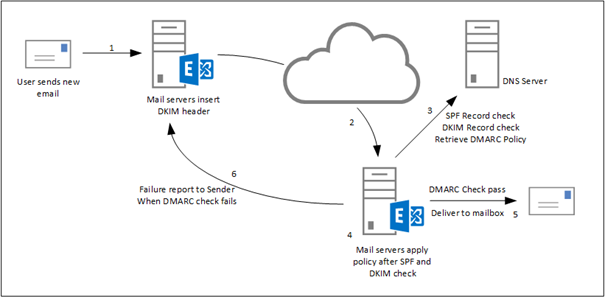
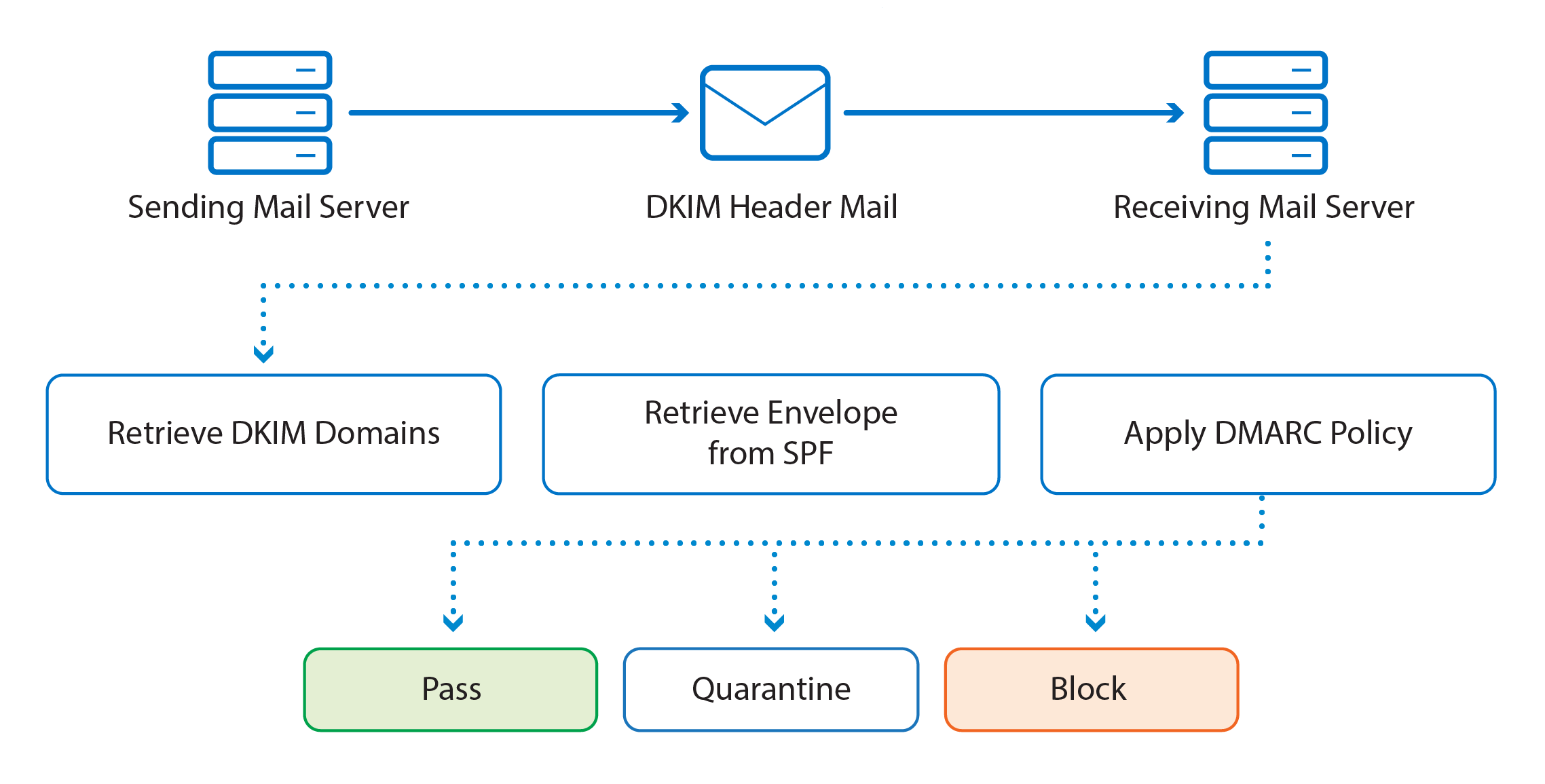
Here is how DMARC works: first you publish a DMARC record for your email domain in the DNS; whenever an email that claims to have originated from your domain is received, the email service provider fetches the DMARC record and checks the email message accordingly; depending on the outcome, the email is either delivered, quarantined, or rejected. Email delivery reports are sent to the email addresses specified in the DMARC record periodically, by email service providers

    DMARC implements identifier alignment to eliminate the discrepancy between envelope from/header from addresses in SPF, and that between d= value and header from address in DKIM;
    DMARC adds reporting capabilities to enable email domain owners to gain visibility into email deliverability, and ultimately implement full email protection against email spoofing/phishing.

DMARC alignment: authentication hardened
When either of the following is true of an email message, we say the email is DMARC aligned:

    it passes SPF authentication, and SPF has identifier alignment;
    it passes DKIM authentication, and DKIM has identifier alignment.

https://dmarcly.com/blog/home/how-to-implement-dmarc-dkim-spf-to-stop-email-spoofing-phishing-the-definitive-guide#introduction-to-spf


  • SPF is using an SPF record in public DNS where all legitimate outbound SMTP servers for a domain are listed. A receiving SMTP server can check this DNS record to make sure the sending mail server is allowed to send email messages on behalf of the user or his organization

DKIM is about signing and verifying header information in email messages. A sending mail server can digitally sign messages, using a private key that’s only available to the sending mail server. The receiving mail server checks the public key in DNS to verify the signed information in the email message. Since the private key is only available to the sending organization’s mail servers, the receiving mail server knows that it’s a legitimate mail server, and thus a legitimate email message.
DMARC or Domain-based Message Authentication, Reporting & Conformance
DMARC which stands for Domain-based Message Authentication, Reporting & Conformance is an email validation mechanism, built on top of SPF and DKIM. DMARC is using a policy which is published in DNS. This policy indicates if the sending mail server is using SPF and/or DKIM, and tells the receiving mail server what to do if SPF and/or DKIM does not pass their respective checks.
https://jaapwesselius.com/2016/08/23/senderid-spf-dkim-and-dmarc-in-exchange-2016-part-iii/