Sunday, February 21, 2021

How does SSL handshake work?


  • Does TLS use symmetric or asymmetric encryption?

Both.
the initial exchange is done using asymmetric.
bulk data encryption requires speed and therefore symmetric algorithms.
  • Describe the process of a TLS session being set up when someone visits a secure website.

Look for the standard responses, with the client sending helo with ciphers, server responding with a public key and picking a cipher, agreement on a shared key, etc

The SSL/TLS handshake involves a series of steps through which both the parties – client and server, validate each other and start communicating through the secure SSL/TLS tunnel.
The reason it’s called a handshake is that it’s when two parties – client and server come across each other for the first time
The handshake involves a number of steps that start from validating the identity of the other party and concludes with the generation of a common key – secret key if you may call it
a conversation between two parties (client and server) wanting to accomplish the same purpose – securing the communication with the help of symmetric encryption.

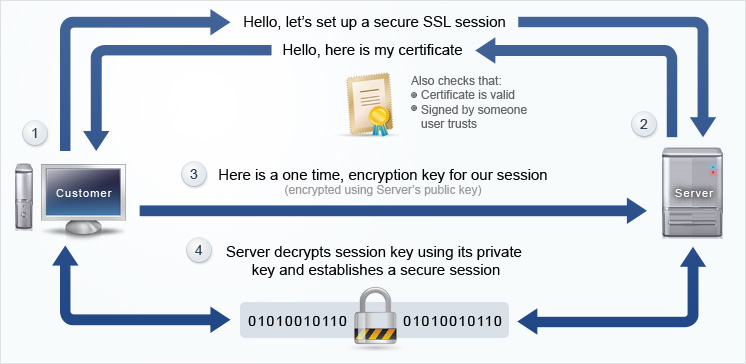
Client: “Hello there. I want to establish secure communication between the two of us. Here are my cipher suits and compatible SSL/TLS version.”

Server: “Hello Client. I have checked your cipher suits and SSL/TLS version. I think we’re good to go ahead. Here are my certificate file and my public key. Check ‘em out.

Client: “Let me verify your certificate. (After a while) Okay, it seems fine, but I need to verify your private key. What I’ll do is, I will generate and encrypt a pre-master (shared secret key) key using your public key. Decrypt it using your private key and we’ll use thing master key to encrypt and decrypt the information

Server: “Done.”

[Now that both the parties know who they’re talking to, the information transferred between them will be secured using the master-key. Keep in mind that once the verification part is over, the encryption takes place through the master-key only. This is symmetric encryption.]

Client: “I’m sending you this sample message to verify that our master-key works. Send me the decrypted version of this message. If it works, our data is in safe hands.”

Server: “Yeah, it works. I think we’ve accomplished what we were looking for.”
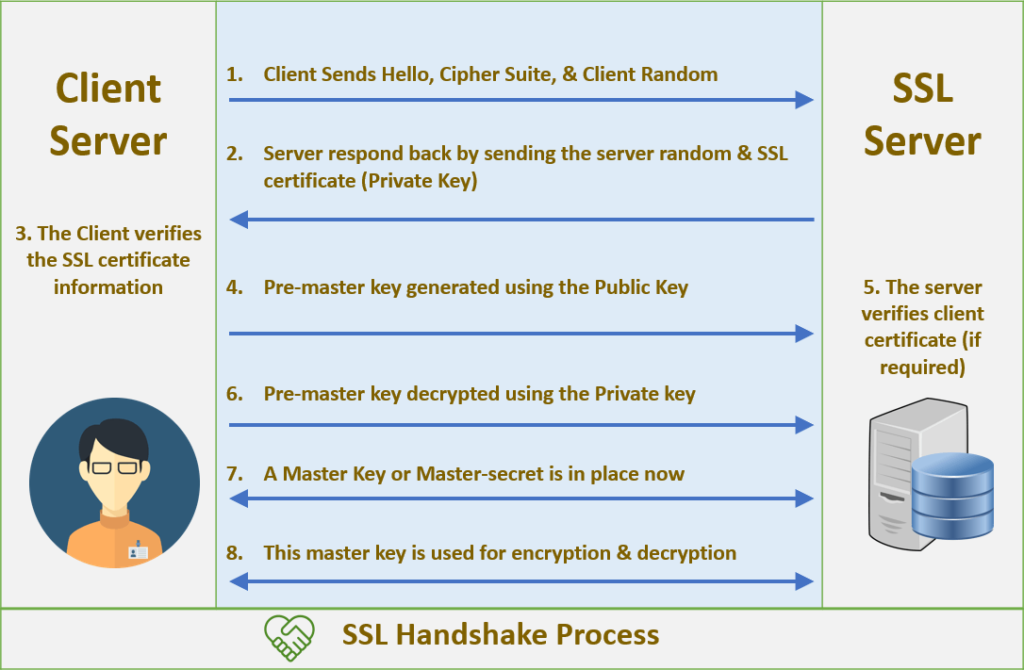
Breaking Down the TLS Handshake

secret key is used to encrypt/decrypt conversation
claim1
http over ssl thus on application layer of OSI model
claim2
encryption decryption processes thus on presentation layer of OSI model
claim3 
point to point session security thus on session layer of OSI model
ssl protocol in application layer in TCP/IP model 

  • Asymmetric vs symmetric encryption


The handshake itself uses asymmetric encryption – two separate keys are used, one public and one private. Since asymmetric encryption systems have much higher overhead, they are not usable to provide full-time, real-world security. Thus, the public key is used for encryption and the private key for decryption during the handshake only, which allows the two parties to confidentially set up and exchange a newly-created “shared key”. The session itself uses this single shared key to perform symmetric encryption, and this is what makes a secure connection feasible in actual practice (the overhead is vastly lower). So the full and correct answer to “Is SSL/TLS encryption asymmetric or symmetric?” is “First one, then the other.”


  • What is a “cipher suite?
The handshake itself has multiple stages, each managed according to different rules.
a series of separate back and forth negotiations (about what keys to use, how to encrypt the handshake itself, how to authenticate the handshake and so forth) the parties can agree to use a “cipher suite” – a pre-existing selection or kit of agreed-upon components. 
TLS specifications allow for quite a number of cipher suites, and the client and server will almost always have access to one they can both employ.

Basic vs mutually-authenticated handshake
Another confusing point is that the basic model we described above lets the client verify the server, and the vast majority of sessionssecured by TLS only require this.
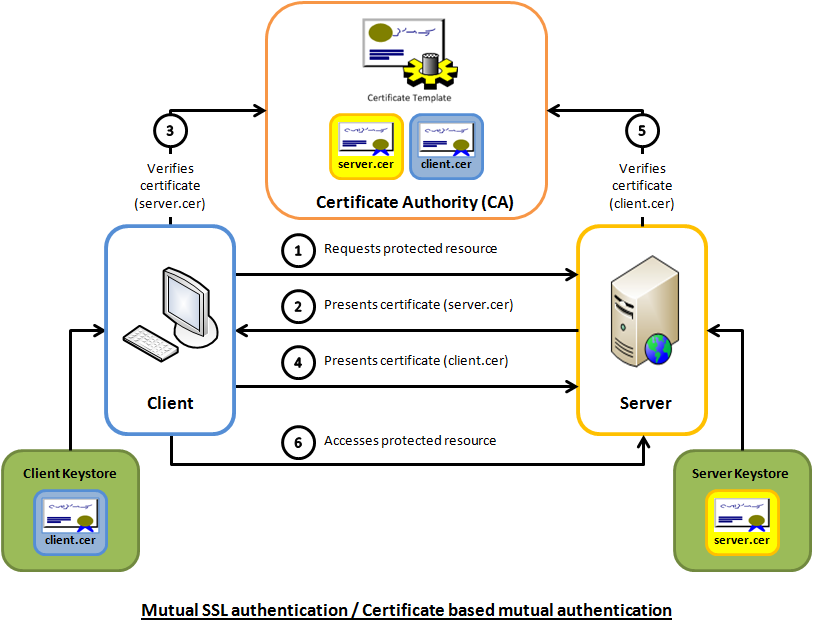
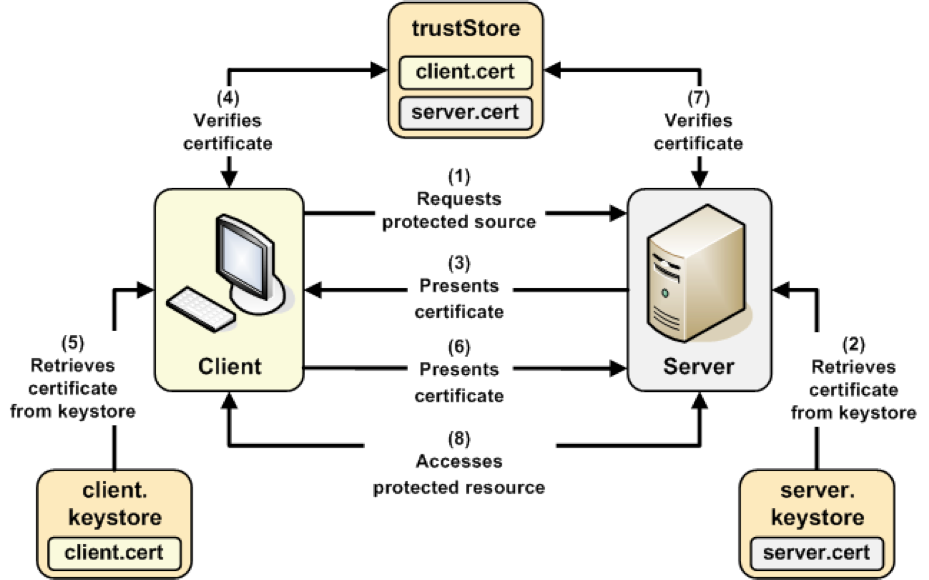
some cipher suites will require the client to also send a certificate and public key for mutual authentication of both parties. This two-way authentication will of course add overhead to the handshake

Different sessions will have different security parameters
Each new handshake creates a new session, and the settings used in one can differ drastically from another depending on the cipher suite chosen.
Depending on the cipher suite, some steps may be added (like the requirement for two-way authentication) or absent. In fact, there are actually cipher suites that negotiate a session to use no encryption whatsoever

https://www.ssl.com/article/ssl-tls-handshake-overview/

  • 12. What are the differences between HTTPS, SSL, and TLS?

HTTPS is hypertext transfer protocol and secures communications over a network. TLS is transport layer security and is a successor protocol to SSL.

https://www.springboard.com/blog/25-cybersecurity-job-interview-questions-and-answers/

  • An Overview of One-Way SSL and Two-Way SSL

SSL (Secure Socket Layer) is the standard technology used for enabling secure communication between a client and sever to ensure data security & integrity. 

How One-Way SSL Works?
In one way SSL, only client validates the server to ensure that it receives data from the intended server. For implementing one-way SSL, server shares its public certificate with the clients

How Two-Way (Mutual) SSL works?
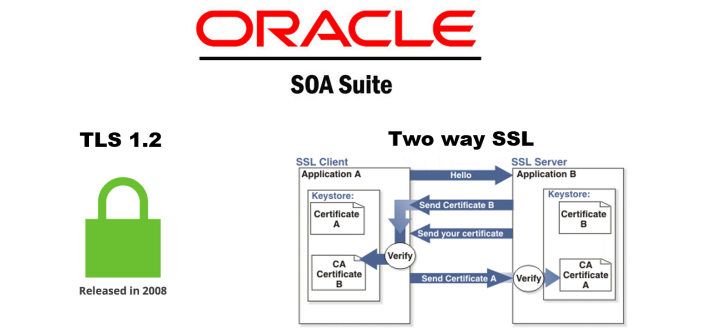
both client and server authenticate each other to ensure that both parties involved in the communication are trusted. Both parties share their public certificates to each other and then verification/validation is performed based on that.
https://tutorialspedia.com/an-overview-of-one-way-ssl-and-two-way-ssl/


Tuesday, February 9, 2021

MAC Address

  •  MAC Address

Stands for "Media Access Control Address,"

A MAC address is a hardware identification number that uniquely identifies each device on a network.

The MAC address is manufactured into every network card, such as an Ethernet card or Wi-Fi card, and therefore cannot be changed

MAC addresses are made up of six two-digit hexadecimal numbers, separated by colons.

For example, an Ethernet card may have a MAC address of 00:0d:83:b1:c0:8e. 

https://techterms.com/definition/macaddress#:~:text=Stands%20for%20%22Media%20Access%20Control,each%20device%20on%20a%20network.&text=For%20this%20reason%2C%20MAC%20addresses,hexadecimal%20numbers%2C%20separated%20by%20colons.


  • MAC addresses are primarily assigned by device manufacturers, and are therefore often referred to as the burned-in address, or as an Ethernet hardware address, hardware address, or physical address.

Many network interfaces, however, support changing their MAC address. 

Network nodes with multiple network interfaces, such as routers and multilayer switches, must have a unique MAC address for each NIC in the same network. However, two NICs connected to two different networks can share the same MAC address

Within the Open Systems Interconnection (OSI) network model, MAC addresses are used in the medium access control protocol sublayer of the data link layer. 

As typically represented, MAC addresses are recognizable as six groups of two hexadecimal digits, separated by hyphens, colons, or without a separator.

https://en.wikipedia.org/wiki/MAC_address


  • Reasons you might want to change your MAC_address


It’s more of a spoofing than changing since this is done at the software level.


here are a few occasions where you might want to change your device’s MAC.


You want to re-use an already-approved MAC address on a new device — the reason many routers have a “MAC clone” feature. (By the way, in this case, on the reverse, if you change the MAC of an approved device, it will be disconnected.)


You know your computer has been blocked or restricted from a network and want to sneak through.


You’re about to join a new network — like a public Wi-Fi — and don’t want folks to know your device’s real MAC.


How to figure out your device’s MAC


For example, on a router or a modem, the address is generally on the underside of the hardware itself. Just flip it up and take a close look.

On a mobile device (like a phone) tends how this in the “About Device” area of the operating system.


Since MAC and IP are closely related, the two are almost always stored next to each other. In other words, if you see the IP, chances are the MAC is around.


How to change a device’s MAC address

That’s probably because you really cannot permanently change a device’s MAC address anyway.

What you can do is disguise a NIC’s real MAC address as another using software. This change is temporary. When you reset (or re-install) the application, or move the NIC to a different device, or sometimes even restart the device, its real MAC address will return.

keep in mind the limited sense of the word “change” in this case. I’d say “MAC spoofing” is a more accurate choice of expression.

Generally, though, you can change the MAC of a router or a computer


How to change the MAC address of a router

It’s only possible to change a router’s MAC address if the router has the MAC Clone feature — most routers do.

Or you can choose to clone the MAC of the computer you’re using. After that, apply the change, and the router will carry that MAC address until you reset it to default factory settings.


How to change the MAC address of a Windows computer

How to change the MAC address of a Mac computer


The takeaway

if you ever wonder what will happen if two devices are sharing the same MAC address in a network. The answer is entirely predictable.

Though extremely rare, this can occur, and I have deliberately made that happen just for kicks. In this case, both devices will get the same IP address, and you’ll have an IP conflict situation, and neither device will get connected.


https://dongknows.com/mac-address-explained/

Sunday, January 17, 2021

network topologies

  •  Network Topologies

This section will be divided into 4 major categories. Within these sections, discussions of hybrid topologies may take place.


Bus Topology


Ring Topology


Star Topology


Mesh Topology


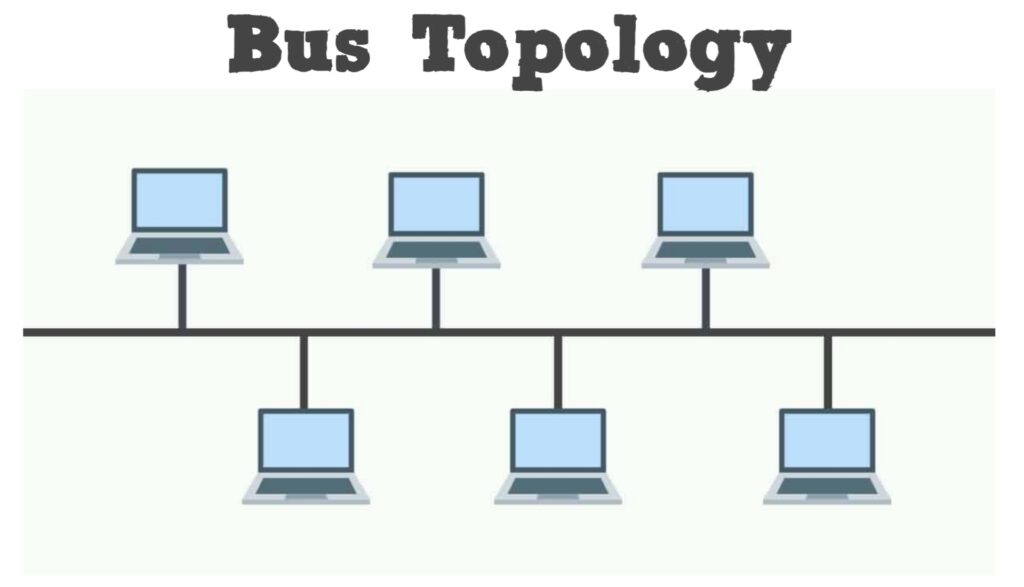
Bus Topology is the simplest way to connect multiple clients

Ring Topology is where each node connects exactly to two other nodes, forming a single continuous pathway for signals through each node in a ring.

Star Topology is one of the most common networking topologies

Mesh Topology is where each node in a network may act as an independent router


http://webpage.pace.edu/ms16182p/networking/topologies.html


  • Physical Network Topologies


2.1 Bus Network Topology

In Bus Network Topology a single cable is used to connect all devices on the net. This cable is often referred to as the network Backbone. When communication occurs between nodes the device sending the message broadcasts to all nodes on the network, but only the desired recipient digests the message. Advantages of this type of Physical Topology include ease of installation and minimization of the required cabling. 


2.2 Ring Network Topology

Ring Network Topology has each node in a network connected to two other nodes in the network in conjunction with the first and last nodes being connected. Messages from one node to another then travel from originator to destination via the set of intermediate nodes. The intermediate nodes serve as active repeaters for messages intended for other nodes. Some forms of Ring Network Topology have messages traveling in a common direction about the ring (either clockwise or counterclockwise) while other forms of this type of configuration (called Bi-directional Rings) have messages flowing in either direction with the help of two cables between each connected node


2.3 Star Network Topology

Star Network Topology requires the use of a central top level node to which all other nodes are connected. This top level node may be a computer, or a simple switch, or just a common connection point. Messages received by the top level node can either be broadcast to all subordinate nodes, or if the top level device is of high enough fidelity, sent only to the desired subordinate node. Inter node messaging delays are reduced with this configuration. An important advantage of the Star Network Topology comes from the localization of cabling failures inherent in this configuration. Failure in the connection between the top level node and any subordinate node, or failure in a subordinate node will not disrupt the entire network. 


2.4 Tree Network Topology

Tree Network Topology is constructed from either making a set of Star Network Topologies subordinate to a central node, or by linking a set of Star Network Topologies together directly via a bus, thereby distributing the functionality of the central node among several Star Network Topology top level nodes .


2.5 Mesh Network Topology

Mesh Network Topologies capitalize on path redundancy. This Topology is preferred when traffic volume between nodes is large. A proportion of nodes in this type of network have multiple paths to another destination node. With the exception of the Bi-directional Ring ( and this was only when a failure was detected ) each of the topologies discussed so far had only one path from message source to message destination. Thus the probability of single point network failure is greatly minimized with Mesh Network Topology. A major advantage of the Mesh Network Topology is that source nodes determine the best route from sender to destination based upon such factors connectivity, speed, and pending node tasks. A disadvantage of Mesh Network Topologies is the large cost incurred in setting up the network. A further disadvantage of this type of network is the requirement for each node to have routing algorithm for path computation. A full mesh is described as each node being directly connected to every other node in the network


https://www.cse.wustl.edu/~jain/cse567-08/ftp/topology/index.html

Tuesday, January 5, 2021

UAV Drone Forensics

  •  UNMANNED AERIAL VEHICLE FORENSICINVESTIGATION PROCESS: DJI PHANTOM 3 DRONE AS A CASE STUDY

However, existing UAV/drone forensics generally  rely  on  conventional  digital  forensic  investigation  guidelines  such  as  those  ofACPO  and  NIST, which  may  not  be  entirely  fit-for-purpose. 


4.2 Proposed process

In  our  process,  there  are  three  main stages,    namely:    preparation,    examination    and analysis/report.The first stage includes Steps 1 to 6. Steps 7 to  17  are  part of  the  second  stage,  and  the final stage includes Steps 18 to 20

Step   1 -Identify   and determine the   chain   of command

Step  2 -Have conventionalforensic  practices(e.g. DNA, fingerprints, and   ballistic)already   been implemented?

Step 3–Identify the role of the device in conducting the offence(Offence analysis)

Step 4-Photographs

Step 5-Identify the make and model

Step 6-Open source investigation to identifydevice characteristics,  potential  data  storage  locations, and availableforensic/non-forensic tools


Step    7-Identify capabilities    (Video/Audio recording, carrying capacity and technique)

Step 8 -Identify potential modifications

Step 9 -Identify data storage locations.

Step 10 -Identify ports

Step 11 -Extract removable data storage mediums

Step 12 -Preserve evidence –Clone/forensic copy of storage medium

Step   13 -Traditional   interrogation   of   storage medium -use certified forensic tools

Step 14 -Extended interrogation of storage medium

This  step  is somewhat unique  to  UAV  forensics.  Typical    digital    forensic analysis    is    normally conducted  using commercial forensic  tool,  which will usually have a proven record for accuracy.Any examination using non-validated toolsis considered a risk. However, until commercial forensic tools for all UAVs are available, we may have little choicebut to  rely  on  open  source  tools  to  extract  data  of forensic interest

Step  15 -Interrogation  of  the  UAV/drone -Potentially  using  a  clone  of  any  storage  medium identified

Step 16 -Interrogation of peripheral devices: flight controller, mobile device, etc

Step  17 -Extract  removable  data  storage  mediums (Destructive


Step 18–Initial reviewof extracted data

Step 19 –Interpreting and translating of data -Into a human readable and evidential format

Step 20 –Report/Statement


Besides,  UAV  could  be  integrated with  radio  communicationservicesin  the  future. Hence, forensic acquisition and analysis of artefacts from radio-communication services[28]can alsobe explored


https://arxiv.org/ftp/arxiv/papers/1804/1804.08649.pdf

Monday, January 4, 2021

gitops

  •   What is GitOps?

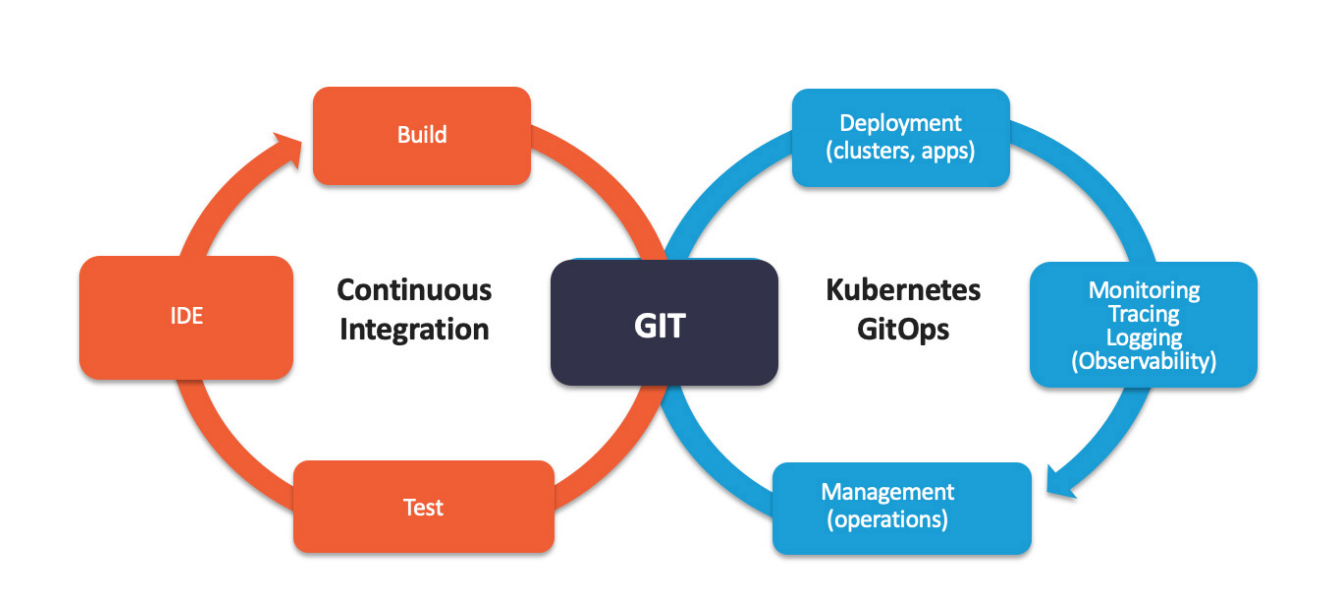
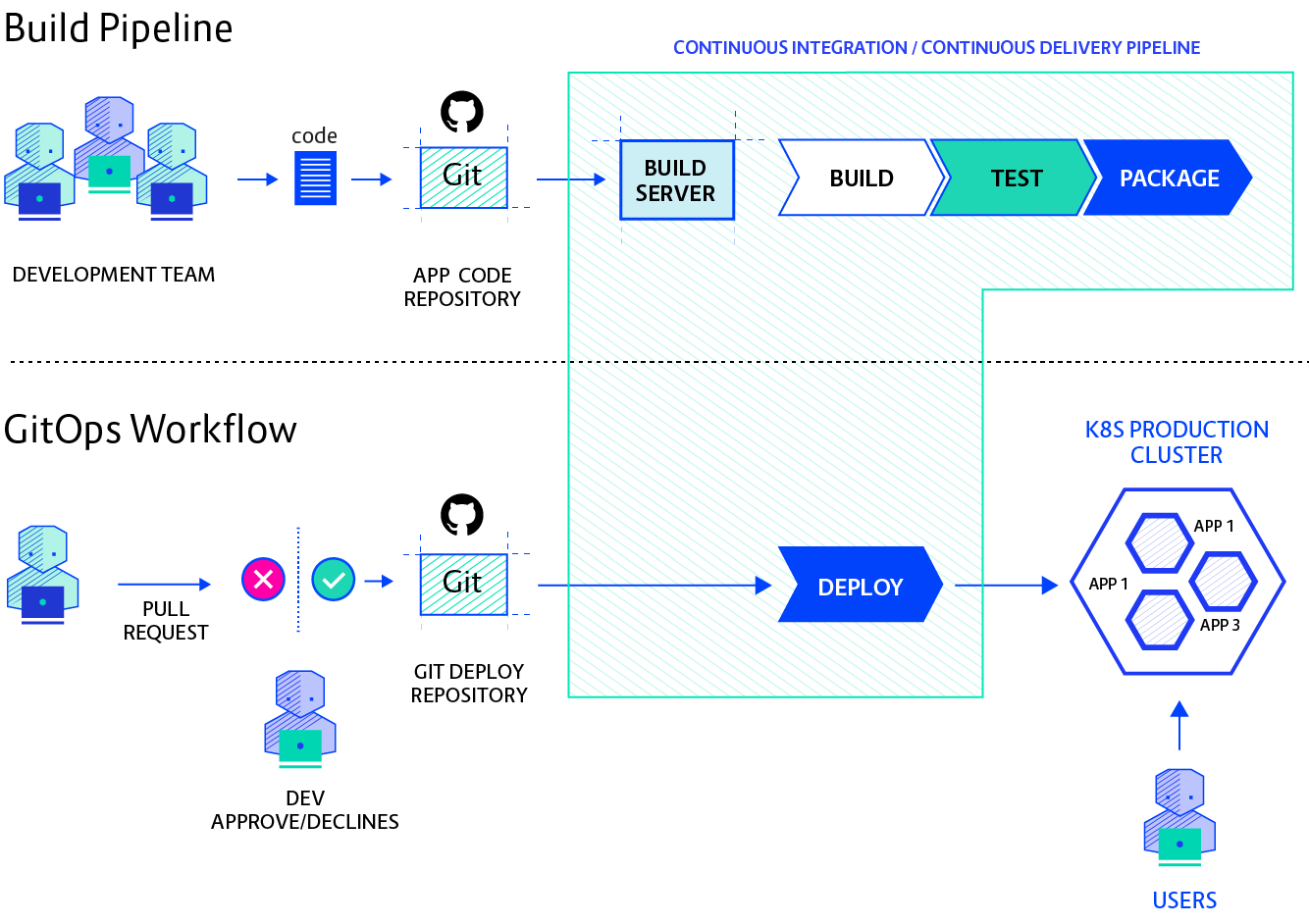
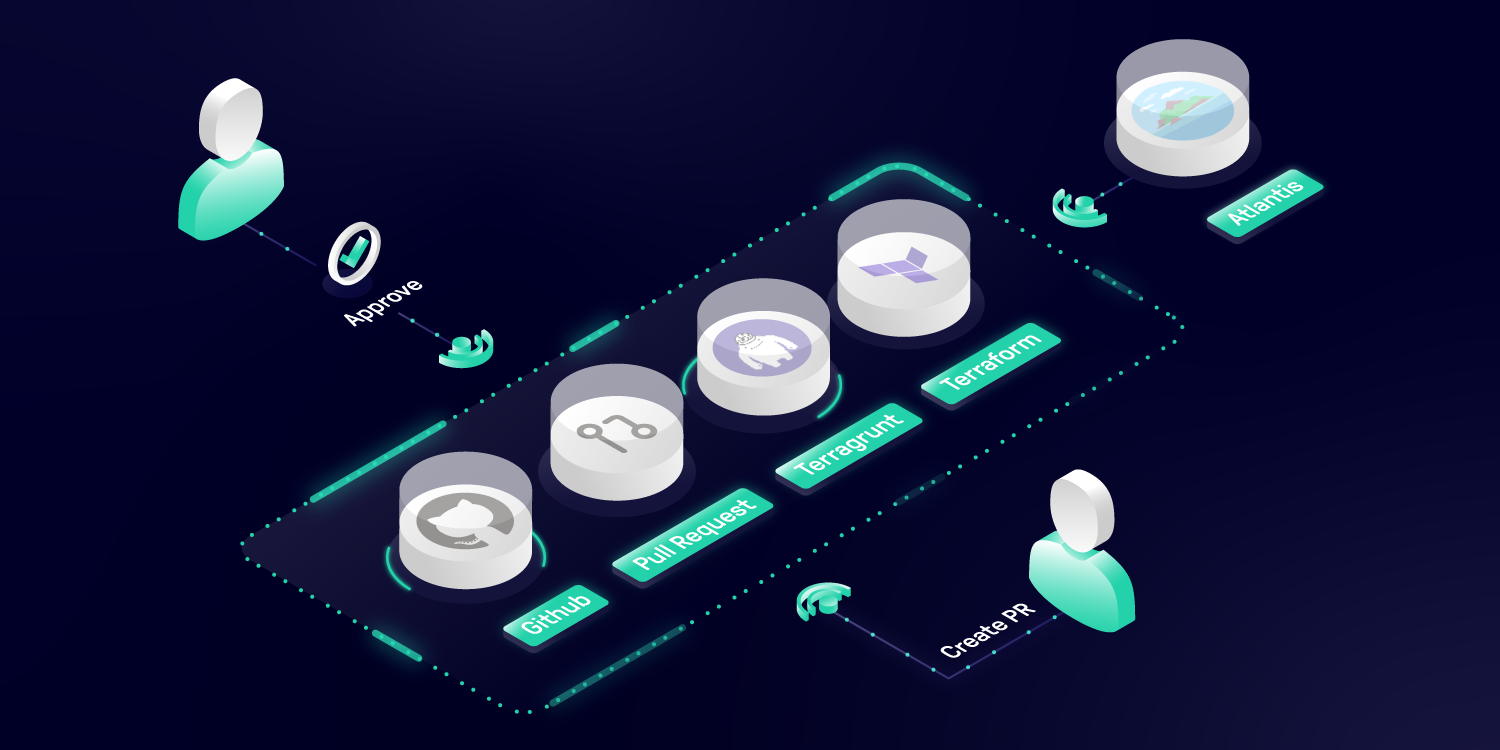
GitOps is a way of implementing Continuous Deployment for cloud native applications. It focuses on a developer-centric experience when operating infrastructure, by using tools developers are already familiar with, including Git and Continuous Deployment tools.


The core idea of GitOps is having a Git repository that always contains declarative descriptions of the infrastructure currently desired in the production environment and an automated process to make the production environment match the described state in the repository. If you want to deploy a new application or update an existing one, you only need to update the repository - the automated process handles everything else. It’s like having cruise control for managing your applications in production.


Why should I use GitOps?

Deploy Faster More Often

What is unique about GitOps is that you don’t have to switch tools for deploying your application. Everything happens in the version control system you use for developing the application anyways.

When we say “high velocity” we mean that every product team can safely ship updates many times a day — deploy instantly, observe the results in real time, and use this feedback to roll forward or back.


Easy and Fast Error Recovery

This makes error recovery as easy as issuing a git revert and watching your environment being restored.The Git record is then not just an audit log but also a transaction log. You can roll back & forth to any snapshot.


Easier Credential Management

your environment only needs access to your repository and image registry. That’s it. You don’t have to give your developers direct access to the environment.

kubectl is the new ssh. Limit access and only use it for deployments when better tooling is not available.


Self-documenting Deployments

With GitOps, every change to any environment must happen through the repository. You can always check out the master branch and get a complete description of what is deployed where plus the complete history of every change ever made to the system. And you get an audit trail of any changes in your system


Shared Knowledge in Teams

Using Git to store complete descriptions of your deployed infrastructure allows everybody in your team to check out its evolution over time. With great commit messages everybody can reproduce the thought process of changing infrastructure and also easily find examples of how to set up new systems.


How does GitOps work?


Environment Configurations as Git repository

GitOps organizes the deployment process around code repositories as the central element. There are at least two repositories: the application repository and the environment configuration repository. The application repository contains the source code of the application and the deployment manifests to deploy the application. The environment configuration repository contains all deployment manifests of the currently desired infrastructure of an deployment environment. 


Push-based vs. Pull-based Deployments

There are two ways to implement the deployment strategy for GitOps: Push-based and Pull-based deployments. 

The difference between the two deployment types is how it is ensured, that the deployment environment actually resembles the desired infrastructure.

When possible, the Pull-based approach should be preferred as it is considered the more secure and thus better practice to implement GitOps.


Push-based Deployments

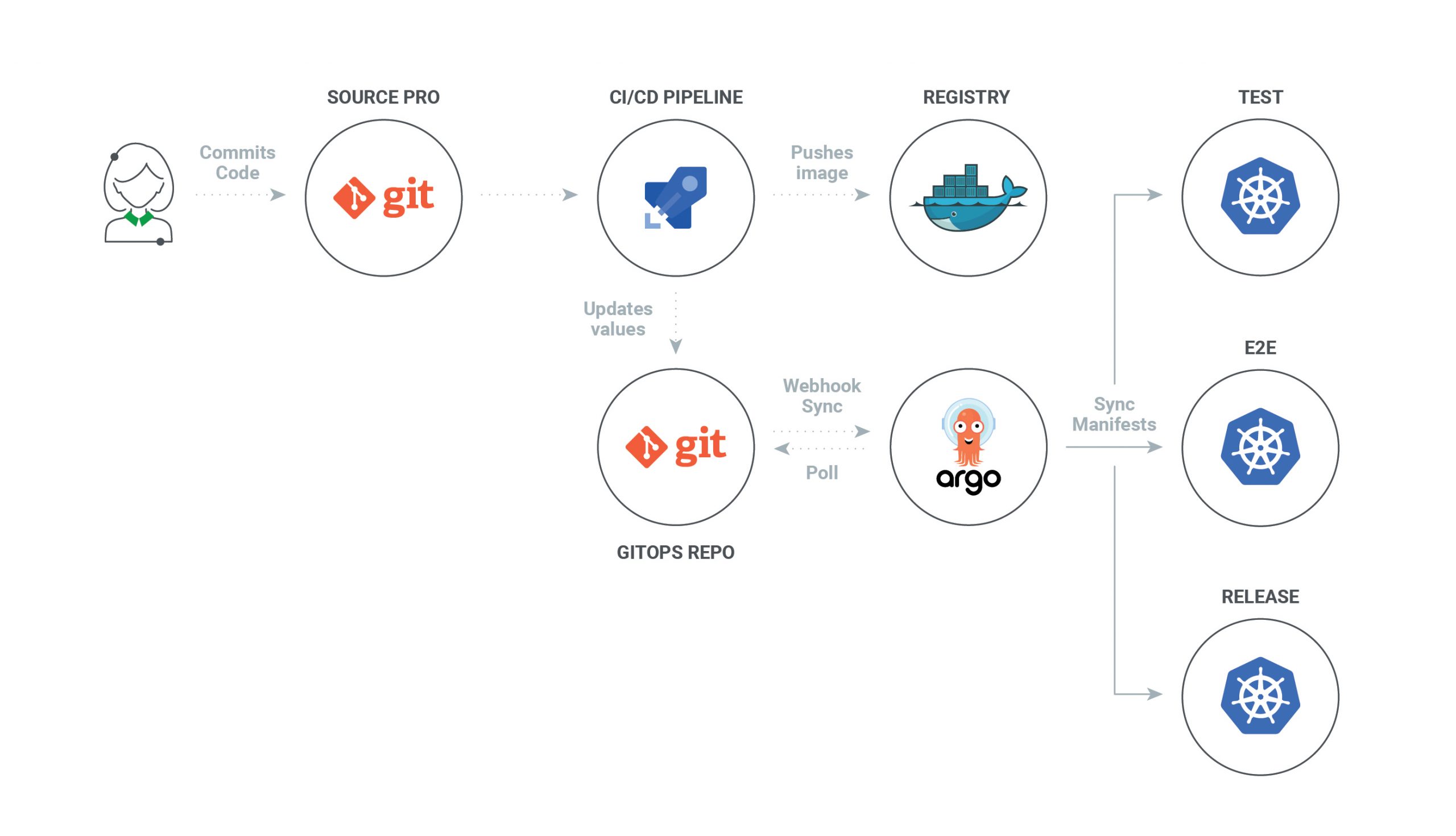
The Push-based deployment strategy is implemented by popular CI/CD tools such as Jenkins, CircleCI, or Travis CI. The source code of the application lives inside the application repository along with the Kubernetes YAMLs needed to deploy the app. Whenever the application code is updated, the build pipeline is triggered, which builds the container images and finally the environment configuration repository is updated with new deployment descriptors.

With this approach it is indispensable to provide credentials to the deployment environment.

In some use cases a Push-based deployment is inevitable when running an automated provisioning of cloud infrastructure. In such cases it is strongly recommended to utilize the fine-granular configurable authorization system of the cloud provider for more restrictive deployment permissions.

Another important thing to keep in mind when using this approach is that the deployment pipeline only is triggered when the environment repository changes. It can not automatically notice any deviations of the environment and its desired state. This means, it needs some way of monitoring in place, so that one can intervene if the environment doesn’t match what is described in the environment repository


Pull-based Deployments

The Pull-based deployment strategy uses the same concepts as the push-based variant but differs in how the deployment pipeline works. Traditional CI/CD pipelines are triggered by an external event, for example when new code is pushed to an application repository. With the pull-based deployment approach, the operator is introduced. It takes over the role of the pipeline by continuously comparing the desired state in the environment repository with the actual state in the deployed infrastructure. Whenever differences are noticed, the operator updates the infrastructure to match the environment repository. Additionally the image registry can be monitored to find new versions of images to deploy.

Just like the push-based deployment, this variant updates the environment whenever the environment repository changes. However, with the operator, changes can also be noticed in the other direction. Whenever the deployed infrastructure changes in any way not described in the environment repository, these changes are reverted. This ensures that all changes are made traceable in the Git log, by making all direct changes to the cluster impossible.

This change in direction solves the problem of push-based deployments, where the environment is only updated when the environment repository is updated.

Most operators support sending mails or Slack notifications if it can not bring the environment to the desired state for any reason, for example if it can not pull a container image. 

Additionally, you probably should set up monitoring for the operator itself, as there is no longer any automated deployment process without it.

The operator should always live in the same environment or cluster as the application to deploy

seen with the push-based approach, where credentials for doing deployments are known by the CI/CD pipeline. 

When the actual deploying instance lives inside the very same environment, no credentials need to be known by external services.

The Authorization mechanism of the deployment platform in use can be utilized to restrict the permissions on performing deployments. 

When using Kubernetes, RBAC configurations and service accounts can be utilized.


Working with Multiple Applications and Environments

When you are using a microservices architecture, you probably want to keep each service in its own repository.

GitOps can also handle such a use case. You can always just set up multiple build pipelines that update the environment repository. From there on the regular automated GitOps workflow kicks in and deploys all parts of your application.

Managing multiple environments with GitOps can be done by just using separate branches in the environment repository.

You can set up the operator or the deployment pipeline to react to changes on one branch by deploying to the production environment and another to deploy to staging.


FAQ

Is my project ready for GitOps?

All you need to get started is infrastructure that can be managed with declarative Infrastructure as Code tools.

I don’t use Kubernetes. Can I still use GitOps?

In principle, you can use any infrastructure that can be observed and described declaratively, and has Infrastructure as Code tools available

However, currently most operators for pull-based GitOps are implemented with Kubernetes in mind.

Is GitOps just versioned Infrastructure as Code?

Declarative Infrastructure as Code plays a huge role for implementing GitOps, 

GitOps takes the whole ecosystem and tooling around Git and applies it to infrastructure. 

Continuous Deployment systems guarantee that the currently desired state of the infrastructure is deployed in the production environment.

Apart from that you gain all the benefits of code reviews, pull requests, and comments on changes for your infrastructure.

How to get secrets into the environment without storing them in git?

you have have secrets created within the environment which never leave the environment

For example, you provision a database within the environment and give the secret to the applications interacting with the database only.

Another approach is to add a private key once to the environment (probably by someone from a dedicated ops team) and from that point you can add secrets encrypted by the public key to the environment repository.

How does GitOps Handle DEV to PROD Propagation?

GitOps doesn’t provide a solution to propagating changes from one stage to the next one. We recommend using only a single environment and avoid stage propagation altogether. But if you need multiple stages (e.g., DEV, QA, PROD, etc.) with an environment for each, you need to handle the propagation outside of the GitOps scope, for example by some CI/CD pipeline.

We are already doing DevOps. What’s the difference to GitOps?

GitOps is a technique to implement Continuous Delivery. While DevOps and GitOps share principles like automation and self-serviced infrastructure, these shared principles certainly make it easier to adopt a GitOps workflow when you are already actively employing DevOps techniques.

So, is GitOps basically NoOps?

You can use GitOps to implement NoOps,

If you are using cloud resources anyway, GitOps can be used to automate those. 

Typically, however, some part of the infrastructure like the network configuration or the Kubernetes cluster you use isn’t managed by yourself decentrally but rather managed centrally by some operations team.

So operations never really goes away.

Is there also SVNOps?

If you prefer SVN over Git,you may need to put more effort into finding tools that work for you or even write your own.

All available operators only work with Git repository

https://www.gitops.tech/


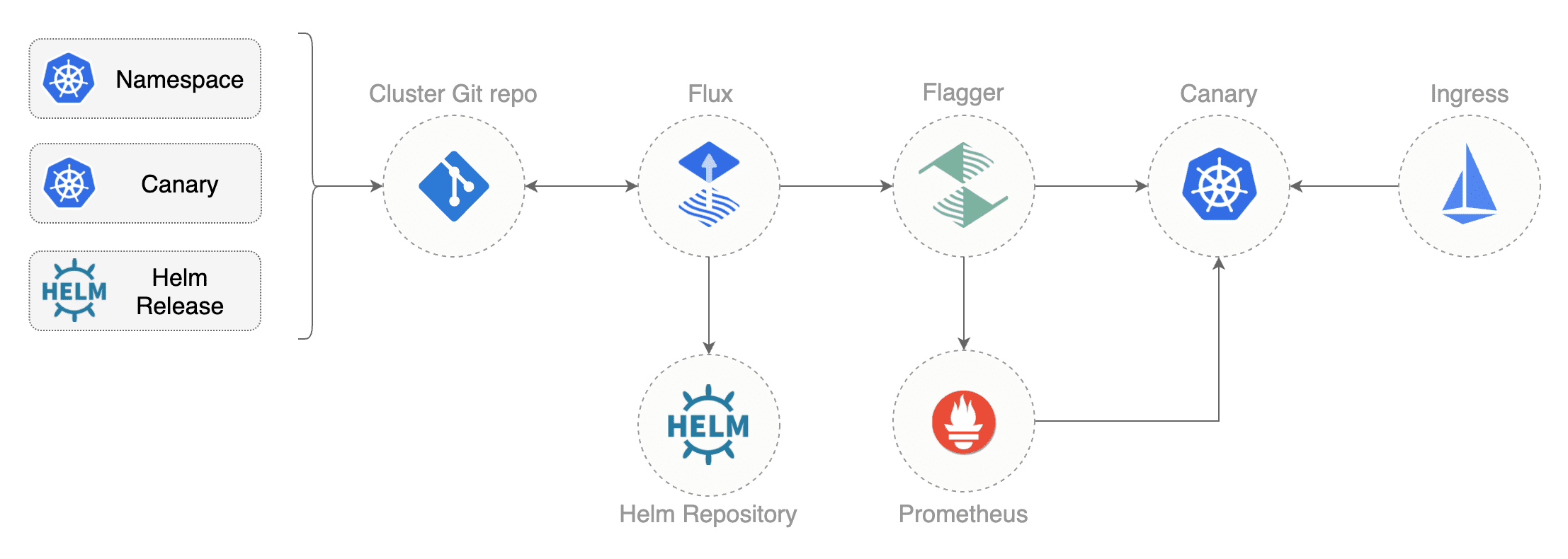
  •     ArgoCD: A GitOps operator for Kubernetes with a web interface
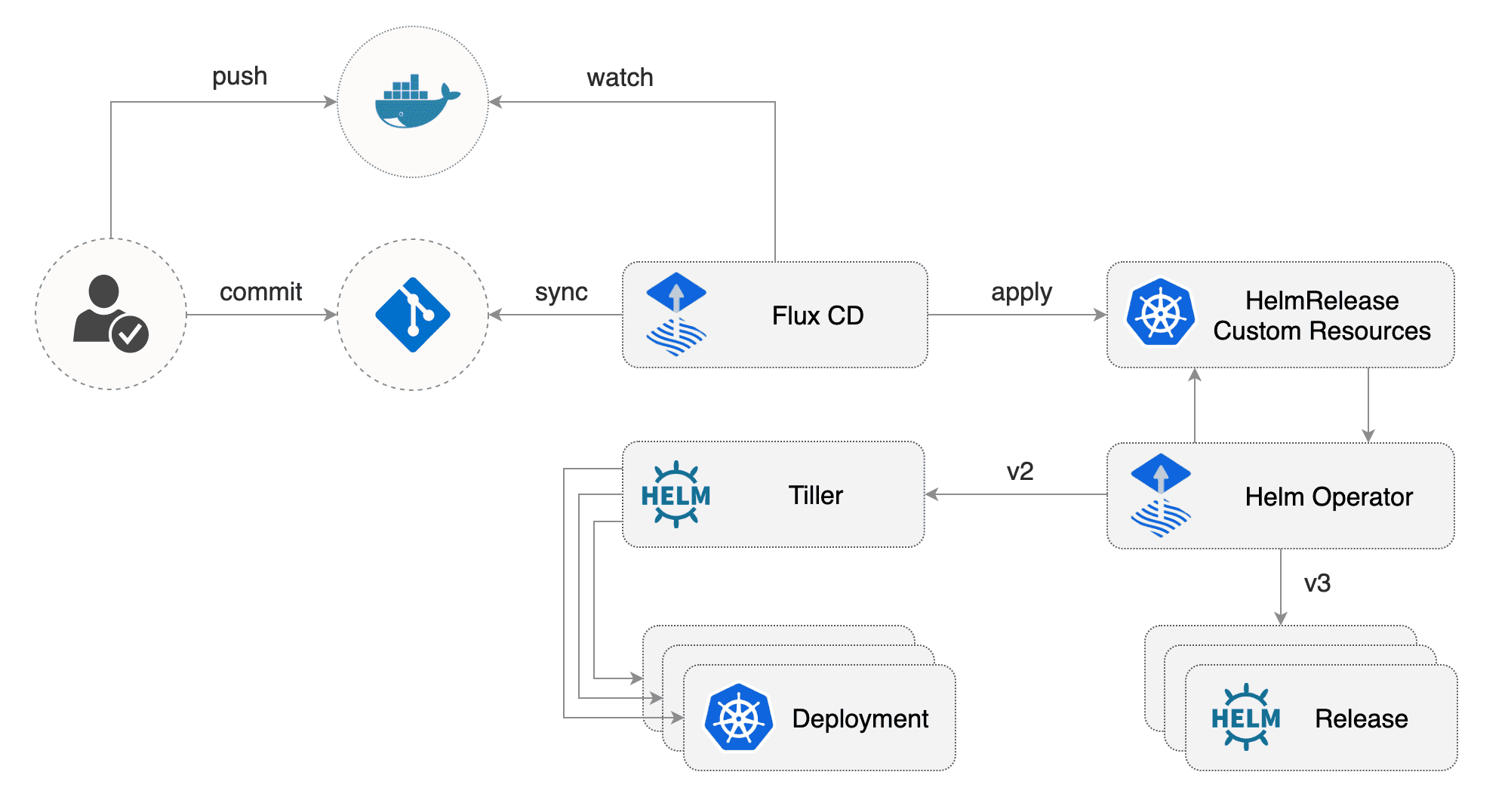
  •     Flux: The GitOps Kubernetes operator by the creators of GitOps — Weaveworks
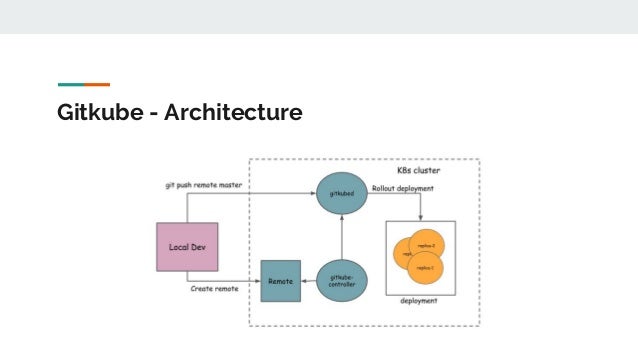
  •     Gitkube: A tool for building and deploying docker images on Kubernetes using git push
  •     JenkinsX: Continuous Delivery on Kubernetes with built-in GitOps
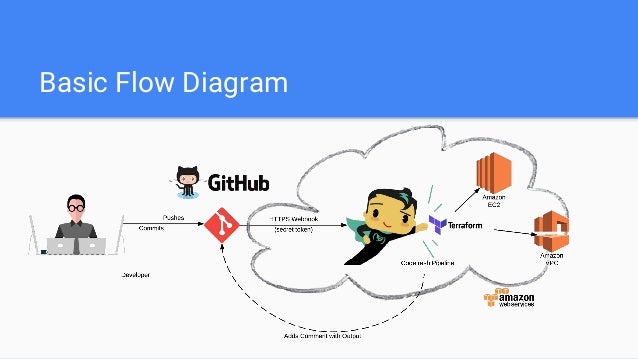
  •     Terragrunt: A wrapper for Terraform for keeping configurations DRY, and managing remote state
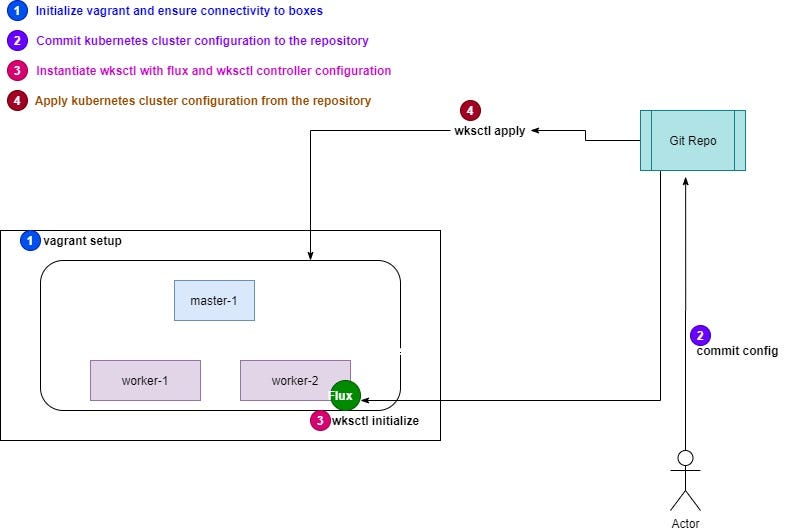
  •     WKSctl: A tool for Kubernetes cluster configuration management based on GitOps principles
  •     Helm Operator: An operator for using GitOps on K8s with Helm
  •     werf: A CLI tool to build images and deploy them to Kubernetes via push-based approach

Friday, January 1, 2021

AI in Cybersecurity

  •  Machine Learning in Cybersecurity

we structured the report around the questions you should ask about ML tools. We chose this framing, rather than proposing a detailed guide of how to build an ML system in cybersecurity, because we want to enable you to learn what a good tool looks like.


1. What is your topic of interest?

2. What information will help you address the topic of interest?

3. How do you anticipate that an ML tool will address the topic of interest?

4. How will you protect the ML system against attacks in an adversarial, cybersecurity environment?

5. How will you find and mitigate unintended outputs and effects?

6. Can you evaluate the ML tool adequately, accounting for errors?

7. What alternative tools have you considered? What are the advantages and disadvantages of each one?

https://insights.sei.cmu.edu/cert/2019/12/machine-learning-in-cybersecurity.html

Wednesday, December 30, 2020

Sistem odası

  •  Bir Sistem odasınde bağıl nem ile ilgili olarak iki olası tehlike bulunur:

1. Elektrostatik deşarj: Elektrostatik deşarj olasılığı, nem çok düşük olduğunda gerçekleşir. Ayrıca, bu olasılık sıcaklık düşük olduğunda da artar. Elektrostatik deşarj insanlar tarafından oldukça zor fark edilebilir ve genelde yaralanmalara yol açmaz. Ancak, 10 Volt değerindeki bir deşarj donanıma hasar verebilir.

2. Korozyon: Bu durum metalik bir donanım, donanım ıslandığında veya havadaki su yoğuşmasının sonucu olarak küçük damlalar oluştuğunda veya suya maruz kaldığında oluşur.

ÖrneÄŸin: Yüksek nem bulunan bir ortamda, sunucuların içerisindeki elemanlar hasar görebilir ve veri kaybı yaÅŸanabilir. Buradaki ana nokta, yoÄŸuÅŸma ve elektrostatik deÅŸarjın engellendiÄŸi bir ortamda, nemin optimum bir aralıkta tutulacak ÅŸekilde dengelenmesidir. Bunun için, en uygun bağıl nem aralığı %40 ile %55 arasıdır. 

(Bu değer aynı zamanda TIA/EIA 942 standardıyla önerilir)

https://hassasklima.com/bilgi-bankasi/tag/sistem%20odas%C4%B1%20nem%20oran%C4%B1%20ne%20olmal%C4%B1.html


  •  Havadaki nem oranının aşırı yükselmesi veya düşmesi bilgisayar sistemlerine zarar verebilir. Nemin çok az olması, statik elektrik yüklenme ve aktarımlarını arttırarak manyetik teyp ve benzeri bileÅŸenlerde sorunlara yol açabilir.  Nem oranının çok yükselmesi ise, bilgisayar sistemlerinizin devrelerinde kısa devrelere  kadar uzanan sorunlara neden olabilir.  Söz konusu olumsuzlukların önlenebilmesi için yüksek güvenilirlik gerektiren ortamlarda nem düzeyi belirli sınırlar arasında tutulmalı ve  nem düzeyinin belirlenen sınırlar dışına çıkması durumunda alarm sistemleri devreye girmelidir.

 https://sistemnetwork.karabuk.edu.tr/sistem_odasi/sistem_odasi.html

SQL Injection Vulnerability

  •  SQL Injection 


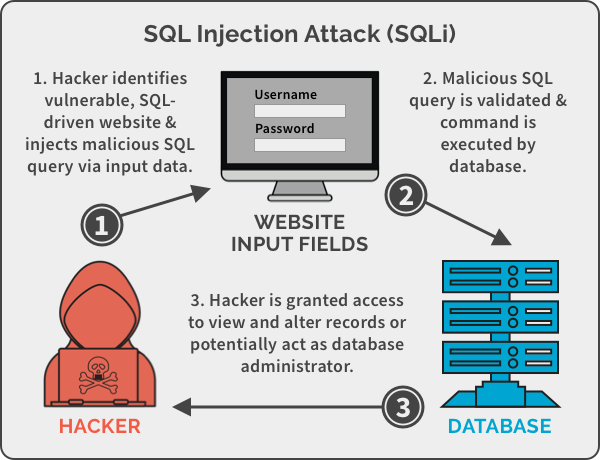
Generally, the purpose of SQL injection is to convince the application to run SQL code that was not intended.

SQL injection occurs when an application processes user-provided data to create a SQL statement without first validating the input.


During a web application SQL injection attack,

The malicious code is inserted into a web form field

Or the website’s code to make a system execute a command shell

Or other arbitrary commands.


divide data into packets, each sent individually

If multiple routes are available between two points on a network, packet switching can choose the best one and fall back to secondary routes in case of failure

Packets may take any path across a network and are reassembled by the receiving node. 

Missing packets can be retransmitted, and out of-order packets can be resequenced.


Finding a SQL Injection Vulnerability 


2.Test the SQL Server using single quotes (‘’). Doing so indicates whether the user input variable is sanitized or interpreted literally by the server.


If the server responds with an error message that says use 'a'='a' (or something similar), then it’s most likely susceptible to a SQL injection attack.


Use the SELECT command to retrieve data from the database or the INSERT command to add information to the database.


Here are some examples of variable field text you can use on a web form to test for SQL vulnerabilities:

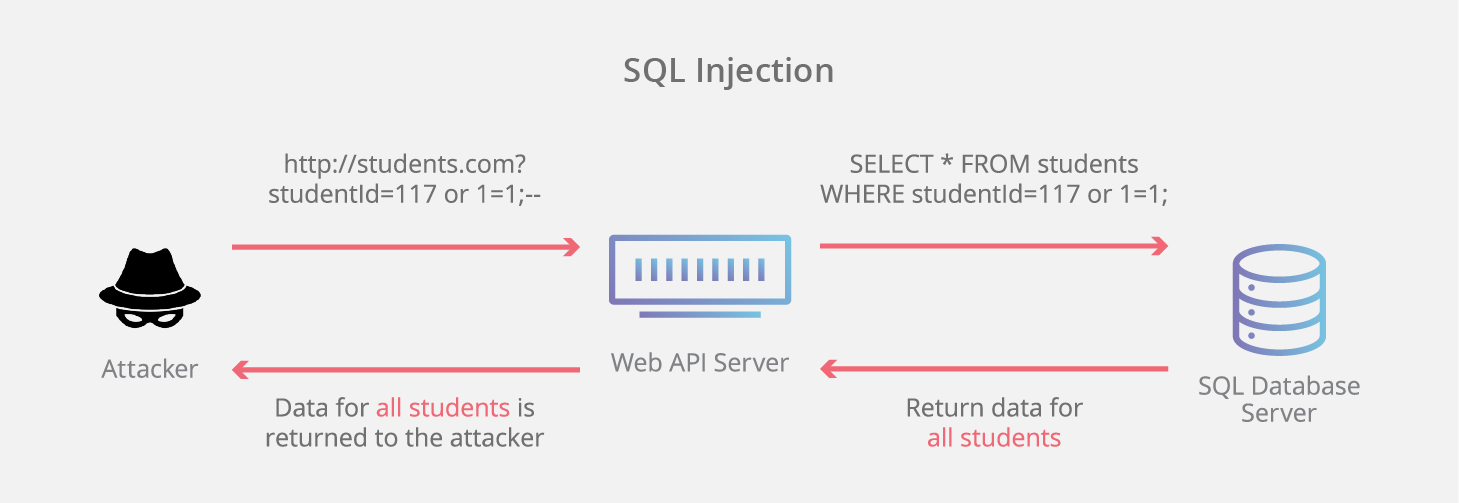
Blah’ or 1=1--

Login:blah’ or 1=1--

Password::blah’ or 1=1--

http://search/index.asp?id=blah’ or 1=1--


These commands and similar variations may allow a user to bypass a login depending on the structure of the database.

When entered in a form field, the commands may return many rows in a table or even an entire database table because the SQL Server is interpreting the terms literally.

The double dashes near the end of the command tell SQL to ignore the rest of the command as a comment


Here are some examples of how to use SQL commands to take control:

To get a directory listing, type the following in a form field:

Blah‘;exec master..xp_cmdshell “dir c:\*.* /s >c:\directory.txt”--

To create a file, type the following in a form field:

Blah‘;exec master..xp_cmdshell “echo hacker-was-here > c:\hacker.txt”--

To ping an IP address, type the following in a form field:

Blah‘;exec master..xp_cmdshell “ping 192.168.1.1”--


The Purpose of SQL Injection


SQL injection attacks are used by hackers to achieve certain results. Some SQL exploits will produce valuable user data stored in the database, and some are just precursors to other attacks.


Identifying SQL Injection Vulnerability

The purpose is to probe a web application to discover which parameters and user input fields are vulnerable to SQL injection.


Performing Database Finger-Printing

The purpose is to discover the type and version of database that a web application is using and “fingerprint” the database.

Knowing the type and version of the database used by a web application allows an attacker to craft database specific attacks.


Adding or Modifying Data

The purpose is to add or change information in a database.


Performing Denial of Service

These attacks are performed to shut down access to a web application, thus denying service to other users.

Attacks involving locking or dropping database tables also fall under this category.


Evading Detection

This category refers to certain attack techniques that are employed to avoid auditing and detection.


Bypassing Authentication

The purpose is to allow the attacker to bypass database and application authentication mechanisms.

Bypassing such mechanisms could allow the attacker to assume the rights and privileges associated with another application user.


Executing Remote Commands

These types of attacks attempt to execute arbitrary commands on the database. These commands can be stored procedures or functions available to database users.


Performing Privilege Escalation

These attacks take advantage of implementation errors or logical flaws in the database in order to escalate the privileges of the attacker.


SQL Injection Using Dynamic Strings 


static SQL statements

Many functions of a SQL database receive static user input where the only variable is the user input fields.

Such statements do not change from execution to execution.

They are commonly called static SQL statements


dynamic SQL statements

Some programs must build and process a variety of SQL statements at runtime.

In many cases the full text of the statement is unknown until application execution.

Such statements can, and probably will, change from execution to execution.

So, they are called dynamic SQL statements.


Dynamic SQL is an enhanced form of SQL that, unlike standard SQL, facilitates the automatic generation and execution of program statements.

Dynamic SQL is a term used to mean SQL code that is generated by the web application before it is executed.

Dynamic SQL is a flexible and powerful tool for creating SQL strings.


It can be helpful when you find it necessary to write code that can adjust to varying databases, conditions, or servers.

Dynamic SQL also makes it easier to automate tasks that are repeated many times in a web application.

A hacker can attack a web-based authentication form using SQL injection through the use of dynamic strings.


For example, the underlying code for a web authentication form on a web server may look like the following:

SQLCommand = “SELECT Username FROM Users WHERE Username = ‘“


SQLCommand = SQLComand & strUsername


SQLCommand = SQLComand & “‘ AND Password = ‘“


SQLCommand = SQLComand & strPassword


SQLCommand = SQLComand & “‘“


strAuthCheck = GetQueryResult(SQLQuery)


A hacker can exploit the SQL injection vulnerability by entering a login and password in the web form that uses the following variables:

Username: kimberly

Password: graves’ OR ‘’=’


The SQL application would build a command string from this input as follows:

SELECT Username FROM Users

WHERE Username = ‘kimberly’

AND Password = ‘graves’ OR ‘’=’’


This query will return all rows from the user’s database, regardless of whether kimberly is a real username in the database or graves is a legitimate password.

This is due to the OR statement appended to the WHERE clause.

The comparison ‘’=’’ will always return a true result, making the overall WHERE clause evaluate to true for all rows in the table.

This will enable the hacker to log in with any username and password


SQL Injection Countermeasures


The cause of SQL injection vulnerabilities is relatively simple and well understood:

Insufficient validation of user input.

To address this problem, defensive coding practices, such as encoding user input and validation, can be used when programming applications.

It is a laborious and time-consuming process to check all applications for SQL injection vulnerabilities.


When implementing SQL injection countermeasures, review source code for the following programming weaknesses:

Single quotes

Lack of input validation

The first countermeasures for preventing a SQL injection attack are

Minimizing the privileges of a user’s connection to the database and

Enforcing strong passwords for SA and Administrator accounts.


You should also disable verbose or explanatory error messages so no more information than necessary is sent to the hacker;

Such information could help them determine whether the SQL Server is vulnerable


Another countermeasure for preventing SQL injection is checking user data input and validating the data prior to sending the input to the application for processing.

Some countermeasures to SQL injection are

Rejecting known bad input

Sanitizing and validating the input field


https://sct.emu.edu.tr/en/Documents/System%20Security.ppt

Tuesday, December 29, 2020

self-garbling virus

  •   A self-garbling virus attempts to hide from anti-virus software by garbling its own code. When these viruses spread, they change the way they are encoded so anti-virus software cannot find them. A small portion of the virus code decodes the garbled code when activated

https://infosecurity.txstate.edu/awareness/Cyber-Threats/Viruses/virus_defn.html

Thursday, December 24, 2020

Clickjacking

  • Clickjacking

Clickjacking, also known as a “UI redress attack”, is when an attacker uses multiple transparent or opaque layers to trick a user into clicking on a button or link on another page when they were intending to click on the top level page. Thus, the attacker is “hijacking” clicks meant for their page and routing them to another page, most likely owned by another application, domain, or both.

Using a similar technique, keystrokes can also be hijacked. With a carefully crafted combination of stylesheets, iframes, and text boxes, a user can be led to believe they are typing in the password to their email or bank account, but are instead typing into an invisible frame controlled by the attacker

Examples
For example, imagine an attacker who builds a web site that has a button on it that says “click here for a free iPod”. However, on top of that web page, the attacker has loaded an iframe with your mail account, and lined up exactly the “delete all messages” button directly on top of the “free iPod” button. The victim tries to click on the “free iPod” button but instead actually clicked on the invisible “delete all messages” button. In essence, the attacker has “hijacked” the user’s click, hence the name “Clickjacking”.

Defending against Clickjacking
There are two main ways to prevent clickjacking:

Sending the proper Content Security Policy (CSP) frame-ancestors directive response headers that instruct the browser to not allow framing from other domains. (This replaces the older X-Frame-Options HTTP headers.)
Employing defensive code in the UI to ensure that the current frame is the most top level window

https://owasp.org/www-community/attacks/Clickjacking#:~:text=Clickjacking%2C%20also%20known%20as%20a,on%20the%20top%20level%20page.

  1. Clickjacking categories

Classic: works mostly through a web browser
Likejacking: utilizes Facebook's social media capabilities
Nested: clickjacking tailored to affect Google+
Cursorjacking: manipulates the cursor's appearance and location
MouseJacking: inject keyboard or mouse input via remote RF link
Browserless: does not use a browser
Cookiejacking: acquires cookies from browsers
Filejacking: capable of setting up the affected device as a file server
Password manager attack: clickjacking that utilizes a vulnerability in the autofill capability of browsers

Prevention

Client-side
NoScript
NoClickjack
GuardedID
Gazelle
Intersection Observer v2

Server-side
Framekiller
X-Frame-Options
Content Security Policy

https://en.wikipedia.org/wiki/Clickjacking

Tuesday, October 13, 2020

HPC fabric topology

  •  ExascaleHPC Fabric Topology


Topologies –Fat Tree Example


Torus Topology

Mesh or 3DTorus

▪Mesh –each node is connected to 4 other nodes: positive and negative X and Y axis

▪3Dmesh –Each node is connected to 6 other nodes: positive and negative X, Y and Z axis

▪2D/3Dtorus –The ends of the 2D/3Dmeshes are connected


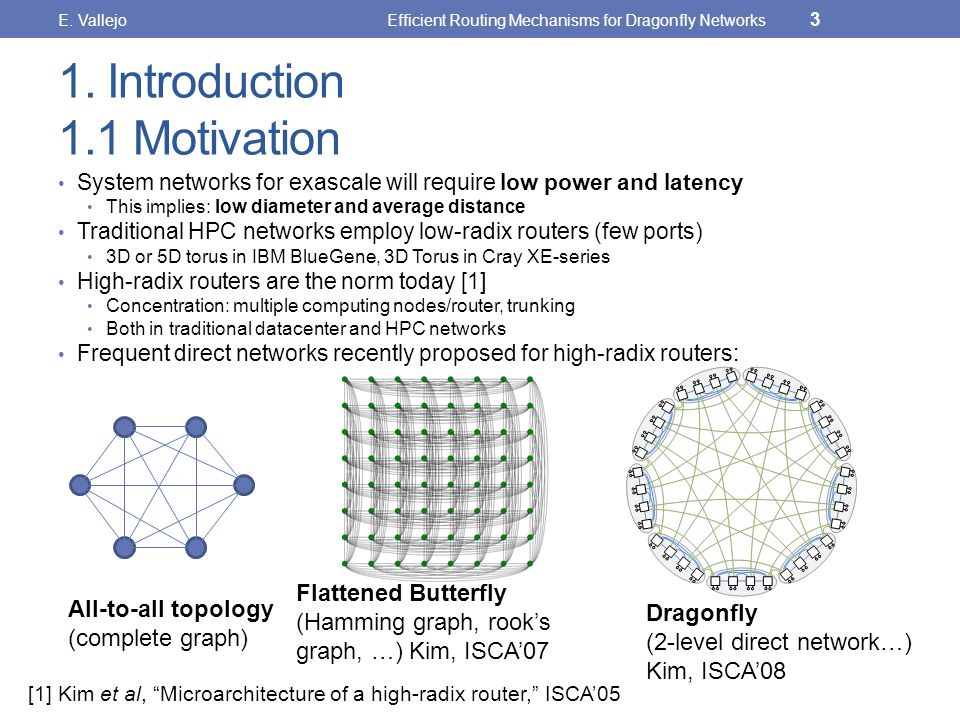
Dragonfly+ Topology

What is Dragonfly Topology?

Dragonfly is a hierarchical topology with the following properties:

Several “groups”, connected together using all to all links▪The topology inside each group can be any topology

▪Focus on reducing the number of long links and network diameter to reduce total cost of network

▪Requires Adaptive Routing to enable efficient operation


There are Different Dragonfly Topologies Options


Dragonfly+ Topology

▪Several “groups”, connected using all to all links

▪The topology inside each group can be any topology

▪Reduce total cost of network (fewer long cables)

▪Utilizes Adaptive Routing to for efficient operations ▪Simplifies future system expansion 


Future Expansion of Dragonfly+ Based System

▪Dragonfly+ is the only topology that allows system expansion at zero cost

▪While maintaining bisection bandwidth

▪No port reservation

▪No re-cabling


Dragonfly+ Simplifies Scale Deployment and Cost


http://www.hpcadvisorycouncil.com/events/2019/APAC-AI-HPC/uploads/2018/07/Exascale-HPC-Fabric-Topology.pdf


Wednesday, July 8, 2020

Courses of Action Matrix


  • How to Defend With the Courses of Action Matrix and Indicator Lifecycle Management

The seven phases of the kill chain cover all of the stages of a single intrusion that — when completed successfully — lead to a compromise.
Within each of these stages is also an opportunity for defenders to prevent a successful intrusion. 
The weaponization phase, for example, can reveal document metadata or the characteristics of the tools that are used by the attackers. The delivery phase, in turn, can tell you which email infrastructure is used or which web infrastructure has been set up for delivering a browser plugin exploit. 

The information that results from analyzing these phases will include, among other things, IoCs. These indicators describe your adversaries by providing details about the infrastructure they use, fingerprints of their actions and the tactics, techniques and procedures (TTPs) used to attack their victims.


How to Apply the Courses of Action Matrix
The indicators extracted when you analyze the different phases of the Cyber Kill Chain should be put into action to increase your defenses. There are essentially two significant categories of action: passive and active.
This categorization of actions is described in another model from Lockheed Martin: the courses of action matrix. 

passive actions: 
Discover: security information and event management (SIEM) or stored network data.The goal is to determine whether you have seen a specific indicator in the past.
Detect: These actions are most often executed via an intrusion detection system (IDS) or a specific logging rule on your firewall or application. It can also be configured as an alert in a SIEM when a specific condition is triggered.

It’s important to note that these actions are mutually exclusive, and only one can be applied at a time. 

active actions
Deny:Common examples include a firewall block or a proxy filter.
Disrupt: Examples include quarantining or memory protection measures.
Degrade:Degrading will not immediately fail an event, but it will slow down the further actions of the attacker. Throttling bandwidth is one way to degrade an intrusion.
Deceive: One way to do this is to put a honeypot in place and redirect the traffic, based on an indicator, towards the honeypot
Destroy:The destroy action is rarely for “usual” defenders, as this is an offensive action against the attacker. These actions, including physical destructive actions and arresting the attackers, are usually left to law enforcement agencie

https://securityintelligence.com/how-to-defend-with-the-courses-of-action-matrix-and-indicator-lifecycle-management/

Monday, June 29, 2020

API hooking


  • API hooking is a technique by which we can instrument and modify the behavior and flow of API calls. API hooking can be done using various methods on Windows. Techniques include memory break point and .DEP and JMP instruction insertion

https://resources.infosecinstitute.com/api-hooking/#gref

Saturday, June 27, 2020

Scaffolding


  • Scaffolding, as used in computing, refers to one of two techniques: The first is a code generation technique related to database access in some model–view–controller frameworks; the second is a project generation technique supported by various tools. 


Code generation
Scaffolding is a technique supported by some model–view–controller frameworks, in which the programmer can specify how the application database may be used. The compiler or framework uses this specification, together with pre-defined code templates, to generate the final code that the application can use to create, read, update and delete database entries, effectively treating the templates as a "scaffold" on which to build a more powerful application.

Project generation
Complicated software projects often share certain conventions on project structure and requirements. For example, they often have separate folders for source code, binaries and code tests, as well as files containing license agreements, release notes and contact information
https://en.wikipedia.org/wiki/Scaffold_(programming)

Thursday, June 25, 2020

Return-oriented programming


  • Return-oriented programming

Return-oriented programming (ROP) is a computer security exploit technique that allows an attacker to execute code in the presence of security defenses such as executable space protection and code signing.
In this technique, an attacker gains control of the call stack to hijack program control flow and then executes carefully chosen machine instruction sequences that are already present in the machine's memory, called "gadgets".Each gadget typically ends in a return instruction and is located in a subroutine within the existing program and/or shared library code. Chained together, these gadgets allow an attacker to perform arbitrary operations on a machine employing defenses that thwart simpler attacks.
https://en.wikipedia.org/wiki/Return-oriented_programming


  • Executable space protection

In computer security, executable-space protection marks memory regions as non-executable, such that an attempt to execute machine code in these regions will cause an exception. It makes use of hardware features such as the NX bit (no-execute bit), or in some cases software emulation of those features. However technologies that somehow emulate or supply an NX bit will usually impose a measurable overhead; while using a hardware-supplied NX bit imposes no measurable overhead.
https://en.wikipedia.org/wiki/Executable_space_protection


  • Code signing

Code signing is the process of digitally signing executables and scripts to confirm the software author and guarantee that the code has not been altered or corrupted since it was signed. The process employs the use of a cryptographic hash to validate authenticity and integrity.
The efficacy of code signing as an authentication mechanism for software depends on the security of underpinning signing keys. As with other public key infrastructure (PKI) technologies, the integrity of the system relies on publishers securing their private keys against unauthorized access. Keys stored in software on general-purpose computers are susceptible to compromise. Therefore, it is more secure, and best practice, to store keys in secure, tamper-proof, cryptographic hardware devices known as hardware security modules or HSMs
https://en.wikipedia.org/wiki/Code_signing

Side-channel attack


  • Side-channel attack

In computer security, a side-channel attack is any attack based on information gained from the implementation of a computer system, rather than weaknesses in the implemented algorithm itself (e.g. cryptanalysis and software bugs). Timing information, power consumption, electromagnetic leaks or even sound can provide an extra source of information, which can be exploited.
General classes of side channel attack include:

    Cache attack — attacks based on attacker's ability to monitor cache accesses made by the victim in a shared physical system as in virtualized environment or a type of cloud service.
    Timing attack — attacks based on measuring how much time various computations (such as, say, comparing an attacker's given password with the victim's unknown one) take to perform.
    Power-monitoring attack — attacks that make use of varying power consumption by the hardware during computation.
    Electromagnetic attack — attacks based on leaked electromagnetic radiation, which can directly provide plaintexts and other information. Such measurements can be used to infer cryptographic keys using techniques equivalent to those in power analysis or can be used in non-cryptographic attacks, e.g. TEMPEST (aka van Eck phreaking or radiation monitoring) attacks.
    Acoustic cryptanalysis — attacks that exploit sound produced during a computation (rather like power analysis).
    Differential fault analysis — in which secrets are discovered by introducing faults in a computation.
    Data remanence — in which sensitive data are read after supposedly having been deleted. (i.e. Cold boot attack)
    Software-initiated fault attacks — Currently a rare class of side-channels, Row hammer is an example in which off-limits memory can be changed by accessing adjacent memory too often (causing state retention loss).
    Optical - in which visual recording can read secrets and sensitive data using a high resolution camera, or other devices that have such capabilities (see examples below)
https://en.wikipedia.org/wiki/Side-channel_attack

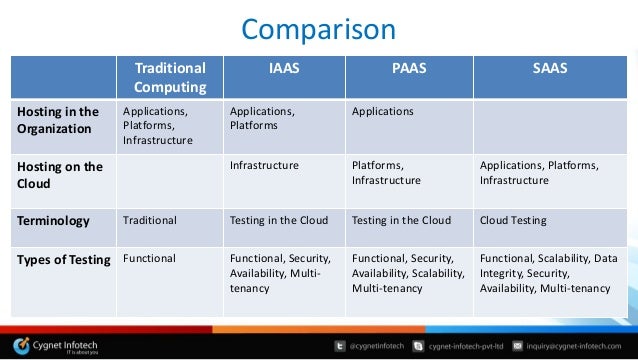
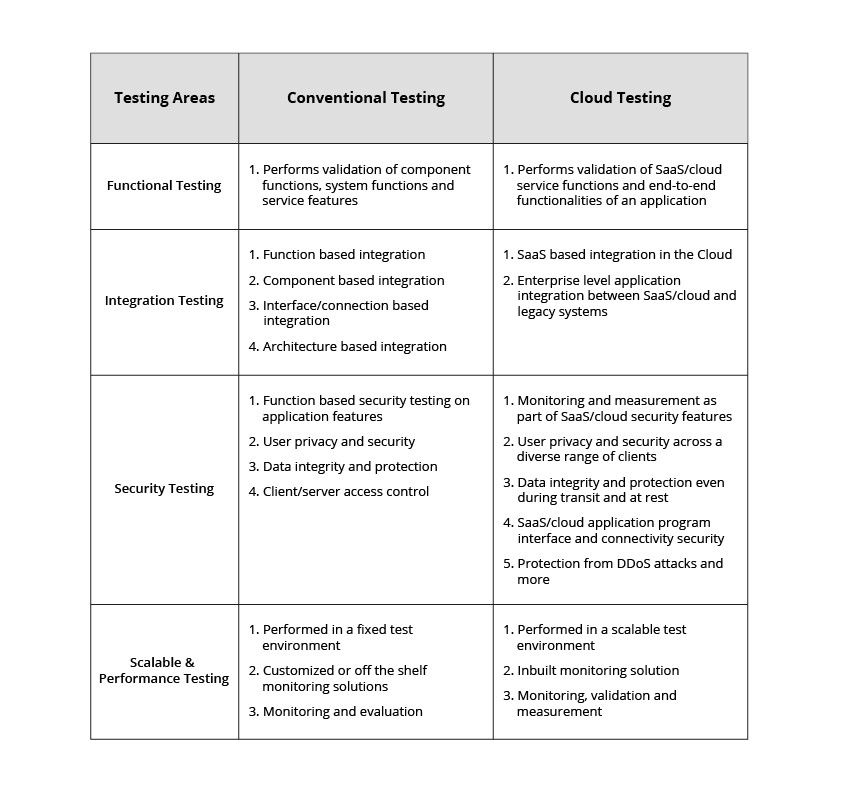
Functional Non-functional testing (cloud)


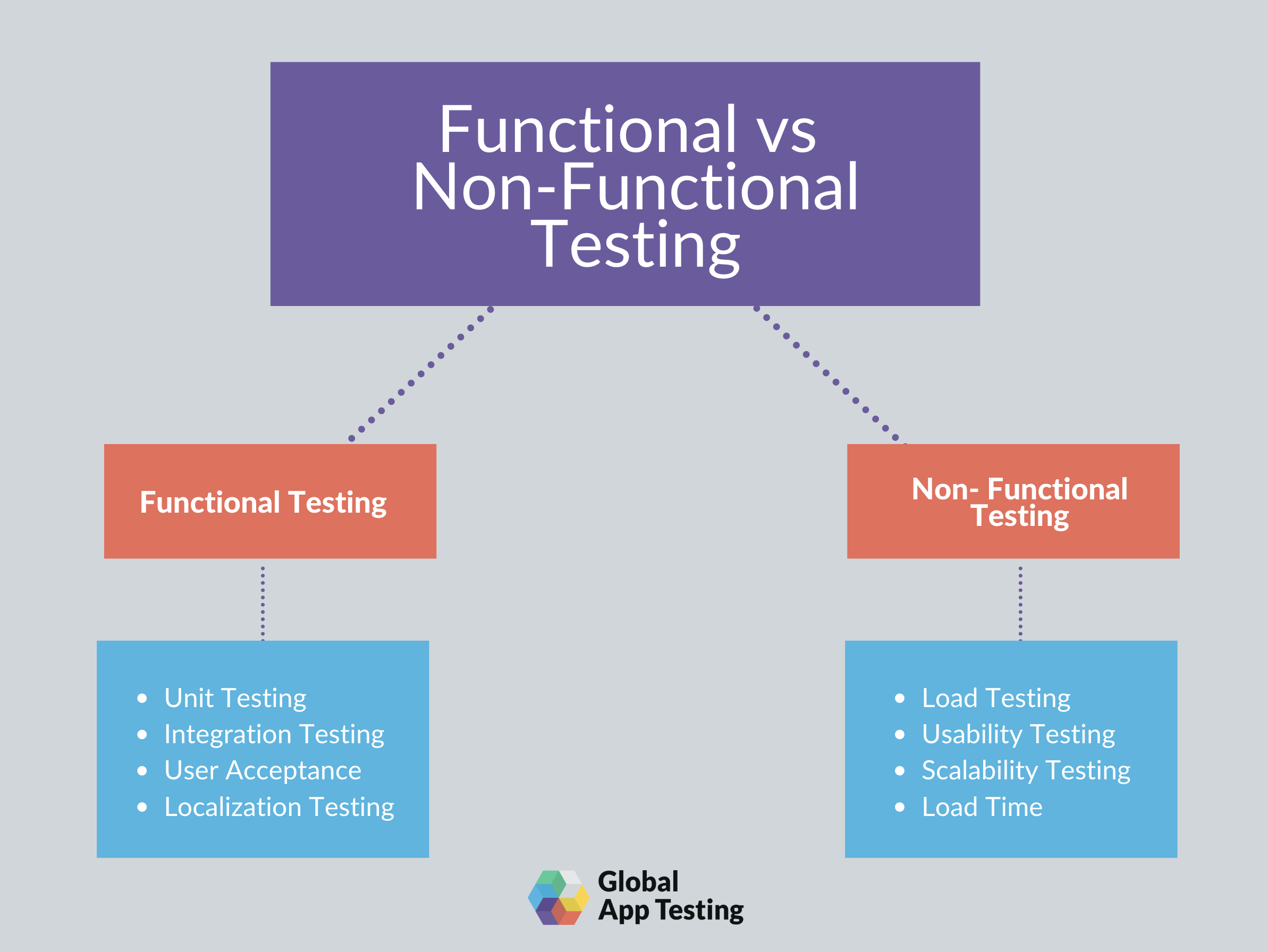
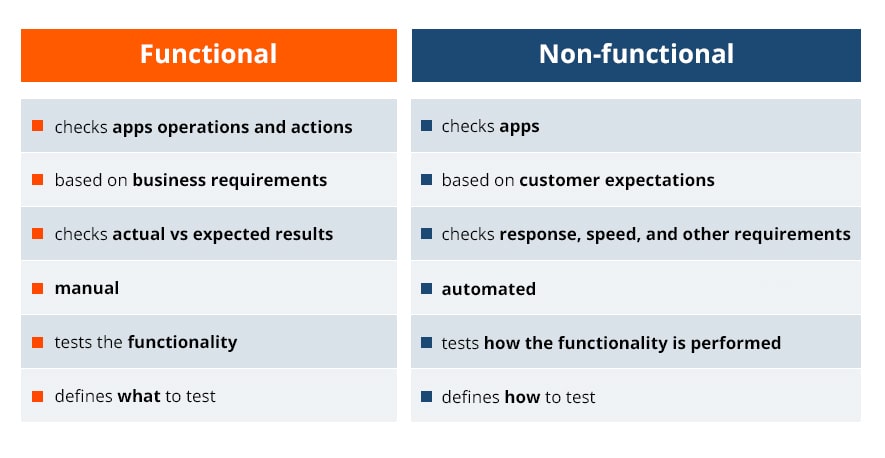
  • The main difference between functional and nonfunctional testing

Functional requirements: describe the behavior/execution of the software system
Non-functional requirements: describe the performance or usability of the software system

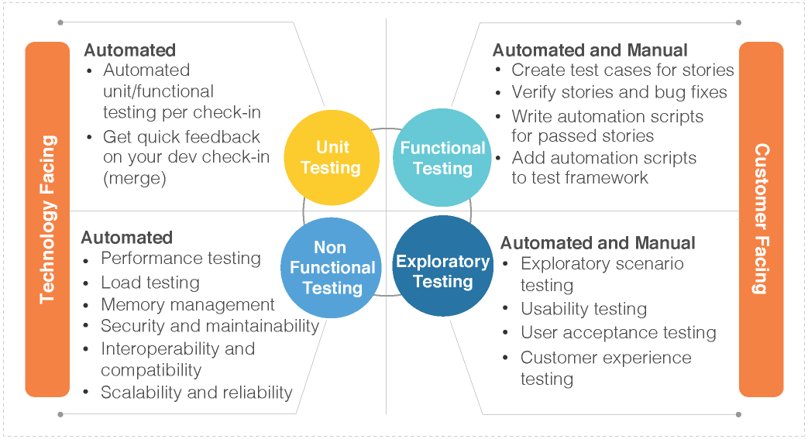
Here are some of the common functional testing techniques:

Installation testing – for desktop or mobile application, testing proper installation
Boundary value analysis – testing of the boundaries of numerical inputs
Equivalence partitioning – grouping tests together to reduce overlap of similar functional tests
Error guessing – assessing where functional issues are most likely to be found and testing these more extensively than other areas
Unit testing – testing performed at the smallest level of the software—not how the system is functioning as a whole, but whether each unit is executing properly
API testing – checks that internal and external APIs are functioning properly, including data transfer and authorization
Regression testing – tests that are performed to verify that new software changes did not have adverse effects on existing functionality (most common automation technique)


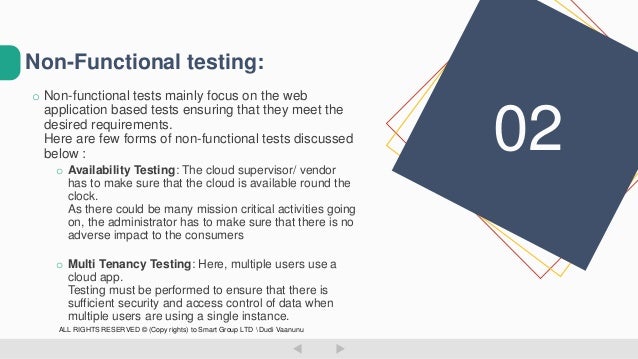
These are the chief nonfunctional testing techniques:

Load testing – tests performed on simulated environment to test the behavior of the system during expected conditions (various number of users)
Stress testing – testing performance when low on resources, such as server issues or lack of hard drive space on a device
Scalability testing – checking a system’s ability to scale with increased usage and to what extent performance is affected
Volume testing – testing performance with a high volume of data, not necessarily high number of users, but could be one user performing a high-volume task, such as a multiple-file upload
Security testing – tests performed to uncover how vulnerable the system is to attacks, and how well data is protected
Disaster recovery testing – checks on how quickly a system can recover following a crash or major issue
Compliance testing – tests of the software system against any set of standards (whether due to industry regulations or a company’s set of standards)
Usability testing – testing whether the GUI is consistent and if the application as a whole is intuitive and easy to use

https://testlio.com/blog/whats-difference-functional-nonfunctional-testing/#:~:text=Functional%20requirements%20are%20the%20WHAT,customer%20expectations%20are%20being%20met.

  • Differences between Functional and Non-functional Testing


Functional Testing:
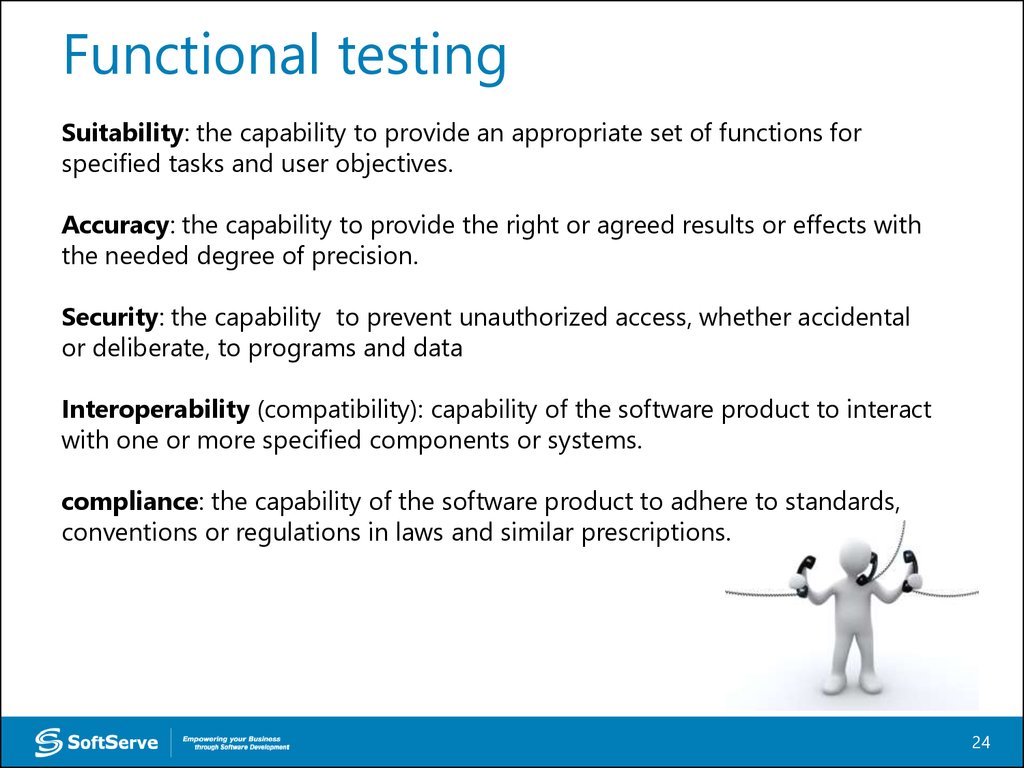
Functional testing is a type of software testing in which the system is tested against the functional requirements and specifications. Functional testing ensures that the requirements or specifications are properly satisfied by the application. This type of testing is particularly concerned with the result of processing. It focuses on simulation of actual system usage but does not develop any system structure assumptions.
Non-functional Testing:
Non-functional testing is a type of software testing that is performed to verify the non-functional requirements of the application. It verifies whether the behavior of the system is as per the requirement or not. It tests all the aspects which are not tested in functional testing.
https://www.geeksforgeeks.org/differences-between-functional-and-non-functional-testing/
  • The implementation under test is that which implements the base standard(s) being tested.
https://link.springer.com/referenceworkentry/10.1007%2F978-0-387-73003-5_700

Implementation under test, a term used in technological vulnerability analysis, particularly protocol evaluation
https://en.wikipedia.org/wiki/IUT

Implementation Under Test (IUT) That part of a real system which is to be tested, which should be an implementation of applications, services or protocols.
https://portal.etsi.org/CTI/CTISupport/Glossary.htm

  • The main difference is that regression testing is designed to test for bugs you don't expect to be there, whereas retesting is designed to test for bugs you do expect to be there.
The point of regression testing is to ensure that new updates or features added to software don’t break any previously released updates or features.
To perform regression testing you typically have a regression suite – a series of test cases set up to test these older features.
Regression test cases are often automated because these tests build up as the software changes or grows

retesting is designed to test specific defects that you’ve already detected (typically during your regression testing).
In other words, regression testing is about searching for defects, whereas retesting is about fixing specific defects that you’ve already found.
https://www.leapwork.com/blog/difference-between-retesting-and-regression-testing

Regression testing is performed for passed test cases while Retesting is done only for failed test cases
Regression testing checks for unexpected side-effects while Re-testing makes sure that the original fault has been corrected.
Regression Testing doesn’t include defect verification whereas Re-testing includes defect verification.
Regression testing is known as generic testing whereas Re-testing is planned testing.
Regression Testing is possible with the use of automation whereas Re-testing is not possible with automation.
https://www.guru99.com/re-testing-vs-regression-testing.html

  • Examples of Functional testing are
Black Box testing
https://www.guru99.com/functional-testing.html

Black-box testing. Contrary to white-box testing, black-box testing involves testing against a system where the internal code, paths and infrastructure are not visible. Thus, testers use this method to validate expected outputs against specific inputs. 
https://www.applause.com/blog/functional-testing-types-examples

  • It helps detect defects in the software.
Testing is done by executing the program. 
Dynamic testing involves both functional and non-functional testing.
https://www.professionalqa.com/dynamic-testing
  •  Ensures the functionality, reliability, and performance between the integrated module.
 To be precise the success of Integration Testing lies in the perfection of the test plan.
 https://www.professionalqa.com/integration-testing