For context, a BMC is a specialized controller embedded in servers. It often comes in the form of a system-on-chip (SoC), with its own CPU, memory, and storage and lots of IO. A BMC connects to sensors to read environmental conditions and to fans to control temperature. It also provides other system management functions, including remote power control, serial over LAN, and monitoring and error logging of the server host CPU and memory.
Until now, on the software side, the complete BMC software stack was closed. BMC software is usually developed by the hardware manufacturer during the hardware-development phase. Because the BMC software was closed, whatever was developed for the existing hardware could not be reused for the next generation. The long BMC software schedule directly affected new hardware development. When hardware development ended, the BMC software development stopped as well. Further bug fixes or new features had to wait for the hardware manufacturer.
In this case, you can use NetFlow, an effective tool to meet the needs of network traffic management.
NetFlow was originally developed by Cisco.
Cisco's NetFlow also has multiple versions, such as V5, V7, V8, and V9. Currently NetFlow V5 is the mainstream.
the flow of an IP data package defines at least the following 7 key elements:
Source IP address;
Destination IP address;
Source port number;
Destination port number;
Type of the third layer agreement;
TOS field;
Logical port of network device input/output (if index)
Example 1: CodeRed's Flow features are destination port=80, packets=3, size=144bytes. Although on the Internet, normal behaviors that conform to the above characteristics exist (such as using ICQ), a host that is generally used normally will not send out a large number of these messages in a few consecutive periods of time.
take several different time periods, such as 5 minutes each, if the flow that meets the characteristics in each time period is greater than the upper limit, it can be judged as Code Red.
Example 2: A host infected with Nimda virus will initiate a large number of connections to external addresses (usually TCP port 80). The flow feature of Nimda is that each Flow represents a connection with destination port=80. If a normal client is in a period of time If the number of flows within (for example, 5 minutes) is too large, it is likely to be infected by viruses or have other attacks against HTTP.
if Apache Http Server is infected with Slapper Worm, a large number of Http packets will also be generated.
take several different time periods, each of 5 minutes, if the flow that meets the characteristics in each time period exceeds the upper limit, it can be judged as Nimda virus or other attack behavior.
Example 3: Worm.Sasser is characterized by an IP that initiates a TCP connection on port 445 to multiple randomly generated IPs at the same time.
the same source IP, a large number of different destination IPs, and the destination port is 445. When the flow meets the upper limit, it can be considered as an oscillator virus.
Example 4: the notorious Microsoft SQL-Server vulnerability caused a great impact. Its characteristic is a TCP stream with a destination port of 1433.
Example 5: Analyze DOS attack traffic with NetFlow
DOS can use the defects of the TCP protocol to open a half-open TCP connection through SYN, occupying system resources, so that legitimate users are excluded and cannot establish a normal TCP connection.
the detection of ICMP attacks can be based on the following conditions: In several consecutive time periods, assuming that each time period is 5 minutes, ICMP packets in each time period are greater than 5000
another DDOS attack is SYN flooding, which is characterized by the SYN in the TCP header being set and a large number of SYN characteristic packets. The Flag bit is provided in the NetFlow output format, which creates conditions for us to judge SYN attacks
the condition for detecting SYN flooding is: in several consecutive time periods, assuming that each time period is 5 minutes, a large number of data packets with flag=2 are generated. Normal connections will not generate so many data packets with flag=2, so it can Set the threshold to 5000
If the number of data packets with flag=2 sent by the host exceeds 1000, it can be considered that the host is launching an attack.
Case 6: Application of NetFlow in Network Forensics
Fprobe: Send data stream from remote host;
NfSen: NetFlow analysis graphical front end;
Nfdump: NetFlow acquisition module;
the network data is received at the network interface, and then the collected data is converted by the Fprobe program according to certain rules and formats (Netflow format), and then sent to the system's port 555 (check/etc/default/fprobe for details),
Then the Nfdump program in the Nfsen system will store the converted data in the/var/cache/nfdump/flows/directory,
and finally read it by the web front-end program Nfsen
When computers need to talk to one another, they establish communication channels, commonly referred to as connections. (Technically speaking, these communication channels can only be called connections when the TCP protocol is involved.) A flow refers to any connection or connection-like communication channel.
a flow is defined by its 5-tuple, a collection of five data points:
The source and destination IP addresses exchanging information
The source and destination ports, if any (ICMP, for example, doesn’t use ports)
The protocol
Flow identifies a communication channel, and all packets sharing the same 5-tuple fields belong to the same flow.
NetFlow is functionality built into network devices that collects measurements for each flow and exports them to another system for analysis. NetFlow captures a number of details, including the timestamp of a flow’s first and last packets (and therefore its duration), the total number of bytes and packets exchanged, and a summary of the flags used in TCP connections.
By collecting and analyzing this flow data, we can learn details about how the network is being used. Flow analysis is helpful in troubleshooting network issues, identifying bandwidth hogs, and tracking which external IPs or countries you’re exchanging data with
Having this information is important, but what you can do it is what really matters. This data can help you answer questions like:
Who’s using banned applications, like BitTorrent?
Who’s hogging bandwidth and slowing down the network?
Why your web server is receiving so many connections from North Korea?
What was a hacked server connected to during an infection?
Why use NetFlow?
Simply stated, you should use NetFlow because it gives you deep network visibility.
configuring NetFlow on the main router connected to the internet (R1) lets you monitor all the traffic in and out of the company, and to watch for any attacks on the servers in the DMZ. This is typically referred to as north-south traffic.
If you enable NetFlow on the main switch connecting the different departments (S1), you also gain instant visibility into all internal network traffic as well, typically referred to as east-west traffic.
NetFlow vs. SNMP
Similar to NetFlow, SNMP has a concept of agents (analogous to a flow exporter) and managers (analogous to a flow collector).
NetFlow and SNMP have some similarities, but it’s where they differ that’s most interesting. While they can both be used to monitor the throughput of a network, only NetFlow provides visibility into the what and the where of the traffic
There is a bit of a difference however with data collection. With NetFlow, there is only one way to get data from the flow exporter to the flow collector. The flow exporter actively sends data to the flow collector. SNMP, on the other hand, has two ways of getting data from an agent to a manager. SNMP can utilize traps, a push notification from the agent to the manager, or SNMP polls, a pull request to the agent, initialized from a manager. SNMP polling is the primary way most network management systems collect performance data.
Another major difference between NetFlow and SNMP is that NetFlow focuses only on traffic passing through a network device. SNMP allows network administrators to collect data on other device performance metrics, such as CPU and memory utilization, and even into hardware health information – like fan speed and temperature.
Where SNMP falls short on giving network admins visibility into the what and the where of the traffic, NetFlow is there to fill in that gap.
Limitations of NetFlow
NetFlow identifies the device but not necessarily the user
NetFlow records the IP address at the time of data collection
if you use Network Address Translation (NAT) in your network, and do the NetFlow collection after you’ve NAT’d the traffic (on the ‘outside’ interface of a firewall), you won’t see the internal IPs associated with that traffic. I’ve been in this spot once or twice, trying to troubleshoot who is consuming all that bandwidth when every flow says “it’s the firewall!” You’ll want to ensure you’re always collecting flow traffic from an interface where you’ll see your internal IPs, before it is NAT’d.
NetFlow doesn’t see inside the flows
The 5-tuple of information collected by NetFlow is actually extracted out of the header of an IP packet.
The solution? Many organizations look to Deep Packet Inspection (DPI), including TLS inspection, as a way of peering inside the network traffic to analyze it for security threats and policy compliance
The inspection appliances need to sit in-line with the traffic and adds an additional failure point.
There are privacy implications to doing DPI on all traffic.
It can be cost prohibitive for some organizations.
NetFlow can be used for monitoring, but not active management
NetFlow doesn’t tell you where a device is connected
Two-Factor Authentication vs. Multi-Factor Authentication: What Are the Risks
Business networks are crucial to protect, so firms want only authorized people accessing them.
In cybersecurity, authentication means verifying that a person or device is who they claim to be.
It usually involves checking the identity claim against what's called a factor.
This could be a password, a biometric identifier (a fingerprint, an iris scan), or the ability to control a trusted piece of equipment such as an electronic ID card or a cell phone.
Single-Factor Authentication
A user has a password and types it in.
An analogy in the physical world might be a person using a key or code to unlock a safe.
Two-Factor Authentication
It's the simplest type of multi-factor authentication.
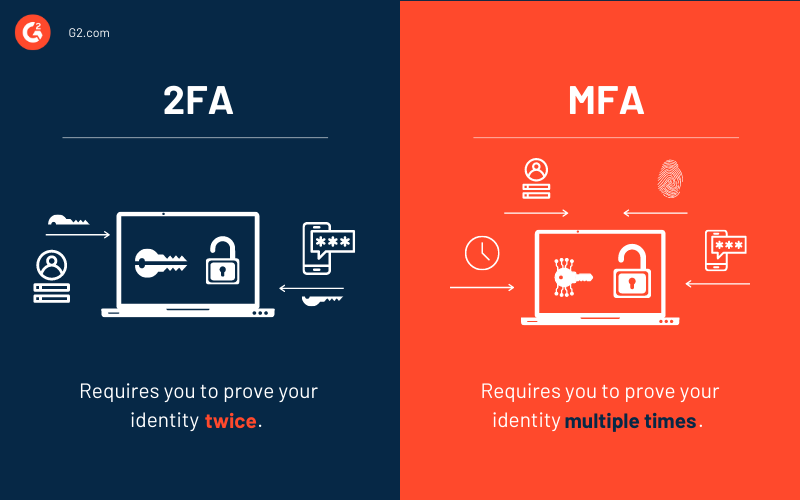
With 2FA, users have to supply two distinct proofs of identity to gain access to the network.
Usually, this includes a password and control over a trusted cell phone.
For instance, with Twitter, users employing 2FA first enter their passwords and next, receive an SMS authentication message from Twitter with a six-digit code to input.
Multi-Factor Authentication
The term multi-factor authentication (MFA) means there are more than two factors involved.
For every factor of authentication you add, you boost security, but at the cost of making your user experience worse.
MFA systems can also be cumbersome for IT teams, who have to manage integrations with multiple applications or systems.
Adaptive Multi-Factor Authentication
Adaptive authentication means the system is flexible depending on how much risk a user presents.
For example, if an employee is working on the company premises and uses a badge to get through security to her office, Okta will recognize that she is in a trusted location, and that she has permissions to proceed.
If that same employee is working from a coffee shop, the system may prompt her for an additional security factor when she goes to log in remotely, since she’s not in a trusted location.
Or, it could present an additional MFA challenge if the user was working from a personal laptop instead of a company device.
Whether a user is accessing his email or the corporate payroll files, he needs to verify his identity before that access is granted. There are three possible ways this user can prove he is who he claims to be:
Knowledge—the user provides information only he knows, like a password or answers to challenge questions
Possession—the user supplies an item he has, like a YubiKey or a one-time password
Inherence—the user relies on a characteristic unique to who he is, such as a fingerprint, retina scan, or voice recognition
Two-Factor Authentication vs. Multi-Factor Authentication (2FA vs. MFA)
The difference between MFA and 2FA is simple. Two-factor authentication (2FA) always utilizes two of these factors to verify the user’s identity. Multi-factor authentication (MFA) could involve two of the factors or it could involve all three. “Multi-factor” just means any number of factors greater than one.
Knowledge (e.g. Password, PIN; meaning something you know),
Possession (e.g. Smart card, smartphone, wearable, cryptographic key etc.; Meaning something you have),
Inherence (e.g. Fingerprint, iris scan, voice print etc.; Meaning something you are),
Context (e.g. Location, what you do, how the user reacts, pattern etc.; Meaning something the user does in the context of his or her user life)
https://www.getidee.com/blog/mfa-vs-2fa
Multi Factor authenticators (MFA)
This refers to using a single authenticator that requires a second factor to activate (MF authenticator) to achieve MFA or 2FA. For example, using a smartphone as an authenticator to access a website.The smartphone MUST be activated first using a PIN (knowledge) or a fingerprint(inherence) by the user. Then the key on the smartphone can be used to access the website.
Pros:
The user is in full control of both factors especially when an MF hardware cryptographic device is used as recommended by NIST for AAL 3.
No risk of keylogger or screen capture to harvest the user password on device, web or on mobile applications.
An attacker still needs the second factor to be able to use a stolen MF software / hardware authenticator.
MF hardware authenticator device is mostly offline – more difficult for an attacker to get.
The Verifier is only concerned with securing one factor. The second factor is controlled by the user.
Cons:
The second factor is on the same device. Where the second factor is verified locally e.g.OTP software generator on a smartphone, both the second factor and the secret key used to generate the OTP could be compromised at once.
On the fly-phishing where an attacker captures for example the password and OTP provided by the legitimate user and uses it immediately for illegitimate access to the user resources. With MF authenticators only the OTP is captured (assuming the service provider is satisfied with multi factor using a single authenticator).
Single factor authenticators (1FA)
Pros:
If one of the factors, say knowledge, is compromised it might not affect the other factor (e.g.OTP or crypto key) on the SF device. Although compromising the other factor might be trivial.
Cons:
The user is not in control of where both factors (e.g.Password and OTP) are entered.
The user password could be sniffed or captured with a keylogger, screen capture from the authentication device/application.
An attacker could use phishing to deceive users into entering their password on fake sites/login forms. Especially users that use the same password on many services – this gives an attacker automatic access to the other accounts that use the same password.
An attacker could reset the user account with just their password and email to associate a new second factor to the user account.
The SF authenticator device/software is not protected – for example, SF OTP software on a smartphone, all the attacker need is to steal the smartphone or token and then could try to get the second via phishing, brute force, keylogger, screen capture, and maybe social engineering.
On the fly-phishing: both single factors could be captured which could compromise the other user accounts.
The verifier must manage at least two different authenticators for each user.
https://www.getidee.com/blog/mfa-vs-2fa
Multi-factor authentication (MFA; encompassing authentication, or 2FA, along with similar terms) is an electronic authentication method in which a user is granted access to a website or application only after successfully presenting two or more pieces of evidence (or factors) to an authentication mechanism: knowledge (something only the user knows), possession (something only the user has), and inherence (something only the user is)
NIST now asks for a minimum length of eight characters for human-generated passwords and six characters for machine-generated ones. To enable greater security for more sensitive accounts, NIST specifies you should allow for a maximum password length of at least 64 characters.
The guidelines prohibit sequential or repeating characters (like 3456 or zzzz) and prohibit dictionary words
Allowing special characters in passwords also promotes increased security. NIST SP 800-63-3 requires systems permit passwords to incorporate any ASCII or Unicode character (even emojis). Spaces are also supported to enable passphrases
systems should utilize special software to check a proposed password against a slew of previously exposed passwords from past breaches
Password fields must now allow a user to paste text in via a device’s copy-and-paste feature. This enables compatibility with password managers which have numerous security benefits
stored passwords must be hashed and salted rather than saved as plaintext
the new NIST guidelines outlaw password hints
Knowledge-based authentication (KBA)—such as questions like, “What street did you grow up on?” or “Who was your best friend in high school?”—are also no longer allowed. The answers are too easy to figure out, especially in today’s age of public social media
The guidelines removed password complexity requirements, and special characters and numbers are no longer needed
no longer required to change their passwords on a regular basis.
NIST now requires a minimum length of eight characters for user-generated passwords and six characters for those that are generated by a machine
NIST now requires systems to permit passwords that contain special characters, even emojis and spaces. The new guidelines prohibit sequential (ex: 1234) or repeating (ex: aaaa) characters and dictionary words
Password fields must now allow users to paste text using a device’s copy and paste feature. This affords users the opportunity to use password managers, which can greatly increase security.
Stored passwords must also be hashed and salted (security measures similar to encryption).
NIST has completely outlawed the use of password hints. Knowledge-based authentication (KBA) questions like “What street did you grow up on?” are also no longer permitted. The answers to these are too easily found over the internet, and can easily lead to a breach.³
frequent password changes are counterproductive to good password security. NIST recommends removing this requirement, which should increase usability and make password security more user-friendly.
NIST recommends minimizing password complexity requirements, like the necessary inclusion of upper case letters, symbols, and numbers.Reducing password complexity can be another great step on the road to better security practices that employees find easier to manage
A commonly held security practice is screening your users’ passwords against lists of commonly held passwords and known compromised passwords. NIST recommends you utilize software that can check proposed passwords against previously held or exposed passwords
particularly that forcing complexity and regular changes is now seen as bad practice
Verifiers should not impose composition rules e.g., requiring mixtures of different character types or prohibiting consecutively repeated characters
Verifiers should not require passwords to be changed arbitrarily or regularly e.g. the previous 90 day rule
Passwords must be at least 8 characters in length
Password systems should permit subscriber-chosen passwords at least 64 characters in length.
All printing ASCII characters, the space character, and Unicode characters should be acceptable in passwords
When establishing or changing passwords, the verifier shall advise the subscriber that they need to select a different password if they have chosen a weak or compromised password
Verifiers should offer guidance such as a password-strength meter, to assist the user in choosing a strong password
Verifiers shall store passwords in a form that is resistant to offline attacks. Passwords shall be salted and hashed using a suitable one-way key derivation function. Key derivation functions take a password, a salt, and a cost factor as inputs then generate a password hash.
Typical components of a password policy include:
Many policies require a minimum password length. Eight characters is typical
the use of both upper-case and lower-case letters (case sensitivity)
inclusion of one or more numerical digits
inclusion of special characters, such as @, #, $
prohibition of words found in a password blocklist
prohibition of words found in the user's personal information
prohibition of use of company name or an abbreviation
prohibition of passwords that match the format of calendar dates, license plate numbers, telephone numbers, or other common numbers
Password block list
Password block lists are lists of passwords that are always blocked from use.
should no longer be used because they have been deemed insecure for one or more reasons, such as being easily guessed, following a common pattern, or public disclosure from previous data breaches.
Common examples are Password1, Qwerty123, or Qaz123wsx
Password duration
This policy can often backfire.
so if people are required to choose many passwords because they have to change them often, they end up using much weaker passwords; the policy also encourages users to write passwords down.
if the policy prevents a user from repeating a recent password, this requires that there is a database in existence of everyone's recent passwords (or their hashes) instead of having the old ones erased from memory. Finally, users may change their password repeatedly within a few minutes, and then change back to the one they really want to use, circumventing the password change policy altogether.
frequently changing a memorized password is a strain on the human memory, and most users resort to choosing a password that is relatively easy to guess
Users are often advised to use mnemonic devices to remember complex passwords. However, if the password must be repeatedly changed, mnemonics are useless because the user would not remember which mnemonic to use. Furthermore, the use of mnemonics (leading to passwords such as "2BOrNot2B") makes the password easier to guess
Requiring a very strong password and not requiring it be changed is often better.However, this approach does have a major drawback: if an unauthorized person acquires a password and uses it without being detected, that person may have access for an indefinite period.
Password policies may include progressive sanctions beginning with warnings and ending with possible loss of computer privileges or job termination. Where confidentiality is mandated by law, e.g. with classified information, a violation of password policy could be a criminal offense
Some systems limit the number of times a user can enter an incorrect password before some delay is imposed or the account is frozen
Stricter requirements are also appropriate for accounts with higher privileges, such as root or system administrator accounts.
Usability considerations
Inclusion of special characters can be a problem if a user has to log onto a computer in a different country. Some special characters may be difficult or impossible to find on keyboards designed for another language.
Some identity management systems allow self-service password reset, where users can bypass password security by supplying an answer to one or more security questions such as "where were you born?", "what's your favorite movie?", etc. Often the answers to these questions can easily be obtained by social engineering, phishing or simple research.
software composition analysis (SCA)
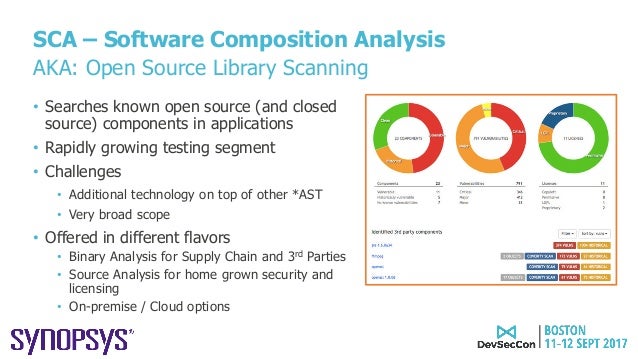
SCA, a term coined by market analysts, describes an automated process to identify open source components in a codebase. Once a component is identified, it becomes possible to map that component to known security disclosures and determine whether multiple versions are present within an application. SCA also helps identify whether the age of the component might present maintenance issues. While not strictly a security consideration, SCA also facilitates legal compliance related to those open source components.
While development and security teams often use SAST (static application security testing) and SCA solutions to identify security weaknesses and vulnerabilities in their web applications, detection of many vulnerabilities is only possible by dynamically testing the running application, which led to the development of dynamic application security testing (DAST) tools. Despite similarities to traditional DAST and penetration testing tools, IAST is superior to both in finding vulnerabilities earlier in the software development life cycle (SDLC)—when it is easier, faster, and cheaper to fix them. Over time, IAST is likely to displace DAST usage for two reasons: IAST provides significant advantages by returning vulnerability information and remediation guidance rapidly and early in the SDLC, and it can be integrated more easily into CI/CD and DevOps workflows.
https://www.synopsys.com/blogs/software-security/iast-sca-security-toolkit/
Component Analysis is the process of identifying potential areas of risk from the use of third-party and open-source software and hardware components. Component Analysis is a function within an overall Cyber Supply Chain Risk Management (C-SCRM) framework. A software-only subset of Component Analysis with limited scope is commonly referred to as Software Composition Analysis (SCA).
https://www.owasp.org/index.php/Component_Analysis
Software Composition Analysis (SCA) platform that keeps track of all third-party components used in all the applications an organization creates or consumes. It integrates with multiple vulnerability databases including the National Vulnerability Database (NVD), Node Security Platform (NSP), and VulnDB from Risk Based Security.
Dependency-Check is a Software Composition Analysis (SCA) tool that attempts to detect publicly disclosed vulnerabilities contained within a project’s dependencies.
https://owasp.org/www-project-dependency-check/
What is Open Source Security?
Open Source Security, commonly referred to as Software Composition Analysis (SCA), is a methodology to provide users better visibility into the open source inventory of their applications.
What is Open Source?
Open source refers to any software with accessible source code that anyone can modify and share freely.
Why Use Open Source Software?
Open Source Software (OSS) is distributed freely, making it very cost-effective. Many developers benefit by starting with OSS and then tweaking it to suit their needs. Since the code is open, it's simply a matter of modifying it to add the functionality they want.
Is Open Source a Security Risk?
Open source components are not created equal. Some are vulnerable from the start, while others go bad over time
Usage has become more complex. With tens of billions of downloads, it’s increasingly difficult to manage libraries and direct dependencies
Transitive dependencies: if you are using dependency management tools like Maven (Java), Bower (JavaScript), Bundler (Ruby), etc., then you are automatically pulling in third party dependencies – a liability that you can’t afford.
Ensure all privileged developers use multi-factor authentication (MFA) tokens. This includes those with commit or accept privileges. MFA hinders attackers from “taking over” these accounts.
Use a combination of tools in your CI pipeline to detect vulnerabilities.
Evaluate software before selecting it as a direct dependency. Only add it if needed, evaluate it (see Concise Guide for Evaluating Open Source Software, double-check its name (to counter typosquatting), and ensure it’s retrieved from the correct repository.
Use package managers. Use package managers (system, language-level, and/or container-level) to automatically manage dependencies and enable rapid updates.
Implement automated tests. Include negative tests (tests that what shouldn’t happen doesn’t happen) and ensure the test suite is thorough enough to “ship if it passes the tests”
Monitor known vulnerabilities in your software’s direct & indirect dependencies. E.g., enable basic scanning via GitHub’s dependabot or GitLab dependency scanning. Many other third party Software Composition Analysis (SCA) tools are also available. Quickly update vulnerable dependencies.
Keep dependencies reasonably up-to-date
Do not push secrets to a repository. Use tools to detect pushing secrets to a repository.
Review before accepting changes. Enforce it, e.g., GitHub or GitLab protected branches.
Improve your OpenSSF Scorecards score (if OSS and on GitHub). You can read the Scorecards checks. Use the Allstar monitor.
Improve your Supply chain Levels for Software Artifacts (SLSA) level. This hardens the integrity of your build and distribution process against attacks.
Publish and consume a software bill of materials (SBOM). This lets users verify inventory, id known vulnerabilities, & id potential legal issues. Consider SPDX or CycloneDX.
Onboard your project into LFX Security if you manage a Linux Foundation project.
Apply the CNCF Security TAG Software Supply Chain Best Practices guide.
Implement ASVS and follow relevant cheatsheets.
Apply SAFECode’s Fundamental Practices for Secure Software Development.
There are two main technical categories of verification tools:
Static analysis is any approach for verifying software (including finding defects) without executing software. This includes tools that examine source code looking for vulnerabilities (e.g., source code vulnerability scanning tools). It also includes humans reading code, looking for problems.
Dynamic analysis is any approach for verifying software (including finding defects) by executing software on specific inputs and checking the results. Traditional testing is a kind of dynamic analysis. Fuzz testing, where you send many random inputs to a program to see if it does something it should not, is also an example of dynamic analysis.
Types of Tools
This section will cover some of the most common application security tools including linters, SAST, SCA, DAST, Fuzzers, Hard Coded Secrets Detectors, and SBOM generators.
Quality scanners (linters)
Quality scanners, also called "linters", examine source code, byte code, or machine code to look for generic “quality” problems. For example, they may look for misleading indentation, combinations of constructs that usually indicate a defect, or overly-long methods that may be hard to understand later. There are a large variety of these, including style checkers and external type checkers.
For our purposes we will include compiler warning flags in this category.
These tools often don’t focus on security, but using them can still help improve security:
Some tools analyze code specifically looking for vulnerabilities. They go by a variety of names, such as security code scanners, Static Application Security Testing (SAST) tools, security source code scanners (if they examine source code), binary code scanners (if they only examine executables), or sometimes just static code analyzers. Some people use the term SAST only when the tool analyzes source code.
Secret scanning tools
Secret scanning tools look for secrets (passwords, stored keys, etc.), typically in a repository's code and/or configuration. These are typically static analysis tools. These tools typlically detect the secrets in code by grepping (simple text based searching) or regex searches.
Software Bill Of Materials (SBOM) tools
A Software Bill Of Materials (SBOM) is an artifact that may accompany the release of a software package. The SBOM includes an inventory of the software components and dependencies that are included in a parent software. This may include both open source and proprietary components and dependencies. It may also include additional information such as more in-depth package information, file information, licensing, authors, contributors, security checksums or references, copyright information, as well as their hierarchical relationships.
Machine-readable formats for SBOMs grant the opportunity for this information to be shared throughout the software supply chain; thus increasing transparency of and confidence in the final delivered software artifact. The machine readable formats for SBOMs currently include SPDX, CycloneDX, and SWID.
SBOMs are quickly becoming a necessity for software products and services to include in their software delivery practices. SBOMs are being recommended by several security frameworks, organizations, and security requirements such as the White House Executive Order 14028, NIST, NTIA,the OpenSSF Mobilization Plan, and SLSA.
Software component analysis (SCA) tools, also called dependency analysis or origin analysis tools, determine the reused components used by code (source code or executable). To be security-relevant, these tools also determine which of those reused components have publicly-known vulnerabilities (CVEs).
Dependency Updating & Hygiene Tools
SCA tools help identify the known vulnerable OSS components used in your project, but other tools exist to help ensure that OSS hygiene becomes an automated process. As required in the OpenSSF Secure Supply Chain Consumption Framework (S2C2F) maturity level 2, tools such as Dependabot or Renovate bot will auto-submit Pull Requests (PRs) to update your known-vulnerable dependencies. All a developer has to do is choose to accept the PR to keep their dependencies up-to-date.
Fuzzers
A fuzzer is a tool that implements a dynamic analysis approach called fuzz testing or fuzzing. In fuzz testing, you generate a large number of inputs, run the program, and see if the program behaves badly (e.g., crashes or hangs). A key aspect of fuzzing is that it does not generally check if the program produces the correct answer; it just checks that certain reasonable behavior (like “does not crash”) occurs
Web Application Scanner
A web application scanner (WAS), also called a web application vulnerability scanner, essentially pretends it is a simulated user or web browser and tries to do many things to detect problems. Think of a WAS as a frenetic and malicious web browser user; the WAS will try to click on every button it finds, enter bizarre text into every text field it finds, and so on. In short, it attempts simulated attacks and odd behavior to try to detect problems. This means that WASs often build on fuzzers internally, but they are specifically designed to analyze web applications.
There are many of these tools. OSS tools include OWASP ZAP, W3AF, IronWASP, Skipfish, and Wapiti. Proprietary tools include IBM AppScan, HP WebInspect, and Burp Suite Pro. If you have no idea, you might check out OWASP ZAP at least; it is easy to use, and it can find many things. But tools change over time, and it is best to look at your options before picking one (or several).
The term Dynamic Application Security Testing, or DAST, is often seen in literature. However, the meaning of DAST has a lot of variation:
For some, DAST is dynamic analysis for finding vulnerabilities in just web applications, making DAST the same as a web application scanner.
For others, DAST includes web application scanners and fuzzers for programs other than web applications.
your project communicates with an external service, you might use a token or private key for authentication. Tokens and private keys are examples of secrets that a service provider can issue. If you check a secret into a repository, anyone who has read access to the repository can use the secret to access the external service with your privileges. We recommend that you store secrets in a dedicated, secure location outside of the repository for your project.
Secret scanning will scan your entire Git history on all branches present in your GitHub repository for secrets.
What is the difference between Jenkins and Jenkins X?
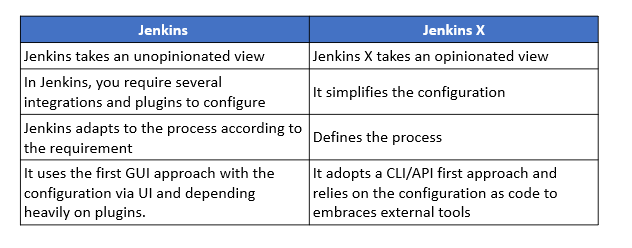
Unlike Jenkins, Jenkins X is opinionated and built to work better with technologies like Docker or Kubernetes. Having said that, Jenkins and Jenkins X are deeply related as everything that is done with Jenkins X can be done with Jenkins, using several plugins and integrations. However, Jenkins X simplifies everything, letting you harness the power of Jenkins 2.0 and using open source tools like Helm, Draft, Monocular, ChartMuseum, Nexus and Docker Registry to easily build cloud native applications.
In fact, it’s this selection of tools and processes that make Jenkins X special and different from Jenkins and any other CI/CD solution. For instance, Jenkins X defines the process, while Jenkins adapts to whichever process are wanted or needed. Jenkins X adopts a CLI/API first approach, relies on configuration as code and embraces external tools (e.g., Helm, Monocular, etc). On the other hand, Jenkins has a UI first approach with configuration via UI, and everything heavily driven by internal plugins. Additionally, the Jenkins X Preview environments enable developers to collaboratively validate changes integrated into the codebase by creating a running system per Pull Request
Why was Jenkins X started?
Microservices architecture: While the cloud with its several deployment models (public, private and hybrid) gained adoption across all industries, the challenge of deploying, managing and updating applications remained unresolved.
Container ecosystem: Containers, which offer OS virtualization, gained popularity as they solve some of the problems associated with microservices.
The rise of Kubernetes: While containers make things simpler, they are not free from challenges. In fact, they are similar to VMs when it comes to managing or orchestrating them.
What are the main features of Jenkins X?
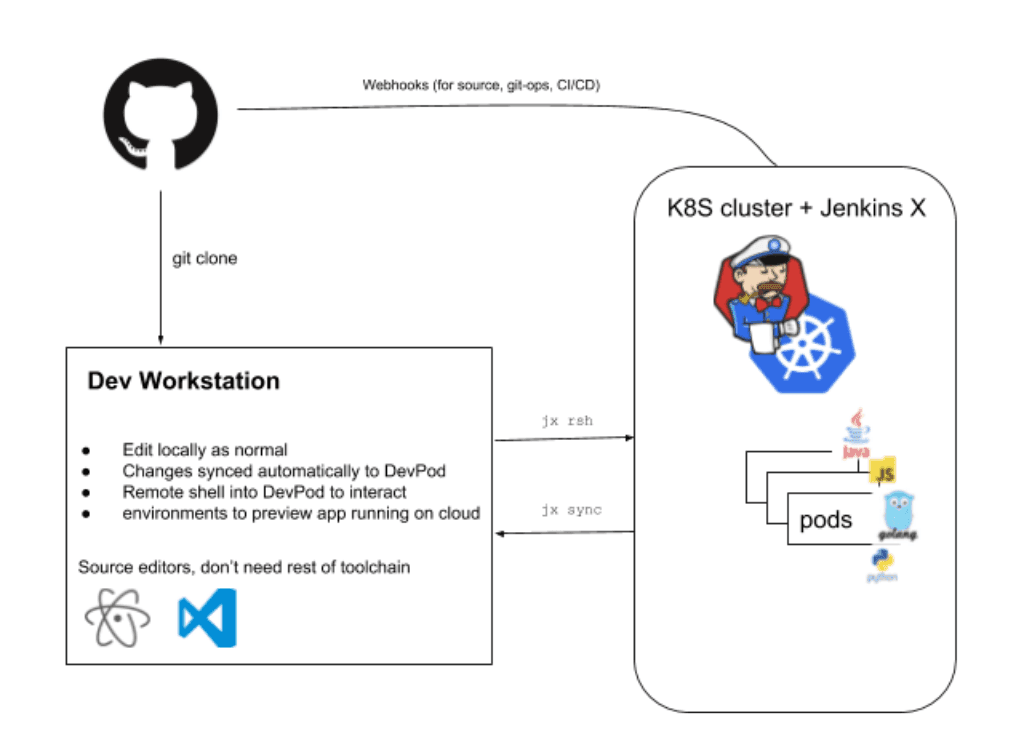
Automated CI and CD: Jenkins X offers a sleek jx command line tool, which allows Jenkins X to be installed inside an existing or new Kubernetes cluster, import projects and bootstrap new applications. Also, Jenkins X creates pipelines for the project automatically.
Environment Promotion via GitOps: Jenkins X allows for the creation of different virtual environments for development, staging, and production, etc. using the Kubernetes Namespaces.
Preview Environments: Though the preview environment can be created manually, Jenkins X automatically creates Preview Environments for each pull request. This provides a chance to see the effect of changes before merging them.
What are the top 5 advantages of Jenkins X?
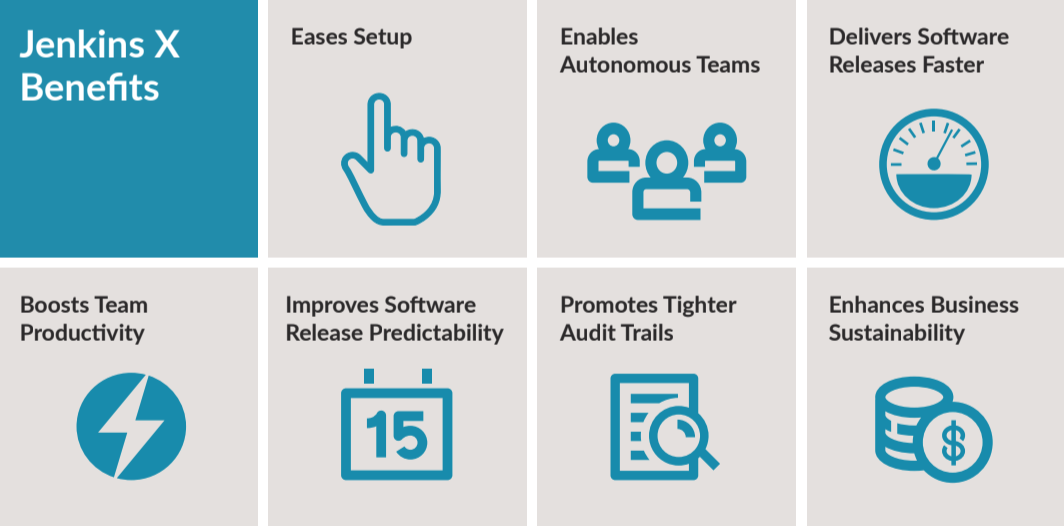
Easier setup: Jenkins X offers build packs for different kinds of projects, automates the installation, configuration and upgrades of external tools (Helm, Skaffold, Monocular etc.),
Isolation: Every team gets to run its own instance of Jenkins X; either in a shared cluster or in their own separate clusters.
Higher velocity: Jenkins X allows unhindered development without shipping logistics slowing things down. Powerful commands expedite most tasks and provide seamless integration with cloud or SCM. For example, a simple ”jx create cluster gke” command installs Jenkins X on Google cloud. AWS (EKS), Azure (AKS), Oracle (OKE) and more can also be used
Faster recovery: GitOps creates a single source of truth with everything versioned and comments available for every pull request. The configuration as code, of both Jenkins X and your environments, allows developers to get the right context and traceable information to resolve outages faster.
Predictable releases: Jenkins X helps create development/test environments using the “jx create devpod” command to provide each developer their own sandbox inside the Jenkins X cluster. As the devbuild pods are the same as those used in the pipeline used in production, it ensures code will perform in a predictable manner. Further, Jenkins X helps spin up Preview Environments before code is promoted to production
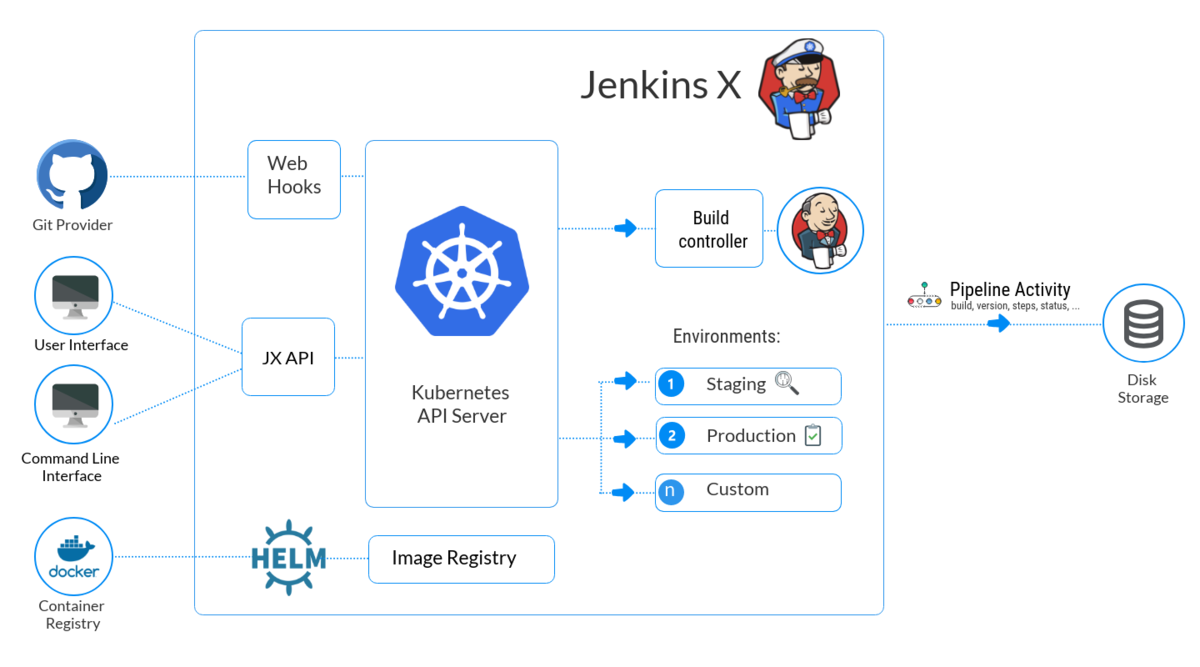
Following the success of Jenkins, a new version of Jenkins has been introduced lately called Jenkins X (JX). It provides continuous integration, automated testing, and continuous delivery to Kubernetes.
It’s designed from the ground up to be a cloud-native, Kubernetes-only application that not only supports CI/CD but also makes working with Kubernetes as simple as possible. With one command you can create a Kubernetes cluster, install all the tools you’ll need to manage your application. You can also create build and deployment pipelines, and deploy your application to various environments.
Jenkins is described as an “extensible automation server” that is configured, via plugins, to be a Continuous Integration Server, a Continuous Deployment hub, or a tool to automate just about any software task. JX provides a specific configuration of Jenkins, meaning you don’t need to know which plugins are required to stand up a CI/CD pipeline. It also deploys numerous applications to Kubernetes to support building your docker container, storing the container in a docker registry, and deploying it to Kubernetes.
Serverless Jenkins:
the Jenkins community has created a version of Jenkins that can run classic Jenkins pipelines via the command line with the configuration defined by code instead of the usual HTML forms.
Preview Environments:
Though the preview environment can be created manually, Jenkins X automatically creates Preview Environments for each pull request. This provides a chance to see the effect of changes before merging them. Also, Jenkins X adds a comment to the Pull Request with a link for the preview for team members.
https://medium.com/edureka/jenkins-x-d87c0271af57
Jenkins Configuration as Code
The ‘as code’ paradigm is about being able to reproduce and/or restore a full environment within minutes based on recipes and automation, managed as code
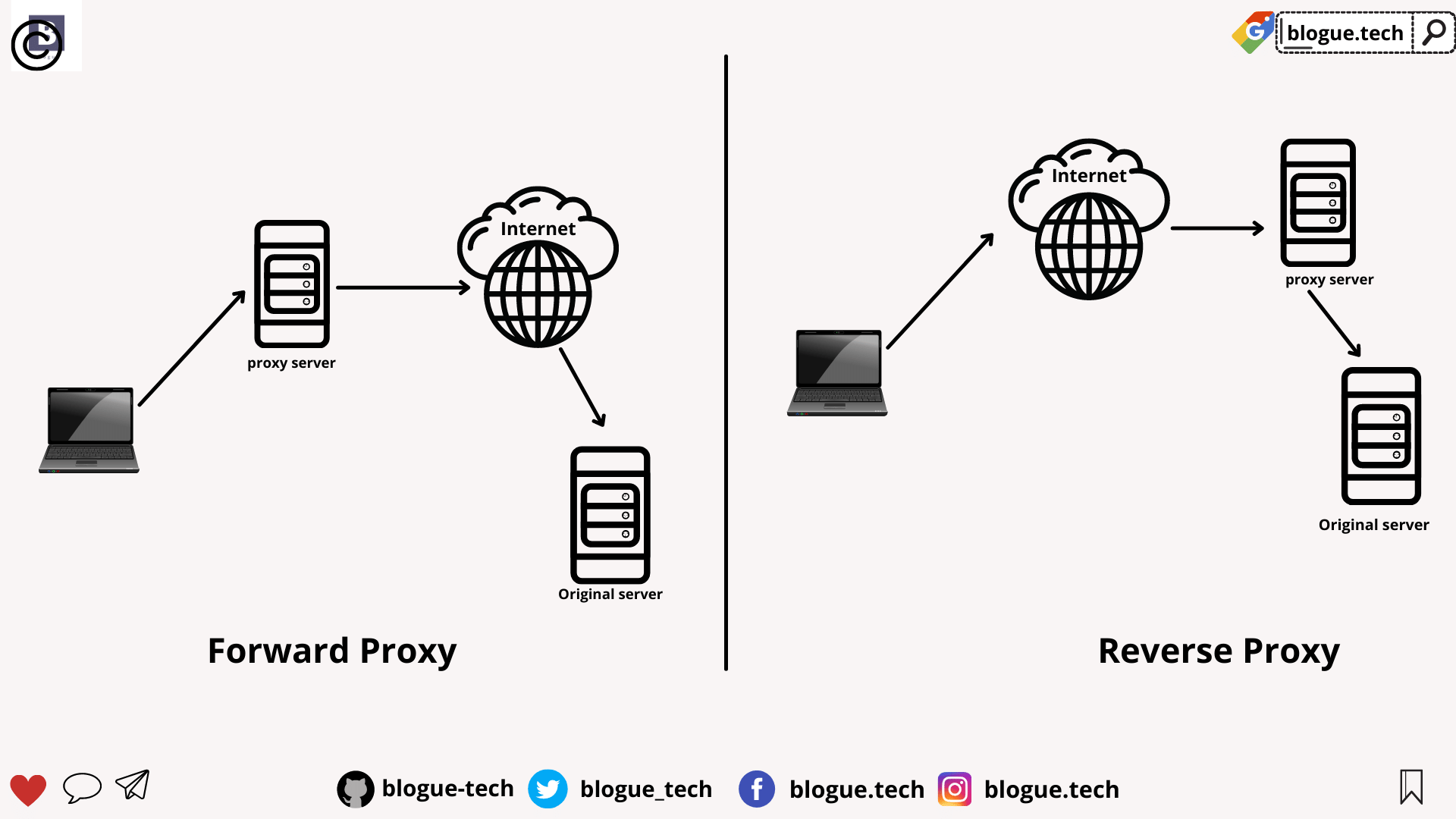
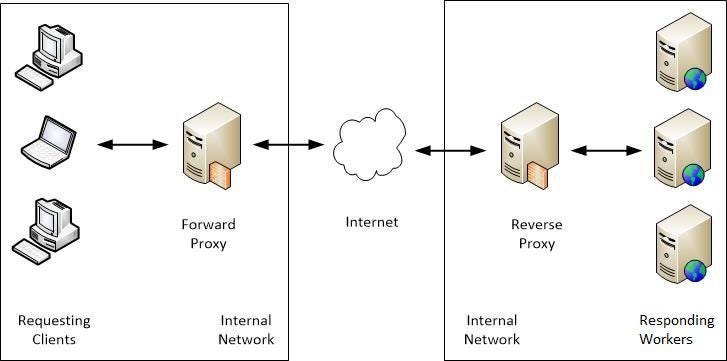
A forward proxy is the most common form of a proxy server and is generally used to pass requests from an isolated, private network to the Internet through a firewall. Using a forward proxy, requests from an isolated network, or intranet, can be rejected or allowed to pass through a firewall.
A forward proxy server will first check to make sure a request is valid. If a request is not valid, or not allowed (blocked by the proxy), it will reject the request resulting in the client receiving an error or a redirect. If a request is valid, a forward proxy may check if the requested information is cached. If it is, the forward proxy serves the cached information. If it is not, the request is sent through a firewall to an actual content server which serves the information to the forward proxy. The proxy, in turn, relays this information to the client and may also cache it, for future requests.
Reverse proxy
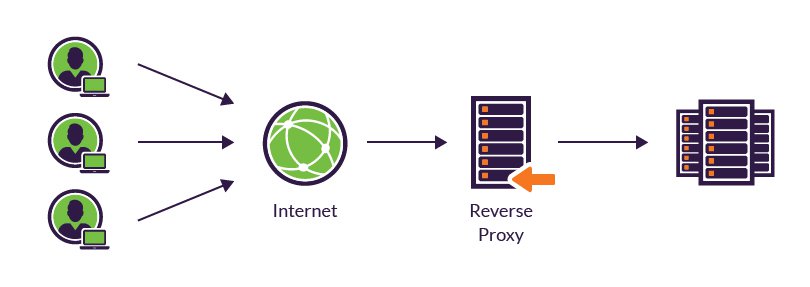
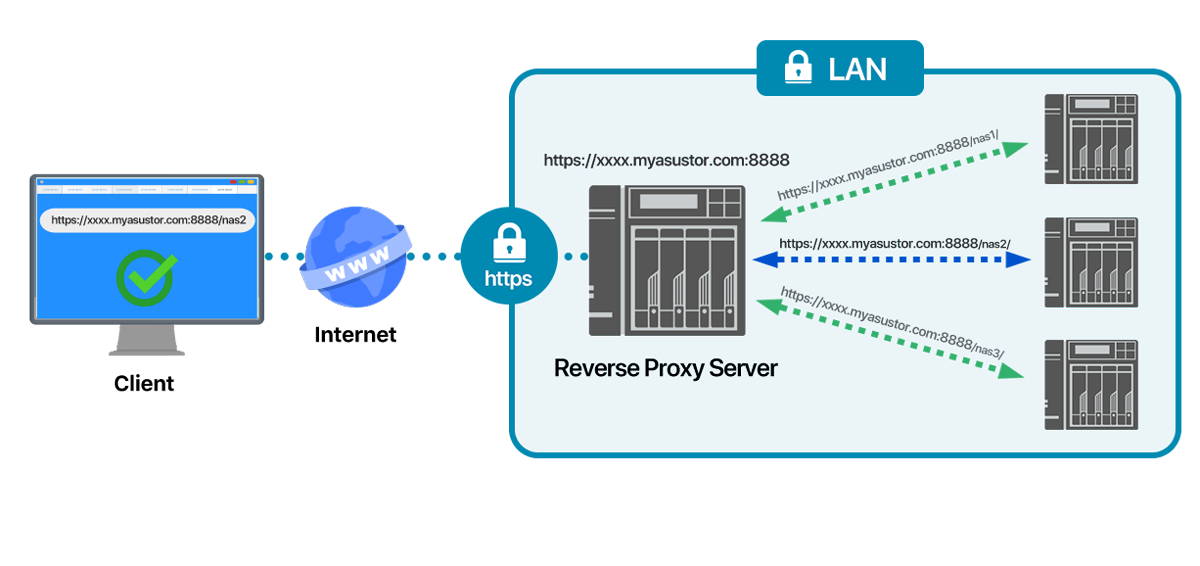
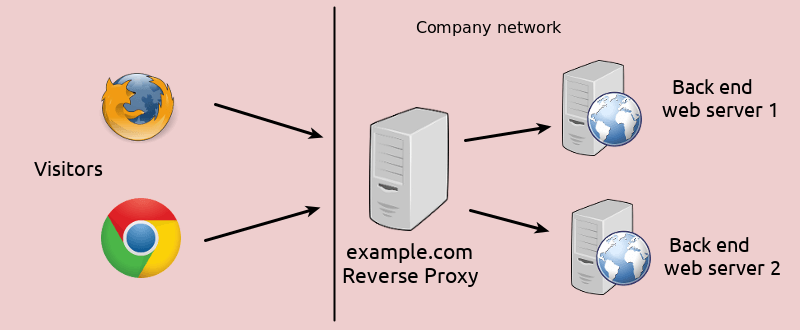
A reverse proxy is another common form of a proxy server and is generally used to pass requests from the Internet, through a firewall to isolated, private networks. It is used to prevent Internet clients from having direct, unmonitored access to sensitive data residing on content servers on an isolated network, or intranet
If caching is enabled, a reverse proxy can also lessen network traffic by serving cached information rather than passing all requests to actual content servers.
Reverse proxy servers may also balance workload by spreading requests across a number of content servers.
One advantage of using a reverse proxy is that Internet clients do not know their requests are being sent to and handled by a reverse proxy server.
The above image shows a reverse proxy configuration. An Internet client initiates a request to Server A (Proxy Server) which, unknown to the client, is actually a reverse proxy server. The request is allowed to pass through the firewall and is valid but is not cached on Server A. The reverse proxy (Server A) requests the information from Server B (Content Server), which has the information the Internet client is requesting. The information is served to the reverse proxy, where it is cached, and relayed through the firewall to the client. Future requests for the same information will be fulfilled by the cache, lessening network traffic and load on the content server (proxy caching is optional and not necessary for proxy to function on your HTTP Server). In this example, all information originates from one content server (Server B).
Proxy chaining
A proxy chain uses two or more proxy servers to assist in server and protocol performance and network security. Proxy chaining is not a type of proxy, but a use of reverse and forward proxy servers across multiple networks. In addition to the benefits to security and performance, proxy chaining allows requests from different protocols to be fulfilled in cases where, without chaining, such requests would not be possible or permitted.
For example, a request using HTTP is sent to a server that can only handle FTP requests. In order for the request to be processed, it must pass through a server that can handle both protocols. This can be accomplished by making use of proxy chaining which allows the request to be passed from a server that is not able to fulfill such a request (perhaps due to security or networking issues, or its own limited capabilities) to a server that can fulfill such a request.
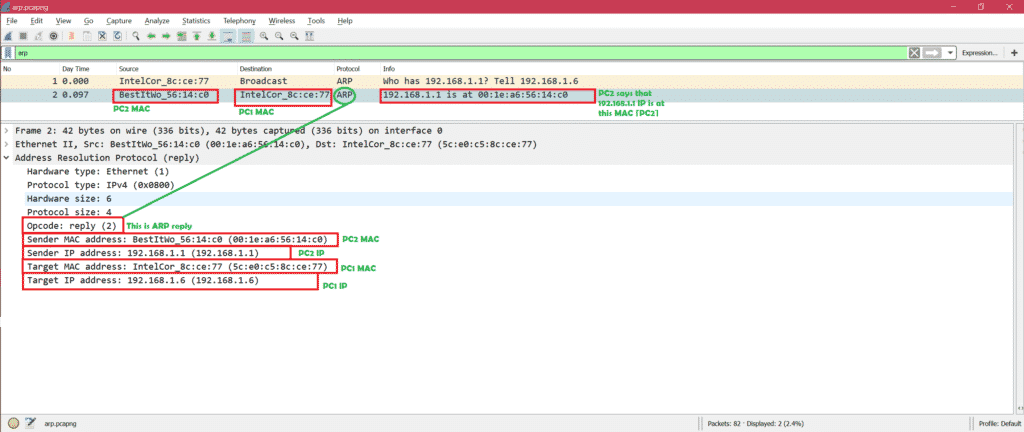
When a new computer joins a LAN, it is assigned a unique IP address to use for identification and communication
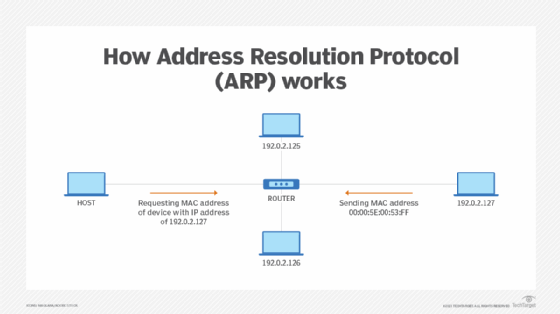
When an incoming packet destined for a host machine on a particular LAN arrives at a gateway, the gateway asks the ARP program to find a MAC address that matches the IP address
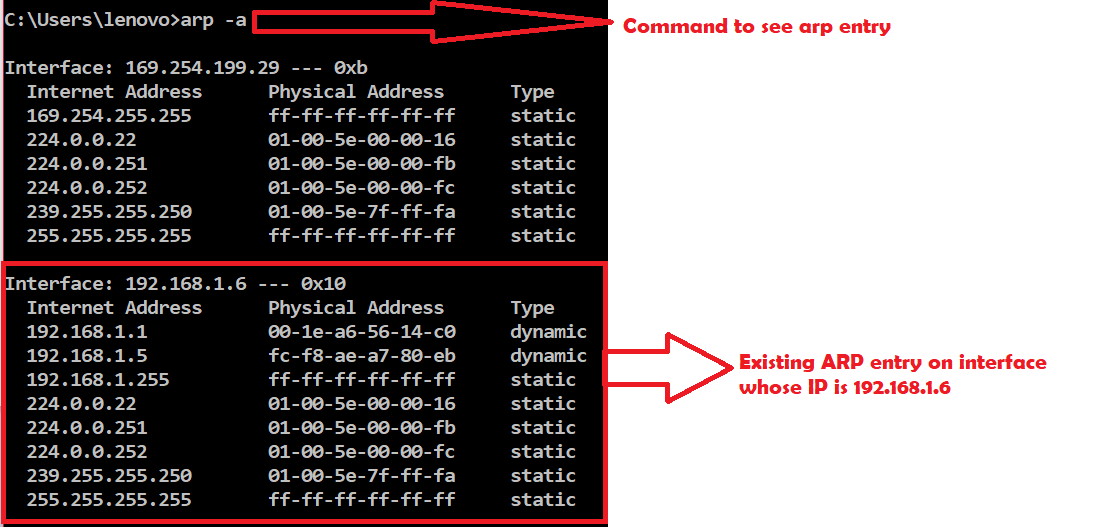
A table called the ARP cache maintains a record of each IP address and its corresponding MAC address.
All operating systems in an IPv4 Ethernet network keep an ARP cache.
Every time a host requests a MAC address in order to send a packet to another host in the LAN, it checks its ARP cache to see if the IP to MAC address translation already exists.
If the translation does not already exist, then the request for network addresses is sent and ARP is performed.
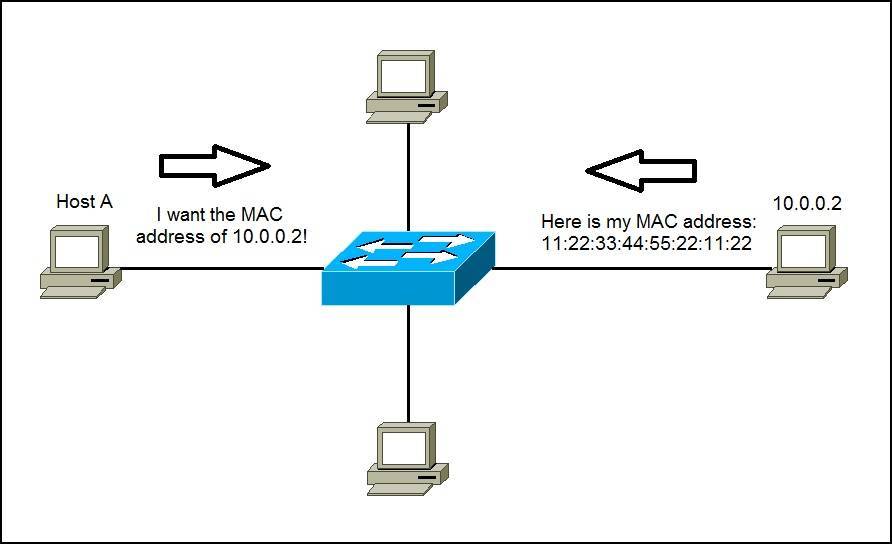
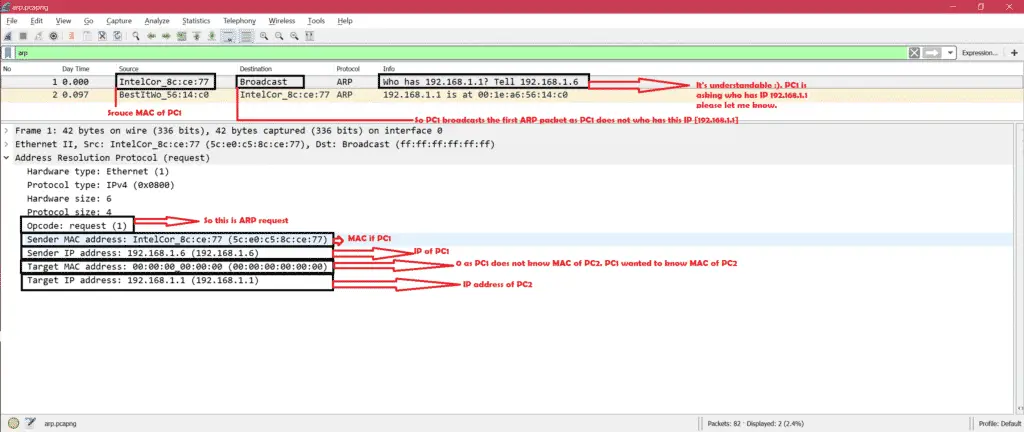
ARP broadcasts a request packet to all the machines on the LAN and asks if any of the machines know they are using that particular IP address. When a machine recognizes the IP address as its own, it sends a reply so ARP can update the cache for future reference and proceed with the communication.
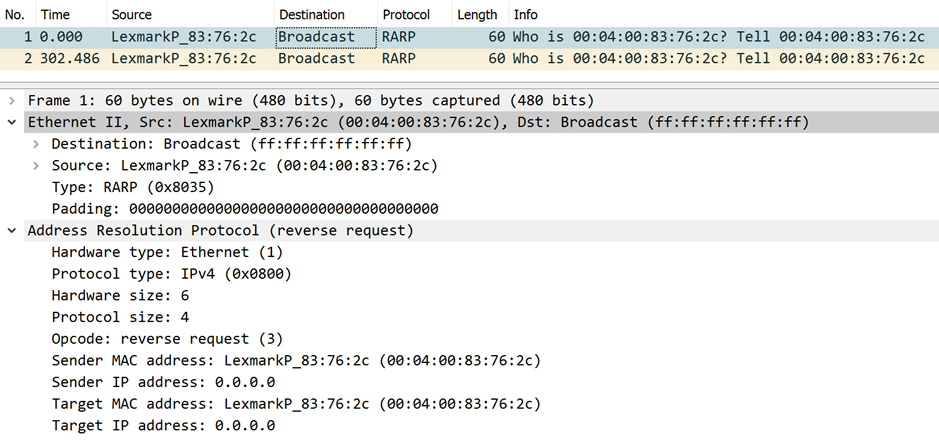
Host machines that don't know their own IP address can use the Reverse ARP (RARP) protocol for discovery.
When an ARP inquiry packet is broadcast, the routing table is examined to find which device on the LAN can reach the destination fastest. This device, which is often a router, becomes a gateway for forwarding packets outside the network to their intended destinations.
ARP spoofing and ARP cache poisoning
Any LAN that uses ARP must be wary of ARP spoofing, also referred to as ARP poison routing or ARP cache poisoning.
ARP spoofing is a device attack in which a hacker broadcasts false ARP messages over a LAN in order to link an attacker's MAC address with the IP address of a legitimate computer or server within the network. Once a link has been established, the target computer can send frames meant for the original destination to the hacker's computer first as well as any data meant for the legitimate IP address.
RARP: Its opposite of normal ARP that we have discussed. That means you have MAC address of PC2 but you do not have IP address of PC2. Some specific cases need RARP.
The Reverse Address Resolution Protocol (RARP) is an obsolete computer communication protocol used by a client computer to request its Internet Protocol (IPv4) address from a computer network, when all it has available is its link layer or hardware address, such as a MAC address. The client broadcasts the request and does not need prior knowledge of the network topology or the identities of servers capable of fulfilling its request.
Gratuitous Address Resolution Protocol (ARP) requests help detect duplicate IP addresses.
A gratuitous ARP is a broadcast request for a router’s own IP address. If a router or switch sends an ARP request for its own IP address and no ARP replies are received, the router- or switch-assigned IP address is not being used by other nodes
However, if a router or switch sends an ARP request for its own IP address and an ARP reply is received, the router- or switch-assigned IP address is already being used by another node.
Gratuitous ARP could mean both gratuitous ARP request or gratuitous ARP reply. Gratuitous in this case means a request/reply that is not normally needed according to the ARP specification (RFC 826) but could be used in some cases.
A gratuitous ARP request is an AddressResolutionProtocol request packet where the source and destination IP are both set to the IP of the machine issuing the packet and the destination MAC is the broadcast address ff:ff:ff:ff:ff:ff.
Gratuitous ARPs are useful for four reasons:
They can help detect IP conflicts. When a machine receives an ARP request containing a source IP that matches its own, then it knows there is an IP conflict.
They assist in the updating of other machines' ARP tables. Clustering solutions utilize this when they move an IP from one NIC to another, or from one machine to another. Other machines maintain an ARP table that contains the MAC associated with an IP. When the cluster needs to move the IP to a different NIC, be it on the same machine or a different one, it reconfigures the NICs appropriately then broadcasts a gratuitous ARP reply to inform the neighboring machines about the change in MAC for the IP. Machines receiving the ARP packet then update their ARP tables with the new MAC
They inform switches of the MAC address of the machine on a given switch port, so that the switch knows that it should transmit packets sent to that MAC address on that switch port.
Every time an IP interface or link goes up, the driver for that interface will typically send a gratuitous ARP to preload the ARP tables of all other local hosts. Thus, a gratuitous ARP will tell us that that host just has had a link up event, such as a link bounce, a machine just being rebooted or the user/sysadmin on that host just configuring the interface up. If we see multiple gratuitous ARPs from the same host frequently, it can be an indication of bad Ethernet hardware/cabling resulting in frequent link bounces
Vulnerability (weakness) is a gap in the protection efforts of a system, a threat is an attacker who exploits that weakness. Risk is the measure of potential loss when that the vulnerability is exploited by the threat
2. What is the difference between Asymmetric and Symmetric encryption and which one is better?
Symmetric encryption uses the same key for both encryption and decryption, while Asymmetric encryption uses different keys for encryption and decryption.
Symmetric is usually much faster but the key needs to be transferred over an unencrypted channel. Asymmetric on the other hand is more secure but slow.
Hence, a hybrid approach should be preferred. Setting up a channel using asymmetric encryption and then sending the data using a symmetric process.
4. What is XSS, how will you mitigate it?
Cross site scripting is a JavaScript vulnerability in web applications.
when a user enters a script in the client-side input fields and that input gets processed without getting validated.
This leads to untrusted data getting saved and executed on the client-side. Countermeasures of XSS are input validation, implementing a CSP (Content security policy)
5. What is the difference between encryption and hashing?
Encryption is reversible whereas hashing is irreversible. Hashing can be cracked using rainbow tables and collision attacks but is not reversible.
Cross-Site Request Forgery is a web application vulnerability in which the server does not check whether the request came from a trusted client or not. The request is just processed directly
13. CIA triangle?
Confidentiality: Keeping the information secret.
Integrity: Keeping the information unaltered.
Availability: Information is available to the authorised parties at all times.
14. HIDS vs NIDS and which one is better and why?
HIDS is a host intrusion detection system and NIDS is a network intrusion detection system. Both the systems work on similar lines. It’s just that the placement is different. HIDS is placed on each host whereas NIDS is placed in the network. For an enterprise, NIDS is preferred as HIDS is difficult to manage, plus it consumes the processing power of the host as well.
20. Various response codes from a web application?
1xx – Informational responses
2xx – Success
3xx – Redirection
4xx – Client-side error
5xx – Server side error
30. What is a false positive and false negative in case of IDS?
When the device generated an alert for an intrusion that has actually not happened: this is a false positive and if the device has not generated any alert and the intrusion has actually happened, this is the case of a false negative.
Three-way handshake mechanism: In this mechanism, the client sends an SYN TCP packet to the server asking for a connection (synchronizing) request and a sequence number. The server responds with the SYN/ACK packet, acknowledging the connection request and assigning a sequence number. The client again sends an ACK packet to accept the response of the server.
Question 6: What is data leakage? Explain in your own words.
Answer: Data leakage refers to the exposure or transmission of an organization’s sensitive data to the external recipient. The data may be transmitted or exposed via the internet or by physical means.
Question 7: List the steps to develop the Data Loss Prevention (DLP) strategy?
Answer: The steps to develop and implement a DLP strategy are as follows:
Step1: prioritizing the critical data assets
Step2: categorizing the data based on its source
Step3: analyzing which data is more prone to the risks
Step4: monitor the transmission of the data
Step5: developing control measures to mitigate the data leakage risk
Question 8: What is the difference between TCP and UDP?
TCP(Transfer Layer Protocol)
TCP is reliable as it guarantees the delivery of data packets to the destination.
TCP is heavyweight.
TCP is slower as compared to UDP
Example: HTTP, SSH, HTTPS, SMTP
UDP(User Datagram Protocol)
UDP is not reliable as it does not guarantees the delivery of data packets to the destination
UDP is lightweight.
UDP IS faster than TCP
Example: TFTP, VoIP, online multiplayer gamess
Question 9: What is the difference between firewall deny and drop?
Answer: DENY RULE: If the firewall is set to deny rule, it will block the connection and send a reset packet back to the requester. The requester will know that the firewall is deployed.
DROP RULE: If the firewall is set to drop rule, it will block the connection request without notifying the requester.
It is best to set the firewall to deny the outgoing traffic and drop the incoming traffic so that attacker will not know whether the firewall is deployed or not.
Question 11: What is the Runbook in SOC?
A runbook, also known as a standard operating procedure (SOP), consists of a set of guidelines to handle security incidents and alerts in the Security Operation Centre. The L1 security analyst generally uses it for better assessment and documentation of the security events.
Question 12: What is the difference between the Red Team and the Blue Team?
Red Team: The red team plays an offensive role. The team conducts rigorous exercises to penetrate the security infrastructure and identify the exploitable vulnerabilities in it. The red team is generally hired by the organization to test the defenses.
Blue Team: The blue team plays a defensive role. The blue team’s role is to defend the organization’s security infrastructure by detecting the intrusion. The members of a blue team are internal security professionals of the organization.
Question 13: Define a Phishing attack and how to prevent it?
Answer: Phishing is a type of social engineering attack in which an attacker obtains sensitive information from the target by creating urgency, using threats, impersonation, and incentives. Spear phishing, e-mail spam, session hijacking, smishing, and vishing are types of phishing attacks.
Question 14: What is the Cross-Site Scripting (XSS) attack, and how to prevent it?
Answer: Cross-site Scripting: In the cross-site scripting attack, the attacker executes the malicious scripts on a web page and can steal the user’s sensitive information. With XSS vulnerability, the attacker can inject Trojan, read out user information, and perform specific actions such as the website’s defacement.
Countermeasures:
Encoding the output
Applying filters at the point where input is received
Using appropriate response headers
Enabling content security policy
Escaping untrusted characters
Question 15: Explain the SQL injection vulnerability and give countermeasures to prevent it?
Answer: SQL Injection: SQL injection is a famous vulnerability in the web application that allows hackers to interfere in communication taking place between a web application and its database. Hackers inject malicious input into the SQL statement to compromise the SQL database. They can retrieve, alter, or modify the data. In some cases, it allows attackers to perform DDOS attacks.
Countermeasures:
Using parameterized queries
Validating the inputs
Creating stored procedures
Deploying a web application firewall
Escaping untrusted characters
Question 16: Difference between hashing and Encryption?
Hashing
Conversion of data into a fixed-length of unreadable strings using algorithms
Hashed data can not be reverted back into readable strings
The length of the hashed string is fixed
No keys are used in hashing
Encryption
Conversion of data into an unreadable string using cryptographic keys
strings Encrypted data can be decrypted back into readable strings
The length of the encrypted string is not fixed
Keys are used in Encryption
Question 18: What is the difference between SIEM and IDS?
Both collect the log data, but unlike SIEM, IDS does not facilitate event correlation and centralization of log data.
Question 20: What is DNS? Why is DNS monitoring essential?
DNS monitoring can disclose information such as websites visited by the employee, malicious domain accessed by an end-user, malware connecting to Command & Control server. It can help in identifying and thwarting cyberattacks.
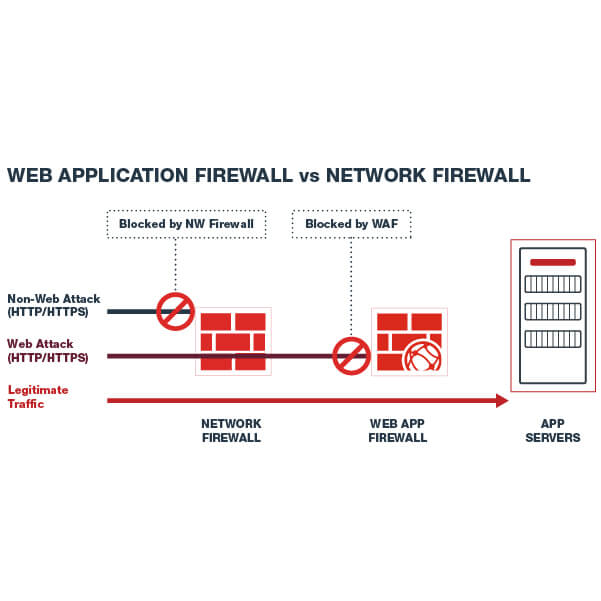
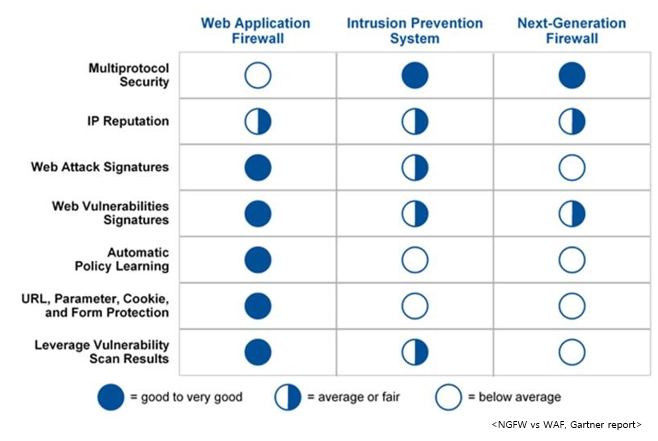
A WAF examines and filters traffic to web applications. It keeps track of communication between the client and server, and server and server
A WAF protects against some of the most common cyber attacks, including SQL injections, cross-site scripting and (D)DoS attacks
When you first define communication and access, you let the WAF monitor traffic for a period of time so that it can learn what legitimate traffic looks like. It then creates a default mode and the WAF can then keep track of unusual traffic patterns
What are the differences between Web Application Firewalls and traditional firewalls?
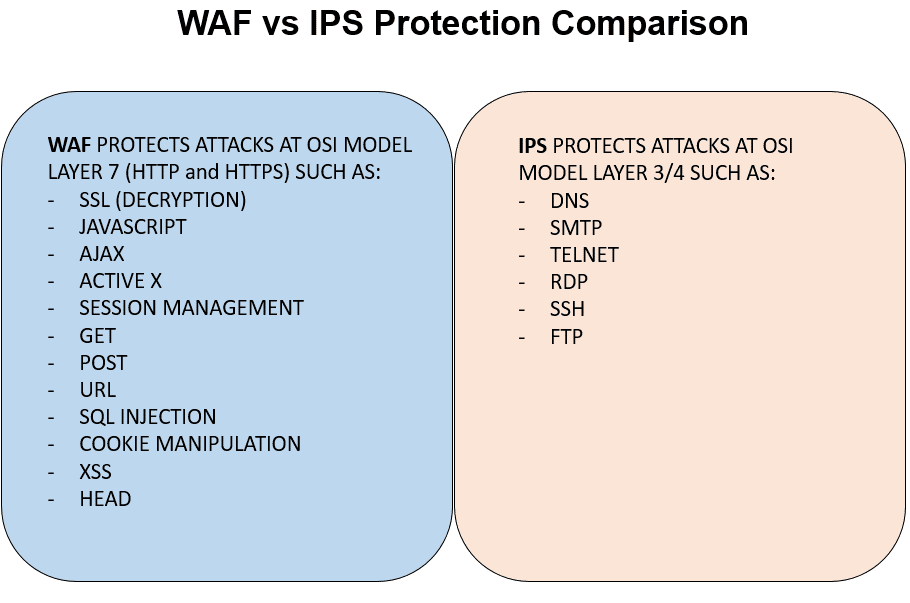
Application firewalls are on a higher level in the OSI model compared to traditional firewalls.
If a new type of hacker attack is discovered you can update the WAF software with the attack signature, which enables it to learn the patterns of that traffic and block it.
What are the benefits of using a WAF?
Many agree that it is better to protect the application itself than the server itself. This allows for a deeper level of detail compared to traditional firewalls, thus giving a more ‘fine tune’ protection. A Web Application Firewall prevents data loss, data corruption and spoofing.
There are several types of firewalls but the most common one is the hardware network firewall.
Basic firewalls work at Layer 3 and Layer 4 of the OSI model
a network firewall is stateful. This means that the firewall keeps track of the states of connections that pass through it.
For example, if an internal host successfully accesses an Internet website through the firewall, the latter will keep the connection inside its connection table so that reply packets from the external web server will be allowed to pass to the internal host because they already belong to an established connection.
Next-Generation Firewalls work all the way up to Layer 7 of the OSI models which means they are able to inspect and control traffic at the application level.
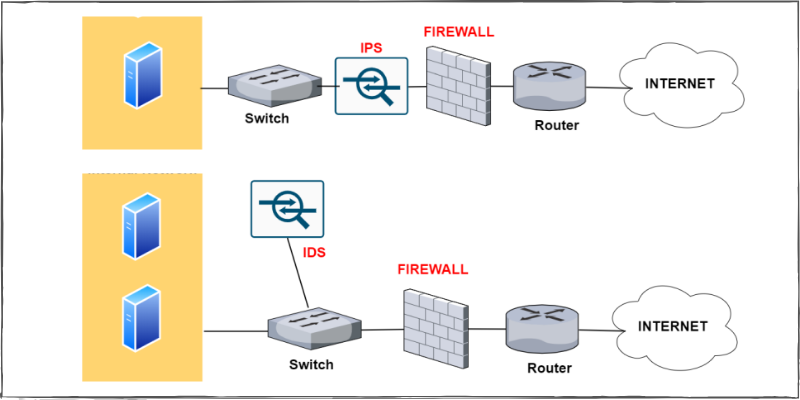
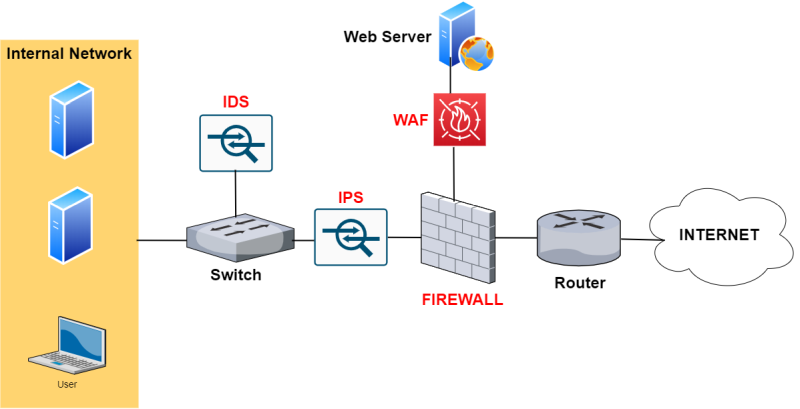
That's why the IPS is connected in line to the packet flow. As shown
from the network topology above (Firewall with IPS), the IPS device is
usually connected behind the firewall but in-line the communication path
which transmits packets to/from the internal network.
Usually, an IPS is signature-based which means that it has a database of
known malicious traffic, attacks, and exploits and if it sees packets
matching a signature then it blocks the traffic flow.
an IPS can work with statistical anomaly detection, rules set by the administrator, etc.
An IDS (Intrusion Detection System) is the predecessor of IPS and is
passive in nature. As shown from the network above (Firewall with IDS),
this device is not inserted in-line with the traffic but rather it is in
parallel (placed out-of-band).
Traffic passing through the switch is also sent at the same time to the IDS for inspection. If a security anomaly is detected in the network traffic, the IDS will
just raise an alarm (to the administrator) but it will not be able to
block the traffic
Similar to IPS, the IDS device also uses mostly signatures of known
security attacks and exploits in order to detect an intrusion attempt.
In order to send traffic to the IDS, the switch device must have
a SPAN port configured in order to copy traffic and send it towards the
IDS node.
For example, an IDS can send a command to the firewall in order to block specific packets if the IDS detects an attack.
Since most websites nowadays use SSL (HTTPS), the WAF is able also to
provide SSL acceleration and also SSL inspection by terminating the SSL
session and inspect the traffic inside the connection on the WAF itself.
As shown from the network above (Firewall with WAF), it is placed in front of a Website (usually) in a DMZ zone of a firewall.
. Which of these protocols is a connection-oriented protocol? The Correct Answer is:- D
A) FTP
B) UDP
C) POP3
D) TCP
What port range is an obscure third-party application most likely to use? The Correct Answer is:- D
A) 1 to 1024
B) 1025 to 32767
C) 32768 to 49151
D) 49152 to 65535
Which category of firewall filters is based on packet header data only? The Correct Answer is:- C
A) Stateful
B) Application
C) Packet
D) Proxy
At which layer of the OSI model does a proxy operate? The Correct Answer is:- D
A) Physical
B) Network
C) Data Link
D) Application
Which technology allows the use of a single public address to support
many internal clients while also preventing exposure of internal IP
addresses to the outside world? The Correct Answer is:- D
A) VPN
B) Tunneling
C) NTP
D) NAT
What item is also referred to as a logical address to a computer system? The Correct Answer is:- A
A) IP address
B) IPX address
C) MAC address
D) SMAC address
Which of the following is commonly used to create thumbprints for digital certificates? The Correct Answer is:- A
A) MD5
B) MD7
C) SHA12
D) SHA8
Which of the following creates a fixed-length output from a variable-length input? The Correct Answer is:- A
A) MD5
B) MD7
C) SHA12
D) SHA8
What encryption process uses one piece of information as a carrier for another? The Correct Answer is:- A
A) Steganography
B) Hashing
C) MDA
D) Cryptointelligence
Which of the following is a major security problem with FTP? The Correct Answer is:- C
A) Password files are stored in an unsecure area on disk.
B) Memory traces can corrupt file access.
C) User IDs and passwords are unencrypted.
D) FTP sites are unregistered.
What type of program exists primarily to propagate and spread itself
to other systems and can do so without interaction from users? The Correct Answer is:- D
A) Virus
B) Trojan horse
C) Logic bomb
D) Worm
Which mechanism is used by PKI to allow immediate verification of a certificate’s validity? D) OCSP
A) CRL
B) MD5
C) SSHA
D) OCSP
Which statement(s) defines malware most accurately? The Correct Answer is:- B,C
A) Malware is a form of virus.
B) Trojans are malware.
C) Malware covers all malicious software.
D) Malware only covers spyware.
Which is/are a characteristic of a virus? Which is/are a characteristic of a virus?
A) A virus is malware.
B) A virus replicates on its own.
C) A virus replicates with user interaction.
D) A virus is an item that runs silently.
A polymorphic virus __________. The Correct Answer is:- C
A) Evades detection through backdoors
B) Evades detection through heuristics
C) Evades detection through rewriting itself
D) Evades detection through luck
A sparse infector virus __________. The Correct Answer is:- C
A) Creates backdoors
B) Infects data and executables
C) Infects files selectively
D) Rewrites itself
how to protect data layer at Layer 2 OSI?
encryption
what security controls can you implement at layer 7 OSI?