Tuesday, January 5, 2016

MPLS

  • Multiprotocol Label Switching (MPLS) is a mechanism in high-performance telecommunications networks that directs data from one network node to the next based on short path labels rather than long network addresses, avoiding complex lookups in a routing table. The labels identify virtual links (paths) between distant nodes rather than endpoints. MPLS can encapsulate packets of various network protocols.
https://en.wikipedia.org/wiki/Multiprotocol_Label_Switching

Multi Protocol Label Switching (MPLS) links are being used more and more in the telecom design of many organizations with multiple locations.
http://www.loadbalancersolutions.com/elfiq/mpls.aspx
  •  Multiprotocol Label Switching (MPLS) is a technology used within computer network genesis to regulate data traffic and speed up the time that data packet takes to flow from one node to another. In conventional routed IP networks, whenever a packet arrives, the router makes an independent forwarding decision thus making the process complex and slow. On the other hand, MPLS provides a unified data carrying service for packet switching and circuit-based clients. The MPLS architecture can be installed seamlessly over any existing structural design such as IP, Frame Relay, Asynchronous Transfer Mode (ATM), or Ethernet.

Benefits of MPLS

MPLS is especially beneficial when it comes to wide area networks (WANs). The robustness of the MPLS architecture makes data transfer simpler by managing large routed networks which in turn makes WAN router/engineers’ work easier. For companies that are depending upon voice and video output, MLPS provides a structure to support Quality of Support (QoS). The technology’s protocol-agnostic nature manages different types of traffic without regard to what type of traffic it is. It increases the reliability and predictability of traffic because the label switch paths are fixed which ultimately allows the packets to travel along designated paths
https://whatis.ciowhitepapersreview.com/definition/multiprotocol-label-switching/

  • Combining IPSec and MPLS

From a customer perspective, it is impossible to control the whole network; the SP must be trusted to some extent. If the MPLS core is not properly configured with the necessary security measures, the connected VPNs will be exposed to some forms of attack. IPSec offers additional security over an MPLS network.

IPSec can be run on the CE routers, or on devices further away from the core. If the CE router is under control of the customer, this could be an obvious choice. If the SP controls the CEs as part of the service, the customer has to decide whether to trust the SP to configure IPSec for him/her on the CE routers, or whether to maintain control over the IPSec in additional equipment outside the SP's scope.

All options below are based on an MPLS core network with VPN services. The basic assumption for all the scenarios is that the MPLS core is configured and managed in a secure fashion.

Summary of Configuration Options
Option 1: Dynamic versus Static Routing between CEs and PEs
Option 2: Internet Service
Option 3: Running IPSec over the MPLS Cloud
Option 4: Including the CE Router in the SP Management


Conclusions
MPLS provides full address and routing separation as in traditional Layer 2 VPN services. It hides addressing structures of the core and other VPNs, and it is in today's understanding not possible from the outside to intrude into the core or other VPNs abusing the MPLS mechanisms. It is also not possible to intrude into the MPLS core if it is properly secured. However, there is a significant difference between MPLS-based VPNs and, for example, FR- or ATM-based VPNs: The control structure of the core is on Layer 3 in the case of MPLS. This fact has caused significant scepticism in the industry toward MPLS, because this setup might open the architecture to DoS attacks from other VPNs or the Internet (if connected).

As shown in this paper, it is possible to secure an MPLS infrastructure to the same level of security as a comparable ATM or FR service. It is also possible to offer Internet connectivity to MPLS VPNs in a secure manner, and to interconnect different VPNs via firewalls

With regard to attacks from within the MPLS core, all VPN classes (MPLS, FR, ATM) have the same problem: If an attacker can install a sniffer, he/she can read information in all VPNs, and if the attacker has access to the core devices, he/she can execute a large number of attacks, from packet spoofing to introducing a new peer router. Numerous precaution measures that an SP can use to tighten security of the core are outlined above, but the security of the MPLS architecture depends on the security of the SP. If the SP is not trusted, the only way to fully secure a VPN against attacks from the "inside" of the VPN service is to run IPSec on top, from the CE devices or beyond.

The end result of the report is that MPLS is at least as secure as Frame Relay and ATM networks
https://www.cisco.com/en/US/tech/tk436/tk428/technologies_white_paper09186a00800a85c5.shtml#wp30332

  • MPLS Security is a cross-functional area covering data and control plane protection mechanisms for all main MPLS areas, including Layer 2 and Layer 3 VPNs, Traffic Engineering, and GMPLS.
https://www.cisco.com/c/en/us/products/ios-nx-os-software/mpls-security/index.html

  • MPLS works by prefixing packets with an MPLS header, containing one or more labels. This is called a label stack. Each label stack entry contains four fields
http://akashphoenix.blogspot.com/2012/05/multiprotocol-label-switching-mpls.html


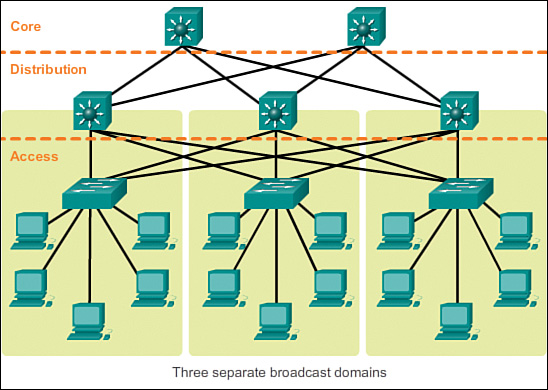
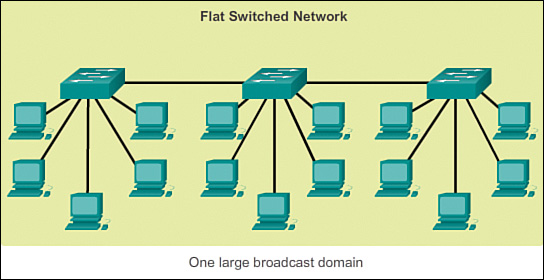
  • Early networks were deployed in a flat topology
Hubs and switches were added as more devices needed to be connected. A flat network design provided little opportunity to control broadcasts or to filter undesirable traffic. As more devices and applications were added to a flat network, response times degraded, making the network unusable

A hierarchical network design involves dividing the network into discrete layers. Each layer, or tier, in the hierarchy provides specific functions that define its role within the overall network. This helps the network designer and architect to optimize and select the right network hardware, software, and features to perform specific roles for that network layer. Hierarchical models apply to both LAN and WAN design.

The benefit of dividing a flat network into smaller, more manageable blocks is that local traffic remains local. Only traffic that is destined for other networks is moved to a higher layer.

A typical enterprise hierarchical LAN campus network design includes the following three layers:

    Access layer: Provides workgroup/user access to the network
    Distribution layer: Provides policy-based connectivity and controls the boundary between the access and core layers
    Core layer: Provides fast transport between distribution switches within the enterprise campus


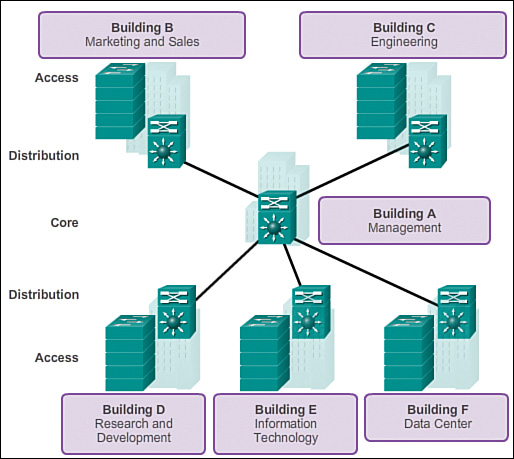
Notice that each building is using the same hierarchical network model that includes the access, distribution, and core layers.

There are no absolute rules for the way a campus network is physically built. While it is true that many campus networks are constructed using three physical tiers of switches, this is not a strict requirement. In a smaller campus, the network might have two tiers of switches in which the core and distribution elements are combined in one physical switch. This is referred to as a collapsed core design.
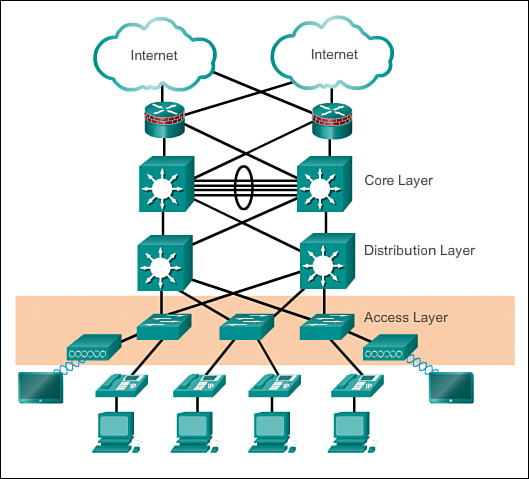
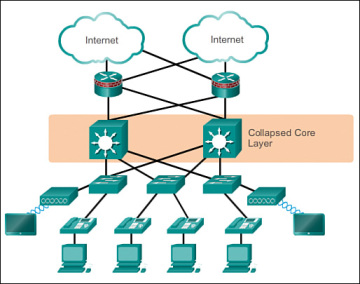
the access layer for a small business network generally incorporates Layer 2 switches and access points providing connectivity between workstations and servers.
The three-tier hierarchical design maximizes performance, network availability, and the ability to scale the network design.
However, many small enterprise networks do not grow significantly larger over time. Therefore, a two-tier hierarchical design where the core and distribution layers are collapsed into one layer is often more practical. A “collapsed core” is when the distribution layer and core layer functions are implemented by a single device. The primary motivation for the collapsed core design is reducing network cost, while maintaining most of the benefits of the three-tier hierarchical model

http://www.ciscopress.com/articles/article.asp?p=2202410&seqNum=4
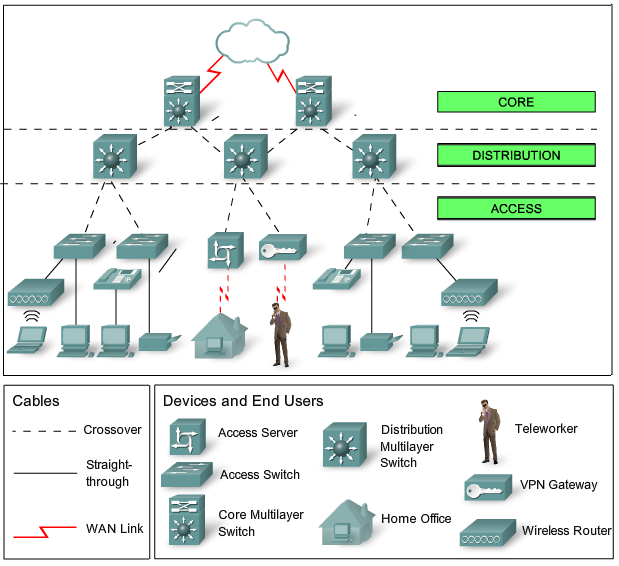
Access Layer–provide a means of connecting devices to the network and controlling which devices are allowed to communicate on the networkDevices: PCs, printers, and IP phones, routers, switches, bridges, hubs, and wireless access points (AP)

Distribution Layer–aggregates the data received from the access layer switches before it is transmitted to the core layer for routing to its final destination. The distribution layer controls the flow of network traffic using policies and delineates broadcast domains by performing routing functions between virtual LANs (VLANs) defined at the access layer. Devices: high-performance switches to ensure reliability

Core Layer–high-speed backbone of the internetwork Devices: routers, switches capable of forwarding large amounts of data quickly
http://blog.router-switch.com/2014/04/network-design-with-examples-core-and-distribution/


MicroNugget: What is MPLS?
interface independence
Quality of Service,QoS

MicroNugget: What is Multi-Protocol Label Switching (MPLS)?
for packet forwarding decision MPLS uses labels,instead of using IP addresses or layer3 information
label is attached to every single packet
packet forwarding based on label takes less resources compared to IP addresses,
MPLS applications such as layer3 VPNs,Pseudowire 
building label based forwarding table
label swapping

MPLS Part 1: The Basics of Label Switching
high-performance forwarding 
QoS traffic engineering
e.g:retail sector, Point-Of-Sale(POS) devices sending data to data centers

Applications of MPLS within VPN
Point-to-Point: leased line over VPN, called pseudo-wire
Private LAN Service:interconnecting multiple LANs based in different sites

MPLS does not care what underlying protocol is used (e.g: PPP,DSL,PDH,ATM,SDH/SONET,Ethernet etc)
MPLS maps onto layer2 protocol and provides common fast divison transport method over packet-switched networks(PSN)
MPLS is in OSI between layer2 and layer3, "layer 2.5"

MPLS routers do two tasks
1-map onto any layer2 protocol
2-check IP packet above as it arrives at the transport network and sends it on own its way

difference between routing and switching
which network and which exit port? router asks
packet reference id ,input port id ? switch

MPLS:Switch if possible,Route if necessary
Label switch router(LSR), switch+router
Label Edge Router(LER),known as edge LSR,provider edge router(PER)
MPLS domain,LSR,


packet from IP domain arrives at Ingress LER,
Ingress LER checks layer3 information on the packet
Ingress LER checks its lookup table
Ingress LER finds a reference called forwarding equivalence class(FEC) for the incoming packet 
label for FEC added to packet which is a number
packer is forwarded to MPLS domain
label is held in shim header
shim header is between layer3(IP) and layer2
label swapping
packet arrives at egress LER,
egress LER pops/removes the label and forwards the packet to IP domain 

label switched path(LSP) is established by label distribution protocol(LDP) or Resource Reservation Protocol-Traffice Engineering (RSVP-TE)
LSPs are one-directional

label operations(push,swap,pop)
FEC does not change, label changes, label swapping  

  • Pseudowire ( sometimes spelled as "pseudo wire" or abbreviated as PW) is a mechanism for emulating various networking or telecommunications services across packet-switched networks that use Ethernet, IP, or MPLS. Services emulated can include T1 leased line, frame relay, Ethernet, ATM, TDM, or SONET/SDH. As defined in RFC 3985 ("Pseudo Wire Emulation Edge-to-Edge [PWE3] Architecture") a pseudowire delivers the bare minimum of functionality necessary to emulate a wire with some required degree of fidelity for some specific service definition.


Required functions for PWs
Encapsulating service-specific bit streams, cells, or protocol data units (PDUs) that appear at some ingress port, then ferrying them across some IP path or through an MPLS tunnel.
Occasionally managing order and timing of incoming PW traffic so as to properly emulate a service with the necessary fidelity (TDM and ATM are good examples where timing issues are very important).

Seen from the perspective of customer edge equipment (CE), a PW appears to be an unshared link or a circuit for some designated service.
https://searchnetworking.techtarget.com/definition/pseudowire
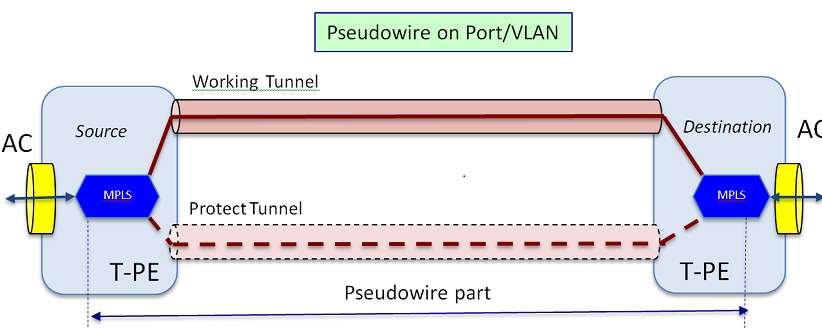
Pseudowires(PW) are used to provide end-to-end services across an MPLS network. They are the basic building blocks that can provide a point-to-point service as well as a multipoint service such as VPLS, which is practically a mesh of PWs used to create the bridge domain across which the packets flow.
https://www.cisco.com/c/en/us/support/docs/multiprotocol-label-switching-mpls/mpls/212007-Pseudowire-Concepts-and-troubleshooting.html

library vs framework vs architecture

  •     A Library is a reusable set of types/functions you can use from a wide variety of applications. The application code initiates communication with the library and invokes it.
    A Framework consists of one or more libraries, but the difference is that Inversion of Control applies. The application registers with the framework (often by implementing one or more interfaces), and the framework calls into the application, which may call back into the framework. A framework often exists to address a particular general-purpose Domain (such as web applications, or workflows, etc.).
    Architecture consists of the guiding principles behind a given application. It is not strongly tied to a particular framework or library.

Frameworks is a collection of classes and tools that help you developing great softwares ... like .net framework or Qt.
Architecture is entirely different : it refers to design pattern or how an application or a framework is organized. What are the modules that compose it and how they communicate together


Architecture is about style, abstract idea, flow, methodology, concept. Framework is something which implements the style, idea, concept etc..or makes it easier to implement it. example,

Architecture: Every component should have standard pluggable interfaces and it should be possible to connect any component to any other.

Framework: Then lego building blocks can be the framework.

Library: some readymade combinations of blocks that would work as the pillars.

Application: A building structure using the pillars and other building blocks(application).


http://stackoverflow.com/questions/2190625/what-is-the-difference-between-framework-and-architecture

The Internet of Things (IoT)

  • The Internet of Things (IoT) is the network of physical objects or "things" embedded with electronics, software, sensors, and network connectivity, which enables these objects to collect and exchange data
The Internet of Things allows objects to be sensed and controlled remotely across existing network infrastructure,
when IoT is augmented with sensors and actuators, the technology becomes an instance of the more general class of cyber-physical systems, which also encompasses technologies such as smart grids, smart homes, intelligent transportation and smart cities
https://en.wikipedia.org/wiki/Internet_of_Things

  • lora
Our members are collaborating together and sharing experience to drive the success of the LoRa protocol, LoRaWAN™, as the open global standard for secure, carrier-grade IoT LPWA connectivity. With a certification program to guarantee interoperability and the technical flexibility to address the multiple IoT applications be they static or mobile
https://www.lora-alliance.org/


  • sigfox
We power the IoT with the simplest communication solutions
http://www.sigfox.com/

  • What Is SigFox?
The low power, wide area (LPWA) network space, which is a subset of the Machine-to-Machine (M2M) market and is often referred to now as the Internet of Things (IoT).
Specifically, SigFox sets up antennas on towers (like a cell phone company), and receives data transmissions from devices like parking sensors or water meters
http://www.link-labs.com/what-is-sigfox/


  • NB-IOT, Accelerating Cellular IOT
NB-IOT provides better network coverage for thing-to-thing communications, supports more connections, and lowers power consumption. Therefore, NB-IOT meets the application requirements in industrial, public, personal, and home domains.
http://www.huawei.com/minisite/hwmbbf15/en/nb-iot-accelerating-cellular-iot.html

  • What is Weightless?
Weightless is both the name of a group, the Weightless Special Interest Group (SIG), and the technology.
Weightless technology delivers wireless connectivity for low power, wide area networks (LPWAN) specifically designed for the Internet of Things
http://www.weightless.org/about/what-is-weightless

  • IoT can be divided into 3 categories, based on usage and clients base:

    Consumer IoT includes the connected devices such as smart cars, phones, watches, laptops, connected appliances, and entertainment systems.
    Commercial IoT includes things like inventory controls, device trackers, and connected medical devices.
    Industrial IoT covers such things as connected electric meters, waste water systems, flow gauges, pipeline monitors, manufacturing robots, and other types of connected industrial devices and systems.
https://www.linkedin.com/pulse/three-major-challenges-facing-iot-ahmed-banafa/?trackingId=6R%2FhTv2o1HB39DNqv4s7Hg%3D%3D


  • The IoT platforms are suites of components those help to setup and manage the internet connected devices.
A person can remotely collect data, monitor and manage all internet connected devices from a single system.
https://www.how2shout.com/tools/best-opensource-iot-platforms-develop-iot-projects.html


  • ThingsBoard is an open-source IoT platform for data collection, processing, visualization, and device management.
ThingsBoard is licensed under Apache License 2.0, so you can use any it in your commercial products for free. You can even host it as a SaaS or PaaS solution.
https://thingsboard.io/

  • MindSphere is the open, cloud-based IoT operating system from Siemens that lets you connect your machines and physical infrastructure to the digital world. It lets you harness big data from billions of intelligent devices, enabling you to uncover transformational insights across your entire business.
https://www.siemens.com/global/en/home/products/software/mindsphere.html


  • intelligent device
An intelligent device is any type of equipment, instrument, or machine that has its own computing capability.
http://internetofthingsagenda.techtarget.com/definition/intelligent-device

  • Contiki is an open source operating system for the Internet of Things. Contiki connects tiny low-cost, low-power microcontrollers to the Internet. Contiki is a powerful toolbox for building complex wireless systems.
Cooja is the Contiki network simulator. Cooja allows large and small networks of Contiki motes to be simulated. Motes can be emulated at the hardware level, which is slower but allows precise inspection of the system behavior, or at a less detailed level, which is faster and allows simulation of larger networks.
http://www.contiki-os.org/start.html


  •  With Foren6, we propose a novel passive network analyser aimed specifically at sensor networks operating on emerging IoT standards, 6LoWPAN and RPL, which serves both the academic community and early adopters of 6LoWPAN and RPL.
 https://www.cetic.be/Demo-Abstract-Foren6-a-RPL-6LoWPAN

  • The iBeacon is simply a protocol that takes advantage of the new Bluetooth Low Energy technologies.
http://beekn.net/2015/02/tutorial-using-beacon-ibeacon-technologies-iphone-ipad/

  • Automotive Ethernet is a physical network that is used to connect components within a car using a wired network
AUTOSAR is an open and standardized automotive software architecture, jointly developed by automobile manufacturers, suppliers, and tool developers. AUTOSAR includes the automotive TCP/UDP/IP stack that is used in automobiles
https://support.ixiacom.com/sites/default/files/resources/whitepaper/ixia-automotive-ethernet-primer-whitepaper_1.pdf

  • Gateway Tier
On top of providing the transport, the gateway can also optionally provide functions such as data filtering, cleanup, aggregation and packet content inspection.

https://mobilebusinessinsights.com/2017/09/the-essential-building-blocks-of-an-iot-architecture/#.WbSDSG3tj4s.linkedin


  • Operational Technology (OT) is hardware and software that detects or causes a change through the direct monitoring and/or control of physical devices, processes and events in the enterprise.

OT is common in Industrial Control Systems (ICS) such as a SCADA System.
In the world of critical infrastructure, OT may be used to control power stations or public transportation.
For many years, industrial systems relied upon proprietary protocols and software, were manually managed and monitored by humans, and had no connection to the outside world.For this reason, they were a fairly insignificant target for hackers as there was no networked interface to attack and nothing to gain or destroy. The only way to infiltrate these systems was to obtain physical access to a terminal and this was no easy task. OT and IT integrated little and did not deal with the same kinds of vulnerabilities.
https://www.forcepoint.com/cyber-edu/ot-operational-technology-security


  • in-vehicle infotainment solution


One of the key technologies, which works as a focal point of all the modern automotive systems and integrates their functions to be controlled and monitored from one central unit, is “In-Vehicle Infotainment System”.

What is In-vehicle infotainment?
The IVI can be described as a combination of vehicle systems which are used to deliver entertainment and information to the driver and the passengers through audio/ video interfaces, control elements like touch screen displays, button panel, voice commands, and more
https://www.einfochips.com/blog/everything-you-need-to-know-about-in-vehicle-infotainment-system/

  • What is HIL Testing?

Hardware-in-the-Loop (HIL) simulation is a technique that is used for testing control systems. Carrying out a HIL simulation to test a control system is called HIL testing.
https://www.hil-simulation.com/home/hil-testing.html

Tuesday, November 17, 2015

opensource GEO


  • PostGIS is a spatial database extender for PostgreSQL object-relational database

http://postgis.net/


  • GeoServer is an open source server for sharing geospatial data

http://geoserver.org/


  • A high-performance, feature-packed library for all your mapping need

http://openlayers.org/

open source storage


  • FreeNAS is an operating system that can be installed on virtually any hardware platform to share computer data storage over a computer network. 'Free' as in 'free and open source' and 'NAS' as in "network-attached storage", FreeNAS is the simplest way to create a centralized and easily-accessible home for your data. 
FreeNAS, the world’s most popular open source storage OS, utilizes the ZFS file system to safeguard and protect all of your important data. ZFS is a enterprise-level open source filesystem and volume manager that offers unprecedented flexibility and commitment to data integrity. It’s a next-generation file system that eliminates most, if not all, of the limitations found in legacy file systems and hardware RAID

http://www.freenas.org

  • Openfiler

Openfiler converts an industry standard x86_64 architecture system into a full-fledged NAS/SAN appliance or IP storage gateway and provides storage administrators with a powerful tool to cope with burgeoning storage needs.
https://www.openfiler.com/

  • From cloud-based backup solutions to high-availability, content delivery networks (CDNs), object storage has become an integral part of the modern technology landscape.   
https://www.digitalocean.com/community/tutorials/how-to-set-up-an-object-storage-server-using-minio-on-ubuntu-16-04

  • Minio is an object storage server released under Apache License v2.0. It is compatible with Amazon S3 cloud storage service. It is best suited for storing unstructured data such as photos, videos, log files, backups and container / VM images. Size of an object can range from a few KBs to a maximum of 5TB.
https://github.com/minio/minio/blob/master/README.md

Tuesday, October 13, 2015

forensics sciences

  • Dr. Merck assists investigators of animal cruelty with crime scene investigation as well as the examination of live and deceased victims.  She helps with large scale operations including exhumations of burial sites and examination of skeletal animal remains
http://www.veterinaryforensics.com/

  • The ASPCA Veterinary Forensic Sciences Program is also designed for these professionals so they can better document, collect, and preserve evidence from scenes of animal cruelty for the prosecution of the animal crime or for additional demonstrative evidence for the prosecution of the human crime
http://forensics.med.ufl.edu/about/

  • As a forensic science in the strict sense of the term, astronomical knowledge can help resolve certain legal questions. In one reported instance, an astronomer testified in court as an expert witness as to whether a newly built house would cast a shadow on another house. More generally, questions about the sun's or moon's placement in the sky at certain times of day or night may be legally relevant, such as for determining the date on which a photograph was made.It has for instance been reported that Abraham Lincoln once successfully defended a legal case by describing the location of the Moon on the night of the offense
https://en.wikipedia.org/wiki/Forensic_astronomy

Tuesday, September 29, 2015

ITWatchDogs

ITWatchDogs environmental monitors enable you to keep an eye on remote conditions in critical areas for environmental factors including temperature, humidity, airflow, light, sound, door position, power and much more. Get alerts for abnormal conditions via Email, SMS & SNMP traps.
http://www.itwatchdogs.com/

KMS

KMS activates computers on a local network, eliminating the need for individual computers to connect to Microsoft. To do this, KMS uses a client–server topology. KMS client computers can locate KMS host computers by using Domain Name System (DNS) or a static configuration. KMS clients contact the KMS host by using remote procedure call (RPC). KMS can be hosted on computers that are running the Windows Vista, Windows 7, Windows Server 2003, Windows Server 2008, or Windows Server 2008 R2 operating systems

Sunday, September 27, 2015

Preboot Execution Environment

Preboot Execution Environment
In computing, the Preboot eXecution Environment (PXE) specification describes a standardized client-server environment that boots a software assembly, retrieved from a network, on PXE-enabled clients. On the client side it requires only a PXE-capable network interface controller (NIC), and uses a small set of industry-standard network protocols such as DHCP and TFTP.
https://en.wikipedia.org/wiki/Preboot_Execution_Environment

  • In order to setup PXE server, you need to have a working DHCP and TFTP servers. DHCP server is used to distribute the IP addresses for the network systems, so that the client systems can communicate with PXE server. And, TFTP server is used to download the installation files from PXE server and send them to the PXE clients. We can deploy PXE, and DHCP servers on the same system or use different systems for each server. Due to lack of resources, I have tested this on a single system. You can either use a separate system or single machine for all servers.
https://www.ostechnix.com/how-to-install-pxe-server-on-ubuntu-16-04/

The setup that requires here is basically one PXE server and one Host that will be the PXE client
The Services required on the PXE Server:
1. TFTP
2. DHCP
3. NFS
https://community.mellanox.com/docs/DOC-2164

Power cycling

Power cycling is the act of turning a piece of equipment, usually a computer, off and then on again. Reasons for power cycling include having an electronic device reinitialize its set of configuration parameters or recover from an unresponsive state of its mission critical functionality, such as in a crash or hang situation. Power cycling can also be used to reset network activity inside a modem.
https://en.wikipedia.org/wiki/Power_cycling

Wednesday, September 16, 2015

ISDN

Integrated Services for Digital Network (ISDN) is a set of communication standards for simultaneous digital transmission of voice, video, data, and other network services over the traditional circuits of the public switched telephone network
https://en.wikipedia.org/wiki/Integrated_Services_Digital_Network

Network Address Translation (NAT)

  • you could have 4,294,967,296 unique addresses (232). The actual number of available addresses is smaller (somewhere between 3.2 and 3.3 billion) because of the way that the addresses are separated into classes, and because some addresses are set aside for multicasting, testing or other special uses.
This is where NAT (RFC 1631) comes to the rescue. Network Address Translation allows a single device, such as a router, to act as an agent between the Internet (or "public network") and a local (or "private") network. This means that only a single, unique IP address is required to represent an entire group of computers
http://computer.howstuffworks.com/nat1.htm

  • NAT serves three main purposes:
Provides a type of firewall by hiding internal IP addresses
Enables a company to use more internal IP addresses. Since they're used internally only, there's no possibility of conflict with IP addresses used by other companies and organizations.
Allows a company to combine multiple ISDN connections into a single Internet connection.
http://www.webopedia.com/TERM/N/NAT.html

  • Network address translation (NAT) is a methodology of remapping one IP address space into another by modifying network address information in Internet Protocol (IP) datagram packet headers while they are in transit across a traffic routing device.[1] The technique was originally used for ease of rerouting traffic in IP networks without renumbering every host. It has become a popular and essential tool in conserving global address space allocations in face of IPv4 address exhaustion.
https://en.wikipedia.org/wiki/Network_address_translat

  • Network Address Translation (NAT) is the process where a network device, usually a firewall, assigns a public address to a computer (or group of computers) inside a private network. The main use of NAT is to limit the number of public IP addresses an organization or company must use, for both economy and security purposes.

http://whatismyipaddress.com/nat


  • So what does the size of the Internet have to do with NAT?

When IP addressing first came out, everyone thought that there were plenty of addresses to cover any need. Theoretically, you could have 4,294,967,296 unique addresses (232). The actual number of available addresses is smaller (somewhere between 3.2 and 3.3 billion) because of the way that the addresses are separated into classes, and because some addresses are set aside for multicasting, testing or other special uses.

Network Address Translation allows a single device, such as a router, to act as an agent between the Internet (or "public network") and a local (or "private") network. This means that only a single, unique IP address is required to represent an entire group of computers.

http://computer.howstuffworks.com/nat.htm

Sunday, September 13, 2015

Man-In-The-Middle (MITM)

  • Proxy only tools
Proxy tools only permit interaction with the parts of the HTTP protocol, like the header and the body of a transaction, but do not have the capability to intercept the TCP connection between client and server. To intercept the communication, it’s necessary to use other network attack tools or configure the browser.
https://www.owasp.org/index.php/Man-in-the-middle_attack

  • mitmproxy is a free and open source interactive HTTPS proxy.

https://mitmproxy.org/
  • A Man-In-The-Middle (MITM) attack is achieved when an attacker poisons the ARP cache of two devices with the (48-bit) MAC address of their Ethernet NIC (Network Interface Card). Once the ARP cache has been successfully poisoned, each of the victim devices send all their packets to the attacker when communicating to the other device. This puts the attacker in the middle of the communications path between the two victim devices; hence the name Man-In-The-Middle (MITM) attack. It allows an attacker to easily monitor all communication between victim devices.
http://www.cisco.com/c/en/us/products/collateral/switches/catalyst-6500-series-switches/white_paper_c11_603839.html

  • In cryptography and computer security, a man-in-the-middle attack (often abbreviated to MITM, MitM, MIM, MiM or MITMA) is an attack where the attacker secretly relays and possibly alters the communication between two parties who believe they are directly communicating with each other
https://en.wikipedia.org/wiki/Man-in-the-middle_attack

  • In computer networking, ARP spoofing, ARP cache poisoning, or ARP poison routing, is a technique by which an attacker sends (spoofed) Address Resolution Protocol (ARP) messages onto a local area network. Generally, the aim is to associate the attacker's MAC address with the IP address of another host, such as the default gateway, causing any traffic meant for that IP address to be sent to the attacker instead.
ARP spoofing may allow an attacker to intercept data frames on a network, modify the traffic, or stop all traffic. Often the attack is used as an opening for other attacks, such as denial of service, man in the middle, or session hijacking attacks
https://en.wikipedia.org/wiki/ARP_spoofing

  • ARP is the Address Resolution Protocol. Essentially all it does is resolve a logical IP address to a physical Hardware (MAC) address.
ARP stands for Address Resolution Protocol. It is used to associate a layer 3 (Network layer) address (such as an IP address) with a layer 2 (Data Link layer) address (MAC address).

http://mellowd.co.uk/ccie/?tag=how-does-arp-work
http://forums.sureshkumar.net/networking-interview-technical-questions/14810-networking-what-arp-how-does-work.html

  • ARP cache
The ARP cache can contain dynamic (learned) entries and static (user-configured) entries

Entries in the static ARP table are user-configured.
You can add entries to the static ARP table regardless of whether or not the device the entry is for is connected to the Layer 3 switch.

Layer 3 switches have a static ARP table. Layer 2 switches do not.
http://www.brocade.com/content/html/en/configuration-guide/FI_08030_L3/GUID-B5A197B6-5EB5-481E-8535-5DC9FD66CA14.html

  • Gratuitous ARP could mean both gratuitous ARP request or gratuitous ARP reply.
Gratuitous in this case means a request/reply that is not normally needed according to the ARP specification (RFC 826) but could be used in some cases.
A gratuitous ARP request is an AddressResolutionProtocol request packet where the source and destination IP are both set to the IP of the machine issuing the packet and the destination MAC is the broadcast address ff:ff:ff:ff:ff:ff. Ordinarily, no reply packet will occur. A gratuitous ARP reply is a reply to which no request has been made.

Gratuitous ARPs are useful for four reasons:

They can help detect IP conflicts. When a machine receives an ARP request containing a source IP that matches its own, then it knows there is an IP conflict.

They assist in the updating of other machines' ARP tables. Clustering solutions utilize this when they move an IP from one NIC to another, or from one machine to another. Other machines maintain an ARP table that contains the MAC associated with an IP. When the cluster needs to move the IP to a different NIC, be it on the same machine or a different one, it reconfigures the NICs appropriately then broadcasts a gratuitous ARP reply to inform the neighboring machines about the change in MAC for the IP. Machines receiving the ARP packet then update their ARP tables with the new MAC.

They inform switches of the MAC address of the machine on a given switch port, so that the switch knows that it should transmit packets sent to that MAC address on that switch port

Every time an IP interface or link goes up, the driver for that interface will typically send a gratuitous ARP to preload the ARP tables of all other local hosts. Thus, a gratuitous ARP will tell us that that host just has had a link up event, such as a link bounce, a machine just being rebooted or the user/sysadmin on that host just configuring the interface up. If we see multiple gratuitous ARPs from the same host frequently, it can be an indication of bad Ethernet hardware/cabling resulting in frequent link bounces.


 A typical clustering scenario might play out like the following:

    Two nodes in a cluster are configured to share a common IP address 192.168.1.1. Node A has a hardware address of 01:01:01:01:01:01 and node B has a hardware address of 02:02:02:02:02:02.

    Assume that node A currently has IP address 192.168.1.1 already configured on its NIC. At this point, neighboring devices know to contact 192.168.1.1 using the MAC 01:01:01:01:01:01.
    Using the heartbeat protocol, node B determines that node A has died.

    Node B configures a secondary IP on an interface with ifconfig eth0:1 192.168.1.1.

    Node B issues a gratuitous ARP with send_arp eth0 192.168.1.1 02:02:02:02:02:02 192.168.1.255. All devices receiving this ARP update their table to point to 02:02:02:02:02:02 for the IP address 192.168.1.1.

https://wiki.wireshark.org/Gratuitous_ARP
  • One such way is to spoof your MAC address and poison the arp table. Since arp keeps no state information, the arp cache can be overwritten (unless an entry is explicitly marked as permanent)
The attacker can then either respond to Computer A (pretending to be Computer B), or simply forward the packets to its intended destination, but only after the packet information is captured and logged for later use by the attacker.
http://www.admin-magazine.com/Articles/Arp-Cache-Poisoning-and-Packet-Sniffing

  • ProxyFuzz
ProxyFuzz is a man-in-the-middle non-deterministic network fuzzer written in Python. ProxyFuzz randomly changes (fuzzes) contents on the network traffic. It supports TCP and UDP protocols and can also be configured to fuzz only one side of the communication

  • Different types of network-based evidence

Full content data
Nothing is being filtered, exact copies ofall thetraffic (often called "packet captures", abbreviated toPCAP) are being stored.

Session data
 It usually consists of aggregated traffic metadata and usually refers to the conversation between two network entities, grouped together into"flows" and/or groups of network packets related to one another 
 session data areable to informthe investigator about questions such aswho talked to whom, when, for how long, etc. without looking at any contents of the conversation(s) at all.
all an investigator needs to know is that700,000 packets have been transferred between two otherwise "quiet" network nodeson a Sunday at 02:15 am. 


Alert data
Whenever network traffic triggers a pre-defined item of interest (such as a particular pattern of bytes, or counts of activity, or other characteristics) the analyst will be dealing withalert data. Alerts are typically generated by Network Intrusion Detection Systems (NIDS) such as Suricata or Snor

Statistical data
Statistical data providethe analyst with network-related aspects such as the number of bytes contained in a packet trace, start and end times of network conversations, number of services and protocols being used, most active network nodes, least active network nodes, outliers in network usage, average packet size, average packet rate, and so on. It can therefore also actas auseful source for anomaly detectio

Acquiring traffic in cables

Network taps
Inline network tapsare OSI layer 1 which can be insertedinlinebetween two physically connected network devices.The network tap will pass along the packetsandphysically replicate copies to one or more monitoring ports.They are commonly designed to require no power for passively passing packets. This reduces the risk of a network outage caused by the tap. This does not cover the power requirements of the monitoring station though

Vampire taps redevices that pierce the shielding of coaxial cables to provide access to the signal within. The device clamps onto and "bites" into the cable.
Unlike inline network taps, the cable does not need to be severed (or disconnected) for a vampire tap to be installed. 

Fibre Optic network taps work similarly to inline taps for copper cables.

Hubs
A network hub is an OSI Layer 1 device that physically connects all stations on a local subnet to one circuit. It maintains no knowledge of what devices are connected to what ports. When the hub receives a frame, it forwards it toall other ports. Therefore, every device connected to the hub physically receives all traffic destined to every other device attached to the hub. Thus, all traffic on the segment can be trivially captured by connecting to any unused port on a hub.A reliable way to determine if a device is actually a hub is to connect a station to it, put the network interface into promiscuous mode, and observe the traffic. If only packets destined for the monitoring station and broadcast traffic can be seen, then the device is a switch. If it is a hub, traffic to all other connected stations should be seen.
Switches
Unlike hubs, switches usesoftware to keep track of which stations are connected to which ports, in its CAM (Content Addressable Memory) table. 
A switches CAM table stores MAC addresses with corresponding switch ports.Switches can often be configured to replicate traffic from one or more ports to some other port for aggregation and analysis.The most vendor-neutral term for this is “port mirroring.” 
nvestigators will need administrative access to theswitch’s operating system to configure port mirroring. A monitoring station needs to be connected to the mirroring port to capture the traffic. Investigators mustconsider the bandwidth mirroring port in comparison tothe traffic on the monitored ports,not to drop packets
Active acquisition
In cases when the network administrators themselves are not trusted, investigators may need to use the same techniques asattackers.This is not recommended and should be seen only as a measure of last resort, as they cause the switch to operate outside normal parameters and will likely trigger intrusion detection mechanisms in the network.
First, the attacker can flood theCAM table of the switch with information (by sending packets with different MAC addresses). This attack is referred to as “MAC flooding” or “CAM table overflow”. When the CAM table overflows, switches by default will “fail open” to a hub mode of operationand send traffic for systems not in the CAM table out to every port.
Second, an “ARP spoofing”, or “ARP (cache) poisoning” attack can be conducted. The Address Resolution Protocol (ARP) is used by stations on a LAN to dynamically map IPv4 addresses (Layer 3) to corresponding MAC addresses (for IPv6 this function is carried out within ICMPv6, but the principle is otherwise identical). The attacker broadcasts bogus ARP packets, which link the attacker’s MAC address to the victim’s IP address. Other stationson the LAN add this bogus information to their ARP tables, and send traffic for the router’s IP address to the attacker’s MAC address instead. This causes all IP packets destined for the victim station to be sent instead to the attacker (who can then copy, change, and/or forward them on to the victim).
Acquiring traffic in radio networks
There are many protocols in use today that enable wireless networking.For each protocol, there are severalfrequency bandsover which data can be transmitted, with each band subdivided into smaller bands, called channels.Not all frequency bands or all channels are in use everywhere in the world. Most countries limit what frequency and channels are used within their jurisdiction. The consequence isthat network equipment made for one country may operate on different frequencies and channels than one made for another country.Thus, adversaries using wireless technology from a different country which may not be detected by that countries network equipment.
Spectrum analysers are designed to monitor RF frequencies and report on usage. They can be very helpful for identifying rogue wireless devices and channels in use.
WLAN passive evidence acquisition
Tocapture WLAN traffic, investigators need an 802.11 wireless card capable of running in Monitor mode.a mode that many WLAN cards do not support. There is a difference between Monitor mode and Promiscuous mode that can be summed up as follows
An important difference between Monitor mode and promiscuous mode is that in monitor mode the packets are captured in 802.11 format while in promiscuous mode theyare presented in Ethernet (802.3) format. From a forensic standpoint, monitor mode is preferable as it is completely passive and conveys more information. It is recommended to use a special-purpose WiFi monitoring card that can be configured to operate completely passively.
https://www.enisa.europa.eu/topics/trainings-for-cybersecurity-specialists/online-training-material/documents/introduction-to-network-forensics-handbook.pdf