Wednesday, July 21, 2021

proxy server

  •  Forward proxy


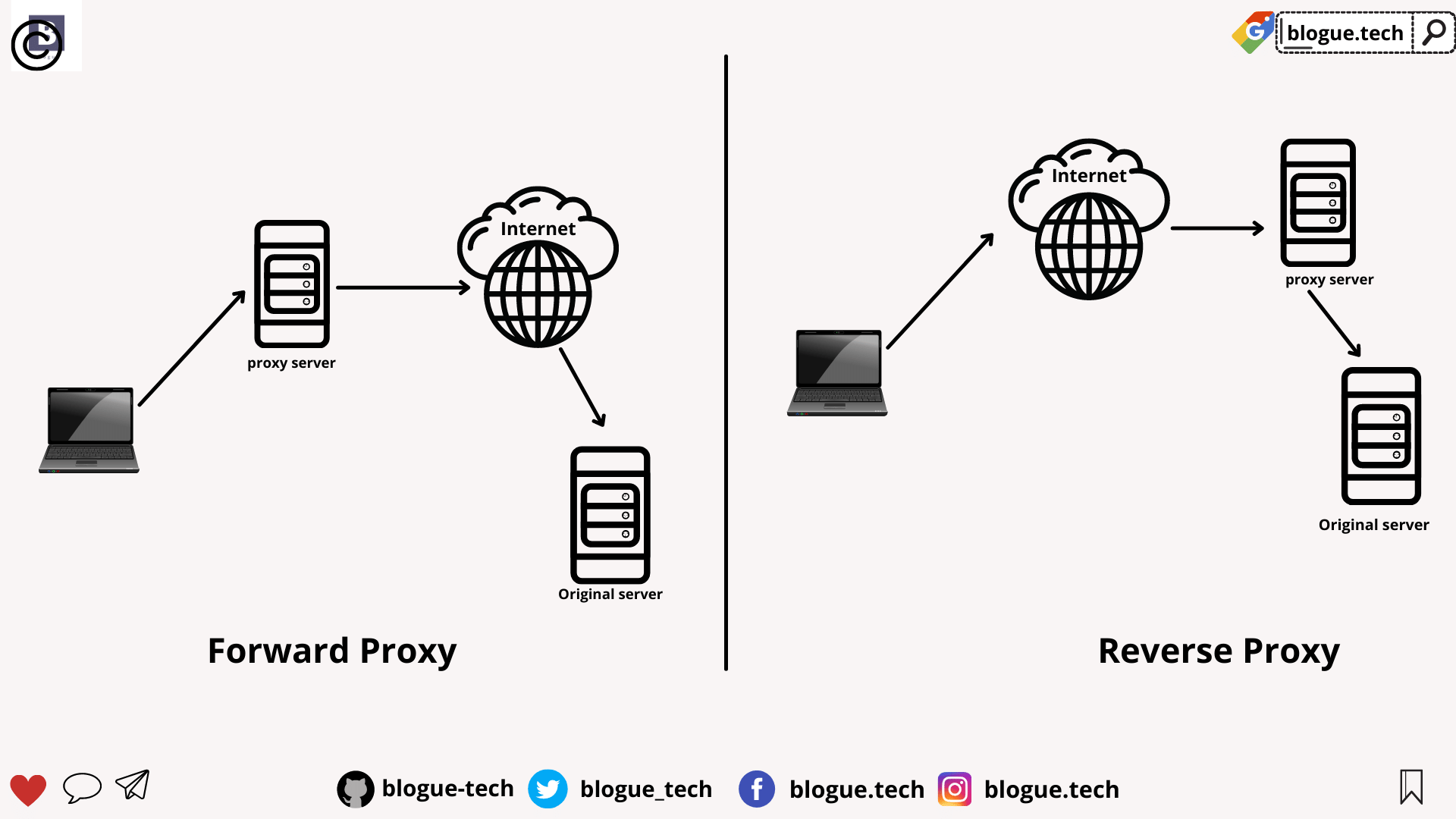
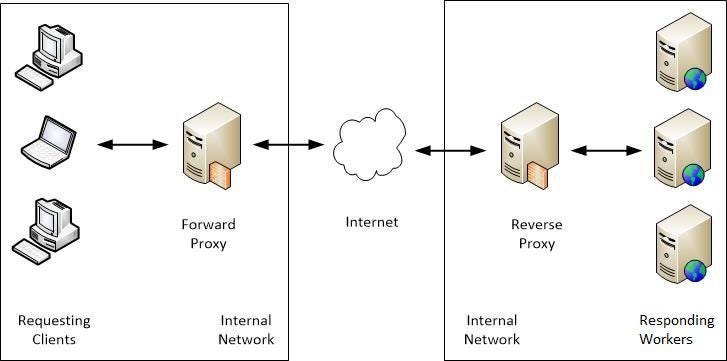
A forward proxy is the most common form of a proxy server and is generally used to pass requests from an isolated, private network to the Internet through a firewall. Using a forward proxy, requests from an isolated network, or intranet, can be rejected or allowed to pass through a firewall. 


A forward proxy server will first check to make sure a request is valid. If a request is not valid, or not allowed (blocked by the proxy), it will reject the request resulting in the client receiving an error or a redirect. If a request is valid, a forward proxy may check if the requested information is cached. If it is, the forward proxy serves the cached information. If it is not, the request is sent through a firewall to an actual content server which serves the information to the forward proxy. The proxy, in turn, relays this information to the client and may also cache it, for future requests.


Reverse proxy


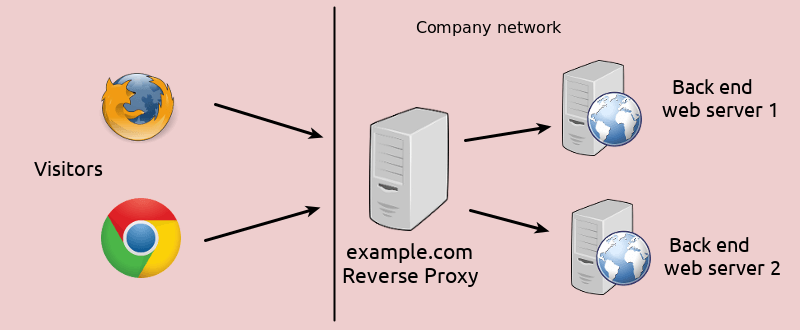
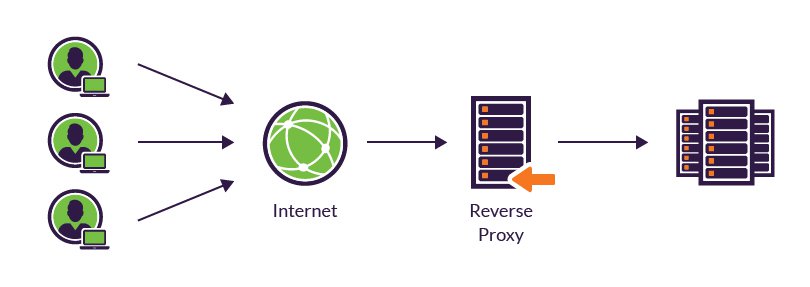
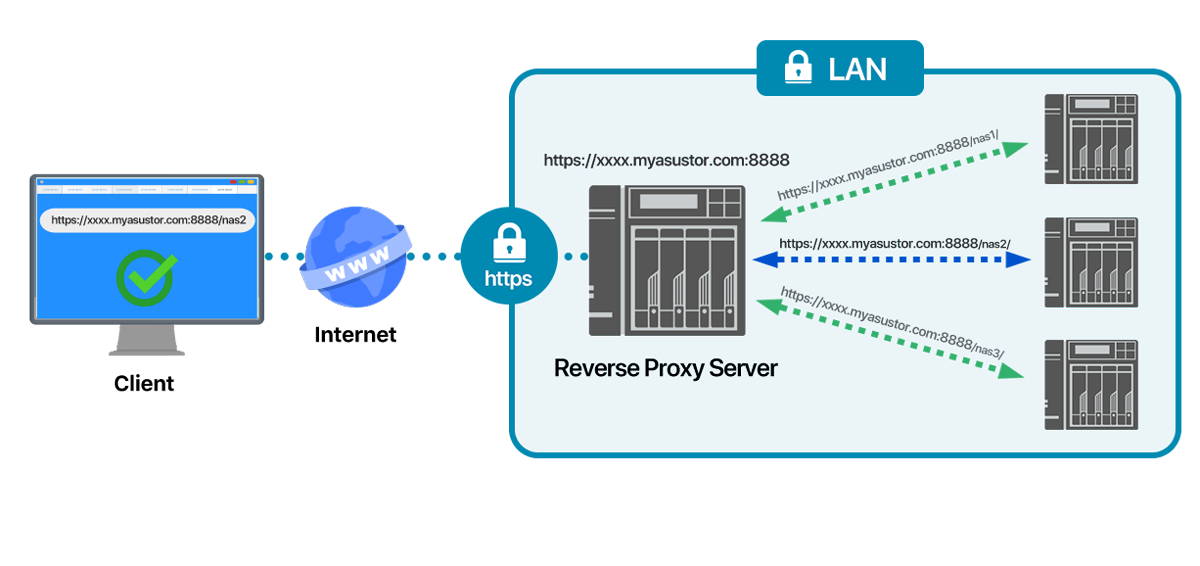
A reverse proxy is another common form of a proxy server and is generally used to pass requests from the Internet, through a firewall to isolated, private networks. It is used to prevent Internet clients from having direct, unmonitored access to sensitive data residing on content servers on an isolated network, or intranet

If caching is enabled, a reverse proxy can also lessen network traffic by serving cached information rather than passing all requests to actual content servers. 

Reverse proxy servers may also balance workload by spreading requests across a number of content servers.  

One advantage of using a reverse proxy is that Internet clients do not know their requests are being sent to and handled by a reverse proxy server. 


The above image shows a reverse proxy configuration. An Internet client initiates a request to Server A (Proxy Server) which, unknown to the client, is actually a reverse proxy server. The request is allowed to pass through the firewall and is valid but is not cached on Server A. The reverse proxy (Server A) requests the information from Server B (Content Server), which has the information the Internet client is requesting. The information is served to the reverse proxy, where it is cached, and relayed through the firewall to the client. Future requests for the same information will be fulfilled by the cache, lessening network traffic and load on the content server (proxy caching is optional and not necessary for proxy to function on your HTTP Server). In this example, all information originates from one content server (Server B).


Proxy chaining


A proxy chain uses two or more proxy servers to assist in server and protocol performance and network security. Proxy chaining is not a type of proxy, but a use of reverse and forward proxy servers across multiple networks. In addition to the benefits to security and performance, proxy chaining allows requests from different protocols to be fulfilled in cases where, without chaining, such requests would not be possible or permitted. 


For example, a request using HTTP is sent to a server that can only handle FTP requests. In order for the request to be processed, it must pass through a server that can handle both protocols. This can be accomplished by making use of proxy chaining which allows the request to be passed from a server that is not able to fulfill such a request (perhaps due to security or networking issues, or its own limited capabilities) to a server that can fulfill such a request. 


https://www.ibm.com/docs/en/i/7.2?topic=concepts-proxy-server-types


How does ARP work?

  •  How ARP works

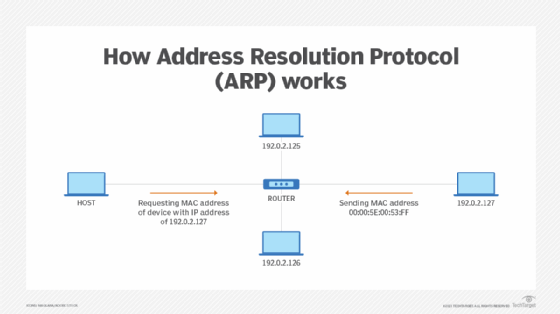
When a new computer joins a LAN, it is assigned a unique IP address to use for identification and communication

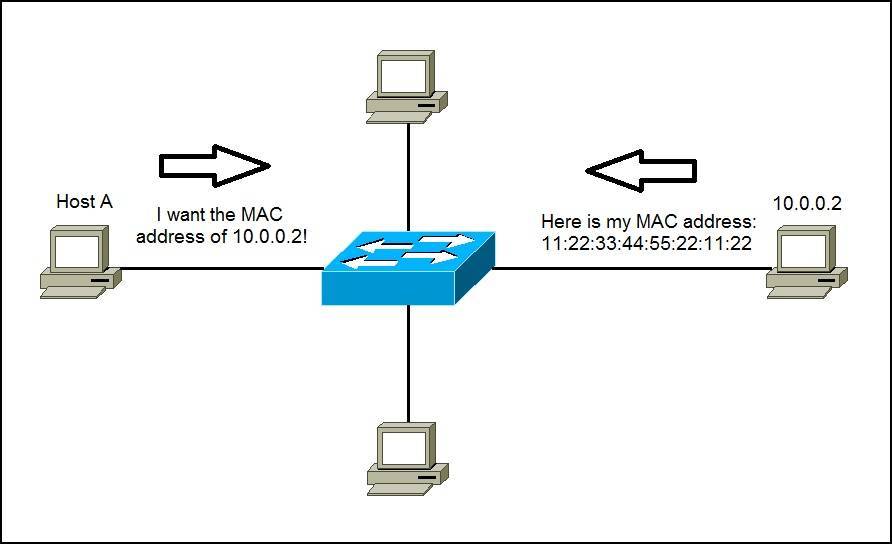
When an incoming packet destined for a host machine on a particular LAN arrives at a gateway, the gateway asks the ARP program to find a MAC address that matches the IP address

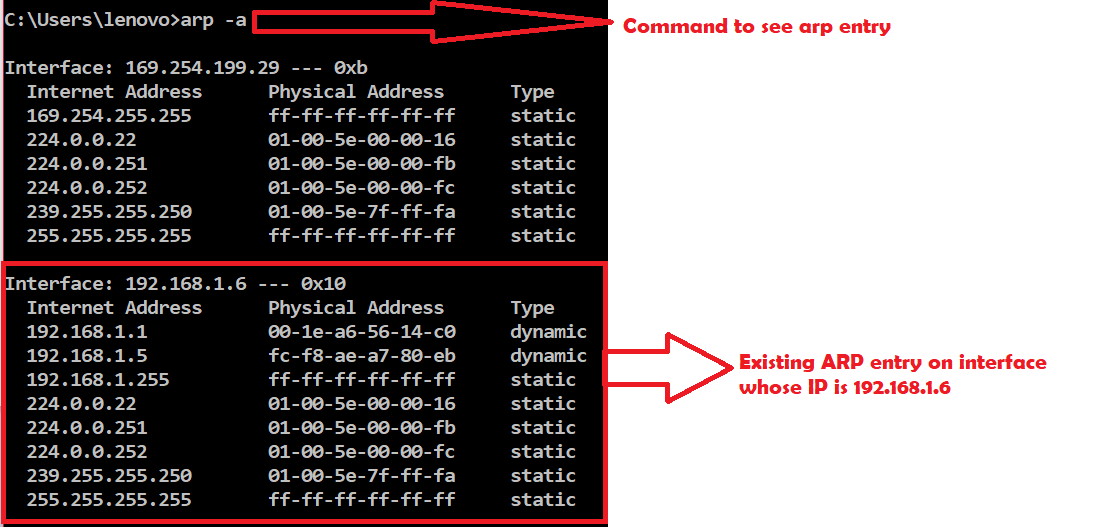
A table called the ARP cache maintains a record of each IP address and its corresponding MAC address.

All operating systems in an IPv4 Ethernet network keep an ARP cache.

Every time a host requests a MAC address in order to send a packet to another host in the LAN, it checks its ARP cache to see if the IP to MAC address translation already exists.

If the translation does not already exist, then the request for network addresses is sent and ARP is performed.


ARP broadcasts a request packet to all the machines on the LAN and asks if any of the machines know they are using that particular IP address. When a machine recognizes the IP address as its own, it sends a reply so ARP can update the cache for future reference and proceed with the communication.


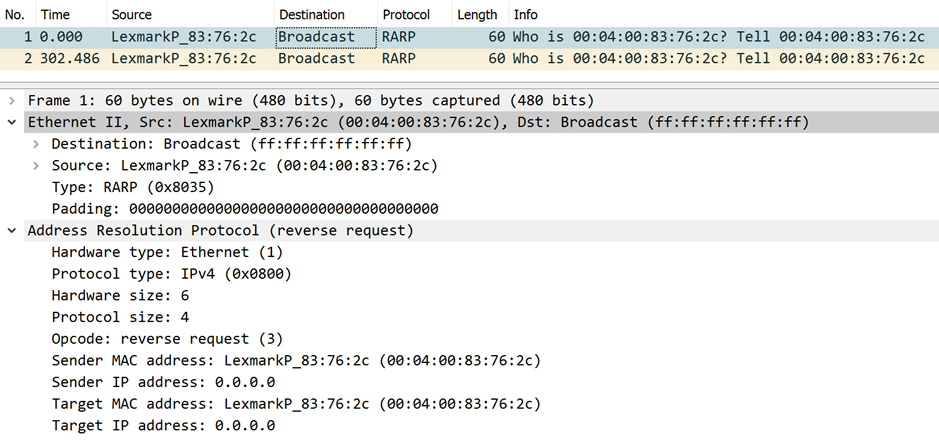
Host machines that don't know their own IP address can use the Reverse ARP (RARP) protocol for discovery.


When an ARP inquiry packet is broadcast, the routing table is examined to find which device on the LAN can reach the destination fastest. This device, which is often a router, becomes a gateway for forwarding packets outside the network to their intended destinations.


ARP spoofing and ARP cache poisoning

Any LAN that uses ARP must be wary of ARP spoofing, also referred to as ARP poison routing or ARP cache poisoning.

ARP spoofing is a device attack in which a hacker broadcasts false ARP messages over a LAN in order to link an attacker's MAC address with the IP address of a legitimate computer or server within the network. Once a link has been established, the target computer can send frames meant for the original destination to the hacker's computer first as well as any data meant for the legitimate IP address.


https://searchnetworking.techtarget.com/definition/Address-Resolution-Protocol-ARP


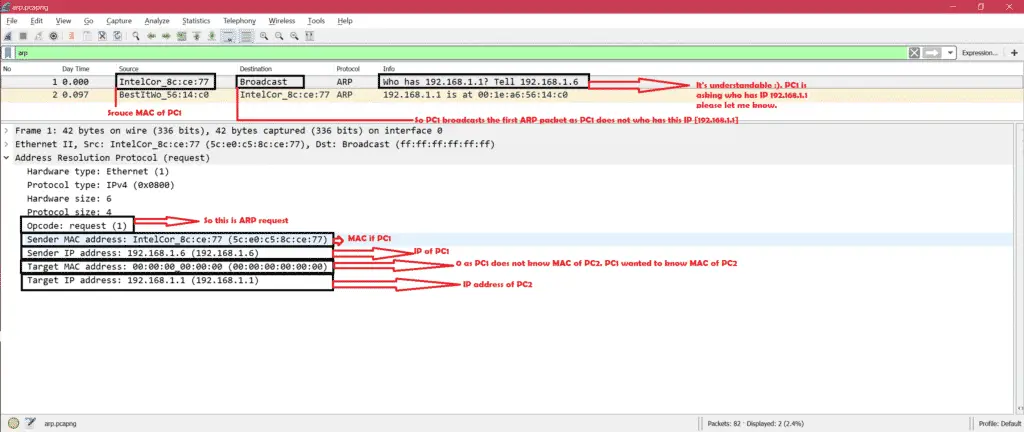
ARP Request


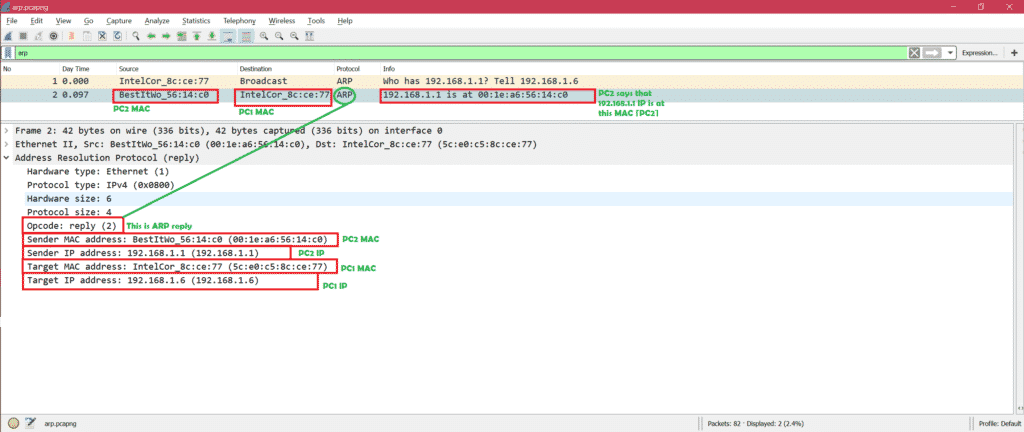
ARP Reply


  • RARP: Its opposite of normal ARP that we have discussed. That means you have MAC address of PC2 but you do not have IP address of PC2. Some specific cases need RARP.

https://linuxhint.com/arp_packet_analysis_wireshark/

  • The Reverse Address Resolution Protocol (RARP) is an obsolete computer communication protocol used by a client computer to request its Internet Protocol (IPv4) address from a computer network, when all it has available is its link layer or hardware address, such as a MAC address. The client broadcasts the request and does not need prior knowledge of the network topology or the identities of servers capable of fulfilling its request.

https://en.wikipedia.org/wiki/Reverse_Address_Resolution_Protocol


  • Configuring Gratuitous ARP
Gratuitous Address Resolution Protocol (ARP) requests help detect duplicate IP addresses.
A gratuitous ARP is a broadcast request for a router’s own IP address. If a router or switch sends an ARP request for its own IP address and no ARP replies are received, the router- or switch-assigned IP address is not being used by other nodes

However, if a router or switch sends an ARP request for its own IP address and an ARP reply is received, the router- or switch-assigned IP address is already being used by another node.


https://www.juniper.net/documentation/us/en/software/junos/multicast-l2/topics/task/interfaces-configuring-gratuitous-arp.html

  • Gratuitous ARP
Gratuitous ARP could mean both gratuitous ARP request or gratuitous ARP reply. Gratuitous in this case means a request/reply that is not normally needed according to the ARP specification (RFC 826) but could be used in some cases. 

A gratuitous ARP request is an AddressResolutionProtocol request packet where the source and destination IP are both set to the IP of the machine issuing the packet and the destination MAC is the broadcast address ff:ff:ff:ff:ff:ff.

Gratuitous ARPs are useful for four reasons:

They can help detect IP conflicts. When a machine receives an ARP request containing a source IP that matches its own, then it knows there is an IP conflict.

They assist in the updating of other machines' ARP tables. Clustering solutions utilize this when they move an IP from one NIC to another, or from one machine to another. Other machines maintain an ARP table that contains the MAC associated with an IP. When the cluster needs to move the IP to a different NIC, be it on the same machine or a different one, it reconfigures the NICs appropriately then broadcasts a gratuitous ARP reply to inform the neighboring machines about the change in MAC for the IP. Machines receiving the ARP packet then update their ARP tables with the new MAC

They inform switches of the MAC address of the machine on a given switch port, so that the switch knows that it should transmit packets sent to that MAC address on that switch port.


Every time an IP interface or link goes up, the driver for that interface will typically send a gratuitous ARP to preload the ARP tables of all other local hosts. Thus, a gratuitous ARP will tell us that that host just has had a link up event, such as a link bounce, a machine just being rebooted or the user/sysadmin on that host just configuring the interface up. If we see multiple gratuitous ARPs from the same host frequently, it can be an indication of bad Ethernet hardware/cabling resulting in frequent link bounces

https://wiki.wireshark.org/Gratuitous_ARP


Ports and Protocols

  •  This is a list of TCP and UDP port numbers used by protocols for operation of network applications.

https://en.wikipedia.org/wiki/List_of_TCP_and_UDP_port_numbers


soc analyst interview question

  •  1. Explain risk, vulnerability and threat?

Vulnerability (weakness) is a gap in the protection efforts of a system, a threat is an attacker who exploits that weakness. Risk is the measure of potential loss when that the vulnerability is exploited by the threat


2. What is the difference between Asymmetric and Symmetric encryption and which one is better?

Symmetric encryption uses the same key for both encryption and decryption, while Asymmetric encryption uses different keys for encryption and decryption.

Symmetric is usually much faster but the key needs to be transferred over an unencrypted channel. Asymmetric on the other hand is more secure but slow. 

Hence, a hybrid approach should be preferred. Setting up a  channel using asymmetric encryption and then sending the data using a symmetric process.


4. What is XSS, how will you mitigate it?

Cross site scripting is a JavaScript vulnerability in web applications.

when a user enters a script in the client-side input fields and that input gets processed without getting validated. 

This leads to untrusted data getting saved and executed on the client-side. Countermeasures of XSS are input validation, implementing a CSP (Content security policy)


5. What is the difference between encryption and hashing?

Encryption is reversible whereas hashing is irreversible. Hashing can be cracked using rainbow tables and collision attacks but is not reversible.

Encryption ensures confidentiality whereas hashing ensures Integrity.


7. What is CSRF?

Cross-Site Request Forgery is a web application vulnerability in which the server does not check whether the request came from a trusted client or not. The request is just processed directly


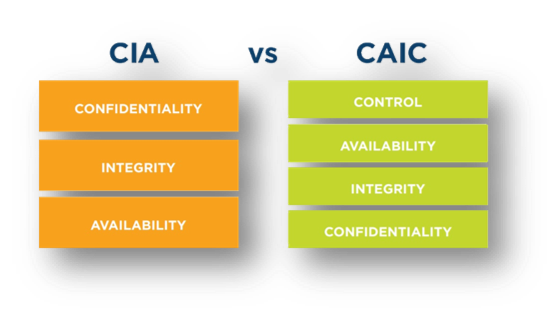
13. CIA triangle?

Confidentiality: Keeping the information secret.

Integrity: Keeping the information unaltered.

Availability: Information is available to the authorised parties at all times.


14. HIDS vs NIDS and which one is better and why?

HIDS is a host intrusion detection system and NIDS is a network intrusion detection system. Both the systems work on similar lines. It’s just that the placement is different. HIDS is placed on each host whereas NIDS is placed in the network. For an enterprise, NIDS is preferred as HIDS is difficult to manage, plus it consumes the processing power of the host as well.


20. Various response codes from a web application?

1xx – Informational responses

2xx – Success

3xx – Redirection

4xx – Client-side error

5xx – Server side error


30. What is a false positive and false negative in case of IDS?

When the device generated an alert for an intrusion that has actually not happened: this is a false positive and if the device has not generated any alert and the intrusion has actually happened, this is the case of a false negative.


https://www.siemxpert.com/blog/soc-analyst-interview-question/


  • Question 4: What is the three-way handshake?

Three-way handshake mechanism: In this mechanism, the client sends an SYN TCP packet to the server asking for a connection (synchronizing) request and a sequence number. The server responds with the SYN/ACK packet, acknowledging the connection request and assigning a sequence number. The client again sends an ACK packet to accept the response of the server.


Question 6: What is data leakage? Explain in your own words.

Answer: Data leakage refers to the exposure or transmission of an organization’s sensitive data to the external recipient. The data may be transmitted or exposed via the internet or by physical means.


Question 7: List the steps to develop the Data Loss Prevention (DLP) strategy?

Answer: The steps to develop and implement a DLP strategy are as follows:

Step1: prioritizing the critical data assets

Step2: categorizing the data based on its source

Step3: analyzing which data is more prone to the risks

Step4: monitor the transmission of the data

Step5: developing control measures to mitigate the data leakage risk


Question 8: What is the difference between TCP and UDP?


TCP(Transfer Layer Protocol)

TCP is reliable as it guarantees the delivery of data packets to the destination.

TCP is heavyweight.

TCP is slower as compared to UDP

Example: HTTP, SSH, HTTPS, SMTP


UDP(User Datagram Protocol)

UDP is not reliable as it does not guarantees the delivery of data packets to the destination

UDP is lightweight.

UDP IS faster than TCP

Example: TFTP, VoIP, online multiplayer gamess


Question 9: What is the difference between firewall deny and drop?

Answer: DENY RULE: If the firewall is set to deny rule, it will block the connection and send a reset packet back to the requester. The requester will know that the firewall is deployed.

DROP RULE: If the firewall is set to drop rule, it will block the connection request without notifying the requester.

It is best to set the firewall to deny the outgoing traffic and drop the incoming traffic so that attacker will not know whether the firewall is deployed or not.


Question 11: What is the Runbook in SOC?

A runbook, also known as a standard operating procedure (SOP), consists of a set of guidelines to handle security incidents and alerts in the Security Operation Centre. The L1 security analyst generally uses it for better assessment and documentation of the security events.


Question 12: What is the difference between the Red Team and the Blue Team?

Red Team: The red team plays an offensive role. The team conducts rigorous exercises to penetrate the security infrastructure and identify the exploitable vulnerabilities in it. The red team is generally hired by the organization to test the defenses.

Blue Team: The blue team plays a defensive role. The blue team’s role is to defend the organization’s security infrastructure by detecting the intrusion. The members of a blue team are internal security professionals of the organization.


Question 13: Define a Phishing attack and how to prevent it?

Answer: Phishing is a type of social engineering attack in which an attacker obtains sensitive information from the target by creating urgency, using threats, impersonation, and incentives. Spear phishing, e-mail spam, session hijacking, smishing, and vishing are types of phishing attacks.


Question 14: What is the Cross-Site Scripting (XSS) attack, and how to prevent it?

Answer: Cross-site Scripting: In the cross-site scripting attack, the attacker executes the malicious scripts on a web page and can steal the user’s sensitive information. With XSS vulnerability, the attacker can inject Trojan, read out user information, and perform specific actions such as the website’s defacement.


Countermeasures:

    Encoding the output

    Applying filters at the point where input is received

    Using appropriate response headers

    Enabling content security policy

    Escaping untrusted characters


Question 15: Explain the SQL injection vulnerability and give countermeasures to prevent it?

Answer: SQL Injection: SQL injection is a famous vulnerability in the web application that allows hackers to interfere in communication taking place between a web application and its database. Hackers inject malicious input into the SQL statement to compromise the SQL database. They can retrieve, alter, or modify the data. In some cases, it allows attackers to perform DDOS attacks.


Countermeasures:

    Using parameterized queries

    Validating the inputs

    Creating stored procedures

    Deploying a web application firewall

    Escaping untrusted characters


Question 16: Difference between hashing and Encryption?


Hashing

Conversion of data into a fixed-length of unreadable strings using algorithms

Hashed data can not be reverted back into readable strings

The length of the hashed string is fixed

No keys are used in hashing


Encryption

Conversion of data into an unreadable string using cryptographic keys

strings Encrypted data can be decrypted back into readable strings

The length of the encrypted string is not fixed

Keys are used in Encryption


Question 18: What is the difference between SIEM and IDS?

Both collect the log data, but unlike SIEM, IDS does not facilitate event correlation and centralization of log data.


Question 20: What is DNS? Why is DNS monitoring essential?

DNS monitoring can disclose information such as websites visited by the employee, malicious domain accessed by an end-user, malware connecting to Command & Control server. It can help in identifying and thwarting cyberattacks.


https://www.infosectrain.com/blog/20-most-common-soc-analyst-interview-questions-and-answers/ 


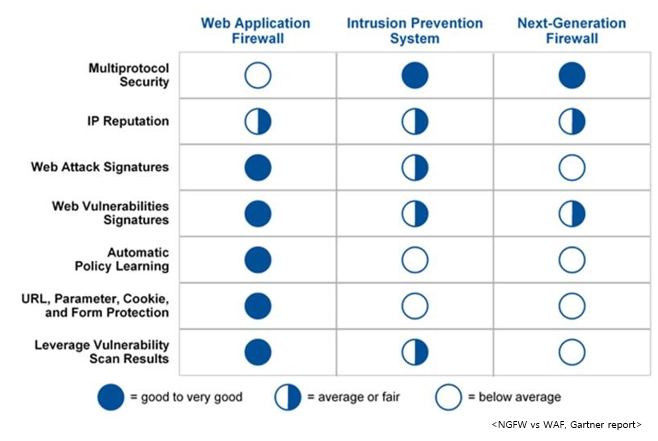
  • How does a Web Application Firewall work?
A WAF examines and filters traffic to web applications. It keeps track of communication between the client and server, and server and server
A WAF protects against some of the most common cyber attacks, including SQL injections, cross-site scripting and (D)DoS attacks
When you first define communication and access, you let the WAF monitor traffic for a period of time so that it can learn what legitimate traffic looks like. It then creates a default mode and the WAF can then keep track of unusual traffic patterns

What are the differences between Web Application Firewalls and traditional firewalls?
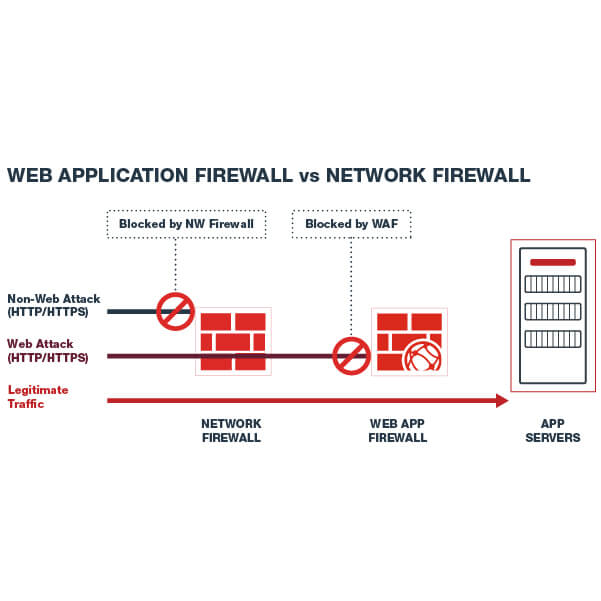
Application firewalls are on a higher level in the OSI model compared to traditional firewalls.
If a new type of hacker attack is discovered you can update the WAF software with the attack signature, which enables it to learn the patterns of that traffic and block it. 

What are the benefits of using a WAF?
Many agree that it is better to protect the application itself than the server itself. This allows for a deeper level of detail compared to traditional firewalls, thus giving a more ‘fine tune’ protection. A Web Application Firewall prevents data loss, data corruption and spoofing.

https://complior.se/questions-and-answers-about-waf/
There are several types of firewalls but the most common one is the hardware network firewall. 
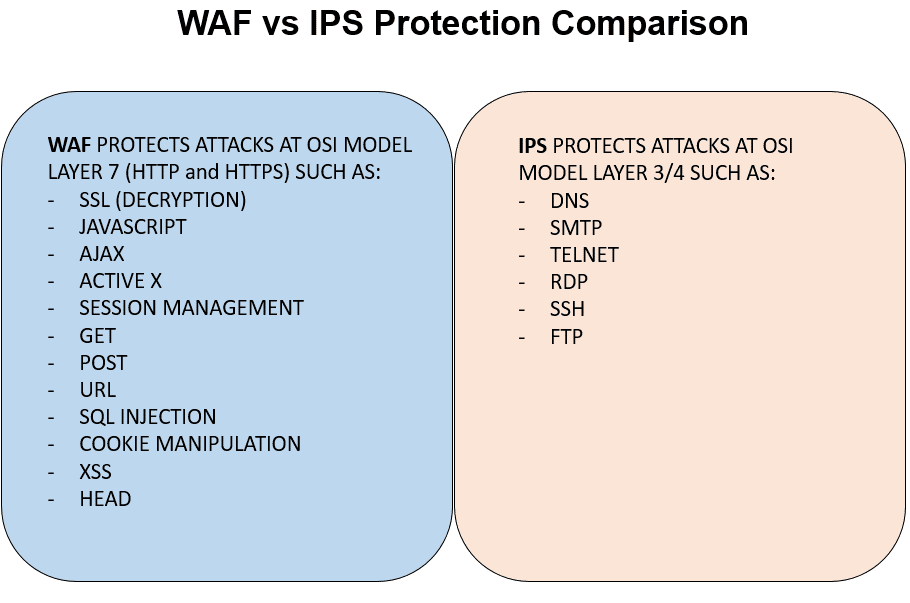
Basic firewalls work at Layer 3 and Layer 4 of the OSI model

a network firewall is stateful. This means that the firewall keeps track of the states of connections that pass through it.
For example, if an internal host successfully accesses an Internet website through the firewall, the latter will keep the connection inside its connection table so that reply packets from the external web server will be allowed to pass to the internal host because they already belong to an established connection.

Next-Generation Firewalls work all the way up to Layer 7 of the OSI models which means they are able to inspect and control traffic at the application level.

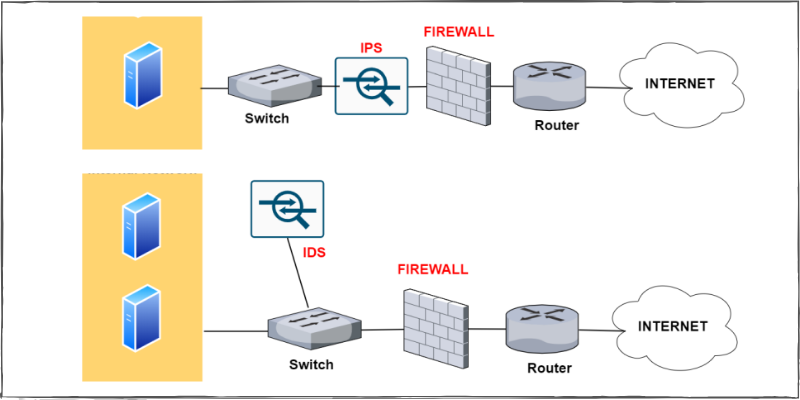
That's why the IPS is connected in line to the packet flow. As shown from the network topology above (Firewall with IPS), the IPS device is usually connected behind the firewall but in-line the communication path which transmits packets to/from the internal network.

Usually, an IPS is signature-based which means that it has a database of known malicious traffic, attacks, and exploits and if it sees packets matching a signature then it blocks the traffic flow.
an IPS can work with statistical anomaly detection, rules set by the administrator, etc.

An IDS (Intrusion Detection System) is the predecessor of IPS and is passive in nature. As shown from the network above (Firewall with IDS), this device is not inserted in-line with the traffic but rather it is in parallel (placed out-of-band).

Traffic passing through the switch is also sent at the same time to the IDS for inspection. If a security anomaly is detected in the network traffic, the IDS will just raise an alarm (to the administrator) but it will not be able to block the traffic
Similar to IPS, the IDS device also uses mostly signatures of known security attacks and exploits in order to detect an intrusion attempt.
In order to send traffic to the IDS, the switch device must have a SPAN port configured in order to copy traffic and send it towards the IDS node.

For example, an IDS can send a command to the firewall in order to block specific packets if the IDS detects an attack.

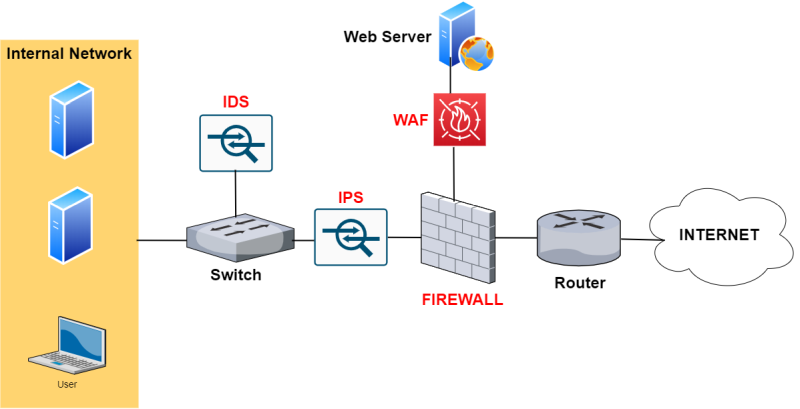
Since most websites nowadays use SSL (HTTPS), the WAF is able also to provide SSL acceleration and also SSL inspection by terminating the SSL session and inspect the traffic inside the connection on the WAF itself.
As shown from the network above (Firewall with WAF), it is placed in front of a Website (usually) in a DMZ zone of a firewall.

https://forum.huawei.com/enterprise/en/comparison-and-differences-between-ips-vs-ids-vs-firewall-vs-waf/thread/763619-867

. Which of these protocols is a connection-oriented protocol? The Correct Answer is:- D

  • A) FTP
  • B) UDP
  • C) POP3
  • D) TCP 

What port range is an obscure third-party application most likely to use? The Correct Answer is:- D

  • A) 1 to 1024
  • B) 1025 to 32767
  • C) 32768 to 49151
  • D) 49152 to 65535 

 Which category of firewall filters is based on packet header data only? The Correct Answer is:- C

  • A) Stateful
  • B) Application
  • C) Packet
  • D) Proxy 

At which layer of the OSI model does a proxy operate? The Correct Answer is:- D

  • A) Physical
  • B) Network
  • C) Data Link
  • D) Application 

Which technology allows the use of a single public address to support many internal clients while also preventing exposure of internal IP addresses to the outside world? The Correct Answer is:- D

  • A) VPN
  • B) Tunneling
  • C) NTP
  • D) NAT 

 What item is also referred to as a logical address to a computer system? The Correct Answer is:- A

  • A) IP address
  • B) IPX address
  • C) MAC address
  • D) SMAC address 

Which of the following is commonly used to create thumbprints for digital certificates? The Correct Answer is:- A

  • A) MD5
  • B) MD7
  • C) SHA12
  • D) SHA8 

Which of the following creates a fixed-length output from a variable-length input? The Correct Answer is:- A

  • A) MD5
  • B) MD7
  • C) SHA12
  • D) SHA8 

What encryption process uses one piece of information as a carrier for another? The Correct Answer is:- A

  • A) Steganography
  • B) Hashing
  • C) MDA
  • D) Cryptointelligence 

Which of the following is a major security problem with FTP? The Correct Answer is:- C

  • A) Password files are stored in an unsecure area on disk.
  • B) Memory traces can corrupt file access.
  • C) User IDs and passwords are unencrypted.
  • D) FTP sites are unregistered. 

What type of program exists primarily to propagate and spread itself to other systems and can do so without interaction from users? The Correct Answer is:- D

  • A) Virus
  • B) Trojan horse
  • C) Logic bomb
  • D) Worm  

Which mechanism is used by PKI to allow immediate verification of a certificate’s validity? D) OCSP

  • A) CRL
  • B) MD5
  • C) SSHA
  • D) OCSP  

Which statement(s) defines malware most accurately? The Correct Answer is:- B,C

  • A) Malware is a form of virus.
  • B) Trojans are malware.
  • C) Malware covers all malicious software.
  • D) Malware only covers spyware. 

 Which is/are a characteristic of a virus? Which is/are a characteristic of a virus?

  • A) A virus is malware.
  • B) A virus replicates on its own.
  • C) A virus replicates with user interaction.
  • D) A virus is an item that runs silently.

A polymorphic virus __________. The Correct Answer is:- C

  • A) Evades detection through backdoors
  • B) Evades detection through heuristics
  • C) Evades detection through rewriting itself
  • D) Evades detection through luck 

A sparse infector virus __________. The Correct Answer is:- C

  • A) Creates backdoors
  • B) Infects data and executables
  • C) Infects files selectively
  • D) Rewrites itself 
how to protect data layer at Layer 2 OSI?
encryption
what security controls can you implement at layer 7 OSI?
wef,proxies,content delivery network-cdn
what protocols are used at transport layer OSI?
tcp udp 
SNMP is a layer 7 (Application )protocol
ICMP is a layer 3 protocol (Network)


malware analysis

  •  What is Malware Analysis?


Malware analysis is the process of understanding the behavior and purpose of a suspicious file or URL. The output of the analysis aids in the detection and mitigation of the potential threat


    Pragmatically triage incidents by level of severity

    Uncover hidden indicators of compromise (IOCs) that should be blocked

    Improve the efficacy of IOC alerts and notifications

    Enrich context when threat hunting


Types of Malware Analysis


Static Analysis


Basic static analysis does not require that the code is actually run. Instead, static analysis examines the file for signs of malicious intent. It can be useful to identify malicious infrastructure, libraries or packed files.


Technical indicators are identified such as file names, hashes, strings such as IP addresses, domains, and file header data can be used to determine whether that file is malicious.


tools like disassemblers and network analyzers can be used to observe the malware without actually running it in order to collect information on how the malware works.


since static analysis does not actually run the code, sophisticated malware can include malicious runtime behavior that can go undetected.

For example, if a file generates a string that then downloads a malicious file based upon the dynamic string, it could go undetected by a basic static analysis. 


Dynamic Analysis

Dynamic malware analysis executes  suspected malicious code in a safe environment called a sandbox

This closed system enables security professionals to watch the malware in action without the risk of letting it infect their system or escape into the enterprise network.

Dynamic analysis provides threat hunters and incident responders with deeper visibility, allowing them to uncover the true nature of a threat. 

As a secondary benefit, automated sandboxing eliminates the time it would take to reverse engineer a file to discover the malicious code.


The challenge with dynamic analysis is that adversaries are smart, and they know sandboxes are out there, so they have become very good at detecting them. To deceive a sandbox, adversaries hide code inside them that may remain dormant until certain conditions are met. Only then does the code run.


Hybrid Analysis (includes both of the techniques above)


For example, one of the things hybrid analysis does is apply static analysis to data generated by behavioral analysis – like when a piece of malicious code runs and generates some changes in memory. Dynamic analysis would detect that, and analysts would be alerted to circle back and perform basic static analysis on that memory dump. As a result, more IOCs would be generated and zero-day exploits would be exposed.


Malware Analysis Use Cases


Malware Detection

By providing deep behavioral analysis and by identifying shared code, malicious functionality or infrastructure, threats can be more effectively detected.

In addition, an output of malware analysis is the extraction of IOCs. The IOCs may then be fed into SEIMs, threat intelligence platforms (TIPs) and security orchestration tools to aid in alerting teams to related threats in the future.


Threat Alerts and Triage

Malware analysis solutions provide higher-fidelity alerts earlier in the attack life cycle. Therefore, teams can save time by prioritizing the results of these alerts over other technologies.


Incident Response

The goal of the incident response (IR) team is to provide root cause analysis, determine impact and succeed in remediation and recovery. The malware analysis process aids in the efficiency and effectiveness of this effort.


Threat Hunting

Malware analysis can expose behavior and artifacts that threat hunters can use to find similar activity, such as access to a particular network connection, port or domain. By searching firewall and proxy logs or SIEM data, teams can use this data to find similar  threats.


Stages of Malware Analysis


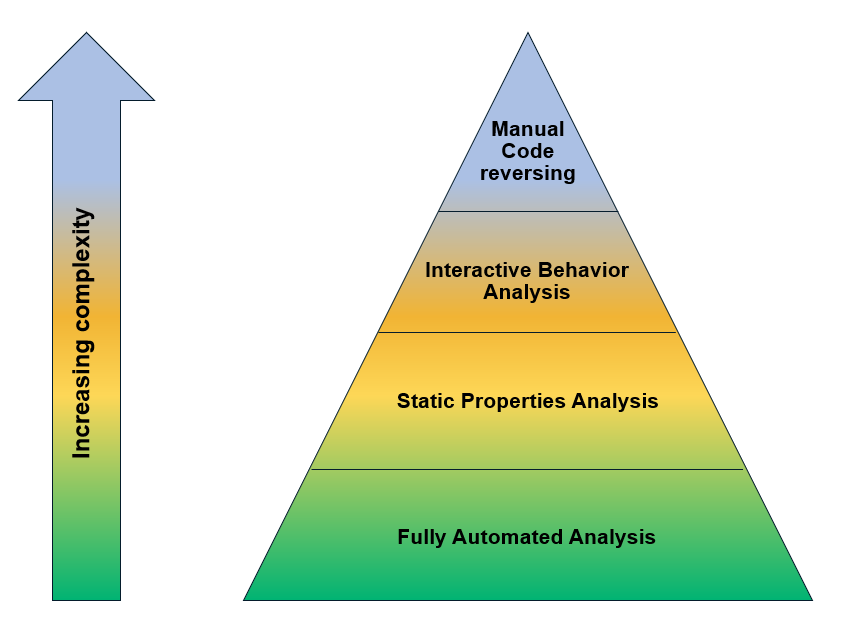
Static Properties Analysis

Static properties include strings embedded in the malware code, header details, hashes, metadata, embedded resources, etc. This type of data may be all that is needed to create IOCs, and they can be acquired very quickly because there is no need to run the program in order to see them.


Interactive Behavior Analysis

Behavioral analysis is used to observe and interact with a malware sample running in a lab. Analysts seek to understand the sample’s registry, file system, process and network activities. They may also conduct memory forensics to learn how the malware uses memory. If the analysts suspect that the malware has a certain capability, they can set up a simulation to test their theory.


Fully Automated Analysis


Manual Code Reversing

analysts reverse-engineer code using debuggers, disassemblers, compilers and specialized tools to decode encrypted data, determine the logic behind the malware algorithm  and understand any hidden capabilities that the malware has not yet exhibited. 


https://www.crowdstrike.com/cybersecurity-101/malware/malware-analysis/

  • Understand Where You Currently Fit Into the Malware Analysis Process


    Fully-Automated Analysis: Run (“detonate”) the suspicious file in an automated analysis environment (“sandbox”) to get a report on its activities, such as its interaction with the file system and network.

    Static Properties Analysis: Examine metadata and other details embedded in the file (e.g., strings) without running it, so you can spot the areas you might want to examine more deeply in subsequent steps.

    Interactive Behavior Analysis: Run the file in an isolated laboratory environment, which you fully control, tweaking the lab’s configuration in a series of iterative experiments to study the specimen’s behavior.

    Manual Code Reversing: Examine the code that comprises the file, often with the help of a disassembler and a debugger, to understand its key capabilities and fill in the gaps left from the earlier analysis steps.


Memory, file system, and network forensics efforts (when applicable) also contribute to the understanding.


https://www.sans.org/blog/how-you-can-start-learning-malware-analysis/


  • Intro to Malware Analysis: What It Is & How It Works


There are a few key reasons to perform malware analysis:


    Malware detection — To better protect your organization, you need to be able to identify compromising threats and vulnerabilities.

    Threat response — To help you understand how these threats work so you can react accordingly to them.

    Malware research — This can help you to better understand how specific types of malware work, where they originated, and what differentiates them.


What Is Malware?

Malware is any piece of software that’s harmful to your system — worms, viruses, trojans, spyware, etc

Malware analysis can help you to determine if a suspicious file is indeed malicious, study its origin, process, capabilities, and assess its impact to facilitate detection and prevention.


The Two Types of Malware Analysis Techniques: Static vs. Dynamic


There are two ways to approach the malware analysis process — using static analysis or dynamic analysis. With static analysis, the malware sample is examined without detonating it, whereas, with dynamic analysis, the malware is actually executed in a controlled, isolated environment.


Static Malware Analysis

The malware components and properties are analyzed without running the code

Static malware analysis is signature-based — i.e., the signature of the malware binary is determined by calculating the cryptographic hash.

The malware binary can be reverse-engineered by using a disassembler.

Static malware analysis involves virus scanning, fingerprinting, memory dumping, etc.


Dynamic Malware Analysis

The malware is executed within a virtual environment, and its behavior is observed.

Dynamic malware analysis takes a behavior-based approach to malware detection and analysis.

The malware binary can be reverse-engineered using disassemblers and debuggers to understand and control certain aspects of the program when executing.

Dynamic malware analysis involves registry changes, API calls, memory writes, etc.

It is more effective and provides a higher detection rate than static analysis


The Four Stages of Malware Analysis


Stage One: Fully Automated Analysis

Automated malware analysis refers to relying on detection models formed by analyzing previously discovered malware samples

Fully automated analysis can be done using tools like Cuckoo Sandbox, an open-source automated malware analysis platform that can be tweaked to run custom scripts and generate comprehensive reports.


Stage Two: Static Properties Analysis

Static properties analysis involves looking at a file’s metadata without executing the malware

One of the free tools that you may find useful for this purpose is PeStudio. This tool flags suspicious artifacts within executable files and is designed for automated static properties analysis. PeStudio presents the file hashes that can be used to search VirusTotal, TotalHash, or other malware repositories to see if the file has previously been analyzed.


Stage Three: Interactive Behavior Analysis

the malware sample is executed in isolation as the analyst observes how it interacts with the system and the changes it makes.

Often, a piece of malware might refuse to execute if it detects a virtual environment or might be designed to avoid execution without manual interaction (i.e., in an automated environment)


There are several types of actions that should immediately raise a red flag, including:


    Adding or modifying new or existing files,

    Installing new services or processes, and

    Modifying the registry or changing system settings.


Some types of malware might try to connect to suspicious host IPs that don’t belong to the environments. Others might also try to create mutex objects to avoid infecting the same host multiple times (to preserve operational stability). These findings are relevant indicators of compromise.


Some of the tools that you can use include:


    Wireshark for observing network packets,

    Process Hacker to observe the processes that are executing in memory,

    Process Monitor to observe real-time file system, registry, process activity for Windows, and

    ProcDot to provide an interactive and graphical representative of all recorded activities.


Stage Four: Manual Code Reversing


This process can:


    Shed some light on the logic and algorithms the malware uses,

    Expose hidden capabilities and exploitation techniques the malware uses, and

    Provide insights about the communication protocol between the client and the server on the command and control side.


Typically, to manually reverse the code, analysts make use of debuggers and disassemblers. 


How to Prevent Malware Infection


Keep your systems and applications up to date.

Stay wary of social engineering attacks that can compromise your data

Perform regular scans on your systems using antivirus, anti-malware solutions

Employ security best practices like using a secure connection, blocking ads, etc. 

Create backups for all your business-critical data

https://sectigostore.com/blog/malware-analysis-what-it-is-how-it-works/


  • Free Automated Malware Analysis Sandboxes and Services

Automated malware analysis tools, such as analysis sandboxes, save time and help with triage during incident response and forensic investigations

https://zeltser.com/automated-malware-analysis/


  • Free Blocklists of Suspected Malicious IPs and URLs

Several organizations maintain and publish free blocklists of IP addresses and URLs of systems and networks suspected in malicious activities on-line

https://zeltser.com/malicious-ip-blocklists/


  • Free Online Tools for Looking up Potentially Malicious Websites

Several organizations offer free online tools for looking up a potentially malicious website. Some of these tools provide historical information; others examine the URL in real time to identify threats

https://zeltser.com/lookup-malicious-websites/


What about malware variations that have not yet been seen? Signature-based detection methods will not work. To detect these types of threats, vendors created Sandboxing products, which take a suspect file and place it in an environment where its behaviors can be closely analyzed. If the file does something malicious while in the sandbox, it is flagged as malware. This is known as Heuristic detection, and it looks for anomaly behavior that is out of the ordinary. In fact, vendors create proprietary heuristic algorithms that can detect never before seen polymorphic samples of malware


https://training.fortinet.com/pluginfile.php/1624915/mod_scorm/content/1/story_content/external_files/NSE%202%20TIS%20Script_EN.pdf
Tuesday, July 20, 2021

API security

 Performance isn’t the only reason to limit API requests, either. API limiting, which is also known as rate limiting, is an essential component of Internet security, as DoS attacks can tank a server with unlimited API requests.

Rate limiting also helps make your API scalable. If your API blows up in popularity, there can be unexpected spikes in traffic, causing severe lag time.


What Is API Rate Limiting?


Rate limiting is a critical component of an API product’s scalability.


API owners typically measure processing limits in Transactions Per Second (TPS). Some systems may have physical limitations on data transference. Both are part of the Backend Rate Limiting.


To prevent an API from being overwhelmed, API owners often enforce a limit on the number of requests, or the quantity of data clients can consume. This is called Application Rate Limiting.


If a user sends too many requests, API rate limiting can throttle client connections instead of disconnecting them immediately. Throttling lets clients still use your services while still protecting your API.


However, keep that in mind there is always the risk of API requests timing out, and the open connections also raise the risk of DoS attacks.


Best Practices For API Rate Limiting


One approach to API rate limiting is to offer a free tier and a premium tier, with different limits for each. There are many things to consider when deciding what to charge for premium API access


API providers will still need to consider the following when setting up their API rate limits.


    Are requests throttled when they exceed the limit?

    Do new calls and requests incur additional fees?

    Do new calls and requests receive a particular error code and, if so, which one

What You Need To Know About Rate Limiting

Many services that use REST APIs feature API limiting as a defense against DoS attacks and overloaded servers. 

Some APIs feature soft limits, which allow users to exceed the limits for a short period. Others have a more hardline approach, immediately returning an HTTP 429 error and timing out, forcing the user to send a brand new query.

Setting a timeout is the easiest way to limit API requests.

Three Methods Of Implementing API Rate-Limiting


1. Request Queues

Android Volley

Amazon Simple Queue Service (ASQS)

Setting Rules For Request Queues


2. Throttling

Throttling is another common way to practically implement rate-limiting. It lets API developers control how their API is used by setting up a temporary state, allowing the API to assess each request. When the throttle is triggered, a user may either be disconnected or simply have their bandwidth reduced


3. Rate-limiting Algorithms

Leaky Bucket

Fixed Window

Sliding Log

Sliding Window

https://nordicapis.com/everything-you-need-to-know-about-api-rate-limiting/


  • How Rate Limiting thwarts Layer 7 DDoS attacks


The changing nature of the DDoS attack

brute force attacks against Layer 3 and 4, the network and transport layers of the internet, were devastating

But Layer 3 and 4 attacks are not as effective as they used to be because content delivery networks (CDNs) have massive capacity capable of absorbing sudden spikes in network traffic.


As defenses evolve, so do the threats from sophisticated attackers. They are now employing more targeted attacks against the application layer, or Layer 7. A Layer 7 attack may look like a legitimate HTTP request, and it doesn’t take thousands of infected machines to launch; it only requires a small number of resources, an automated script and knowledge of a web application’s bottlenecks. Though this type of attack takes a bit more expertise than a brute force Layer 3 or 4 attack, when executed well, its effectiveness and high ROI means that it is likely to become more common.


Application layer DDoS attacks take advantage of this vulnerability. To find the right spot to target, an attacker will look for parts of your web application that often require queries to your application or database backend


On an e-commerce site, this might be a page that makes API calls to load a list of products, pricing, and product availability

On a password-protected site, that might be a login request that checks credentials from the request body against known usernames and passwords.


But instead of making the request once or twice – a normal browsing behavior – a botnet involved in an application layer attack can make the request hundreds of thousands of times per second to overwhelm your backend services.


Without a mechanism to track the rate of HTTP requests from a client, each of these can appear to be a legitimate request, and a traditional DDoS mitigation system or firewall that inspects an individual HTTP request won’t detect and mitigate it


How rate limiting works

It’s vital to control the rate of backend requests or login attempts at the edge to limit the damage from application DDoS attacks. The first step is to determine which parts of your website or application are most vulnerable to a DDoS attack. Once you have found those pages or API endpoints that involve backend queries, you can then determine the maximum allowed request rate for them.


For example, if you know that a typical user physically cannot submit login credential to your login endpoint more than five times per second, then you know that any user request more frequent than this is likely malicious.

for example, set the rate limit on your login endpoint at five per second and lock out any client, that is to say, IP or IP and user-agent pair that violates that rule. 


However, you might place a higher limit on how often a user can refresh your homepage or product details page since these pages make fewer backend queries or can be served from CDN cache. 


You can also set different penalties for clients who violate rate limiting rules on different parts of the application. In one place, a violation might result in their subsequent requests getting blocked for five minutes; in another, you might redirect them to a CAPTCHA page.


https://www.verizondigitalmedia.com/blog/how-rate-limiting-thwarts-layer-7-ddos-attacks/

  • Status Code


The Status-Code element is a 3-digit integer where first digit of the Status-Code defines the class of response and the last two digits do not have any categorization role. There are 5 values for the first digit:

S.N. Code and Description

1 1xx: Informational

This means request received and continuing process.

2 2xx: Success

This means the action was successfully received, understood, and accepted.

3 3xx: Redirection

This means further action must be taken in order to complete the request.

4 4xx: Client Error

This means the request contains bad syntax or cannot be fulfilled

5 5xx: Server Error

The server failed to fulfill an apparently valid request


https://www.tutorialspoint.com/http/http_quick_guide.htm


  • 3 Common Methods of API Authentication Explained 

three major methods of adding security to an API — HTTP Basic Auth, API Keys, and OAuth.


HTTP Basic Authentication


In this approach, an HTTP user agent simply provides a username and password to prove their authentication. This approach does not require cookies, session IDs, login pages, and other such specialty solutions, and because it uses the HTTP header itself, there’s no need to handshakes or other complex response systems.


The problem is that, unless the process is strictly enforced throughout the entire data cycle to SSL for security, the authentication is transmitted in open on insecure lines.


even if SSL is enforced, this results in a slowing of the response time. And even ignoring that, in its base form, HTTP is not encrypted in any way. It is encapsulated in base64, and is often erroneously proclaimed as encrypted due to this.


In an internal network, especially in IoT situations where speed is of no essence, having an HTTP Basic Authentication system is acceptable as a balance between cost of implementation and actual function.


API Keys


 In this approach, a unique generated value is assigned to each first time user, signifying that the user is known. When the user attempts to re-enter the system, their unique key (sometimes generated from their hardware combination and IP data, and other times randomly generated by the server which knows them) is used to prove that they’re the same user as before.


The problem, however, is that API keys are often used for what they’re not – an API key is not a method of authorization, it’s a method of authentication.


OAuth


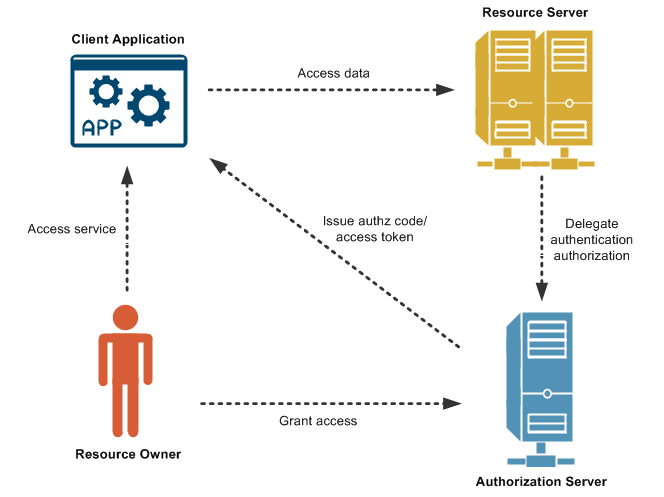
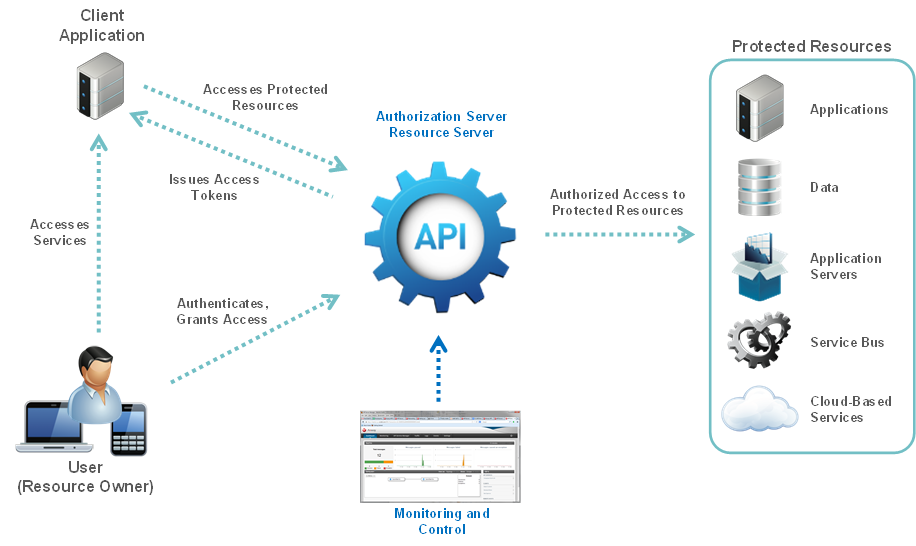
OAuth is not technically an authentication method, but a method of both authentication and authorization

In this approach, the user logs into a system. That system will then request authentication, usually in the form of a token. The user will then forward this request to an authentication server, which will either reject or allow this authentication. From here, the token is provided to the user, and then to the requester. Such a token can then be checked at any time independently of the user by the requester for validation, and can be used over time with strictly limited scope and age of validity.


https://nordicapis.com/3-common-methods-api-authentication-explained/

  • OAuth (Open Authorization[1][2]) is an open standard for access delegation, commonly used as a way for Internet users to grant websites or applications access to their information on other websites but without giving them the passwords

https://en.wikipedia.org/wiki/OAuth


  • REST API - Response Codes and Statuses

the common HTTP response codes associated with REST APIs

https://documentation.commvault.com/commvault/v11/article?p=45599.htm

mobile device management (MDM)

  •  Microsoft Intune is an MDM and MAM provider for your devices

Microsoft Intune is a cloud-based service that focuses on mobile device management (MDM) and mobile application management (MAM). 

You control how your organization’s devices are used, including mobile phones, tablets, and laptops. You can also configure specific policies to control applications. For example, you can prevent emails from being sent to people outside your organization. Intune also allows people in your organization to use their personal devices for school or work. On personal devices, Intune helps make sure your organization data stays protected, and can isolate organization data from personal data.

Intune integrates with Azure Active Directory (Azure AD) to control who has access, and what they can access. It also integrates with Azure Information Protection for data protection. It can be used with the Microsoft 365 suite of products. For example, you can deploy Microsoft Teams, OneNote, and other Microsoft 365 apps to devices. This feature enables people in your organization to be productive on all of their devices, while keeping your organization’s information protected with policies you create.


In Intune, you manage devices using an approach that's right for you. For organization-owned devices, you may want full control on the devices, including settings, features, and security. In this approach, devices and users of these devices "enroll" in Intune. Once enrolled, they receive your rules and settings through policies configured in Intune. For example, you can set password and PIN requirements, create a VPN connection, set up threat protection


For personal devices, or bring-your-own devices (BYOD), users may not want their organization administrators to have full control. In this approach, give users options. For example, users enroll their devices if they want full access to your organization resources. Or, if these users only want access to email or Microsoft Teams, then use app protection policies that require multi-factor authentication (MFA) to use these apps.


https://docs.microsoft.com/en-us/mem/intune/fundamentals/what-is-intune


Wednesday, June 30, 2021

Low-code development

  •  A low-code development platform (LCDP) provides a development environment used to create application software through a graphical user interface instead of traditional hand-coded computer programming. A low-coded platform may produce entirely operational applications, or require additional coding for specific situations. Low-code development platforms reduce the amount of traditional hand coding, enabling accelerated delivery of business applications

https://en.wikipedia.org/wiki/Low-code_development_platform

Sunday, June 27, 2021

Operational Technology (OT)

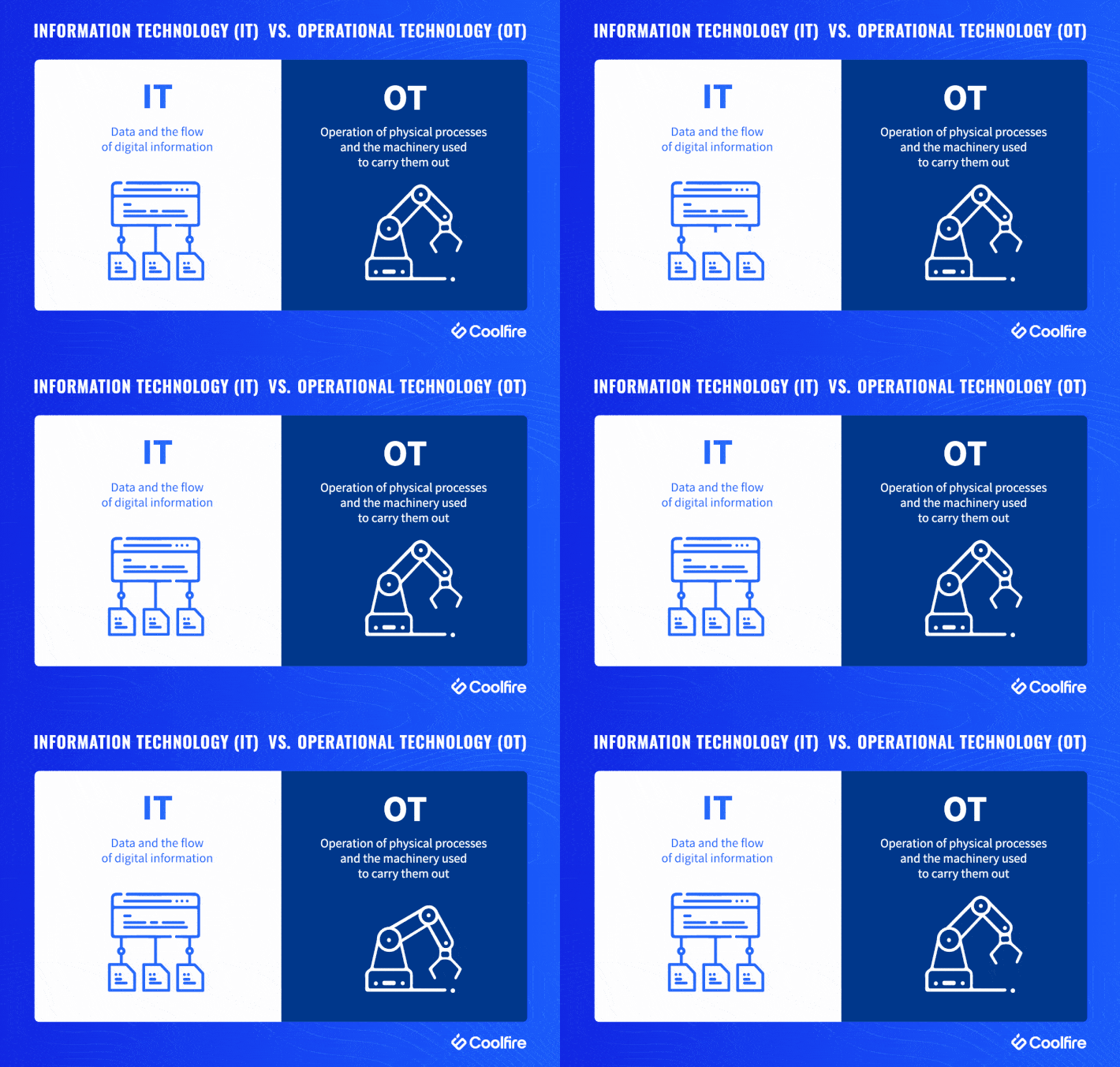
  •  In short, IT deals with information, while OT deals with machines.

The former manages the flow of digital information (read: data), while the latter manages the operation of physical processes and the machinery used to carry them out.

shorthand to represent this distinction is the office (IT) vs. the factory floor (OT).


Understanding OT


Compared with IT, OT is unique in that related hardware and software is usually (historically) designed to do specific things: control heat, monitor mechanical performance, trigger emergency shutoffs, etc. Typically, this is done through industrial control systems (ICS) and supervisory control and data acquisition (SCADA).


If employees have seen fit to change the temperature on a factory floor, raise or lower humidity levels, or shut off machinery for a given reason, OT has provided a quick, clear way of making that happen — a physical switch, a steel lever, or a big red button. Conversely, IT systems have been able to perform key operations without constant human intervention — provided those workflows are within programmed functions.


https://www.coolfiresolutions.com/blog/difference-between-it-ot/


  • The New Age of Operational Technology


Traditionally, OT was an ‘air-gapped’ environment, meaning that it was not connected to external networks or digital technologies.

since the rise of the fourth industrial revolution, also known as "Industry 4.0". Companies taking part in this change have begun implementing new digital solutions in their networks looking to stay ahead of their competition. These solutions aim to increase automation, add “smart” devices, make data more efficient and available, and interconnect networks for convenience.


As part of the interconnection, and in order to make OT components more accessible while being able to collect and analyze data about them, IT and OT networks are also becoming interconnected

This movement is referred to as IT-OT Convergence.

While connecting operational with information technology opens a great door to new opportunities, it also introduces a vast landscape of cybersecurity threats to what was once an air-gapped network.


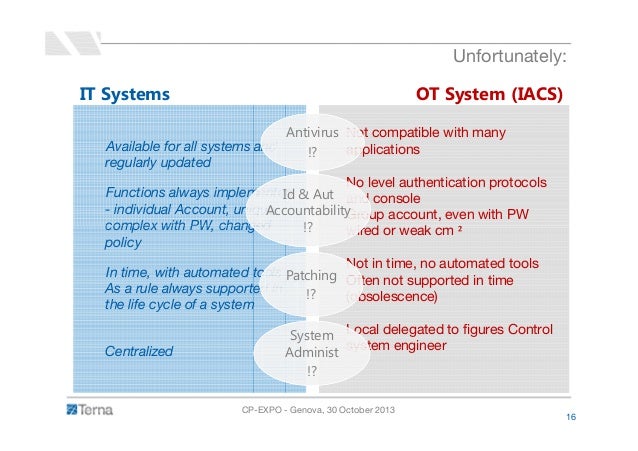
IT vs OT - Four Core Differences


1. Enterprise vs Industry

OT includes completely different components that can be found primarily in industrial environments. These components are often screenless (machinery, PLCs), they communicate over industrial protocols that are never seen on IT networks (e.g., Modbus, Ethernet/IP, Profinet), they lack security tools (firewalls, antivirus), and they are even programmed differently than “normal” computers.


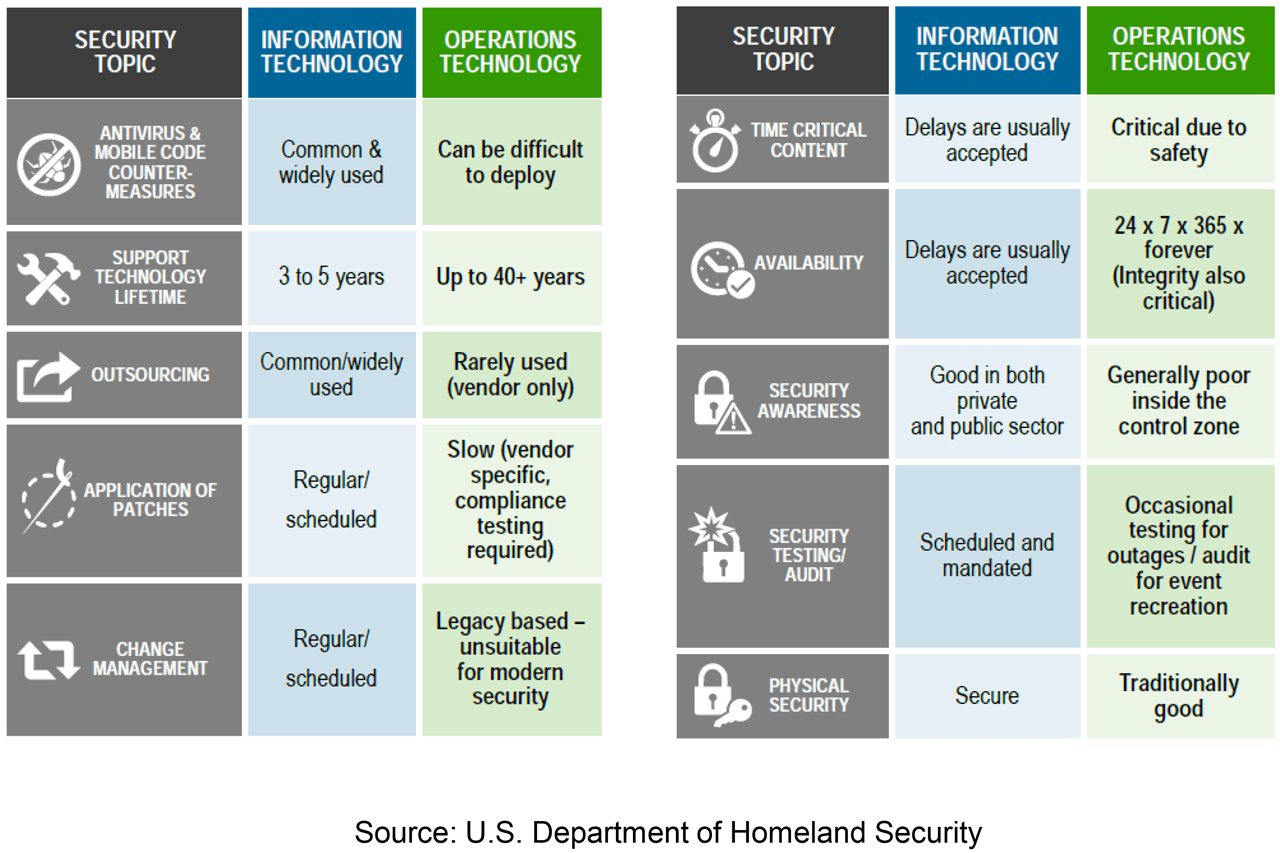
2. IT Prioritizes Confidentiality, OT Focuses on Safety

In OT, the safety and availability of equipment and processes dominate.For example, a ransomware attack that blocks access to operations can lead to a few days of inactivity where each day may be worth millions of dollars.


3. IT Incidents are More Frequent, OT Incidents are More Destructive

IT has more touchpoints with the internet. These gateways pose higher security risks because each one can potentially be a hack waiting to happen.


OT has a lower number of gateways, making it comparatively safer. However, the potential magnitude of compromised physical equipment tends to be greater than that of a data breach. Even slight OT cyber-incidents can lead to huge financial losses and have damaging ramifications that can affect the general population, such as water contamination and power outages


4. Security Patching - Every Week vs Every Ten Years

IT components advance so fast and have relatively short life spans, that a network can look completely different only several years apart. In fact, IT security updates are so frequent that many IT vendors have a designated "update day of the week" or "Patch Tuesday".


patching OT components requires complete shutdowns that halts production, vendors running OT networks rarely patch their components, if at all.Since OT components are rarely updated, they may have many more public vulnerabilities when compared to IT computers. This means that the probability of a successful exploit on an OT system is exponentially higher than on an IT system.


https://www.otorio.com/blog/it-security-vs-ot-security-the-operational-technology-cybersecurity-guide-for-industry-professionals/


Tuesday, June 22, 2021

cyber security standards

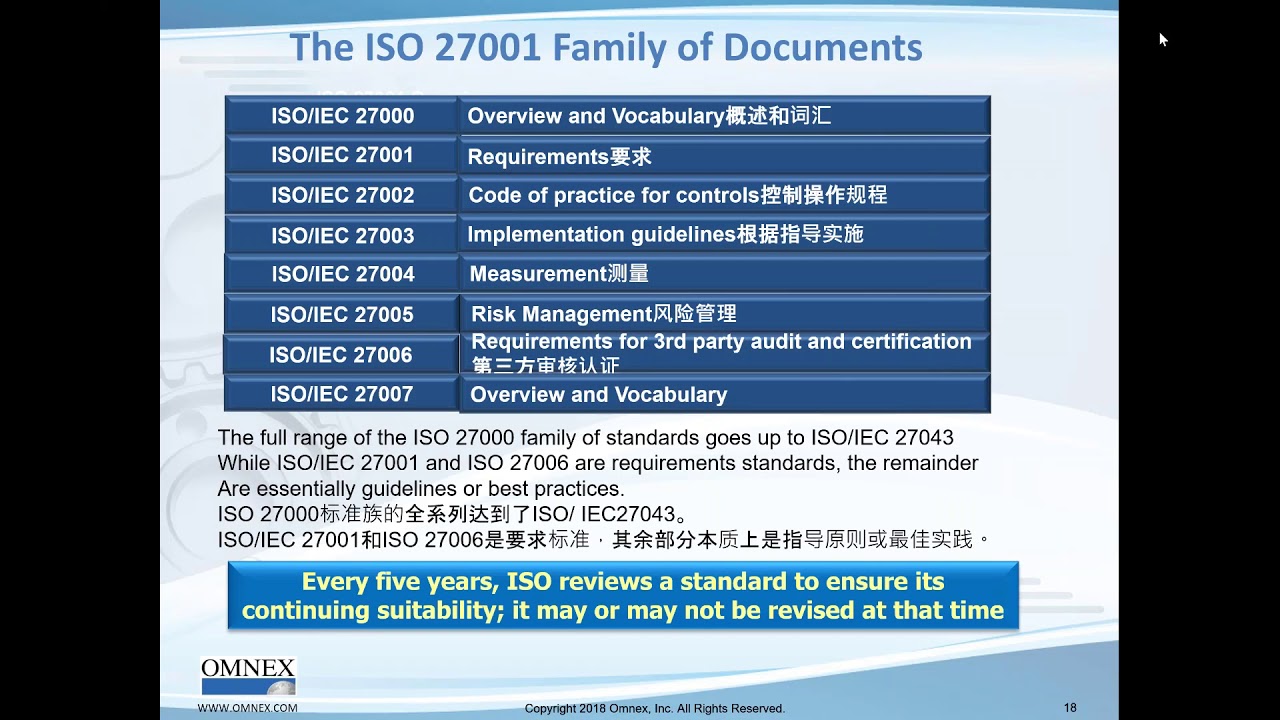
  •  ISO/IEC 27001 is an international standard on how to manage information security.

https://en.wikipedia.org/wiki/ISO/IEC_27001


ISO/IEC 27001

Information security management

ISO/IEC 27001 is widely known, providing requirements for an information security management system (ISMS), though there are more than a dozen standards in the ISO/IEC 27000 family.

https://www.iso.org/isoiec-27001-information-security.html


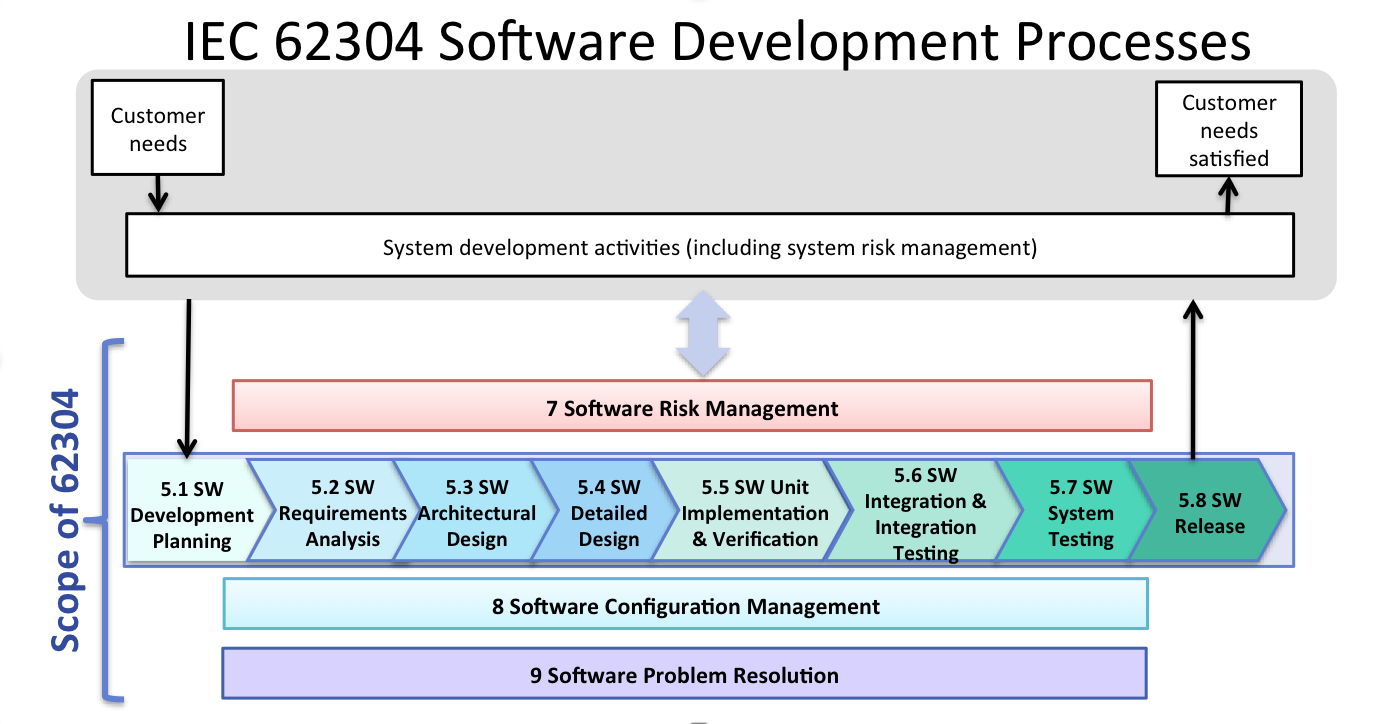
  • IEC 62304

The international standard IEC 62304 – medical device software – software life cycle processes[1] is a standard which specifies life cycle requirements for the development of medical software and software within medical devices.

https://en.wikipedia.org/wiki/IEC_62304


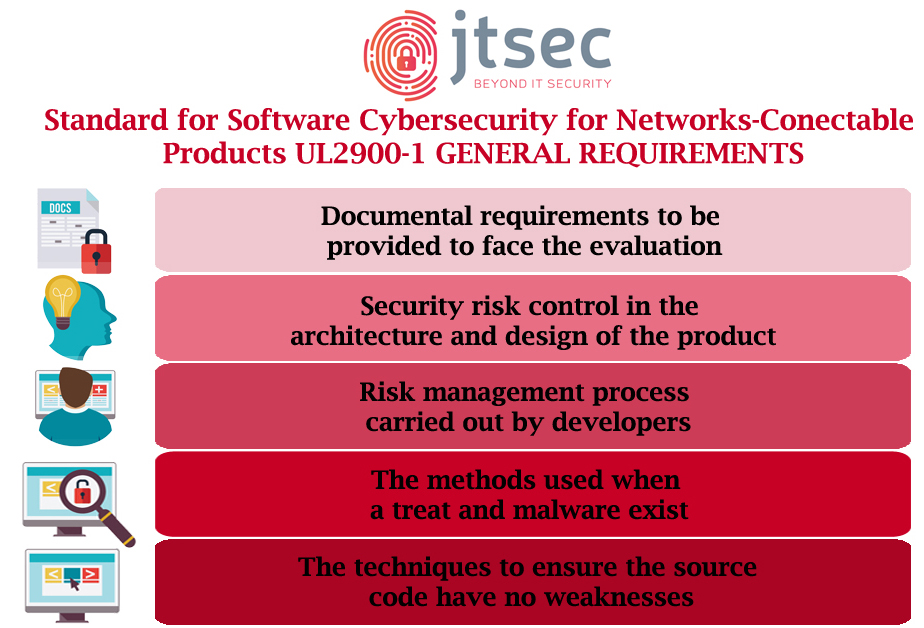
  • What is UL 2900?

UL 2900 is a series of standards published by UL (formerly Underwriters Laboratories), a global safety consulting and certification company. The standards present general software cyber security requirements for network-connectable products (UL 2900-1), as well as requirements specifically for medical and healthcare systems (UL 2900-2-1), industrial control systems (UL 2900-2-2), and security and life safety signaling systems (UL 2900-2-3).

https://www.synopsys.com/glossary/what-is-ul-2900.html


Thursday, June 3, 2021

Bring Your Own Key (BYOK)

  •  What is Bring Your Own Key (BYOK)?


While cloud computing offers many advantages, a major disadvantage has been security, because data physically resides with the cloud service provider (CSP) and out of the direct control of the owner of the data. 

For enterprises that elect to use encryption to protect their data, securing their encryption keys is of paramount importance.

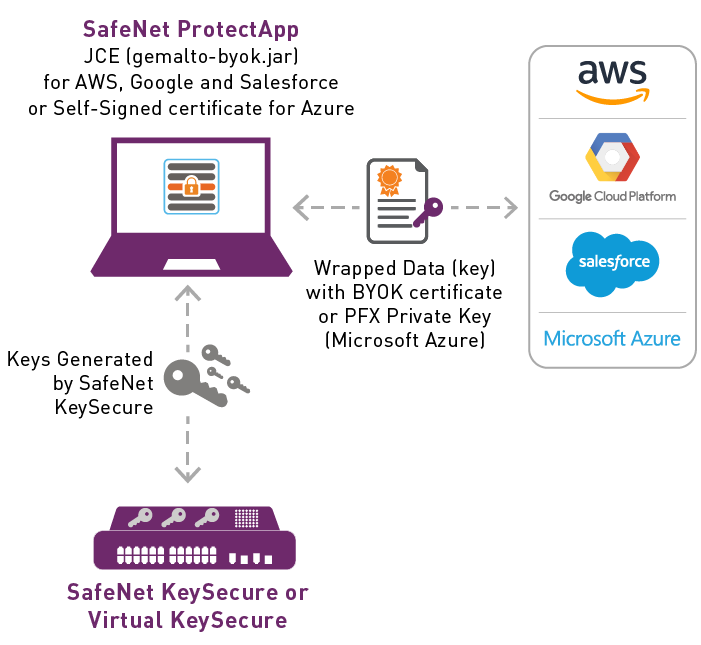
Bring Your Own Key (BYOK) is an encryption key management system that allows enterprises to encrypt their data and retain control and management of their encryption keys.

However, some BYOK plans upload the encryption keys to the CSP infrastructure. In these cases, the enterprise has once again forfeited control of its keys.

A best-practice solution to this "Bring Your Own Key" problem is for the enterprise to generate strong keys in a tamper-resistant hardware security module (HSM) and control the secure export of its keys to the cloud, thereby strengthening its key management practices.


https://cpl.thalesgroup.com/faq/key-secrets-management/what-bring-your-own-key-byok


Wednesday, June 2, 2021

Office 365 Security

  •  Office 365 Security overview


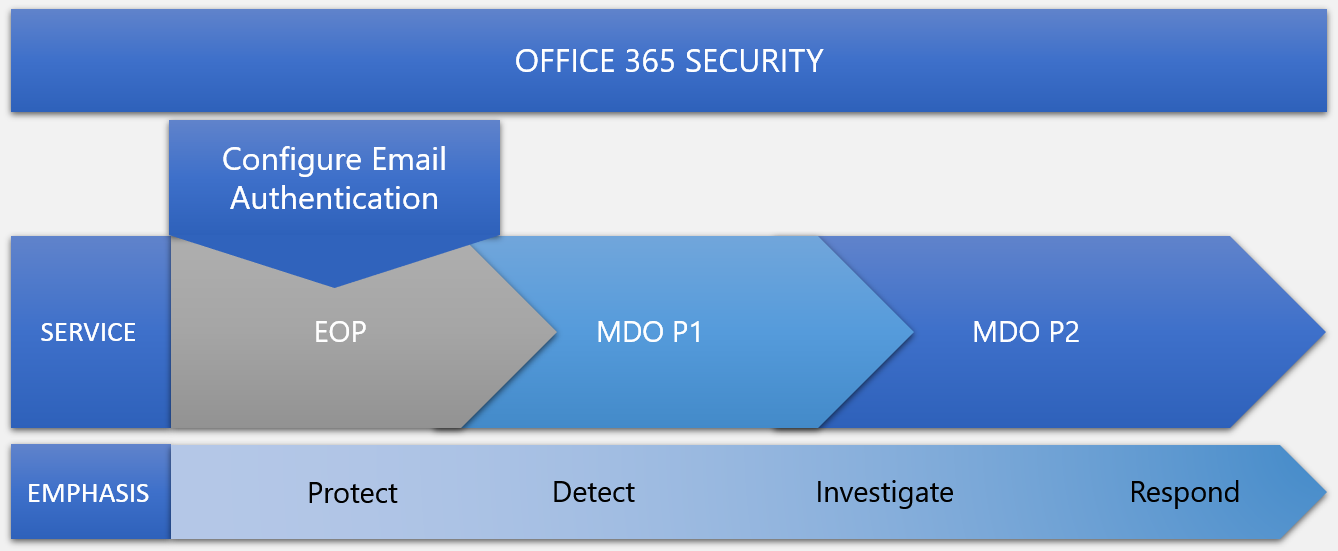
In Office 365 security, there are three main security services (or products) tied to your subscription type:


    Exchange Online Protection (EOP)

    Microsoft Defender for Office 365 Plan 1 (Defender for Office P1)

    Microsoft Defender for Office 365 Plan 2 (Defender for Office P2)


EOP

Prevents broad, volume-based, known attacks


Microsoft Defender for Office 365 P1

Protects email and collaboration from zero-day malware, phish, and business email compromise.


Microsoft Defender for Office 365 P2

Adds post-breach investigation, hunting, and response, as well as automation, and simulation (for training).


https://docs.microsoft.com/en-us/microsoft-365/security/office-365-security/overview?view=o365-worldwide


  • Exchange Online Protection overview

Exchange Online Protection (EOP) is the cloud-based filtering service that protects your organization against spam, malware, and other email threats. EOP is included in all Microsoft 365 organizations with Exchange Online mailboxes.

EOP is also available by itself to protect on-premises mailboxes and in hybrid environments to protect on-premises Exchange mailboxes.

How EOP works

When an incoming message enters EOP, it initially passes through connection filtering, which checks the sender's reputation. The majority of spam is stopped at this point and rejected by EOP.

Then the message is inspected for malware. If malware is found in the message or the attachment(s) the message is routed to an admin only quarantine store

The message continues through policy filtering, where it's evaluated against any mail flow rules (also known as transport rules) that you've created. For example, a rule can send a notification to a manager when a message arrives from a specific sender.

The message passes through content filtering (anti-spam and anti-spoofing) where harmful messages are identified as spam, high confidence spam, phishing, high confidence phishing, or bulk (anti-spam policies) or spoofing (spoof settings in anti-phishing policies). You can configure the action to take on the message based on the filtering verdict (quarantine, move to the Junk Email folder, etc.).

A message that successfully passes all of these protection layers is delivered to the recipients.

EOP datacenters

In Europe, the Middle East, and Africa (EMEA), all Exchange Online mailboxes are located in EMEA datacenters, and all messages are routed through EMEA datacenters for EOP filtering.

EOP features

EOP uses several URL block lists that help detect known malicious links within messages.
EOP uses a vast list of domains that are known to send spam.
EOP uses multiple anti-malware engines help to automatically protect our customers at all times.
EOP inspects the active payload in the message body and all message attachments for malware.

https://docs.microsoft.com/en-us/microsoft-365/security/office-365-security/exchange-online-protection-overview?view=o365-worldwide


  • Configure connection filtering

If you're a Microsoft 365 customer with mailboxes in Exchange Online or a standalone Exchange Online Protection (EOP) customer without Exchange Online mailboxes, you use connection filtering in EOP (specifically, the default connection filter policy) to identify good or bad source email servers by their IP addresses.

The IP Allow List, safe list, and the IP Block List are one part of your overall strategy to allow or block email in your organization.

What do you need to know before you begin?

You open the Security & Compliance Center at https://protection.office.com/. To go directly to the Anti-spam settings page, use https://protection.office.com/antispam.

To connect to Exchange Online PowerShell, see Connect to Exchange Online PowerShell.

You need to be assigned permissions in Exchange Online before you can do the procedures in this article:

    To modify the default connection filter policy, you need to be a member of the Organization Management or Security Administrator role groups.
    For read-only access to the default connection filter policy, you need to be a member of the Global Reader or Security Reader role groups.


https://docs.microsoft.com/en-us/microsoft-365/security/office-365-security/configure-the-connection-filter-policy?view=o365-worldwide

  • Anti-spam protection in EOP

In Microsoft 365 organizations with mailboxes in Exchange Online or standalone Exchange Online Protection (EOP) organizations without Exchange Online mailboxes, email messages are automatically protected against spam (junk email) by EOP.

Anti-spam technologies in EOP

The anti-spam settings in EOP are made of the following technologies:

    Connection filtering: Identifies good and bad email source servers early in the inbound email connection via the IP Allow List, IP Block List, and the safe list (a dynamic but non-editable list of trusted senders maintained by Microsoft). You configure these settings in the connection filter policy.

Spam filtering (content filtering): EOP uses the spam filtering verdicts Spam, High confidence spam, Bulk email, Phishing email and High confidence phishing email to classify messages. You can configure the actions to take based on these verdicts, and you can configure the end-user notification options for messages that were quarantined instead of delivered. 

Manage errors in spam filtering

It's possible that good messages can be identified as spam (also known as false positives), or that spam can be delivered to the Inbox.

Here are some best practices that apply to either scenario:

Always submit misclassified messages to Microsoft.

Examine the anti-spam message headers: These values will tell you why a message was marked as spam, or why it skipped spam filtering.
Point your MX record to Microsoft 365: In order for EOP to provide the best protection, we always recommend that you have email delivered to Microsoft 365 first.
If the MX record points to some other location (for example, a third-party anti-spam solution or appliance), it's difficult for EOP to provide accurate spam filtering. In this scenario, you need to configure Enhanced Filtering for connectors (also known as skip listing).

Use email authentication: If you own an email domain, you can use DNS to help insure that messages from senders in that domain are legitimate. To help prevent spam and unwanted spoofing in EOP, use all of the following email authentication methods:
SPF: Sender Policy Framework verifies the source IP address of the message against the owner of the sending domain. 
DKIM: DomainKeys Identified Mail adds a digital signature to the message header of messages sent from your domain
DMARC: Domain-based Message Authentication, Reporting, and Conformance helps destination email systems determine what to do with messages that fail SPF or DKIM checks and provides another level of trust for your email partners. 

Verify your bulk email settings: The bulk complaint level (BCL) threshold that you configure in anti-spam policies determines whether bulk email (also known as gray mail) is marked as spam. The PowerShell-only setting MarkAsSpamBulkMail that's on by default also contributes to the results.

Prevent the delivery of spam to the Inbox

Verify your organization settings: Watch out for settings that allow messages to skip spam filtering (for example, if you add your own domain to the allowed domains list in anti-spam policies)

Verify the junk email rule is enabled in the user's mailbox: It's enabled by default, but if it's disabled, messages marked as junk can't be moved into the Junk Email folder

Use the available blocked sender lists:

Unsubscribe from bulk email If the message was something that the user signed up for (newsletters, product announcements, etc.) and contains an unsubscribe link from a reputable source, consider asking them to simply unsubscribe.

Standalone EOP: create mail flow rules in on-premises Exchange for EOP spam filtering verdicts: In EOP environments where EOP protects on-premises Exchange mailboxes, you need to configure mail flow rules (also known as transport rules) in on-premises Exchange to translate the EOP spam filtering verdict so the junk email rule can move the message to the Junk Email folder. 

Prevent good email from being identified as spam

Here are some steps that you can take to help prevent false positives:

    Verify the user's Outlook Junk Email Filter settings:
Verify the Outlook Junk Email Filter is disabled: When the Outlook Junk Email Filter is set to the default value No automatic filtering, Outlook doesn't attempt to classify massages as spam. When it's set to Low or High, the Outlook Junk Email Filter uses its own SmartScreen filter technology to identify and move spam to the Junk Email folder, so you could get false positives. Note that Microsoft stopped producing spam definition updates for the SmartScreen filters in Exchange and Outlook in November, 2016. The existing SmartScreen spam definitions were left in place, but their effectiveness will likely degrade over time.
Verify the Outlook 'Safe Lists Only' setting is disabled: When this setting is enabled, only messages from senders in the user's Safe Senders list or Safe Recipients list are delivered to the Inbox; email from everyone else is automatically moved to the Junk Email folder.
Use the available safe sender lists
Verify users are within the sending and receiving limits
Standalone EOP: use directory synchronization: If you use standalone EOP to help protect your on-premises Exchange organization, you should sync user settings with the service by using directory synchronization.

Anti-spam legislation

https://docs.microsoft.com/en-us/microsoft-365/security/office-365-security/anti-spam-protection?view=o365-worldwide

  • Anti-malware protection in EOP

Some of the major categories of malware are:

    Viruses that infect other programs and data, and spread through your computer or network looking for programs to infect.

    Spyware that that gathers your personal information, such as sign-in information and personal data, and sends it back to its author.

    Ransomware that encrypts your data and demands payment to decrypt it. Anti-malware software doesn't help you decrypt encrypted files, but it can detect and remove the malware payload that's associated with the ransomware.

EOP offers multi-layered malware protection that's designed to catch all known malware traveling into or out of your organization. The following options help provide anti-malware protection:

Layered defenses against malware: Multiple anti-malware scan engines help protect against both known and unknown threats. 

Real-time threat response: During some outbreaks, the anti-malware team may have enough information about a virus or other form of malware to write sophisticated policy rules that detect the threat, even before a definition is available from any of the scan engines used by the service. 

Fast anti-malware definition deployment: The anti-malware team maintains close relationships with partners who develop anti-malware engines. As a result, the service can receive and integrate malware definitions and patches before they're publicly released

In EOP, messages that are found to contain malware in any attachments are quarantined, and can only be released from quarantine by an admin.

Anti-malware policies

Anti-malware policies control the settings and notification options for malware detections. 

Recipient notifications: By default, a message recipient isn't told that a message intended for them was quarantined due to malware. But, you can enable recipient notifications in the form of delivering the original message with all attachments removed and replaced by a single file named Malware Alert Text.txt 
You can replace the default text in the Malware Alert Text.txt file with your own custom text.

Common attachments filter: There are certain types of files that you really shouldn't send via email (for example, executable files). Why bother scanning these type of files for malware, when you should probably block them all, anyway? That's where the common attachments filter comes in. It's disabled by default, but when you enable it, the file types you specify are automatically treated as malware. You can use the default list of file types or customize the list. The default file types are: .ace, .ani, .app, .docm, .exe, .jar, .reg, .scr, .vbe, .vbs.

Zero-hour auto purge (ZAP) for malware: ZAP for malware quarantines messages that are found to contain malware after they've been delivered to Exchange Online mailboxes. By default, ZAP for malware is turned on

Sender notifications: By default, a message sender isn't told that their message was quarantined due to malware. But, you can enabled notification messages for senders based on whether the sender is internal or external.

Recipient filters: For custom anti-malware policies, you can specify recipient conditions and exceptions that determine who the policy applies to. You can use these properties for conditions and exceptions:

    The recipient is
    The recipient domain is
    The recipient is a member of

Recipient filters: For custom anti-malware policies, you can specify recipient conditions and exceptions that determine who the policy applies to. You can use these properties for conditions and exceptions:

    The recipient is
    The recipient domain is
    The recipient is a member of

Priority: If you create multiple custom anti-malware policies, you can specify the order that they're applied. No two policies can have the same priority, and policy processing stops after the first policy is applied.


Anti-malware policies in the Microsoft 365 security center vs PowerShell

The basic elements of an anti-malware policy are:

    The malware filter policy: Specifies the recipient notification, sender and admin notification, ZAP, and the common attachments filter settings.
    The malware filter rule: Specifies the priority and recipient filters (who the policy applies to) for a malware filter policy.

The difference between these two elements isn't obvious when you manage anti-malware polices in the security center:

    When you create an anti-malware policy, you're actually creating a malware filter rule and the associated malware filter policy at the same time using the same name for both.
    When you modify an anti-malware policy, settings related to the name, priority, enabled or disabled, and recipient filters modify the malware filter rule. Other settings (recipient notification, sender and admin notification, ZAP, and the common attachments filter) modify the associated malware filter policy.
    When you remove an anti-malware policy, the malware filter rule and the associated malware filter policy are removed.

In Exchange Online PowerShell or standalone EOP PowerShell, the difference between malware filter policies and malware filter rules is apparent.
You manage malware filter policies by using the *-MalwareFilterPolicy cmdlets, and you manage malware filter rules by using the *-MalwareFilt7erRule cmdlets.

In PowerShell, you create the malware filter policy first, then you create the malware filter rule that identifies the policy that the rule applies to.
In PowerShell, you modify the settings in the malware filter policy and the malware filter rule separately.
When you remove a malware filter policy from PowerShell, the corresponding malware filter rule isn't automatically removed

Default anti-malware policy

Every organization has a built-in anti-malware policy named Default that has these properties:


    The policy is applied to all recipients in the organization, even though there's no malware filter rule (recipient filters) associated with the policy.
    The policy has the custom priority value Lowest that you can't modify (the policy is always applied last). Any custom anti-malware policies that 
you create always have a higher priority than the policy named Default.
    
The policy is the default policy (the IsDefault property has the value True), and you can't delete the default policy.


https://docs.microsoft.com/en-us/microsoft-365/security/office-365-security/anti-malware-protection?view=o365-worldwide

  • Configure anti-phishing policies in EOP

In Microsoft 365 organizations with mailboxes in Exchange Online or standalone Exchange Online Protection (EOP) organizations without Exchange Online mailboxes, there's a default anti-phishing policy that contains a limited number of anti-spoofing features that are enabled by default

Admins can view, edit, and configure (but not delete) the default anti-phishing policy. For greater granularity, you can also create custom anti-phishing policies that apply to specific users, groups, or domains in your organization. Custom policies always take precedence over the default policy, but you can change the priority (running order) of your custom policies

Organizations with Exchange Online mailboxes can configure anti-phishing policies in the Security & Compliance Center or in Exchange Online PowerShell.

The basic elements of an anti-phishing policy are:

    The anti-phish policy: Specifies the phishing protections to enable or disable, and the actions to apply options.
    The anti-phish rule: Specifies the priority and recipient filters (who the policy applies to) for an anti-phish policy
The difference between these two elements isn't obvious when you manage anti-phishing policies in the Security & Compliance Center:


    When you create an anti-phishing policy, you're actually creating an anti-phish rule and the associated anti-phish policy at the same time using the same name for both.
    When you modify an anti-phishing policy, settings related to the name, priority, enabled or disabled, and recipient filters modify the anti-phish rule. All other settings modify the associated anti-phish policy.
    When you remove an anti-phishing policy, the anti-phish rule and the associated anti-phish policy are removed.

In Exchange Online PowerShell, you manage the policy and the rule separately. 

Every organization has a built-in anti-phishing policy named Office365 AntiPhish Default that has these properties:

    The policy is applied to all recipients in the organization, even though there's no anti-phish rule (recipient filters) associated with the policy.
    The policy has the custom priority value Lowest that you can't modify (the policy is always applied last). Any custom policies that you create always have a higher priority.
    The policy is the default policy (the IsDefault property has the value True), and you can't delete the default policy.


https://docs.microsoft.com/en-us/microsoft-365/security/office-365-security/configure-anti-phishing-policies-eop?view=o365-worldwide

  • Recommended settings for EOP and Microsoft Defender for Office 365 security

Applies to

    Exchange Online Protection
    Microsoft Defender for Office 365 plan 1 and plan 2
    Microsoft 365 Defender


Exchange Online Protection (EOP) is the core of security for Microsoft 365 subscriptions and helps keep malicious emails from reaching your employee's inboxes. 

Anti-spam, anti-malware, and anti-phishing protection in EOP

EOP anti-spam policy settings
EOP outbound spam policy settings
EOP anti-malware policy settings
EOP default anti-phishing policy settings

https://docs.microsoft.com/en-us/microsoft-365/security/office-365-security/recommended-settings-for-eop-and-office365?view=o365-worldwide