Friday, October 19, 2012
How to Respond to Positive Risks
How to Respond to Positive Risks
On projects, risks can be identified through various project activities, such as during an Iteration Planning Meeting. Whatever the source, there are four ways to deal with positive risks:
Exploit
Share
Enhance
Accept
Exploit
Exploiting a positive risk is about ensuring everything is in place to increase the probability of the occurrence of the risk.
Share
Sometimes exploiting a positive risk is not possible without collaboration. Sharing a positive risk is when you collaborate with another department or organization to exploit a positive risk
Enhance
Enhancing a risk involves identifying the root cause of a positive risk so that you can influence it for a greater likelihood of the opportunity occurrin
Accept
At times, opportunities simply fall on your lap and you choose to accept them. This is called accepting a positive risk. It also means you AcceptPositive are acknowledging that you’d rather not Exploit, Share, or Enhance the risk.
http://www.brighthubpm.com/risk-management/48400-how-to-respond-to-positive-risks/

Risk breakdown structure
Risk breakdown structure
Risk Breakdown Structure (RBS) - A hierarchically organised depiction of the identified project risks arranged by category
When planning a project to meet targets for cost, schedule, or quality, it is useful to identify likely risks to the success of the project. A risk is any possible situation that is not planned for, but that, if it occurs, is likely to divert the project from its planned result. For example, an established project team plans for the work to be done by its staff, but there is the risk that an employee may unexpectedly leave the team.
In Project Management, the Risk Management Process has the objectives of identifying, assessing, and managing risks, both positive and negative. All too often, project managers focus only on negative risk, however, good things can happen in a project, "things" that were foreseen, but not expressly planned.
The objective of Risk Management is to predict risks, assess their likelihood and impact, and to actively plan what should be done ahead of time to best deal with situations when they occur.
The RBS can also help the project manager and the risk manager to better understand recurring risks and concentrations of risk that could lead to issues that affect the status of the project
http://en.wikipedia.org/wiki/Risk_breakdown_structure
The PMI Code of Ethics and Professional Conduct
The PMI Code of Ethics and Professional Conduct
Interpersonal project team conflicts. Challenges with project sponsors. Vendor negotiations. Cultural differences. Government regulations. Project professionals interact with many different types of people, and often are faced with various ethical dilemmas throughout their careers.
Deciding what is ethical can be challenging, and the answers may differ depending on your organization and culture.
To provide some guidance, PMI volunteers helped to develop the PMI Code of Ethics and Professional Conduct. All PMI members and credential holders must sign the code, agreeing to adhere to a high standard of ethical behavior.
http://www.pmi.org/en/About-Us/Ethics/~/media/PDF/Ethics/ap_pmicodeofethics.ashx
Contingency reserve vs. management reserve
- Contingency reserve vs. management reserve
both refer to money used to account for a risk that has triggered, there is a difference.
Contingency reserve - This is your fund for “known-unknowns“. That means you’ve already identified the risk; you just don’t know how much it will impact your project. This can be estimated based on the sum of all of your risks’ expected values.
Management reserve - This is for the “unknown-unknowns“. Basically, you didn’t even identify the risk until it has occurred. This may be derived from using percentage of the overall project budget.
http://pmsecrets.blogspot.com/2008/01/contingency-reserve-vs-management.html
- Contingency Reserve vs Management Reserve
Contingency Reserves: Contingency Reserve is the cost, or time reserve that is used to manage the identified risks or “known-unknowns” (known=identified, unknowns=risks). Contingency Reserve is not a random reserve, it is a properly estimated reserve t based on Expected Monitory Value (EMV), or Decision Tree Method.
Contingency Reserve is controlled by the project manager. He has the authority to use it when any identified risk occurs, or he can delegate this authority to risk owner, who will use it at appropriate time and informs the project manager at later stage.
Management Reserve: Management Reserve is the cost, or time reserve that is used to manage unidentified risks or “unknown-unknowns” (unknown=unknown, unknowns=risks). Management Reserve is not an estimated reserve, it is defined as per organization’s policy. For some organization, it is 5% of total cost, or time of the project and for some others – 10%.
Management Reserve is controlled by someone outside the project team, usually from the management. Every time, when an unidentified risk occurs, project manager has to take approval from the management to use this reserve.
Here discussion about the contingency reserve and management reserve finishes, but before we leave let us summarized all key points once again:
Contingency Reserve:
used to manage identified risks
estimated based on Expected Monitory Value (EMV), or decision tree method
project manager has authority to use this reserve.
Management Reserve:
used to manage unidentified risks
calculated as a percentage of cost, or time of project
required management approval to use this reserve.
http://pmstudycircle.com/2012/02/contingency-reserve-vs-management-reserve/#axzz29h4Sxbij
Risk Register
Risk Register
A Risk Register is a Risk Management tool commonly used in Project Management and organisational risk assessments. It acts as a central repository for all risks identified by the project or organisation and, for each risk, includes information such as risk probability, impact, counter-measures, risk owner and so on. It can sometimes be referred to as a Risk Log (for example in PRINCE2).
http://en.wikipedia.org/wiki/Risk_register
Manage Stakeholder Expectations Process
The process of communicating and working with stakeholders to meet their needs and addressing issues as they occur.
- Inputs
Stakeholder register
Stakeholder management strategy
Project management plan
Issue log
Change log
Organizational process assets
- Tools and Techniques
Communication methods
Interpersonal tools
Management tools
- Outputs
Organizational process assets updates
Change requests
Project management plan updates
Project document updates
http://leadinganswers.typepad.com/leading_answers/104-manage-stakeholder-expectations.html
Thursday, October 18, 2012
Conflict Resolution Techniques
- Techniques for Conflict Resolution
• Behavioral Techniques
o Don’t negotiate when angry.
o Forget the past and stay in the present.
o Focus on the problem not the person.
o Communicate feelings assertively, NOT aggressively. Express
concerns without blaming the other side.
o Expect and accept another’s right to disagree. Don’t push or
force compliance; work to develop common agreement.
o Don’t view the situation as a competition where one has to win
and the other has to lose. Work toward a solution where both
parties have some of their needs met.
o Build ‘power with’ NOT ‘power over’ others.
o Thank the person for listening.
• Negotiation Techniques
o Identify and define the conflict in specific terms.
o Focus on areas of common interest and potential areas for
agreement.
o NEVER jump to conclusions or make assumptions about what
another is feeling or thinking.
o Listen without interrupting; ask for feedback if needed to assure
a clear understanding of the issue.
o Generate alternative solutions.
o Discuss the pros and cons of the alternatives. Listen as well as
state your case.
o Select the best course of action that all can agree upon.
o Implement only the parts of the plan that are in agreement.
Remember, when only one person’s needs are satisfied in a
conflict, it is NOT resolved and will continue.
o Follow-up to evaluate the effectiveness of the plan and make
any adjustments necessary.
http://www.pbs.org/newshour/extra/teachers/lessonplans/world/july-dec09/techniques_for_conflict_resolution.pdf
- When conflicts go unaddressed, they can have a negative impact on productivity and teamwork. Using conflict resolution strategies in the workplace will help maintain a healthy work environment. Conflict resolution requires specific leadership skills, problem solving abilities and decision making skills. Consider the following conflict resolution techniques to help resolve issues in your office
http://www.notredameonline.com/conflict-resolution-in-the-workplace/
- Conflict Management Techniques
Conflict situations are an important aspect of the workplace. A conflict is a situation when the interests, needs, goals or values of involved parties interfere with one another. A conflict is a common phenomenon in the workplace. Different stakeholders may have different priorities; conflicts may involve team members, departments, projects, organization and client, boss and subordinate, organization needs vs. personal needs. Often, a conflict is a result of perception. Is conflict a bad thing? Not necessarily. Often, a conflict presents opportunities for improvement. Therefore, it is important to understand (and apply) various conflict resolution techniques.
Forcing
Also known as competing. An individual firmly pursues his or her own concerns despite the resistance of the other person. This may involve pushing one viewpoint at the expense of another or maintaining firm resistance to another person’s actions.
Win-Win (Collaborating)
Also known as problem confronting or problem solving. Collaboration involves an attempt to work with the other person to find a win-win solution to the problem in hand - the one that most satisfies the concerns of both parties. The win-win approach sees conflict resolution as an opportunity to come to a mutually beneficial result. It includes identifying the underlying concerns of the opponents and finding an alternative which meets each party's concerns.
Compromising
Compromising looks for an expedient and mutually acceptable solution which partially satisfies both parties.
Withdrawing
Also known as avoiding. This is when a person does not pursue her/his own concerns or those of the opponent. He/she does not address the conflict, sidesteps, postpones or simply withdraws
Smoothing
Also known as accommodating. Smoothing is accommodating the concerns of other people first of all, rather than one's own concerns.
http://www.hrpersonality.com/Resources/ConflictManagementTechniques.aspx
- Conflict Resolution Techniques
Avoidance Approach
Stay out of conflict; remain neutral on issues. Employed by individuals that do not have enough invested in the issue to see value in the conflict. Often used when the conflict is not critical or is perceived to be beyond their capacity to manage.
Domination Approach
Remain singularly focused on one resolution to a conflict. These individuals will not readily yield and often fail to recognize the value of alternatives.
Accommodation Approach
Entirely yielding to the conflicting point of view. Seeking to preserve personal relationships even when it does benefit project tasks and objectives
Compromise Approach
Assumes that no solution can be achieved that will yield complete satisfaction for all participants involves. Attempts to balance personal relationships and project success when one or both may be compromised in the conflict.
Consensus Approach
Mutual agreement and understanding between all conflicting parties. Leads to project success while simultaneously reinforcing personal relationships. Is often the lengthiest resolution to a conflict, but produces the most favorable results.
http://projectmechanics.com/conflict-management/conflict-resolution-techniques
Wednesday, October 17, 2012
course pages
BM348 -Tasarim Kaliplari
http://members.comu.edu.tr/msahin/
Advanced Object-Oriented Systems
http://people.engr.ncsu.edu/efg/591O/s98/lectures/javaDesignPatterns/ppframe.htm
CMSC446 Introduction To Design Patterns
http://userpages.umbc.edu/~tarr/dp/spr06/cs446.html
Design Patterns in Java
http://alumnus.caltech.edu/~croft/research/java/pattern/
CSC407H Lectures: Summer 2006
http://www.cdf.utoronto.ca/~csc407h/summer/lectures.shtml
- Design pattern online tests
http://www.interqiew.com/tests?type=dp
Project Cost Management
| Process | Project Phase | Key Deliverables |
|---|---|---|
| Estimate Costs | Planning | Activity Cost Estimates,Basis of estimates |
| Determine Budget | Planning | Cost performance baseline |
| Control Costs | Monitoring and Controlling | Work performance measurements |
4-The Estimate Costs process takes the following inputs -
Scope baseline
Project schedule
Human resource plan
Risk register
Enterprise environmental factors
Organizational process assets
5-Depreciation is technique used to compute the estimated value of any object after few years. There are three type of depreciation techniques. These are
Straight line depreciation The same amount is deprecated (reduced) from the cost each year.
Double-declining balance - In the first year there is a higher deduction in the value - twice the amount of straight line. Each year after that the deduction is 40% less than the previous year.
Sum of year depreciation - Lets say the life of an object is five years. The total of one to five is fifteen. In first year we deduce 5/15 from the cost, in second year we deduce 4/15, and so on.
6-Analogous Estimating is an estimating technique with the following characteristics -
Estimates are based on past projects (historical information)
It is less accurate when compared to bottom-up estimation
It is a top-down approach
It takes less time when compared to bottom-up estimation
It is a form of an expert judgment
7-In Parametric Modeling Estimation, you use a mathematical model to make an estimate. It is of two types.
Regression Analysis
is a mathematical model based upon historical information.
Learning Curve model is based upon the principal that the cost per unit decreases as more work gets completed.
8-Bottom up estimation is same as WBS estimation. It involves estimating each work item and adding the estimates to get the total project estimate.
Planned Value (PV) refers to what the project should be worth at this point in the schedule. It is also referred as BCWS (Budgeted Cost of Work Scheduled).
Earned Value (EV) is the physical work completed to date and the authorized budget for that. It is also referred as BCWP (Budgeted Cost of Work Performed).
Actual Cost (AC) is the actual amount of money spent so far. It is also referred as ACWP (Actual Cost of Work Performed)
Estimate At Completion (EAC) refers to the estimated total cost of the project at completion.
CPI refers to Cost Performance Index. It is defined as
CPI = EV/AC
If CPI is less than 1, this means that the project is over budget.
BAC refers to Budget at Completion. It is related to EAC.
EAC = BAC/CPI
ETC refers to Estimate to Completion. It is defined as
ETC = EAC - AC
CV refers to Cost Variance. It is defined as
CV = EV - AC
SV refers to Schedule Variance. It is defined as
SV = EV - PV
Negative cost or schedule variance means that project is behind in cost or schedule.
VAC refers to Variance At Completion. It is defined as
VAC = BAC - EAC
For example, in the first month the project will require $10,000. Cost estimating involves defining cost estimates for tasks. Cost budgeting defines cost estimates across time.
The tools and techniques used for Estimate Costs are -
Expert judgment
Analogous estimating
Parametric estimating
Bottom-up estimating
Three-point estimates
Reserve analysis
Cost of quality
Project Management estimating software
Vendor bid analysis
The after project costs are called life cycle costs.
http://www.preparepm.com/notes/cost.html
- Project Management Formulas
http://69.13.149.40/Students/Formulas.htm
Earned Value Management - EVM
Budget At Completion (BAC)
Budget At Completion (BAC) is the total budget allocated to the project.
Budget At Completion (BAC) is generally plotted over time. Say like periods of reporting ( Monthly, Weekly etc. )
BAC is used to compute the Estimate At Completion ( EAC ), explained in next section.
BAC is also used to compute the TCPI and TSPI
BAC is calculated using the following formula
BAC = Baselined Effort-hours * Hourly Rate
Estimate To Complete (ETC)
Estimate To Complete (ETC) is the estimated cost required to complete the remainder of the project.
Estimate To Complete (ETC) is calculated and applied when the past estimating assumptions become invalid and a need for fresh estimates arises.
ETC is used to compute the Estimation at Completion (EAC).
Estimate At Completion (EAC)
Estimate At Completion (EAC) is the estimated cost of the project at the end of the project.
There are three methods to calcualte EAC
Variances are Typical - This method is used when the variances at the current stage are typical and are not expected to occure in the future.
Past Estimating Assumptions are not valid - This method is used when the past estimating assumptions are not valid and fresh estimates are applied to the project.
Variances will be present in the future - This method is used when the assumption is that the current variances will be continue to be present in the future.
The formula for calculation of the three methods are as given below:
AC + ( BAC -EV )
AC + ETC ( Estimate to complete )
AC + ( BAC- EV ) / CPI
http://www.tutorialspoint.com/earn_value_management/evm_formula.htm
- How to Calculate Earned Value Analysis
Earned value analysis (EVA) is a project evaluation tool.
It evaluates how much work should have been done, how much money has been spent and the value of work done.
EVA gives an assessment of the project -- its efficiency and problem areas, if any.
You must compute three performance metrics --
cost performance index (CPI),
schedule performance index (SPI)
cost schedule index (CSI)
--to perform a valid analysis.
the budget at completion (BAC), which is basically the budget for your project. For instance, if you have budgeted $500,000 to finish project "A" your BAC is $500,000
the budgeted cost of work scheduled (BCWS). Suppose you planned to complete project A in five months, accomplishing 20 percent of the project every month. BCWS is the percent of planned completion, converted to decimal form and then multiplied by BAC.
Using our example, BCWS = 0.2 * $500,000 = $100,000.
your actual cost of work performed (ACWP), or cost of work completed. For instance, if you've spent $150,000 in the first month and have accomplished 10 percent of the project, your ACWP is $150,000.
budgeted cost of work performed (BCWP). BCWP is the percent of actual work performed converted to decimal form and then multiplied by BAC.
Using our example, BCWP = 0.1 * $500,000 = $50,000.
cost performance index (CPI). CPI is BCWP divided by ACWP.
In our example, CPI = $50,000 / $150,000 = 0.33.
This means that for every dollar spent, the project is generating only 33 cents worth of work. You are over your budget. Ideally, $1 spent should generate $1 of work. This should prompt an investigation of the project
schedule performance index (SPI). SPI is BCWP divided by BCWS.
Using our example, SPI = $50,000 / $100,000 = 0.50.
This indicates that the project team is completing only 30 minutes of work for what is supposedly one hour of work. You are behind schedule.
your cost schedule index (CSI). CSI is CPI multiplied by SPI.
Using our example, CSI = 0.33 x 0.50 = 0.16.
This implies that our sample project is behind schedule and over budget. The farther CSI is from 1.0, the less likely the project will be able to financially recover. It will be the responsibility of the project sponsor and project manager to seriously consider abandoning the project to limit financial losses.
http://www.ehow.com/how_8446348_calculate-earned-value-analysis.html
- Calculate Cost Performance Index (CPI) and Schedule Performance Index (SPI)
Cost Performance Index (CPI index): Represents the amount of work is being completed on a project for every unit of cost spent. CPI is computed by EV / AC. A value of above 1 means that the project is doing well against the budget.
Schedule Performance Index (SPI index): Represents how close actual work is being completed compared to the schedule. SPI is computed by EV / PV. A value of above one means that the project is doing well against the schedule.
Earned Value Analysis Example 1
Suppose you have a budgeted cost of a project at $900,000. The project is to be completed in 9 months. After a month, you have completed 10 % of the project at a total expense of $100,000. The planned completion should have been 15 %.
Now, let’s see how healthy the project by computing the CPI index and SPI index.
Earned Value Analysis - Example 2
Suppose you are managing a software development project. The project is expected to be completed in 8 months at a cost of $10000 per month. After 2 months, you realize that the project is 30 % completed at a cost of $40,000. You need to determine whether the project is on-time and on-budget after 2 months.
http://www.brighthubpm.com/monitoring-projects/57944-calculating-cost-performance-index-and-schedule-performance-index/
- Example:
Two projects have their cost performance index calculated. Both projects are 10 percent over budget at the time of the calculation. Project One has a budget of $1,000,000, and Project Two has a budget of $10,000. These budget figures are the amounts that should have been spent as of today’s date. We will assume that the project is on schedule at this point in time. What is the cost performance index for each?
Project One is over budget by 10 percent of its budget or $100,000.
Project Two is also over budget by 10 percent of its budget or $1,000.
CPI = BCWP / ACWP
The BCWP is $1,000,000 for Project One.
The ACWP is $1,100,000 for Project One ($1,000,000 + $100,000).
The BCWP is $10,000 for Project Two.
The ACWP is $11,000 for Project Two ($10,000 + $1,000).
CV = BCWP – ACWP
The cost variance for Project One is $1,000,000 ? $1,100,000 or ? $100,000. The cost variance for Project Two is $10,000 ? $11,000 or $1,000 The CPI for Project One is $1,000,000 / $1,100,000 or 0.909. The CPI for Project Two is $10,000 / $11,000 or 0.909.
Notice that the size of the project does not make any difference in the calculation of the index. Projects that are each behind 10 percent have the same value for their cost performance index. This makes assessing the health or sickness of projects of different sizes much easier.
http://pmtips.net/earned-reporting-cost-performance-index/
- CPI
The cost performance index is a ratio that measures the financial effectiveness of a project by dividing the budgeted cost of work performed by the actual cost of work performed. If the result is more than 1, as in 1.25, then the project is under budget, which is the best result. A CPI of 1 means the project is on budget, which is also a good result. A CPI of less than 1 means the project is over budget. This represents a risk in that the project may run out of money before it is completed.
CPI Example
For example, assume a project has a budgeted cost of $10,000 but actually cost only $8,000. Dividing $10,000 by $8,000 produces a CPI of 1.25, which means the project is 25 percent under budget.
SPI
The CPI is only one aspect of determining the progress of a project. The other is the schedule performance index, or SPI. This is also a ratio that divides the budgeted cost of work performed by the budgeted cost of work scheduled.
SPI Example
For example, assume a project has two people working full time, and that each person costs the company $1,250 a week. A project is one week behind at the time of the calculation. One week times two people at $1,250 a week equals $2,500, which represents the amount by which the schedule is behind. If the budgeted cost of worked scheduled at that time is $6,000, you subtract the $2,500 from that cost to come up with the budgeted cost of work performed at $3,500. Dividing $3,500 by $6,000 produces an SPI of 0.53. As with the CPI, SPI values under 1 are not good because they mean the project is behind schedule. A value of 1 means the project is on schedule, and a value more than 1 means the project is ahead of schedule.
EVA
Earned value analysis, or EVA, looks at the relationship between the CPI and SPI, including such factors as the schedule and cost variances, to judge how a project is doing. It often involves graphing CPI and SPI over the life of a project. In a nutshell, the closer these numbers are to 1, the more likely it is that a project will be completed on time and on budget. While keeping one or both values over 1 is a worthwhile goal, it may indicate original assumptions were unrealistically rosy. The worst situation is to have one or both numbers under 1 over an extended period of time. The lower those numbers are under 1 and the longer the time, the less likely it is that the project can recover from such the deficit. It may also mean that not enough money and time were originally scheduled.
http://smallbusiness.chron.com/project-management-cpi-numbers-mean-35541.html
- EXAMPLE
project total budget is 80000 $
CPI is 0.95
project has spent 25000$
how much money do you need to spend more??
BAC=80000
CPI=0.95
EAC(estimation at completion)
EAC = BAC/CPI=80000/0.95=84210
ETC refers to Estimate to Completion.
AC=25000
EAC=84210
ETC = EAC - AC=84210-25000=59210
you need 59210 $ more to complete project
JSP Expression Language
- JSP Expression Language
JSP Expression Language (EL) makes it possible to easily access application data stored in JavaBeans components. JSP EL allows you to create expressions both (a) arithmetic and (b) logical. Within a JSP EL expression, you can use integers, floating point numbers, strings, the built-in constants true and false for boolean values, and null.
http://www.tutorialspoint.com/jsp/jsp_expression_language.htm
- Expression Language
A primary feature of JSP technology version 2.0 is its support for an expression language (EL). An expression language makes it possible to easily access application data stored in JavaBeans components. For example, the JSP expression language allows a page author to access a bean using simple syntax such as ${name} for a simple variable or ${name.foo.bar} for a nested property.
http://docs.oracle.com/javaee/1.4/tutorial/doc/JSPIntro7.html
- Expression Language in JSP 2.0
Expression Language was first introduced in JSTL 1.0 (JSP Standard Tag Library ). Before the introduction of JSTL, scriptlets were used to manipulate application data.JSTL introduced the concept of an expression language (EL) which simplified the page development by providing standerd tag libraries. These tag libraries provide support for common, structural tasks, such as: iteration and conditionals,
processing XML documents, internationalization and database access using the Structured Query Language (SQL).
The Expression Language introduced in JSTL 1.0 is now incorporated in JavaServer Pages specification(JSP 2.0).
http://www.javabeat.net/2007/08/expression-language-in-jsp-2-0/
Monday, October 15, 2012
Interrupt
- Interrupts
Defn: an event external to the currently executing process that causes a change in the normal flow of instruction execution; usually generated by hardware devices external to the CPU
Typically indicate that some device needs service
http://www.cs.toronto.edu/~demke/469F.06/Lectures/Lecture6.pdf
- Interrupts
An interrupt is an exception, a change of the normal progression, or interruption
in the normal flow of program execution.
An interrupt is essentially a hardware generated function call.
Interrupts are caused by both internal and external sources.
An interrupt causes the normal program execution to halt and for the interrupt
service routine (ISR) to be executed.
At the conclusion of the ISR, normal program execution is resumed at the point
where it was last.
http://web.engr.oregonstate.edu/~traylor/ece473/lectures/interrupts.pdf
Interrupt vector
Interrupt vector
An interrupt vector is the memory address of an interrupt handler, or an index into an array called an interrupt vector table that contains the memory addresses of interrupt handlers. When an interrupt is generated, the Operating System saves its execution state via a context switch, and begins execution of the interrupt handler at the interrupt vector.
http://en.wikipedia.org/wiki/Interrupt_vector
interrupt vector
An interrupt vector is the memory location of an interrupt handler, which prioritizes interrupts and saves them in a queue if more than one interrupt is waiting to be handled.
http://whatis.techtarget.com/definition/interrupt-vector
Hardware Interrupt Handling
interrupt vector associates handlers with interrupts
http://www.cs.toronto.edu/~demke/469F.06/Lectures/Lecture6.pdf
Operating Systems
In memory (specified by the hardware) the OS stores an interrupt vector, which contains the address of the interrupt handler
http://www.cs.nyu.edu/courses/spring09/V22.0202-002/lectures/lecture-06.html
Firewall
Firewall
A firewall can either be software-based or hardware-based and is used to help keep a network secure. Its primary objective is to control the incoming and outgoing network traffic by analyzing the data packets and determining whether it should be allowed through or not, based on a predetermined rule set
http://en.wikipedia.org/wiki/Firewall_(computing)
Firewall Stateful versus Stateless
state
snapshot, freeze frame in memory
context-sensitive
9.3 Understanding Stateful vs Stateless Inspection
statefull firewalls, OSI layer 3,4,5
keeps track of the state of the connection
UDP connectionless
state references TCP state
most common deployed firewalls
state table; source,destination,port,sequencing,flag
state table processed by ACL
limitations; udp,icmp etc protocols do not contain state information
- STATELESS Firewalls
STATEFUL Firewall
Stateful firewalls can watch traffic streams from end to end. They are aware of communication paths and can implement various IP Security (IPsec) functions such as tunnels and encryption. In technical terms, this means that stateful firewalls can tell what stage a TCP connection is in (open, open sent, synchronized, synchronization acknowledge or established). It can tell if the MTU has changed and whether packets have fragmented. etc.
https://www.cybrary.it/0p3n/stateful-vs-stateless-firewalls/
- A stateful firewall is capable of tracking connection states, it is better equipped to allow or deny traffic based on such knowledge. A TCP connection for example goes through the handshake (SYN-SYN+ACK-SYN), to EASTABLISHED state, and finally is CLOSED. A stateful firewall can detect these states. If a packet belongs to an already running flow it can be allowed, while a new connection form the untrusted host can be dropped.
When to use Stateless firewall?
A stateless firewall can be a faster and less resource intensive alternative in the following cases
Server side firewall: If you are running a purely server application with well-known ports on a machine. In this case firewall can be explicitly programmed to allow connection to and from the server port. As the server ports are well known to the firewall and the server expects new connection anyway, stateless firewalls can handle this use case.
Client side firewall: A client program which strictly connect to a small set of trusted hosts (internal) can be protected using stateless firewalls with specific rules
https://chandanduttachowdhury.wordpress.com/2018/03/25/stateful-vs-stateless-firewalls-which-one-to-use-when/
- When an IP session, for instance on the TCP protocol, is initiated, and the connection is authorised - let's assume, an HTTP connection from an internal network towards an external web site on port 80 - the firewall will keep track of who has started the connection and to which destination, will inspect and understand the information exchanged inside the communication, and will open other ports accordingly to allow the connection to be instantiated and maintained - for instance, the firewall has to accept the acknowledge packet from the server, and to do that, it has to allow the reply happening on a certain port from the server back to the client, maybe perform the NAT/P (Network and Port Address Translation) down to the client (if it was placed for instance in a private range addressing). This network opening happens "on the fly" in the firewall, as normally the same packet would not be allowed from external to internal, if the session was not initiated from the internal
As opposed to stateful firewalls, stateless have no such capabilities. They only basically keep a list of ports that are allowed or not, and are not able to adjust them dynamically depending on the protocol involved. This means for instance that in the case of a client on an internal network connecting to an FTP server on an outside network, you would need to allow the outgoing FTP port from client to server, and then a range of high ports (for "high" ports it is meant any port > 1024) connecting between the client and the server; the stateless firewall cannot open the high port on the fly, and therefore you need to keep all the ports that can be possibly negotiated open all the time, which of course exposes your surface to many more risks
Stateless firewalls are basically ACL (Access Control List) based, that is, they are the software that often provides ACLs on routers.
Stateless filtering is still used in certain cases, especially in WAN networking
For instance, let's assume you need to allow a third party to connect to your corporate network via VPN, and you are using router as a site-to-site VPN terminator; this router does not support stateful filtering, and you cannot afford for any reason to install a proper stateful firewall, but you still want to somehow limit the access this external company has to your network - I am aware it is not really a secure filtering, but ACLs can be better than nothing.
let's assume you have Cisco routers which do not support stateful filters, but you still want to apply some security - for instance on WAN or links. Routers and other equipment are used as WAN network hops or BGP routers to direct Internet traffic; generally, you cannot afford installing a firewall in front of every Internet-exposed router, and therefore you would limit filtering to simple ACLs (for instance allowing ICMP packets on the public interface and management only to the internal interface)
https://www.quora.com/What-is-the-difference-between-stateful-and-stateless-firewalls-Are-there-different-applications-for-each
- A Next-Generation Firewall (NGFW) is an integrated network platform that is a part of the third generation of firewall technology, combining a traditional firewall with other network device filtering functionalities, such as an application firewall using in-line deep packet inspection (DPI), an intrusion prevention system (IPS).
Other techniques might also be employed , such as TLS/SSL encrypted traffic inspection, website filtering, QoS/bandwidth management, antivirus inspection and third-party identity management integration
- Next-Generation IPS
https://f5.com/solutions/enterprise/reference-architectures/next-generation-ips
- Cisco Firepower Next-Generation IPS (NGIPS) threat appliances combine superior visibility, embedded security intelligence, automated analysis, and industry-leading threat effectiveness
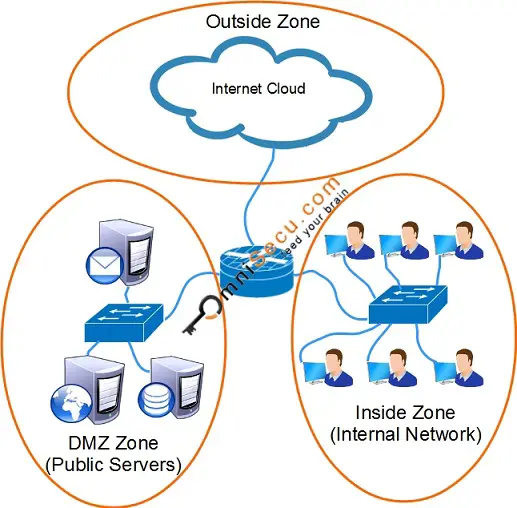
Two important terms used in Cisco IOS Zone Based Firewall terminology are Zones and Zone Pairs
zones can be created in IOS and then the router interfaces can be assigned to specific zones. Network traffic between zone interfaces is controlled by zone policy.
http://www.omnisecu.com/ccna-security/what-are-zones-and-zone-pairs.php
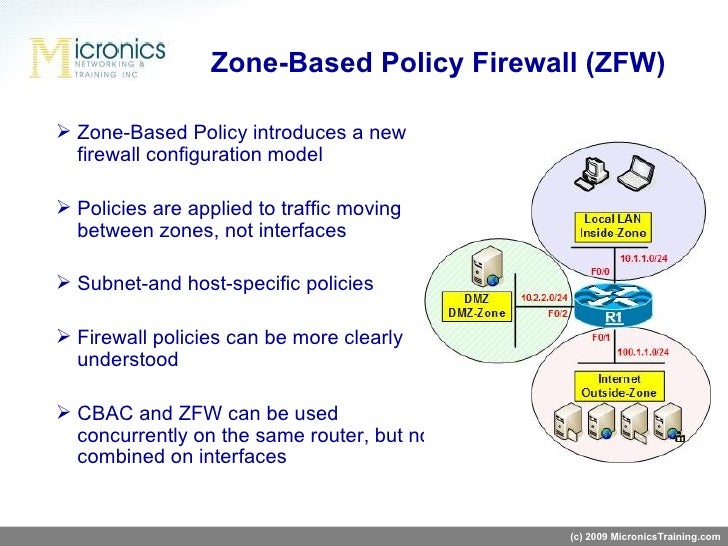

the basic config and options of Cisco IOS zone based firewall using the Topology below Grab the initial configs and GNS3
https://www.m00nie.com/2011/03/simple-zone-based-ios-firewall-gns3-lab/

Configuring the Zone-Based Firewall
A Zone-Based Firewall assigns each interface to a specific zone. The firewall zones will be used to define what traffic is allowed to flow between the interfaces. The traffic that originates in the EdgeRouter itself will also be assigned to a zone: the local zone.
https://help.ubnt.com/hc/en-us/articles/204952154-EdgeRouter-Zone-Based-Firewall

Zone Based Firewall Configuration Example
Zone Based Firewall is the most advanced method of a stateful firewall that is available on Cisco IOS routers. The idea behind ZBF is that we don’t assign access-lists to interfaces but we will create different zones. Interfaces will be assigned to the different zones and security policies will be assigned to traffic between zones.
https://networklessons.com/cisco/ccie-routing-switching/zone-based-firewall-configuration-example
- Next-Generation Intrusion
https://www.trendmicro.com/en_us/business/products/network/integrated-atp/next-gen-intrusion-prevention-system.html
- Forefront Unified Access Gateway (UAG)
https://technet.microsoft.com/en-us/library/ff358694.aspx
- Unified threat management (UTM) or unified security management (USM), is a solution in the network security industry, and since 2004 it has gained currency as a primary network gateway defense solution for organizations.
[ 1] In theory, UTM is the evolution of the traditional firewall into an all-inclusive security product able to perform multiple security functions within onesingle system: networkfirewalling , network intrusion prevention and gateway antivirus (AV), gateway anti-spam, VPN, content filtering, load balancing, data loss prevention, and on-appliance reporting.
https://en.wikipedia.org/wiki/Unified_threat_management
- First, BIG-IP AFM offers high-speed, application-aware firewall rules that allow security personnel to manage their layer 4 network. Second, BIG-IP AFM
is aware of 38 types of DDoS attacks and automatically alerts and mitigates them (organizations can further define their own DDoS scenarios). Finally, BIG-IP AFM offers, for the first time, granular visibility and logging at the application level, allowing organizationsto slowly begin to deprecate their zone abstractions and provide instrumentation directly to the individual application teams
- What is a UTM Firewall?
In the early days of network security, a firewall merely filtered traffic based on ports & IP addresses. Over time, firewalls continued to evolve by keeping track of the state of network connections passing through the appliance, which we call "stateful."
organizations deployed multiple appliances, each with differing roles to defend against different classes of attacks
A stateful packet inspection firewall allowed inbound & outbound traffic on the network
An additional web proxy filtered content & URLs while scanning with antivirus services
A separate Intrusion Prevention System (IPS) was often deployed to detect & block malicious traffic
An appliance was needed for spam filtering to filter junk emails & phishing attempts
VPN servers connected remote offices or allowed remote users to access company resources
UTM firewalls could now collocate multiple security services into one appliance, providing robust network protection against a plurality of attack types
Benefits that UTM provided
UTM firewalls protected inbound & outbound traffic from a multitude of threats & attack types
Antivirus, anti-malware, & anti-spyware services could run concurrently to prevent attacks at the gateway
Integrated Intrusion Prevention blocked the exploit of vulnerabilities
Email filtering blocked unwanted emails like spam & email-borne threats
Web sites & web content could be filtered & monitored from the same central command dashboard
Control & visibility over traffic flows improved with Quality of Service enhancements & bandwidth management
Working remotely became more convenient with the ability to connect easily to remote locations with a site-to-site VPN
Simplification of complex networks allowed for dynamic routing, policy-based routing, & multiple Internet connections on a single secure network
On to the Next Generation
The most current iteration of firewall appliances are referred to as Next Generation Firewalls, or NGFWs.
This current generation saw major improvements in the coordination & communication between the multiple services that UTM firewalls consolidated. Artificial intelligence, machine learning, & automation began to feature in these cutting-edge services, allowing for improvements in threat intelligence & response times that a human administrator alone could not reach.manufacturers heavily emphasized "Single-Pane-Of-Glass" (SPOG) management platforms in which all relevant dashboards & interfaces could be viewed & interacted with through a single portal or page, removing the need to bounce around multiple tabs while managing a network
Benefits that NGFWs provide
Real-time, automated communication between services allows for devices to be isolated & quarantined after an incident until IT can respond
Cloud-based sandboxing technology allows for the quarantine & detonation of potentially harmful files
Everything from NAT policies, content filtering, user groups, access control lists, Wi-Fi, & more can be managed through a single screen
Emphasis is placed on maintaining network performance even with multiple complex security services operating in tandem
Integrated Intrusion Prevention with deep packet scanning
Ability to identity & control hosted & cloud-based applications
https://www.firewalls.com/what_is_utm_firewall
- How does a firewall work?
It can permit or block any port number, web application, and network-layer protocols based on configuration.
Common ports:
80 HTTP
443 HTTPS
20 & 21 FTP
23 Telnet
22 SSH
25 SMTP
- What are the types of firewalls?
The National Institute of Standards and Technology (NIST), an organization from the US, divides firewalls into three basic types: Packet filters, Stateful inspection, and Proxy.
Packet filters permit or block packets based on port number, protocols source, and destination address.
Stateful inspection works on the principle of the state of active connections between client and server. It uses state information to allow or block network traffic.
Proxy firewall combines stateful inspection technology to enable deep packet inspection. Here, the firewall act as a proxy; a client makes a connection with the firewall, and then the firewall makes a separate connection to the server on behalf of the client.
- What is source-routed traffic and why is it a threat?
It allows a sender of a packet to partially or completely specify the route the packet takes through the network.
Generally, the router decides the route from destination to source.
If source-routed traffic allows through the firewall, an attacker can generate traffic claiming to be from a system "inside'' the firewall. In general, such traffic wouldn’t route to the firewall properly, but with the source routing option, all the routers between the attacker's machine and the target will return traffic along the source route's reverse path
Most commercial routers incorporate the ability to block source routing specifically, and many versions of Unix that might be used to build firewall bastion hosts have the ability to disable or to ignore source routed traffic.
Source Routed Packets
Drop Source Routed IP Packets - (Enabled by default.) Clear this checkbox if you are testing traffic between two specific hosts and you are using source routing.
IP Source Routing is a standard option in IP that allows the sender of a packet to specify some or all of the routers that should be used to get the packet to its destination.
This IP option is typically blocked from use as it can be used by an eavesdropper to receive packets by inserting an option to send packets from A to B via router C. The routing table should control the path that a packet takes, so that it is not overridden by the sender or a downstream router.
How Does Source Routing Work?
In the Internet Protocol (IPv4), there are built-in header options for a sender of a packet to force the path instead of taking the normal best possible routing implemented by every routing protocol. Specifically, the rarely used Strict Source Route (SSR) and Loose Source Route (LSR) header options are what enables source routing mechanism. In the IPv6, the header that allows for source routing is called Type o Routing (RHo).
In the IPv4, a partial or complete list of nodes on the network can be determined by using the LSR and SSR fields respectively. In this case, node address list can not be greater than 40 bytes long, that is the size maximum size of IPv4 option part of header. This allows for defining 9 routing nodes at most for IPv4 networks.
In IPv6 on the other hand, source routing is implemented in an extension header which is not limited in size. Assuming packet fragmentation is not allowed, IPv6 extension header size will be limited only by the maximum size of a packet defined by TCP MTU (Maximum Transmission Unit). In this case 90 routing nodes can be defined inside a packet where the MTU is 1500 bytes.
source routing is not considered secure and as suggested by IETF, it needs to be disabled by default on networking devices and on operating system
Attack 1: Information Gathering
Even if source routing is not allowed on a network, an attacker can send an IP packet and use the ICMP (Internet Control Message Protocol) response to get information (E.g., operating system) about the target computer or network device. For this reason, the default configuration should be to drop IP source route packets in order to prevent leaking information about the network devices and their configuration.
Attack 2: Network Topology Discovery
Source routing can be used by attackers to probe the network by forcing packets into specific parts of the network.
Attack 3: IP Spoofing
LSR can allow an attacker to spoof an address and successfully receive response packets by forcing return traffic for spoofed packets to pass through the attacker’s device. For this reason, packets marked as LSR are usually blocked on the Internet.
Attack 4: Bypass Security Measures
Attack 5: Network Congestion (DoS)
in IPv6, source routing is implemented in an extension header which is not limited in size. Depending on the the IPv6 configuration, this can allow an attacker to define 90 nodes or more to force packets to pass through on the network. This could lead an attacker with limited upload link to congest the network significantly, resulting in DoS (Denial of Service).
https://cybersophia.net/articles/what-is/what-is-source-routing/
http://dev.fyicenter.com/Interview-Questions/Computer-Security-2/What_is_source_routed_traffic_and_why_is_it_a_th.html
http://help.sonicwall.com/help/sw/eng/9510/26/2/3/content/Firewall_Advanced.070.3.htm
Saturday, October 13, 2012
Two Phase Locking
Two Phase Locking
The most commonly implemented locking mechanism is called
Two Phased Locking or 2PL
2PL is a concurrency control mechanism that ensure serializability.
2PL has two phases : Growing and shrinking.
A transaction acquires locks on data items it will need to complete the transaction.This is called the
growing phase
Once one lock is released, all no other lock may be acquired. This is called the
shrinking phase
The most common way in which access to items is controlled is by “locks.”
Lock manager is the part of a DBMS that records, for each item I, whether one or more transactions are reading or writing any part of I.
Megabytes, Gigabytes, Terabytes
Processor or Virtual Storage |
|
· 1 Bit = Binary Digit
· 8 Bits = 1 Byte · 1024 Bytes = 1 Kilobyte · 1024 Kilobytes = 1 Megabyte · 1024 Megabytes = 1 Gigabyte · 1024 Gigabytes = 1 Terabyte · 1024 Terabytes = 1 Petabyte · 1024 Petabytes = 1 Exabyte · 1024 Exabytes = 1 Zettabyte · 1024 Zettabytes = 1 Yottabyte · 1024 Yottabytes = 1 Brontobyte · 1024 Brontobytes = 1 Geopbyte http://www.whatsabyte.com/ |
Friday, October 12, 2012
What is downcasting in java?
Suppose we have the following Java code in which a downcast is being performed:
class Parent{ /* ... */}
class ChildClass extends Parent { /* ... */ }
public class Tester {
public static void main (String args[ ]) {
Parent p = new Parent ( );
/*this is a downcast since the Parent class
object, "p" is being cast to a ChildClass type,
and ChildClass derives from the Parent class */
ChildClass c = (ChildClass) p;
}
}
So, in downcasting, you are going down the inheritance diagram by taking an object of a base class (at the top), and then trying to convert into the type of one of the derived classes (going down)
ChildClass c = (ChildClass) p;
So, what happens when the code in our example above is run?
The code above will actually compile, but at runtime it will throw a Runtime Exception (a java.lang.ClassCastException).
If a Java expert would look at the code in our example up above, he or she would definitely know that the code would not work at run-time. So, why does it even compile? Well, remember that the compiler sees things differently from humans – and it thinks that the programmer knows what he is doing. But, in any case, the error is found at run time. By having the cast there (remember the cast is the “(ChildClass) p”), we are telling the compiler that we really do actually want to do this – it is not just a mistake in typing. So, the compiler trusts our judgement. But at runtime Java finds out that the object “p” is of the “ParentClass” type, and it will throw a Runtime Exception.
What if there was no type cast in the code above?
Suppose there is no type cast, and the critical line of code above is changed so that it looks like this:
ChildClass c = p;
Then this code would give a compile time error instead of a runtime error – because there is no way that an object of the Parent class can ever be downcast to an object of it’s child class.
Is downcasting ever allowed in Java, and when would it be necessary?
Yes, downcasting is allowed in Java – if it wasn’t then the code up above would always return an error at compile time, not just at run-time.
Downcasting is very useful when you need to compare one object to another. An example would help clarify – take a look at the code below:
http://www.programmerinterview.com/index.php/java-questions/downcasting-in-java/
- Downcasting
In object-oriented programming, downcasting or type refinement is the act of casting a reference of a base class to one of its derived classes.
In other words, when a variable of the base class (parent class) has a value of the derived class (child class), downcasting is possible.
For example in Java:
public class Parent{}
public class Child extends Parent(){}
public static void main(String args[]){
Parent parent = new Child(); // Parent is parent class of Child, parent variable holding value of type Child
Child child = (Child)parent; // This is possible since parent object is currently holding value of Child class
}
Most often, you will encounter a need to do downcasting when passing a value in a parameter. So, in another example, let's say we have method objectToString that takes Object which we assume the parameter myObject is String type.
public String objectToString(Object myObject){
return (String)myObject; //This will only work when the myObject currently holding value is string.
}
public static void main(String args[]){
String result = objectToString("My String"); //This will work since we passed in String, so myObject has value of String.
Object iFail = new Object();
result = objectToString(iFail); //This will fail since we passed in Object which does not have value of String.
}
The danger of downcasting in this approach is that it's not compile time check, but rather it is run time check
http://en.wikipedia.org/wiki/Downcasting
Thursday, October 11, 2012
Process Control Block
- Process Control Block
The OS must know specific information about processes in order to manage, control them and also to implement the process model, the OS maintains a table (an array of structures), called the process table, with one entry per process.
These entries are called process control blocks (PCB) - also called a task control block
http://siber.cankaya.edu.tr/ozdogan/OperatingSystems/ceng328/node87.html
- Process Control Block
A process in an operating system is represented by a data structure known as a process control block (PCB) or process descriptor. The PCB contains important information about the specific process including
The current state of the process i.e., whether it is ready, running, waiting, or whatever.
Unique identification of the process in order to track "which is which" information.
A pointer to parent process.
Similarly, a pointer to child process (if it exists).
The priority of process (a part of CPU scheduling information).
Pointers to locate memory of processes.
A register save area.
The processor it is running on.
The PCB is a certain store that allows the operating systems to locate key information about a process. Thus, the PCB is the data structure that defines a process to the operating systems.
http://www.personal.kent.edu/~rmuhamma/OpSystems/Myos/processControl.htm
Interprocess Communication in Unix
- Pipes
The only real IPC facility available in early Unices was the ``pipe.''
Pipes are creating using the pipe system call
% prog1 | prog2
When a command like this is given to the shell, the shell creates a pipe before forking prog1 and prog2.
The ``write to'' end of the pipe is connected to prog1's stdout, while the ``read from'' end of the pipe is connected to prog2's stdin.
Now, output from prog1 is fed to prog2's input.
- Named Pipes (FIFOs)
Closely related to the pipe is the ``named pipe,'' also called a FIFO. A FIFO is an IPC channel that is given a name in the file system space, using the mkfifo system call (there is also a mkfifo command that is just a wrapper around the mkfifo system call). Once a FIFO has been created processes can open it just like a file, and write to it or read from it. The only thing is, the data that is written is not actually written to a file; it's maintained in a buffer by the kernel.
Named pipes were a huge step forward, but still suffered from only being able to be used between two processes on a single system, not over a network.
- Sockets
Conceptually, internet sockets on a Unix system look like a numbered array of interprocess communication channels -- so there is a socket 0, socket 1, socket 2, and so forth. They pretty much expect to be used in a client-server relationship; a daemon wishing to provide a service creates a socket and listens to it; a client program connects to the socket and makes requests. The daemon is also able to send messages back to the client.
http://www.cs.nmsu.edu/~pfeiffer/classes/574/notes/ipc.html
Buddy memory allocation
- The Buddy System
The buddy system is a memory allocation and management algorithm that manages memory in power of two increments
A memory manager (e.g., the Linux page allocator) using the Buddy System keeps lists of free blocks that are sizes of powers of two (2, 4, 8, 16, 32, …).
Initially, when all of memory is free, all lists are empty except for the largest power of two that is less than or equal to the size of allocatable memory
When a block of size n is needed, the algorithm checks the list for the nearest power of two that is greater than or equal to n. If there is one, all is well and the block can be marked as used. If there is no free block, the algorithm gets a block from the next level, splits it into two buddies (which get recorded in the previous level of the list), and uses one of those for allocation. When that block is freed again, the buddies can be combined and brought back up to the next level in the lis
For example, suppose we're using a buddy-based page allocator and need a block of 53 contiguous pages. The closest bigger power of two is 64, so we request a 64-page chuck. Suppose that all we have is one free 512-page segment. We have an array of pointers to lists: a 512-page list, a 256-page list, etc., down to a 1-page list.
The algorithm starts off by looking looks for a 64-page segment. That list is empty, so it then attempts to get a 128-page segment that it can split into two 64-page buddies. That doesn't exist either, so we then look for a 256-page segment. We don't have it, so we then look for a 512-page segment. We have one of those and split it into two 256-page buddies. Now we back up and look for the 256-page segment that we couldn't find earlier. Now we have two of those. We grab one and split it into two 128-page buddies. We back up further and look for that 128-page segment. We have two of those now and split one into two 64-page segments. We back up further to our initial search for a 64-page segment and, lo and behold, we have one we can allocate.
http://www.cs.rutgers.edu/~pxk/416/notes/09-memory.html
- Buddy memory allocation
The buddy memory allocation technique is a memory allocation algorithm that divides memory into partitions to try to satisfy a memory request as suitably as possible
This system makes use of splitting memory into halves to try to give a best-fit
http://en.wikipedia.org/wiki/Buddy_memory_allocation
Types of I/O Devices
- Block devices
Organize data in fixed-size blocks
Transfers are in units of blocks
Blocks have addresses and data are therefore addressable
E.g. hard disks, USB disks, CD-ROMs
- Character devices
Delivers or accepts a stream of characters, no block structure
Not addressable, no seeks
Printers, network interfaces, terminals
http://www.cs.princeton.edu/courses/archive/fall08/cos318/lectures/Lec11-Devices.pdf
What is a device driver?
Software in OS to manage I/O to a device is called a device driver
A device driver abstracts specific device hardware into a generic model of I/O device
Makes it easy to port OS and applications to new hardware - device independence
Goals of the OS
Provide a generic, consistent, convenient and reliable way to access I/O devices
As device-independent as possible
http://www0.cs.ucl.ac.uk/staff/s.wilbur/1b11/1b11-5.pdf
What are some advantages and disadvantages for a Modular Kernel?
A modular kernel is an attempt to merge the good points of kernel-level drivers and third-party drivers
In a modular kernel, some part of the system core will be located in independent files called modules that can be added to the system at run time.
Advantages
The most obvious is that the kernel doesn't have to load everything at boot time; it can be expanded as needed. This can decrease boot time, as some drivers won't be loaded unless the hardware they run is used
The core kernel isn't as big
If you need a new module, you don't have to recompile.
Disadvantages
It may lose stability. If there is a module that does something bad, the kernel can crash, as modules should have full permissions.
..and therefore security is compromised. A module can do anything, so one could easily write an evil module to crash things. (Some OSs only allow modules to be loaded by the root user.)
http://wiki.osdev.org/Modular_Kernel
what is mutual exclusion ?
A way of making sure that if one process is using a shared modifiable data, the other processes will be excluded from doing the same thing.
http://www.personal.kent.edu/~rmuhamma/OpSystems/Myos/mutualExclu.htm
In computer science, mutual exclusion refers to the problem of ensuring that no two processes or threads (henceforth referred to only as processes) can be in their critical section at the same time
http://en.wikipedia.org/wiki/Mutual_exclusion
What is race condition?
A race condition is a situation in which a computer system tries to process at least two operations simultaneously,
http://www.wisegeek.com/what-is-a-race-condition.htm
a situation in which multiple processes read and write a shared data item and the final result depends on the relative timing of their execution
http://wiki.answers.com/Q/What_is_race_condition_in_operating_systems
The race condition is the situation where several processes access and manipulate shared data concurrently. The final value of the shared data depends upon which process finishes last. To prevent race conditions, concurrent processes must be synchronized.
http://www.basicsofcomputer.com/race_conditions_in_operating_system.htm
A race condition occurs when 2 or more threads are able to access shared data and they try to change it at the same time
http://stackoverflow.com/questions/34510/what-is-a-race-condition
Critical Section
Critical section
In concurrent programming, a critical section is a piece of code that accesses a shared resource (data structure or device) that must not be concurrently accessed by more than one thread of execution
http://en.wikipedia.org/wiki/Critical_section
That part of the program where the shared memory is accessed is called the Critical Section.
http://www.personal.kent.edu/~rmuhamma/OpSystems/Myos/criticalSec.htm
A section of code or collection of operations in which only one process may be executing at a given time, is called critical section.
http://www.basicsofcomputer.com/critical_section_problem_in_operating_system.htm
The fork(), exec() system call
- fork():
The fork system call does not take an argument.
When a fork() system call is made, the operating system generates a copy of the parent process which becomes the child process.
The following is a simple example of fork()
#include
#include
#include
int main(void)
{
printf("Hello \n");
fork();
printf("bye\n");
return 0;
}
Hello - is printed once by parent process
bye - is printed twice, once by the parent and once by the child
- exec*()
"The exec family of functions replaces the current process image with a new process image." (man pages)
http://www.cs.uregina.ca/Links/class-info/330/Fork/fork.html
What is the meaning of the term "busy waiting"?
What is the meaning of the term "busy waiting"?
In computer systems organization or operating systems, "busy waiting" refers to a process that keeps checking something (e.g., an I/O device) to see if it is ready so that it can proceed with the processing.
The repeated execution of a loop of code while waiting for an event to occur is called busy-waitin
http://www.coolinterview.com/interview/21017/
processes waiting on a semaphore must constantly check to see if the semaphore is not zero. This continual looping is clearly a problem in a real multiprogramming system (where often a single CPU is shared among multiple processes). This is called busy waiting and it wastes CPU cycles. When a semaphore does this, it is called a spinlock.
http://en.wikibooks.org/wiki/Operating_System_Design/Processes/Semaphores
What is process?
What is process?
In computing, a process is an instance of a computer program that is being executed.
It contains the program code and its current activity. Depending on the operating system (OS), a process may be made up of multiple threads of execution that execute instructions concurrently
Isletim Sisteminin Temel Görevleri
Isletim Sisteminin Temel Görevleri
• Islem Yönetimi (ProcessManagement)
• Bellek Yönetimi (MemoryManagement)
• Giris/Çikis Yönetimi (I/O Management)
• Dosya Yönetimi (File Management)
http://www.akaresoft.com/LINUX_AkareSoft.pdf
Process States
Process States and Their Transitions
When a process is born, its life in the system begins
During its existence a process executes, it changes states.
I. New
(The process is being created.)
II. Ready
(The process is waiting to be assigned to processors.)
A process which is ready to execute by the processor is said to be in ready state.
III. Running
(Instructions are being executed.)
IV. Waiting / Blocked State
The process is waiting for some event to occur (such as an I/O completion or reception of a signal)
V.Terminated
The process has finished execution.
http://mavieksen.blogspot.com/2012/10/process-states.html
- 1 Primary process states
1.1 Created
1.2 Ready or waiting
1.3 Running
1.4 Blocked
1.5 Terminated
https://en.wikipedia.org/wiki/Process_state
Isletim Sistemi Tarihçesi
- ILK NESIL iSLETIM SISTEMLERI (1945 – 1955)
1940 larda Howard Aiken, John von Neumann, Jpresper
Eckert ve William Mauncley VAKUM TÜPLERI kullanarak
ilk hesap yapabilen motorlar üretmislerdir.
Von Neumann architecture
The term Von Neumann architecture, also known as the Von Neumann model or the Princeton architecture, derives from a 1945 computer architecture proposal by the mathematician and early computer scientist John von Neumann and others
This describes a design architecture for an electronic digital computer with subdivisions of a processing unit consisting of an arithmetic logic unit and processor registers, a control unit containing an instruction register and program counter, a memory to store both data and instructions, external mass storage, and input and output mechanisms
http://en.wikipedia.org/wiki/Von_Neumann_architecture
The Von Neumann architecture has been incredibly successful, with most modern computers following the idea.
You will find the CPU chip of a personal computer holding a control unit and the arithmetic logic unit (along with some local memory) and the main memory is in the form of RAM sticks located on the motherboard.
But there are some basic problems with it. And because of these problems, other architectures have been developed.
http://www.teach-ict.com/as_as_computing/ocr/H447/F453/3_3_3/vonn_neuman/miniweb/pg3.htm
The Von Neumann architecture:
The Von Neumann architecture is a design model for a stored-program digital computer.
Its main characteristic is a single separate storage structure (the memory) that holds both program and data.
Some important features of the Von Neumann architecture are:
- both instructions (code) and data (variables and input/output) are stored in memory;
- memory is an collection of binary digits (bits) that have been organized into bytes, words, and regions with addresses;
- the code instructions and all data have memory addresses;
- to execute each instruction, it has to be moved to registers;
- only the registers have the “smarts” to do anything with the instructions; memory locations have no “smarts”;
- to save a result computed in the registers, it has to be moved back to memory;
- the granularity of instructions at the machine or assembler level is much smaller than the granularity at the MATLAB programming language level; that is, each MATLAB instruction corresponds to many machine instructions;
- operating systems and compilers keep the instructions and data in memory organized so it doesn't get mixed up together;
- if a program execution goes past its legal last instruction (for example) it can overwrite other instructions/data in memory and cause strange things to happen;
- one of the advantages of modern operating systems and compilers is the concept of relocatable code — that is, code that can be loaded and run from any location in memory.
http://last3.in/2010-11/CSE101/lectures/10-von-neumann-notes.html
- IKINCI NESIL, TRANSISTÖRLER VE TOPLU IS(BATCH) SISTEMLERI
Bu makineler müsterilere satilabilecek hale ve
güvenilirlige gelmislerdi. Çok pahali oldugu için büyük
kurumlar, devletler ya da üniversiteler alabiliyordu.
Bir is yaptirmak için program FORTRAN ya da
ASSEMBLER ile bir kagida yazilir. Sonra bu program
delikli kartlara aktarilir. Bu kartlar sirasiyla makinelerde
isletilirdi.
- ÜÇÜNCÜ NESIL (1965-1980) ENTEGRE DEVRELER VE ÇOKLU PROGRAMLAMA (Multi Programming)
Eskiden bir is çalisirken I/O nedeniyle beklediginde baska
bir is çalismazdi. OS/360 ile bellek birden fazla parçaya
ayrilmis ve her parçada baska isin çalismasi saglanmistir.
Bir isin çalismasi I/O için askiya alindiginda, bellekteki
baska bir ise geçilirdi.
Diger yeniligi kartlardaki programlari diske okumasi ve
programlari diskten yüklemesidir
- DÖRDÜNCÜ NESIL (1980-1990) KISISEL BILGISAYARLAR
LSI(Large Scale Integration) büyük ölçekli entegre
devrelerin gelistirilmesi ile (1 cm slikon üzerinde yüzlerce
transistör vardir) kisisel bilgisayarlar üretilmistir
http://members.comu.edu.tr/msahin/courses/isletim_sistemi_giris/ders02.pdf
- An operating system (OS) is system software that manages computer hardware, software resources, and provides common services for computer programs.
https://en.wikipedia.org/wiki/Operating_system
- An operating system is a program that acts as an interface between the user and the computer hardware and controls the execution of all kinds of programs.
Following are some of important functions of an operating System.
Memory Management
Processor Management
Device Management
File Management
Security
Control over system performance
Job accounting
Error detecting aids
Coordination between other software and users
https://www.tutorialspoint.com/operating_system/os_overview.htm
- An operating system is a set of programs that lies between applications software and the computer hardware. Conceptually the operating system software is an intermediary between the hardware and the applications software.
An operating system has three main functions: (1) manage the computer's resources, such as the central processing unit, memory, disk drives, and printers, (2) establish a user interface, and (3) execute and provide services for applications software.
https://homepage.cs.uri.edu/faculty/wolfe/book/Readings/Reading07.htm
- Computer = HW + OS + Apps + Users
OS serves as interface between HW and ( Apps & Users )
OS provides services for Apps & Users
OS manages resources ( Government model, it doesn't produce anything. )
https://www2.cs.uic.edu/~jbell/CourseNotes/OperatingSystems/1_Introduction.html
Isletim Sistemi Türleri
* Mainframe (Ana Çati) sistemleri
* Sunucu(Server) isletim sistemleri
* Çok islemcili isletim sistemleri
* Kisisel bilgisayar isletim sistemleri
* Gerçek Zamanli(real-time) isletim sistemleri
*Gömülü(embedded) isletim sistemleri
*Akilli-kart(smart card) isletim sistemler
Anaçati(Mainframe) Isletim
Sistemleri
*Yogun I/O islemi gerektiren çok sayida görev
çalistirmaya yönelik sistemler için kullanilir:
Hizmetleri:
1. toplu is(batch) kipinde çalisma. Örnegin, ayni anda tüm
kullanicilarin belirli hesaplarini güncelleme gibi.
2.birim-is[hareket] (transaction) isleme. Örnegin,
rezervasyon islemleri gibi.
3.zaman paylasimli çalisma. Örnegin, veritabani
sorgulama
Sunucu Isletim Sistemleri
Sunucular üzerinde çalisirlar.
- sunucularin kaynak kapasiteleri yüksektir.
- bagli is istasyonlari vardir.
-anaçati sistemler bulunur.
Çok Islemcili Isletim Sistemleri
-Birden fazla islemcili bilgisayar sistemlerinde kullanilir.
-islem gücünün arttirilmasi hedeflenmektedir.
-Islemcilerin baglanma sekillerine göre sistemler
gruplanirlar:
*paralel sistemler
*grid sistemler
*çok islemcili sistemler
Kisisel Bilgisayar Isletim Sistemleri
-Kullaniciya etkin ve kolay kullanilabilri bir arayüz
sunmak
Gerçek Zamanli Isletim Sistemleri
Endüstriyel kontrol sistemlerinde kullanilirlar.
Zaman kisitlamasi çok önemlidir.
Örnek:VxWorks , QNX
Gömülü(Embedded) Isletim Sistemleri
avuç-içi bilgisayarlar ve gömülü sistemlere yönelik
tasarlanmistir.
kisitli ve özel amaçli islevler içerir.
TV, mikrodalga firin, çamasir makinesi, cep telefonlari için
gelistirilmis sistemler.
PalmOS , WindowsCE, Symbian OS
Akilli Kart(Smart Card)Isletim Sistemleri
-En küçük isletim sistemi türüdür.
-Kredi karti boyutunda üzerinde islemci olan kartlarda
çalisir.
-Islemci ve bellek kisitlamalari çok önemlidir.
-bazi isletim sistemleri Java tabanlidir.JVM içerir ve Java
programlari çalistirabilirler.
Örn:MULTOS, Windows Embedded CE,SmartecOS
http://members.comu.edu.tr/msahin/courses/isletim_sistemi_giris/ders02.pdf
TEMEL ISLETIM SISTEMI YAPILARI
TEMEL ISLETIM SISTEMI YAPILARI
1.Tek Parça (monolitik) Sistemler
2.Katmanli(Layered) Sistemler
3.Sanal Makineler(Virtual Machines)
4.Dis-çekirdek(exo-kernel) Sistemler
5.Sunucu-Istemci Modeli (server-client)
Tek Parça(Monolitik) Sistemler
Isletim sistemi büyük bir prosedür toplulugudur.
Tüm yapilabilecek isler isletim sisteminin içinde yer alir.
Islevleri yerine getiren tüm prosedürler ayni seviyede yer
alir ve birbirleri ile etkilesim yapabilirler.
Çekirdek yapisi büyüktür.
Katmanli(Layered) Sistemler
Katmanlardan meydana gelir.
Her katman alttakinin
islevlerinden olusturulur.
Sanal Makineler (Virtual Machines)
Amaç çoklu programlama ortami ile tamamen donanima
bagimli olan kismi birbirinden ayirmaktir.
-Birden fazla sanal makineyi bir üst katmanda çalistirir.
Bu makineler asil sistemin herseyiyle birebir kopyasidir.
-Her sanal makine farkli Isletim Sistemi çalistirabilir.
Dis Çekirdekler(Exo-Kernels)
Sanal makine gibi çalisir
Her kullaniciya bilgisayarin gerçek kopyasi verilir.
Her sanal makineye kaynaklarin belirli bir alt kümesi
verilir. Her sanal makinenin kullanabilecegi kaynak
araliklari belirlidir.
En alt katmanda bir dis çekirdek(exo-kernel) çalisir ve
kaynaklarin düzenli ve dogru sekilde dagitilmasini ve
kullanilmasini kontrol eder.
-Her sanal makine farkli isletim sistemi olabilir
Sunucu-Istemci Modeli
Çekirdek kipinde çalisan mikro çekirdek(mikro kernel)
vardir. Bu çekirdek en küçük sayidaki hizmete sahip
Isletim sisteminin çok büyük görev yogunlugu kullanici
kipinde(user mode) çalisan programlarda gerçeklesir
http://members.comu.edu.tr/msahin/courses/isletim_sistemi_giris/ders02.pdf
Subscribe to:
Posts (Atom)