When we asked Far where short links go when they die, he pointed to 301works.org . 301works is an Internet Archives initiative created to preserve short URL links in the event of a shutdown. If a short URL company faces closure 301works takes control of shortening domain services and ensures that links remain intact. While the technical side of the program has not been completely laid out, a number of companies have agreed to show the 301works seal including Bit.ly, Cligs, Twurl, Awe.sm and AppsFire. To apply check out 301works.org here.
URL is expired by the shortener service: This may be intentional, and desired by the short link creator. Sometimes, the creator wants the links to expire after a certain time. At other times it might be a consequence of the URL shortener's policy: they may expire links for non-paying customers, etc.
Shortner service shuts down for economic reasons: Some times the entity operating the URL shortener shuts down or goes of of business. Many people believe that using the URL shortener of a large company like Google's goo.gl shortener will avoid this problem. But as the shutdown of Google Reader showed, even a much loved, popular service, from a big company, is not immune to shutdown, especially if the economics don't work out. And investments by venture capitalists to the contrary, the economics of URL shortening are quite fickle.
Top-level domain(TLD) issues: At other times the URL shortener's domain registrar withdraws their registration or some other force majure event occurs with the TLD. Many URL shorteners have exotic top-level domains, like bit.ly (.ly is the top level domain for Libya.) is.gd (.gd is the top level domain for Grenada.) This keeps the URL base short. Unfortunately, unlike well known top-level domains like .com, .org, or .edu, less well known TLDs, and country specific TLDs suffer from regulatory instability. In bit.ly's case there was a concern that the Libyan government at the time, which contolled the .ly domaian, would revoke the company's domain registration. With is.gd, there is an ongoing dispute over the registrar for the domain (as of the time of this article's writing.)
http://vepa.in/technology/the-trouble-with-url-shorteners
With services like Domainr and IWantMyName, you can easily get a custom domain to use with link shorteners. Here at CoSchedule we bought cos.sc as our custom domain, and integrated it with Bit.ly. When we shorten a link, it appears like so:
FictionBook is an open XML-based e-book format which originated and gained popularity in Russia. FictionBook files have the .fb2 filename extension.The FictionBook format does not specify the appearance of a document; instead, it describes its structure. For example, there are special tags for epigraphs, verses and quotations. All ebook metadata, such as author name, title, and publisher, is also present in the ebook file. This makes the format convenient for automatic processing, indexing, and ebook collection management, and allows automatic conversion into other formats.
Windows To Go is a portable Windows installation on USB media (thumb drives, disc drives). Microsoft has introduced this feature in Windows 8 Enterprise for business users (admins, maintenance people or mobile users). Windows To Go enables users to carry their own Windows environment and boot it on several computers.
Due to license issues Windows To Go is officially restricted on Enterprise version of Windows 8, 8.1 and Windows 10.
http://borncity.com/win/2015/02/09/create-windows-to-go-from-any-windows-88-110-with-rufus/
Running Windows 8 from an External USB drive with Windows To Go
https://www.youtube.com/watch?v=1WAAZ76cSEw
How to create Windows to Go flash drive | Win 8, 8.1
S3 Browser is a freeware Windows client for Amazon S3 and Amazon CloudFront. Amazon S3 provides a simple web services interface that can be used to store and retrieve any amount of data, at any time, from anywhere on the web. Amazon CloudFront is a content delivery network (CDN). It can be used to deliver your files using a global network of edge locations.
http://s3browser.com
Binary coded decimal (BCD) requires a minimum of 4 bits to represent all possible digits from 0 to 9. There are ten possible configurations for a BCD with the following corresponding Gray codes, which also require a minimum of 4 bits:
https://www.answers.com/Q/How_do_you_convert_bcd_into_Gray_code
How To Boot From Live USB in VMware Player/VirtualBox - Ubuntu/Linux Mint
a way for making VirtualBox or VMware Player boot from live USB devices since this feature hasn't been implemented yet natively in both software. The trick we will use will rely on the Plop boot manager which allows via a live iso to boot from USB devices.
http://www.upubuntu.com/2012/11/how-to-boot-from-live-usb-in-vmware.html
Microsoft itself also offers a manager tool called Remote Desktop Connection Manager 2.7 (RDCMan) that helps you manage multiple remote desktop connections. It’s similar to Windows Servers’ built-in MMC Remote Desktop Snap-in but more flexible.
https://www.microsoft.com/en-us/download/details.aspx?id=44989
The Data Distribution Service for Real-Time Systems (DDS) is an Object Management Group (OMG) machine-to-machine middleware "m2m" standard that aims to enable scalable, real-time, dependable, high-performance and interoperable data exchanges between publishers and subscribers. DDS addresses the needs of applications like financial trading, air-traffic control, smart grid management, and other big data applications.
OpenDDS is an open source C++ implementation of the Object Management Group (OMG) Data Distribution Service (DDS). Java applications can use OpenDDS through JNI bindings. OpenDDS is supported by OCI and the source code is hosted on GitHub.
We present empirical evidence to demonstrate that there is
little or no difference between the Java Virtual Machine and
the .NET Common Language Runtime, as regards the compilation
and execution of object-oriented programs
The JVM . . .
• is stack-based
• is secure—type safety is guaranteed by preventing explicit
pointer manipulation
• has automatic memory management (garbage collection)
• is object-oriented, with primitive instructions for creating
objects, accessing object members
https://www.cs.utah.edu/~asbill/jsinger.pdf
Application virtualization software refers to both application virtual machines and software responsible for implementing them. Application virtual machines are typically used to allow application bytecode to run portably on many different computer architectures and operating systems. The application is usually run on the computer using an interpreter or just-in-time compilation (JIT).
OData, short for Open Data Protocol, defines a protocol for the querying and updating of data utilizing existing Web protocols. OData is a REST-based protocol for querying and updating data and is built on standardized technologies such as HTTP, Atom/XML, and JSON. It is different from other REST-based web services in that it provides a uniform way to describe both the data and the data model.
It is considered to be a flexible technology for enabling interoperability between disparate data sources, applications, services and clients
http://www.webopedia.com/TERM/O/odata-open-data-protocol.html
OData - the best way to REST
An open protocol to allow the creation and consumption of queryable and interoperable RESTful APIs in a simple and standard way.
http://www.odata.org
In computing, Open Data Protocol (OData) is an open protocol which allows the creation and consumption of queryable and interoperable RESTful APIs in a simple and standard way.
https://en.wikipedia.org/wiki/Open_Data_Protocol
The purpose of the Open Data protocol (hereafter referred to as OData) is to provide a REST-based protocol for CRUD-style operations (Create, Read, Update and Delete) against resources exposed as data services. A “data service” is an endpoint where there is data exposed from one or more “collections” each with zero or more “entries”, which consist of typed named-value pairs. OData is published by Microsoft under OASIS (Organization for the Advancement of Structured Information Standards) Standards so that anyone that wants to can build servers, clients or tools without royalties or restrictions.
server specialization and flexibility of the network is on the increase – and this means different workloads can be directed to the most appropriate hardware. Some applications require more compute, while others need more memory bandwidth or storage I/O. Some would benefit from Digital Signal Processing (DSP) functionality, while others would prefer a Field-Programmable Gate Array (FPGA)
The future of data center compute is in Systems-on-a-Chip (SoCs) customized for different workloads
Examples of existing ARM chips bound for the data center include the X-Gene SoC from Applied Micro, AMD’s Opteron A1100 (codenamed ‘Seattle’), and Cavium’s ThunderX.
What is a CPU?
it is ultimately a very fast calculator. It fetches data from memory, and then performs some kind of arithmetic (add, multiply) or logical (and, or, not) operation on that data.
What is an SoC?
An SoC, or system-on-a-chip to give its full name, integrates almost all of these components into a single silicon chip. Along with a CPU, an SoC usually contains a GPU (a graphics processor), memory, USB controller, power management circuits, and wireless radios (WiFi, 3G, 4G LTE, and so on). Whereas a CPU cannot function without dozens of other chips, it’s possible to build complete computers with just a single SoC.
The difference between an SoC and CPU
The number one advantage of an SoC is its size: An SoC is only a little bit larger than a CPU, and yet it contains a lot more functionality
Due to its very high level of integration and much shorter wiring, an SoC also uses considerably less power
Cutting down on the number of physical chips means that it’s much cheaper to build a computer using an SoC
The only real disadvantage of an SoC is a complete lack of flexibility. With your PC, you can put in a new CPU, GPU, or RAM at any time — you cannot do the same for your smartphone
http://www.extremetech.com/computing/126235-soc-vs-cpu-the-battle-for-the-future-of-computing
In hardware design, there are two approaches to solving the vast computing needs of a site like Facebook. There's the approach of “scale up” — building ever-increasing amounts of computing power in a given system. Or you can “scale out,” building an ever-increasing fleet of simple systems, each with a moderate amount of computing power.
As we continued to evolve our infrastructure, we realized 2S was the wrong tool for some of our needs. To provide our infrastructure with capacity that scales out with the demand, we designed a modular chassis that contains high-powered system-on-a-chip (SoC) processor cards, code-named “Yosemite.
https://code.facebook.com/posts/1616052405274961/introducing-yosemite-the-first-open-source-modular-chassis-for-high-powered-microservers-/
FPGAs provide a unique combination of highly parallel custom computation, relatively low manufacturing/engineering costs, and low power requirements.
FPGAs can be applied to assist a wide variety of enterprise applications.
Offloading Communication Protocol Processing
Encryption
Spam Filtering
Quantifying Speedup and Characterizing FPGA-Appropriate Applications
Offloading Communication Protocol Processing
Any time that information is transferred from one processor to another, some communication is necessary. If this communication does not go through shared memory, it requires the serialization and deserialization of various data structures and objects. This translation overhead may be significant when considering the performance of large distributed or networked systems. In this case study, we look at how we can offload object marshaling for Remote Procedure Calls (RPCs) to an FPGA.
Encryption
As networked systems and services gain popularity, the security and computational overhead of encrypted communication becomes more important. Reconfigurable computing platforms seem to be ideal for accelerating encryption due to their adaptability and highly parallel execution model
Spam Filtering
Regular expressions are used by many e-mail systems to filter for spam. These systems may match against tens to hundreds of thousands of regular expressions. While this highly parallel problem can be mapped to FPGAs quite effectively, the conventional FPGA design methodology and execution model presents several practical problems for developers trying to create
research.microsoft.com/en-us/projects/fpga_apps/
A set of FPGAs built onto a datacenter server rack could function as a GPU to boost the performance of one workload and get a software update that turns half into CPUs and the other half into image- or video-processing specialists – without requiring users to buy new hardware or even switch servers in between workloads.
In one example of FPGA-boosted datacenters, Microsoft was able to boost the throughput of servers running its Bing search engine by 95 percent at a cost of an additional 10 percent per server and 30 percent overall, according to a Microsoft report published in June 2014.
https://goparallel.sourceforge.net/intel-creates-xeon-fpga-powerhouse-with-16-7b-altera-buy
A field-programmable gate array (FPGA) is an integrated circuit designed to be configured by a customer or a designer after manufacturing – hence "field-programmable".
The CISC Approach
the entire task of multiplying two numbers can be completed with one instruction:
MULT is what is known as a "complex instruction." It operates directly on the computer's memory banks and does not require the programmer to explicitly call any loading or storing functions. It closely resembles a command in a higher level language. For instance, if we let "a" represent the value of 2:3 and "b" represent the value of 5:2, then this command is identical to the C statement "a = a * b."
One of the primary advantages of this system is that the compiler has to do very little work to translate a high-level language statement into assembly. Because the length of the code is relatively short, very little RAM is required to store instructions. The emphasis is put on building complex instructions directly into the hardware.
The RISC Approach
RISC processors only use simple instructions that can be executed within one clock cycle. Thus, the "MULT" command described above could be divided into three separate commands: "LOAD," which moves data from the memory bank to a register, "PROD," which finds the product of two operands located within the registers, and "STORE," which moves data from a register to the memory banks. In order to perform the exact series of steps described in the CISC approach, a programmer would need to code four lines of assembly:
there are more lines of code, more RAM is needed to store the assembly level instructions. The compiler must also perform more work to convert a high-level language statement into code of this form
An ARM processor is one of a family of CPUs based on the RISC (reduced instruction set computer) architecture developed by Advanced RISC Machines (ARM).
ARM is a family of instruction set architectures for computer processors developed by British company ARM Holdings, based on a reduced instruction set computing (RISC) architecture.
http://en.wikipedia.org/wiki/ARM_architecture
An ARM processor is one of a family of CPUs based on the RISC (reduced instruction set computer) architecture developed by Advanced RISC Machines (ARM).
ARM makes 32-bit and 64-bit RISC multi-core processors. RISC processors are designed to perform a smaller number of types of computer instructions so that they can operate at a higher speed, performing more millions of instructions per second (MIPS).
http://whatis.techtarget.com/definition/ARM-processor
OpenCL(Open Computing Language) is the open, royalty-free standard for cross-platform, parallel programming of diverse processors found in personal computers, servers, mobile devices and embedded platforms.
https://www.khronos.org/opencl/
Open Computing Language (OpenCL) is a framework for writing programs that execute across heterogeneous platforms consisting of central processing units (CPUs), graphics processing units (GPUs), digital signal processors (DSPs), field-programmable gate arrays (FPGAs) and other processors or hardware accelerators.
Determines whether the automatic logon feature is enabled. Automatic logon uses the domain, user name, and password stored in the registry to log users on to the computer when the system starts. The Log On to Windows dialog box is not displayed. https://technet.microsoft.com/en-us/library/cc939702.aspx
The Linux Essentials Professional Development Certificate validates a demonstrated understanding of:
FOSS, the various communities, and licenses knowledge of open source applications in the workplace as they relate to closed source equivalents basic concepts of hardware, processes, programs and the components of the Linux Operating System how to work on the command line and with files how to create and restore compressed backups and archives system security, users/groups and file permissions for public and private directories how to create and run simple scripts https://www.lpi.org/certification/linux-essentials/
LPIC-1: Linux Server Professional Certification
Work at the Linux command line Perform easy maintenance tasks: help users, add users to a larger system, backup and restore, shutdown and reboot Install and configure a workstation (including X) and connect it to a LAN, or a standalone PC to the Internet https://www.lpi.org/certification/get-certified-lpi/lpic-1-linux-server-professional/
Administer a small to medium-sized site
Plan, implement, maintain, keep consistent, secure, and troubleshoot a small mixed (MS, Linux) network, including a: LAN server (Samba, NFS, DNS, DHCP, client management) Internet Gateway (firewall, VPN, SSH, web cache/proxy, mail) Internet Server (web server and reverse proxy, FTP server) Supervise assistants Advise management on automation and purchases
The cross-functional team is a group of people who collectively represent the entire organization’s interests in a specific product or product family. This team provides benefits for the individuals on the team, the product and its customers, and the organization at large.
Search domain means the domain that will be automatically appended when you only use the hostname for a particular host or computer. This is basically used in a local network.
Lets say you have a domain name like xyz.com (it may be available globally or may be local only) and you have 100 computers in the LAN.
Now you want this domain name to be automatically appended when you look for any computer by just hostname of the computer
Your private path to access network resources and services securely
https://openvpn.net/
Linux Notes (without RPM)
If you are using Debian, Gentoo, or a non-RPM-based Linux distribution, use your distro-specific packaging mechanism such as apt-get on Debian or emerge on Gentoo.
It is also possible to install OpenVPN on Linux using the universal ./configure method. First expand the .tar.gz file:
tar xfzopenvpn-[version].tar.gz
Then cd to the top-level directory and type:
./configure
make
make install
OpenVPN is a full-featured SSL VPN which implements OSI layer 2 or 3 secure network extension using the industry standard SSL/TLS protocol, supports flexible client authentication methods based on certificates, smart cards, and/or username/password credentials, and allows user or group-specific access control policies using firewall rules applied to the VPN virtual interface. OpenVPN is not a web application proxy and does not operate through a web browser.
Open source Network access control that provide secure access for LAN/WAN. Allows to apply flexible access policies based on rules.
http://www.opennac.org/opennac/en.html
FreeNAC provides Virtual LAN assignment, LAN access control (for all kinds of network devices such as Servers, Workstations, Printers, IP-Phones ..), live network end-device discovery
PacketFence is a fully supported, trusted, Free and Open Source network access control (NAC) solution. Boasting an impressive feature set including a captive-portal for registration and remediation, centralized wired and wireless management, powerful BYOD management options, 802.1X support, layer-2 isolation of problematic devices
http://packetfence.org/
What is Packetfence? Simply put, it's a Network Access Control (NAC) solution. In other words, if you want to control what devices are allowed on your network, you should consider a NAC.
Captive-portal for registration and remediation
Centralized wired and wireless management
802.1X support
Layer-2 isolation of problematic devices
Integration with the Snort IDS and the Nessus vulnerability scanner
https://www.techrepublic.com/article/how-to-install-packetfence-on-centos-7/
PacketFence reuses many components in an infrastructure. Nonetheless, it will install the following ones and manage them itself:
database server (MariaDB)
web server (Apache)
DHCP server (PacketFence)
RADIUS server (FreeRADIUS)
firewall (iptables)
3.2. Minimum Hardware Requirements
The following provides a list of the minimum server hardware recommendations:
Intel or AMD CPU 3 GHz, 2 CPU cores
12 GB of RAM (16 GB recommended)
100 GB of disk space (RAID-1 recommended)
1 network card (2 recommended)
3.3. Operating System Requirements
PacketFence supports the following operating systems on the x86_64 architecture:
Red Hat Enterprise Linux 7.x Server
Community ENTerprise Operating System (CentOS) 7.x
Debian 9.0 (Stretch)
Captive portal: Can be used to require users to login before using the network or to present instructions to a user on a web page, blocking all other network traffic, when a problem is detected.
Malware detection and alerting: Along with internal features, PacketFence can work with remote sensors like from Snort.
Vulnerability scans with Nessus: Can use the external Nessus program to periodically run vulnerability scans.
Isolation of problematic devices: One of the several isolation techniques PacketFence support is VLAN isolation (with VoIP support), where problematic clients would be moved to a designated VLAN. Switches from many vendors are supported.
DHCP fingerprinting: Used to automatically allow or disallow specific device types (such as VoIP phones or Wi-Fi equipped game systems).
http://www.practicallynetworked.com/security/packet_fence_tutorial.htm
What is geo-fencing?
Geo-fencing enables software administrators to define geographical boundaries. They draw a shape around the perimeter of a building or area where they want to enforce a virtual barrier. It is really that easy. The administrator decides who can access what within that barrier, based on GPS coordinates.differentiate between geo-location and geo-fencing. Because geo-location uses your IP it can be easily spoofed or fooled and is not geographically accurate. However, geo-fencing is based on GPS coordinates from satellites tracking latitude and longitude.
https://blog.microfocus.com/research/geo-fencing-securing-authentication/4275/
Network Policy Server (NPS)
NPS is installed when you install the Network Policy and Access Services (NPAS) feature in Windows Server 2016 and Server 2019.
Network Policy Server (NPS) allows you to create and enforce organization-wide network access policies for connection request authentication and authorization.
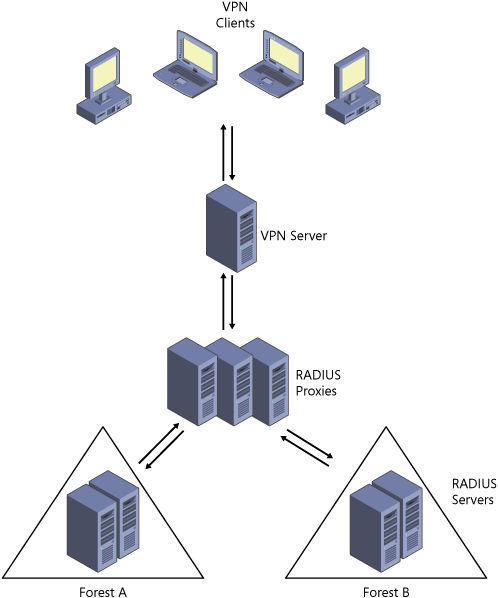
You can also configure NPS as a Remote Authentication Dial-In User Service (RADIUS) proxy to forward connection requests to a remote NPS or other RADIUS server so that you can load balance connection requests and forward them to the correct domain for authentication and authorization.
RADIUS server
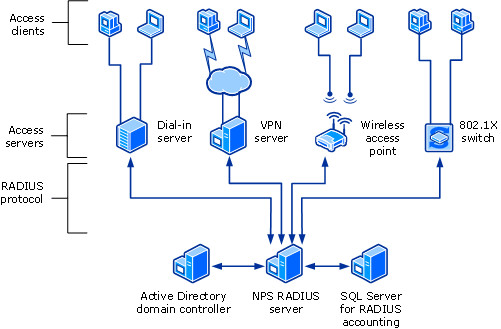
NPS performs centralized authentication, authorization, and accounting for wireless, authenticating switch, remote access dial-up and virtual private network (VPN)
connections
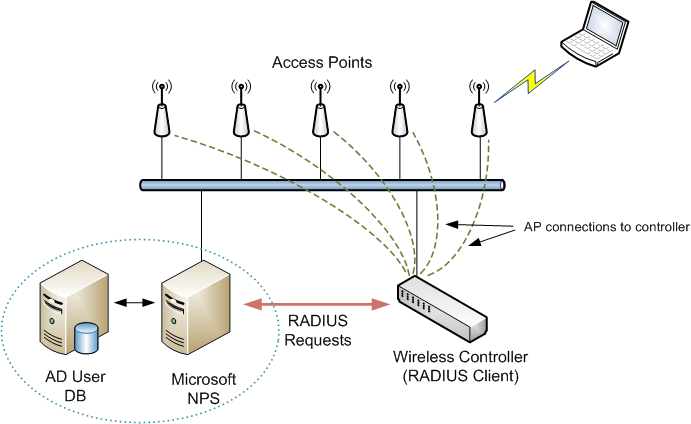
When you use NPS as a RADIUS server, you configure network access servers, such as wireless access points and VPN servers, as RADIUS clients in NPS.
You also configure network policies that NPS uses to authorize connection requests, and you can configure RADIUS accounting so that NPS logs accounting information to log files on the local hard disk or in a Microsoft SQL Server database
RADIUS proxy
RADIUS proxy. When you use NPS as a RADIUS proxy, you configure connection request policies that tell the NPS which connection requests to forward to other RADIUS servers and to which RADIUS servers you want to forward connection requests. You can also configure NPS to forward accounting data to be logged by one or more computers in a remote RADIUS server group
RADIUS accounting. You can configure NPS to log events to a local log file or to a local or remote instance of Microsoft SQL Server.
You can configure NPS with any combination of these features. For example, you can configure one NPS as a RADIUS server for VPN connections
and also as a RADIUS proxy to forward some connection requests to members of a remote RADIUS server group for authentication and authorization in another domain.
You can use NPS as a RADIUS server when:
You are using an AD DS domain or the local SAM user accounts database as your user account database for access clients.
You are using Remote Access on multiple dial-up servers, VPN servers, or demand-dial routers and you want to centralize both the configuration of network policies and connection logging and accounting.
You are outsourcing your dial-up, VPN, or wireless access to a service provider. The access servers use RADIUS to authenticate and authorize connections that are made by members of your organization.
You want to centralize authentication, authorization, and accounting for a heterogeneous set of access servers.
RADIUS server and RADIUS proxy configuration examples
NPS as a RADIUS server. In this example, NPS is configured as a RADIUS server, the default connection request policy is the only configured policy, and all connection requests are processed by the local NPS. The NPS can authenticate and authorize users whose accounts are in the domain of the NPS and in trusted domains.
NPS as a RADIUS proxy. In this example, the NPS is configured as a RADIUS proxy that forwards connection requests to remote RADIUS server groups in two untrusted domains.
NPS as both RADIUS server and RADIUS proxy. In addition to the default connection request policy, which designates that connection requests are processed locally, a new connection request policy is created that forwards connection requests to an NPS or other RADIUS server in an untrusted domain. This second policy is named the Proxy policy. In this example, the Proxy policy appears first in the ordered list of policies. If the connection request matches the Proxy policy, the connection request is forwarded to the RADIUS server in the remote RADIUS server group. If the connection request does not match the Proxy policy but does match the default connection request policy, NPS processes the connection request on the local server. If the connection request does not match either policy, it is discarded.
NPS as a RADIUS server with remote accounting servers. In this example, the local NPS is not configured to perform accounting and the default connection request policy is revised so that RADIUS accounting messages are forwarded to an NPS or other RADIUS server in a remote RADIUS server group. Although accounting messages are forwarded, authentication and authorization messages are not forwarded, and the local NPS performs these functions for the local domain and all trusted domains.
NPS with remote RADIUS to Windows user mapping. In this example, NPS acts as both a RADIUS server and as a RADIUS proxy for each individual connection request by forwarding the authentication request to a remote RADIUS server while using a local Windows user account for authorization. This configuration is implemented by configuring the Remote RADIUS to Windows User Mapping attribute as a condition of the connection request policy. (In addition, a user account must be created locally on the RADIUS server that has the same name as the remote user account against which authentication is performed by the remote RADIUS server.)
NPS logging is also called RADIUS accounting. Configure NPS logging to your requirements whether NPS is used as a RADIUS server, proxy, or any combination of these configurations.
Remote Authentication Dial-In User Service (RADIUS) is a networking protocol that provides centralized authentication, authorization, and accounting (AAA) management for users who connect and use a network service.
RADIUS is a client/server protocol that runs in the application layer, and can use either TCP or UDP. Network access servers, which control access to a network, usually contain a RADIUS client component that communicates with the RADIUS server
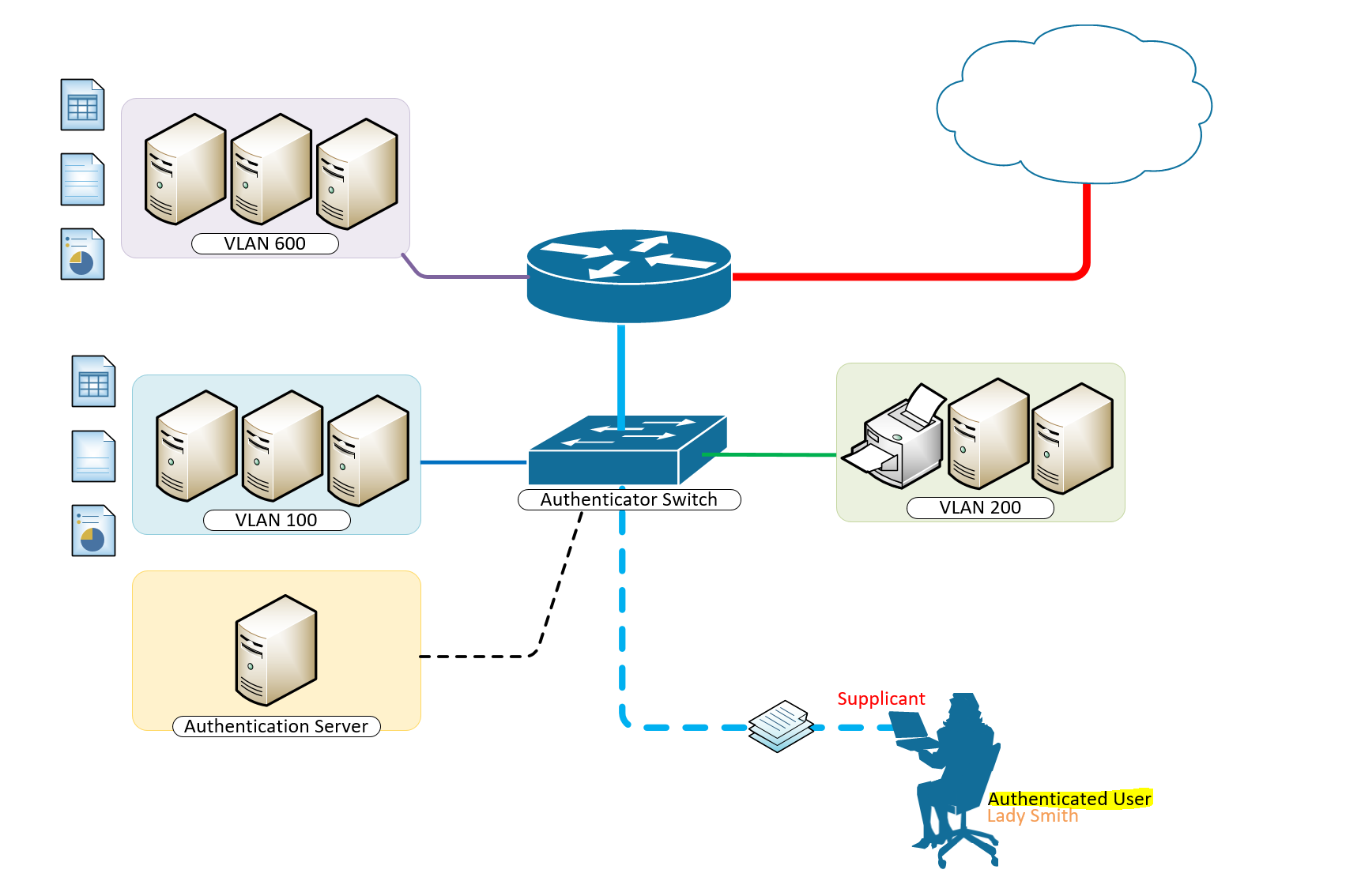
RADIUS is often the back-end of choice for 802.1X authentication
Authentication and authorization
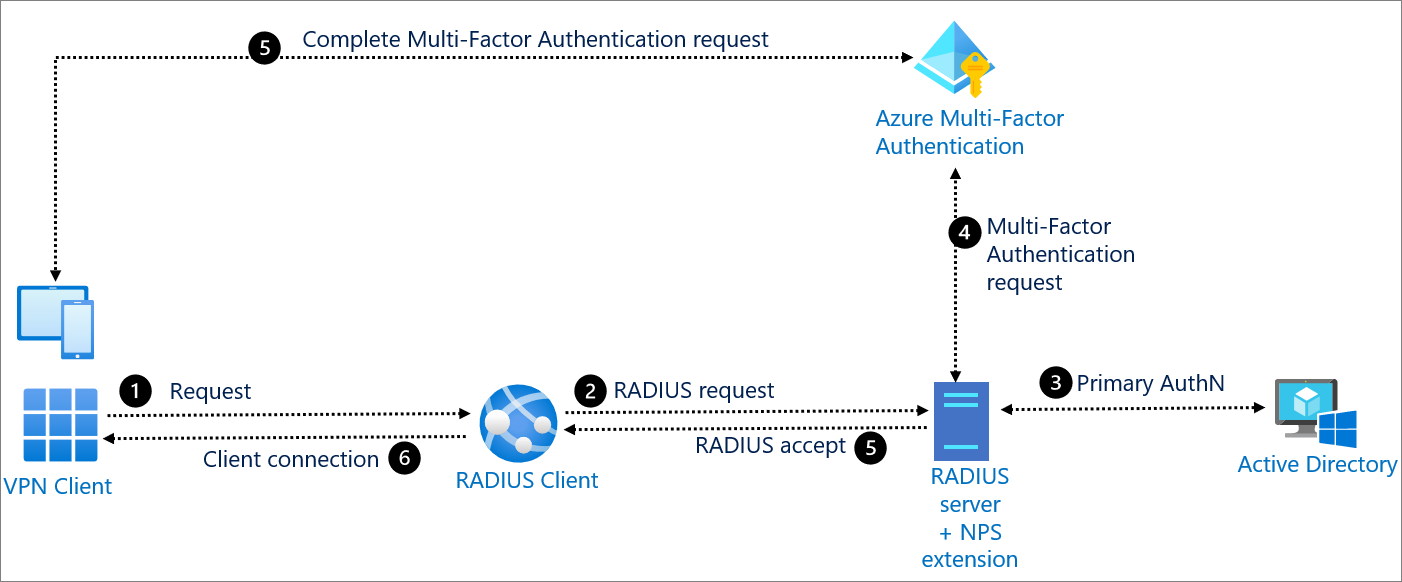
The user or machine sends a request to a Network Access Server (NAS) to gain access to a particular network resource using access credentials.
The credentials are passed to the NAS device via the link-layer protocol;for example, Point-to-Point Protocol (PPP) in the case of many dialup or DSL providers or posted in an HTTPS secure web form.
In turn, the NAS sends a RADIUS Access Request message to the RADIUS server, requesting authorization to grant access via the RADIUS protocol.
This request includes access credentials, typically in the form of username and password or security certificate provided by the user.
Additionally, the request may contain other information which the NAS knows about the user, such as its network address or phone number, and information regarding the user's physical point of attachment to the NAS.
The RADIUS server checks that the information is correct using authentication schemes such as PAP, CHAP or EAP.
The user's proof of identification is verified, along with, optionally, other information related to the request, such as the user's network address or phone number, account status, and specific network service access privileges
RADIUS servers checked the user's information against a locally stored flat file database. Modern RADIUS servers can do this, or can refer to external sources—commonly SQL, Kerberos, LDAP, or Active Directory servers—to verify the user's credentials
The RADIUS server then returns one of three responses to the NAS: 1) Access Reject, 2) Access Challenge, or 3) Access Accept
For example, the following authorization attributes may be included in an Access-Accept:
The specific IP address to be assigned to the user
The address pool from which the user's IP address should be chosen
The maximum length of time that the user may remain connected
An access list, priority queue or other restrictions on a user's access
L2TP parameters
VLAN parameters
Quality of Service (QoS) parameters
Accounting
Accounting is described in RFC 2866.
Packet structure
RADIUS is transported over UDP/IP on ports 1812 and 1813.
Attribute value pairs
The RADIUS Attribute Value Pairs (AVP) carry data in both the request and the response for the authentication, authorization, and accounting transactions.
Vendor-specific attributes
many vendors of RADIUS hardware and software implement their own variants using Vendor-Specific Attributes (VSAs).
https://en.wikipedia.org/wiki/RADIUS
FreeRADIUS is a modular, high performance free RADIUS suite
The FreeRADIUS Suite includes a RADIUS server, a BSD-licensed RADIUS client library, a PAM library, an Apache module, and numerous additional RADIUS related utilities and development libraries
In most cases, the word "FreeRADIUS" refers to the free open-source RADIUS server from this suite.
It supports all common authentication protocols, and the server comes with a PHP-based web user administration tool called dialupadmin
It is the basis for many commercial RADIUS products and services, such as embedded systems, RADIUS appliances that support Network Access Control, and WiMAX
It is also widely used in the academic community, including eduroam.
Modules included with the server core support LDAP, MySQL, PostgreSQL, Oracle, and many other databases.
It supports all popular EAP authentication types, including PEAP and EAP-TTLS. More than 100 vendor dictionaries are included, ensuring compatibility with a wide range of NAS devices
https://en.wikipedia.org/wiki/FreeRADIUS
The FreeRADIUS Server Project is a high performance and highly configurable multi-protocol policy server, supporting RADIUS, DHCPv4 DHCPv6, TACACS+ and VMPS.
FreeRADIUS can authenticate users on systems such as 802.1x (WiFi), dialup, PPPoE, VPN's, VoIP, and many others.
https://github.com/FreeRADIUS/freeradius-server
Network access control is a computer networking solution that uses a set of protocols to define and implement a policy that describes how to secure access to network nodes by devices when they initially attempt to access the network.
A basic form of NAC is the 802.1X standard
Network access control aims to do exactly what the name implies—control access to a network with policies, including pre-admission endpoint security policy checks and post-admission controls over where users and devices can go on a network and what they can do.
Build highly personalized, process-based applications today, for free, with our open source
Community edition
http://www.bonitasoft.com/downloads-v2
Activiti is a light-weight workflow and Business Process Management (BPM) Platform targeted at business people, developers and system admins
http://activiti.org/
Intalio|bpms provides a comprehensive enterprise-class platform to design, deploy, and manage the most complex business processes
http://www.intalio.com/products/bpms/overview/
Business Process Model and Notation (BPMN) is a graphical representation for specifying business processes in a business process model. It was previously known as Business Process Modeling Notation.
jBPM is a flexible Business Process Management (BPM) Suite. It makes the bridge between business analysts and developers. Traditional BPM engines have a focus that is limited to non-technical people only. jBPM has a dual focus: it offers process management features in a way that both business users and developers like it.
http://www.jbpm.org/
Perfect tool for occasional users and beginners in Business Process Management.
http://www.ariscommunity.com/aris-express
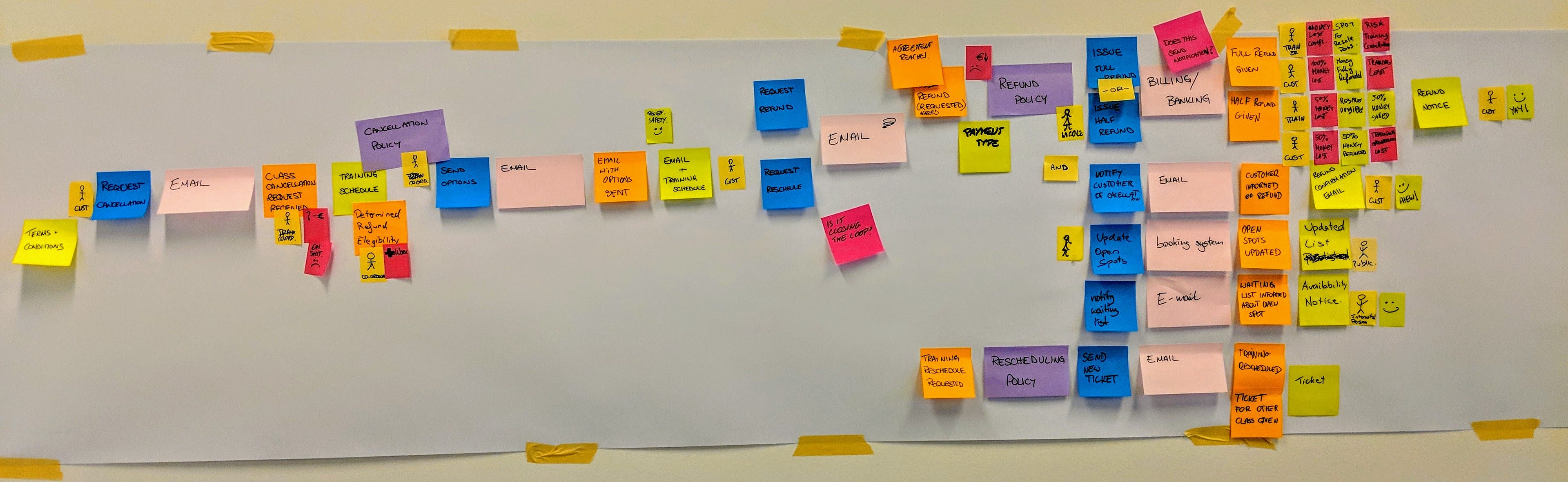
Event storming is a workshop-based method to quickly find out what is happening in the domain of a software program.Compared to other methods it is extremely lightweight and intentionally requires no support by a computer.The result is expressed in sticky notes on a wide wall.Event storming can be used as a means for business process modeling and requirements engineering.
This video discusses how to combine two sets of results together in SQL. The following SQL keywords are covered: UNION, UNION ALL, INTERSECT, MINUS, and EXCEPT.
The MINUS and EXCEPT commands are the same. Some databases use MINUS while other databases use EXCEPT.
http://www.1keydata.com/sql/union-intersect-minus-video.html
difference between union,union all,intersect,minus
The purpose of the SQL UNION ALL command is to combine the results of two queries together UNION vs UNION ALL UNION and UNION ALL both combine the results of two SQL queries. The difference is that, while UNION only selects distinct values, UNION ALL selects all values. http://www.1keydata.com/sql/sqlunionall.html
The purpose of the SQL UNION query is to combine the results of two queries together. In this respect, UNION is somewhat similar to JOIN in that they are both used to related information from multiple tables. One restriction of UNION is that all corresponding columns need to be of the same data type. Also, when using UNION, only distinct values are selected
http://www.1keydata.com/sql/sqlunion.html
Similar to the UNION command, INTERSECT also operates on two SQL statements. The difference is that, while UNION essentially acts as an OR operator (value is selected if it appears in either the first or the second statement), the INTERSECT command acts as an AND operator (value is selected only if it appears in both statements).
http://www.1keydata.com/sql/sql-intersect.html
The MINUS command operates on two SQL statements. It takes all the results from the first SQL statement, and then subtract out the ones that are present in the second SQL statement to get the final answer. If the second SQL statement includes results not present in the first SQL statement, such results are ignored.
Two Facebook data centers designed and built specifically to store copies of all user photos and videos started serving production traffic. Because they were optimized from the ground up to act as “cold storage” data centers for a very specific function, Facebook was able to substantially reduce its data center energy consumption and use less expensive equipment for storage.
Two billion photos are shared daily on Facebook services. Many of these photos are important memories for the people on Facebook and it's our challenge to ensure we can preserve those memories as long as people want us to in a way that's as sustainable and efficient as possible. As the number of photos continued to grow each month, we saw an opportunity to achieve significant efficiencies in how we store and serve this content and decided to run with it.
https://code.facebook.com/posts/1433093613662262/-under-the-hood-facebook-s-cold-storage-system-/
First Look: Facebook’s Oregon Cold Storage Facility
JOVIAL is a high-level computer programming language similar to ALGOL, but specialized for the development of embedded systems (specialized computer systems designed to perform one or a few dedicated functions, usually embedded as part of a complete device including mechanical parts).
Multiprotocol Label Switching (MPLS) is a mechanism in high-performance telecommunications networks that directs data from one network node to the next based on short path labels rather than long network addresses, avoiding complex lookups in a routing table. The labels identify virtual links (paths) between distant nodes rather than endpoints. MPLS can encapsulate packets of various network protocols.
Multi Protocol Label Switching (MPLS) links are being used more and more in the telecom design of many organizations with multiple locations.
http://www.loadbalancersolutions.com/elfiq/mpls.aspx
Multiprotocol Label Switching (MPLS) is a technology used within computer network genesis to regulate data traffic and speed up the time that data packet takes to flow from one node to another. In conventional routed IP networks, whenever a packet arrives, the router makes an independent forwarding decision thus making the process complex and slow. On the other hand, MPLS provides a unified data carrying service for packet switching and circuit-based clients. The MPLS architecture can be installed seamlessly over any existing structural design such as IP, Frame Relay, Asynchronous Transfer Mode (ATM), or Ethernet.
Benefits of MPLS
MPLS is especially beneficial when it comes to wide area networks (WANs). The robustness of the MPLS architecture makes data transfer simpler by managing large routed networks which in turn makes WAN router/engineers’ work easier. For companies that are depending upon voice and video output, MLPS provides a structure to support Quality of Support (QoS). The technology’s protocol-agnostic nature manages different types of traffic without regard to what type of traffic it is. It increases the reliability and predictability of traffic because the label switch paths are fixed which ultimately allows the packets to travel along designated paths
https://whatis.ciowhitepapersreview.com/definition/multiprotocol-label-switching/
Combining IPSec and MPLS
From a customer perspective, it is impossible to control the whole network; the SP must be trusted to some extent. If the MPLS core is not properly configured with the necessary security measures, the connected VPNs will be exposed to some forms of attack. IPSec offers additional security over an MPLS network.
IPSec can be run on the CE routers, or on devices further away from the core. If the CE router is under control of the customer, this could be an obvious choice. If the SP controls the CEs as part of the service, the customer has to decide whether to trust the SP to configure IPSec for him/her on the CE routers, or whether to maintain control over the IPSec in additional equipment outside the SP's scope.
All options below are based on an MPLS core network with VPN services. The basic assumption for all the scenarios is that the MPLS core is configured and managed in a secure fashion.
Summary of Configuration Options
Option 1: Dynamic versus Static Routing between CEs and PEs
Option 2: Internet Service
Option 3: Running IPSec over the MPLS Cloud
Option 4: Including the CE Router in the SP Management
Conclusions
MPLS provides full address and routing separation as in traditional Layer 2 VPN services. It hides addressing structures of the core and other VPNs, and it is in today's understanding not possible from the outside to intrude into the core or other VPNs abusing the MPLS mechanisms. It is also not possible to intrude into the MPLS core if it is properly secured. However, there is a significant difference between MPLS-based VPNs and, for example, FR- or ATM-based VPNs: The control structure of the core is on Layer 3 in the case of MPLS. This fact has caused significant scepticism in the industry toward MPLS, because this setup might open the architecture to DoS attacks from other VPNs or the Internet (if connected).
As shown in this paper, it is possible to secure an MPLS infrastructure to the same level of security as a comparable ATM or FR service. It is also possible to offer Internet connectivity to MPLS VPNs in a secure manner, and to interconnect different VPNs via firewalls
With regard to attacks from within the MPLS core, all VPN classes (MPLS, FR, ATM) have the same problem: If an attacker can install a sniffer, he/she can read information in all VPNs, and if the attacker has access to the core devices, he/she can execute a large number of attacks, from packet spoofing to introducing a new peer router. Numerous precaution measures that an SP can use to tighten security of the core are outlined above, but the security of the MPLS architecture depends on the security of the SP. If the SP is not trusted, the only way to fully secure a VPN against attacks from the "inside" of the VPN service is to run IPSec on top, from the CE devices or beyond.
The end result of the report is that MPLS is at least as secure as Frame Relay and ATM networks
https://www.cisco.com/en/US/tech/tk436/tk428/technologies_white_paper09186a00800a85c5.shtml#wp30332
MPLS Security is a cross-functional area covering data and control plane protection mechanisms for all main MPLS areas, including Layer 2 and Layer 3 VPNs, Traffic Engineering, and GMPLS.
MPLS works by prefixing packets with an MPLS header, containing one or more labels. This is called a label stack. Each label stack entry contains four fields
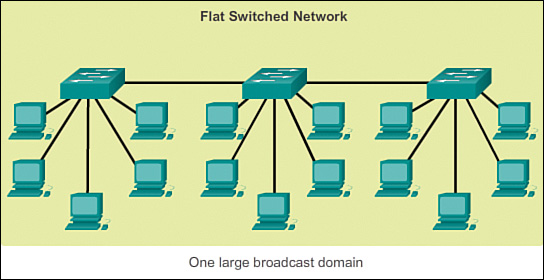
Hubs and switches were added as more devices needed to be connected. A flat network design provided little opportunity to control broadcasts or to filter undesirable traffic. As more devices and applications were added to a flat network, response times degraded, making the network unusable
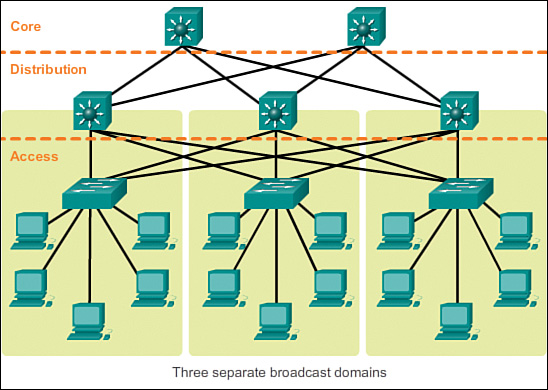
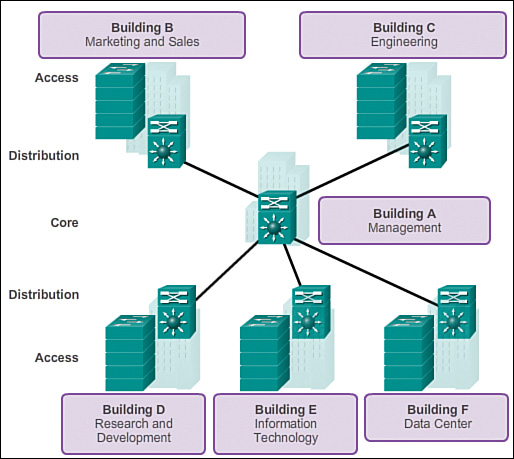
A hierarchical network design involves dividing the network into discrete layers. Each layer, or tier, in the hierarchy provides specific functions that define its role within the overall network. This helps the network designer and architect to optimize and select the right network hardware, software, and features to perform specific roles for that network layer. Hierarchical models apply to both LAN and WAN design.
The benefit of dividing a flat network into smaller, more manageable blocks is that local traffic remains local. Only traffic that is destined for other networks is moved to a higher layer.
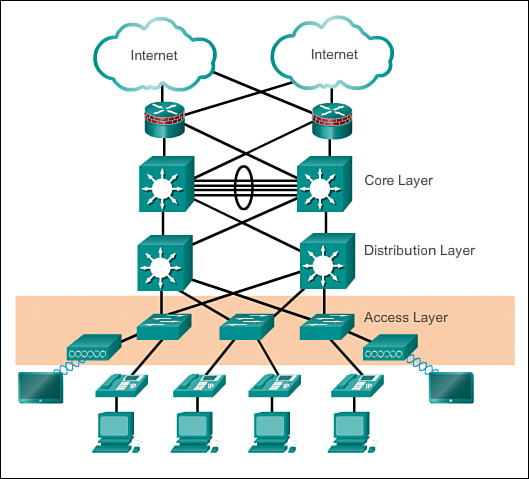
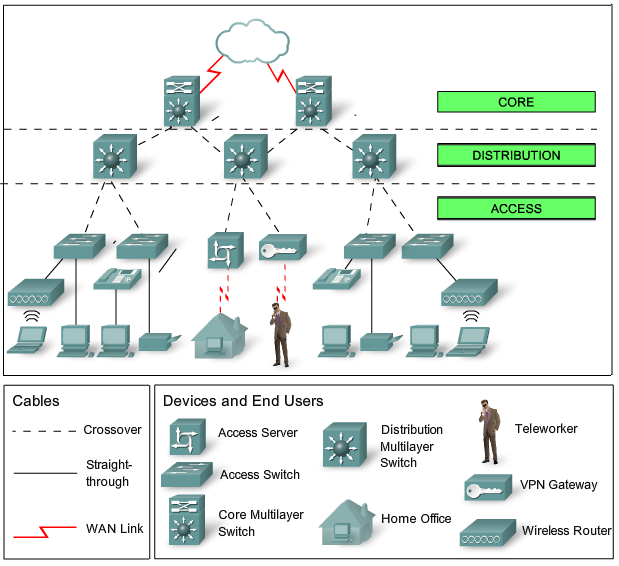
A typical enterprise hierarchical LAN campus network design includes the following three layers:
Access layer: Provides workgroup/user access to the network
Distribution layer: Provides policy-based connectivity and controls the boundary between the access and core layers
Core layer: Provides fast transport between distribution switches within the enterprise campus
Notice that each building is using the same hierarchical network model that includes the access, distribution, and core layers.
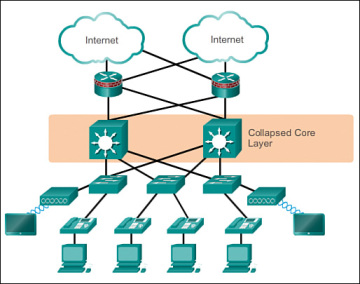
There are no absolute rules for the way a campus network is physically built. While it is true that many campus networks are constructed using three physical tiers of switches, this is not a strict requirement. In a smaller campus, the network might have two tiers of switches in which the core and distribution elements are combined in one physical switch. This is referred to as a collapsed core design.
the access layer for a small business network generally incorporates Layer 2 switches and access points providing connectivity between workstations and servers.
The three-tier hierarchical design maximizes performance, network availability, and the ability to scale the network design.
However, many small enterprise networks do not grow significantly larger over time. Therefore, a two-tier hierarchical design where the core and distribution layers are collapsed into one layer is often more practical. A “collapsed core” is when the distribution layer and core layer functions are implemented by a single device. The primary motivation for the collapsed core design is reducing network cost, while maintaining most of the benefits of the three-tier hierarchical model
Access Layer–provide a means of connecting devices to the network and controlling which devices are allowed to communicate on the networkDevices: PCs, printers, and IP phones, routers, switches, bridges, hubs, and wireless access points (AP)
Distribution Layer–aggregates the data received from the access layer switches before it is transmitted to the core layer for routing to its final destination. The distribution layer controls the flow of network traffic using policies and delineates broadcast domains by performing routing functions between virtual LANs (VLANs) defined at the access layer. Devices: high-performance switches to ensure reliability
Core Layer–high-speed backbone of the internetwork Devices: routers, switches capable of forwarding large amounts of data quickly
http://blog.router-switch.com/2014/04/network-design-with-examples-core-and-distribution/
MicroNugget: What is MPLS?
interface independence
Quality of Service,QoS
MicroNugget: What is Multi-Protocol Label Switching (MPLS)?
for packet forwarding decision MPLS uses labels,instead of using IP addresses or layer3 information
label is attached to every single packet
packet forwarding based on label takes less resources compared to IP addresses,
MPLS applications such as layer3 VPNs,Pseudowire
building label based forwarding table
label swapping
MPLS Part 1: The Basics of Label Switching
high-performance forwarding
QoS traffic engineering
e.g:retail sector, Point-Of-Sale(POS) devices sending data to data centers
Applications of MPLS within VPN
Point-to-Point: leased line over VPN, called pseudo-wire
Private LAN Service:interconnecting multiple LANs based in different sites
MPLS does not care what underlying protocol is used (e.g: PPP,DSL,PDH,ATM,SDH/SONET,Ethernet etc)
MPLS maps onto layer2 protocol and provides common fast divison transport method over packet-switched networks(PSN)
MPLS is in OSI between layer2 and layer3, "layer 2.5"
MPLS routers do two tasks
1-map onto any layer2 protocol
2-check IP packet above as it arrives at the transport network and sends it on own its way
difference between routing and switching
which network and which exit port? router asks
packet reference id ,input port id ? switch
MPLS:Switch if possible,Route if necessary
Label switch router(LSR), switch+router
Label Edge Router(LER),known as edge LSR,provider edge router(PER)
MPLS domain,LSR,
packet from IP domain arrives at Ingress LER,
Ingress LER checks layer3 information on the packet
Ingress LER checks its lookup table
Ingress LER finds a reference called forwarding equivalence class(FEC) for the incoming packet
label for FEC added to packet which is a number
packer is forwarded to MPLS domain
label is held in shim header
shim header is between layer3(IP) and layer2
label swapping
packet arrives at egress LER,
egress LER pops/removes the label and forwards the packet to IP domain
label switched path(LSP) is established by label distribution protocol(LDP) or Resource Reservation Protocol-Traffice Engineering (RSVP-TE)
LSPs are one-directional
label operations(push,swap,pop)
FEC does not change, label changes, label swapping
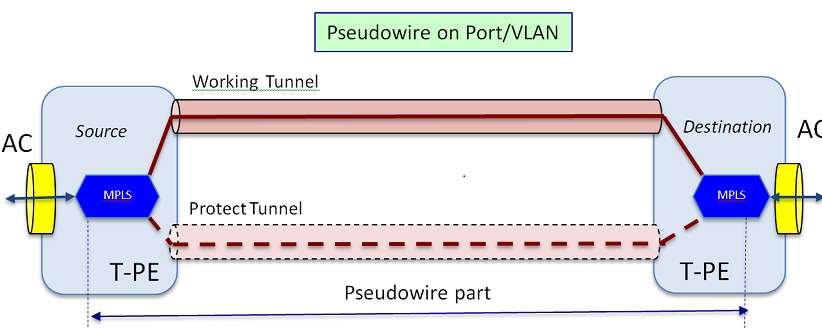
Pseudowire ( sometimes spelled as "pseudo wire" or abbreviated as PW) is a mechanism for emulating various networking or telecommunications services across packet-switched networks that use Ethernet, IP, or MPLS. Services emulated can include T1 leased line, frame relay, Ethernet, ATM, TDM, or SONET/SDH. As defined in RFC 3985 ("Pseudo Wire Emulation Edge-to-Edge [PWE3] Architecture") a pseudowire delivers the bare minimum of functionality necessary to emulate a wire with some required degree of fidelity for some specific service definition.
Required functions for PWs
Encapsulating service-specific bit streams, cells, or protocol data units (PDUs) that appear at some ingress port, then ferrying them across some IP path or through an MPLS tunnel.
Occasionally managing order and timing of incoming PW traffic so as to properly emulate a service with the necessary fidelity (TDM and ATM are good examples where timing issues are very important).
Seen from the perspective of customer edge equipment (CE), a PW appears to be an unshared link or a circuit for some designated service.
https://searchnetworking.techtarget.com/definition/pseudowire
Pseudowires(PW) are used to provide end-to-end services across an MPLS network. They are the basic building blocks that can provide a point-to-point service as well as a multipoint service such as VPLS, which is practically a mesh of PWs used to create the bridge domain across which the packets flow.
A Library is a reusable set of types/functions you can use from a wide variety of applications. The application code initiates communication with the library and invokes it.
A Framework consists of one or more libraries, but the difference is that Inversion of Control applies. The application registers with the framework (often by implementing one or more interfaces), and the framework calls into the application, which may call back into the framework. A framework often exists to address a particular general-purpose Domain (such as web applications, or workflows, etc.). Architecture consists of the guiding principles behind a given application. It is not strongly tied to a particular framework or library.
Frameworks is a collection of classes and tools that help you developing great softwares ... like .net framework or Qt. Architecture is entirely different : it refers to design pattern or how an application or a framework is organized. What are the modules that compose it and how they communicate together
Architecture is about style, abstract idea, flow, methodology, concept. Framework is something which implements the style, idea, concept etc..or makes it easier to implement it. example,
Architecture: Every component should have standard pluggable interfaces and it should be possible to connect any component to any other.
Framework: Then lego building blocks can be the framework.
Library: some readymade combinations of blocks that would work as the pillars.
Application: A building structure using the pillars and other building blocks(application).